.svg)
%20(1).svg)


Updated February 3, 2026
TL;DR: Cold email delivers $38 for every $1 spent when you respect the technical rules. Getting started involves five core steps: buy 2-3 secondary domains to protect your brand, authenticate DNS records (SPF, DKIM, DMARC), warm up inboxes for 2-4 weeks, build a verified prospect list using waterfall enrichment, and write value-first copy between 50-125 words. Never send from your primary domain. Cap daily sends at 30-50 emails per inbox. Aim for 5-10% reply rates and keep bounce rates below 2%. You can automate the entire process without hiring an SDR team. See how top-performing campaigns perform in our Cold Email Benchmark Report 2026.
I've seen cold email outperform every other B2B channel on cost per meeting. If you want to master cold email outreach, this is where to start. Email marketing generates $38 for every $1 spent, and nearly 1 in 5 companies achieve ROI above $70 per dollar. The catch? Most startups fail before they send a single message because they skip the technical safety net.
This guide covers the exact setup, data sourcing, and writing frameworks you need to book meetings without burning your domain reputation. For a full breakdown of recommended platforms, see our email tools guide. I treat email outreach like an engineering problem: clean inputs (verified data) plus safe process (warmup and sending limits) equals predictable outputs (meetings).
Why email outreach beats social for B2B growth
LinkedIn and paid ads are rented land. You pay per click, per impression, or per seat, and the moment you stop paying, the channel dies. Email is owned infrastructure. Once you build sender reputation and a verified list, your cost per meeting drops to near zero.
Compare the economics. You spend $3,000 on LinkedIn ads and might generate 15-20 qualified leads at roughly $150-200 per lead in competitive B2B niches. You spend that same $3,000 on six months of email infrastructure (secondary domains, Google Workspace inboxes, and Instantly Growth plan) and create a system that keeps producing conversations long after the initial investment.
The fundamental advantage: you control the contact list, the sending infrastructure, and the entire funnel. Social algorithms change overnight. Email protocols (SMTP, DNS authentication) are 30-year standards that shift slowly and predictably. One founder booked 113 sales calls in 30 days using systematic cold email.
Step 1: Technical setup and domain protection
Buy secondary domains to protect your brand
Never send cold outreach from your primary company domain. If your primary is yourcompany.com, register 2-3 variations like getyourcompany.com or tryyourcompany.com. Secondary domains isolate cold outreach risk. If a secondary domain gets flagged or blacklisted due to high bounce rates or spam complaints, your primary domain remains untouched.
For beginners, start with 2-3 secondary domains and 2-3 inboxes per domain. To send 1,000 emails safely per day, you need approximately 7 secondary domains at 30 emails per inbox. Secondary domains cost $12-32 per year to register, making this the cheapest insurance in your growth stack.
"Setup is quick and easy, with great customer support if there are any issues or uncertainty" - Harrison P. on G2
Authenticate your email records (SPF, DKIM, DMARC)
Think of SPF, DKIM, and DMARC as your digital ID card. These DNS records tell Gmail and Outlook that you are authorized to use this domain. Without them, your emails land in spam regardless of copy quality.
SPF (Sender Policy Framework) whitelists IP addresses allowed to send for your domain. DKIM (DomainKeys Identified Mail) adds a signature to verify messages haven't been tampered with. DMARC (Domain-based Message Authentication) tells servers what to do when messages fail SPF or DKIM checks.
Setting up these records takes 15-30 minutes per domain. For Google Workspace and GoDaddy, follow Instantly's step-by-step guide. For other providers, check Instantly's warmup filters documentation.
Warm up inboxes before sending a single email
Warmup gradually increases email volume over 2-4 weeks to build sender reputation. Instantly's deliverability network of 4.2M+ accounts sends emails to your inbox, your inbox replies, and those replies get marked as important. This signals to Gmail and Outlook that you are legitimate.
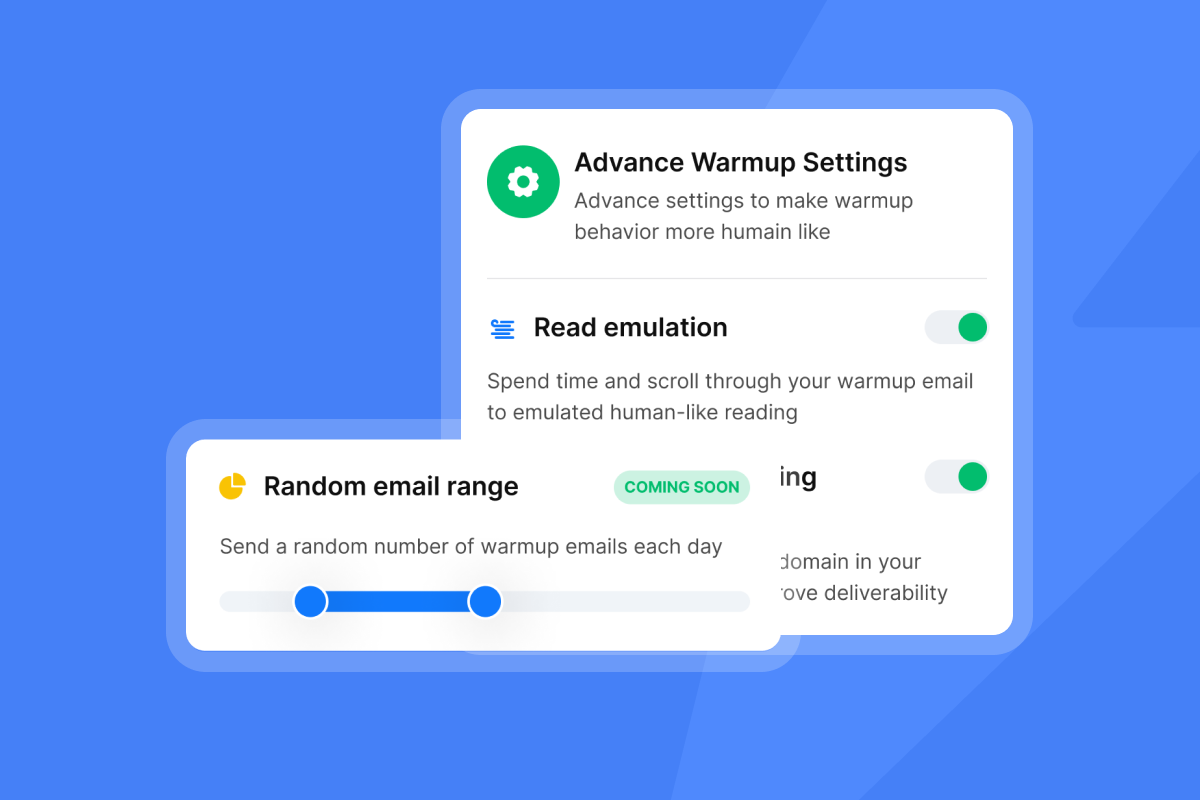
Instantly recommends warming up new domains for at least 2-4 weeks before starting cold outreach. During warmup, do not send any cold emails. Start with 5-10 emails daily during week one, then gradually increase to 30-40 daily by week three. Instantly's Growth plan includes advanced warmup options like weekday-only sending, read emulation, and custom open/reply rate targets so you can match your warmup traffic to real human behavior.
"The Unibox feature is a great touch, it helps me manage replies in one place without switching tools." - Shiv C. on G2
Once warmup completes, many practitioners continue running 10-20 warmup emails daily alongside campaigns for ongoing reputation maintenance. Watch Patrick Walsh's video walkthrough on setting up Instantly warmup for a visual guide.
Step 2: Build a verified prospect list
Define your Ideal Customer Profile (ICP)
Start narrow. I see founders make one mistake over and over: targeting "everyone." Define your ICP using three filters: job title, company size, and industry. "VP of Sales at Series A SaaS companies with 20-100 employees" is a tight ICP. "Marketing professionals" is not.
Ask three questions:
- Who has budget authority to buy your product?
- Which companies feel the pain your product solves most acutely?
- What signals indicate buying intent (recent funding, job postings, tech stack changes)?
Build a spreadsheet with 5-10 companies you would consider "perfect fit" customers. Reverse-engineer commonalities. Use LinkedIn Sales Navigator, Crunchbase, or SuperSearch to identify patterns in company revenue, employee count, tech stack, and growth trajectory.
Use waterfall enrichment for verified data
Waterfall enrichment checks multiple providers one by one until it finds a verified result. If Provider A returns no email, the system tries Provider B, then C, and so on. This approach dramatically increases find rates and reduces bounce risk.
Instantly SuperSearch includes 450M+ B2B leads and runs waterfall enrichment across 5+ providers with LLM-assisted enrichment on a credits model. The key advantage is verification status. Each email is marked as "verified" or "catch-all," and verified emails consistently produce lower bounce rates.
Steps to build a 500-contact list:
- Filter by ICP criteria: Job title, company size, location, tech stack
- Export verified contacts: Use only "verified" status emails, avoid "catch-all" unless you manually verify
- Enrich with AI context: Pull recent company news, job postings, or social posts for personalization
- Deduplicate: Remove contacts already in your CRM or previous campaigns
A clean 500-contact list with tight targeting will outperform a 5,000-contact list with loose criteria every time. Keep bounce rates below 2% to protect sender reputation.
"Finding leads with Instantly is much quicker compared to other tools and it never crashes like others do." - Faisal K. on G2

Step 3: Write copy that gets replies
The value-first framework for cold emails
I use a simple pattern in every cold email: hook with relevance, prove value with social proof, and close with a soft CTA. Emails with 6-8 sentences get the best results: 42.67% open rate and 6.9% reply rate. Messages between 50-125 words consistently outperform longer emails.
Value-first framework:
- Line 1 (Hook): Mention something specific about their company (recent funding, job posting, blog post)
- Lines 2-3 (Problem): Name the pain point your ICP faces in a way that shows you understand their business
- Lines 4-5 (Proof): Share a relevant result from a similar company ("We helped Company X increase pipeline by 40% in Q1")
- Line 6 (CTA): Ask one small, easy question ("Would Thursday or Friday work better for a quick intro call?")
Good example:
Subject: Saw you're hiring 3 SDRs
Hi [Name],
Noticed your job posts for SDR roles. We helped [Similar Company] book 15 demos in 10 days after adding automated follow-ups and cleaner lists. Same flat fee, no per-seat tax as you scale.
Worth a quick chat? Thursday 2pm or Friday 10am work?
[Your Name]
This example mentions a specific signal (hiring SDRs), includes proof (15 demos), and asks one easy question. Watch Instantly's cold email copywriting framework video for live examples. If you need a starting point, use Instantly's AI Sequence Writer (included in Growth plan) to generate frameworks based on your ICP, then customize the proof points and CTAs.
Personalization at scale using Spintax
Spintax (spinning syntax) creates multiple variations of a single message by embedding alternatives within your text. When Google sees thousands of identical messages, they flag you as a mass emailer and tank your deliverability. Spintax solves this by randomizing text so each email looks unique.
Spintax is written using curly brackets {}, with multiple text options separated by a pipe |. When the email generates, the platform randomly selects one option.
Example:
{Hello|Hi|Hey} {First Name},

{Noticed|Saw|Spotted} you recently {posted|shared|published} about {topic}.

{Would|Does|Could} {Thursday|Friday} work for a {quick|brief|short} call?
This single template produces 108 unique variations. Spintax improves deliverability by making your messages look less like bulk mail and increases reply rates by adding natural variation. Use Spintax for greetings, transition phrases, and CTAs. Do not use it for the core value proposition.
Step 4: Launch and manage the campaign
Set safe daily sending limits
Instantly recommends sending max 30-50 emails per day per inbox for best results. This limit protects your sender reputation and aligns with how real humans use email. Sending 500 emails in one hour from a new inbox looks suspicious to Gmail and Outlook.
Safe sending schedule:
| Week | Cold emails per inbox | Warmup emails per inbox | Total per inbox |
|---|---|---|---|
| 1-2 | 0 (warmup only) | 20-40 | 20-40 |
| 3-4 | 15-25 | 10-20 | 30-40 |
| 5+ | 30-50 | 10-20 | 50-60 |
Set your campaign sending window to business hours in your prospect's timezone (8:30-10:30 AM works well). Avoid sending on weekends unless you have data showing your ICP checks email Saturday morning. Maintain predictable daily volumes that email providers learn to trust.
"I use Instantly for automated prospection to find new clients, and I'm able to send hundreds of emails per day, which is exactly what I wanted. The support team is really active, helpful, and always provides solutions." - Adam N on G2
Use inbox rotation to spread volume across multiple accounts within a single campaign. If you have 3 inboxes sending 30 emails each, you reach 90 prospects daily while each individual inbox stays under the safety threshold.
Manage Your Email Outreach Workflow in One Platform
Starting cold email outreach can involve separate tools for finding and verifying prospects, warming inboxes, personalizing messages, sending campaigns, and managing replies. Instantly brings these parts of the workflow together so you can manage outreach without stitching together multiple standalone tools.
| Feature | Traditional CRM | ChatGPT / Claude | Instantly |
|---|---|---|---|
| Find prospects with a B2B Lead Finder | × | × | ✓ |
| Verify prospect data with an email verifier | × | × | ✓ |
| Personalize cold emails with AI Sales Agents | × | Manual | ✓ |
| Prepare inboxes with email warmup | × | × | ✓ |
| Send and automate cold email outreach | × | × | ✓ |
| Automate campaign follow-ups | Limited | Manual | ✓ |
| Manage responses with an AI Reply Agent | × | × | ✓ |
| Monitor deliverability with an Inbox Placement Test | × | × | ✓ |
Handle replies efficiently with a Unibox
Instead of logging into 5 different Gmail accounts to check replies, Instantly's Unibox v2 centralizes all replies from your secondary-domain inboxes into one feed. Replies from leads in your campaigns appear in the Primary folder. All other replies appear in the Others folder.
Unibox workflow:
- AI sentiment analysis: Instantly uses LLM/GPT-4 to classify replies as positive, neutral, or negative
- Bulk actions: Tag 10 positive replies as "Book Meeting" and forward to your calendar tool in two clicks
- Quick notes: Add context before handing off to SDRs ("Interested in enterprise plan, wants demo next week")
- Integration: Push positive replies to your CRM via Zapier, Make, or Instantly's API
"I love the comprehensive capabilities of Instantly, which have significantly streamlined my operations by replacing about 5 or 6 other technologies I used to rely on. This tool is a powerhouse for lead scrubbing, lead mining, research, outreach, launch strategy, and idea generation." - Heather O. on G2
Step 5: Measure and optimize performance
Benchmarks you should aim for
According to Instantly's 2026 Cold Email Benchmark Report, the average reply rate is 3.43%, with top performers exceeding 10%. Current data shows goodcold email reply rates in 2026 hit 10%, not 5%.
Target benchmarks:
| Metric | Minimum | Good | Excellent |
|---|---|---|---|
| Open rate | 20% | 30-40% | 50%+ |
| Reply rate | 3% | 8-12% | 15%+ |
| Bounce rate | <2% | <1% | <0.5% |
| Positive reply rate | 3% | 5-8% | 10%+ |
The average cold email open rate in 2026 is 27.7%. If your open rate drops below 20%, check your subject lines and sender name. If your reply rate sits below 3%, your copy or targeting needs work. If your bounce rate exceeds 2%, pause immediately and clean your list.
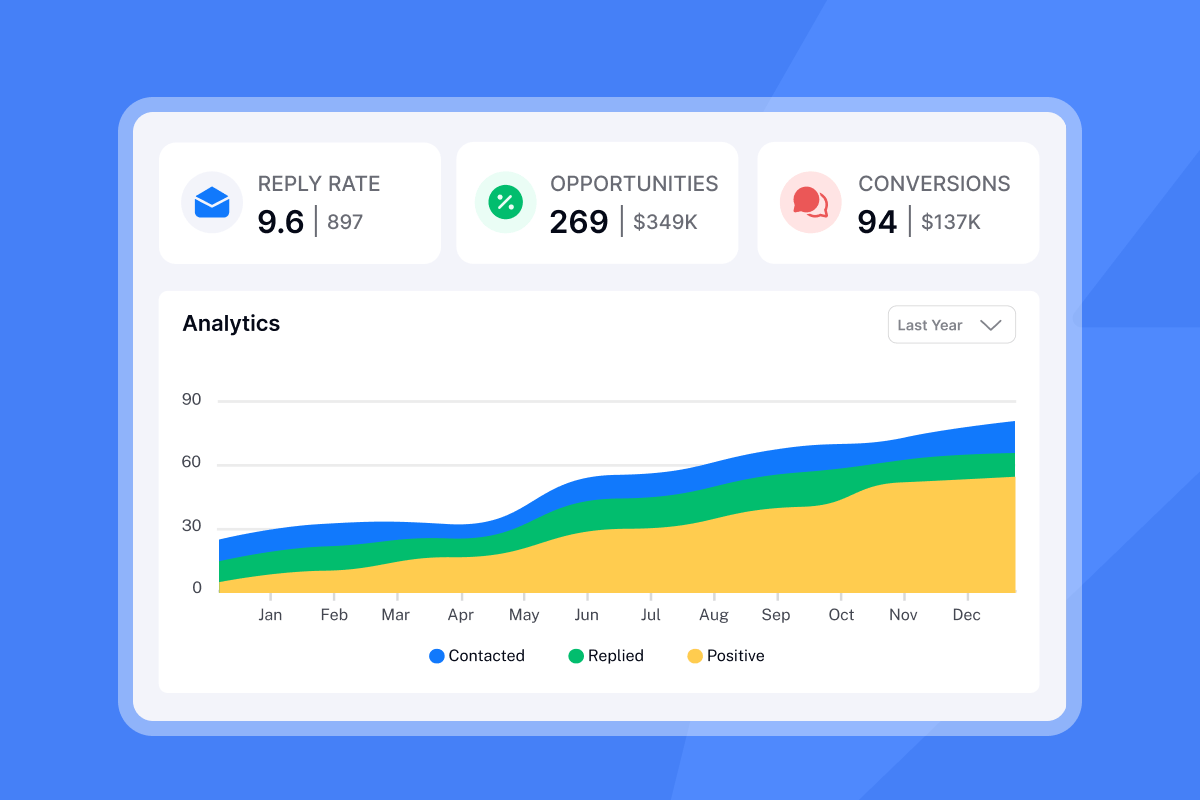
Track metrics at the inbox level and campaign level. If one inbox shows a 15% bounce rate, pause it immediately and swap in a fresh account before it damages your other inboxes. Use Instantly's analytics dashboard to identify underperforming inboxes quickly.
"Deliverability tools that actually move the needle: warmup, inbox rotation, and smart sending windows help us land in Primary instead of Promotions/Spam." - Anthony V. on G2
A/B testing subject lines and offers
A 2-email sequence with one follow-up generates most responses (6.9% reply rate). Test one variable at a time: subject line, opening hook, proof point, or CTA.
A/B test framework:
- Subject line test: "Quick question about [Company]" vs "Saw you're hiring SDRs" (send 100 to each variant)
- Opening hook test: "Noticed your recent post" vs "Congrats on the funding round" (send 100 to each)
- CTA test: "Worth a quick chat?" vs "Would Thursday work for a 15-min call?" (send 100 to each)
Run tests for at least 100 sends per variant to reach statistical significance. Instantly's A/Z testing feature (now included in Growth plan) lets you test up to 26 variants simultaneously and automatically sends more volume to winning variants. Check out Instantly's cold email strategy video for current best practices.
Common mistakes that kill campaign ROI
Three mistakes account for 80% of failed cold email campaigns:
Skipping warmup: Every new inbox needs a warmup period before cold outreach. No exceptions.
Selling too hard: Your first email is a conversation starter, not a pitch deck. Share one relevant insight, ask one easy question, stop talking.
Ignoring bounce rates: Keep bounce rates below 2%. Every bounce damages sender reputation. Clean your lists, use verification, and remove addresses that consistently bounce.
Erratic sending volume: Sending 500 emails Monday, nothing Tuesday-Thursday, then 1,000 Friday looks suspicious. Set consistent daily limits so email providers learn to trust your pattern. Watch Instantly's 39 lessons from starting cold email for a full breakdown.
For US campaigns, CAN-SPAM requires a clear unsubscribe link, a physical mailing address, and non-deceptive subject lines. For EU campaigns, GDPR allows B2B cold email under legitimate interest, but honor removal requests promptly. Consult legal counsel for compliance specifics.
"I've been using Instantly for my outbound campaigns, and the experience has been outstanding. The platform is fast, reliable, and very easy to work with, especially when handling large lead lists and multiple sequences." - santiago pelaez on Trustpilot
Ready to start your first campaign?
Cold email works when you treat it as a system, not a lottery. Buy secondary domains today. Set up DNS tomorrow. Start warmup on day three. Build your first 500-contact list during week two. Write value-first copy during week three. Launch during week four.
You will spend 2-4 weeks on setup before you send a single cold email. That wait protects your domain and your time. I have seen founders skip warmup, burn their domain in 48 hours, and start over from scratch with three months lost.
A complete starter setup costs $75-110 per month. Instantly's Growth plan at $47 per month includes unlimited email accounts, unlimited warmup, and 5,000 emails monthly. Add SuperSearch Growth at $47 per month for 1,500 credits (roughly 750-1,000 verified contacts) and you have a complete system for $94 monthly. No per-seat tax. No surprises.
For a complete technical walkthrough, watch Vincent Robin's setup tutorial or browse Instantly's Ultimate Guide to Cold Email Deliverability. Start your warmup today at Instantly.ai so you are ready to send in 14 days. Your first booked meeting costs time and patience. Your hundredth costs pennies.
Frequently asked questions about email outreach
What is a good reply rate for cold email?
A 8-12% reply rate is good for B2B cold email in 2026. Top performers achieve 15%+ through meticulous list targeting and personalized copy.
How many follow-up emails should I send?
Two follow-ups generate the best response rates (6.9%). Adding a third email drops reply rates by up to 20%, so stop after 2-3 total touches.
Is cold email legal under CAN-SPAM and GDPR?
Yes, for B2B in the US under CAN-SPAM (include unsubscribe link and physical address). Yes, for B2B in the EU under GDPR's legitimate interest basis (honor removal requests promptly).
How much does it cost to start email outreach?
$75-110 monthly for a basic setup: $12-24/year for 2 secondary domains ($1-2/month), $14/month for 2 Google Workspace inboxes (Business Starter plan at $7/user), and $47/month for Instantly Growth plan. Add SuperSearch for leads ($47/month) to reach $108-110 total.
How long should I warm up a new domain?
Warm up new domains for 2-4 weeks minimum before sending cold outreach. Many practitioners continue running 10-20 warmup emails daily even after launching campaigns.
What bounce rate is too high?
Keep bounce rates below 2%. Rates above 5% signal serious deliverability issues that need immediate attention. Pause campaigns and clean your list.
Can I send cold email from my primary company domain?
No. Always use secondary domains to protect your primary domain's reputation. If a secondary gets flagged, your customer communications remain unaffected.
How do I improve open rates?
Test subject lines with specific, relevant hooks ("Saw you're hiring SDRs" beats "Quick question"). Avoid spam trigger words and ensure SPF/DKIM/DMARC are properly configured.
Key terminology
Warmup: The process of gradually increasing email sending volume over 2-4 weeks to build sender reputation with email providers through automated engagement.
SPF (Sender Policy Framework): A DNS record that lists authorized IP addresses allowed to send emails on behalf of your domain, preventing spoofing.
DKIM (DomainKeys Identified Mail): A digital signature added to each email that verifies the message hasn't been altered in transit and confirms sender authenticity.
DMARC (Domain-based Message Authentication): A DNS record that instructs receiving servers what action to take when emails fail SPF or DKIM authentication checks.
Waterfall enrichment: A sequential data verification method that checks multiple providers one by one until finding a verified contact, increasing find rates and reducing bounce risk.
Spintax: Spinning syntax that creates multiple email variations using curly brackets and pipes to randomize text, improving deliverability by avoiding identical messages.
Unibox: A centralized inbox that aggregates replies from multiple sending accounts into one interface, simplifying reply management and eliminating inbox-switching.
Bounce rate: The percentage of emails that fail to deliver, indicating invalid addresses or deliverability issues. Healthy programs maintain rates below 2%.
Reply rate: The percentage of sent emails that generate any response, positive or negative. Strong B2B campaigns achieve 8-12% reply rates in 2026.
ICP (Ideal Customer Profile): A detailed description of the companies and decision-makers most likely to buy your product, based on firmographics and behavioral signals.

Further Reading
- Cold Email Outreach Templates – Get practical cold outreach email templates and learn how to write cold emails that generate responses.
- Best Email Outreach Tools & Platforms – Compare tools and platforms for managing and scaling email outreach.
- How to Improve Email Deliverability – Learn how to improve inbox placement and protect your sender reputation.
- AI Sales Agent – Learn how AI sales agents can automate prospecting, research and personalized outreach.
- How to Generate More Sales Pipeline – Learn how to turn prospecting, outreach and follow-up into qualified sales opportunities.


