.svg)
%20(1).svg)


Updated February 3, 2026
TL;DR: Cold email outreach in 2026 requires systematic infrastructure, not just clever copy. Success depends on six steps: technical setup with DNS records (SPF, DKIM, DMARC) and 30-day warmup, building verified lead lists with waterfall enrichment to keep bounces below 2%, writing short personalized emails under 125 words, structuring 3-4 email sequences spaced 2-3 days apart, ramping from 10-20 emails per day per inbox to a maximum of 30-50, and tracking three KPIs (50%+ open rate, 5-10% reply rate, under 2% bounces). B2B sales cycles now average 379 days, 16% longer than 2021. Tools like Instantly provide unlimited email accounts with built-in warmup and automated deliverability testing to scale infrastructure without per-seat penalties. Learn how top B2B teams scale outreach in the Cold Email Benchmark Report 2026.
I watched hundreds of campaigns fail not because of weak copy, but because emails never reached the primary inbox. You can spend three hours crafting the perfect pitch, but if it lands in spam, you book zero meetings. The plumbing matters more than the polish.
Google and Yahoo now require bulk senders (anyone sending 5,000+ messages per day) to implement SPF, DKIM, and DMARC authentication, maintain spam rates below 0.3%, and provide one-click unsubscribe. As of February 2024, non-compliant emails face temporary rejections. By November 2025, enforcement tightened to permanent blocks.
The shift demands a new approach: treat deliverability as infrastructure, not an afterthought. Use a proven template for followup sequences to stay compliant and effective.
What is cold email outreach?
Effective cold email outreach is the practice of sending targeted business messages to prospects you have no prior relationship with, aimed at starting a conversation that leads to a commercial outcome. The key distinction from spam is relevance, targeting, and compliance.
The CAN-SPAM Act defines commercial email as "any electronic mail message the primary purpose of which is the commercial advertisement or promotion of a commercial product or service." Legitimate outreach complies with three core requirements: no misleading transmission information, a legitimate physical postal address, and a working unsubscribe method that honors opt-out requests within 10 business days.
Spam uses deceptive subject lines, falsified headers, and ignores opt-outs. Cold email outreach is targeted to specific personas, personalized based on research, and provides clear value to the recipient. The law makes no exception for business-to-business email, meaning B2B senders must follow the same compliance rules as B2C marketers.
The 6-step email outreach process
Here is the complete system for building a cold email program that generates consistent meetings:
- Technical setup - Configure DNS records (SPF, DKIM, DMARC) and implement 30-day warmup protocols to build sender reputation
- List building - Define your ICP and use waterfall enrichment to verify contact data, keeping bounce rates below 2%
- Copywriting - Write short, personalized emails focused on one specific value proposition with a clear call to action
- Sequencing - Structure 3-4 touch campaigns with 2-3 day spacing and varied angles to increase reply probability
- Launching and pacing - Ramp daily volume from 10-20 emails per inbox per day, scaling slowly to avoid spam triggers
- Optimization - Track open rate (50%+ target), reply rate (5-10% target), and bounce rate (under 2%), then iterate on underperformers
Each step builds on the previous one. Skip technical setup and your carefully researched list lands in spam. Nail deliverability but send to bad data and you damage sender reputation with bounces. Get both right but write generic copy and you get opens with no replies.
Step 1: Technical setup and deliverability infrastructure
This is where most teams lose before they start. You cannot fake good deliverability. Mailbox providers (Gmail, Outlook, Yahoo) evaluate every sender based on authentication, engagement history, and complaint rates. Send from an unauthenticated domain or ramp volume too fast and mailbox providers automatically filter you to spam before a human sees your message.
Configure DNS records (SPF, DKIM, DMARC)
Think of DNS records as your email ID card. Without them, you are an anonymous sender and mailbox providers block anonymous senders by default.
- SPF (Sender Policy Framework) tells receiving servers which IP addresses are authorized to send email on behalf of your domain. SPF verifies the sending IP and confirms it matches your published list of approved senders.
- DKIM (DomainKeys Identified Mail) adds a digital signature to each outgoing message using cryptography. DKIM proves the content has not been altered and confirms the message came from your domain, not a spoofed sender.
- DMARC (Domain-based Message Authentication, Reporting, and Conformance) ties SPF and DKIM together. DMARC instructs receiving servers what to do if SPF or DKIM fail: deliver the message, quarantine it to spam, or reject it entirely. DMARC also sends reports back to you showing which emails pass or fail authentication checks.
Set up all three records in your domain's DNS settings. Most domain registrars (GoDaddy, Namecheap, Cloudflare) provide interfaces for adding TXT records. The exact values depend on your email service provider, but the structure looks like this:
- SPF:
v=spf1 include:_spf.instantly.ai ~all - DKIM: A TXT record with a public key provided by your sending platform
- DMARC:
v=DMARC1; p=quarantine; rua=mailto:your@email.com
One critical rule: use separate domains for cold outreach versus your primary business email. If your company website is company.com, buy companymail.com or trycompany.com for outreach. This isolates your sender reputation. A spam complaint or deliverability issue on your outreach domain does not affect email from your CEO or support team. Instantly's help documentation on secondary sending domains provides the complete setup strategy.
Warm up domains to build sender reputation
Warmup is not optional. Think of it as pre-race stretching. Skip it and you risk a strain like a spam block.
New domains have no sending history, which means mailbox providers treat them with suspicion. Warmup solves this by gradually increasing your sending volume while generating positive engagement signals (opens, replies, emails moved out of spam).
Best practices recommend starting with 2-5 emails per day for the first five days, then increasing by 10-20 emails per week. The goal is 40-50 emails per day as a safe limit for warmup traffic. Achieving maximum deliverability takes 4-8 weeks depending on your target volume and how well recipients engage.
Here is the ramp schedule I use:
- Week 1 (2-5 emails/day): Establish basic sending pattern without triggering new-sender filters
- Week 2 (10-15 emails/day): Increase volume while positive engagement signals accumulate
- Week 3 (20-30 emails/day): Build enough history for mailbox providers to classify you as legitimate
- Week 4+ (30-40 emails/day): Reach sustainable sending threshold with established reputation
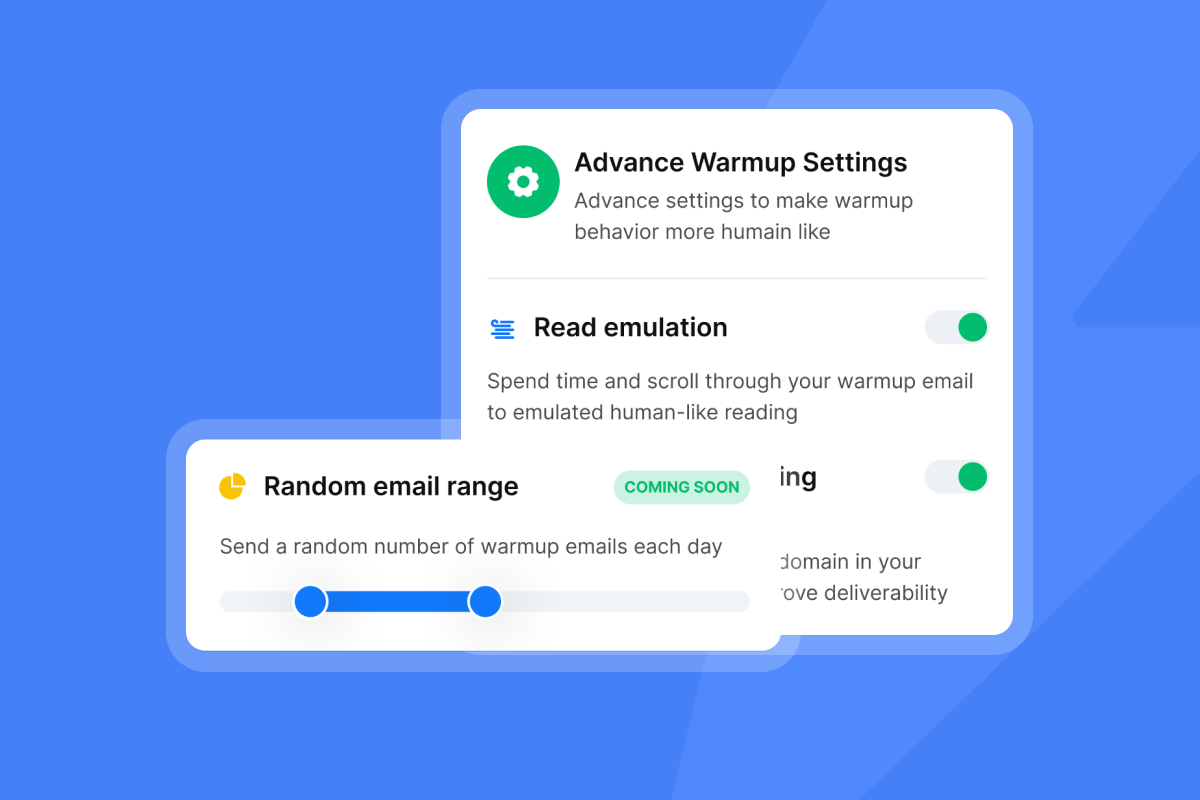
Instantly automates this process through its built-in warmup feature which connects your accounts to a network of other warmed accounts. These accounts exchange emails, open messages, reply to each other, and move emails out of spam folders to simulate real human engagement. Mailbox providers see positive signals and improve your sender reputation accordingly.
"I love the DFY domains and email accounts, save me a lot of time in cold email outreach. Customer service is great and active too." - Tommy on Trustpilot
The warmup settings interface lets you configure weekday-only sending, open rate emulation, reply rate targets, and ramp speed. For heads of sales managing a team, this means you can standardize warmup protocols across all sending accounts without manual monitoring.
"Instantly allows me to connect hundreds of inboxes and send mass emails on a scheduled basis, automatically organizing which inbox to send with on which day and spreading it all out" - Harvey S. on G2
Never skip warmup. Never rush it. The 30-day investment protects your deliverability for months of campaigns.
Google and Yahoo enforcement changes
In February 2024, Google and Yahoo implemented strict requirements for bulk senders. Anyone sending more than 5,000 messages in a single day must comply with three rules:
- Strong authentication - Deploy SPF, DKIM, and DMARC on all sending domains
- One-click unsubscribe - Include a list-unsubscribe header and honor opt-outs within two days
- Spam rate threshold - Keep complaint rates below 0.3%, ideally below 0.1%
Google started enforcement in February 2024. By November 2025, they tightened rules further with temporary rejections for non-compliant senders and permanent blocks for repeat violations. Yahoo follows identical policies.
This affects your infrastructure decisions. If you plan to scale past 5,000 emails per day, you must distribute sending across multiple domains and accounts. Sending 5,000 emails from a single inbox triggers bulk sender thresholds and exposes you to strict enforcement. Sending 30-50 emails from each of 100+ accounts keeps you under the radar while scaling total volume safely.
Step 2: Building a verified lead list
Bad data kills campaigns faster than bad copy. Every bounced email damages your sender reputation. Mailbox providers track bounce rates as a signal of list quality. Keep bounces below 2%, ideally much lower, or risk getting filtered to spam on future sends.
Define your Ideal Customer Profile (ICP)
Start with your current best customers. What do they have in common?
Look at:
- Company size (employees, revenue)
- Industry and sub-verticals
- Technology stack (what tools do they use?)
- Growth signals (recent funding, hiring, expansion)
- Job titles of decision makers and their reporting structure
Write this down as a filter checklist. You will use it to qualify or disqualify prospects during list building.
One common mistake is targeting "anyone who might buy." That approach fails because your message cannot be relevant to both a 10-person startup and a 5,000-person enterprise. Pick one ICP, build a campaign for them, measure results, then expand to a second ICP. Targeting too broadly dilutes your message and wastes verified contacts on prospects who will never convert. Teams burn 5,000-contact lists in two weeks by going too broad, then blame the tool when reply rates sit at 1%.
Use waterfall enrichment for valid emails
Waterfall enrichment pulls data from multiple providers in sequence. If Provider A cannot find a verified email, the system checks Provider B, then Provider C, until it locates valid contact information or exhausts all sources.
The process works like this:
- First provider runs your lead through its database but returns no email
- Second provider finds an email but marks it as "risky" (catch-all domain, old data)
- Third provider verifies the email format and confirms deliverability
- Fourth provider (if needed) adds phone number and additional enrichment data
This matters because individual data providers have gaps. No single source maintains 100% coverage or 100% accuracy. Waterfall enrichment increases your hit rate and reduces false negatives where a valid contact exists but one provider missed it.
Instantly's SuperSearch integrates 450M+ B2B contacts with waterfall enrichment from 5+ data providers. The AI-assisted enrichment uses LLM models to fill gaps in partial records, improving match rates on hard-to-find contacts.
Catch-all email verification adds another layer of validation. Catch-all domains accept any email sent to their domain (sales@, info@, hello@, randomname@) which makes traditional verification methods fail. Instantly's verification system tests these addresses without actually sending a full email, confirming deliverability before you add them to campaigns.
"I enjoy the built-in AI enrichment feature, which is amazing for lead enrichment. The unibox is really clean and organizes my replies all in one place in such a user-friendly manner." - Harvey S. on G2
Target list sizes depend on your ICP specificity. A narrow ICP (Series B SaaS CTOs in fintech with 50-200 employees) might yield 500-1,000 contacts. A broader ICP (marketing directors at B2B companies) could produce 50,000+ contacts. Start narrow, validate your offer resonates, then expand.

Step 3: Writing cold emails that get replies
Copy matters, but not the way most people think. Your goal is not to impress the recipient with clever wordplay. Your goal is to start a conversation.
Short emails outperform long emails. Research analyzing 34 million emails found 20-39 words optimal, and 1-2 paragraphs work best with a 3.8% response rate. Long-form pitches that scroll off the screen get deleted.
The 30/30/50 rule for cold email copy
The 30/30/50 rule is a copywriting framework that prioritizes clarity and brevity:
- 30% personalization: Open with a specific reference that proves you researched them (job posting, recent company news, content they published)
- 30% value proposition: State the concrete problem you solve for people like them, backed by one proof point (metric, customer name, case study)
- 50% less fluff: Cut everything that does not directly support the personalization or value prop (no "I hope this email finds you well," no multi-paragraph company backstory, no vague claims)
Apply this to every email in your sequence. Each message should answer three questions in 1-2 paragraphs: Why am I writing to you specifically? What problem do I solve? What do I want you to do next?
Crafting subject lines that earn opens
Subject lines determine whether your email gets opened. Average cold email open rates dropped to 27.7% in 2026, which means most recipients never see your message.
Effective subject lines look like internal emails. They use neutral tones, lowercase text, and avoid marketing language.
Examples that work:
- "quick question"
- "marketing strategy"
- "[Prospect Company] / [Your Company]"
- "idea for [specific topic]"
- "RFP Response"
Avoid superlatives which tend to trigger spam filters and feel salesy. Make it sound like an email you would write to a colleague: short, descriptive, and relevant.
The anatomy of a reply-worthy cold email
Keep the structure simple:
Line 1: Personalized reference (not "I saw you on LinkedIn")
Line 2-3: Specific problem you solve for people like them
Line 4-5: One proof point (customer name, metric, case study)
Line 6: Clear, low-friction call to action
Example:
"Your team at [Company] posted three SDR roles last month.
I help B2B teams fill their calendars without hiring more reps. One client booked 47 demos in their first 30 days after we rebuilt their outreach infrastructure.
Worth a 15-minute conversation? If so, grab a time [insert Calendly] or just reply with your availability."
Notice what this avoids: no fluff, no paragraphs about "who we are," no multiple CTAs. The personalization is specific (job postings), the value is clear (fill calendars), the proof is concrete (47 demos), and the ask is simple (one meeting).
Messages that do not contain attachments or graphic materials have almost 2x higher reply rate. Use plain text formatting. No images in the first email. Anything that looks designed or templated gets ignored.
Using templates vs. personalization
Templates save time but generic templates kill response rates. The solution is using spintax (spin syntax) to create variations within your template structure.
Spintax works by defining multiple options for specific text blocks. The sending platform randomly selects one option each time it sends an email, making every message unique to spam filters while maintaining your core message.
Example: {Hi|Hey|Hello} {Name}, I noticed {your company|[Company]} produces multiple combinations that read naturally but register as different content.
Instantly's AI Sequence Writer and AI Rephrase tool automate this process. Input your base message and the AI generates variations for subject lines, opening sentences, and value propositions. The AI Spam Words Checker scans your draft for terms that trigger spam filters, suggesting replacements before you launch.
For visual guidance on building effective campaigns, watch this walkthrough on setting up cold email campaigns which covers the complete process from account setup through message composition.
Step 4: Structuring the campaign sequence
Single emails rarely convert. 70% of responses are generated from the 2nd to 4th email, and it takes an average of three total emails to move from first contact to positive reply.
The standard sequence structure:
Email 1 (Day 1): Value-focused introduction with personalization
Email 2 (Day 3): Different angle on the same value prop, short reminder
Email 3 (Day 7): Case study or social proof, address common objection
Email 4 (Day 14): Final follow-up with permission to close the loop
Best practice for B2B cold outreach is 3 emails total per prospect, with follow-ups spaced 2-3 days apart for initial sequences. Some teams extend to 4-9 follow-ups over 2-3 weeks, as 80% of sales require 5+ touchpoints.
Each email in the sequence needs a distinct angle. Repeating "just following up" or "checking in" wastes the opportunity. Change your approach:
- Email 1: Focus on the problem
- Email 2: Focus on the solution
- Email 3: Focus on proof (customer story)
- Email 4: Permission-based breakup ("Should I close your file?")
The key rule: stop immediately if prospects ask you to stop. Always respect opt-out requests.
Instantly's campaign editor provides a visual sequence builder where you set delays between steps, add conditional branches based on engagement (opened but not replied, not opened), and create A/Z tests to compare different messaging approaches. The A/Z testing feature splits your audience and measures which variant generates more replies.
Step 5: Launching and pacing the campaign
Deliverability depends on volume management. Send too much too fast and you trigger spam filters. Send too little and you waste time reaching your target audience.
The ramp-up schedule
Start conservative and increase gradually:
Week 1: 10-20 emails per day per inbox
Week 2: 20-30 emails per day per inbox
Week 3: 30-40 emails per day per inbox
Week 4+: 30-50 emails per day per inbox (maximum safe volume)
Industry best practices recommend capping at 30-50 emails per inbox per day to minimize spam filter triggers. Exceeding this threshold significantly increases the risk of deliverability issues, though it does not guarantee spam placement on its own.
The math: if you need to send 1,000 emails per day, you need 20-30 separate email accounts sending 30-50 emails each. This horizontal scaling approach keeps each account below risk thresholds while giving you the total volume to reach your audience.
Distributing sends across multiple domains within a deliverability optimized infrastructure prevents any single domain from being overloaded and triggering spam filters. Maintain consistent sending patterns because erratic volume kills deliverability. Sending 500 emails Monday, nothing Tuesday through Thursday, then 1,000 Friday looks suspicious to mailbox providers. Set campaign limits to maintain predictable daily volumes.
Instantly's unlimited email accounts pricing model supports this strategy. Growth Outreach starts at $47/month (or $30/month on annual plans) with unlimited sending accounts and unlimited warmup included. Compare this to per-seat pricing models where adding accounts multiplies your monthly cost. For agencies or teams scaling across multiple clients, flat-fee unlimited accounts remove the cost penalty of proper deliverability infrastructure.
"Instantly is easy to use and very effective for cold email outreach. I like how it handles email warm-up, campaign setup, and inbox rotation all in one place, which makes scaling outreach simple and efficient." - Joy V on G2
For advanced deliverability, the Light Speed plan ($358/month or $286.3/month on annual) adds SISR (Server and IP Sharding and Rotation) with dedicated private IP pools. SISR distributes your sending across isolated infrastructure to help manage reputation across multiple sending paths.
Step 6: Measuring success and optimizing
Track three KPIs that matter: open rate, reply rate, and bounce rate. Everything else is a vanity metric.
Open Rate tells you if your emails reached the inbox and if your subject lines worked. Many high-performing B2B campaigns reach 50% or higher. The average dropped to 27.7% in 2026, so hitting 40%+ puts you above average. Low open rates signal deliverability problems (spam folder placement) or weak subject lines.
Reply Rate measures message relevance. Target 5-10% for most B2B teams, with top performers hitting 15%+ on focused campaigns with verified contacts. Reply rates fell to 5.1% on average, making 8-10% performance strong. Low reply rates signal targeting problems (wrong ICP), offer problems (value prop does not resonate), or message problems (copy is generic or confusing).
Bounce Rate indicates data quality. Keep bounces below 2%. A 2% bounce rate is considered industry average, but you should aim lower. Every bounced email damages sender reputation. High bounce rates mean your list verification failed or your data sources are stale.
Instantly's analytics dashboard consolidates these metrics across all your campaigns and sending accounts. The Unibox feature routes and labels replies in a unified inbox, centralizing responses so you can measure outcomes across all senders without switching between accounts.
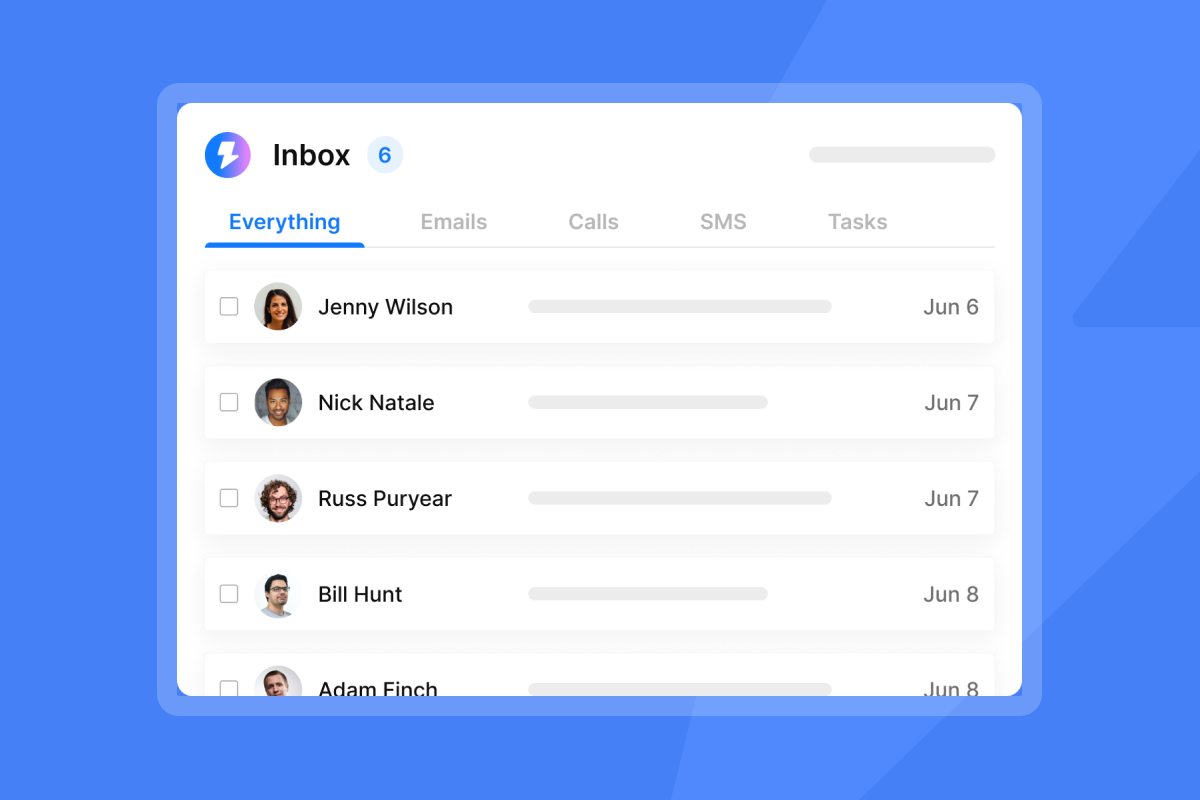
"The unibox is really clean and organizes my replies all in one place in such a user-friendly manner" - Harvey S. on G2
Run Inbox Placement tests regularly to monitor where your emails land. Instantly's automated placement testing sends test messages to seed accounts across major mailbox providers (Gmail, Outlook, Yahoo) and reports back whether you landed in primary inbox, promotions tab, or spam folder. This lets you catch deliverability drops before they damage your entire campaign.
When performance drops, fix it systematically:
- Low open + low reply: Deliverability problem, check placement tests
- High open + low reply: Message problem, rewrite your value prop
- High bounce rate: Data problem, switch verification providers
- High reply + low meeting: CTA problem, make the next step easier
For a detailed look at optimization strategies, this video on fixing cold email campaigns walks through diagnosis and fixes in 20 minutes.
16 cold email outreach best practices for 2026
- Use plain text formatting - Messages without attachments or graphics get higher reply rates
- No images in first email - Visual elements trigger spam filters and reduce deliverability
- Verify catch-all emails - Use catch-all verification to confirm deliverability before sending
- Keep sentences short and clear - Brevity improves scannability and reply rates
- Send 1-2 paragraphs maximum - This length shows higher response rate, better than longer formats
- Warm up accounts for 30 days minimum - Build reputation slowly before launching campaigns
- Spread volume across multiple domains - Distribute sends to prevent overloading any single domain
- Maintain consistent sending patterns - Erratic volume signals suspicious behavior to mailbox providers
- Test inbox placement regularly - Monitor where emails land using automated placement tests
- Use spintax for variations - Create multiple text versions to avoid repetitive content detection
- Include clear single CTA - One specific call to action outperforms multiple options
- Stop immediately if prospects ask - Always respect opt-out requests within 10 days per CAN-SPAM requirements
- Monitor engagement signals - Mailbox providers watch opens, replies, and spam complaints as value indicators
- Use waterfall enrichment - Verify through multiple providers to improve data accuracy
- Avoid spam trigger words - Scan drafts before sending to identify problematic language
- Send 3-4 emails per sequence - Most successful B2B senders stick to 3 total emails per prospect
These practices compound. Implementing one improves results slightly. Implementing all systematically changes your outcomes.
Top email outreach tools compared
| Tool | Price Model | Unlimited Accounts | Lead Database | Key Differentiator |
|---|---|---|---|---|
| Instantly | Flat fee ($47-358/mo) | Yes | Yes (450M+ contacts) | Built-in warmup, deliverability network, SISR on Light Speed |
| Apollo | Per-seat | No | Yes | Contact database with mixed data quality reviews |
| Outreach | Per-seat | No | No (requires integration) | Enterprise SEP with deep CRM ties, complex implementation |
| Lemlist | Per-seat | No | Yes (limited) | Multichannel focus with LinkedIn, per-seat limits scale |
The pricing model determines your economics at scale. Per-seat tools charge for each user or sending account. If you need 50 sending accounts to safely distribute volume, per-seat pricing multiplies your cost by 50. Flat-fee models like Instantly's Growth Outreach at $47/month cover unlimited accounts, making horizontal scaling affordable.
For lead data, Instantly's SuperSearch integrates 450M+ contacts directly into the workflow with waterfall enrichment from 5+ providers. You find prospects, verify emails, and launch campaigns in one platform instead of switching between a data tool, a sending tool, and a warmup tool.
Compare Instantly's pricing plans for detailed feature breakdowns across Growth, Hypergrowth, and Light Speed tiers.
Conclusion
Cold email outreach in 2026 rewards the disciplined engineer over the creative writer. The system works: separate domains with verified DNS records, 30-day warmup protocols, verified contacts from waterfall enrichment, short value-focused messages, 3-4 email sequences paced 2-3 days apart, and strict volume caps at 30-50 per inbox per day. Track three KPIs (50%+ open rate, 5-10% reply rate, under 2% bounces) and fix what breaks.
Most teams fail on infrastructure before copy ever matters. You cannot write your way out of spam folder placement. Build the plumbing first.
Start with Instantly's free trial to access unlimited warmup, campaign builders, and AI tools. Test the infrastructure with a small 500-contact campaign before scaling to full volume. Watch this masterclass on winning with cold outreach in 2026 for implementation details.
Frequently asked questions about email outreach
What is a good open rate for cold email?
Many high-performing B2B campaigns reach 50% or higher. The 2026 average dropped to 27.7%, making anything above 40% strong performance.
How many follow-ups are appropriate?
3-4 emails total per prospect is standard. Always stop immediately if someone asks.
Is cold emailing illegal?
No, for B2B senders who follow CAN-SPAM Act rules: honest headers, physical address, and working opt-out honored within 10 days.
What bounce rate is acceptable?
Below 2% is target. 2% is industry average, but aim for under 1% with proper verification.
How long should I warm up new domains?
30 days minimum. Maximum deliverability takes 4-8 weeks depending on your target sending volume.
Key terminology
SPF (Sender Policy Framework): DNS record listing which IP addresses can send email for your domain, used by receiving servers to verify sender authenticity.
DKIM (DomainKeys Identified Mail): Digital signature added to emails using cryptography to prove the message came from your domain and was not altered.
DMARC (Domain-based Message Authentication, Reporting, and Conformance): Policy telling receiving servers what to do when SPF or DKIM checks fail (deliver, quarantine, or reject).
Bounce Rate: Percentage of sent emails that return as undeliverable due to invalid addresses, full inboxes, or blocked domains. Keep below 2%.
Spintax: Syntax for creating multiple text variations within a single template to improve deliverability and avoid repetitive content detection.
Unibox: Centralized inbox consolidating replies from all connected email accounts into one master view for easier management and reporting.
Waterfall Enrichment: Process of checking multiple data providers in sequence to verify and enrich lead contact information until valid data is found.
Warmup: Gradual process of increasing sending volume from a new domain while generating positive engagement signals to build sender reputation with mailbox providers.
Catch-all Email: Domain configured to accept messages sent to any address at that domain, requiring special verification methods to confirm deliverability.
SISR (Server and IP Sharding and Rotation): Advanced deliverability infrastructure distributing sends across dedicated private IP pools to manage reputation across multiple sending paths.

Further Reading
- How to Find Sales Prospects – Learn how to identify relevant B2B prospects, prioritize accounts and verify contact information.
- How to Generate More Sales Pipeline – Learn how to turn prospecting, outreach and follow-up into qualified sales opportunities.
- Email Response Rate – Learn how to measure and improve cold email responses through better targeting, deliverability and follow-ups.
- Email Autoresponder Tools – Compare email autoresponder tools for managing replies and automating follow-ups.
- How to Find Decision Makers at Companies – Learn how to identify the right contacts and reach people involved in purchasing decisions.


