


Updated September 11, 2025
TL;DR
- Use one all‑in‑one system for data, outreach, warmup, and replies. Tool sprawl kills focus and budget. Research shows it can take up to 9.5 minutes to regain focus after switching apps.
- Build a small, verified list fast with Instantly.ai’s SuperSearch, then send a simple 2‑touch sequence. SuperSearch covers 450M+ B2B contacts with waterfall verification.
- Protect domain health. Warm up new inboxes, ramp volume slowly, and run Inbox Placement automated tests before scaling. See the warmup guide.
- Expect replies from the follow‑up, not the first email. A first follow‑up boosts replies by about 49%, and a 2‑email sequence averages 6.9% replies, according to a Belkins study.
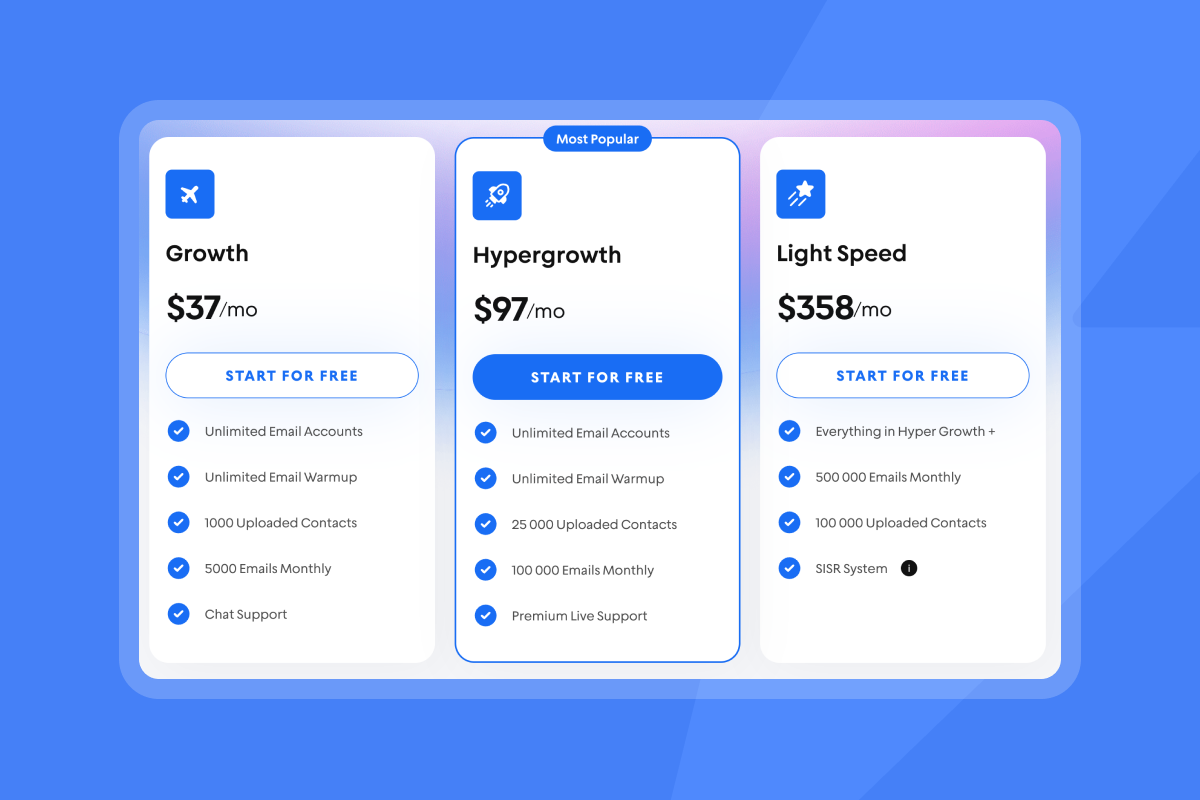
- Keep costs predictable. Instantly’s founder‑friendly flat‑fee Outreach plan starts at $37 per month with unlimited email accounts and warmup on Instantly’s pricing.
Most B2B lead‑gen advice assumes large teams and big budgets. Your reality is different. You need booked meetings soon, using a system you can run yourself, without burning your domain or your runway.
The founder’s dilemma: too many tasks, not enough pipeline
Problem: You need a repeatable way to find decision‑makers, start conversations, and book meetings without hiring an SDR team or stitching five tools.
Impact: Tool sprawl drives context switching, and it can take up to 9.5 minutes to regain focus after switching between apps
Founders also worry about hidden fees, domain health, and compliance. Meanwhile, buyers spend little time with suppliers, so your message must land cleanly and quickly. B2B buyers spend only about 17% of their buying time with all suppliers combined, according to Gartner on the B2B buying journey.
A founder‑friendly framework for B2B lead generation
Quick fix: Consolidate data, outreach, warmup, and replies in one platform. Cut the switching tax and start sending sooner.
Long‑term approach: Build a cash‑efficient system you can operate yourself. Protect domain health, use verified contacts, and automate follow‑ups so meetings keep coming.
The framework has three steps:
- Discover verified contacts.
- Launch outreach that protects domain health.
- Convert replies into booked meetings.
This is where Instantly helps. It combines SuperSearch lead data, automated warmup and deliverability checks, outreach automation, and a unified reply inbox. It runs on a flat fee with unlimited email accounts so you do not pay a per‑seat tax as you scale on a founder‑friendly flat‑fee pricing model. For a concise walkthrough of the platform, watch this Instantly sales engagement platform video.
Step 1: Discover your first 1,000 leads (without breaking the bank)
Implementation steps:
- Define your ICP. Write down industry, headcount band, geo, seniority, and the pains your product solves.
- Apply filters. In SuperSearch, filter by job title, industry, location, employee size, revenue, tech used, and keywords. Save the search for reuse.
- Validate with waterfall enrichment. Let SuperSearch verify work emails via multiple providers. Only add verified contacts to prevent bounces.
- Segment for relevance. Create small batches by role or trigger so copy stays specific.
- Ship a tight first list. Aim for the first 1,000 verified contacts so you can send, learn, and refine list hygiene.
Instead of paying for multiple data tools, use Instantly to find verified contacts with SuperSearch and build a targeted list within minutes. SuperSearch documents 450M+ contacts and waterfall verification, as explained in the SuperSearch credit system help article, and you can review recent improvements in the SuperSearch changelog.
"Being able to manage the campaigns you create, most especially when you have the ability to add leads that have been verified and what is impressive is the neat findings and descriptions of the found leads" - G2 review
Prefer a video walkthrough of lead discovery to launch? Watch the full tutorial on generating B2B leads with Instantly.
Step 2: Launch your first campaign and protect your domain
Preventive measures: Warm new inboxes, ramp gradually, set SPF/DKIM/DMARC, and run placement checks before scaling. Maintain list hygiene to keep bounces at or below 1% using the warmup guide, Inbox Placement automated tests, and the product overviews for Email warmup and Email verification.
Implementation steps:
- Connect and warm inboxes. Add sending accounts and start warmup. Keep warmup on even after you begin production sends. Follow a slow, steady ramp to build sender reputation, as detailed in How to warm up your domain. For product specifics, see Email warmup.
- Confirm alignment and set send windows. Ensure SPF, DKIM, and DMARC are in place, then send during local business hours for your segment. If placement dips, pause and re‑warm.
- Draft a simple sequence. Keep copy short and specific to the problem your ICP cares about. One clear ask per email. Use two subject line variants and two body variants for A/B tests. For a quick primer on cadence and deliverability, see Cold email outreach best practices.
- Automate smart follow‑ups. Most replies arrive after a follow‑up. A first follow‑up boosts replies by about 49%, and campaigns with one initial email plus one follow‑up average 6.9% replies, according to the Belkins 2024 study. Time the follow‑up about three days after the first send.
- Monitor deliverability. Run automated checks across providers and pause a mailbox if placement falls below a threshold or if a blacklist is detected using Inbox Placement.
"Easy to use, intuitive, minimal clicks/steps to get stuff done, and things just work." - G2 review
"Emails go out on time and land where they should." - G2 review
Step 3: Manage replies and book your first meetings
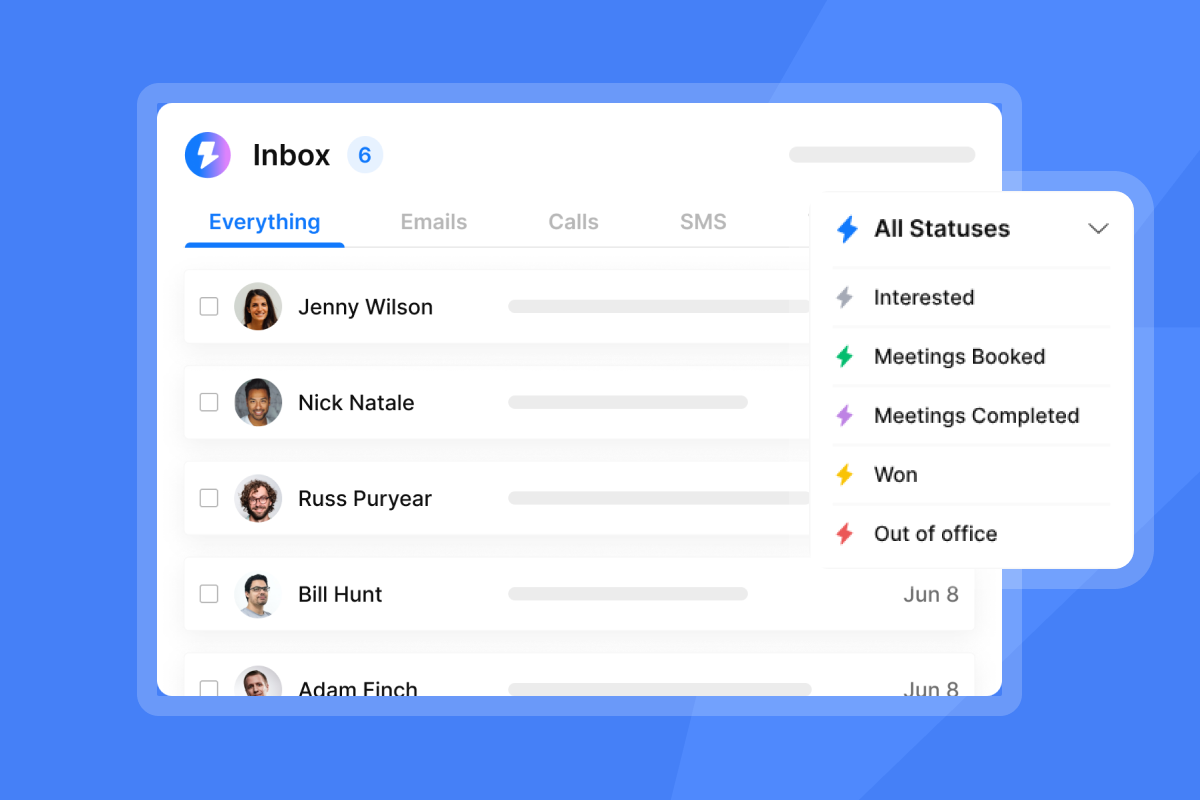
How Instantly.ai helps: Unibox centralizes replies from all connected inboxes so you can triage, answer, and book within one view. Default tabs include Interested, Meeting booked, and Not interested. You can also automate triage with AI labels, as explained in the Unibox guide.
Implementation steps:
- Check Unibox daily. Respond to positive replies within 24 hours. Speed up common answers using reply macros.
- Label and route. Tag Interested, Not now, Referral, or Wrong person so follow‑ups stay clean with custom labels.
- Move to meeting. Propose two specific time slots. Drop your calendar link only after they confirm interest.
- Use AI when volume rises. There is a human‑in‑the‑loop option using the AI Reply Agent to answer common objections, share your calendar, and send context‑aware replies.
"Being able to set up bulk outreach campaigns and with a fraction of the time & energy that manual outreach requires is priceless." - G2 review
"The team were able to create a new Google Sheets, upload it and let me know it had been actioned all within 5 minutes of reaching out... Instantly helps us to reach hundreds/thousands of contacts instantly." - G2 review
Your B2B lead generation checklist for startups
Use this to keep the motion tight and affordable.
- ICP clarity. Write a one‑line ICP. Add role, company size, and one urgent pain.
- Verified contacts. Use SuperSearch filters. Export only verified work emails.
- List hygiene. Remove risky domains and role accounts. Keep bounces at or below 1%.
- Warmup on. Start warmup on all sending inboxes and keep it running.
- Ramp plan. Week 1: 30 emails per inbox per day. Week 2: 50. Week 3: 70 to 100 if placement is healthy.
- Two‑touch sequence. Initial value email on Day 1. Follow‑up on Day 4. One ask.
- Placement checks. Run checks with Inbox Placement before scaling. Pause if inbox rate drops.
- Unibox routine. Daily triage. Reply within 24 hours. Label and move interested leads to a meeting.
- Proof of value. Track reply rate, meetings booked, and time‑to‑first‑meeting.
- Cost control. Start with Outreach Growth and SuperSearch Growth. Add CRM when reply volume justifies it. See founder‑friendly flat‑fee pricing.
How‑to: run your first 10‑day pilot in Instantly.ai
Materials:
- Two warmed inboxes.
- 400 to 1,000 verified contacts from SuperSearch.
- Two subject lines and two body variants.
Steps:
- Connect 2 inboxes and start warmup. Done when both pass placement checks. If you prefer video, see the full tutorial.
- Build a 400‑1,000 contact list that matches your ICP. Done when hard bounces stay at or below 1%.
- Launch a 2‑touch sequence with one clear ask. Done when both variants reach 100 sends.
- Follow up on Day 4. Done when overall reply rate reaches at least 5%.
- Triage Unibox daily and book calls within 24 hours of positive replies. Done when 1% of total sends convert to meetings.
Why these numbers:
- The first follow‑up lifts replies by about 49%. Two total emails average 6.9% replies, according to Belkins data.
- A compact pilot reduces risk while you tune copy, list hygiene, and send windows.
From founder‑led sales to predictable growth
You do not need five tools or a new hire to build pipeline. One platform that handles verified data, warmup and deliverability checks, outreach, and reply management keeps your focus on conversations that matter. Instantly’s flat‑fee model with unlimited accounts means you can scale outreach without per‑seat penalties, start small, and add capacity as replies grow. Start your free trial and go from discovery to your next booked meeting with founder‑friendly flat‑fee pricing.
"We increased our revenue by six figures within 4 months of starting with instantly. To say its totally worth it would be an understatement." - Trustpilot review
Frequently asked questions
How fast can I book my first meetings?
- Many founders see their first positive replies within a few days of sending, and first meetings inside two weeks once warmup, list hygiene, and follow‑ups are in place. For example, one user shared, "we closed a high ticket client" early in a new campaign, in a G2 review. Results vary by domain age, data quality, and copy.
What reply rate should I target with this approach?
- Aim for 5% replies on verified lists with two total emails and a clear ask. The first follow‑up is the lift, per the Belkins 2024 study.
How much does it cost to run this as a startup?
- A common starter stack is Outreach Growth at $37 per month plus SuperSearch Growth at $47 per month. Add CRM at $47 per month once reply volume justifies it. All plans run on a flat‑fee model with unlimited email accounts for outreach, as shown on Pricing.
What about compliance for cold email?
- Email only relevant business contacts, include a clear opt‑out, honor unsubscribes immediately, and keep data up to date. Target legitimate interest in B2B contexts and follow local laws. Review Instantly’s sending policy and consult your counsel.
Why not use multiple specialist tools?
- Every extra tool adds switching time and billing complexity. Founders need speed to value. Consolidating steps into one place reduces the context‑switching tax and makes it easier to diagnose deliverability, as explained by Atlassian on context switching.
Is Instantly proven at startup scale?
- Instantly has served 40,000+ clients, and the Outreach Growth plan includes unlimited email accounts and warmup so you do not pay a per‑seat tax as you add inboxes. Browse client stories on the wall of love.
Key terms glossary
- Pipeline per dollar: How much potential revenue you create per dollar spent on outbound.
- Primary inbox: The folder your contacts read. Not spam or promotions.
- Sender reputation: How inbox providers score your domain based on behavior.
- Warmup: Gradually increasing daily sends from a new or idle inbox to build trust.
- List hygiene: Ongoing removal of bad or risky emails to keep bounces low.
- Verified contacts: Work emails confirmed deliverable by a verifier.
- Send windows: Local time ranges when your campaign sends.


