


TL;DR: Agencies that send cold email at scale need two things to protect client results: verified contacts and healthy sender reputation. Instantly solves both with flat-fee pricing, unlimited accounts, built-in bulk verification, warmup, and deliverability monitoring across all clients. Keep hard bounces at or below 1 percent, hold spam complaints under 0.3 percent, and measure reply-to-meeting rates. Use the steps below to set up client workspaces, verify lists, warm inboxes, and monitor placement. Start a free trial or grab the checklist to standardize team hygiene.
Updated September 17, 2025
Are per-email verification costs eating your margins? For agencies, every extra credit and seat fee compounds across clients. Instantly gives you flat-fee economics, unlimited accounts, and integrated deliverability so you can verify at scale and keep every client’s emails in the primary inbox.
"Instantly.ai has assisted us in creating outbound email systems that reach your ideal buyer's inbox and foster meaningful connections. Also, their customer support is next level, 10/10." - Verified User in Investment Banking
B2B buyers also give you a short window to make contact. Buyers spend about 17 percent of their evaluation time with all suppliers combined, which means inbox placement matters more than ever, as a Gartner report shows.
This playbook shows how to run bulk email verification for agencies inside Instantly, protect sender reputation, and tie clean lists to booked meetings.
What is email verification and why it matters for agencies?
Email verification confirms that addresses in your list are valid, deliverable, and low risk. It removes invalid, disposable, and spam-trap emails before you send.
Lists decay fast. Email databases degrade by roughly 22 percent per year, so unverified lists gather bounces and complaints that lower domain health, according to HubSpot. Once reputation dips, inbox placement falls and recovery takes weeks.
The agency imperative: protecting client sender reputation
Inbox placement is the outcome clients buy. Average global inbox placement sits in the low to mid 80s percent, even before cold email risk is factored in, per Validity. Your job is to push higher with clean data and healthy senders.
Targets that keep clients safe:
- Hard bounces at or below 1 percent.
- Spam complaints under 0.3 percent, aligned with Gmail’s bulk sender guidance in the Gmail sender guidelines.
- Consistent warmup and gradual throughput increases per inbox.
Instantly supports this at agency scale with unlimited accounts on all Outreach plans, automated warmup, Inbox Placement tests, and health dashboards on the Inbox Placement page.
"I like that I can scale up my outreach without worrying about hitting weird limits. Warmup runs automatically, and I don't have to think about it. The ability to run multiple inboxes at once is a huge plus for me." - Latika D. on G2
How email verification works: types of checks
Verification tools run layered checks to mark each address as valid, risky, or invalid.
- Perform a syntax check. Done when malformed addresses are caught.
- Conduct domain and MX lookup. Done when a domain can receive mail is confirmed.
- Execute an SMTP handshake. Done when mailbox existence is confirmed without sending.
- Detect catch-all domains. Done when domains that accept all mail are flagged.
- Identify disposable emails. Done when short-lived addresses are removed.
- Detect role-based emails. Done when generic inboxes are flagged for separate handling.
- Screen for spam traps and blocklists. Done when known trap patterns and listed sources are avoided.
- Apply activity and risk scoring. Done when deliverability risk is graded from multiple signals.
Instantly’s verifier applies these checks in bulk on import or by API, then labels contacts for safe sending. See integrations and API options in the Instantly Integrations collection. For a hands-on demo of dealing with catch-all domains, watch the short catch-all verification video.
The benefits of a clean email list for agency clients
Clean lists improve outcomes and lower risk.
- Higher inbox placement. Fewer bounces and traps mean more primary inbox landings. Average inbox placement sits in the 80s percent, and clean, authenticated lists push higher per Validity.
- Lower bounce rate. Keep hard bounces at or below 1 percent. Many providers flag lists over 2 percent hard bounces.
- Cost efficiency. You avoid paying to contact dead addresses and protect domains you would otherwise have to replace. With annual list decay near 22 percent, re-verification recovers wasted sends, per HubSpot.
- Better engagement. Verified, relevant contacts open and reply more. That means more meetings at the same volume.
- Stronger reputation. You reduce spam complaints and avoid spam traps, which protects client domains.
"Emails go out on time and land where they should. The warm-up feature runs automatically, so I don't have to worry about deliverability." - Corey B. on G2
Checklist: benefits of a clean list
- Reduced hard bounces to at or below 1 percent.
- Higher inbox placement and opens for the same volume.
- Lower cost per meeting as waste is cut out.
- Fewer domain resets and less support time.
- Clearer reporting your clients trust.
Simple ROI math example for an agency
- 100,000 sends on a stale list with 4 percent hard bounces wastes 4,000 sends and harms domain health.
- The same 100,000 sends on a verified list at 1 percent bounces wastes 1,000 sends. You preserve 3,000 deliverable attempts and protect the domain.
- If 1 percent of delivered emails convert to meetings, that difference can be 20 to 30 extra meetings per campaign at the same cost base.
Choosing the right email verification tool for agencies
Agencies benefit most from flat-fee pricing, unlimited accounts, and verification integrated with warmup and placement testing. This avoids per-email costs and tool sprawl across clients.
| Tool | Pricing model | Key features | Limits and caps |
|---|---|---|---|
| Instantly.ai | Flat-fee subscriptions. Unlimited accounts and warmup on all plans. | Bulk verification, outreach, warmup, inbox placement testing, SISR on Light Speed, CRM, AI agents. | Plan contact caps. Credits apply for some AI features. |
| ZeroBounce | Credit based and subscriptions. | Bulk and API verification, activity data, blacklist tools. | Per verification credits. |
| Hunter.io | Freemium credits then paid packs. | Lead discovery plus email verification and simple campaigns. | Monthly credit caps. |
| Verifalia | Pay-as-you-go credits and plans. | Multi-pass checks, EU data residency options, API. | Credits per verification. |
| Email Hippo | Credits and subscriptions. | Real-time and bulk checks, disposable detection. | Credits per check. |
| EmailListVerify | Tiered credit bundles. | Catch-all testing, bulk cleansing, API. | Credits per check. |
Notes
- Most verifiers bill per email. Costs scale linearly with list size and client count.
- Instantly stands out for flat-fee unlimited accounts plus warmup, inbox placement tests, and SISR. This reduces vendor sprawl and simplifies operations across clients. See the pricing page for Outreach, SuperSearch, and CRM tiers.
Instantly pricing snapshot for agency stacks
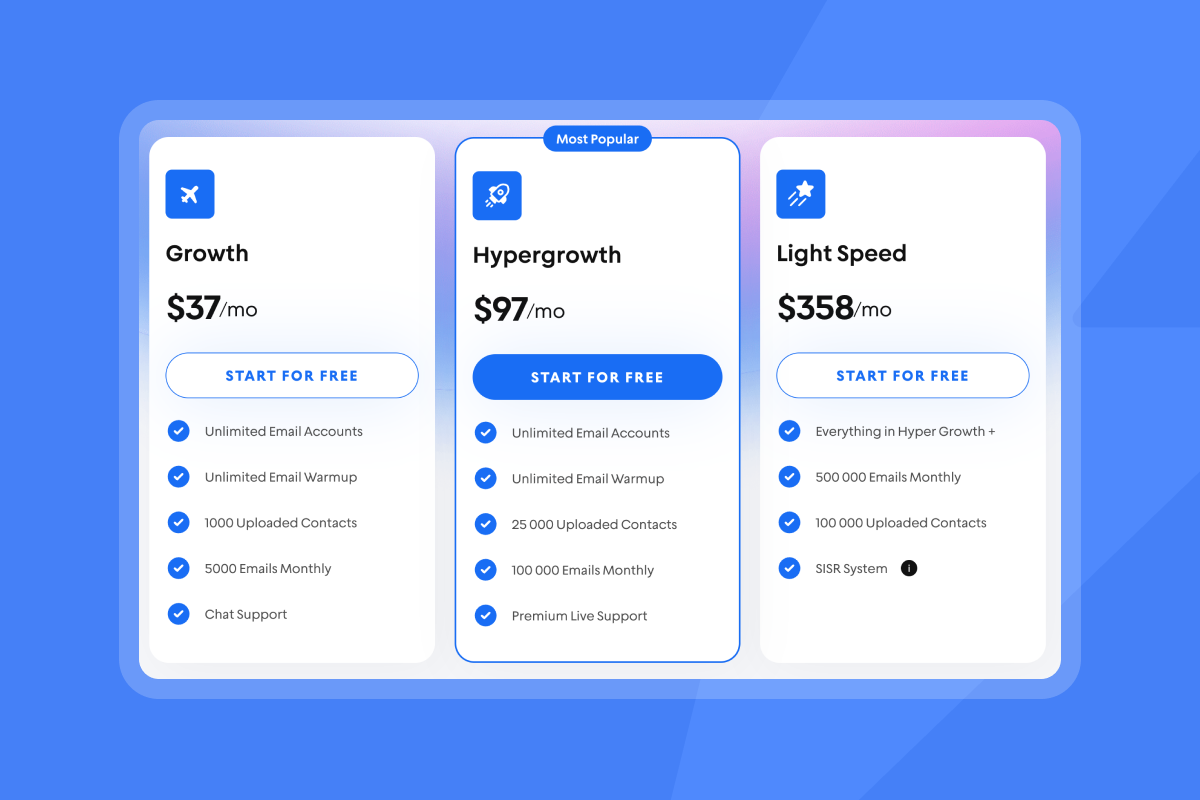
- Outreach Growth: $37 per month. Unlimited accounts and warmup.
- Outreach Hypergrowth: $97 per month.
- Outreach Light Speed: $358 per month. Adds SISR.
- SuperSearch credits: $47 to $197 per month tiers.
- CRM: $47 or $97 per month tiers.
"Instantly is for me the Apple of Cold Outreach tools. Easy to use, intuitive, minimal clicks/steps to get stuff done, and things just work." - Thomas D. on G2
The Instantly agency playbook: step-by-step bulk verification
Create a client workspace, import and verify the list, then send from warmed inboxes with placement monitoring. Use rotation and throttles to keep bounces at or below 1 percent.
Step 1: Setting up client accounts and workspaces
- Create a separate workspace per client. Workspaces keep data and reporting isolated. Invite client users or SDRs with the right role.
Done when: The client has a named workspace and only assigned users can access it. - Connect sending inboxes. Add client domains and mailboxes you will rotate for throughput. Instantly includes unlimited accounts and warmup on all Outreach plans.
Done when: Inboxes connect, authenticate, and begin warmup. - Authenticate domains. Confirm SPF, DKIM, and DMARC. This is required for primary inbox placement and bulk sender rules. Use the Instantly guide on SPF, DKIM, and DMARC.
Done when: Records pass checks and Inbox Placement tests show healthy authentication.
Helpful links
- Deliverability tests on Inbox Placement.
- Security posture in the Instantly DPA.
Step 2: Importing and verifying client email lists
- Import the CSV. Map fields like email, first name, company, and tags in the workspace.
Done when: Leads appear in the list with correct field mapping. - Select Verify leads. Run bulk verification to label Valid, Risky, or Invalid before any send. You can also use API v2 or webhooks to automate this step.
Done when: The list shows verification statuses and counts by category. - Filter to verified contacts. Exclude invalid and high-risk addresses. Decide your policy for role-based and catch-alls.
Done when: A clean segment is ready with at or below 1 percent expected hard bounces.
Helpful links
- Integrations and workflow options in the Instantly Integrations collection.
- Automate placement tests using the Inbox Placement Test API.
- If you prefer a no-code walkthrough of API automation, see this n8n demo on automating Instantly with API v2.
Step 3: Integrating verification with outreach campaigns
- Build the campaign. Attach the cleaned segment to a new sequence. Use spin syntax variants for subject and intro to avoid fingerprinting.
Done when: The campaign passes preflight checks and includes two to three variants. - Enable sender rotation and throttles. Spread sends across client inboxes. Start slow in week one, then ramp. Use send windows that fit the buyer’s local time.
Done when: Daily caps and windows are conservative and placement stays high. - Enable placement testing and alerts. Run automated Inbox Placement tests, monitor SpamAssassin scores, and pause sends if health dips.
Done when: Placement is at or above your target and hard bounces remain under 1 percent. - Route replies to a unified workflow. Use Unibox and the CRM to tag positive replies, push to meetings, and sync to Salesforce or HubSpot. Try the AI Reply Agent for triage with a human-in-the-loop review in the AI Reply Agent guide.
Done when: Meetings and pipeline are attributed to campaigns and visible to clients.
For a visual walkthrough of this flow checkout our Youtube tutorial:
"Being able to set up bulk outreach campaigns and with a fraction of the time & energy that manual outreach requires is priceless. This service is GOLD." - William M. on G2
Best practices for ongoing email list hygiene and deliverability for agencies
Re-verify lists on a schedule, ramp sends slowly, monitor placement, and enforce a bounce and complaint policy. Standardize this across client workspaces.
Best practices checklist
- Quarterly re-verification: Lists decay about 22 percent per year. Re-verify every 1 to 3 months for active segments, per HubSpot.
- Hard bounce guardrail: If hard bounces exceed 1 percent, pause, re-verify, and cut risky segments. Many ESPs flag lists over 2 percent.
- Complaint control: Keep spam complaints under 0.3 percent. Make unsubscribes one click and honor removals quickly, reflected in the Gmail sender guidelines.
- Warmup and ramp: New inboxes warm for at least two weeks. Increase caps gradually and test placement weekly. Instantly’s private deliverability network underpins warmup, described on the Inbox Placement page and in product docs.
- Rotation and SISR: Rotate across inboxes. On Light Speed, use SISR to shard and rotate servers and IPs for safer throughput, as outlined on pricing.
- Engagement trims: Suppress non-openers after a set number of touches to protect reputation.
- DNS audits: Re-check SPF, DKIM, and DMARC when providers or records change.
- Blacklist checks: Investigate and remediate before resuming volume if a domain appears on an RBL.
- Content variation: Use A and Z tests and spin syntax to reduce repeats.
Addressing agency-specific needs with Instantly
Instantly is built for multi-client scale. You get flat-fee unlimited accounts, verification, warmup, placement testing, and pipeline reporting in one place.
- Agency operators
- Problem: Per-seat and per-credit costs inflate with client count.
- Instantly fit: Flat-fee plans with unlimited accounts and warmup across clients. Separate workspaces for clean data boundaries. Clear tiers on the pricing page.
- Sales and RevOps leaders
- Problem: You need reliable reporting that reconciles to CRM and a defensible deliverability system.
- Instantly fit: Outreach analytics, Unibox reply handling, and CRM syncs via native connectors, Zapier, or partners. Automated Inbox Placement tests, warmup, and health dashboards.
- Growth marketers
- Problem: You need verified data and speed from targeting to send.
- Instantly fit: SuperSearch with 450M plus B2B leads and a clear credit system in the SuperSearch credit overview. AI Copilot for targeting and copy on Copilot. One-click verification on import, then immediate routing into campaigns.
- Startup founders
- Problem: You want enterprise-grade deliverability and automation without five different tools.
- Instantly fit: Outreach, warmup, verifier, CRM, and AI reply in one stack. Unlimited accounts let you scale inbox count without more seats.
Proof from customers
"Best cold email platform, been using it at the agency for 2 yrs... great deliverability and amazing support." - Andrei D. on G2
"Easy to use and can handle high volumes + the support is very efficient which makes it a reliable tool to scale your outbound." - Hugo D. on G2
"The platform is fast, reliable, and incredibly easy to use... with a support team that goes above and beyond to help." - Uros M. on G2
"Very easy to use and straight forward tool for emailing... we start to see the results from the email campaigns." - Miguel on Trustpilot
Scale client success with verified emails
Bulk email verification is how agencies protect sender reputation and deliver consistent client results. Instantly’s flat-fee model with unlimited accounts, integrated verification, warmup, Inbox Placement tests, and SISR gives you an agency-grade system. Standardize the playbook above, keep hard bounces at or below 1 percent, and report outcomes your clients trust.
Start a free trial of Instantly to run this verification playbook across unlimited client accounts to scale your agency’s email deliverability.
Video references for further learning
- Full Instantly tutorial for 2025 on the Instantly YouTube channel.
- How to verify your email addresses on YouTube.
- The ultimate guide to cold email deliverability in 2025 on YouTube.
- Read our breakdown on Apollo vs Instantly for agencies.
FAQ
- How do agencies do bulk email verification at scale?
Import CSV lists into each client workspace in Instantly, select Verify leads, filter to Valid, then launch campaigns from warmed inboxes with placement monitoring. - How often should I re-verify client lists?
Every 1 to 3 months for active segments. Email lists decay by about 22 percent per year, according to HubSpot. - What bounce rate is acceptable for cold email?
Keep hard bounces at or below 1 percent. Many providers flag lists over 2 percent. - What complaint rate should I target?
Keep spam complaints under 0.3 percent in line with the Gmail sender guidelines. - Can Instantly integrate with my CRM and alerting?
Yes. Use native connectors, Zapier, webhooks, and partners to sync leads and outcomes. Placement tests can be automated via the Inbox Placement Test API.
Key terminology for email verification
- Email verification: Automated checks to confirm an address is valid and safe.
- Bounce rate: Percent of emails that fail to deliver. Hard bounces are permanent.
- Sender reputation: Domain and IP trust score used by mailbox providers.
- List hygiene: Ongoing cleaning that removes risky or stale contacts.
- Disposable email: Temporary throwaway address. High risk.
- Catch-all domain: Accepts any mailbox. Address-level confirmation is unreliable.
- Spam trap: Honeypot address to catch low-quality senders.
- SMTP check: Non-sending handshake to see if a mailbox exists.
- DNS verification: Confirms domain MX and related mail records exist.
- Role-based email: info@, sales@. Often lower engagement.
- SPF, DKIM, DMARC: DNS authentication records needed for deliverability.
- SISR: Server and IP sharding and rotation to spread risk.


