


Updated October 31, 2025
TL;DR: Agencies can book more client demos by implementing Instantly's 30-day AI reply management plan. This plan uses Instantly's AI Reply Agent to automate lead reply classification and response, ensuring deliverability and scaling operations without compounding per-seat costs. We detail the setup, daily tasks, and optimization steps to consistently convert email replies into booked meetings, freeing up agency staff time for high-value conversations. The system handles replies in under 5 minutes and costs 5 credits per AI reply.
Managing client email replies manually drains hours your team could spend closing deals. For agency operators managing outreach across 10 to 150+ sending inboxes, manual reply handling can't scale without burning your team or letting hot leads go cold.
This guide outlines a practical 30-day plan to integrate Instantly's AI Reply Agent into your agency workflow. You will learn how to automate reply classification, maintain deliverability across client domains, and drive consistent demo bookings without the burden of per-seat pricing or tool sprawl.
Why AI reply management is essential for agencies
Manual reply handling creates compounding problems for agencies running cold email at scale. Every additional client inbox adds 20 to 50 inbound replies per week. At 10 clients with 5 inboxes each, that's 1,000 to 2,500 replies monthly requiring classification, response drafting, and CRM updates.
The challenge of scaling manual reply handling
Agencies also face tool sprawl, juggling separate platforms for warmup, sending, enrichment, and reply management. Each tool charges per seat or per inbox, which erodes your margins as you scale. Instantly consolidates these functions under a flat-fee model with unlimited email accounts, removing the per-seat tax that punishes growth.
"Instantly is for me the Apple of Cold Outreach tools. Easy to use, intuitive, minimal clicks/steps to get stuff done, and things just work." - Thomas D. on G2
How AI improve agency outreach efficiency
Instantly's AI Reply Agent reads incoming emails, classifies intent using natural language processing, and generates human-like responses in under 5 minutes. It handles follow-ups, shares calendar links, and updates lead statuses without constant human intervention.
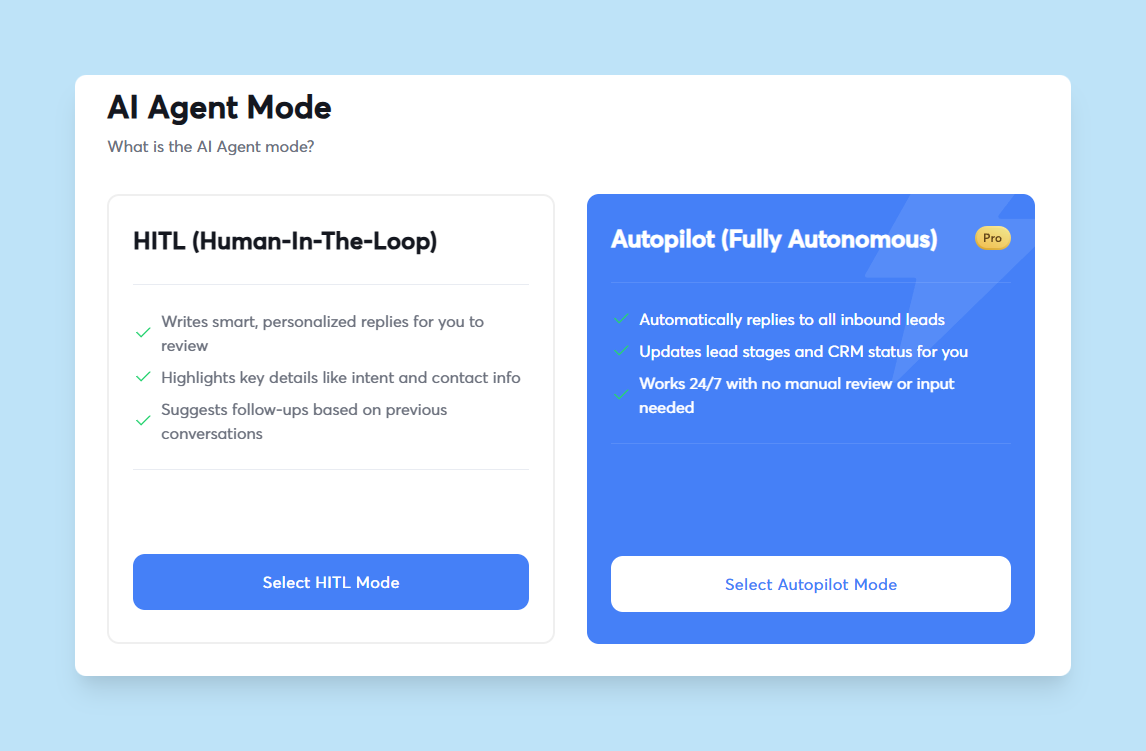
The system operates in two modes. Human-in-the-Loop (HITL) mode lets your team review and approve AI-generated replies before sending. Autopilot mode sends replies automatically once you trust the AI's accuracy.
AI-driven classification goes beyond keyword matching. It interprets sentiment and understands context. An email saying "Not interested in your pricing" gets classified as a negative objection, not a pricing inquiry.
What is Instantly's AI Reply Agent?
Instantly's AI Reply Agent is a natural language processing engine that automates email reply handling across all your client campaigns.
Automated reply classification and response
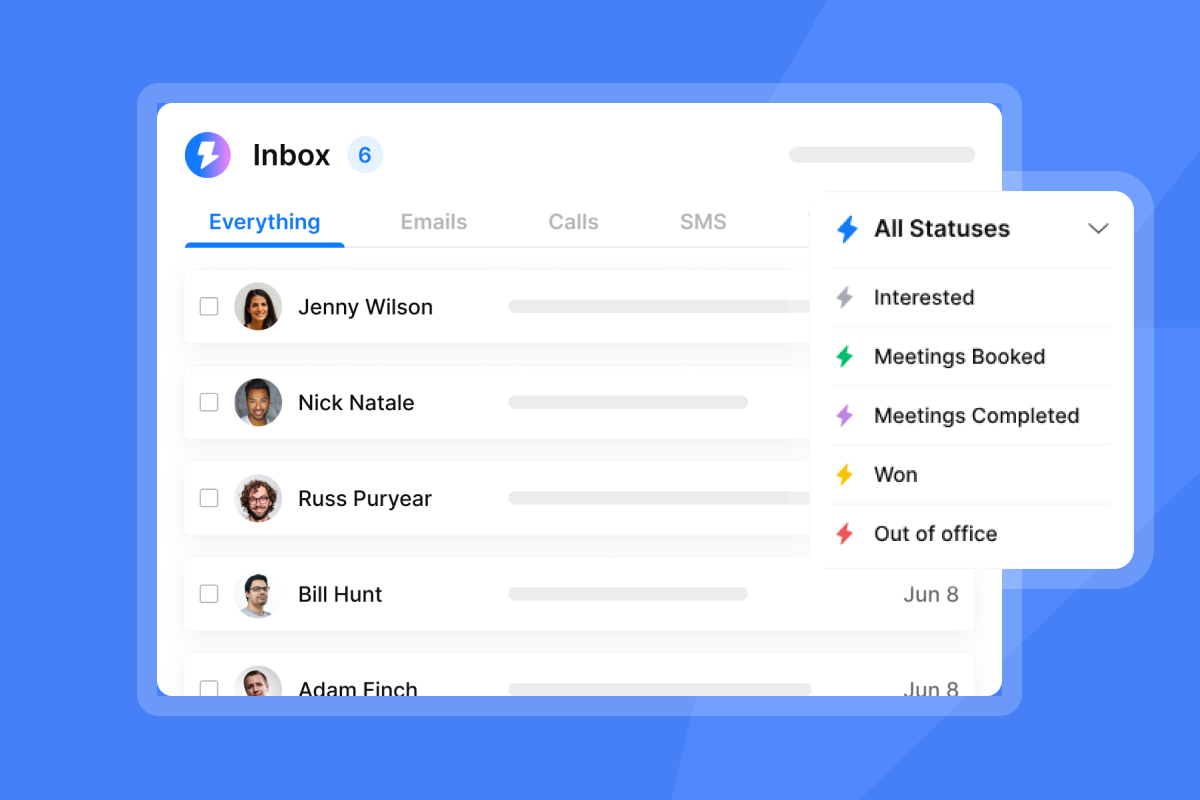
The AI reads each incoming reply and classifies it into categories like Interested, Not Interested, Out of Office, or custom labels you define. It uses sentiment analysis and named entity recognition to understand intent beyond simple keywords.
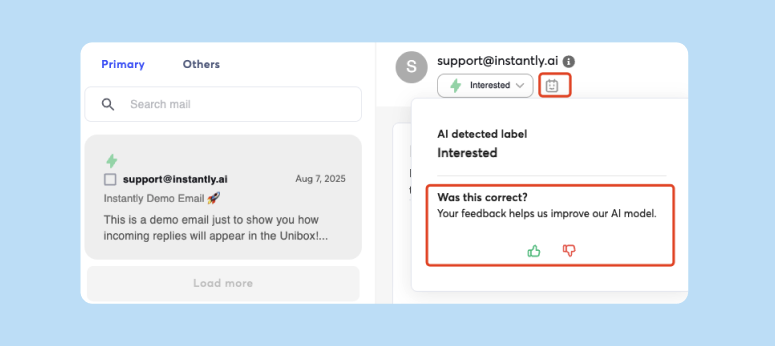
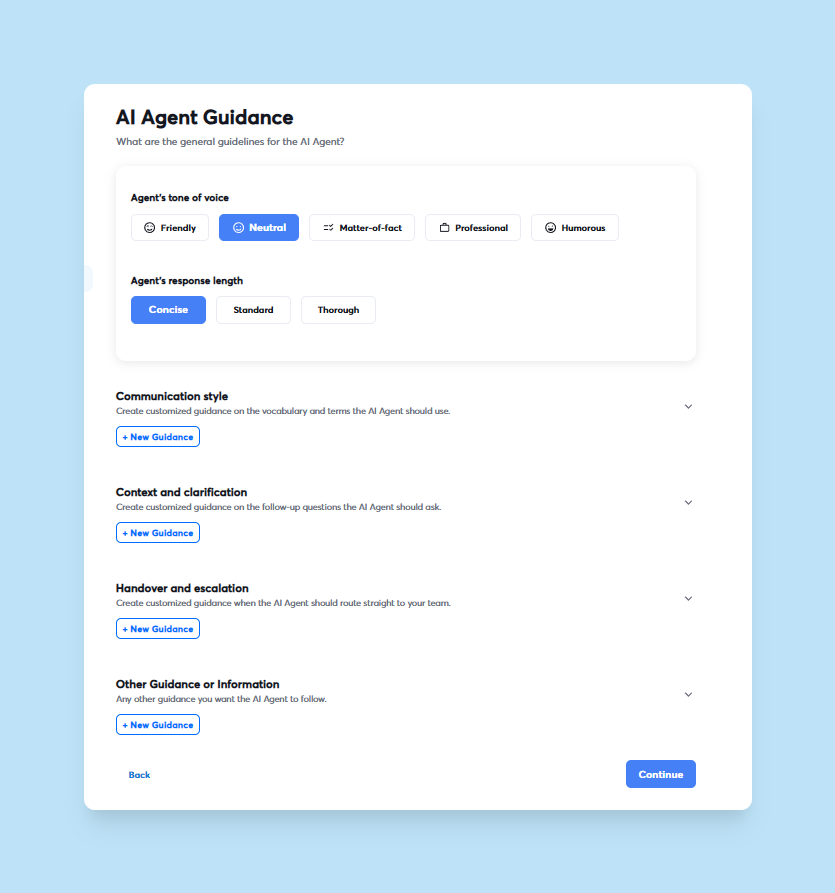
Once classified, the AI generates a response based on guidance you provide during setup. You train the agent on your client's tone of voice, product details, and value propositions. The AI then crafts replies that match that style, answer common questions, and nudge interested leads toward booking a meeting.
Instantly's Unibox platform automatically labels and routes leads, enabling the AI Reply Agent to trigger subsequent actions based on classification. For example, an "Interested" reply might trigger an automated response with a Calendly link, while a "Not Interested" reply updates the CRM status.
Human-in-the-Loop vs. Autopilot modes
HITL mode is your training phase. The AI suggests replies and flags them for human review before sending. Your team sees the AI's draft in the Activity Feed, edits if needed, and approves or rejects it. This feedback loop refines the AI's accuracy over the first few weeks.
Autopilot mode removes the approval step. The AI sends replies automatically within 5 minutes of receiving them. This is suitable for agencies that have validated the AI's performance and want to scale without adding headcount.
You can run HITL on high-value or complex campaigns and Autopilot on well-tested, high-volume sequences.
Over time, you can tune the AI Agent to your exact tone of voice and style so it can behave or mimic anyone on your team.
How AI replies consume Instantly credits
Each AI-generated reply costs 5 Instantly credits. Credits are part of Instantly's SuperSearch and AI feature pricing. The Growth plan includes 1,500 to 2,000 credits monthly for around $47, while the Hyper Credits plan offers 10,000 to 200,000 credits for $197 per month.
If your agency handles 500 AI replies monthly across all clients, that's 2,500 credits. Compare this to hiring an SDR at $4,000+ per month.
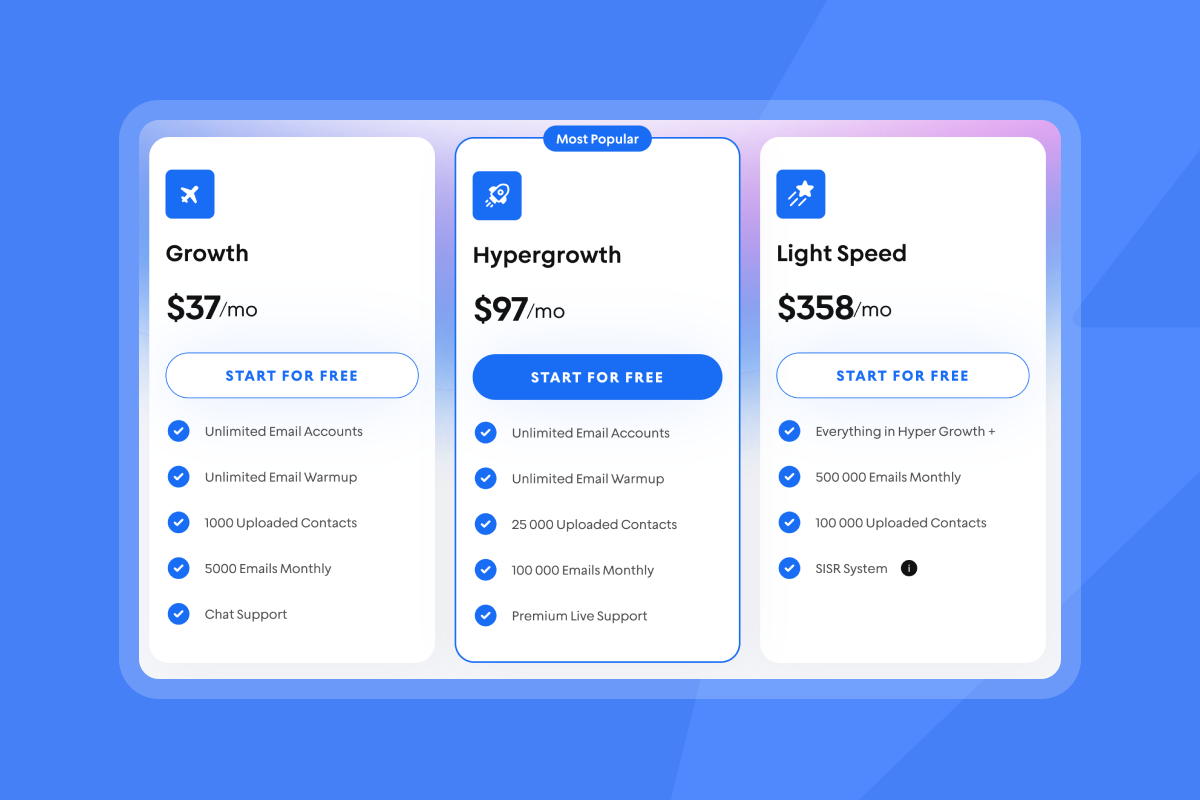
Instantly's flat-fee outreach pricing starts at $37 per month for unlimited email accounts and warmup. You can combine outreach and credits under one login, which simplifies billing compared to platforms that charge per seat or per mailbox.
The 30-day AI reply management plan: Step-by-step
This plan structures your implementation into four weekly phases, each with specific tasks and checkpoints.
Week 1: Setup and initial training
Day 1-3: Connect email accounts and configure deliverability
- Start by connecting 2 to 6 email accounts per client to Instantly. Each account should be on a unique sending domain to distribute volume and protect sender reputation.
- Enable automated email warmup for each account. Warmup should run for at least 2 weeks before you send cold emails. Configure your DNS records (SPF, DKIM, DMARC) following Instantly's setup guide to pass authentication checks.
Day 4-5: Set up the AI Reply Agent
- Navigate to AI Agents in your Instantly dashboard and create a new AI Reply Agent. Choose HITL mode for the first 2 weeks. Define the campaigns or inboxes the AI should monitor. You can use tags to organize by client or campaign type.
- Train the agent by providing clear guidance on tone, product details, and common objections. For example, instruct the AI to "qualify leads by asking about their current solution" or "book a 15-minute demo if they express interest." Connect your Calendly or other booking tool so the AI can share meeting links automatically.
Day 6-7: Define reply macros and test responses
- Create reply macros for common scenarios. Use dynamic fields like
{{first name}}and{{company name}}to personalize responses. For instance, a macro for interested leads might say: "Hi{{first name}}, glad this resonates. Here's my calendar to book a quick call: [link]." - Run a small test campaign to a known list. Send 10 to 20 emails and monitor how the AI classifies and responds to replies.
Weeks 2-3: Launch, monitor, and optimize
Day 8-10: Activate AI for client campaigns
- Expand the AI to cover your first client's active campaigns. Keep HITL mode active so your team reviews every reply. Set up Slack notifications so your team sees AI-suggested replies in real time.
- Monitor your Campaign Pipeline Analytics daily. Track open rates, reply rates, and booked meetings. Aim for at least a 5% reply rate and a 1% meeting booking rate as early benchmarks.
"The platform is super intuitive, easy to set up, and makes it simple to manage multiple domains and inboxes at scale. Deliverability is great and the analytics give us exactly what we need to optimize campaigns quickly." - Shaiel P. on G2
Day 11-14: First optimization pass
- Review the AI's classification accuracy. Check for false positives (e.g., marking a negative reply as interested) and false negatives (missing genuine interest).
- Refine the AI's guidance based on these findings. If the AI struggles with sarcasm or ambiguous replies, add explicit examples in the training. Update reply macros to address common objections you see in the data.
- Run an A/Z test on subject lines or send windows using Instantly's built-in testing feature. Compare reply rates across variants to identify what resonates.
Day 15-17: Refine AI classification rules
- By now you have 100+ classified replies. Analyze patterns. Are most "Not Interested" replies objections about timing, budget, or relevance? Adjust your email copy and follow-up sequences to address these objections earlier.
- Update the AI's custom labels if needed. Instantly allows you to define custom reply categories beyond the defaults. For example, create a "Pricing Inquiry" label and train the AI to share a pricing doc and suggest a call.
Day 18-21: Expand to more clients
- Replicate your optimized AI setup for a second client. Use the same training approach but customize the tone and product details.
"I find Instantly extremely user-friendly since everything was very easy to use from the start, and the great training provided made the setup even smoother." - Carter W. on G2
- Test transitioning your first client's campaigns to Autopilot mode. Start with a low-risk sequence and monitor for 2 to 3 days. If the AI maintains accuracy, expand Autopilot to additional campaigns.
Week 4: Review and advanced strategies
Day 22-25: Analyze results across all clients
- Pull a full report from Instantly's analytics dashboard. Calculate your reply rate, meeting booking rate, and cost per meeting. Compare these metrics to your pre-AI baseline.
- Review deliverability health using Instantly's Inbox Placement tests. Ensure emails still land in primary inboxes and sender reputation remains strong. If you see a dip, pause campaigns, re-verify your lead list, and lower send volume temporarily.
Day 26-30: Implement advanced workflows
- Connect Instantly to your CRM using native integrations or Zapier. Push AI-classified leads and responses into your CRM automatically. This eliminates manual data entry and keeps your sales pipeline current.
- Set up automated follow-up sequences triggered by AI classifications. For instance, if a lead replies "Not now, check back in Q2," schedule a follow-up for 3 months later.
- Plan a monthly review cadence. Schedule a 30-minute session with your team to discuss AI performance, share best practices across clients, and adjust strategy based on market feedback.
Watch how Instantly's CRM manages your outreach end to end and get you more leads:
"Instantly has been a game changer for my vertical in merchant service where email marketing is key. I've converted several leads into deals using Instantly and it's paid for itself 5x." - Philip Hendrich on Trustpilot
How Instantly's AI Reply Agent books more demos
AI reply management accelerates your sales cycle by automating critical tasks that manual handling can't match at scale.
Speed and quality at scale
Speed matters for conversion. Responding within the first few minutes dramatically improves conversion compared to waiting an hour or more. Instantly's AI responds instantly, day or night, which means you never miss a hot lead because your team was in a meeting or asleep.
Human agents vary in quality and energy. The AI delivers consistent quality every time, following the guidelines you set during training. This consistency is crucial for agencies managing multiple clients.
"Simple and well-designed UX, effective support from both humans and AI for small questions. Additionally, the AI is capable of entering campaign configurations and applying fixes, which is a huge time saver!" - Guillaume N. on G2
Cost-effective agency economics
Your sales team should spend time on discovery calls, demos, and closing deals, not sorting through hundreds of replies. The AI handles the repetitive work, which allows your team to focus on conversations that drive revenue.
Instantly charges a flat fee per workspace, not per seat or per inbox. The Growth plan at $37 per month includes unlimited email accounts and warmup. The Hypergrowth plan at $97 per month adds 100,000 emails monthly and advanced features like A/Z testing.
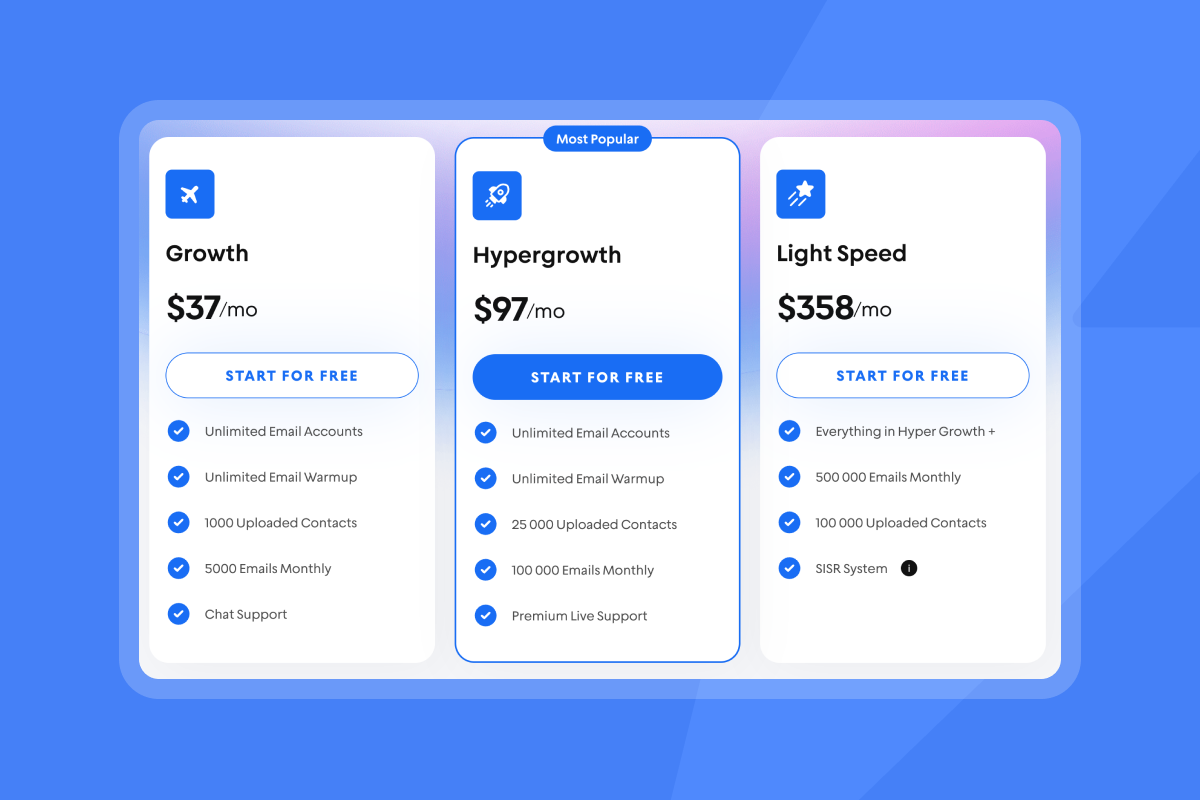
Compare this to platforms that charge $50 to $100 per user per month. At 10 users, you are paying $500 to $1,000 monthly just for access. Instantly eliminates that tax, which means you can scale your agency without your software costs exploding.
"Easy to use, reliable sending and sender reputation, multiple domains." - Mika Norismaa on Trustpilot
Measuring success: Key metrics for AI reply management
Track these metrics to validate your AI implementation and optimize performance.
Reply rate and booked meeting rate
Reply rate is the percentage of sent emails that receive any response. Aim for 5% to 10% for cold outreach. Booked meeting rate is the percentage of replies that convert to scheduled demos. Target 10% to 20% of replies turning into meetings.
Instantly's analytics dashboard shows these metrics by campaign, client, and time period. If your reply rate drops below 5%, audit your email copy, list quality, and send timing. If your meeting booking rate is under 10%, review the AI's responses to interested leads and ensure calendar links are prominent.
Time saved and cost per meeting
Calculate time saved by multiplying the number of AI-handled replies by the average minutes per manual reply. If the AI processes 500 replies monthly and each would take 3 minutes manually, you save 25 hours per month.
Cost per meeting is your total outreach spend divided by booked meetings. Include your Instantly subscription, domain costs, and personnel time. If you spend $500 monthly and book 20 meetings, your cost per meeting is $25. Compare this to paid ads or other channels to assess ROI.
Deliverability health and sender reputation
Monitor your inbox placement rate using Instantly's Inbox Placement tests. Aim for 80%+ primary inbox placement. Check your sender reputation weekly to catch issues before they escalate.
Track bounce rates (keep under 1%), spam complaint rates (keep under 0.1%), and unsubscribe rates. If any metric spikes, pause campaigns, clean your list, and adjust your content. Instantly's SISR system on the Light Speed plan provides dedicated IP pools for better control over sender reputation.
Watch our deep dive workshop on deliverability below:
Instantly vs. manual reply management: A comparison
The table below shows the practical differences between manual and AI-driven reply handling for agencies.
| Factor | Manual Reply Management | AI Reply Management (Instantly) |
|---|---|---|
| Response time | 2-24 hours depending on team availability | Under 5 minutes, 24/7 |
| Time per reply | 2-5 minutes for classification and response | Automated (zero manual time after setup) |
| Consistency | Varies by rep skill and energy | Consistent tone and quality |
| Scalability | Requires hiring more SDRs | Scales across unlimited inboxes at flat fee |
| Cost | $4,000+ per full-time SDR monthly | $37-$358/mo + credits (5 per AI reply) |
Manual reply management is viable for small volumes (under 100 replies monthly) but requires additional headcount as volume grows. AI reply management through Instantly maintains quality and speed regardless of volume, which is why agencies managing 10+ clients prefer it.
Scale your agency's outreach with AI
Manual reply handling is a bottleneck that limits your agency's growth. The 30-day plan outlined here gives you a repeatable system to implement Instantly's AI Reply Agent across all your client campaigns.
By automating reply classification and response, you free your team to focus on high-value conversations that close deals. You maintain consistent quality across clients, respond instantly to hot leads, and scale without adding headcount. Instantly's flat-fee pricing with unlimited email accounts removes the per-seat tax that erodes agency margins.
Start with HITL mode to train the AI on your clients' tone and value props. Monitor performance weekly and refine guidance based on real reply data. Transition to Autopilot once accuracy is validated. Track reply rates, booked meetings, and cost per meeting to measure ROI.
Start a free 14 day trial and configure your first AI Reply Agent to transform how your agency handles client outreach.
FAQs
How long does it take to set up Instantly's AI Reply Agent for a client?
Initial setup can be done in 10-30 minutes. Additional clients take a few minutes using template replication.
Can the AI handle objections and complex questions?
Yes, the AI trains on your product details and common objections. Complex or emotional replies route to humans via HITL mode.
What happens if the AI misclassifies a reply?
Manually adjust classifications in Unibox to improve future accuracy. HITL mode prevents incorrect replies from sending.
Does Instantly support integration with my CRM?
Yes, Instantly offers native integrations with HubSpot and Salesforce, plus connections via API, webhooks, or Zapier for other platforms.
How many credits do I need monthly for AI replies?
Each AI reply costs 5 credits. For 500 replies monthly, you need 2,500 credits, which fits the Supersonic plan at $97 per month.
Key Terms Glossary
AI Reply Agent: An AI system that automatically reads, classifies, and responds to email replies using natural language processing.
Human-in-the-Loop (HITL): A mode where AI-generated replies are reviewed and approved by a human before sending.
Unibox: Instantly's unified inbox that centralizes replies from all connected email accounts for efficient triage.
Sender reputation: A score assigned by email providers based on sending behavior, which affects inbox placement.
Email warmup: The process of gradually increasing email volume from new accounts to build sender reputation.
Credits: Instantly's usage-based pricing unit for AI features and data enrichment, with each AI reply consuming 5 credits.


