


Updated December 17 2025
TL;DR: Agency operators can unify AI sales data in their CRM without costly overhauls by strategically mapping data flows and choosing integrated platforms. We provide an all-in-one solution with built-in AI (Copilot, AI Reply Agent), lead data (SuperSearch with 450M+ contacts), and flexible CRM integrations (Unibox, OutboundSync, Zapier). Our flat-fee model with unlimited email accounts streamlines data flow, automates workflows, and delivers a unified view of client interactions without per-seat penalties.
Your agency relies on AI sales tools to drive client growth, but managing separate platforms for lead enrichment (Apollo, ZoomInfo), email warmup (Warmbox, Mailreach), sending (Lemlist, Smartlead), and reply handling creates three specific problems.
- You spend 8-12 hours per week manually copying contact data, campaign results, and reply threads between tools.
- Incomplete data sync means your client reports miss critical metrics like which enriched leads actually convert to meetings.
- Per-seat pricing compounds as you add inboxes, with typical agency stacks costing $400-$800+ monthly per client account.
This guide provides a practical framework for integrating AI sales data with your existing CRM systems.
Why Unifying AI Sales Data in Your CRM Matters for Your Agency
Fragmented data across AI sales tools and CRMs creates operational friction that directly impacts your bottom line. When lead enrichment happens in one tool, outreach in another, and reply management in a third, your team spends hours manually copying data instead of booking meetings.
Disconnected AI Sales Data Costs Agencies $600-$1,200 Monthly Per Client
Tool sprawl costs agency operators in three specific ways.
- Per-seat fees for separate enrichment, warmup, sending, and CRM tools compound to $600-$1,200 monthly per client workspace.
- Manual data entry between systems introduces errors. One incorrect email address or stale job title triggers bounces that damage sender reputation.
- Incomplete visibility into campaign performance makes it impossible to show clients accurate cost-per-meeting ROI or identify which sequences drive results.
Sales teams lose a huge chunk of their time on administrative tasks when data flows are not automated. For agency operators managing multiple client campaigns, this lost time translates directly to missed meetings and higher churn risk.

What You Gain from Unifying AI Sales Data with CRM Systems
A properly integrated system gives you real-time visibility into every client campaign from one dashboard. You can track which AI-enriched leads convert to replies, which sequences book meetings, and where bottlenecks appear in your funnel. This clarity lets you replicate what works and fix what does not, faster.
Unified data also protects the sender's reputation. When bounce rates, spam signals, and engagement metrics flow automatically into your monitoring dashboard, you can pause problem campaigns before they burn client domains. Clean, consistent data across systems reduces manual errors that trigger spam filters and keeps your agency's deliverability metrics healthy.
What Prevents Agencies from Successfully Unifying AI Sales Data in Their CRM
Agencies face specific integration hurdles that generic sales teams do not encounter. Managing client workspaces, rotating domains, and maintaining separate reporting for each account amplifies the complexity.
Tool sprawl and data silos
Most AI sales tools operate as standalone platforms. You use one tool for lead enrichment, another for email warmup, a third for sending campaigns, and a fourth for managing replies. Each tool stores its own data in isolated silos that do not communicate naturally.
When a lead generated through SuperSearch moves through an outreach sequence and replies, that conversation history should flow directly into your CRM. Without proper integration, your team manually copies contact details, email threads, and engagement metrics between platforms. This process breaks down at scale when you manage campaigns for 10+ clients simultaneously.
Watch how this works in practice in the tutorial below:
High integration costs and complexity
Traditional CRM integrations come with hidden costs. Per-seat pricing models charge you for every user, inbox, or client workspace you add. Many platforms also charge separately for API access, premium integrations, or higher-tier plans just to enable bidirectional data sync.
The actual cost is not just subscription fees. Factor in setup time (4-8 hours per client workspace), testing across client domains, debugging failed syncs, and the opportunity cost of campaigns delayed while you fix broken data flows. Research on data enrichment tools shows that poorly configured integrations create duplicate records, miss critical updates, or fail silently when rate limits are exceeded.
Data quality and consistency issues
AI tools generate valuable intelligence, but that data loses value when it arrives in your CRM incomplete, outdated, or formatted incorrectly. Lead enrichment workflows depend on clean source data and consistent field mapping between systems.
When your enrichment tool updates a contact's job title but that change does not sync to your CRM, your outreach sequences send outdated personalization. Bounced emails from bad data hurt sender reputation and waste warmup efforts. Duplicate contact records created by integration failures inflate your database costs and confuse reporting.
Lack of real-time visibility
Static integrations that sync data once per day or require manual exports create blind spots. You need to see which campaigns are performing right now, not yesterday. Real-time data flow lets you respond to high-intent replies within minutes, adjust send windows when engagement dips, and pull back throttle if bounce rates spike.
Conversation intelligence platforms solve this problem for call data by logging conversations to CRM systems automatically. Your cold email stack needs the same capability. Every email sent, opened, clicked, or replied to should update CRM records instantly so your team can prioritize hot leads and automate follow-ups without manual intervention.
"I appreciate Instantly's pricing, which is quite reasonable and crucial for me since I am starting with a limited budget. The ease of use and efficient setup process is remarkable as it made things effortless, saving me a tremendous amount of time..." - Jonathan C. on G2
5-Step Guide to Integrate AI Sales Data in Your CRM
Follow this five-step framework to build a unified data system that scales with your agency without requiring a CRM overhaul.
1. Map your current data flow and identify gaps
Start by documenting every tool in your stack and what data each one generates. Create a simple table with three columns: Tool name, Data it produces, Where that data should end up.
Example mapping:
| Tool | Data Produced | Destination |
|---|---|---|
| SuperSearch | Contact details, firmographics, verified emails, mobile numbers | CRM contact records, Instantly campaigns |
| Instantly sending | Emails sent, opens, clicks, bounces, replies, reply sentiment | CRM activity log, opportunity records |
| AI Reply Agent | Reply classification (interested, not interested, meeting request), response drafts | CRM tasks, opportunity stage updates |
| Unibox conversations | Full email threads, conversation history, engagement timeline | CRM contact notes, activity feed |
Walk through one client campaign end-to-end and note every place where someone manually copies data or where information gets lost. Those gaps are your integration priorities. Focus first on connections that save the most time or prevent the most errors.
2. Choose AI sales tools with robust integration capabilities
Not all AI sales platforms are built for agency use. Prioritize tools that offer three integration features: unlimited account support, native CRM connectors or well-documented APIs, and flat-fee pricing that does not compound as you add client workspaces.
AI sales assistants should sync contact data, activity history, and engagement metrics bidirectionally with your CRM. Look for platforms that support HubSpot, Salesforce, and workflow automation tools like Zapier or Make without requiring expensive middleware.
For outbound sales platforms, verify they can push campaign data (sends, opens, replies) to your CRM in real time and pull contact segments from CRM fields to trigger sequences automatically. Most importantly for agencies, choose platforms with flat-fee pricing and unlimited account support rather than per-seat models that compound costs as you scale client portfolios.
Watch my workshop on how AI Agents are changing outreach systems in 2025:
3. Configure seamless data sync between AI tools and CRM
Once you have selected your tools, configure field mapping carefully. Decide which CRM fields will store enriched lead data (job title, company size, industry), campaign metrics (emails sent, reply rate), and engagement scores. Standardize naming conventions across all client workspaces so reporting stays consistent.
For Salesloft and HubSpot integration, you can set up automatic two-way sync of contacts and accounts, one-way sync of opportunities from HubSpot to Salesloft, and one-way sync of Salesloft activities back to HubSpot. This ensures sales engagement data is always reflected in your CRM for unified reporting.
Configure sync frequency based on your needs. Real-time sync works best for high-velocity campaigns where you need to respond to replies within minutes. Set up error alerts so your team knows immediately when a sync breaks. Build a simple runbook that documents which integrations exist, who owns them, and how to troubleshoot common issues like authentication failures or duplicate record creation.
4. Automate workflows for consistent data capture
Manual processes fail at scale. Use automation to ensure every lead, email, reply, and meeting flows through your system consistently. Workflow automation tools like Zapier and Make let you chain together actions across platforms without writing code.
Example automation workflows:
- Lead enrichment to campaign launch: When a new lead enters your CRM with a verified email, automatically enrich it with firmographic data, assign it to the appropriate client workspace in your sending platform, and add it to the relevant outreach sequence.
- Reply classification to task creation: When an AI reply agent classifies an inbound email as "interested" or "meeting request," automatically create a task in your CRM assigned to the account manager and update the lead status to "engaged."
- Meeting booked to opportunity creation: When a prospect books a calendar meeting, automatically create or update an opportunity record in your CRM, log the activity, and trigger a Slack notification to the account team.
With our Zapier integration, you can build these workflows in 15-30 minutes without code. For example, when a lead replies with positive sentiment (detected by AI Reply Agent), trigger a Zap that updates the CRM contact status to "Engaged," creates a task for the account manager with the reply excerpt, and sends a Slack notification. Watch this tutorial on connecting Instantly with HubSpot to see field mapping and automation setup in practice.
5. Monitor data quality and system performance
Integration is not set-and-forget. Schedule weekly audits to verify data is flowing correctly. Check for duplicate contact records, missing activity logs, or stale data that did not update. Run spot checks on a few recent campaigns to confirm all sends, opens, and replies appear in CRM records.
Track integration-specific metrics: sync success rate, average sync latency, API error rate, and data completeness percentage. Set up alerts for critical thresholds. If bounce rates exceed 1%, pause sends and verify list hygiene. If a CRM sync fails for more than an hour, escalate immediately. Your deliverability and sender reputation depend on catching issues before they compound.
Review integration costs monthly. If Zapier task consumption is spiking, look for inefficient workflows that trigger unnecessary updates. Batch operations where possible and dedupe records before syncing to reduce API calls.
Watch our masterclass on the state of deliverability in 2025 below:
How Instantly Unifies your AI Sales Data Without Expensive Per-Seat Tools or Custom Development
We consolidate the tools agencies need into one platform with flat-fee pricing and unlimited email accounts. This architecture eliminates most integration complexity while giving you the data flow and automation features required to scale client campaigns safely.
Centralized outreach and AI reply management with Unibox and AI Reply Agent
Our Unibox gives you one inbox for all client campaigns. Every reply across all sending accounts flows into a unified view where you can filter by client, campaign, or engagement status. No more logging into 20+ Gmail accounts to check for responses.
The AI Reply Agent automatically classifies incoming replies as interested, not interested, out of office, or meeting request. It responds in under 5 minutes, maintaining conversation momentum when prospects are hot. You can run it in Autopilot mode for instant responses or Human-in-the-Loop mode where your team reviews and approves AI-drafted replies before sending.
This centralized reply management automatically logs all interactions, so when you sync with your CRM, every conversation and classification flows through without manual copying.
"Instantly has become the backbone of our outbound system. What stands out most is the deliverability and domain health performance, it's noticeably better than other tools we tested." - Luisa R. on G2
AI Reply Agent costs 5 credits per reply, making costs predictable as you scale. Since we include unlimited email accounts on all plans starting at $37 per month, you avoid the per-seat trap that crushes agency margins on competitor platforms. Watch this tutorial on Instantly's features to see our AI Reply Agent in action.
Streamlined lead data with SuperSearch and Copilot
Our SuperSearch provides access to 450M+ B2B leads with waterfall enrichment across 5+ data providers. Instead of subscribing to separate enrichment tools, paying per lead credit, and manually importing results into your sending platform, you search, enrich, and launch campaigns from one interface.
Copilot is our in-app AI assistant for research, campaign creation, and analytics. It helps you identify target accounts, write email copy that matches your ideal customer profile, and interpret campaign performance data to make optimization decisions faster. Copilot tasks automate recurring research and reporting workflows, reducing the time required to launch new client campaigns.
When combined with our CRM module, SuperSearch data populates contact and company fields automatically. You can segment audiences based on enriched attributes (industry, company size, tech stack) and trigger sequences directly from your lead database. This tight integration eliminates the CSV export and re-import cycle that breaks data integrity and wastes time.
For agencies using Clay for lead enrichment, we integrate seamlessly so you can combine Clay's advanced waterfall logic with our sending infrastructure and deliverability network. Data flows directly from enrichment to campaign to CRM without disconnected steps.
Watch how our get thousands of leads with Instantly on demand:
Flexible CRM integrations for a unified view
We connect to your existing CRM through multiple paths depending on your stack and requirements. Native integrations, partner platforms, and automation tools give you the flexibility to build exactly the data flow your agency needs.
For HubSpot and Salesforce users, OutboundSync provides bidirectional sync of contacts, accounts, opportunities, and campaign activities in 15-30 minutes of setup time. Watch this demo on syncing Instantly campaign data into HubSpot and Salesforce to see how two-way data flow works in practice. This integration ensures that every send, open, click, and reply updates your CRM records in real time while pulling contact segments and custom fields from your CRM to personalize outreach.
We also integrate with Zapier and Make for workflow automation. You can trigger Zaps when a new lead replies, automatically create CRM tasks when meetings are booked, or push campaign metrics into Google Sheets for custom reporting dashboards.
Our CRM module (Growth CRM at $47/month or Hyper CRM at $97/month) includes Unibox, opportunity pipeline management, tasks, follow-ups, and reporting. For smaller agencies or those just starting, using our built-in CRM eliminates integration complexity entirely while giving you all the core functionality needed to manage client campaigns and track deals.
"What I find most impressive about Instantly is how effortlessly it streamlines outreach management and campaign scaling. The user interface is straightforward and intuitive, making it easy to get started without facing a steep learning curve." - Aziz a. on G2
Flat-fee economics for scalable growth
Traditional sales engagement platforms charge per seat, per inbox, or per contact. As your agency adds clients and sending accounts, costs compound rapidly. Our pricing model flips this. You pay a flat monthly fee based on feature tier (Growth at $37/month, Hypergrowth at $97/month, or Light Speed at $358/month for dedicated IP pools) and get unlimited email accounts on every plan.
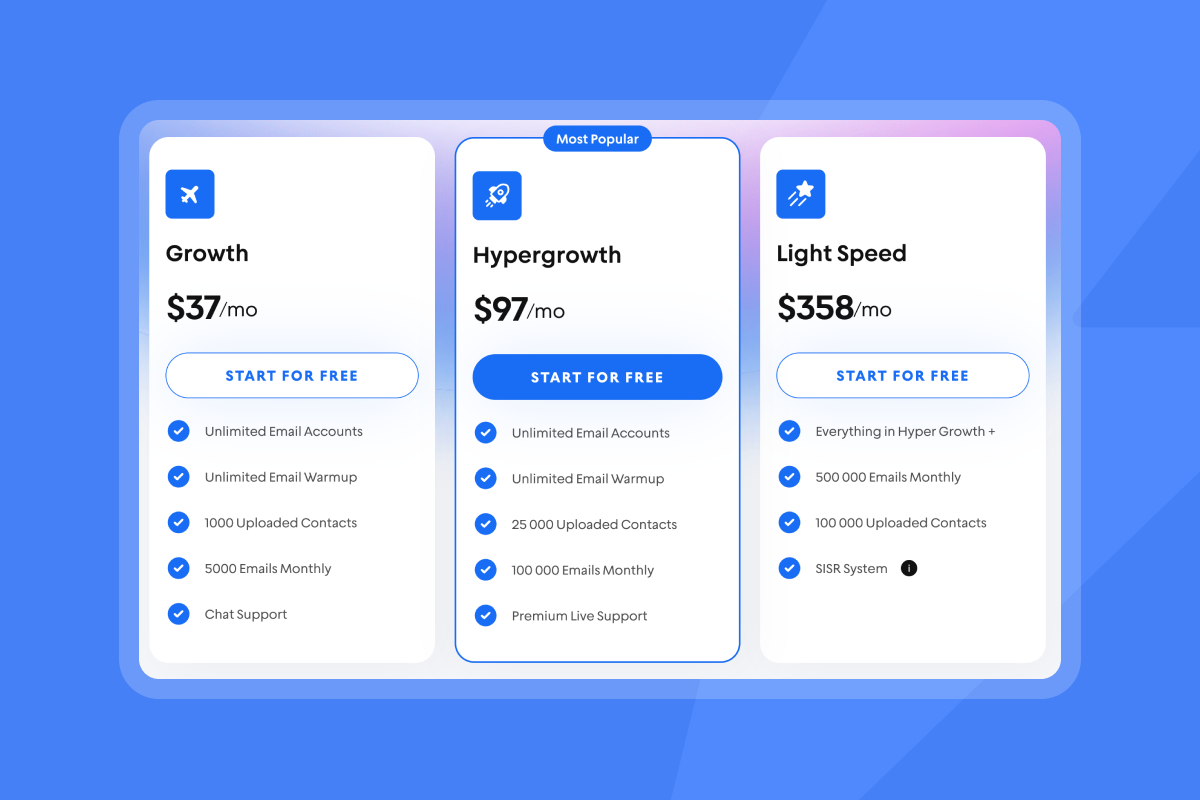
Compare this to per-seat platforms where adding 10 client workspaces (each with 5 sending accounts) costs an additional $300-$500 monthly. With our unlimited account model, those same 50 inboxes cost you nothing beyond your base subscription.
Your only variable costs are credits for AI replies (5 credits per AI response) and SuperSearch lead exports, both of which scale predictably with usage. For a detailed breakdown of understanding integration costs and ROI for agencies, our blog documents exactly what you will spend on core sending infrastructure versus optional add-ons.
What Happens When You Successfully Unify AI Sales Data in Your Agency CRM
When data flows cleanly between AI tools and your CRM, operational friction disappears and you can focus on outcomes that matter: booked meetings, accurate reporting, and client retention.
Improved client reporting and ROI
Unified data lets you show clients exactly what they are paying for. Pull a single report from our analytics dashboard that displays leads sourced, emails sent (down to the specific send window), replies received with AI sentiment classification, meetings booked, and opportunities created. No more manually combining exports from five different tools, which typically takes 3-4 hours per client per month.
When your CRM contains complete activity history enriched by AI classification (interested, not interested, meeting request), you can demonstrate which sequences and subject lines drive the highest reply rates. Clients care about cost per meeting. Clean, integrated data makes it simple to divide your monthly retainer by meetings booked and show clear ROI.
Reduced operational overhead
Every hour spent copying data between tools or reconciling conflicting records is an hour not spent on strategy or client growth. Automation eliminates this busywork. When new leads flow from SuperSearch directly into campaigns, replies get classified automatically, and meeting bookings create CRM opportunities without manual entry, your team can manage more client accounts with the same headcount.
Instead of hiring another operations person to handle data transfers for 20 clients, you invest in proper integration once and redeploy that budget toward growth initiatives.
"Instantly makes my cold email marketing a lot easier. It's super easy to understand and use after you setup everthing, which is also not hard. The support usually is quick and guides you when you need them." - Alice Santos on Trustpilot
Enhanced decision-making
Real-time data visibility means you catch problems early. When bounce rates spike on a client campaign, you see it immediately in your unified dashboard and can pause sends before burning their domain. When a particular subject line variant drives 8% reply rates versus the typical 4%, you can roll that winning copy out to other clients the same day.
Integrated AI insights from Copilot and AI Reply Agent surface patterns you would miss manually reviewing hundreds of conversations. If prospects in a specific industry consistently mention a particular pain point, you can adjust messaging for all campaigns targeting that vertical.
How to Start Unifying AI Sales Data in Your CRM Today (Implementation Checklist)
Ready to eliminate data silos and manual work? Use this implementation checklist to unify your AI sales data today:
Pre-Implementation (Week 1):
☐ Map your current data flow between all AI sales tools and CRM
☐ Identify which data gets lost or manually copied between systems
☐ Document integration gaps costing the most time or causing most errors
☐ Audit your current tool costs (per-seat fees, API charges, middleware)
Platform Selection (Week 1-2):
☐ Evaluate AI sales platforms with unlimited account support
☐ Verify native CRM connectors or API documentation quality
☐ Test integration depth with dummy client workspace during trial
☐ Calculate total cost of ownership vs. current fragmented stack
Integration Setup (Week 2-3):
☐ Configure field mapping between AI tools and CRM
☐ Standardize naming conventions across all client workspaces
☐ Set up bidirectional sync for contacts, activities, and opportunities
☐ Configure error alerts for failed syncs or authentication issues
Automation Build (Week 3-4):
☐ Create workflow: Lead enrichment → Campaign launch
☐ Create workflow: Reply classification → CRM task creation
☐ Create workflow: Meeting booked → Opportunity creation
☐ Test all workflows with sample data before going live
Monitoring & Optimization (Ongoing):
☐ Schedule weekly data quality audits
☐ Check for duplicate records or missing activity logs
☐ Track sync success rate, latency, and API error rate
☐ Review integration costs monthly and optimize inefficient workflows
We provide the infrastructure agencies need: unlimited email accounts on flat-fee pricing, built-in AI for reply handling and campaign intelligence, 450M+ leads through SuperSearch, centralized inbox management with Unibox, and flexible CRM integrations through OutboundSync, Zapier, and Make.
Start your trial to automate data flow while you focus on booking meetings, and explore our integration documentation to see exactly how data syncs with your existing stack.
FAQs
How do I unify AI sales data in my CRM without replacing my existing tools?
Use integration platforms like OutboundSync, Zapier, or Make to connect your existing AI sales tools (lead enrichment, email sending, reply management) with your current CRM through bidirectional sync. Map data fields carefully so contact details, campaign activities, and engagement metrics flow automatically between systems. Choose AI platforms that offer native CRM connectors or well-documented APIs, allowing you to layer new capabilities onto your existing stack without migration. This approach lets you keep familiar workflows while eliminating manual data transfers.
What's the fastest way to unify AI sales data across multiple client CRMs for agencies?
Select an AI sales platform with unlimited account support and multi-workspace architecture where each client gets isolated data environments that all sync to their respective CRMs through a single integration setup. Platforms like Instantly let you configure one integration template (field mappings, sync rules, automation workflows) and replicate it across all client workspaces in minutes rather than hours. This templated approach reduces setup time from 4-8 hours per client to 15-30 minutes while maintaining data isolation and client-specific reporting.
Can I unify AI sales data in HubSpot or Salesforce without expensive middleware?
Yes, through partner integrations like OutboundSync that provide native bidirectional sync between AI sales platforms and HubSpot or Salesforce without requiring enterprise middleware or iPaaS solutions. These integrations sync contacts, accounts, opportunities, and campaign activities in real time at a flat monthly fee rather than per-record or per-API-call pricing. For custom workflows, use Zapier or Make to build automations that trigger on specific events (new reply, meeting booked) without middleware licensing costs.
How do I unify AI-generated lead data and email replies in my CRM automatically?
Configure your AI sales platform to push enriched lead data (job titles, company details, verified emails) and campaign engagement data (sends, opens, clicks, replies) to your CRM through native integrations or automation tools. Set up workflow triggers so when a lead replies, the AI reply agent classifies sentiment (interested, not interested, meeting request) and automatically creates CRM tasks, updates lead status, and logs the full conversation thread. This end-to-end automation ensures no manual copying between lead enrichment, outreach, and reply management tools.
What's the difference between syncing AI sales data and truly unifying it in a CRM?
Syncing is one-way or periodic data transfer where information moves from AI tools to your CRM on a schedule (hourly, daily), often creating duplicate records or missing real-time updates. Unifying means bidirectional, real-time integration where changes in either system automatically update the other, field mappings ensure data lands in the correct CRM objects, and all contact interactions (enrichment, emails, replies, meetings) appear in a single, chronological activity timeline. True unification eliminates data silos and gives you complete visibility into every prospect's journey without manual reconciliation.
Key terms for AI sales data integration
Bidirectional sync: Two-way data flow between systems where changes in either platform automatically update the other, ensuring both tools maintain consistent, current information without manual intervention.
Unified inbox: A centralized interface that aggregates replies and conversations from multiple email accounts or platforms into one view, eliminating the need to check individual inboxes separately.
Waterfall enrichment: A lead data enrichment process that queries multiple data providers in sequence, using each successive source to fill gaps left by previous providers until all desired fields are populated.
OutboundSync: A partner integration platform that provides deep, bidirectional CRM sync for tools like Instantly with HubSpot and Salesforce, syncing contacts, accounts, opportunities, and activities automatically.
Field mapping: The process of defining which data fields in one system correspond to fields in another during integration, ensuring information transfers to the correct location in each platform.


