


Updated March 06, 2026
TL;DR: Manual outreach gives you control but will not scale to fill a consistent pipeline. Automated email sequences handle delivery, follow-up logic, and inbox placement at volume, but need human judgment at the right moments. The winning approach is composable execution: automate the delivery system, then trigger manual effort when a prospect signals intent. For sales leaders managing 3-15 reps, this means building reliable infrastructure (warmup, inbox rotation, verified data) first, then layering personalization on top. Instantly gives you unlimited sending accounts and built-in warmup on every paid plan, so you scale volume without multiplying per-seat costs or domain risk.
This guide breaks down the trade-offs, gives you a clear framework for when to use each method, and shows you how to build a hybrid engine that a lean team can actually operate and audit. Manual outreach delivers relevance but collapses under volume, and the right cold email platform is what lets you scale both without sacrificing either
The core trade-off: Scale versus control
You face a straightforward tension in cold email outreach: you need enough volume to generate consistent pipeline and enough relevance to get replies. Manual outreach delivers relevance but collapses under volume. Automation delivers volume but risks feeling generic if the underlying infrastructure is wrong.
Here is how the two approaches compare across the dimensions that matter most:
Dimension | Manual outreach | Automated sequences | Hybrid (composable) |
|---|---|---|---|
Daily send capacity | ~30-50 per rep | Scales with inbox count; volume distributed across accounts | Scales with inbox count; volume distributed across team inboxes |
Time per email | High (research-intensive) | Under 1 minute | Low (creative input + review step) |
Personalization depth | High (1-to-1 research) | Moderate (dynamic variables, spintax) | High at triggers, moderate at scale |
Deliverability risk | High (no warmup, volume spikes) | Low (warmup, inbox rotation) | Low (built-in infrastructure) |
Data consistency | Poor (human logging errors) | High (automated CRM sync) | High |
The math makes automation necessary for pipeline coverage. A rep sending 30 highly personalized emails per day generates a manageable number of opens, but 80% of sales require five or more follow-ups to close, and nearly 48% of salespeople never follow up at all, a failure that compounds fast when you're managing mid-funnel volume manually. You need automation to close the gap, and you need the right system to keep deliverability safe as you scale.
The hybrid standard: What is composable email execution?
In composable email execution, you treat your outreach infrastructure as two distinct layers. The delivery system (warmup, inbox rotation, sequence logic, follow-up timing) runs on automation, while the creative payload (high-value personalization, reply handling, strategic account touches) stays with humans.
Think of it like an assembly line with quality checkpoints: the line runs consistently and at volume, while human experts intervene at specific, high-signal moments to ensure quality and convert interest into meetings.
Instantly's 80% automation guide walks through the exact split: which parts of the outreach workflow AI handles reliably (lead gen, follow-up timing, reply classification), which require human judgment, and how to build the handoff logic so warm replies reach a rep before they go cold.
This approach addresses the two biggest fears sales leaders raise about automation: "What if it looks robotic?" and "What if it tanks our domain?" Both risks come from bad infrastructure, not automation itself. A well-built composable system uses warmup to protect domain reputation, verified data to keep bounce rates low, and intent signals to trigger human intervention before a prospect goes cold.
How to blend automation with manual touches
The workflow below is a practical example of composable execution in action.
- Automated Step 1: Initial email sent via sequence, using dynamic variables ({{firstName}}, {{companyName}}) and spintax variation to avoid repetitive content that triggers spam filters.
- Automated Step 2 (Day 3): Follow-up sent automatically. Sending two to three follow-ups starting three days after your initial message can increase response rates by 65.8%, with the first follow-up alone boosting replies by 49%.
- Conditional branch (human judgment):
- If the prospect clicks a link, create a manual task for the rep.
- If the prospect opens 3 or more times, flag as high-interest for review.
- If no engagement, continue automated nurture at a lower frequency.
- Manual task: Rep receives a notification: "Contact at [Company] clicked your case study and visited the pricing page." Rep sends a short, specific email referencing that signal.
- Return to automation: If no reply after the manual touch, re-enter the contact into a lower-frequency educational nurture sequence.
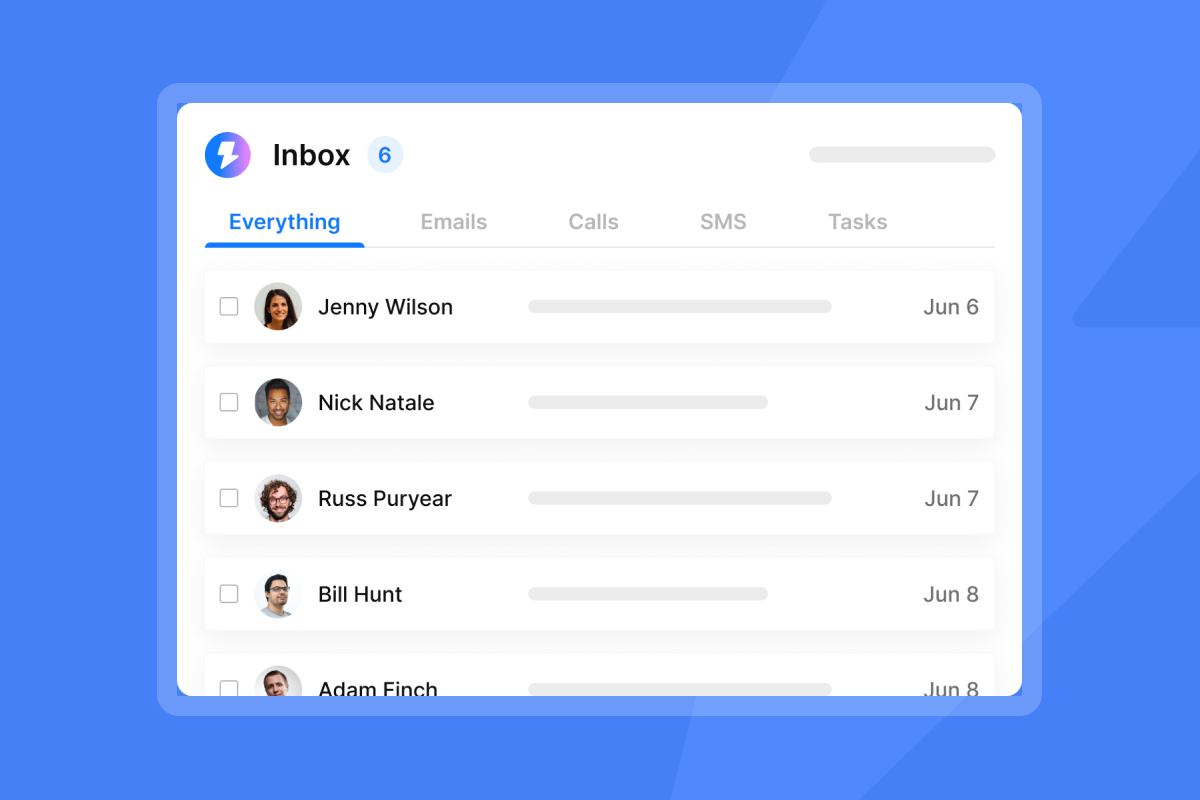
Automation handles volume and consistency, and humans handle conversion. The Instantly Unibox consolidates all replies into one place so reps are not jumping between dozens of inboxes to catch those intent signals.
"The Unibox feature is a time-saver, allowing me to quickly view responses by status or campaign and identify what's working and what isn't." - Heleen D on G2
When to use automated email sequences
Validating new markets and messaging
When you are testing a new ICP segment or entering a new vertical, speed of learning matters more than individual personalization. Automation lets you send structured tests across multiple contacts per segment and gather response data faster than manual outreach. That kind of signal collection is impossible with manual sending, where volume constraints prevent you from gathering statistically meaningful data before the quarter ends.
The Instantly campaign builder lets you set up A/Z variants on subject lines and body copy so you can run segmentation tests without rebuilding sequences from scratch. The AI Sequence Writer, available on Growth and higher plans, can draft initial variant copy for rep review.
"I use Instantly for campaign automation, and I appreciate how it helps me create multi-step sequences with automated follow-ups and A/B testing." - Dheeraj P. on G2
Nurturing leads who are not ready to buy
Mid-funnel nurturing is mathematically impossible at scale without automation.
If an SDR is managing 400-500 mid-funnel contacts, each needing 5-7 touches over 8 weeks, that is 2,000-3,500 touchpoints to coordinate manually. Automation handles the cadence reliably while the rep focuses on conversations that are actually progressing. A low-frequency nurture cadence (every one to two weeks) educates and builds trust without overwhelming contacts who showed initial interest but did not convert immediately.
Instantly's cold email cadence guide covers how to set the right send frequency per segment, including faster cadences for engaged leads and spread-out rhythms for contacts who haven't converted yet, and how to use engagement signals to adjust timing rather than setting a static schedule and hoping.
Watch this campaign build walkthrough to see how sequence steps and delays map to a realistic nurture cadence.
Ensuring deliverability and inbox placement at scale
Manual outreach creates hidden deliverability risk. If you send 20 emails Monday through Thursday, skip the weekend, then send 80 Monday morning, that erratic spike looks suspicious to inbox providers. Spammers operate in bursts. Legitimate senders maintain steady rhythms.
Microsoft Office 365 limits allow 10,000 recipients per day but rate-limit at 30 messages per minute. Manually hitting those thresholds from a single inbox without warmup is a fast path to suspension. Instantly's cold email infrastructure guide covers how to structure the full domain and inbox architecture, including domain-to-inbox ratios, SEG detection, and automated safeguards, so volume distributes safely across accounts before hitting provider rate limits.
Instantly's warmup network runs automatically across all paid Outreach plans, so every inbox in a composable system maintains engagement signals even while campaign sends are paused, which matters because reputation requires ongoing reinforcement, not just a one-time ramp before launch.
"I like how easy Instantly makes scaling outbound reach without sacrificing deliverability or personalization... Its inbox warm-up, sending limits, and reputation management features ensure my emails land in the primary inbox rather than spam." - Steven M. on G2
When to rely on manual outreach
Breaking into enterprise accounts
High-value, low-volume account-based plays are where manual research earns its time investment. When a single contract is worth $100K or more, the economics justify deep research per account: reading a recent earnings call, checking job listings for pain point signals, and referencing a specific initiative in your first email. No automation variable covers that level of insight, and the Gartner B2B buying journey research confirms that buyers spend very little time with any individual vendor, so the precision of a manually researched first touch can determine whether you get that time at all.
One approach: if a deal appears to be worth more than 10x the time cost of manual research, lead with manual outreach.
Navigating complex stakeholder maps
Automated sequences work for initial outreach into these accounts, but threading across multiple personas (economic buyer, champion, blocker) requires human judgment about timing, sequencing, and what each contact already knows.
Manual outreach also covers situations where automation would look tone-deaf: reaching out after a prospect's company announced layoffs, referencing a mutual connection who made a warm introduction, or following up on a previous in-person conversation. These are signals a human reads and responds to, not a time-delay rule.
Operationalizing the strategy: Risks and reporting
Mitigating the risk of automation errors
The most common automation failure is a broken merge tag. A prospect receiving "Hi {{firstName}}" immediately knows they are in a mass sequence. Set fallback values as a standard practice: "Hi {{firstName | there}}" renders as "Hi there" when the first name field is empty, rather than exposing raw syntax.
The second common failure is continuing a sequence after a prospect replies or after a deal closes. Set your sequences to stop on reply by default. If anyone at the prospect's company responds, pause all active contacts at that account. Instantly applies reply detection automatically, so live campaigns adjust without manual intervention.
The broader concern many sales leaders raise is rogue reps. In practice, automation with proper sequence governance is safer than manual outreach from tired reps who copy-paste poorly, forget follow-ups, and log activities inconsistently. Every automated touchpoint is logged, templated, and auditable, so you can see exactly what each rep's contacts received and when.
"The platform makes it simple to manage and scale multiple campaigns simultaneously. The unlimited email accounts feature and the automated warm-up are essential for protecting domain reputation while reaching a high volume of leads." - Robert B. on G2
Key metrics and reporting for sales leaders
Track these five numbers to audit whether your hybrid system is working:
- Inbox placement rate: "Delivered" rate is misleading because emails can land in spam. Use Google Postmaster Tools for Gmail and Microsoft SNDS for Outlook.
- Positive reply rate: Track positive replies separately from "not interested" responses.
- Meetings booked per 1,000 contacts: This metric ties outreach directly to pipeline and is the number a CFO can scrutinize without translation.
- Bounce rate: Instantly's analytics dashboard surfaces bounce data at the campaign level so you catch issues before they damage domain reputation.
- Reply-to-meeting conversion: Divide meetings booked by positive replies. If that rate is low, the problem is reply handling and follow-up speed, not outreach volume.
Instantly's meeting scheduling follow-up guide covers the exact touchpoint cadence after a positive reply lands, including response time targets, the three-touch scheduling sequence, and why reply-to-meeting conversion drops when follow-up speed exceeds 5 minutes.
Run a pre-send Inbox Placement test before scaling any new campaign, it shows provider-level landing data across Gmail, Outlook, and Yahoo in one report, so you have a baseline before volume goes up rather than diagnosing placement problems after reply rates drop.
Choosing the right automation tool for sales
Four criteria determine whether a platform can support composable execution at the team level:
Pricing model: Sales engagement platforms reportedly charge around $71 per user per month on annual contracts. When you need 10-20 inboxes to safely distribute volume across your team, per-seat pricing multiplies fast. Instantly's per-seat vs. flat-fee ROI guide runs the full cost comparison at 50k and 100k monthly send volumes and shows how the cost gap compounds as inbox count grows, useful for sales leaders calculating TCO before a platform decision.
Instantly uses a flat monthly fee with unlimited sending accounts across all paid Outreach plans, so adding inboxes does not add per-seat cost. The Hypergrowth plan at $97/month includes unlimited accounts and 100,000 emails per month.
Built-in warmup: Some platforms require a separate warmup tool, which adds cost and a configuration dependency. We include warmup across all paid Outreach plans. The Done-for-You mailbox setup applies DMARC, DKIM, and SPF automatically, removing one of the most common technical failure points when onboarding new inboxes.
"What sets Instantly apart is the Easy DFY Mailbox Setup. It's incredibly straightforward to get mailboxes up and running with the correct settings like DMARC, DKIM, and SPF applied automatically." - Robert B. on G2
Deliverability infrastructure: Look for inbox rotation, automated inbox placement testing, and blacklist monitoring. Instantly's SISR on Light Speed (dedicated server and IP rotation) gives heavy senders an additional layer of reputation protection as volume scales.
Reporting that reconciles with your CRM: Vanity metrics that do not match CRM data destroy trust with leadership. Confirm that any platform you evaluate tracks positive replies (not just total replies), meetings booked, and bounce rates at the campaign and inbox level.
You can see the full campaign setup process in this co-founder demo walkthrough.
Before committing to a tool, run a one-week time-tracking exercise. Have SDRs log hours across five categories: prospecting research, manual email writing, call time, demo time, and admin work. That audit tells you exactly where to start.
Try Instantly free and use the sequence builder to run your first composable campaign. Connect a warmed inbox, upload a verified list, set your follow-up logic, and let the system handle delivery while your reps focus on replies.
Frequently asked questions
Will automating emails ruin my primary sending domain?
Not if you use secondary sending domains for outbound. Your primary domain handles transactional and inbound email, while secondary domains carry prospecting load, so a deliverability issue never touches your main brand domain.
How many emails per day is safe for a single inbox?
Keep per-inbox volume conservative and within the limits your ESP recommends for warmed inboxes. If your volume target requires more sends, add inboxes and use rotation to distribute load.
How do I keep automated emails from looking generic?
Use spintax to vary sentence structure and opening phrases, and add at least one custom variable per email that references something specific to the prospect (industry, company size, recent news). Personalized emails generate 29% higher open rates and 32% higher reply rates compared to generic sends.
What bounce rate should I pause a campaign at?
Pause the campaign if you notice an elevated bounce rate. Re-verify the list, remove invalid addresses, and restart at a lower daily send cap before scaling back up.
How long does warmup take before I can start outbound sends?
New inboxes and new domains require a dedicated warmup period before outbound sends begin. Start at a low daily volume and ramp up gradually, confirming inbox placement on seed tests before increasing volume.
Key terms glossary
Composable email execution: A hybrid outreach model where automation handles delivery, warmup, and follow-up logic, while human effort focuses on creative strategy, high-value personalization, and reply conversion.
Deliverability: The percentage of sent emails that land in the primary inbox rather than spam or promotions folders. Distinct from delivery rate, which only confirms the email was accepted by the receiving server.
Warmup: The process of gradually increasing email volume from a new inbox or domain to build sender reputation with inbox providers.
Spintax: A syntax technique that generates multiple variations of an email by randomly selecting from alternative words or phrases, used to avoid repetitive content patterns that trigger spam filters.
Unified inbox (Unibox): A consolidated reply management view that aggregates responses from multiple sending accounts into a single interface, so SDRs handle replies without switching between dozens of mailboxes.
Inbox rotation: Automatically distributing sends across multiple configured inboxes so no single account exceeds safe sending thresholds, protecting deliverability while increasing total campaign throughput.


