.svg)
%20(1).svg)


Updated October 26, 2025
TL;DR: Effective B2B appointment setting requires deliverability infrastructure, verified data, automation, and transparent reporting. Instantly provides unlimited email accounts on flat-fee pricing, a 4.2M+ account deliverability network with SISR technology, 450M+ verified leads through SuperSearch, and AI agents for reply handling. This guide shows you how to build a repeatable system that transforms cold outreach into qualified meetings, hitting 5-10% reply rates and converting 1-2% of outreach into booked appointments.
The quarter is tight. Your SDRs need a clear playbook to book meetings consistently, and you need a safe ramp that will not burn domains. Poor deliverability crashes targets. Misleading analytics waste budget. Per-seat pricing models penalize growth.
This comprehensive guide breaks down the art and science of B2B sales appointment setting, offering practical techniques for sales professionals and strategic insights for sales leaders.
What is B2B sales appointment setting?
B2B sales appointment setting is the process of scheduling qualified meetings between your sales representatives and decision-makers at target companies.
The primary objective is not to close deals immediately, but to secure dedicated time for deeper conversations, product demonstrations, or presentations that move prospects through your pipeline. This function serves as a bridge between lead generation and direct sales engagement, turning high-potential leads into qualified meetings that create revenue.
Appointment setting differs from cold calling or generic outreach because it focuses on a specific, measurable outcome: a confirmed meeting on the calendar. It requires coordination across multiple functions including prospecting, qualification, outreach sequencing, objection handling, and scheduling logistics.
When executed properly, B2B appointment setting supports businesses in expanding their client base and fortifying their sales pipeline through systematic, repeatable processes.
Why consistent appointment setting matters for pipeline growth
Consistent appointment setting creates predictable pipeline coverage.
A systematic approach ensures your team engages with prospects who are genuinely interested and ready for deeper discussions.
Sales leaders managing 3-15 reps need standardized processes that work regardless of individual rep skill. Pipeline health, meetings set, and conversion to SQL or Closed-Won define success. Random outreach produces random results. A documented appointment setting system produces defensible processes that scale, clean handoffs to AEs, and transparent dashboards that withstand CFO scrutiny.
For example, one Instantly user reported booking 18 meetings in just 4 days after implementing a systematic cold email approach with proper warmup and sequencing. These outcomes come from treating appointment setting as an engineered system with documented processes, not individual hustle.
Building your appointment setting system: Key pillars for sales leaders
Sales leaders must architect appointment setting as a system with five core pillars: deliverability, data hygiene, scalability, automation, and reporting. Each pillar addresses specific risks that can kneecap monthly targets.
Deliverability: Protecting your sender reputation and primary inbox placement
Deliverability is the foundation. If your emails land in spam, your appointment setting efforts collapse.
Instantly's inbox placement research shows that primary inbox placement directly correlates with reply rates and meeting bookings. Aim for 80-85% inbox placement as your baseline threshold.
Start with authentication. Configure SPF, DKIM, and DMARC records for every sending domain.
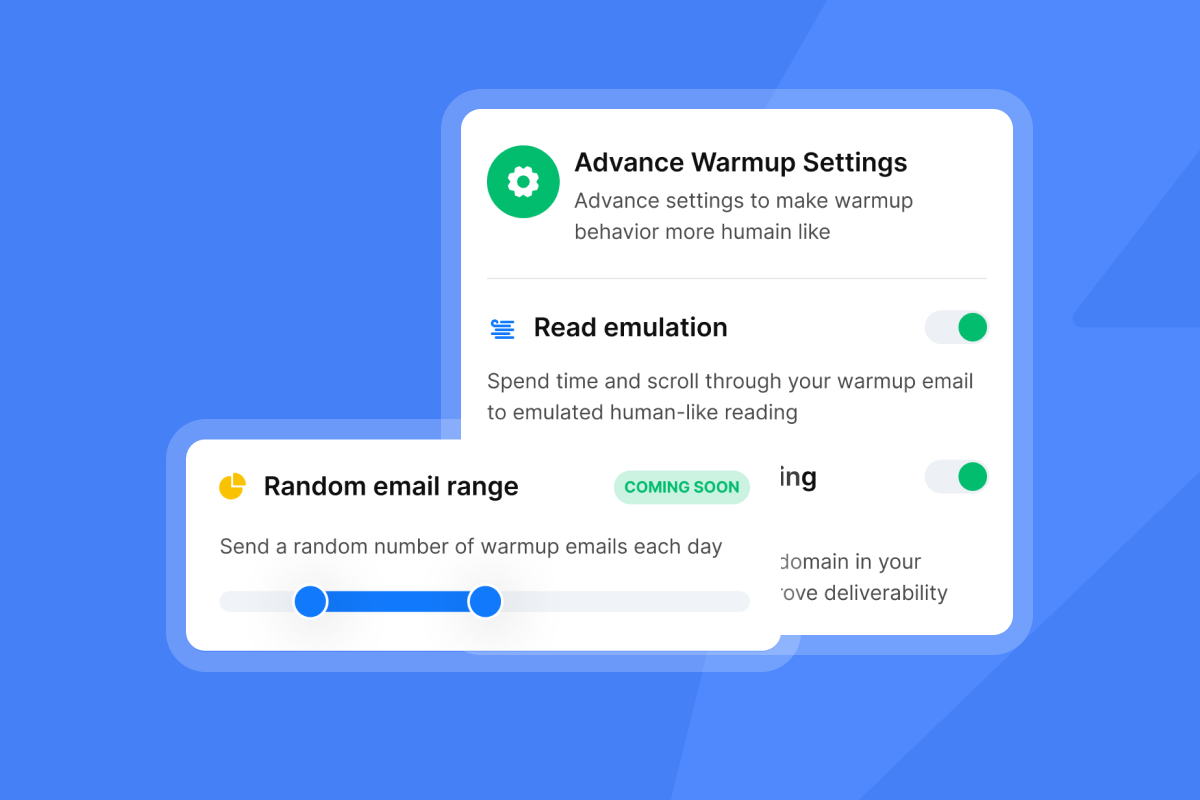
Warm new domains for 30 days minimum before launching campaigns. Instantly automates this process by gradually ramping daily sends over 2-4 weeks, using a private deliverability network of 4.2M+ accounts.
The platform's warmup engine increases volume automatically so you don't need to keep an eye on it. This network simulates natural email engagement patterns that build sender reputation with ISPs.
Monitor three key metrics:
- Inbox placement rate: Track where emails land (primary, promotions, spam). Run automated inbox placement tests weekly across Gmail, Outlook, and other major providers.
- Bounce rate: Keep hard bounces below 2%. A spike indicates list quality issues.
- Spam complaint rate: Stay below 0.3%, ideally under 0.1%.
Instantly's SISR technology (Server & IP Sharding & Rotation) provides dedicated IP pools that isolate your sending reputation from shared infrastructure.
"Deliverability tools like warmup and inbox rotation help them land in Primary instead of Promotions/Spam." - G2 user
Set up automated campaign pauses using Instantly's Rules & Alerts. Configure rules to throttle or pause campaigns when placement drops below 80%, bounces exceed 2%, or complaints cross 0.3%. This prevents one bad campaign from damaging your entire domain reputation. Dig into deliverability further with our 2025 deep dive below:
Data hygiene: Ensuring verified contacts and low bounce rates
Poor data quality causes deliverability crashes and wasted rep time. Verified contacts are non-negotiable for appointment setting at scale.
Bounces poison sender reputation. Invalid emails trigger spam traps. Both outcomes kneecap your targets.
Instantly's SuperSearch provides 450M+ verified B2B leads with waterfall enrichment across 5+ data providers. This approach queries multiple sources in sequence, then verifies results to improve coverage and accuracy. The platform includes LLM-assisted enrichment for additional context about prospects.
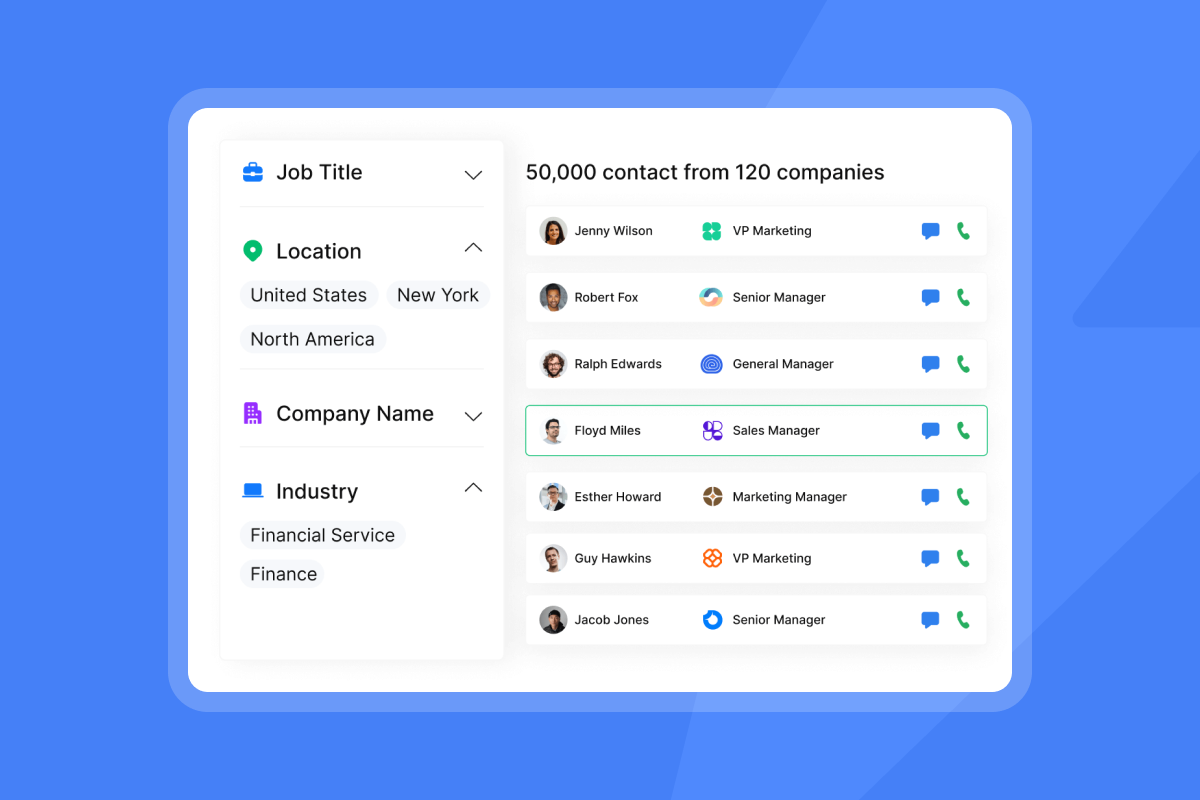
Implement these data hygiene protocols:
- Pre-send verification: Verify email syntax, domain validity, and mailbox existence before adding contacts to campaigns.
- Bounce monitoring: Remove hard bounces immediately. Investigate soft bounces after 3 attempts.
- List aging: Re-verify contacts older than 90 days. People change jobs. Emails go stale.
- Suppression lists: Maintain global blocklists for unsubscribes, bounces, and spam complaints across all campaigns.
"Instantly's clean and simple UI and that everything works really well for managing personalization and tracking at scale." - Trustpilot reviewer
Scalability: Managing unlimited inboxes without per-seat penalties
Traditional sales engagement platforms charge per seat, creating a financial penalty for growth. When you add reps or need more sending capacity, your software costs compound. This pricing model does not map to value creation for agencies or high-growth teams.
Instantly provides unlimited email accounts and warmup on all Outreach plans, starting at $37/month for the Growth plan. You pay for sending capacity and features, not seats.
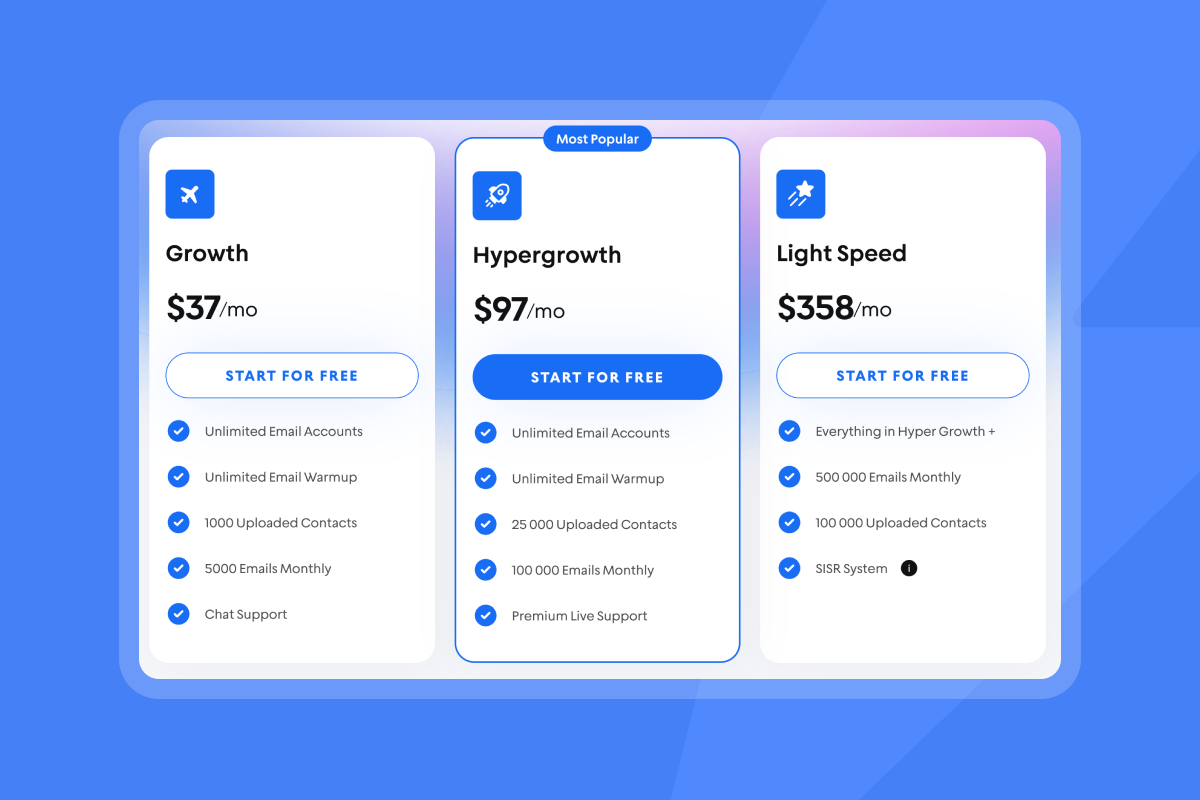
This flat-fee structure keeps base costs predictable as you scale. For agencies managing multiple clients, this means you can provision accounts per client or per campaign without multiplying your SaaS stack.
"Instantly can handle large scale email campaigns without worrying about deliverability. The automation for inbox rotation, warm up and sending limits makes outreach very smooth and saves a lot of manual work." - G2 reviewer
Compare this to per-seat models that charge $50-150 per user per month. A 10-person SDR team pays $500-1,500 monthly before adding data, automation, or advanced features. Instantly's Hypergrowth plan at $97/month (or $77.60/month annual) includes unlimited accounts, 100k emails/month, and premium support.
Plan your capacity by calculating total monthly send volume. Instantly's pricing tiers are based on email credits and throughput, not user count. A typical SDR sends 100-150 emails daily. For a 10-person team sending 1,000-1,500 emails daily (20k-30k monthly), the Hypergrowth plan provides ample headroom.
Automation: Streamlining outreach and reply handling
Manual follow-ups and inbox management drain rep productivity. Most sales require multiple touchpoints, but few sales reps consistently follow up more than 5 times. Automation bridges this execution gap.
Instantly's campaign builder lets you create multi-step sequences with conditional logic. Set up 3-7 touch sequences with delays between steps.
Typical high-performing sequences include:
- Day 1: Initial value-driven email
- Day 3: Follow-up referencing the first email
- Day 6: Case study or social proof
- Day 10: Different angle or question
- Day 14: Breakup email
Use spintax for better deliverability by creating variations of sentences, phrases, and words. Instantly's spin syntax editor makes this process straightforward. Spintax prevents duplicate content detection that can trigger spam filters when sending similar emails to multiple prospects.
The AI Reply Agent handles inbound responses quickly and consistently. Configure it in Human-in-the-Loop mode for review before sending, or Autopilot mode for fully automated responses.
The agent classifies replies (interested, objection, out-of-office, unsubscribe) and drafts appropriate responses. One user testing the feature for 30 days reported significant time savings on inbox management.
Instantly's Copilot assists with campaign creation, lead research, and analytics summaries. Ask Copilot to draft subject lines, create follow-up sequences, or analyze campaign performance. This reduces the time from campaign idea to launch.
Reporting: Gaining transparent insights into performance
Analytics you cannot trust waste budget and mislead strategy. Sales leaders need reporting that reconciles with CRM data, tracks the metrics that matter, and identifies which reps or campaigns need adjustment.
Track these core KPIs for appointment setting:
- Reply rate: Percentage of sent emails that receive any reply. Target 5-10% for cold outreach. Above 10% is strong.
- Interested reply rate: Percentage of replies that express genuine interest. Target 20-40% of total replies.
- Meeting booking rate: Percentage of interested replies that convert to scheduled meetings. Target 30-50%.
- Meeting show rate: Percentage of scheduled meetings that actually occur. Target 70-80%.
- Meeting-to-opportunity conversion: Percentage of held meetings that become qualified opportunities. This metric directly ties appointment setting to pipeline coverage and SQL generation, the ultimate measures of system effectiveness.
Instantly's Unibox centralizes all campaign replies with classification, tasks, and pipeline management. Tag replies by sentiment, assign follow-up tasks to reps, and track progression from reply to booked meeting to opportunity.
The reporting dashboard shows performance by campaign, rep, and time period.
For sales leaders managing team performance, campaign-level metrics reveal which messages, subject lines, and sequences work best. Run A/B tests on subject lines and opening sentences.
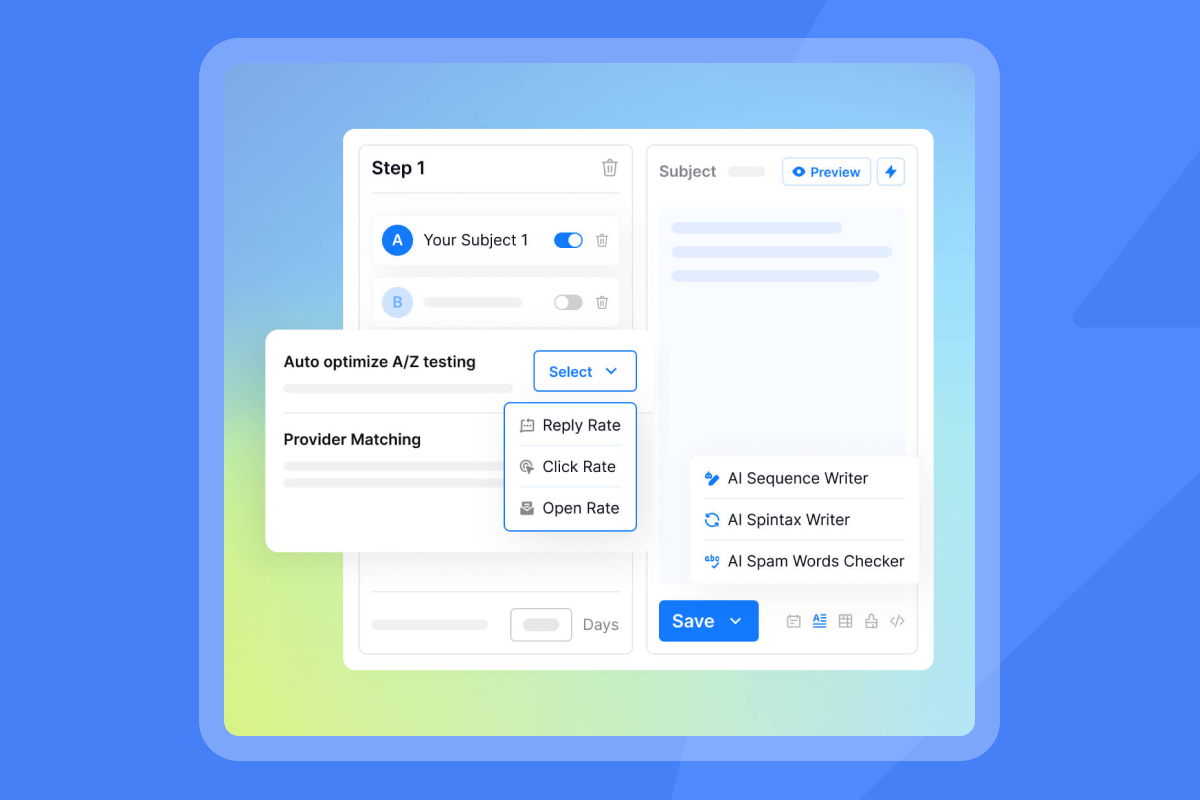
Even small improvements in reply rate compound across thousands of sends. A 1% improvement in reply rate on 10,000 monthly sends generates 100 additional replies, potentially 20-40 more interested prospects and 6-20 additional meetings.
Instantly provides bidirectional CRM integration with HubSpot for accurate reporting that reconciles across systems. Push campaign engagement data into CRM fields. Pull CRM data to suppress existing customers or active opportunities from cold outreach.
This two-way flow prevents embarrassing scenarios where SDRs cold email existing customers.
Practical techniques for sales professionals
Reps need specific, actionable techniques that improve their individual performance within the system leaders build. These tactics focus on message quality, timing, personalization, and handling objections.
Crafting compelling cold emails and follow-up sequences
Cold email copywriting follows a simple structure: hook, value, call-to-action. Skip the fluff. Get to the point. Respect the reader's time.
Subject line: Keep it under 50 characters. Avoid spam triggers like "free," "guarantee," or excessive punctuation. Reference something specific about the prospect or their company.
Subject line examples:
- Question format: "Quick question about [specific initiative]"
- Referral format: "[Mutual connection] suggested I reach out"
- Observation format: "Saw your post on [topic]"
Opening line: Demonstrate you did research. Reference a recent company announcement, a post they wrote, or a specific challenge in their industry. Generic openers like "I hope this email finds you well" signal mass blast.
Value proposition: Explain how you solve a specific problem they likely face. Focus on outcomes, not features. Use a customer example when possible: "We helped [similar company] reduce [pain point] by [metric]."
Call-to-action: Ask for one small, specific next step. "Are you open to a 15-minute conversation next Tuesday or Wednesday?" is clearer than "Let me know if you want to chat."
Length: Keep emails between 50-125 words. Busy executives scan emails in 10-15 seconds.
Follow-up emails: Follow-up emails should reference the previous email without being pushy. Add new value each time: a relevant case study, a useful article, or a different angle on their pain point.
The breakup email in step 5 or 6 creates urgency: "I have not heard back, so I assume this is not a priority right now. Should I close your file?"
Optimizing send windows and personalization
Timing affects reply rates. Send emails when prospects check their inbox: weekday mornings between 8:30-10:30 a.m. in the recipient's local time zone.
Avoid Mondays (inbox overload) and Fridays (people mentally check out). Tuesday through Thursday mornings perform best for B2B.
Instantly's campaign scheduler adjusts send times by time zone automatically. Set your preferred send window once, and the platform distributes sends across that window for each recipient's location.
Personalization increases reply rates significantly. Industry research on appointment setting shows that personalized outreach performs substantially better than generic templates.
Use these personalization variables:
- First name: Basic but essential
- Company name: Shows you know who they are
- Role/title: Tailors the message to their responsibilities
- Recent event: Funding round, product launch, job change, conference attendance
- Mutual connection: If you have one, mention it early
- Industry-specific pain point: Reference a challenge common in their sector
Instantly's personalization tokens pull data from uploaded contact lists or SuperSearch enrichment. The platform also supports custom fields for any additional data points you collect during research.
Handling objections and qualifying leads effectively
Common objections in appointment setting include:
- "Not interested": Acknowledge, ask if timing is the issue, offer to follow up in 3-6 months.
- "Send me information": Provide a brief one-pager, then follow up to schedule a discussion.
- "We already have a solution": Ask about their current approach, identify gaps, position your offering as complementary or superior.
- "No budget": Explore if the problem is urgent enough to reallocate budget or wait until next quarter.
- "Too busy": Offer a very short call (10-15 minutes) or asynchronous options like a recorded demo.
Sales professionals report that addressing objections requires research and preparation. Know the top 3 objections for your offering and develop tested responses.
Lead qualification ensures reps spend time with prospects likely to convert. Use a simple framework:
- Budget: Can they afford your solution?
- Authority: Are you speaking with a decision-maker or influencer?
- Need: Do they have the problem you solve?
- Timeline: When are they looking to implement a solution?
Qualify prospects before booking a meeting or during the first conversation. Instantly's campaign reply tags and Unibox classification help reps quickly categorize incoming responses and prioritize high-quality leads.
Using AI for research and initial reply triage
AI agents reduce manual work in appointment setting workflows.
Instantly's Copilot can research prospects, draft personalized opener variations, and suggest optimal follow-up timing based on campaign analytics, as shown in a tutorial on Copilot's research and drafting capabilities.
The AI Reply Agent automates initial response handling, as demonstrated in a video walkthrough of the AI Reply Agent. When a prospect replies, the agent classifies intent (interested, objection, question, unsubscribe) and drafts an appropriate response.
In Human-in-the-Loop mode, reps review and edit before sending. In Autopilot mode, the agent sends responses directly for common scenarios.
"The clean dashboard and the way support system works is truly incredible, but the most I like about the app is the result it provides to the users." - G2 reviewer
Configure the AI Reply Agent with instructions specific to your offering, common objections, and booking process. The agent learns from approved responses and improves over time.

Evaluating appointment setting solutions: Instantly vs. competitors
Sales leaders evaluating appointment setting platforms must assess capabilities across five dimensions: deliverability infrastructure, lead data access, automation features, pricing model, and integrations.
Key features to look for in an appointment setting platform
Prioritize these features when comparing solutions:
- Unlimited email accounts and warmup: Avoid per-seat pricing that penalizes scale.
- Deliverability monitoring: Automated inbox placement tests, spam detection, and health alerts.
- Integrated lead database: Access to verified B2B contacts without juggling multiple vendors.
- AI-powered automation: Campaign creation, reply handling, and lead research assistance.
- Unified inbox: Centralized reply management with classification and task assignment.
- CRM integration: Bidirectional sync with HubSpot, or your existing system.
- Transparent reporting: Real-time analytics on sends, opens, replies, bounces, and conversions.
- Flexible scheduling: Time zone awareness, send window optimization, and calendar integration.
Tools that standardize processes across reps ensure consistent execution regardless of individual skill levels. Look for platforms that provide templates, playbooks, and automated quality controls. Watch how to get qualified leads end to end Instantly in this tutorial on Youtube:
Instantly's approach to deliverability and unlimited accounts
Instantly built its platform around two core insights: deliverability determines success, and per-seat pricing breaks down at scale.
The platform's 4.2M+ account deliverability network powers automated warmup, creating natural engagement patterns that build sender reputation.
SISR technology (Server & IP Sharding & Rotation) provides dedicated infrastructure. Your sending reputation stays isolated from other users. Email providers see consistent, positive engagement patterns from your domains.
Automated inbox placement testing runs across Gmail, Outlook, Yahoo, and other major providers. The system tests a sample of your emails weekly and reports where they land: primary inbox, promotions, spam, or not delivered.
If placement drops below your threshold, Rules & Alerts pause campaigns automatically before damage spreads.
"The platform is super intuitive, easy to set up, and makes it simple to manage multiple domains and inboxes at scale. Deliverability is great and the analytics give us exactly what we need to optimize campaigns quickly." - G2 user
How Instantly's SuperSearch and AI agents streamline the process
SuperSearch consolidates lead generation into your outreach platform. Search across 450M+ verified B2B contacts with waterfall enrichment across 5+ data providers. Search by company, role, industry, location, or technology stack. Export directly to campaigns or CRM.
The integrated approach eliminates workflow friction. Traditional setups require buying data from ZoomInfo or Apollo, exporting to CSV, importing to your sending platform, then pushing results back to CRM. Each handoff introduces delays and errors.
With SuperSearch inside Instantly, you search, verify, enrich, and launch campaigns in one workflow. LLM-assisted enrichment adds context about prospects that improves personalization. Credits model provides predictable costs: Growth plan includes 1,500-2,000 credits for $47/month.
AI agents handle repetitive tasks. Copilot assists with campaign creation, as shown in a tutorial on Copilot's campaign creation assistance, prospect research, and analytics interpretation. Ask questions in natural language: "Which campaigns have the highest reply rate this month?" or "Draft 3 subject line variations for HR tech buyers."
AI Reply Agent handles the inbox. Classify, route, and respond to common reply types automatically. Focus rep time on conversations that need human touch: detailed questions, complex objections, or direct booking requests.
Pricing models: Flat-fee vs. per-seat costs
Compare total cost of ownership (TCO) across different pricing models:
| Platform Type | Pricing Model | 10-Person Team Cost | Scalability |
|---|---|---|---|
| Instantly | Flat-fee + credits | $37-197/mo base + credits | Unlimited accounts |
| Traditional SEP | Per-seat | $500-1,500/mo | Add seats = add cost |
| Multichannel Suite | Per-seat + usage | $1,000-3,000/mo | Complex scaling |
| Outsourced Service | Per-appointment or retainer | $1,000-5,000/mo | Provider-dependent |
Instantly's pricing structure separates sending capacity (Outreach), lead data (SuperSearch), and CRM features into modular plans. You choose what you need without forced bundles or annual lock-ins.
A typical sales team setup:
- Outreach Hypergrowth: $97/mo (100k emails/mo, unlimited accounts)
- SuperSearch Growth: $47/mo (1,500-2,000 credits)
- Growth CRM: $47/mo (unified inbox, pipeline management)
- Total: $191/mo for core stack
Compare to traditional per-seat platforms charging $50-150 per user. A 10-person team pays $500-1,500 monthly before data, phone, or advanced features.
The agency pricing guide breaks down how unlimited accounts simplify client billing. Provision separate accounts per client without multiplying software costs. Your base Outreach fee stays constant regardless of client count.
Integration with your existing CRM and sales stack
Instantly integrates with major CRMs including HubSpot and via API with custom systems. The bidirectional sync pushes campaign engagement into CRM fields and pulls CRM data to suppress existing contacts from outreach.
Native integrations include:
- Salesforce: Sync leads, contacts, opportunities, and activities
- HubSpot: Sync contacts, companies, deals, and engagement
- Slack: Notifications for replies, meetings booked, and campaign alerts
- Zapier: Connect to 3,000+ apps for custom workflows
- Make (formerly Integromat): Advanced workflow automation
- Calendly: Embed scheduling links in emails, sync booked meetings
API access and webhooks enable custom integrations. Webhooks notify your systems in real-time when events occur: email sent, reply received, meeting booked, bounce detected.
For enterprise teams with complex tech stacks, OutboundSync provides deeper Salesforce integration with field mapping, dedupe logic, and error handling.
Implementing your appointment setting playbook with Instantly
Moving from strategy to execution requires a phased implementation plan. This playbook provides a safe ramp that protects domain reputation while building pipeline.
Setting up warmed inboxes and ramp plans
Step 1: Domain setup
Purchase 2-3 dedicated sending domains separate from your primary business domain. This isolates cold outreach from transactional emails and protects your main domain reputation. Setup takes 30-60 minutes per domain.
Step 2: Configure authentication
Configure authentication records for each domain:
- SPF: Authorize Instantly's sending servers.
- DKIM: Add cryptographic signature to verify sender identity.
- DMARC: Set policy for handling authentication failures (start with "none," move to "quarantine" after 30 days).
Step 3: Enable automated warmup
Enable automated warmup for all accounts. Instantly's warmup engine gradually increases daily send volume over a set number of days.
The system sends warmup emails to other accounts in the 4.2M+ deliverability network, simulating natural engagement. Recipients open, read, and reply, signaling to ISPs that your emails are wanted.
Step 4: Launch campaigns safely
After 10-14 days of warmup, launch your first campaign at 50% of warmup volume. Try not to send more than 30 emails per day per inbox. Monitor placement, bounces, and replies daily.
"The customer service took care of us when we had some bugs and our mail providers got cancelled. They did a good job in reactivating everything." - Trustpilot reviewer
Creating and A/B testing sequences
Build your first campaign with a 5-step sequence:
- Initial email: Value proposition and specific CTA
- Follow-up (Day +3): Reference initial email, add social proof
- Value email (Day +6): Share case study or useful resource
- Different angle (Day +10): New problem or benefit
- Breakup email (Day +14): "Should I close your file?"
Use spintax to create variations that improve deliverability. Write 2-3 versions of each sentence, then let Instantly rotate them automatically. This prevents spam filters from detecting duplicate content when you scale to hundreds or thousands of sends:
{Hi|Hello|Hey} {{firstName}},
Test subject lines systematically. Create two variants for each campaign:
- Variant A: Question format - "Quick question about [topic]?"
- Variant B: Reference format - "Following up on [specific thing]"
Split your prospect list 50/50. Let each variant run for 100-200 sends (roughly 1 week). Compare reply rates. The winner becomes your control. Create a new challenger variant and test again.
Track these metrics per sequence:
- Delivery rate: Should stay above 98%
- Open rate: 40-60% is typical (but opens are increasingly unreliable due to privacy features)
- Reply rate: Target 5-10% for cold outreach
- Interested reply rate: Target 20-40% of replies
- Meeting booking rate: Target 30-50% of interested replies
A comprehensive tutorial on Instantly walks through A/B testing configuration, and result interpretation.
Using the unified inbox for efficient reply management
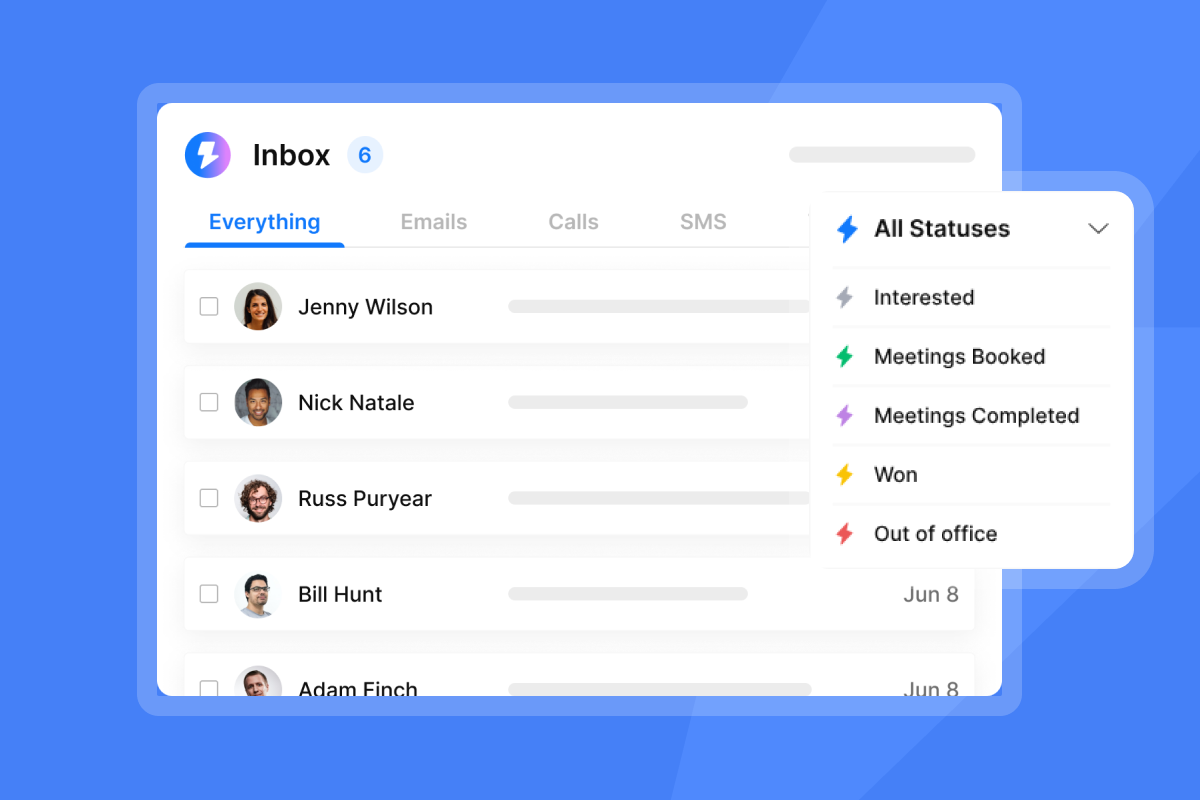
When replies start flowing, Unibox centralizes all responses across campaigns and sending accounts.
The interface shows:
- Reply classification: Interested, objection, question, out-of-office, unsubscribe
- Thread history: Full conversation context
- Tags and notes: Team collaboration on complex prospects
- Tasks: Assign follow-ups, research, or calls to specific reps
- Calendar integration: Book meetings directly from the reply interface
This centralized structure provides the audit-friendly reporting and standardized processes that sales leaders need to ensure consistent execution across the entire team.
Configure the AI Reply Agent to handle common reply types:
- Positive replies: Draft meeting booking message with calendar link
- Objections: Draft response addressing specific objection
- Questions: Draft answer based on knowledge base
- Out-of-office: Schedule follow-up after return date
- Unsubscribe: Automatically remove from all campaigns
In Human-in-the-Loop mode, reps review AI-drafted responses before sending. This provides quality control while still saving time. One user reported that the AI Reply Agent handles routine replies efficiently, as shown in a demonstration of the AI Reply Agent's efficiency.
Set up Slack integration for real-time notifications. When a high-priority prospect replies or a meeting gets booked, your team knows immediately. Configure notification rules by campaign priority, prospect value, or reply sentiment.
Monitoring performance and adjusting strategy
Build a weekly review cadence to analyze performance and make data-driven adjustments. Track these KPIs in Instantly's analytics dashboard:
Campaign-level metrics:
- Reply rate by campaign and sequence step
- Interested reply rate (quality of responses)
- Meeting booking rate (conversion effectiveness)
- Delivery and bounce rates (list health)
Rep-level metrics:
- Total outreach volume per rep
- Reply response time (speed of following up)
- Meeting booking conversion (sales skill)
- No-show rate (qualification quality)
System-level metrics:
- Overall inbox placement across all accounts
- Domain health scores
- Account warmup status
- Credit consumption for data and AI
Export these metrics weekly for leadership review. The data reconciles with CRM records and provides the transparent dashboards that withstand CFO scrutiny.
Review inbox placement test results weekly. If placement drops below 80% for any provider (Gmail, Outlook), investigate:
- Check recent campaign content for spam triggers.
- Review bounce and complaint rates.
- Verify sending volume stayed within limits.
- Confirm DNS records remain properly configured.
Instantly's Rules & Alerts will auto-pause campaigns if critical thresholds are breached, but proactive monitoring prevents issues before they trigger pauses.
Adjust strategy based on data:
- If reply rates are low (<3%), test new subject lines and opening sentences.
- If interested reply rates are low (<15% of replies), improve targeting and personalization.
- If booking rates are low (<25% of interested replies), simplify your CTA and offer shorter meetings.
- If no-show rates are high (>30%), improve qualification or send meeting reminders.
The guide to improving reply rates provides detailed troubleshooting for common performance issues.
Build a predictable pipeline with a proven system
Effective B2B appointment setting requires treating outreach as an engineered system, not individual hustle.
The playbook outlined here gives you a safe ramp plan, proven campaign structures, and monitoring protocols that prevent the deliverability disasters that kneecap quarterly targets. Apply these frameworks, measure the outcomes, and refine based on data.
Ready to apply this playbook and build a predictable meeting generation engine? Start a free trial with 2-3 warmed domains, verified contacts from SuperSearch, and the 5-step sequence framework. You will see initial reply data within 7-10 days. Track placement, replies, and bookings weekly. Adjust what underperforms. Scale what works.
FAQs
How long does it take to see results from cold email appointment setting?
You will see initial reply data within 7-10 days after launching your first campaign, but allow 30-45 days to establish reliable baseline metrics.
The first 30 days include domain warmup (weeks 1-4) and initial campaign ramp (weeks 4-6). Expect to book your first few meetings within the first 14 days after warmup completes, assuming proper list quality, verified contacts, and effective messaging.
Appointment setting performance improves over time as you gather data, refine targeting, and optimize sequences based on actual reply patterns.
What is a good reply rate for B2B cold emails?
A reply rate of 5-10% is considered good for B2B cold outreach, while 10% or higher is strong performance.
However, total reply rate includes all responses: interested, objections, and unsubscribes. More important is your interested reply rate, which should be 20-40% of total replies, or roughly 1-4% of total sends.
For appointment booking, target converting 30-50% of interested replies into scheduled meetings.
How does Instantly ensure high deliverability for cold email campaigns?
Instantly maintains deliverability through three systems: a 4.2M+ account private deliverability network that powers automated warmup, SISR technology (Server & IP Sharding & Rotation) for dedicated sending infrastructure, and continuous inbox placement testing across Gmail, Outlook, and other major providers.
The platform automatically pauses campaigns when placement drops below 80%, bounces exceed 2%, or spam complaints cross 0.3%. This multi-layered approach (authentication, warmup, monitoring, and automated intervention) prevents the deliverability crashes that kneecap monthly targets.
Can Instantly integrate with my existing CRM and sales tools?
Yes, Instantly provides native integrations with HubSpot for bidirectional data sync, pushing campaign engagement data into CRM fields and pulling CRM data to suppress existing contacts from cold outreach.
Additional integrations include Slack for notifications, Calendly for meeting scheduling, and Zapier or Make for connecting to 3,000+ additional apps. The platform also offers API access and webhooks for custom integrations with your specific tech stack.
What is the typical cost per meeting for B2B appointment setting services?
Costs vary significantly by model. Outsourced services typically charge $50-300 per scheduled meeting for pay-per-appointment models. Monthly retainers range from $1,000-5,000 depending on volume and complexity.
In-house costs (salaries, tools, overhead) average $150-250 per booked meeting when fully loaded.
With Instantly's flat-fee model starting at $131/month for core features (Outreach Growth + SuperSearch Growth + CRM Growth), teams can achieve significantly lower cost per meeting compared to outsourced services or traditional per-seat platforms.
Should I build an in-house appointment setting team or outsource?
The decision depends on your control requirements, budget, and timeline.
In-house teams provide direct control, deeper product knowledge, cultural alignment, and faster iteration, but require higher upfront investment in hiring, training, tools, and management.
Comparison research shows that outsourced services offer specialized expertise, faster scaling, and lower operational overhead, but may experience brand misalignment, communication delays, and variable lead quality.
Many companies adopt a hybrid approach: in-house SDRs for high-value accounts and strategic campaigns, outsourced support for volume outreach or new market testing. Instantly's unlimited account model supports both approaches with the same pricing structure.
Key terminology glossary
Deliverability: The ability of your emails to reach recipients' inboxes rather than being blocked or filtered to spam. Measured by inbox placement rate (target 80-85%), bounce rate (keep below 2%), and spam complaint rate (keep below 0.3%).
Domain warmup: The process of gradually increasing sending volume from a new domain over 30+ days to build positive sender reputation with internet service providers. Instantly automates this through a 4.2M+ account network.
Inbox placement rate: The percentage of delivered emails that land in the primary inbox versus promotions, spam, or other folders. Track separately by provider (Gmail, Outlook, etc.).
SISR (Server & IP Sharding & Rotation): Instantly's technology that provides dedicated sending infrastructure and IP pools, isolating your sender reputation from shared systems.
Primary inbox: The main inbox folder where important emails appear, distinct from Promotions, Social, or Spam folders in Gmail and similar categorization in other providers.
Sender reputation: A score assigned by email providers based on your sending patterns, engagement rates, bounce rates, and spam complaints. Good reputation enables inbox placement.
Reply rate: Percentage of sent emails that receive any reply. Target 5-10% for cold B2B outreach. Calculate as (total replies / total delivered emails) × 100.
Interested reply rate: Percentage of replies expressing genuine interest versus objections or unsubscribes. Target 20-40% of total replies.
Meeting booking rate: Percentage of interested replies that convert to scheduled meetings. Target 30-50%.
Spintax (spin syntax): A formatting technique that creates variations of sentences, phrases, or words to prevent duplicate content detection by spam filters. Format: {option1|option2|option3}.
SuperSearch: Instantly's integrated lead database with 450M+ verified B2B contacts, waterfall enrichment across 5+ providers, and LLM-assisted data enhancement.
Unibox (unified inbox): Instantly's centralized reply management interface that aggregates responses from all campaigns and accounts with classification, tagging, and task assignment.
Copilot: Instantly's AI agent for campaign creation assistance, lead research, analytics interpretation, and recurring task automation.
AI Reply Agent: Instantly's AI agent that classifies inbound replies, drafts contextually appropriate responses, and handles routine reply types quickly. Operates in Human-in-the-Loop or Autopilot mode.
Bounce rate: Percentage of emails that fail to deliver. Hard bounces (permanent failures) indicate bad email addresses. Keep total bounces below 2%.
Verified contacts: Email addresses that have been validated for syntax, domain validity, and mailbox existence. Essential for maintaining low bounce rates and good deliverability.
Sequence: A series of scheduled emails sent to prospects over time with delays between each step. Typical cold email sequences include 3-7 steps over 14-21 days.
Send window: The time period during which campaigns send emails. Optimize for weekday mornings (8:30-10:30 a.m.) in recipient time zones for higher open and reply rates.



