


Updated October 03, 2025
TL;DR: Consistently higher cold email reply rates come from three systems working together: Protect deliverability and sender reputation, personalize at scale with AI, test continuously across subject lines, copy, CTAs, timing, and follow-ups. Instantly brings this into one platform with AI Copilot for research and writing, AI Reply Agent to answer leads in under 5 minutes, A/Z testing that auto-optimizes on reply rate, a private deliverability toolkit with Inbox Placement tests, and a unified inbox for fast triage. Start small, measure reply rate at each sequence step, and iterate weekly.
Why does email reply rate matter?
Email reply rate is the percentage of people who respond to at least one email in your sequence. Learn more in our benchmarks for cold email reply rates guide. It is the clearest signal that your message reached the primary inbox, made sense, and prompted a human response.
Replies beat opens and clicks as a KPI for cold email. We break this down further in cold email outreach guide. Privacy features can inflate opens. Clicks depend on design and links. Replies reveal interest, objections, referrals, and opt-outs you can act on. Reply rate ties directly to meetings, pipeline, and revenue.
How to calculate your email reply rate
Use a simple formula.
- Reply rate = Replies / Delivered emails x 100
Example.
You send 1,000 emails. 950 are delivered.
You receive 57 replies.
Reply rate = 57 / 950 x 100 = 6.0 percent. We cover this in detail in our ai outbound sales guide for 2025 guide.
Track reply rate at the sequence level and overall. See our email campaign manager features guide for a full breakdown. That helps you see which steps drive responses.
What is a good email reply rate? Benchmarks and reality
A practical target for focused B2B cold outreach is 5 to 10 percent. See how our cold email outreach software can help you hit these benchmarks. Broad lists and light personalization often land in the 1 to 5 percent range. Ranges vary because industries behave differently, list quality changes performance, and follow-ups lift results.
- Backlinko’s outreach study reported an average response rate of 8.5 percent across niches. That included warm and cold emails and highlighted the impact of relevance and follow-ups.
- Google’s Gmail sender guidelines expect authentication and complaint rates at or below 0.3 percent for bulk senders.
Use ranges as directional targets. Your best benchmark is your data, segmented by ICP, offer, and channel timing.
The foundation: deliverability and sender reputation
Deliverability is non-negotiable. You cannot optimize replies if you do not reach the primary inbox.
Key components:
- Authentication. Set SPF, DKIM, and DMARC on all sending domains. This proves identity to mailbox providers.
- Complaint control. Keep spam complaints below 0.3 percent as Google outlines for bulk senders.
- Bounce control. Verify contacts and aim for hard bounces near or below 1 percent. High bounces destroy trust quickly.
- Warmup and pacing. Warm new inboxes, ramp volume gradually, and use send windows that mimic human behavior.
- Placement testing. Run seed-list Inbox Placement tests and pause when primary placement drops.
Instantly supports this foundation with automated Inbox Placement tests, warmup and pacing controls, and per-account health views. Teams that need dedicated infrastructure can explore SISR on higher tiers for added control, as outlined on the platform’s pages. For a step-by-step walkthrough, watch The Ultimate Guide to Cold Email Deliverability in 2025.
"They specialize in getting emails delivered at a much higher rate than our previous email provider, and make it generally easy to find contacts, and use AI to assist in writing emails." - G2 review by a verified user
Tracking and analyzing your email reply rate
Set up tracking before you scale. Instrument at multiple levels so you can fix issues fast.
- Define KPIs. Primary: reply rate, positive reply rate, meetings booked. Secondary: open rate, bounce rate, spam complaint rate, time to first reply.
- Instrument at three levels. Account health per inbox. Campaign level. Step and variant level.
- Review weekly. Watch placement shifts, reply mix, and meetings per 1,000 emails.
Inside Instantly:
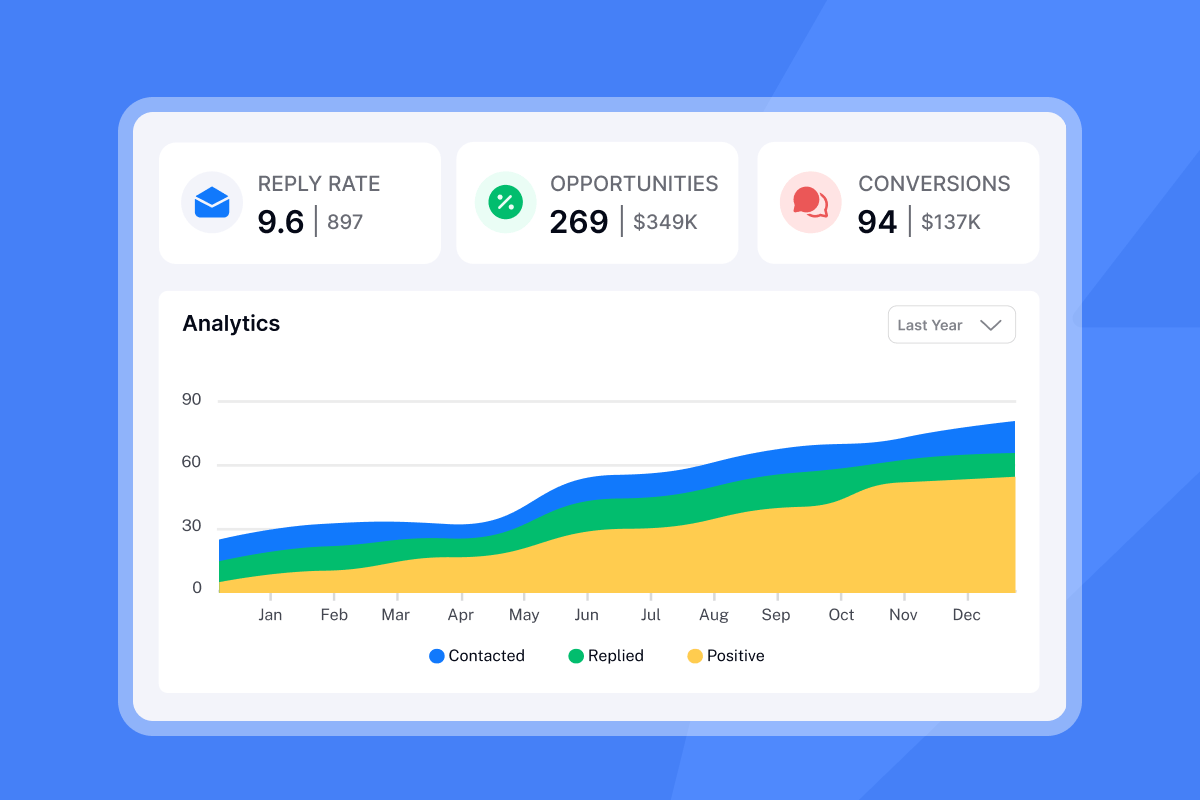
- Campaign and step analytics show opens, replies, and positive outcomes by variant so you can promote winners and retire losers.
- Account analytics rank senders with a combined score for opens and replies so you keep weak inboxes from dragging results down.
- Unify reply handling in Unibox. Route replies, label intent, and hand off to AEs. Harvard Business Review found that responding within one hour made teams up to seven times more likely to qualify leads, underscoring speed to lead as a core metric.
Instantly’s AI Reply Agent drafts and sends replies in minutes in Autopilot or review mode. That helps you maintain fast SLAs without adding headcount.
"Deliverability is great and the analytics give us exactly what we need to optimize campaigns quickly." - G2 review by Shaiel P.
Core strategies to optimize your email reply rate
Optimizing reply rate means focusing on inputs that move responses. Test one input at a time for clean reads.
- Hyper-personalization at scale. Use firmographic, technographic, and recent activity signals to write relevant opening lines. Instantly Copilot drafts segment-specific first lines, value props, and spintax variations you can approve quickly.
- Single, clear CTA. Ask one low-commitment question, such as a 15 minute chat next week. Avoid multi ask emails.
- Timely follow-ups. Multi touch sequences raise engagement in complex B2B. The RAIN Group analysis shows multiple touches are often required to secure a meeting.
- Subject line testing. Keep subjects short, natural, and relevant. Personalized subject lines have been associated with higher opens, which is a gate to replies. Campaign Monitor’s personalization guide cites a 26 percent lift in opens from personalization in earlier analyses.
- Spin syntax and send windows. Use light spintax and staggered send windows in each prospect’s time zone to reduce patterns and protect placement.
Comparison table: Core reply rate optimization strategies
| Tactic | Why it moves replies | Expected impact | Effort level |
|---|---|---|---|
| Verified lists and hygiene | More delivery and fewer bounces | Enables all other gains | Low to medium |
| Hyper-personalized first line | Relevance earns responses | 1 to 3 points lift in replies | Medium |
| Single, clear CTA | Reduces friction to answer | 0.5 to 2 points lift | Low |
| 2 to 4 follow-ups | More touches drive action | Material lift over first touch | Low |
| Subject A/Z testing | Opens are a gate to replies | 10 to 30 percent more opens | Medium |
| Placement testing and pacing | Protects primary placement | Sustains reply rate at scale | Medium |
A/Z testing promotes winners and prunes underperformers. Reply rate rises in steps across weeks.
Optimization playbooks for your role
For growth marketers: data driven experimentation
- Define a weekly cadence. One subject test. One CTA test. One timing test.
- Use Instantly A/Z testing with auto optimize on reply rate so winners keep serving more sends.
- Run placement checks before and after volume lifts. Fix list hygiene and pacing on dips.
- Segment by tech stack, industry, and buying triggers. Build targeted sequences for each segment.
- Score impact by cost per meeting and time to first meeting. Prioritize tests that shorten time to value.
Enable inside Instantly: A/Z tests on subjects and steps, Copilot Tasks to refresh variants weekly, Opportunities tracking to quantify meetings and revenue.
For agency operators: scaling client success
- Standardize a deliverability ramp. Warm for 30 days, cap bounces below 1 percent, require 80 percent or higher primary placement before scaling.
- Publish a QA checklist. DNS, blocklist checks, custom tracking domains, list verification, and send window rules.
- Distribute volume across many inboxes. Use safe pacing and rotation to protect domain health.
- Ship a client report pack. Reply rate by segment, positive replies, meetings set, placement trend, week over week change.
- Centralize triage in Unibox. Route opportunities to client reps. Use AI Reply Agent with human review for quality.
Enable inside Instantly: unlimited senders across workspaces, automated placement tests, Unibox with role based access, Slack review and approval for AI replies.
For sales leaders: standardizing team performance
- Institute guardrails. Require authenticated domains, verified lists, weekly placement checks, and complaint rate monitoring under 0.3 percent.
- Govern sequence libraries. Approve A/Z tested templates. Limit who can create net new copy.
- Enforce reply SLAs. Triage in minutes with AI Reply Agent on review mode. Log handoffs to CRM.
- Audit outcomes. Reconcile Instantly replies and meetings with CRM. Track positive reply rate, meetings per rep, and conversion to SQL.
- Train on safe scale. Ramp new inboxes slowly. Monitor account analytics and pause early on risk signals.
For startup founders: lean and effective outreach
- Start with one ICP and 300 to 500 verified contacts. Keep hard bounces under 1 percent.
- Use Copilot to draft a short, plain text email with a single ask. Test two subjects and two follow ups.
- Launch with two warmed inboxes. Cap at 30 sends per day each.
- Reply immediately to positives. Teams that respond within one hour are up to seven times more likely to qualify leads.
- Iterate weekly. Keep winners, replace losers, and log common objections to improve copy.
Tools and technologies for reply rate optimization
Effective optimization relies on a tight set of capabilities.
- Verified data and enrichment. Reduce bounces and increase relevance for each segment.
- Deliverability controls. Warmup, placement testing, pacing logic, and health monitoring that prevent reputation damage.
- Multi variant testing. Subjects and copy at each step with auto optimization on reply rate.
- Unified reply handling. One inbox for triage, classification, and booking.
- AI assistants. Draft sequences, generate spintax, and handle replies with human oversight.
How Instantly supports this:
- Unibox. Centralized reply management with labels, tasks, and handoffs inside the CRM module. See Unibox in the CRM module.
- AI Reply Agent. Configurable Autopilot or Human in the Loop. Routes, drafts, and sends in under 5 minutes. Priced in credits.
- Deliverability and placement. Automated placement tests and alerts to keep sends safe with a 4.2M private deliverability network.
- A/Z testing with auto optimize. Promote winners on reply rate and pause underperformers so you scale learning without manual pruning.
- SuperSearch. 450M plus B2B leads with waterfall enrichment to source verified contacts and attributes.
For a platform walkthrough that covers A/Z tests, Unibox, and reply handling, watch the Full Instantly.ai Tutorial 2025.
Comparison table: Instantly features that raise reply rate
| Feature | What it does | Reply rate lever | Where to enable |
|---|---|---|---|
| AI Copilot | Research, draft, and vary copy | Personalization at scale | Campaign editor and Copilot |
| A/Z testing | Test many variants with auto optimize | Promote winners on replies | Campaign advanced options |
| Inbox Placement | Automated placement tests and alerts | Protect primary placement | Deliverability toolkit |
| Unibox | Centralized inbox for replies | Faster triage and SLAs | CRM module |
| AI Reply Agent | Auto draft and send replies in minutes | Speed to lead | Unibox and integrations |
| SuperSearch | Verified B2B data and enrichment | More delivery, better fit | Lead sourcing |
Short, proven setup: your first 14 days
- Connect two warmed inboxes and pass placement checks.
- Done when placement is above 80 percent and bounces are below 1 percent.
- Import 400 to 600 verified contacts that match one ICP.
- Done when all contacts are verified and deduped across lists.
- Launch two sequence variants with two subject options and one CTA.
- Done when both variants reach 150 to 200 sends each.
- Add two follow ups at day 3 and day 7.
- Done when each step has at least 100 deliveries.
- Review results at day 7 and day 14. Keep winners and rotate in one new test.
- Done when reply rate is above 5 percent and meetings per 1,000 sends are rising.
For a visual walkthrough checkout this tutorial
What users say
"It has all the tools needed for cold outbound in one place. Previously, I was running 3 different systems to get a fraction of the results."
- G2 review by James L.
"Instantly.ai has assisted us in creating outbound email systems that reach your ideal buyer's inbox and foster meaningful connections. Also, their customer support is next level, 10/10."
- G2 review by a verified user
"Instantly is for me the Apple of Cold Outreach tools. Easy to use, intuitive, minimal clicks/steps to get stuff done, and things just work."
- G2 review by Thomas D.
Comparison table: Strategy vs complexity vs expected lift
| Strategy | Setup time | Risk | Expected lift to replies |
|---|---|---|---|
| Verified lists and hygiene | Low | Low | Enables all other gains |
| Subject A/Z testing | Low | Low | 10 to 30 percent more opens |
| CTA simplification | Low | Low | 0.5 to 2 points |
| Hyper personalized opener | Medium | Low | 1 to 3 points |
| Follow up sequence | Low | Low | Material lift over first touch |
| Placement testing and pacing | Medium | Medium | Sustains scalability |
Checklists you can ship this week
Growth Marketer checklist
- [ ] Define one hypothesis each for subject, opener, and follow up timing.
- [ ] Enable auto optimize on reply rate in A/Z testing.
- [ ] Build three segments by industry and tech stack.
- [ ] Deploy Copilot Tasks to refresh variants weekly.
- [ ] Report cost per meeting and time to first meeting.
Agency Operator checklist
- [ ] Publish a deliverability ramp SOP with acceptance checks.
- [ ] Standardize DNS and tracking domain setup across clients.
- [ ] Enforce send windows and daily caps by client.
- [ ] Centralize replies in Unibox with routing rules.
- [ ] Report weekly on placement, replies, and meetings per client.
Sales Leader checklist
- [ ] Approve a sequence library and A/Z testing guardrails.
- [ ] Set Unibox reply SLAs with AI Reply Agent in review mode.
- [ ] Audit accounts weekly for complaint and bounce trends.
- [ ] Reconcile Instantly meetings with CRM pipeline.
- [ ] Coach on top performing openers and CTAs.
Founder checklist
- [ ] Pick one ICP and 500 verified contacts.
- [ ] Draft one plain text email with a single ask.
- [ ] Test two subjects and two follow ups.
- [ ] Respond to positives in minutes.
- [ ] Log objections and update copy weekly.
Try Instantly free and see how AI Copilot, AI Reply Agent, and A/Z testing improve your reply rate. Compare plans on the Instantly pricing page.
FAQ: Your reply rate questions answered
- What is a good cold email reply rate in B2B?
A practical target is 5 to 10 percent for focused campaigns with verified contacts and personalized copy. Average ranges run 1 to 5 percent. - How do I calculate reply rate?
Replies divided by delivered emails, multiplied by 100. Example: 57 replies from 950 delivered equals 6.0 percent. - How many follow ups should I send?
Plan 2 to 4 follow ups over 7 to 14 days. Multi touch outreach is often required for a meeting in complex B2B. - How long should my cold email be?
Keep it concise. Fifty to 125 words is a safe range for clarity and scannability. - How fast should I answer positive replies?
Within minutes. Faster responses correlate with higher qualification rates.
Key terms glossary
- Reply rate: Replies divided by delivered emails times 100.
- Response rate: Another term for reply rate.
- Cold email: Outreach to recipients without a prior conversation.
- KPI: A key metric that reflects performance.
- Personalization: Copy that reflects details about the recipient.
- CTA: The one action you ask the reader to take.
- Follow ups: Additional emails in the same sequence.
- Subject lines: The email title seen in the inbox.
- A/B testing: Comparing two variants to find a winner.
- A/Z testing: Comparing many variants in one test.
- Deliverability: Likelihood your email reaches the primary inbox.
- Sender reputation: Trust signals tied to your domain and IP.
- Unified inbox: One place to view and manage replies.
- AI Reply Agent: Instantly's agent that drafts and sends replies.
- Pipeline: Sales opportunities created from replies.
- Cost per meeting: Spend divided by meetings booked.
- Time to first meeting: Days from first send to first meeting.
- Spin syntax: Small wording variations to reduce repeats.
- Send windows: Time ranges when emails send.
- Waterfall enrichment: Combining data providers to verify contacts.
- Domain health: DNS, complaints, bounces, and blacklist status.
- Blacklist monitoring: Alerts when domains or IPs are listed.
- Warmup: Low volume sends to build trust signals.
- List hygiene: Removing invalid or risky addresses.
- Verified contacts: Emails confirmed deliverable.
- Throughput: Total sends across connected inboxes per time unit.


