


Updated October 19, 2025
TL;DR: Connect Instantly to automation platforms to create end-to-end, AI-assisted lead gen and outreach. The Zapier app directory lists 8,000+ apps, and Make.com lists 3,000+ integration apps. Use them to capture leads, enrich data, trigger personalized outreach, update your CRM, and triage replies with Instantly’s AI Reply Agent. If you need every send and reply logged back to your CRM, add a bidirectional sync layer with OutboundSync. Get automating fast with Instantly today for free.
Understanding Instantly’s integration capabilities
Instantly connects across your stack in four practical ways:
- Direct CRM connectors: Connect HubSpot, Salesforce, and Pipedrive to import lists and keep campaigns aligned. Browse the Instantly integrations collection.
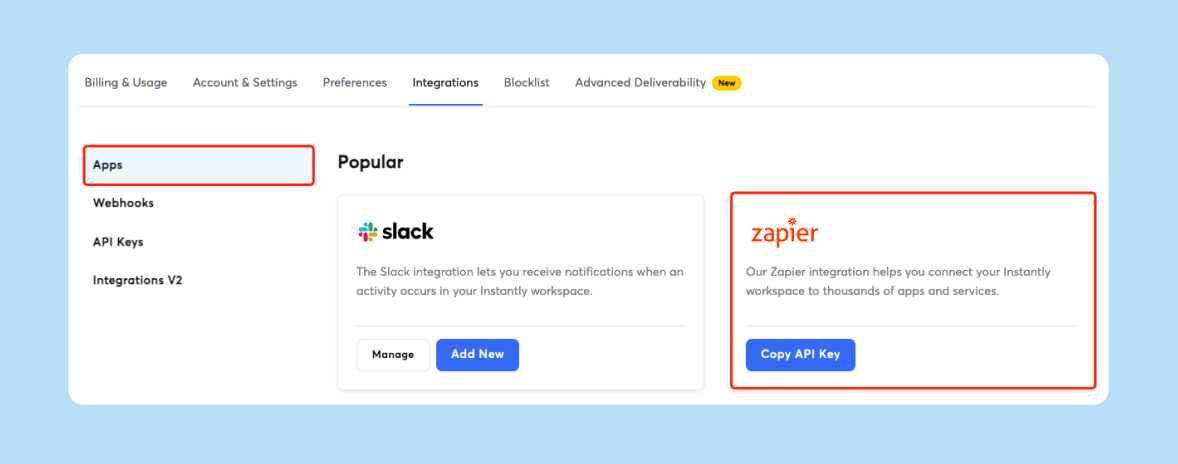
- Automation platforms: Use Zapier to trigger flows on replies, bounces, and status changes. For a quick primer, see Kevin Stratvert’s Zapier AI tutorial for beginners. For visual builds, Make.com scenarios handle branching and data ops across thousands of apps.
- Lead data and personalization: Pair Instantly with enrichment and research tools. Tap Instantly’s SuperSearch for a 450M+ B2B contact pool with waterfall enrichment and AI fields. Add research and actions in Clay or similar tools.
- Developer options: Build custom flows with API keys and webhooks, or consider a unified API to work across many CRMs with one schema.
CRM integrations: native, automation, and bidirectional sync
Native CRM connections help you import contacts and run outreach. See how our email outreach tool can streamline your campaigns. For detailed activity write-back, attribution, and auditing, add automation or a partner connector.
- Native HubSpot and Salesforce: Connect and import lists into Instantly. See the HubSpot connection guide for setup and list importing.
- Automation approach: Use Zapier or Make.com to post Instantly events to CRM objects and properties. If you want a step-by-step overview of AI-powered steps, try the Zapier AI Agents walkthrough.
- Bidirectional sync partner: For granular writeback of sends, replies, bounces, and status changes into CRM timelines and reports, review OutboundSync for Salesforce.
Watch a step by step guide here on how to do this in just a few clicks with Outbound sync: For practical examples, check out complete cold email guide.
Or for our other providers you can connect via our integrations page in a few clicks also with a full help doc here.
Comparison table: CRM integration options
| Option | Data flow | Activity tracking | Setup and best for |
|---|---|---|---|
| Native HubSpot or Salesforce | One-way import to Instantly | Limited event detail in CRM by default | Fast setup. Good for list imports. See the HubSpot importing guide. |
| Zapier or Make.com | Configurable | Flexible via triggers, webhooks, fields | Medium effort. Start with the Zapier integration overview for custom rules and fields. |
| OutboundSync | Bidirectional | Purpose-built for email activities and statuses | Admin-led rollout. Learn more about the Instantly integration for deeper reporting and attribution. |
De-risk Q&A:
CRM integrations can be scary, so to answer those questions in your head right now here's my de-risk Q&A:
What if my HubSpot dashboards miss Instantly replies? Follow the Zapier recipe to trigger on “lead marked interested” or “reply received” and write a Contact activity. If you prefer a walkthrough, watch the HubSpot setup in this Instantly.ai and HubSpot integration video.
Can Salesforce see every Instantly touchpoint? Not with native imports alone. A partner like OutboundSync logs sends, opens, bounces, and replies to Salesforce objects so reports match reality.
How do I keep duplicates out of my CRM? Upsert on email. In Zapier or Make, search before create and only update if found. Most CRMs dedupe on email during imports.
How do I avoid deliverability dips while I scale? Add inboxes and keep per-inbox volume low. Our email tools for agency deliverability guide walks through this step by step. Warm properly. Use placement tests and alerts to pause if health drops. See the Inbox Placement page for what is monitored.
Our team hates brittle tools and long setups. What is realistic? A basic Zap can be live quickly. Visual Make scenarios take longer but handle complex branching. Start with one high‑value event and add branches after it runs clean. We cover this in detail in our top cold email outreach tools guide. If you prefer video, Tom Nassr’s fast AI automation in Zapier shows a lean approach.
Can I trust the data? Enforce one source of truth for contacts and upsert rules. Use daily reconciliation from Instantly events to CRM changes. A purpose-built sync partner can standardize granular activity logs.
Are third‑party automation costs going to spike? Zapier charges by task execution. Make uses credits or operations. Keep flows lean and batch non‑urgent work. Check Make pricing for current allowances.
Will reps adopt this? Route replies into Instantly’s Unibox or Slack and standardize labels, simple!
"Getting set up is very easy, especially with the AI copilot that helps you every step of the way." - G2 review
Automate and scale: workflow platforms with AI
Automation platforms turn Instantly into the nerve center of your go-to-market.
Zapier: Connect Instantly across CRMs, sheets, forms, Slack, and more. For a fast ramp with AI steps, see the Zapier AI tutorial for beginners.
Make.com: Build visual, branching scenarios with webhooks and granular data handling. For a visual example, watch the Instantly.ai and folk CRM integration.
AI you can put to work today
- Lead capture and cleanup: Normalize names, roles, and domains on ingest with Zapier Formatter or Make transformers. A simple AI step helps extract intent and next steps, as shown in Tom Nassr’s fast AI automation in Zapier.
- Personalization AI: Generate first lines and snippets from firmographic context. For how Instantly’s AI fits into a lean sales motion, see the AI sales assistant playbook.
- Reply triage AI: Route and answer replies in near real time with Instantly’s AI Reply Agent. Replies can go out in under 5 minutes and update CRM status.
"Simple and well-designed UX, effective support from both humans and AI for small questions. Additionally, the AI is capable of entering campaign configurations and applying fixes, which is a huge time saver!" - G2 review
Enrich and personalize: lead intelligence integrations
Better data increases reply rate without risking sender reputation. Email also continues to produce strong returns, with an average ROI near 36:1, so clean data and placement matter. See the Litmus ROI analysis.
- Clay: Add waterfall enrichment and AI research, then push leads and custom fields directly into Instantly. Clay’s Instantly integration supports actions like Add Lead to Campaign and Find Leads. See the Instantly provider page on Clay.
- Persana AI: Research prospects, generate personalization, and send to Instantly or your CRM. Persana documents an Instantly integration for pushing leads and copy.
- Linked Helper: If you work with opted-in LinkedIn data, map fields and send to Instantly via API. Linked Helper’s Instantly integration guide shows field mapping and constraints.
- Instantly SuperSearch: Source from 450M+ verified B2B contacts and enrich with AI. Launch outreach from the same place in the SuperSearch help article.
Example workflow
- Clay verifies a work email and writes a personalized intro.
- Make.com transforms job seniority and company domain fields.
- Instantly adds the lead to a mapped campaign and inserts the intro as a custom variable.
- Slack posts a summary when the lead matches ICP criteria. For a video breakdown of data sourcing, watch this SuperSearch full review.
See this workflow in action with our tutorial on how to get almost infinite, enriched leads with Instantly:
"It is the Inbox placement feature which I like the most as it helps us see spam score and inbox placement so we can manage the mail IDs accordingly." - G2 review
Custom solutions: API, webhooks, and unified APIs
For RevOps and developers who need full control and real-time events:
- Instantly API v2: Use scoped keys, more endpoints, and consistent REST models. API v2 is live; v1 is marked for deprecation in 2025. See the API v2 guide.
- Webhooks: Fire on replies, status changes, opens, and bounces. Pair with Make or your middleware for routing and error handling. The integration docs live in Instantly’s help center.
- Unified APIs: Use Unified.to to read and write normalized Contacts, Companies, Deals, and Events across many CRMs with one schema and authorization flow.
Developer checklist
- Rate limits: Plan backoff and retries.
- Idempotency: Upsert by email and domain.
- Error handling: Log payloads and replays.
- Security: Store API keys securely and rotate on schedule.
Step by step: build an all‑in‑one workflow
Prerequisites for automation
- An Instantly workspace with warmed inboxes. Do not scale past 30 emails per inbox per day.
- Verified contacts. Keep hard bounces low and pause to re-verify if you see spikes.
- Access to your CRM and a shared Slack channel.
- Zapier or Make.com accounts. Free tiers are fine for proof-of-concept. Production needs paid limits.
- Follow bulk sender requirements to protect placement. See Gmail’s sender guidelines.
Option A. Zapier recipe in about 20 to 45 minutes
- Trigger: Instantly New Event for “reply received” and “lead marked interested.”
- Filter: Continue only if campaign or label matches ICP.
- Enrich: Optional AI step to extract intent and next steps.
- CRM: Find or create Contact. Create or update a Deal with stage “Meeting set.”
- Calendar: Route to a round-robin booking app if required.
- Slack: Post contact, company, intent, and next step to a channel.
- Instantly: Update lead status and add tag “CRM synced.” For more recipes and design tips, use the Zapier automation guide.
Option B. Make.com scenario in about 30 to 90 minutes
- Webhook: Create a webhook in Make and paste it into Instantly’s webhook settings for replies and positive labels.
- Router: Branch by campaign or territory for routing.
- Data ops: Standardize names, parse signatures, and clean phone fields.
- CRM: Search or create a Contact, update the Opportunity, and log an activity with the email preview.
- AI reply agent: Let Instantly’s AI agents auto-respond to common replies and notify Slack for human review when needed.
- Error workflow: On any error, push to a queue and alert RevOps with payload context. To see field mapping in practice, follow this Make scenario guide.
Success metrics for automation
Track outcomes at the system level. Standardize targets and alerts.
- Deliverability checks: Run Inbox Placement tests before scaling and schedule them weekly. Use automated tests and alerts to pause mailboxes if placement dips. See the automated tests guide.
- Bounce control: Keep hard bounces low. If they rise, pause, re-verify, and resume at a lower cap.
- Daily throughput: Add inboxes to scale. Do not push a single inbox above 30 sends per day.
- Response handling speed: Respond within minutes. Fast follow-up is proven to raise connect rates, as noted by Harvard Business Review’s lead response research.
- CRM reconciliation: Build a daily check that compares Instantly interested replies with CRM movements to catch gaps.
Weekly review
- Check top subjects, steps, and ICP segments.
- Inspect a random sample of AI replies and tighten guardrails if needed.
- Re-run placement tests after any ramp or copy change. For a hands-on overview of deliverability best practices, watch How to avoid cold emails going to spam. For single-run checks, see the one-time tests.
Streamline your outreach with Instantly’s AI‑powered integrations
Connect Instantly to Zapier or Make.com to run a clean motion end to end: find verified leads, enrich context, personalize messages, protect placement, triage replies fast, and write back to your CRM for attribution. You reduce manual steps and speed up meetings without per‑seat penalties.
Explore Instantly’s integrations and start building your AI workflows for free today.
Further reading
To see the basics fast
- Watch Zapier’s lead automation walkthrough
- Explore Make.com integrations
- Setup bidirectional writeback with OutboundSync for full activity tracking.
- Instantly integrations Help Center
FAQ:
How many apps can I connect through Zapier and Make.com?
Zapier lists 8,000+ apps in its directory, and Make.com lists 3,000+ integration apps. For practical setups and templates, see the Zapier automation guide and the Instantly.ai & Close CRM integration video.
Does Make.com support Instantly API v2?
The Make Instantly module requires a v1 key as of April 2025. Instantly says API v2 is live and v1 will be deprecated in 2025. Verify on the Make Instantly app page before rollout.
Can Instantly update HubSpot or Salesforce deals automatically?
Yes. Use Zapier or Make triggers like “reply received” or “interested” to create or update records. For a ready-made example, follow this Zapier recipe.
What AI steps help most?
Personalization lines from enrichment data, reply intent classification, and auto-responses to common replies with AI agents that can reply in under 5 minutes. See the AI Reply Agent guide.
Where do I find 450M+ leads?
Use Instantly’s data engine and enrichment in SuperSearch.
Key terms
- API: A way for apps to exchange data.
- Webhook: Real-time event delivery to your URL.
- Bidirectional sync: Updates flow both ways.
- Enrichment: Adding fields to a record.
- Paths: Zapier’s conditional branches.
- Credits/operations: Unit counts for automation usage.
- Unibox: Instantly’s unified reply inbox.
- SISR: Server and IP sharding and rotation.