


Updated October 31, 2025
TL;DR: Agencies can scale cold email campaigns safely by implementing a systematic reply management system. This guide provides a step-by-step framework for classifying replies into actionable categories, setting up automated workflows that prioritize qualified leads, and using Instantly's AI Reply Agent and Unibox to convert conversations into booked meetings while protecting sender reputation. The system prevents wasted sales resources, maintains deliverability, and enables you to manage 10-150+ inboxes without compounding costs.
Your agency sent 5,000 cold emails last week. You got 200 replies. Three became booked meetings. The other 197 replies are buried somewhere between out-of-office messages, polite declines, and genuine questions that never got answered. This is how agencies burn client domains and lose pipeline.
Managing cold email replies is not just inbox housekeeping. It is the conversion moment. Your outreach investment either becomes qualified pipeline or evaporates into missed opportunities. Agencies with structured reply classification book more meetings, protect sender reputation, and scale profitably. Those relying on manual sorting lose qualified leads, waste sales hours, and risk deliverability issues across client accounts.
Why a Reply Management System is Critical for Agencies
When your agency runs campaigns across dozens of client inboxes, unmanaged replies create three expensive problems.
- First, qualified leads go cold during manual sorting delays.
- Second, your team wastes hours reading "not interested" messages, parsing auto-replies, and determining which responses warrant follow-up. One agency operator noted in their G2 review that organized campaign management and inbox structure immediately stood out, reducing initial frustrations and making reply handling far more efficient.
One of the strongest aspects of Instantly is its ability to streamline the management of multiple campaigns, significantly saving me time and resources... Overall, I have seen a significant jump in efficiency, being able to launch and manage more campaigns effectively, giving Instantly a perfect 10 in terms of recommendation. - G2 review
- Third, mishandled replies damage sender reputation. When prospects reply with "unsubscribe" and those requests sit unprocessed, continued outreach triggers spam complaints that hurt deliverability across all client domains. Classification systems automatically detect opt-out language and immediately suppress future sends, ensuring compliance with CAN-SPAM. Automated suppression prevents these reputation-damaging scenarios before they compound across your client portfolio.
Step-by-Step: How to Classify Cold Email Replies
Define your reply categories
Effective classification starts with clear categories that map to specific actions. Establish these five core categories:
- Positive Interest: Replies showing explicit interest, requesting information, or agreeing to a meeting. Examples include phrases like "Yes, I'm interested," "When can we talk?", or "Send details." These are your highest-priority qualified leads.
- Soft Positive / Referral: Responses indicating engagement but lacking immediate commitment, or referring you to another contact. Look for phrases like "I'm not the decision-maker, but [Name] handles this," or "This looks interesting for the future."
- Information Request / Objection: Prospects seeking clarification or raising concerns. Common examples include "What's your pricing?", "Send a case study?", or "We already have a solution."
- Not Interested: Explicit disinterest or polite declines. Phrases like "No thanks," "Unsubscribe me," or "Not a fit."
- Out of Office / Undeliverable: Automated responses or bounce notifications requiring status updates and either scheduled re-engagement or list removal.
Table 1: Reply Classification Framework
| Category | Example Phrases | Immediate Action | Timeline |
|---|---|---|---|
| Positive Interest | "Let's schedule a call" | Route to SDR, create CRM task | < 2 hours |
| Soft Positive | "Talk to [Name] instead" | Create new lead, generate warm intro | < 24 hours |
| Information Request | "Send pricing details" | Pull resource, schedule follow-up | < 4 hours |
| Not Interested | "Please remove me" | Suppress list, log opt-out | Immediate |
| OOO / Bounce | "Out until [date]" | Pause sequence, schedule resume | Per return date |
Create a decision tree for each category
Transform categories into workflows. For Positive Interest replies, configure your system to route to your fastest SDR within 5 minutes using assignment rules, trigger a CRM task to schedule a discovery call, and create a multi-channel follow-up if no meeting books within 24 hours. Speed matters. Prompt engagement significantly increases qualification rates.
For Referral replies, automatically create a new lead record, tag the original replier as an advocate, and generate a warm introduction template. For Information Request replies, categorize by type (budget, timing, existing solution), pull the relevant resource, and schedule a follow-up 3-5 days later. For Not Interested replies, immediately suppress from active sequences and log the opt-out reason. For OOO replies, pause sequences, extract return dates when possible, and schedule re-engagement.
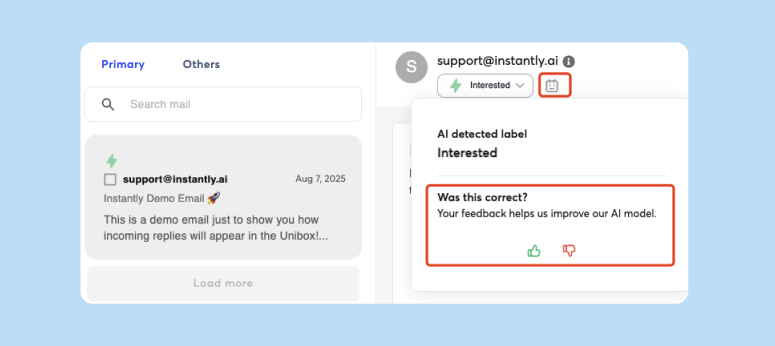
Instantly's AI Reply Agent auto categorizes all replies for you.
Establish clear qualification criteria
Define qualification using three dimensions.
- First, intent strength, measured by explicit language around timing and next steps. Phrases like "I'm ready to move forward" signal higher qualification than "This looks interesting."
- Second, organizational fit, confirmed through company size, industry, or tech stack against your ICP. A reply from a director at a 200-person SaaS company qualifies higher than interest from a solo consultant.
- Third, response latency. Prospects who reply within 24 hours and ask specific questions demonstrate higher engagement. Track these patterns to refine your scoring model.
Setting Up Efficient Reply Management Workflows
Automate initial reply sorting
Automation removes the manual bottleneck. AI-powered classification uses Natural Language Processing to interpret context and sentiment beyond keyword matching.
Start with keyword-based automation for unambiguous categories. Configure rules to automatically tag replies containing "unsubscribe," "remove me," or "opt out" as Not Interested and trigger immediate suppression. Flag replies with "out of office" or "automatic reply" as OOO and pause sequences.
For nuanced classification, train keyword rules on historical reply data to identify patterns. Intent-based routing analyzes phrases like "Can we schedule a call?" to classify as qualified leads, then routes to the appropriate SDR and creates CRM tasks.
Prioritize positive replies for immediate action
Build a priority queue that surfaces Positive Interest replies at the top, with real-time notifications via Slack or CRM. Set a target response time of under 2 hours. Prompt responses dramatically increase conversion rates.
For Soft Positive / Referral replies, generate a warm introduction template pre-filled with conversation context. Track conversion from Positive Interest classification to booked meeting. Well-managed campaigns achieve 6%+ reply rates. If positive replies convert to meetings below 40%, investigate whether classification is too broad or follow-up messaging needs refinement.
Handle negative replies and compliance
For explicit unsubscribe requests, process within 10 business days per CAN-SPAM requirements, though immediate automated suppression is best practice.
For polite "not interested" replies without unsubscribe language, send a brief thank-you, optionally ask about future timing, and move to a long-term nurture sequence. For objection-based replies like "We already have a solution," categorize by objection type and trigger a tailored nurture sequence for re-engagement in 3-6 months.
For hard bounces, immediate permanent removal is required to maintain deliverability above 99%. If any single upload produces bounce rates above 2%, that data source requires immediate verification or replacement.
Instantly's AI Agent and email categorization features handle all of the above for you with just a few clicks to get going. Watch how it works below:
Leveraging Instantly for Scalable Reply Management
Instantly's AI Reply Agent: Automate triage and responses
Instantly's AI Reply Agent handles lead replies at 5 credits per reply, dramatically reducing manual workload while maintaining response quality. The agent automatically categorizes incoming replies, drafts contextual responses, and either sends them in autopilot mode or routes through human-in-the-loop review.
Configure the agent with your qualification criteria, response templates, and escalation rules. Set it to automatically respond to Information Request replies with relevant case studies and a soft meeting invitation, while routing all Positive Interest replies directly to your sales team with a drafted response ready for personalization. The agent integrates with Slack for review and approval workflows.
For agencies managing multiple client campaigns, the AI Reply Agent reduces context-switching overhead. Your team reviews AI-drafted responses organized by client and priority, approving or editing before sending. One G2 reviewer highlighted that lead reply automatic drafting with AI, inbox placement testing, and email tracking streamline operations significantly.
"... features I like the most about intantly are ... replies automatically drafted with AI" - G2 reviewer
The Unibox: Centralized reply management
The Unibox consolidates all incoming replies across unlimited email accounts into a single interface. This eliminates inbox chaos when managing 10-150+ sending accounts across multiple client domains.
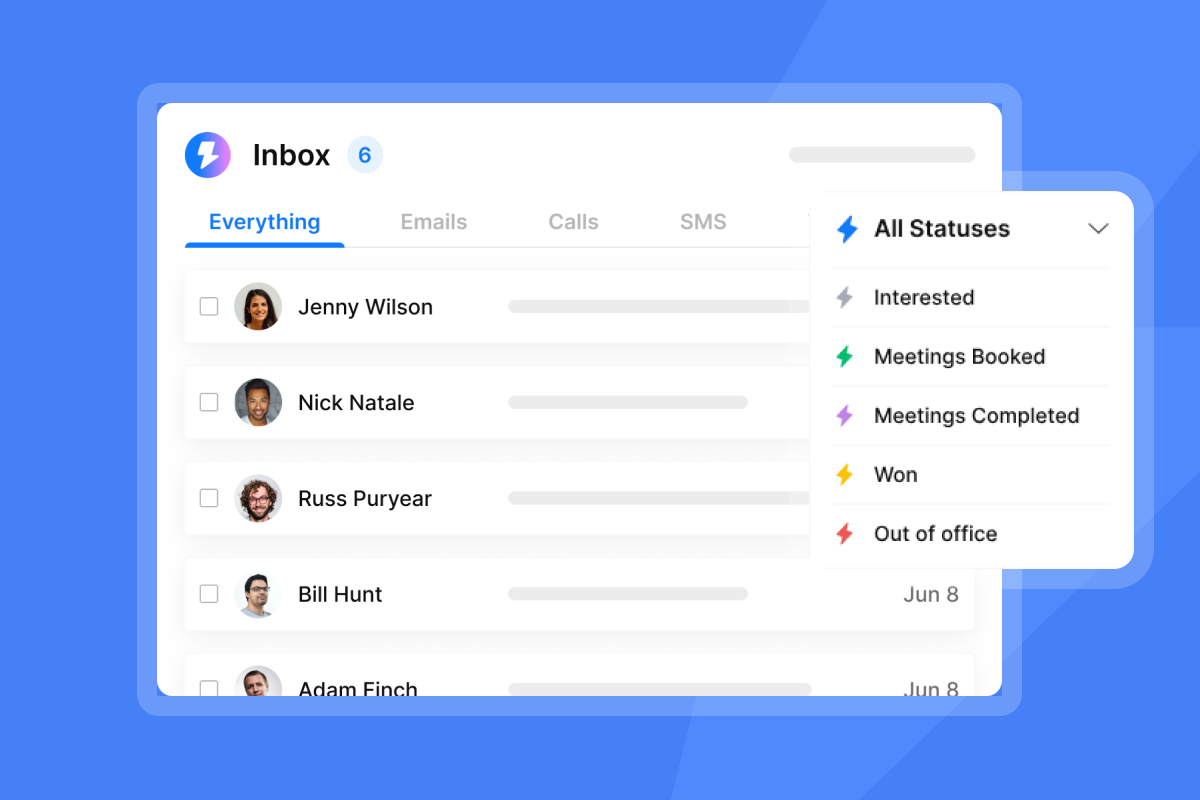
Unibox provides filtering by campaign, client workspace, reply category, and priority. View all Positive Interest replies across all clients in one filtered view, then switch to Information Request replies needing resources. This reduces context-switching time from hours to minutes.
The unified inbox enables team collaboration through shared tags, internal notes, and assignment features. When a reply needs client input before responding, tag it, assign to the account manager, and set a follow-up reminder. Unibox integrates with your CRM through native connectors or Zapier. When a reply is marked as qualified, the system automatically creates or updates the lead record and creates a task for the assigned sales rep.
Unlimited accounts and built-in warmup: Scale safely
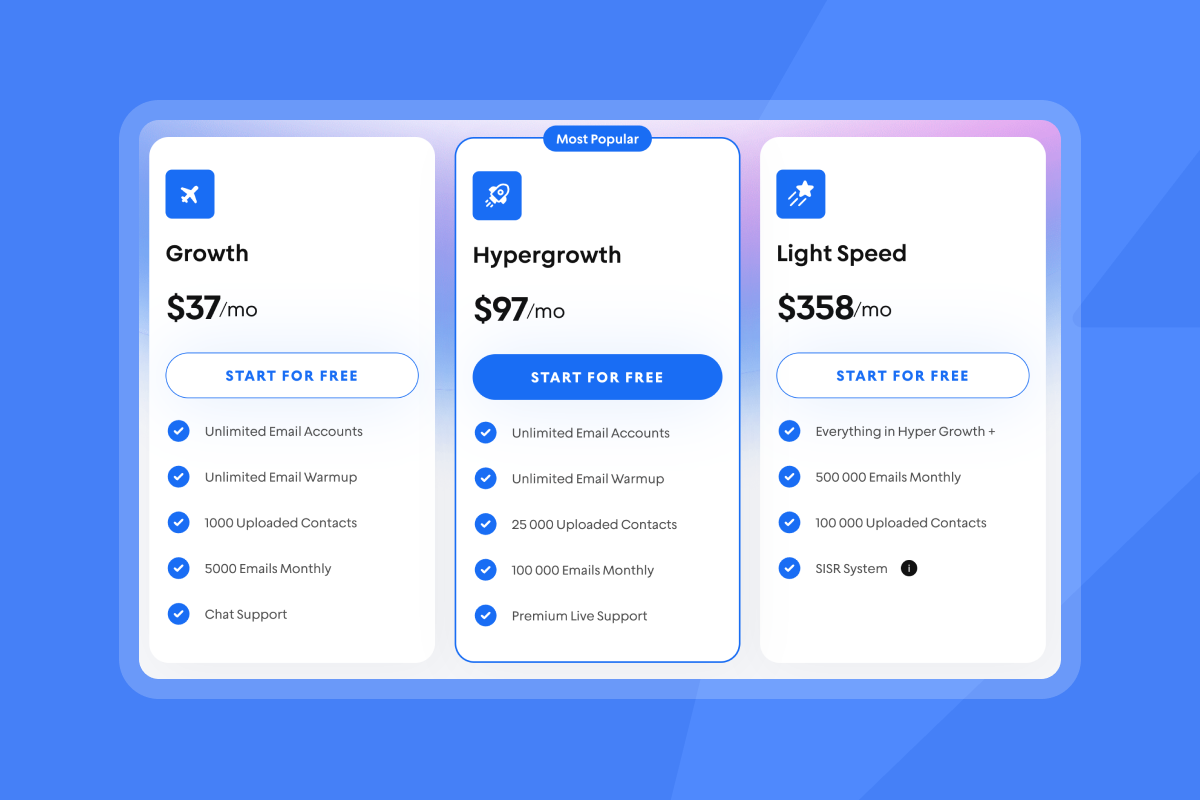
Instantly's flat-fee pricing with unlimited email accounts removes per-seat economics that destroy agency margins. Whether you manage 10 inboxes or 150, cost remains predictable. Plans start at $37/month for Growth, $97/month for Hypergrowth, and $358/month for Light Speed with SISR (dedicated IP pools).
Every account includes built-in warmup that gradually builds sender reputation over 2-4 weeks before production sending begins. This automated warmup maintains engagement patterns that signal legitimate email activity to mailbox providers through Instantly's deliverability network.
The unlimited account model enables dedicated sending domains per client, isolating reputation so one client's campaign issues do not damage deliverability for others. For a full walkthrough of setting up and managing multiple domains efficiently, check out our tutorial video on YouTube.
Deliverability tools: Maintain domain health
- Inbox Placement tests automatically check where your emails land across Gmail, Outlook, and Yahoo. Run placement tests weekly for active campaigns and immediately after any campaign changes or unexpected engagement drops.
- SISR (Server & IP Sharding & Rotation) on Light Speed plans provides dedicated IP pools. For agencies sending 100k+ emails monthly, SISR reduces risk that shared infrastructure issues impact deliverability.
- Track key metrics by campaign: bounce rate (keep below 1%), spam complaint rate (keep below 0.1%), and reply rate (target 5%+ for well-targeted campaigns). Reputation builds through consistent positive engagement signals, and proper reply management contributes by ensuring quick responses to interested prospects.
Reply Management System Checklist
Before launching your system, verify these implementation steps:
- Define five core reply categories with specific examples for each
- Create decision trees mapping each category to immediate action, owner, and timeline
- Set up keyword-based automation rules for unsubscribe, OOO, and bounce detection
- Configure AI Reply Agent with qualification criteria and response templates
- Integrate Unibox with CRM for automatic lead creation and task assignment
- Establish response time targets: < 2 hours for Positive Interest, < 4 hours for Information Requests
- Set up weekly deliverability monitoring with Inbox Placement tests
- Train team on classification guidelines with 3-5 examples per category
- Create feedback loop for team to flag misclassified replies
- Track conversion metrics: reply rate, positive reply to meeting conversion, response time by category
Best Practices for Agency Reply Management
Review your classification system monthly. Analyze which reply types convert best, which objections appear most frequently, and whether categories capture all meaningful patterns. If 20% of Soft Positive replies convert to meetings at the same rate as Positive Interest, your criteria may be too conservative. Test new category splits when you identify patterns. Learn more about optimizing your campaigns in our video on cold email strategy for 2025, which covers testing approaches that generate more booked meetings.
Avoid the operational chaos
Reply management separates agencies that scale profitably from those that drown in operational chaos. The system you implement determines whether you convert 5% or 25% of positive replies into booked meetings, whether you manage 50 inboxes or 150, and whether deliverability stays healthy or degrades.
Start with clear categories, automate obvious classifications, and build workflows ensuring every reply receives the right response within the right timeframe. Instantly's AI Reply Agent, Unibox, and unlimited account model provide infrastructure to run this system across your entire client portfolio on predictable flat-fee economics.
Ready to implement a reply management system that scales with your agency? Get unlimited email accounts, built-in warmup, and centralized reply management across all client campaigns. Start a free 14 day trial today.
FAQs
How quickly should we respond to positive interest replies?
Respond within 2 hours during business hours. Prompt responses increase qualification rates significantly, as delays allow prospects to engage with competitors.
What reply rate should we target for well-managed campaigns?
Target 5% or higher. Well-managed campaigns with strong list quality and personalization achieve 6%+ replies.
Should we use full autopilot or human-in-the-loop for AI replies?
Start with human-in-the-loop for high-value clients. Review AI-drafted responses before sending to maintain quality control and learn capabilities before enabling autopilot for routine replies.
How do we prevent classification from causing compliance issues?
Automate unsubscribe detection with keyword rules and suppress immediately. Review your suppression list monthly to ensure all opt-outs are honored across campaigns.
What team size is needed to manage classified replies effectively?
One person can manage 30-50 active inboxes with automation. Beyond 50 inboxes, plan roughly 40-50 inboxes per team member with proper systems and AI Reply Agent support.
Key Terms Glossary
Sender reputation: A score assigned by mailbox providers based on engagement, bounces, and spam complaints that determines whether emails reach the inbox or spam folder.
Unibox: Centralized inbox interface consolidating replies from multiple email accounts into one organized view with filtering, tagging, and assignment features.
AI Reply Agent: Automated system that categorizes incoming replies, drafts contextual responses, and either sends automatically or routes for human review at 5 credits per reply.
List hygiene: The practice of regularly removing invalid, unsubscribed, and unengaged contacts. Maintain bounce rates below 1% and verify lists before upload to protect deliverability and sender reputation.
SISR: Server & IP Sharding & Rotation technology using dedicated or private IP pools to enhance deliverability for high-volume senders on Light Speed plans.


