


Updated October 31, 2025
TL;DR: Email triage is the systematic process of classifying and prioritizing cold email replies to quickly identify valuable leads. For agencies managing multiple client campaigns, effective triage determines how many replies convert into meetings and how safely you scale client domains. Without structure, you waste hours sorting, miss hot leads, and risk deliverability through slow responses. Instantly's AI Reply Agent automates classification and drafting, Unibox centralizes replies across unlimited accounts and built-in deliverability tools protect sender reputation while you scale. This guide shows you how to implement triage that converts reply chaos into predictable pipeline.
Running cold outreach for 10 clients means managing hundreds of replies every week. One missed "Can we schedule a demo?" buried under 50 "not interested" messages costs you a booked meeting. One slow response to a hot lead means they move on to a competitor.
Cold email response rates usually range from 5% to 12%, with top performers reaching up to 20%. For an agency sending 5,000 emails weekly, that translates to 250 to 600 replies requiring attention. Manual review can’t keep up without risking burnout or missed opportunities.
This guide explains what email triage is, why it matters for agency growth, how to build an effective process, and how Instantly automates classification and response.
What is email triage in cold outreach?
Email triage is the process of sorting and prioritizing incoming replies to identify and engage qualified leads before they lose interest. You categorize each reply based on intent, route it to the right action, and respond at the speed the opportunity demands.
Defining email triage
Email triage for cold outreach means applying a repeatable classification system to every reply. You scan for buying signals like "pricing," "demo," or "next steps," assign a priority level, and decide whether to respond immediately, schedule follow-up, delegate, or archive. Without triage, you review the same thread multiple times, letting hot leads cool for 48 hours while digging through spam complaints.
Why email triage matters for agencies
Agencies stake their reputation on delivering booked meetings for clients. Slow reply handling directly impacts conversion. When a prospect replies "Can we talk this week?" they are evaluating multiple vendors. The first responder wins.
Triage also protects deliverability. Mailbox providers track engagement. If your account accumulates unanswered replies, it signals low engagement quality and hurts your sender reputation, pushing future emails into spam. Agencies managing 10 to 150 sending inboxes cannot afford deliverability drift caused by poor reply hygiene.
Finally, triage reduces cost per meeting. Manual sorting wastes rep time. Structured triage cuts that waste, letting your team spend more hours in live conversations.
Why effective email triage is critical for agency growth
Effective triage drives three agency outcomes: faster meeting conversion, protected sender reputation, and scalable operations.
Converting replies into booked meetings faster
Responding to leads quickly can significantly improve your chances of conversion. When a prospect replies with questions like “What’s your pricing?” or “Can we schedule a demo?”, they’re actively evaluating solutions. Your triage system should surface these replies immediately.
Implement a "2-minute rule" for high-intent replies. If a reply contains a demo request or pricing question, respond immediately or within two minutes of reading.
Protecting sender reputation and client domains
Every delayed reply is a missed engagement signal. When a prospect replies and you do not engage back, the conversation thread stalls. Over time, this pattern degrades your sender reputation, increasing spam folder placement.
Proper triage surfaces spam complaints and unsubscribe requests immediately. Your workflow should auto-tag any reply containing "remove," "unsubscribe," or "stop," then route it to a suppression list before your next send.
Scaling operations without compounding costs
Per-seat pricing models tax every new inbox or team member. Manual triage compounds this problem. Each new client campaign adds 50 to 100 weekly replies without automation.
Instantly's flat-fee unlimited accounts model means you scale sending capacity without per-seat penalties. Pair that with AI triage, and you manage 10 client campaigns or 50 with the same core team.
"Instantly's clean UI, one-click email responses using tags, and smooth Zapier integration allowed me to build my entire client acquisition system." - User on Trustpilot
How to implement an effective email triage process
Build an agency-grade triage system in four steps: define categories, set routing rules, prioritize strategically, and automate with AI.
Step 1: Define clear reply categories
Start by listing every reply type your cold outreach generates:
- Qualified lead: Explicit interest or buying signal
- Demo request: "Can we schedule a call?"
- Pricing inquiry: Questions about cost or plans
- Not interested: Polite decline
- Out of office: Autoresponder
- Unsubscribe request: Opt-out language
- Spam complaint: Aggressive negative reply
- Question or objection: Needs clarification
- Referral or forward: "Talk to my colleague"
Each category maps to a specific action and urgency level. Document your categories in a shared playbook so every team member applies the same tags. Instantly also has AI-based auto-labelling, which can be turned on in a single click.
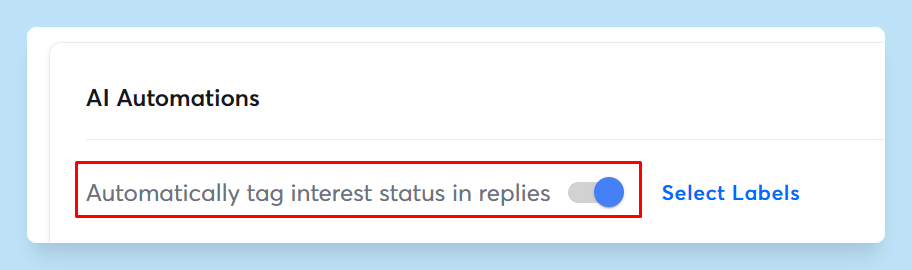
Step 2: Set up filtering and routing rules
Configure email filters to move replies into the right queues:
- Keyword filters: Any reply containing "pricing" or "cost" routes to a "Pricing Inquiry" folder with high priority
- Domain filters: Replies from competitor domains flag as "Competitive Intel"
- Automated routing: High-intent replies auto-assign to the account owner or specialist for that client
Instantly integrates with HubSpot, Salesforce, Zapier, and Make to sync reply data. When a reply is classified as "Demo Request," auto-create a task in your CRM, assign it to the rep, and set a due date.
Step 3: Prioritize and respond strategically
Not all replies deserve the same speed. Assign priority levels:
- Urgent: Demo requests, pricing questions (respond within 1 hour)
- Important: Objections, questions (respond same day)
- Routine: Out-of-office, administrative (respond within 48 hours or archive)
Craft response templates for common reply types. When a prospect asks "What's your pricing?" your rep should not draft from scratch. Instantly's AI writing features analyze email content and CRM profile to suggest personalized draft replies.
Step 4: Automate with AI for speed and accuracy
Manual triage works for small volumes, but breaks at scale. AI automation is non-negotiable when handling dozens of replies daily.
| Factor | Manual Triage | AI-Powered Triage |
|---|---|---|
| Time per 100 replies | 3-4 hours | 15-30 minutes |
| Classification consistency | Varies by rep | Standardized rules |
| Scalability | Linear (add headcount) | Unlimited (flat cost) |
| Response templates | Manual drafting | AI-generated drafts |
Instantly's AI Reply Agent classifies intent and drafts responses automatically. You configure the agent to operate in autopilot mode for routine inquiries or human-in-the-loop mode for complex negotiations.
Integrate AI triage with your full sales stack. Instantly connects with Zapier and Make to trigger workflows when specific reply types arrive. A "Demo Request" reply auto-creates a calendar invite, notifies the rep in Slack, and logs the activity in your CRM.
"Features I like the most about Instantly are ... replies automatically drafted with the help of AI." - Instantly user on G2
Common challenges in email triage and how to overcome them
Agencies encounter three predictable triage challenges: manual workload, classification errors, and inconsistency across campaigns.
Overcoming manual workload and human error
Sales reps waste time re-reading threads, chasing unqualified leads, and missing follow-up windows. Automate classification and tagging. AI-powered email triage agents sort and prioritize incoming emails automatically, removing repetitive work.
Use checklists for high-value replies. Build a checklist: verify sender domain, check CRM for past interactions, assess fit against ICP, draft personalized reply. Instantly's AI Copilot can standardize these steps as recurring tasks.
Dealing with false positives and negatives
No AI model is perfect. Implement a confidence threshold. Replies scored above 90% confidence auto-route without review. Replies scored between 70% and 90% are flagged for human confirmation.
Create feedback loops. When a rep corrects a mis-classified reply, log that correction and feed it back into the AI model. Instantly's AI Reply Agent automatically does this and improves over time for you.
Maintaining consistency across client campaigns
A "qualified lead" for a SaaS client looks different than one for a logistics company. Standardize your triage categories and priority definitions across all clients. Create a master playbook that defines each category with examples from multiple verticals.
Instantly's Unibox centralizes replies across all client accounts, allowing you to manage hundreds of inboxes from one dashboard while applying client-specific tagging and routing logic.
How Instantly helps agencies streamline email triage
Instantly combines deliverability, data, automation, and AI to give agencies a complete triage and reply management system.
AI Reply Agent: Automated classification and response
Instantly's AI Reply Agent analyzes each reply, detects intent, assigns a category, and drafts a personalized response based on your templates and brand voice. You can choose between autopilot or human-in-the-loop mode.
The AI Reply Agent integrates with Slack, sending draft replies to a channel for team review before they go out. Watch this video walkthrough to see the AI Reply Agent in action.
Unibox: Centralized reply management
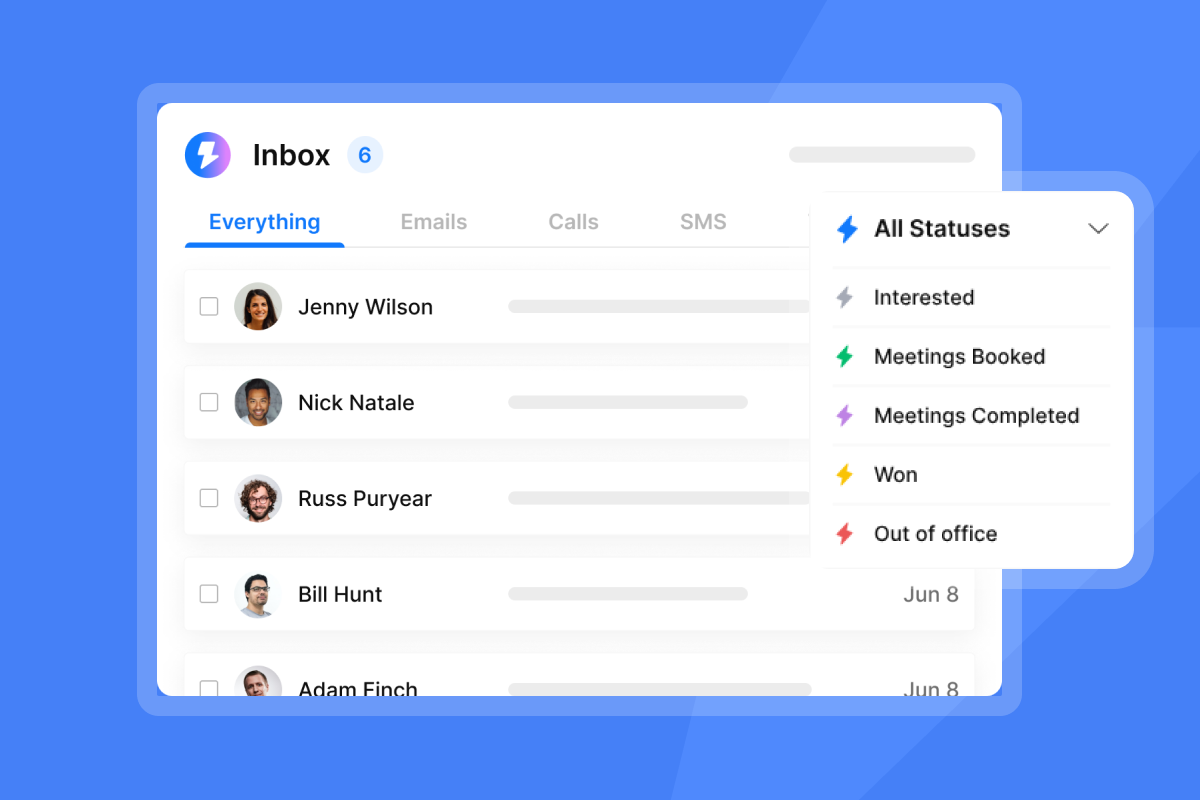
Instantly's Unibox consolidates all cold email replies into one interface. You sort, filter, tag, and respond without switching between accounts.
Unibox provides advanced filtering by campaign, client, sender domain, and custom tags. You view all demo requests across every client in one queue, or drill down to a specific campaign's performance.
"The platform is intuitive and delivers great results. The analytics give us exactly what we need to optimize campaigns quickly." - User on G2
Unlimited accounts and deliverability tools for scale
Instantly's unlimited email accounts model lets you add as many sending inboxes as needed for a flat monthly fee. Built-in warmup across all accounts ensures new inboxes build engagement history before you send cold campaigns.
Inbox Placement tests run automatically, checking whether your emails land in primary, promotions, or spam folders. When deliverability dips, you get alerts and troubleshooting guidance.
Watch this full Instantly tutorial to see how unlimited accounts, warmup, Unibox, and AI Reply Agent work together.
Turn reply chaos into predictable pipeline
Email triage determines how many replies convert into booked meetings, how safely you scale across client domains, and how profitably you grow your agency. Manual triage caps your growth. Structured, AI-powered triage breaks that ceiling.
Start by defining clear reply categories and priority levels. Set up filtering and routing rules that automatically move high-intent replies to the right rep's queue. Build response templates to ensure consistency. Then automate classification and drafting with AI.
Instantly gives you the full stack: unlimited sending accounts on a flat fee, built-in warmup and deliverability monitoring, Unibox for centralized reply management, and AI Reply Agent to handle classification and drafting. You scale across 10 clients or 100 without compounding tool costs or burning out your team.
Ready to apply this playbook? Try Instantly free and use the triage workflows inside the app to convert more replies into booked meetings while protecting client domains.
FAQs
What reply volume typically requires formal email triage for agencies?
Agencies typically need formal triage when manual review causes missed follow-ups and response delays, especially when managing multiple client campaigns simultaneously.
How accurate is AI at classifying cold email replies?
AI classification systems continuously improve with feedback and new interaction patterns, with accuracy increasing as models learn from your specific reply types and qualification criteria.
Can email triage improve cold email deliverability?
Yes. Fast, consistent reply engagement signals active conversations to mailbox providers, improving sender reputation and reducing spam folder placement over time.
How long does it take to set up an automated triage system?
Initial setup with clear categories and routing rules takes a few hours. AI configuration adds another hour or two, with ongoing refinement based on weekly accuracy reviews.
Does Instantly's AI Reply Agent require manual review before sending?
You choose. Autopilot mode sends AI-drafted replies automatically for routine inquiries. Human-in-the-loop mode flags drafts for rep review before sending, giving you full quality control.
Key terms glossary
Email triage: The systematic process of classifying, prioritizing, and responding to incoming email replies to identify valuable leads quickly and ensure timely action.
Intent signals: Specific keywords, phrases, or behaviors in a reply that indicate a prospect's interest level, urgency, or readiness to take the next step in the sales process.
Lead scoring: An AI-powered method of assigning scores to leads based on firmographics, behavioral data, and engagement patterns to prioritize outreach and follow-up.
Sender reputation: A score assigned by mailbox providers based on engagement quality, complaint rates, and bounce rates that determines whether future emails land in primary inbox or spam.
Unified inbox (Unibox): A centralized dashboard that consolidates replies from multiple email accounts or campaigns into one interface for faster triage and response management.


