


Updated October 17, 2025
TL;DR: Pick pricing that scales with throughput, not headcount. Per-seat tools look fine for one to three reps, then compound with each new user and add-on. Your real cost comes from deliverability controls and AI usage, not the sticker price. Flat-fee platforms with unlimited inboxes and warmup keep TCO predictable for agencies and lean teams. Instantly publishes pricing for Outreach, SuperSearch, and CRM, with unlimited accounts and warmup on all Outreach plans, plus SISR on Light Speed for advanced inbox placement control.
How this guide helps
This guide breaks down pricing models, common tiers, and total cost of ownership for cold email and sales engagement. You also get a comparison table, a Total Cost of Ownership (TCO) checklist, and advice to budget with confidence.
Understanding core pricing models
Per-user pricing: what it means for your team
- What it is: You pay per person who logs in.
- Where you see it: Many sales engagement platforms and CRMs.
- Implication: Costs scale with headcount. Reduce spend with seat governance, shared workspaces, and clear roles.
Per-seat pricing: scaling with individual access
- What it is: Similar to per-user, sometimes with role-based limits.
- Where you see it: Mid-market and enterprise SEPs.
- Implication: Expect onboarding, training, and support line items in year one. Larger suites often require more setup, which extends time to value.
Flat-fee pricing: the appeal of unlimited accounts
- What it is: One price per workspace or module, often with unlimited inboxes.
- Where you see it: Email-first outreach platforms.
- Implication: Useful for agencies and lean teams. Cost scales with features and credits, not headcount. Instantly includes unlimited email accounts and warmup on all Outreach plans.
Volume-based pricing: when scale dictates cost
- What it is: Costs tied to sends, credits, or API usage.
- Where you see it: Lead credits, AI usage, and infrastructure like dedicated IPs.
- Implication: Efficient at low volume. Can spike as you grow if you do not monitor usage. Dedicated IPs from cloud senders often start near $24.95 per IP per month.
Pricing tiers and ranges for leading platforms
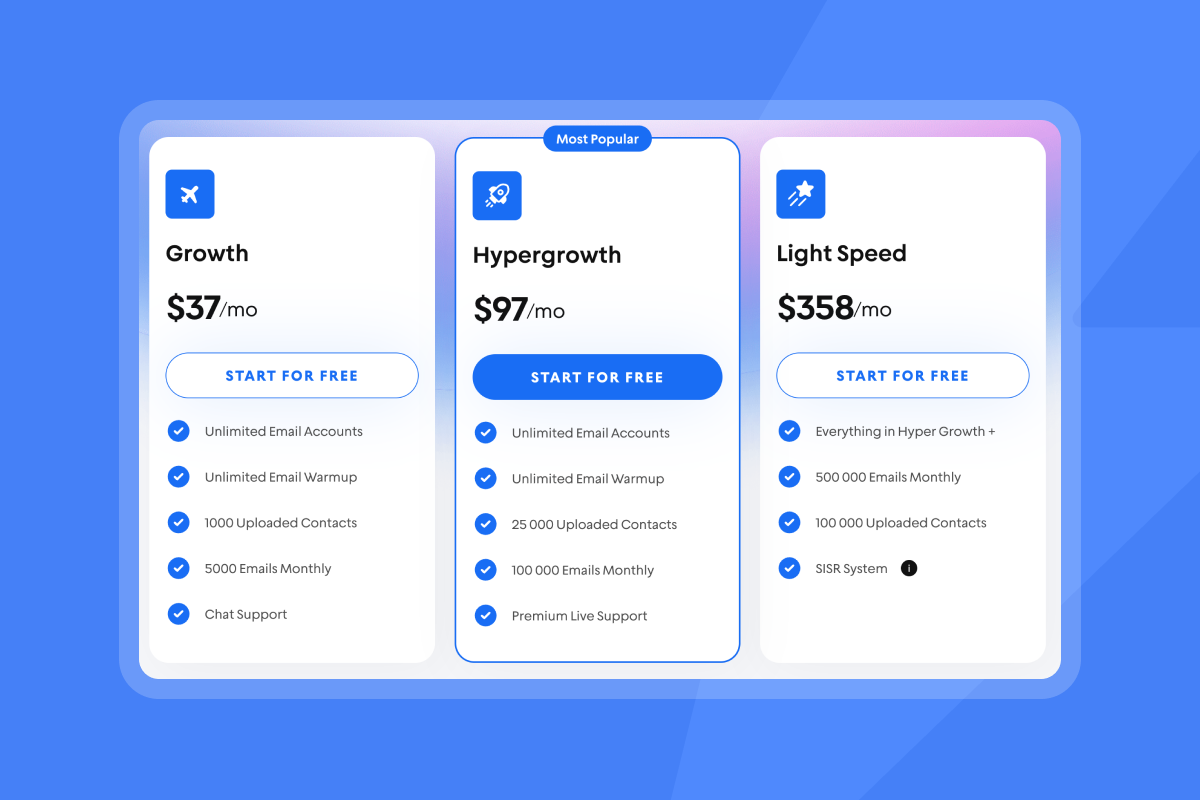
Instantly offers a flat pricing model with unlimited accounts and warmup for those accounts on all plans. Meaning you can predictably control your costs.
Key platforms, entry tiers, and price models
| Platform | Entry plan | Price model | Typical price or signal |
|---|---|---|---|
| Instantly | Growth Outreach | Flat fee | $37 per month. Unlimited accounts and warmup. Instantly pricing |
| Apollo | Basic | Per seat | About $49 per user per month, with higher tiers above that range. |
| Mailshake | Email Outreach | Per seat | About $59 per user per month, with higher tiers available. |
| Pipedrive | Lite | Per seat | Often starts in the mid-$20s per seat per month. |
| Woodpecker | Cold Email | Per seat | Commonly starts near the high-$20s per seat per month. |
| Outreach | Enterprise SEP | Per seat | Pricing typically quote-based for annual contracts. |
Instantly is by far and away the leader when it comes to offering a fixed price with unlimited accounts, warmup along with offering other tools like CRM, Leads data with SuperSearch it can also reduce your tool sprawl and costs way beyond mailboxes. Watch the full Instantly stack in action on Youtube:
Key cost drivers: beyond the base price
Deliverability features and their cost impact
Deliverability is a system. Budget for these line items:
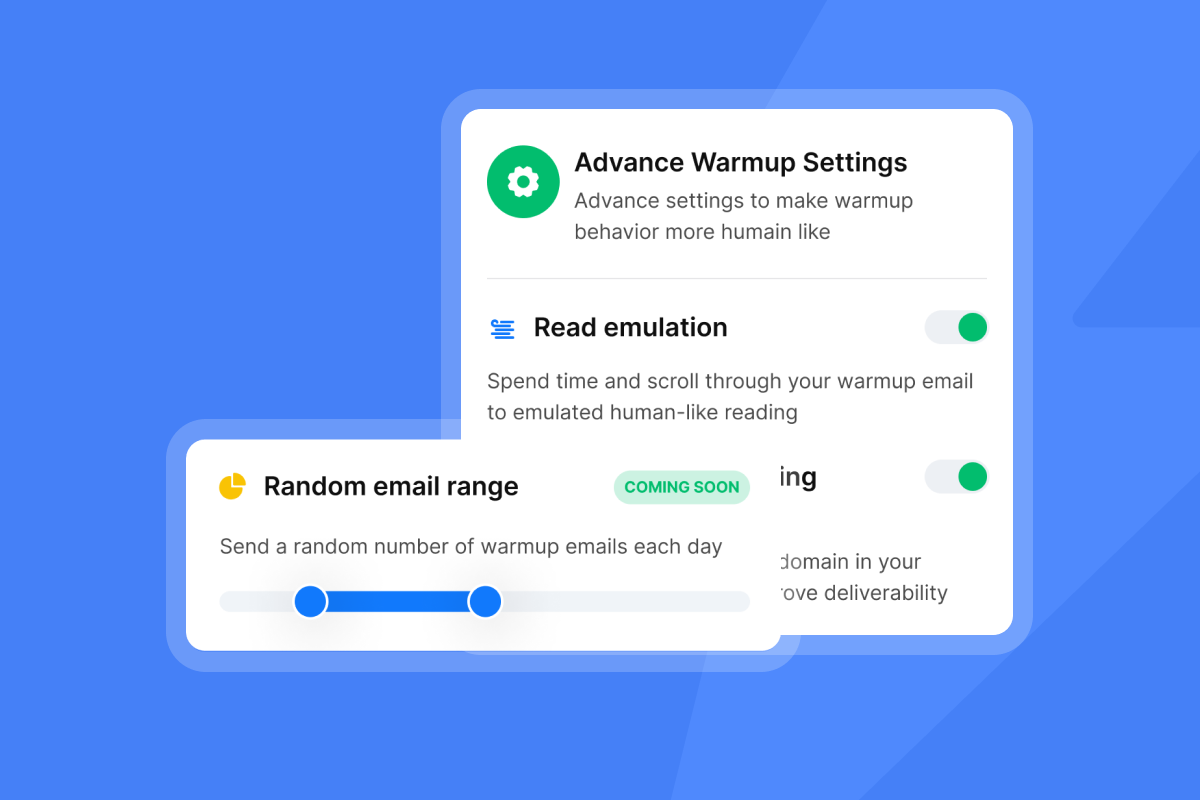
Email warmup and ramp: Build sender reputation before production sends. Standalone warmup tools often range from tens of dollars per inbox per month.
Inbox rotation and adaptive sending: Rotate across multiple inboxes and shape throughput. Cap daily sends per inbox, use paced send windows, and pause sends when placement dips. Instantly supports rotation and pause logic inside campaigns. See the cold email masterclass.
Domain audit and authentication: SPF, DKIM, and DMARC alignment plus blacklist checks. For an independent view of dedicated IP trade-offs, read the EmailToolTester overview.
Dedicated IPs and SISR: Dedicated IPs typically add about $24.95 per IP per month in major clouds. Light Speed adds SISR with private servers and IP pools to control placement at scale.
Inbox placement testing: Seed-list tests by provider and folder with alerts when placement shifts. Learn more about Inbox Placement.
List hygiene and verification: Reduce bounces and protect sender reputation. Verified lead data and enrichment cut data churn before you send.
Instantly has a private deliverability network of 4.2M+ accounts that underpins warmup and placement testing. Read how it compares to other sales engagement products.
"Deliverability tools that actually move the needle: warmup, inbox rotation, and smart sending windows help us land in Primary instead of Promotions/Spam." - Anthony V. on G2
"Unlimited Email inbox warmup is included with all the plans, and you get access to the Unibox at all plans too. This saves a ton of time." - Chinmay K. on G2
AI capabilities and their pricing
- Drafting and personalization: Often bundled in higher tiers or priced by credits. Analysts note AI can automate drafting, triage, and follow-ups so reps spend more time selling. See this Forbes Council article and Windows Central coverage.
- AI reply handling: Instantly’s AI Reply Agent classifies and answers in minutes. Each AI reply costs 5 Instantly credits, which makes budgeting straightforward.
- Agents for research and campaign setup: Instantly Copilot. targets, drafts, enriches, and runs recurring tasks to keep campaigns fresh. For agents in action, watch This AI Agent Replaces Your Sales Team on YouTube.
Other common add-ons and hidden fees
- Onboarding and setup: Enterprise suites often charge one-time onboarding. Analysis of seat-based platforms highlights hidden costs and complexity in yearly contracts. See Avoid Salesloft's hidden costs.
- Priority support: Premium support tiers may add per-seat or per-workspace fees.
- Integrations: Deep CRM sync may need an iPaaS or partner connector. Review Instantly’s integrations hub.
- Dedicated IP pool growth: Buying IPs a la carte compounds monthly at roughly $24.95 per IP.
Total cost of ownership (TCO) explained
Direct costs
- Base plans: Outreach, data, CRM, and any visitors pixel. A common stack is Outreach Growth $37 + SuperSearch Growth $47 + Growth CRM $47 ≈ $131 per month.
- Add-ons and credits: Lead credits and AI credits for replies or drafting. Budget using the 5 credits per AI reply guideline.
- Deliverability controls: Warmup, inbox placement tests, and any dedicated IPs if you manage infra directly.
- Onboarding and support: Some suites bundle paid onboarding and premium support.
Hidden or indirect costs
- Data quality issues: High bounces waste credits and hurt sender reputation. Re-verification and rework add labor.
- Deliverability dips: Spam placement reduces replies and meetings. Dedicated IPs and placement testing help, but you still need a ramp and hygiene system.
- Manual process time: Without AI and unified inbox triage, teams spend hours on low-value tasks.
- Integration complexity: DIY syncs and brittle zaps create maintenance overhead if you lack native depth.
How to calculate your TCO in 7 steps
- List base modules you need for 12 months: Outreach, data credits, CRM, visitors pixel.
- Estimate inbox count and per-inbox daily cap. Keep sends at or below 30 emails per inbox per day. Use rotation across multiple senders.
- Add deliverability controls: warmup, placement tests, and any dedicated IP costs if not included.
- Model AI usage: drafting volume and reply handling. In Instantly, budget 5 credits per AI reply.
- Include onboarding, training, and support where relevant.
- Add integration work: iPaaS fees and maintenance time if needed.
- Convert to cost per meeting: divide monthly TCO by booked meetings for a clear ROI signal.
Evaluating pricing for your use case
For growth marketers: predictable scaling and ROI
What matters most: Inbox placement, fast A/B tests, and clean reply handling to lift reply rate and meetings.
Pricing risks: Credit burn from AI and lead data when tests are unfocused.
Playbook:
- Start with Outreach Growth and SuperSearch Growth. Scale once reply rate rises on verified lists.
- Run Inbox Placement tests on active campaigns. Pause sends when placement drops and fix alignment before resuming.
- Use AI to draft and iterate faster to recover hours per week. Watch how Instantly's AI reply agent does this for you:
For agency operators: flat-fee and multi-client management
What matters most: Unlimited inboxes, safe domain ramp plans, client workspaces, and predictable pricing.
Pricing risks: Per-seat upsell, per-inbox warmup fees, and piecemeal IP costs.
Agency checklist:
- Unlimited accounts. Avoid per-inbox costs.
- Deliverability system. Use placement tests, ramp guardrails, and domain safety tooling backed by a large warmup network.
- IP strategy. If you need dedicated IPs, model monthly spend or choose a plan with private IP pools like Light Speed with SISR.
- AI reply handling. Budget credits based on expected replies.
- Off-ramps. Favor monthly terms or clear ramps to reduce renewal friction.
For sales leaders: predictable team scaling and deliverability
What matters most: Primary inbox placement, governance, CRM handoff, and audit-friendly reporting.
Pricing risks: Per-seat creep, paid onboarding, and hidden integration costs.
Playbook:
- Standardize caps and sequencing. Keep sends at or below 30 per inbox per day. Use send windows and pause when placement dips.
- Enforce hygiene. Verify contacts and test placement on active campaigns.
- Consolidate reply handling. A unified inbox with AI triage reduces manual work and speeds responses.
"Simple and well-designed UX... the AI is capable of entering campaign configurations and applying fixes, which is a huge time saver!" - guillaume n. on G2
"With Instantly, I can manage individual campaigns in one place, including getting feedback from customers and having conversations with them." - Verified User in Information Technology and Services on G2
Validate CRM sync paths. Confirm field mapping, dedupe, and error handling before rollout.
For startup founders: transparent growth and ROI math
What matters most: Time to first meeting, low TCO, and simple billing you can pause or scale.
Pricing risks: Lock-ins, seat taxes, and overages.
Playbook:
- Start small. Outreach Growth $37 + SuperSearch Growth $47 ≈ $84 per month until replies are consistent.
- Track cost per meeting weekly. Improve data quality before sending.
- Automate early. Use Copilot to stand up sequences and AI Reply Agent to triage responses, then switch to human-in-the-loop where nuance matters.
What good ROI looks like
- Deliverability: Inbox placement trending up with stable caps.
- Efficiency: Hours saved weekly through AI drafting and reply triage so reps spend more time selling.
- Outcome metrics: Reply rate rising on verified lists and meetings booked increasing with domain health under control.
My Final take
Your true TCO comes from inbox placement, data quality, and AI usage. Agencies and lean teams often win with flat-fee pricing, unlimited inboxes, and built-in warmup. Enterprise teams should model seats plus deliverability and integration effort before buying. Use the table and TCO steps above to plan with confidence.
Put your TCO math to work. Compare your current stack against Instantly Outreach, SuperSearch, and CRM, then run a 14-day pilot with Inbox Placement tests and safe caps.
FAQ
What is the average entry-level cost for cold email software?
Flat-fee entry plans start near $37 per month with unlimited inboxes and warmup in platforms like Instantly. For context, see this Instantly pricing overview.
How do deliverability features impact the total cost of an outreach tool?
They can dominate your TCO. Budget for warmup, placement testing, and, if you manage infra, dedicated IPs at about $24.95 per IP per month.
What are credit-burn models in AI outreach tools?
AI actions consume credits. In Instantly, each AI Reply Agent message costs 5 credits, so reply volume maps directly to spend.
How can agencies find truly unlimited cold email platforms?
Look for flat fees with unlimited inboxes, unlimited warmup, and placement testing. These keep costs predictable while protecting deliverability at scale.
What hidden costs should I watch for in sales engagement platform pricing?
Per-seat creep, four-figure onboarding, dedicated IP fees, and integration maintenance. Review contract terms and renewal conditions before you commit annually.


