.svg)
%20(1).svg)


TL;DR: Most cold emails miss the primary inbox because of weak sender reputation, missing authentication, high bounces, and aggressive ramps from cold domains. Treat deliverability as a system. Authenticate domains, warm gradually, send to verified contacts, and test placement before scaling. Average inbox placement sits near 83 percent, so every gain matters, as shown in recent email deliverability statistics from EmailToolTester. Instantly automates warmup across a private deliverability network, adds SISR on higher tiers to isolate risk, runs automated inbox placement tests with alerts, and uses AI to improve content and reply handling. The result is steadier inbox placement and more replies for teams running many inboxes.
For sales leaders, inconsistent inbox placement puts pipeline at risk. Missed inboxing means fewer opens, fewer replies, and missed targets. The causes are systemic. Sender reputation, technical setup, list hygiene, and volume control. This guide explains the pitfalls and shows how Instantly standardizes deliverability so more emails land in the primary inbox.
Short TODO Checklist
- DNS setup: Publish SPF, DKIM, and DMARC for every sending domain. Verify alignment before you send with Instantly’s inbox placement checks.
- Warmup: Warm new domains and inboxes for at least 2 to 4 weeks. Gate ramps by placement and bounce trends using email warmup.
- Bounce control: Keep hard bounces under 2 percent using bounce-rate guidance from Campaign Monitor.
- Human-like sending: Vary send windows, rotate many inboxes, and keep first touches short and relevant.
- Continuous testing: Run automated inbox placement tests. Pause or re-warm when health dips.
The hidden costs of poor email deliverability for sales leaders
Impact on pipeline and revenue
EmailToolTester’s most recent research puts average inbox placement near 83 percent, which implies roughly 1 in 6 messages go to spam or never arrive. That compression lowers reply rates and meetings even when copy is strong. See the analysis of email deliverability statistics.
Damaged brand and domain reputation
Spam placement is a negative loop. Once bounces and low engagement degrade trust, recovery can take weeks of clean sending at lower volume. You can catch issues early and enforce slow-ramp guardrails with Instantly’s automated inbox placement tests.
Wasted resources and frustrated teams
Gartner reports B2B buyers spend about 17 percent of their buying time meeting all suppliers combined, so missing the inbox during that window costs real pipeline.
Why your cold emails land in spam: common pitfalls
Sender reputation: the trust factor
Mailbox providers score every domain and IP on bounces, complaints, send spikes, and engagement. New or previously abused domains lack trust, so rapid volume jumps get filtered. Ramp gradually, spread throughput across many inboxes, and keep engagement steady. You can standardize these checks with Instantly’s inbox placement.
Technical setup: SPF, DKIM, DMARC
Authentication proves you are allowed to send and that messages were not altered. Without valid SPF and DKIM, and a sensible DMARC policy, primary-inbox odds drop sharply. Verify records per domain and re-check after any vendor change. Instantly’s inbox placement tests include authentication checks, and Google’s Gmail sender guidelines detail the bulk sender requirements that now apply.
Warmup and volume management
Warmup builds a positive history. Start slowly, simulate natural engagement, and increase volume only when placement and bounce targets are met. Instantly recommends keeping warmup on continuously, with a minimum of two weeks and preferably four for brand-new domains using email warmup. For a walkthrough, watch Instantly’s cold email deliverability guide or this tutorial on avoiding spam with better deliverability.
List hygiene and bounce rates
Sending to invalid or stale addresses triggers hard bounces and traps, which crush reputation. Use verified contacts and remove catch-alls. Aim to keep hard bounces under 2 percent per Campaign Monitor’s guidance.
Content and personalization
Filters weigh message patterns. Generic, repetitive, or link-heavy content at scale hurts placement. Short, plain-text, context-rich messages tend to earn more replies. Benchmarks suggest an average cold email reply rate around 8.5 percent, with top quartile campaigns at or above 20 percent, as shown in Mailmeteor’s cold email statistics.

How Instantly ensures primary inbox placement
Instantly treats deliverability as a system you can standardize and audit across teams.
Automated warmup and the private deliverability network
Instantly automates warmup across a private deliverability network that simulates opens, replies, and spam rescues to build trust before live campaigns. The company describes using over 4,200,000 real accounts in its warmup pool, coordinated through a private network of headless browsers that generates safe, human-like activity in its overview of email deliverability solutions.
- Why it matters: Consistent warmup signals teach providers that recipients engage with you, which improves early placement and supports safer scaling. For setup, see a step-by-step email warmup tutorial.
SISR for isolation and resilience
SISR stands for Server and IP Sharding and Rotation. Instantly continuously monitors IP performance, rotates high-reputation IPs, removes underperformers, and assigns dedicated or private IP blocks on Light Speed and larger-scale use. That isolates risk so one IP event does not derail a campaign day. Learn more in the SISR help doc on server and IP sharding and rotation.
- Why it matters: At volume, infrastructure risk is real. Sharding and rotation reduce single-point-of-failure incidents and protect ongoing campaigns.
Inbox placement tests and real-time automations
Automated tests send your message to monitored inboxes and report where it lands by provider and region. Instantly adds content scoring, blacklist checks, and AI suggestions, plus rules that can pause a mailbox, re-enable slow ramp, or re-warm if placement dips below your target. See how it works in inbox placement automated tests.
- Why it matters: You catch small drifts before they become bad weeks and maintain an audit trail RevOps can trust. A full walkthrough is in the Ultimate Guide to Cold Email Deliverability.
Reputation protection and bounce detection
Instantly enables reputation protection features like global block lists, bounce detection, ESP matching, and provider routing to avoid risky sends and problematic routes. Thresholds, auto-pauses, and slow-ramp modes prevent damage when signals dip. Compare options in the email outreach plans comparison.
AI Copilot for optimized content and targeting
Copilot is an in-app assistant that helps research accounts, generate sequences, and summarize analytics. It pulls context from your website and ICP to craft more relevant outreach and can schedule recurring tasks for ops. Better relevance reduces content-triggered filtering and lifts replies. Explore AI Copilot and walkthrough on Youtube.
What users say
"They specialize in getting emails delivered at a much higher rate than our previous email provider..." - G2 review
"It has all the tools needed for cold outbound in one place." - G2 review
"You can hop on a live chat with a real person in minutes, and get the direct answers you need." - G2 review
Beyond deliverability: Instantly.ai’s comprehensive outreach solution
SuperSearch: 450M+ verified B2B leads
Prospecting is built in. SuperSearch taps 450M+ contacts and runs waterfall enrichment across multiple providers, then pushes verified work emails straight into campaigns or your CRM. Start in SuperSearch.
Unlimited email accounts and flat-fee pricing
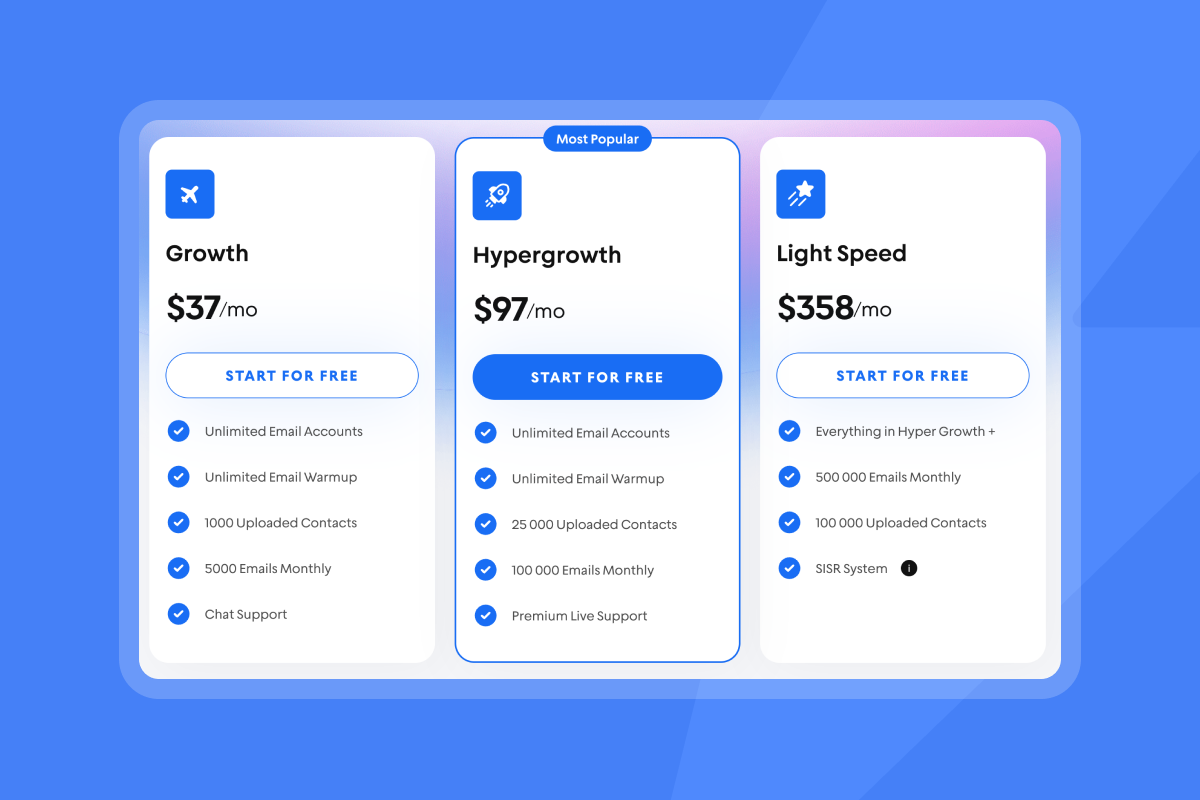
All outreach plans include unlimited email accounts and unlimited warmup. Pricing scales by plan and uploaded contacts, not by seat, which helps agencies and multi-brand teams manage many inboxes without per-seat penalties. Confirm limits in the email outreach plans comparison.
Unibox and AI Reply Agent for efficient reply management
Unibox centralizes replies across all connected inboxes. Teams get faster detection, sentiment tags, and bulk actions so no reply slips through. The AI Reply Agent can answer inbound leads in under 5 minutes and is configurable as Autopilot or Human-in-the-Loop, with usage billed in Instantly credits. See Unibox v2.
Team controls and audit-friendly reporting
Invite team members without per-seat costs, standardize sequences and ramp rules, and sync activities to your CRM through native settings or a partner connector like OutboundSync for HubSpot and Salesforce. Review the Salesforce and HubSpot integration via OutboundSync.
Top SDR and BDR tools: a practical comparison
Pattern-level comparison to help shortlist.
| Tool | Pricing model | Warmup included | Deliverability network | Inbox placement tests |
|---|---|---|---|---|
| Instantly.ai | Flat fee ($37/mo–$97/mo) | Yes (unlimited) | Private 4.2M network | Yes (unlimited) |
| Apollo | Per-seat | Yes (built-in) | Private | No |
| Outreach | Per-seat | No | No | No |
| Salesloft | Per-seat | No | No | No |
| Lemlist | Per-seat ($69–$99/user/mo; enterprise custom) | Yes | 20K network | Yes |
How to fix spam placement now: a deliverability checklist
Use this weekly. Assign each item to an owner.
DNS and compliance
- SPF, DKIM, DMARC: Published and verified for each sending domain. Validate alignment in inbox placement.
- Alignment: From domain aligns with SPF and DKIM.
- Blocklists: No domain or IP on major lists. Recheck weekly.
- Data processing: DPA reviewed. Sub-processors documented. See Instantly sub-processors.
- Standards: Follow Gmail sender guidelines.
Warmup and ramp
- Warmup window: Keep warmup on. For new domains, run at least 2 to 4 weeks using email warmup.
- Ramp gates: Scale only when seed tests are healthy and bounces are controlled.
- Inbox rotation: Distribute sends across many inboxes and stagger send windows.
Data hygiene
- Verified contacts: Import verified work emails only.
- Bounce control: Keep hard bounces under 2 percent with guidance from Campaign Monitor.
- Segmenting: Match ICP fields like role, industry, and time zone.
Sending behavior
- Send windows: Local business hours, varied within a 2 hour band.
- ESP matching: Route Google to Google and Microsoft to Microsoft where possible using ESP matching.
- Link discipline: Favor plain text on first touch. Limit links and heavy HTML.
Monitoring and triage
- Inbox tests: Schedule automated inbox placement tests with alerts and automations.
- Auto-pauses: Pause or re-warm the moment placement dips.
- Root cause: Log issues and fixes. Adjust ramp and copy based on evidence.
For a ened to end tutotial on the abvoe check our How To Avoid Emails Going To Spam video here:
Essential features of top SDR & BDR tools checklist
- Unlimited or high mailbox caps: Run safe throughput without per-seat penalties.
- Warmup included: Automated, always-on warmup to protect sender reputation.
- Placement testing: Automated seed tests with content scoring and blacklist checks.
- Lead quality: Verified data and enrichment to reduce bounces.
- Reply handling: Unified inbox plus AI assistance for speed-to-lead under 5 minutes.
- Team governance: Roles, global block lists, and audit-friendly reporting.
- CRM sync: Native or partner-based integrations for attribution and routing, as documented in inbox placement automated tests.
Choosing the right cold email platform for your role
For sales leaders: predictable pipeline and standardization
- Priorities: Primary-inbox placement, auditable ramps, team controls, accurate reporting, CRM sync.
- Instantly fit: Unlimited accounts on a flat fee, automated placement tests, team reporting, and CRM options. Map plan limits to targets in the email outreach plans comparison.
For agency operators: scalable campaigns and flat-fee economics
- Priorities: Many inboxes, isolation between clients, fast setup, variable volume.
- Instantly fit: Unlimited mailboxes, a private deliverability network, SISR on Light Speed, credits for AI, and no per-seat tax. See the plans comparison.
For growth marketers: A/B testing and granular metrics
- Priorities: Fast experimentation, content scoring, seed-list placement, clean analytics.
- Instantly fit: Inbox tests, A/Z testing, Copilot for copy, unified reporting, and connectors. Review inbox placement automated tests.
For startup founders: high ROI and efficient lead generation
- Priorities: Low cost, verified data, simple setup, automated replies.
- Instantly fit: Growth plan includes unlimited mailboxes and warmup, SuperSearch for 450M+ leads, and AI Reply Agent for 24/7 speed-to-lead. Confirm features in the email outreach plans comparison.
The bottom line
Deliverability is a system. Authentication, warmup, verified data, sending rules, and continuous testing create predictable inbox placement and reliable pipeline. Instantly.ai packages these controls with flat-fee economics, AI, and team reporting so sales leaders can scale outreach with fewer surprises. Start with a small pilot, enforce the checklist, and only scale when tests stay green.
Try Instantly free to ensure your cold emails land in the primary inbox.
Further learning:
Frequently asked questions
- What are the top causes of spam placement?
Missing SPF, DKIM, or DMARC, weak reputation, high bounces, complaint spikes, aggressive ramps, and generic content. Fix DNS, warm gradually, verify data, and test placement using inbox placement. - How long should I warm a new domain?
Keep warmup on. For brand-new domains, plan at least 2 to 4 weeks, then gate ramps by placement and bounce trends rather than time alone with email warmup. - What reply rate should I expect from cold email?
Benchmarks show an average reply rate near 8.5 percent, with the top 25 percent of campaigns at or above 20 percent, according to Mailmeteor’s cold email statistics. - How does Instantly’s SISR help deliverability?
It shards and rotates sending across IPs, replaces flagged IPs, and assigns dedicated IP blocks on Light Speed to isolate risk, as explained in server and IP sharding and rotation. - Can Instantly integrate with my CRM and Slack?
Yes. Use native options and partner connectors like OutboundSync to route activities and replies into HubSpot and Salesforce, plus Slack alerts. Setup details are in Salesforce and HubSpot integration via OutboundSync.
Key terminology defined
- Primary inbox: The folder recipients read most, not Promotions or Spam.
- Sender reputation: Trust score mailbox providers assign to your domain and IP.
- Warmup: Gradual sends that build positive history and engagement signals. Read about email warmup.
- List hygiene: Removing invalid, risky, or stale contacts to prevent bounces.
- Verified contacts: Work emails confirmed deliverable by a verifier or enrichment. Learn more in SuperSearch help.
- Send windows: Time ranges when campaigns are allowed to send.
- ESP matching: Routing Google to Google or Microsoft to Microsoft to lift placement. See ESP matching.
- Throughput: Total sends across connected inboxes in a time period.



