


Updated March 4, 2026
TL;DR: Your subject lines determine inbox placement, not just open rates. The most common mistakes include fake "Re:" prefixes, vague openers, lines too long for mobile, spam-triggering punctuation, clickbait, missing personalization, and seller-centric framing. Each mistake triggers negative engagement signals that damage your domain reputation over time. Fix them by running A/Z tests in Instantly to isolate what actually drives replies, and use the analytics dashboard to tell the difference between a copy problem and a deliverability problem.
Subject lines aren't just a copy problem. They're a deliverability problem. Email service providers evaluate engagement signals including open rates, delete-without-open rates, and spam complaints to decide where your next email lands. A bad subject line trains inbox providers to route your entire domain to spam. Without the right cold email tools, most teams don't catch the problem until reply rates have already collapsed.
We'll walk you through the seven subject line mistakes most likely to burn your domain and show you how to build a testing system that fixes them.
Why bad subject lines destroy domain reputation
Your open rates are a leading indicator, not a vanity metric, and when they drop it often means your domain is losing trust with inbox providers before anyone reads your email body.
ESPs score sender reputation using spam complaint rates, bounce rates, unsubscribes, and engagement rates when deciding where to deliver your mail. High delete-without-open rates, which happen when a subject line looks spammy or irrelevant, signal that your domain sends content recipients don't want, and that signal compounds across every send you make. Content filtering focuses on behavioral patterns over specific words, so a domain with consistent low engagement will get filtered even when the email body is clean and compliant.
The average cold email open rate dropped from 36% to 27.7%, with top-quartile B2B programs hitting 50% or higher through rigorous list hygiene and testing. A properly warmed sending infrastructure, like Instantly's Email Warmup handles the ramp automatically.
Benchmarks show that open rates below 15% typically point to a deliverability or targeting problem. If your team is consistently below those thresholds, the mistakes below are likely the cause. For a full breakdown of the technical factors affecting inbox placement, read Instantly's cold email deliverability guide.
7 subject line mistakes that trigger spam filters and kill replies
For each mistake below, you'll find what it is, why it fails technically or psychologically, and a concrete before-and-after fix.
1. Using false prefixes like "Re:" or "Fwd:"
The mistake: Adding "Re:" or "Fwd:" to a cold email subject line to make it look like part of an existing conversation.
Why it fails: You're breaking trust immediately and risking legal exposure. CAN-SPAM prohibits misleading subject headings that mislead recipients about the contents or subject matter of a message. Fake "Re:" or "Fwd:" prefixes are among the fastest ways to trigger spam filters. Under GDPR's Article 5, email communication must be lawful, fair, and transparent, making deceptive framing a compliance risk in EU markets too. Even when it generates an open, the prospect feels tricked and won't reply, so the short-term spike isn't worth the domain damage or legal exposure.
The fix:
Mistake category | Bad example | Good example | Why it works |
|---|---|---|---|
False prefix | Re: Following up | Question about [Company]'s workflow | Honest, specific, no deception |
2. Writing vague "Quick question" openers
The mistake: Using openers like "Quick question," "Hi," "Checking in," or "Touching base."
Why it fails: These subject lines convey zero information about why the prospect should open the email, and in a crowded inbox they look identical to every other generic outreach message the prospect deletes without opening. Our cold email copywriting framework built around 400+ monthly replies consistently shows specificity as the primary driver of engagement, because generic openers train recipients to ignore your domain entirely.
The fix:
Mistake category | Bad example | Good example | Why it works |
|---|---|---|---|
Vague opener | Quick question | Question about [Company]'s onboarding flow | Signals relevance immediately |
3. Ignoring mobile preview text limits
The mistake: Writing subject lines longer than 50 characters, cutting off the value proposition on mobile before the prospect reads it.
Why it fails: 50-60% from mobile devices, and most mobile email clients between 33-43 characters. If your key message appears after the cutoff, decision-makers triaging on their phone never see it and swipe left.
The fix: Front-load your most important words and aim for 40-50 characters maximum. Pair the subject line with a tight preview text that continues the thought, because Gmail's preheader behavior lets a well-crafted preview extend your pitch even when the subject is cut short.
Mistake category | Bad example | Good example | Why it works |
|---|---|---|---|
Too long for mobile | A potential idea for improving your team's workflow automation and productivity metrics | Idea for [Company]'s workflow | Fits within 40-char mobile display |
4. Triggering spam filters with aggressive punctuation and caps
The mistake: Using ALL CAPS, multiple exclamation points, or heavy ellipses, for example "URGENT!! Read this now..." or "Last Chance...".
Why it fails: VerticalResponse's 2026 analysis shows that ALL CAPS combined with excessive punctuation increases spam scores by 40-60%, pushing emails into dangerous filtering territory. Modern spam filters use cumulative scoring across multiple signals, so combining urgency words with aggressive formatting significantly raises the probability your email routes away from the primary inbox. Beyond the filter risk, this formatting looks unprofessional to the senior B2B buyers you're trying to reach.
The fix: Use sentence case and drop exclamation points from subject lines. Urgency should come from the relevance of the content, not the formatting.
Mistake category | Bad example | Good example | Why it works |
|---|---|---|---|
Spam formatting | URGENT!! Your Q3 pipeline | Thought on your Q3 pipeline | Passes filters, looks professional |
Instantly's subject line conversion guide covers how to reframe seller-centric openers around prospect problems, with AI Copilot prompt templates for generating prospect-focused variants across different ICP segments.
5. Relying on clickbait instead of value
The mistake: Subject lines like "You won't believe this," "Dinner is on me," or "This changes everything."
Why it fails: Clickbait generates opens but kills replies, so your open rate metric spikes while reply rate collapses, and that mismatch signals to ESPs that your content isn't delivering on what the subject line promises. Spam filters flag this category of phrasing as high-risk. For B2B buyers, clickbait reads as unprofessional and burns the single credibility point you get with a cold email.
The fix: Promise something specific and relevant to their job. Watch what works across 1M cold emails for data-backed patterns on the subject line angles that actually drive replies at scale.
Mistake category | Bad example | Good example | Why it works |
|---|---|---|---|
Clickbait | This is a game-changer | 15% cost reduction for your AWS stack? | Promises specific, credible value |
6. Failing to personalize beyond {{firstName}}
The mistake: Using a subject line template that could be sent to any prospect without changing a word, with only a first name token swapped in.
Why it fails: Lack of relevance is the fastest path to the delete folder. Personalized emails generate higher rates compared to non-personalized emails, and researchshows personalized subject lines are 26% more likely to be opened. Using only {{firstName}} signals to a busy prospect that you copied and pasted their name into a mass blast.
The fix: Add {{CompanyName}}, a specific technology they use, a recent post they published, or an observation from their website. One Instantly user described scaling this approach directly:
Our personalization masterclass covers the mechanics in detail.
Mistake category | Bad example | Good example | Why it works |
|---|---|---|---|
No real personalization | Hi {{firstName}}, | Saw your post on scaling outbound | Shows you did the work |
7. Making the subject line about you, not them
The mistake: Subject lines like "Instantly demo," "Our services," or "Meeting request."
Why it fails: Your prospects don't care about you yet. They care about their problems, their quotas, and their team's performance, and a subject line that leads with your company name or product immediately signals that the email is about your needs, not theirs. It gets ignored before anyone reads a word of the body. Our cold email copywriting framework and copywriting masterclass Part 2 both frame the subject line as the prospect's problem stated concisely, not the sender's pitch.
The fix:
Mistake category | Bad example | Good example | Why it works |
|---|---|---|---|
Seller-centric | Instantly demo | Fixing deliverability at [Company] | Frames it around their problem |
Here's the full audit reference breakdown:
Mistake | Bad example | Good example |
|---|---|---|
False prefix | Re: Following up | Question about [Company]'s workflow |
Vague opener | Quick question | Question about [Company]'s onboarding flow |
Too long for mobile | A potential idea for improving your team's workflow automation... | Idea for [Company]'s workflow |
Spam formatting | URGENT!! Your Q3 pipeline | Thought on your Q3 pipeline |
Clickbait | This is a game-changer | 15% cost reduction for your AWS stack? |
No real personalization | Hi {{firstName}}, | Saw your post on scaling outbound |
Seller-centric | Instantly demo | Fixing deliverability at [Company] |
How to audit and optimize subject lines at scale
Fixing individual subject lines isn't a system, and guessing which version will perform better isn't either. A/Z testing is the system, and it removes opinion from the equation entirely.
A/B test subject lines using the A/Z method
Your goal with A/Z testing is to isolate the subject line as a variable, keep the email body identical across all variants, and let reply rate, not open rate, pick the winner.
Instantly's A/Z testing feature supports up to 26 variants within a single campaign step. Here's how to set it up:
- Navigate to your campaign sequence and click "Add variant" to create a new version of the step.
- Write 3-4 distinct subject line variants. Test radically different angles: short vs. long, question vs. statement, pain-focused vs. outcome-focused.
- Keep the body copy identical across all variants to isolate the subject line as the only variable.
- Enable Auto optimize A/Z testing in Campaign Options. Go to Campaign Options, then Advanced Options, then Auto optimize A/Z testing, select reply rate as your winning metric, and click Save.
- Send to a meaningful sample. Instantly recommends a minimum of 100-200 recipients per variant, with 1,000+ per variant producing the most reliable results.
- After one full business cycle, read the step analytics to compare opens, replies, and meetings booked across variants. Instantly automatically identifies the highest-performing variant and deactivates others.
Instantly's subject line A/B testing guide covers the statistical framework behind variant selection, including how to set sample thresholds and avoid calling winners before you have enough data.
Pick the winner based on reply rate because open rate tells you who clicked while reply rate tells you who cared, and those aren't the same metric. Optimizing for the wrong one produces results that don't translate to meetings booked.
"I like the real-time visibility into opens, replies, and engagement, which makes it simple to quickly understand what's working and how to optimize accordingly." - Steven M on G2
For a broader view of what's working in cold email right now, watch new cold email rules for 2026.
Monitor open rates to detect deliverability issues
Not every open rate problem is a subject line problem. If your subject lines are specific, short, and personalized but open rates are still below 20-30%, you likely have a deliverability issue rather than a copy issue, and the fix for each is different.
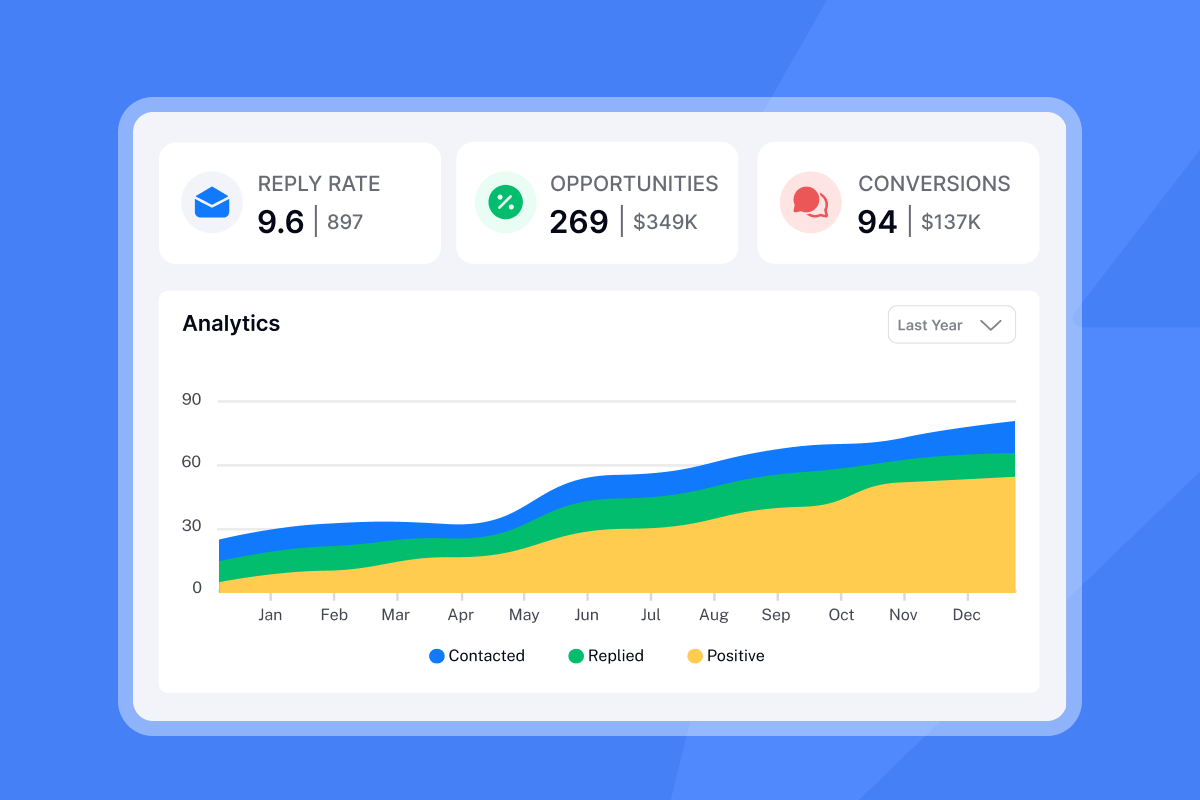
Use the Analytics tab in Instantly to watch two signals:
- Variant-level differences: If Subject A gets 40% opens and Subject B gets 12%, you've got a copy problem. Fix the weaker subject line.
- Sudden drops across all variants: If every variant takes a sharp simultaneous hit, you've got a deliverability problem. Pause sends, check domain health, re-verify your list, and restart at a lower send cap.
Our open rate diagnostic walks through the diagnostic steps in order. The cold email strategy guide provides additional frameworks for campaigns that consistently hit the primary inbox.
Run the audit this week
Your subject lines are the first filter standing between your pipeline and the spam folder. The seven mistakes above are fixable with a clear process: audit your active sequences against the table above, cut anything that relies on deception, vagueness, or seller-centric framing, and replace guessing with A/Z testing.
For any sequence where your open rates sit below 30%, start with our open rate diagnostic before changing copy, because a deliverability problem requires a different fix than a copy problem and treating one as the other burns time and sends.
Ready to run your first A/Z subject line test? Try Instantly's campaign editor free to set up your first four variants this week.
Frequently asked questions about cold email subject lines
What is a good open rate for cold email?
Aim for 50% or higher for well-targeted B2B campaigns. Verified Email research shows the median B2B open rate sits between 36.7% and 42.35% in 2025, while top-quartile programs exceed 50% through segmentation and deliverability optimization. Below 30% indicates a likely deliverability or targeting issue requiring investigation before you change copy.
How long should a cold email subject line be?
Keep it under 40-50 characters to ensure visibility on mobile. EmailToolTester's device testing shows most mobile email clients stop displaying subject lines between 33 and 43 characters, so front-loading your key message is essential.
Should I use emojis in B2B subject lines?
Generally no, especially for senior buyers. Emojis tend to lower open and reply rates in B2B contexts, and the risk of appearing unprofessional to C-suite or VP-level contacts typically outweighs any potential benefit. Brafton notes that results vary by industry, so test with caution rather than assuming a lift.
Does changing the subject line affect the email body?
No, but note that Instantly's threading logic means changing the subject in follow-up steps will break the email thread. Keep follow-up step subject lines identical to Step 1 if you want replies to land in the same thread.
How many subject line variants should I test?
Start with three to four clearly different angles, not minor word swaps. Instantly recommends at least 100-200 recipients per variant as a minimum, with 1,000+ per variant ideal for statistically reliable results before calling a winner.
Key terms glossary
Preview text: The short snippet of text displayed next to or below the subject line in an inbox, visible before the email is opened. A well-crafted preview text extends your subject line's pitch on mobile where character limits cut the subject short.
Spam trigger words: Words, symbols, and formatting patterns (such as "Free!", "$$$", ALL CAPS, or "!!") that email filters flag as likely spam, increasing the probability your email routes away from the primary inbox.
A/Z testing: A method of sending multiple variants of an email element (such as the subject line) to segments of your list to determine which version drives the best outcome, measured by reply rate or meetings booked rather than opens alone. We support up to 26 variants per campaign step.
Primary inbox: The main folder in an email client where important business emails are delivered, as opposed to Promotions, Social, or Spam folders. Landing in the primary inbox is the baseline requirement for any cold outreach to generate replies.
Sender reputation: A score that inbox providers assign to your sending domain based on engagement signals including open rates, reply rates, spam complaint rates, bounce rates, and delete-without-open behavior. Poor subject lines degrade your sender reputation over time by generating negative engagement signals.


