

With the prevalence of AI, it’s easy to ask LLMs like ChatGPT or Claude to write a sales email for you. But while AI is becoming an essential tool in scalable outreach campaigns, it’s vital to recognize that its quality is only as good as the input it receives.
If you want consistent replies, whether using AI or not, and tailored emails, the best place to start is with your email format. It serves as a guideline that you can easily plug and play for any segment, email template, or AI email prompt.
Why Should You Care About Your Email Format?
Email formats shouldn’t be left as an afterthought. The way you format your email copy affects how your email is perceived, from the introduction to your call-to-action. Here are the main reasons why you should care about how you format your email:
People Don’t “Read” Emails, They Triage Them
According to a study on email format by Georgia College, most recipients spend 15 to 20 seconds looking at an email. In that window, most scan through 50 words.
If you can’t get your point across fast and precisely, you’re likely to lose a valuable lead. In short, your prospect is speed-running their inbox. Format is how you make sure your message survives the scroll.
Formatting Measurably Increases Persuasion and Recall
In the same study, researchers tested two emails with identical content, but only one used “best practice” formatting. The formatted version was more persuasive and helped readers remember details more accurately.
On average, the formatted email scored higher in job attractiveness (5.14 vs. 4.57, a 12.5% increase), and it improved memory recall from 6.33 to 7.19 correct answers out of 9 (approximately 70.3% to 79.9% accurate or about 13.6% improvement).
“Top of the Page Rule”: Put the Point First or Get Your Email Ignored
The study recommends explicitly a direct organization for most emails: front-load the critical information first, so your goal is clear. On the other hand, an indirect structure (where you build context first and reveal the main point later) tends to result in longer emails.
Best Email Format Examples: Dissecting Emails and Templates
The best way to learn about email formats is by example. Below are emails and templates gathered from our community. We’ll break down the email format they used and how you can apply it to your own use cases.
Hook + Value + Call-to-Action
If you like straightforward emails, this simple email format might be something you’re already familiar with. You start with a simple hook, icebreaker intro, or a specific reference. Then, you tie that in with your value propositions and transition smoothly into your call-to-action.
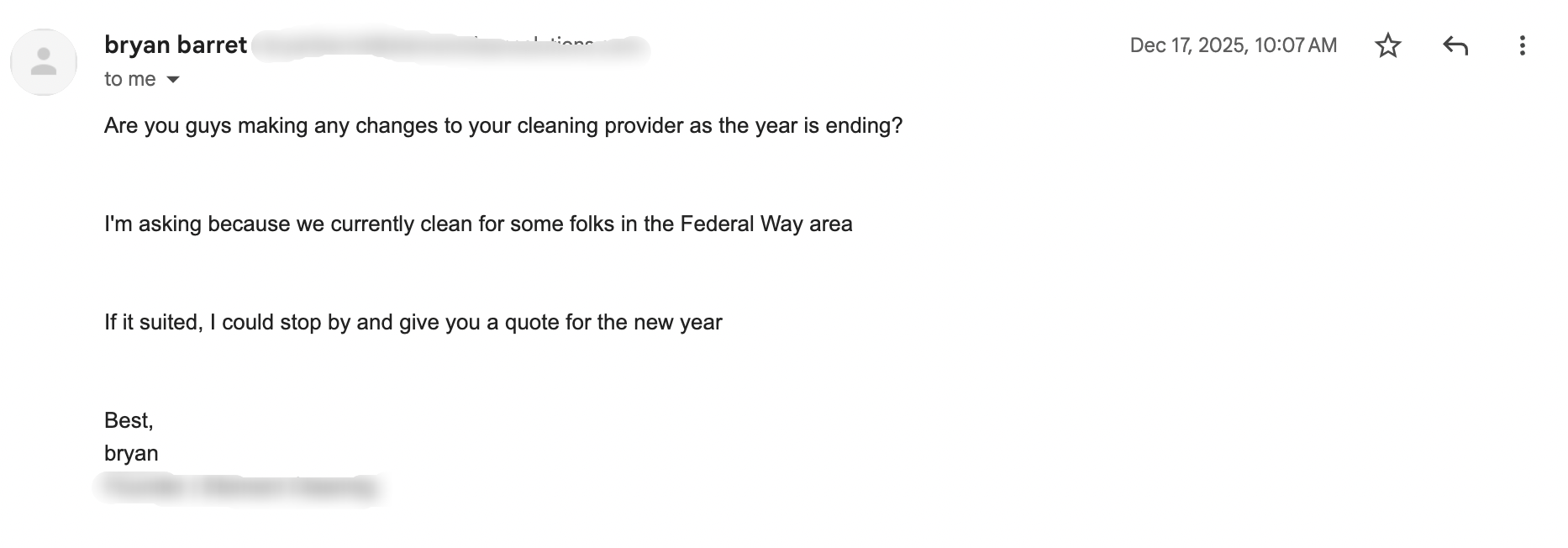
This is a good, bare-bones example of how the hook, value, and CTA work together. Bryan starts with the hook, asking if we’re making changes to our cleaning provider. Then, they present themselves as a good fit and end it with a clear CTA.
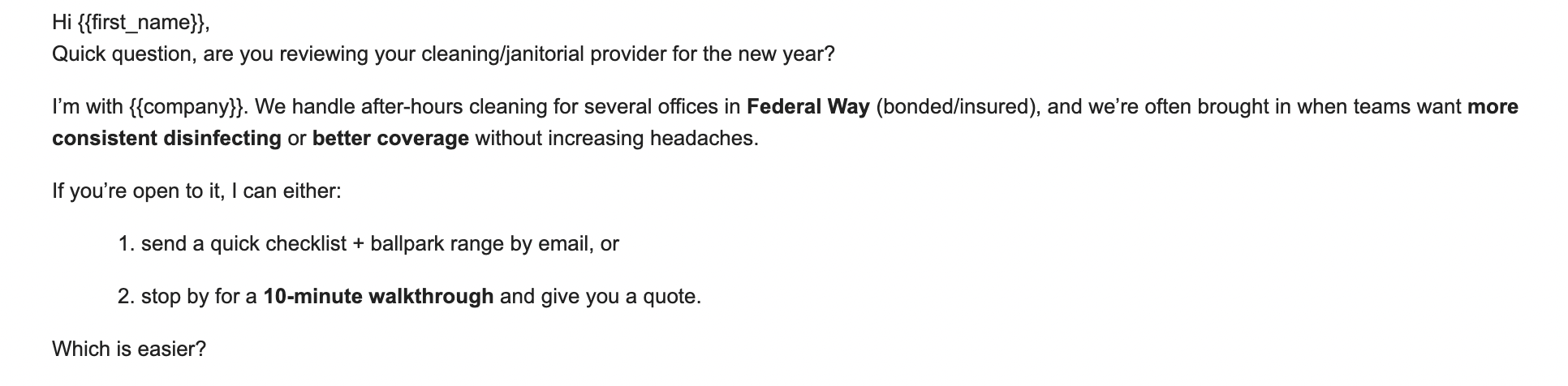
However, due to its brevity, the reader may overlook important context. The good news is that we can take the same email format and tweak the email copy to make it more personalized. Here’s where we can start with:
- “We currently clean for some folks” is vague. Add one concrete proof point: type of facilities, years in business, licensed/bonded/insured, or a recognizable nearby client type (without oversharing).
- What does “clean” mean? Nightly? weekly? Medical-grade? Operatories? Floors? Trash? Bathrooms? The lead needs to know if you’re comparable to their current setup.
- Why the timing matters. “As the year is ending” is a good trigger, but it needs a sentence of meaning, such as contract renewals, budgeting, staffing changes, or coverage gaps.
- Lower-friction CTA: “Stop by and give you a quote” is a heavier ask. Offer a lighter first step: a quick call, sending a checklist and ballpark range, or a 10-minute walkthrough.
Here’s what that could look like if we added a bit more context into the hook + value + CTA email format:
Formal Email Format
If you’re targeting a broad audience, sending an email to a colleague, or emailing company heads, a formal email format is a reliable choice. Most formal emails can be used for cold emails, partnership emails, meeting requests, or any form of follow-up.
Let’s look at this example sales pitch from Indeed that used a formal email template:
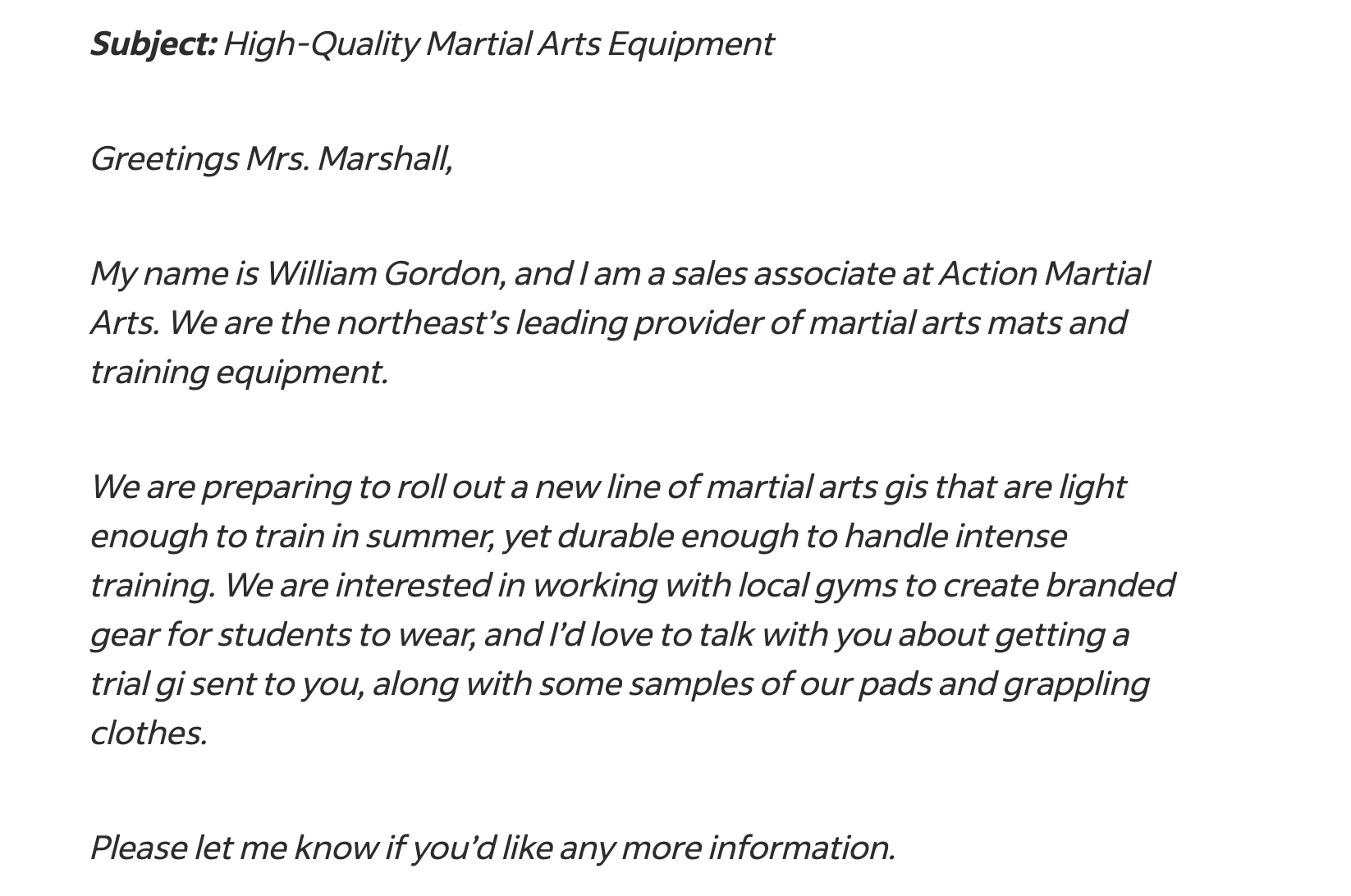
In most formal email formats, context is king. In this example, William Gordon gives context to who he is and what he does, while also providing credibility by saying “northeast’s leading provider of martial arts mats and training equipment.”
Next up is the value proposition: Light but durable martial arts equipment. Then, a no-brainer CTA that’s all value: “I’d love to talk with you about getting a trial gi sent to you along with some samples of our pads and grappling clothes.”
What could’ve made this better is a little tweak to the last line: “Please let me know if you’d like any more information.” It’s fine in this situation, but this line is vague. You want to be as specific as possible with your CTA. Instead, you can try:
- “Would you be open to a quick 10-minute call this week to see if a trial makes sense?”
- “I can send a trial gi in your preferred sizes this week. Who’s the best person to coordinate shipping with?”
- “Are you available Tuesday or Thursday afternoon for a short call to discuss sizing, branding options, and timeline?”
- “If you’d like, I can email a one-page overview of the gi line (materials, pricing, branding options). Should I send that over?”
- “If you’re open to it, I can drop off samples next week. What day/time is best for a quick handoff?”
These CTAs keep the tone professional, but they remove ambiguity and make the “next step” favorable to the recipients and to you. Remember, the CTA should move the needle for your campaigns while reducing the friction for your leads.
The Problem-Agitate-Relief Email Format
Discomfort is a strong motivator when used correctly. However, it must be paired with relief. In this email format, you combine tension and release by highlighting a problem, outlining the consequences of inaction, and then presenting your services as a strong solution.
Subject line: Is bounce rate killing your high-reply campaigns?
Hi {{first_name}},
Has this happened before? You've finally found a segment that replies, your copy is working, and meetings are coming in… then the bounce rate climbs, and everything starts slipping. Replies slow down, and the same campaign that worked suddenly lands in spam or promotions.
When bounces spike, it usually snowballs into:
replacing domains you just warmed up
babysitting inbox health instead of testing new segments
losing replies because messages stop landing where they should
We built {{product}} specifically for this issue. It maintains stable deliverability as you scale, with lead verification that filters out risky addresses, send-limit controls, and inbox rotation to keep volume sustainable.
Would you like me to send over the baseline setup teams use to scale from {{x}} to {{y}} emails/day without bounce rate creeping up?
Best,
{{your_name}}
“Permission to Send” Email: Relevance + Offer + Consent
When you’re sending cold emails, there’s inherently a lot of friction involved (which can be significantly reduced through segmentation and personalization). And, one of the main reasons for this friction is the CTA. Most ask for meetings, demos, or quick calls.
But in most cases, the best possible scenario is getting a reply. You achieve that speed by creating no-friction CTAs, such as asking for consent first. Here’s an example:
Hi {{first_name}}, I’m reaching out because we work with a few offices near {{city}} and occasionally get asked, “What’s the easiest way to send an ortho referral without chasing paperwork?”
I put together a quick 1-page guide that shows:
How to submit a referral online (step-by-step)
When to use a paper form
What info helps us schedule faster
Want me to send it over?
Best,
{{your_name}}
The Checklist / Audit Offer Email Format
One of the fastest ways to get a reply is to provide leads with immediate value. One email format you can use to leverage immediate value is the checklist/audit. The structure is as simple as: Trigger + Offer checklist/audit + CTA.
Subject line: A quick site-walk checklist for {{company}}?
Hi {{first_name}},
With the new year coming up, a lot of property teams are reviewing landscaping coverage so they don’t get surprised by missed visits, seasonal gaps, or last-minute cleanup requests.
If it helps, I can do a quick walkthrough and send a short note with the top 3 items I’d prioritize for 2026 based on what I see on-site, for example:
high-visibility areas that need more frequent attention
irrigation/drainage spots that tend to turn into repeat issues
seasonal work worth scheduling now (mulch, pruning, cleanup)
Is this something you’re interested in?
Best,
{{your_name}}
The Breakup Email Format (Acknowledge + Opt Out + Last Offer)
Not every lead will reply, even with a good follow-up sequence. Instead of keeping these leads in your campaigns, it’s better to remove them entirely after sending one last breakup email. The format here is simple: Acknowledge + an easy way out + the final offer.
However, if you’re planning to convert these leads, the best way to do so is to add extra value to your final offer. Here is an example of the breakup email format at play:
Subject line: Should I close this out?
Hi {{first_name}}, I haven’t heard back, so I’m assuming timing isn’t right.
Should I close the loop, or would it be better to follow up in the next quarter?
If it helps, I can send a quick mini-audit for your clinic:
What’s currently helping (or hurting) your Google visibility
3 practical fixes to drive more calls and booked appointments
A couple of quick-win ideas you can implement even if you don’t work with us
Would you like me to send that over, or should I close this out?
Best,
{{your_name}}
One-Question Email Format
The best emails are those with one purpose and one CTA. However, to gain more context about your leads and prospects, ask the right questions. The structure of the email template consists of a relevant one-liner, your question, and a soft CTA.
Subject line: Quick question about {{topic}}, {{first_name}}
Hi {{first_name}},
We run a small shortlist model for {{industry}} hiring: calibrated role specs first, then we send 3–5 screened candidates within {{timeframe}}.
Are you actively hiring for {{role}} in Q1, or not at the moment?
The goal here is to get a reply and more context so that when you do schedule a meeting, it’ll be easier for you to answer objections, align value, and close deals.
The Two-Option Close (Context + Value + Two Choices)
Some prospects don’t reply because they’re uninterested. Most don’t reply because replying takes work. They have to think, explain, and give you context that you should’ve made easy in the first place.
The Two-Option Close fixes that. You give them two realistic “buckets” to choose from. It’s still a question, but it’s a guided one. Your lead doesn’t need to craft a response from scratch. They just pick A or B, and you have a direction to follow.
Subject line: Which bucket are you in?
Hi {{first_name}},
I’m reaching out because we handle after-hours cleaning for {{city}}, and this is typically the time of year when property teams review their coverage for Q1.
When offices review cleaning, they’re usually in one of two camps:
Things are fine overall, we just want a backup option in case coverage slips or staffing changes
We’ve noticed missed items (restrooms, trash, high-touch surfaces) and want to compare alternatives
Which one is closer to you right now?
Key Takeaways
Email templates give you a starting point. Email formats give you control. Once you understand the structure behind a good email, you can adapt any template to different segments without rewriting from scratch.
To make that work at scale, you need strong lead data and a tool that can personalize without getting messy. Instantly helps teams find leads, enrich them, and send personalized campaigns fast. Try it for free today.


