.svg)
%20(1).svg)


Updated September 11, 2026
TL;DR: Proper email warmup builds your sender reputation through positive, human-like exchanges for high deliverability. Instantly.ai's 2026 benchmark report puts the standard timeline at 4 to 6 weeks, starting at 5 to 10 emails per day and ramping gradually. Success also requires technical setup (SPF/DKIM/DMARC) and continuous monitoring, and warmup should keep running alongside outreach, not stop when campaigns start. Instantly automates the entire process with premium pools and pre-warmed accounts, so your domains are campaign-ready on day one.
An effective email warmup guide gives you a reliable system for launching cold outreach that reaches primary inboxes. With Instantly, you can automate warmup across every domain at no extra cost.
But even with automation, the fundamentals still matter. Getting the highest possible deliverability rates begins with understanding how warmup works and how to combine technical setup and human-like sending behavior.
This guide breaks down warmup basics, how to integrate warmup into early cold email outreach, and the essential steps that help you protect deliverability as you scale.
 Tim K
Tim K
What is email warmup?
Email warmup means building the sending reputation of new domains and inboxes. This is done naturally over time through positive email exchanges.
In most cases, you’d want to warm up domains for at least two weeks before using them in a campaign. Instantly's 2026 benchmark report puts the standard warmup timeline at 4 to 6 weeks before full campaign volume.
When domains are warmed up, email service providers are more likely to view emails you send as legitimate.
Paired with the correct email infrastructure setup, you’ve got a potent recipe for high-converting campaigns. However, email history is just one factor in a successful warmup.
Factors contributing to successful email warmups
Regular back-and-forth emails are what get you started with warmups. But what’s equally as important is the quality, frequency, and cadence of your email warmups.
Email warmup quality
Email service providers consider the context of each email exchange during the warm-up period. If you’re using an email warmup tool, ensure that each email has positive feedback.
Every conversation should look and feel natural. That also extends to the timing and frequency of messages.
Frequency and sending volume
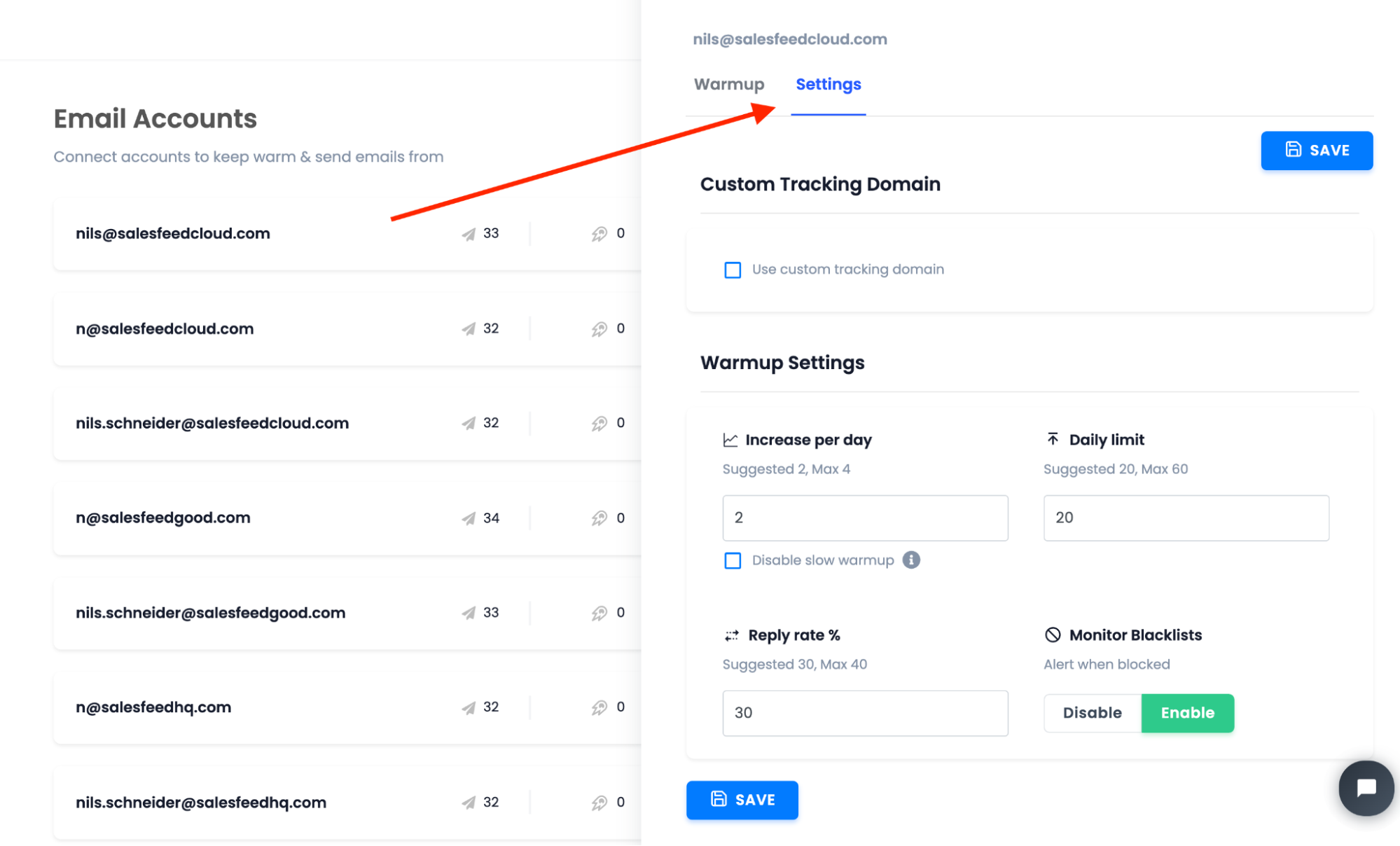
Warmups should count toward the total daily sending volume of each domain and inbox. You can trigger spam filters just as easily with warmups as you would with cold outreach if you aren’t careful.
For starters, best practices recommend starting at 5 to 10 warmup emails per day, then gradually increasing volume over time.
Email cadence in your warmup pool
Email warmups fail if you send like a bot, so avoid bulk sending emails. If you’re automating, ensure the emails you send follow a natural cadence. That means enabling delays, spacing out replies, and varying send times throughout the day.
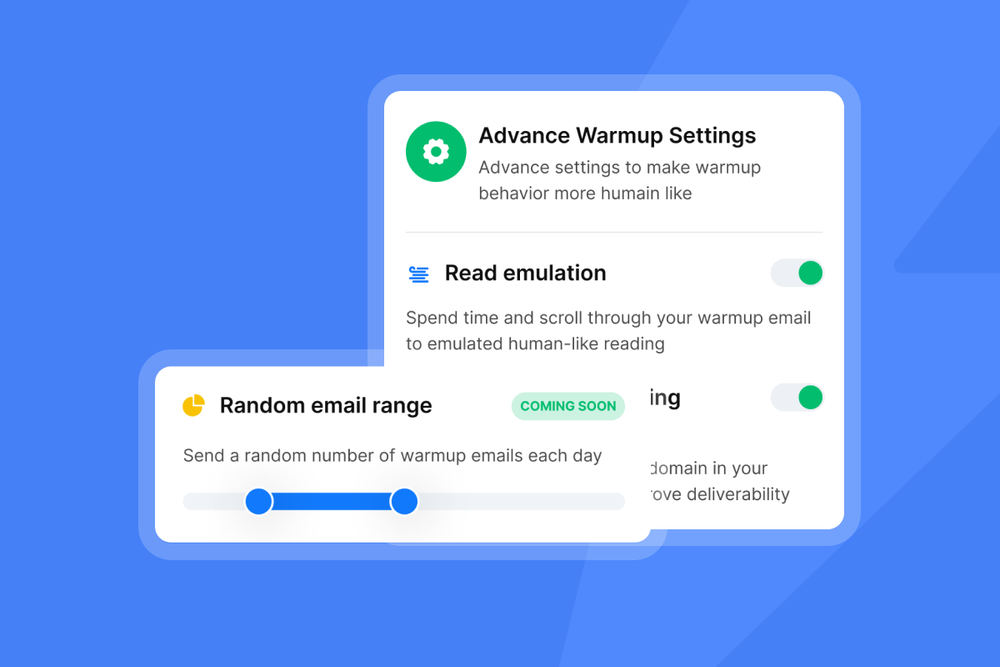
That’s exactly how Instantly approaches warmup cadence. Our warmup process mimics human behavior through automated actions that simulate natural email interactions.
Here’s what that looks like in action:
- Emails sit in your inbox for a few hours before action is taken, like a real person would.
- The system automatically moves emails from spam to the inbox over time.
- Messages are marked as read and essential to signal genuine engagement.
- Replies are sent in the same thread to maintain a natural conversation flow.
Instantly also creates natural conversation patterns between sender and receiver. Every reply carries positive sentiment, resulting in high open and response rates.
This human-like cadence signals to Gmail, Outlook, and other providers that your inbox is a trustworthy sender.
 Mike EllisCo-Founder, Kale Acquisition
What you need before starting email warmup
The warmup process doesn’t start the moment you buy domains and inboxes. You need to take the following essential steps first:
Domain, DNS, and authentication
Start with a dedicated alternative domain for outreach, so you can protect your main domain while maintaining your brand identity. Point your MX records to your mailbox provider so you can receive replies. Add an A record only if your provider requires it.
Publish one SPF record that includes your mailbox provider and any sending platform you will use. Enable DKIM using a 2048-bit key and ensure the selector is active. Add DMARC in monitor mode first with p=none and a reporting address.
Optional trust layers, such as MTA-STS, TLS-RPT, and BIMI, can help, but they are not prerequisites for warmup. Verify everything with a DNS checker, then send a test to confirm SPF, DKIM, and DMARC alignment.
Mailboxes and identity

Warmup works best when your inbox looks and behaves like a real person. Start with a human "From" name and a professional email address. Avoid using role accounts, such as support@ or sales@. Use something like jane@mail.brand.com with “Jane Park” as the display name.
Give the mailbox a face and a voice. Add a profile photo, complete the account profile, and create a simple signature that includes your name, title, company, website, and a physical mailing address line. Keep the email signature mostly text and light on images so early messages don't look like promos.
Set the basics before connecting anything. Choose the correct time zone and working hours. Ensure the "Reply-To" address matches the "From" address, unless you have a deliberate routing plan in place. Turn off vacation responders. Keep inbox categories and filters simple so replies land in the primary inbox.
 Benjamin Clarke
Provider access and tracking
Connect each inbox to your sending platform with stable, modern authentication. Prefer OAuth where available, as it reduces login friction and security prompts. If your provider requires SMTP or IMAP, confirm that the credentials, ports, and TLS settings are correct.
Then, send a manual test to verify that you can both send and receive emails. For Google Workspace, authenticate the mailbox and confirm DKIM is active. For Microsoft 365, ensure that Authenticated SMTP is allowed for the mailbox or connect using OAuth.
Keep tracking light during warmup. Open pixels and link redirects look unnatural when the volume is small, so start with tracking off. If you need analytics, set up a branded tracking domain that matches sender identity, point the CNAME to your platform, and verify SSL.
Monitoring and health
Treat warmup as a live systems check. In the first two weeks of the 4-6 week ramp, review signals daily and pair your internal metrics with provider data from Gmail Postmaster Tools and Microsoft SNDS so you see both engagement and reputation.
Use a small seed list across Gmail and Outlook to confirm inbox placement. If reputation or seed placement trends downward, slow the ramp, widen your send window, and keep content simple until the metrics stabilize.
For the best possible results from your seed list testing, use Instantly Inbox Placement to test cold email deliverability after warmups.
You also get notified if your copy contains spam traps, domains are blacklisted, and if emails will land in primary inboxes.
How to integrate warmup into your cold email campaigns
There’s a lot that goes into a successful warmup. If you want to run your own warmup process for cold email marketing, here are the key factors you need to consider:
Start with a clean foundation
Warmup and outreach work best when your technical setup is stable. Confirm that SPF and DKIM are passing, DMARC is set to 'monitor' or higher, seed tests show inbox placement at Gmail and Outlook, and bounces are low.
Run warmup alongside early outreach
Don't stop warmup when you start prospecting. Keep it running while you introduce live sends in small, predictable increments. In the first days, let warmup make up most of your daily touches and keep outreach as a smaller portion.
Ramp volume in small increments
By the time you're ramping past the initial 5-10/day, and an inbox can handle 30 touches in a day, hold 20 as warm-up and 10 as outreach. Then, increase the outreach slice every few days while monitoring placement and complaints. Spread activity across the workday and avoid sharp spikes.
Control variables while youscale
Use plain text or light HTML for early touches, keep links and attachments to a minimum, and leave tracking off at the start or switch to a branded tracking domain only after placement is steady.
Maintain a single, clear sender identity per inbox and stagger schedules across mailboxes to ensure traffic appears consistent with everyday business use.
Monitor signals and adjust ASAP
Use seed tests to confirm placement and watch complaints and bounce patterns. Treat 4xx deferrals as a cue to slow hourly concurrency and add delays. Treat persistent 5xx bounces as blocks or invalid mailboxes and stop sending to those addresses.
Taper to a maintenance level
Once outreach volume is consistent and placement is predictable, lower the warmup to a small daily baseline in favor of more outreach sends.
This keeps engagement signals flowing and protects the sender's and email domain's reputation during periods of heavier sending.
How Instantly simplifies the warmup process
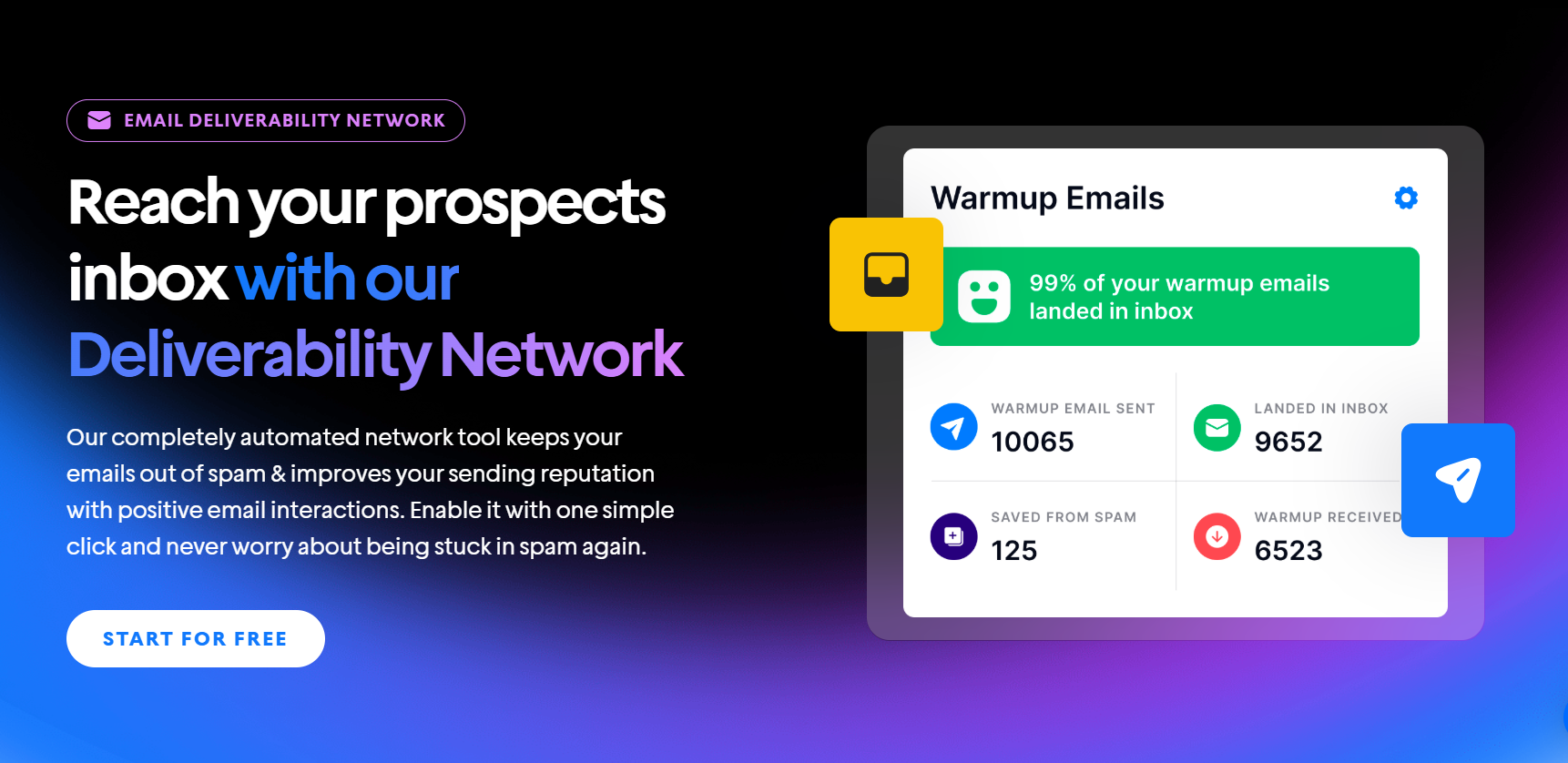
Instantly automates the entire email warmup process with just a button click, running warmup exchanges across a deliverability network of 4.2M+ accounts. However, a lot is going on under the hood to ensure the highest possible deliverability rates. Instantly groups warmup into three pools:
- Standard (Green Flame) is the default option for accounts with mixed quality from multiple providers.
- Premium (Blue Flame) uses high-quality, aged Google and Microsoft accounts with stricter rules, delivering approximately 9% more replies than Standard.
- Basic (Orange Flame) is of lower quality, with fewer positive signals, and is used when accounts exceed SMTP limits.
| Warmup pool | Account quality | Best for | Access |
|---|---|---|---|
| Premium (Blue Flame) | High-quality, aged Google and Microsoft accounts | Maximum deliverability | Included with DFY and pre-warmed accounts, or paid upgrade |
| Standard (Green Flame) | Mixed quality, multiple providers | Default for most accounts | Included on all plans |
| Basic (Orange Flame) | Lower quality, fewer positive signals | Accounts exceeding SMTP limits | Automatic fallback |
You can access Premium in two ways. Instantly Done-For-You (DFY) or Pre-warmed accounts are included in the Premium pool at no extra charge, or you can upgrade for $500 per month for Google and Microsoft accounts only.
Premium improves deliverability by pairing your warmups with high-quality inboxes, which strengthens positive signals and inbox placement. DFY and Pre-warmed accounts start in Premium immediately.
They ship with SPF, DKIM, and DMARC pre-configured so you can launch campaigns on day one, and they are tuned exclusively for Instantly.
DFY accounts are $5 per month each, Pre-warmed accounts are $10 per month each, and domains are $15 per year.
Key Takeaways
Email warmup builds your sender reputation and ensures high deliverability. If you want to find success in cold emails and have your messages land in primary inboxes, email warmup is a non-negotiable.
To scale email warmup and sending volume, you’ll need an automation tool with the fundamentals in mind. That’s where Instantly comes in. Get unlimited warmups, pre-warmed domains, and start getting more replies and conversions. Start your free Instantly trial.

FAQs: email warmup
How long does email warmup take?
Instantly's 2026 benchmark report puts the standard timeline at 4 to 6 weeks before full campaign volume. Start at 5 to 10 warmup emails per day, ramp gradually, and keep some warmup running even after campaigns launch.
Can I skip warmup if I buy pre-warmed accounts?
Pre-warmed accounts shorten the ramp because they arrive with established reputation and authentication configured, but you still build campaign volume gradually so providers see consistent, human-like sending patterns.
Should warmup keep running after campaigns start?
Yes. Keep warmup active alongside outreach, taper it to a small daily baseline once placement is stable, and let warmup plus campaign sends together stay within your per-inbox daily cap of 30 emails.
How do I know warmup is working?
Watch seed-list inbox placement at Gmail and Outlook, bounce rate (keep it below 2%), and reputation data in Google Postmaster Tools and Microsoft SNDS. If placement trends down, slow the ramp and simplify content until metrics stabilize.
Further Reading
- Cold Email Automation Tools: How to Automate Cold Email Campaigns – Learn how to automate cold email outreach, follow-ups, and campaign management once your accounts are ready to send.
- Best Time to Send Cold Email – See what Instantly’s benchmark data reveals about the best days to send cold emails and schedule follow-ups.
- How to Improve Your Cold Email Response Rate – Learn how targeting, messaging, follow-ups, and campaign optimization can help generate more replies.
- How to Automate Prospecting – Learn how to automate prospecting workflows from finding leads through to outreach and follow-ups.
- How to Generate More Sales Pipeline – Learn how to build a more consistent sales pipeline through better prospecting, outreach, and follow-up.
- Email Warmup – Learn how Instantly’s email warmup helps build sender reputation and prepare email accounts for cold email outreach.


