


Updated November 7, 2025
TL;DR: Sales leaders can build more efficient, scalable outreach by integrating email and text messaging directly into existing CRM and sales engagement platforms using a composable method. This approach maintains data hygiene, ensures consistent reporting, and protects deliverability without lock-ins or per-seat penalties. Instantly provides the core email and text messaging engine with unlimited email accounts, a private deliverability network of 4.2M+ accounts, and Calling & SMS functionality. The platform integrates through API, webhooks, and native connectors to give you control, transparency, and predictable costs.
Your sales team likely uses a CRM, a sales engagement platform, and possibly a separate tool for texting. Time is lost switching between them, and pipeline data sits siloed in disconnected systems.
Sales leaders face a choice: Buy an expensive all-in-one suite with clunky UIs and per-seat pricing, or build a composable stack with best-in-breed tools that integrate deeply. This guide explains how to integrate email and text messaging directly into your CRM using a composable method. We cover benefits, key considerations, and practical steps to streamline workflows and drive more booked meetings without burning domains or budget.
Why composable outreach matters for sales leaders
Composable stacks give you control, flexibility, and predictable costs. Monolithic suites promise simplicity but deliver the opposite.
The limitations of monolithic sales suites
Enterprise sales suites promise a single pane of glass, but that promise often comes with trade-offs. These platforms typically charge per seat, which means your costs compound as you scale headcount. A 10-person SDR team can easily pay $5,000 to $10,000 per month before adding advanced features.
Deliverability often suffers in monolithic systems. When you share sending infrastructure with thousands of other customers, your reputation is tied to theirs. Poor sender reputation can tank inbox placement across your entire team.
Data silos are another hidden cost. Integration depth in all-in-one platforms often lags behind dedicated tools with robust APIs. Your reps waste hours reconciling records instead of closing deals.
The benefits of an integrated, composable approach
A composable sales stack flips this model. You choose the best email engine, the best CRM, and the best enrichment source, then connect them through APIs, webhooks, or integration platforms.
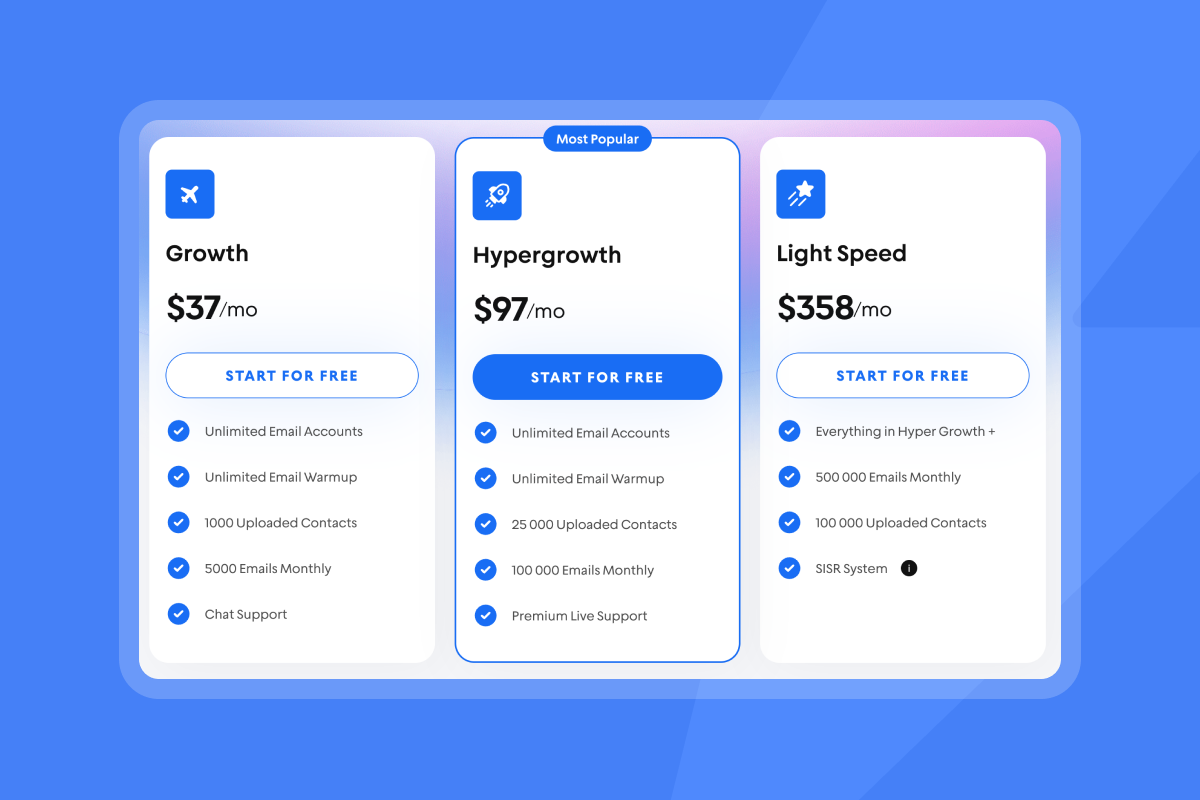
This approach gives you flexibility without vendor lock-in and predictable pricing that scales with usage, not headcount. Instantly offers flat-fee pricing with unlimited email accounts starting at $37 per month.
Data hygiene and accurate reporting improve because you control the integration. You define which fields map to your CRM, set deduplication rules, and ensure every sent email, reply, and meeting-booked status flows into a single timeline.
"It has all the tools needed for cold outbound in one place. Previously, I was running 3 different systems to get a fraction of the results." - James L. on G2
| Feature | Composable Stack (Instantly + CRM) | Monolithic Suite |
|---|---|---|
| Pricing model | Flat-fee, unlimited accounts | Per-seat, compounding costs |
| Deliverability focus | Dedicated warmup, private network, SISR | Shared infrastructure, variable quality |
| Integration depth | API, webhooks, native sync, iPaaS | Limited field mapping, vendor-dependent |
| Lock-in | Month-to-month, easy cancellation | Annual contracts, exit friction |

Key components of a composable sales stack
A composable sales stack has four layers. Your CRM stores all contact data and pipeline stages. Your email engine handles sending and deliverability. Your SMS provider manages text outreach. The integration layer connects everything.
Your CRM as the central hub
Your CRM is the single source of truth for contact data, pipeline stages, and historical interactions. Popular CRMs like Salesforce, HubSpot, and Zoho offer robust APIs and native connectors for bidirectional sync.
Ensure your CRM has standard fields: first name, last name, email, company, and lead status. Custom fields for personalization such as industry, tech stack, or recent funding should exist before you map them in Instantly.
Watch how Instantly integrates with your tools while also providing a full stack outreach system to avoid tool sprawl:
Dedicated email outreach engine (like Instantly)
Instantly acts as your email sending and deliverability engine. It handles warmup, campaign sequencing, A/Z testing, and reply management through the Unibox.
The platform includes 450M+ verified contacts through SuperSearch, so you can enrich and launch campaigns without switching tools.
Unlimited email accounts on all plans mean you can distribute sending across multiple domains to stay under the 30-emails-per-inbox-per-day safe threshold. The private deliverability network with 4.2M+ accounts ensures your warmup emails engage with real inboxes. For high-volume teams, SISR on the Light Speed plan provides dedicated IP pools for complete reputation isolation.
Watch how SuperSearch gets you verified leads data on demand that match your ICP:
Text messaging functionality
SMS outreach adds a high-intent channel to your sequences. Text messages have open rates near 98%, far higher than email.
Instantly's Hyper CRM plan includes Calling & SMS at $97 per month, letting you manage phone numbers, send texts, and log all activity directly in your CRM.
Integration layer (API, webhooks, iPaaS)
The integration layer connects Instantly to your CRM. Instantly offers multiple options:
- API v2 for programmatic control
- Webhooks for real-time event notifications
- Native connectors for HubSpot and Salesforce via OutboundSync
For a full list of all our integrations options check our help article. For teams without technical resources, no-code platforms like Zapier and Make.com provide pre-built triggers and actions.
How to integrate email into your CRM and sales engagement platform
Step 1: Define your data flow and sync requirements
Before connecting any tools, map the data fields and events you want to sync. At minimum:
- Send email activity (sends, opens, replies, bounces) and lead status changes to your CRM
- Define custom fields for personalization such as job title, company size, or pain point
- Ensure fields exist in both systems
Use email address as the unique identifier for deduplication. Configure duplicate detection rules in your CRM to merge records automatically.
Step 2: Connect via native integrations or API
For HubSpot or Salesforce, install OutboundSync from Instantly's integrations page:
- Authorize the app
- Select the fields to map
- Test with a small contact list
For other CRMs like Zoho or Pipedrive, use Zapier or Make.com to build workflows that trigger on Instantly events. Watch how to connect your CRM to Instantly via OutboundSync in just a few clicks:
Step 3: Configure email sending and deliverability settings
Before launching campaigns, set up email warmup for all new inboxes:
- Warm accounts for 2 to 4 weeks
- Gradually increase daily sends from 5 to 15 to 30 emails per inbox
- Keep hard bounce rates below 2%
- Keep soft bounce rates below 5%
Run automated inbox placement tests weekly to confirm emails land in the primary inbox, not spam. If placement drops below 80% on any major provider (Gmail, Outlook, Yahoo), pause that inbox and review your DNS records (SPF, DKIM, DMARC), content quality, and list hygiene.
"The platform is super intuitive, easy to set up, and makes it simple to manage multiple domains and inboxes at scale. Deliverability is great and the analytics give us exactly what we need to optimize campaigns quickly." - Shaiel P. on G2
Step 4: Map fields for consistent reporting
Field mapping ensures data flows cleanly between Instantly and your CRM. Map Instantly's "Lead status" to your CRM's equivalent field (such as "Status" or "Lifecycle stage"). Use dropdown values consistently.
Test mappings by creating a dummy contact in Instantly, updating its status, and verifying the CRM timeline reflects the change within minutes.
For a complete visual walkthrough, watch the full Instantly tutorial to see campaign set up, warmup, and CRM integration in action.
How to integrate text messaging for multi-channel outreach
Step 1: Choose a reliable SMS provider
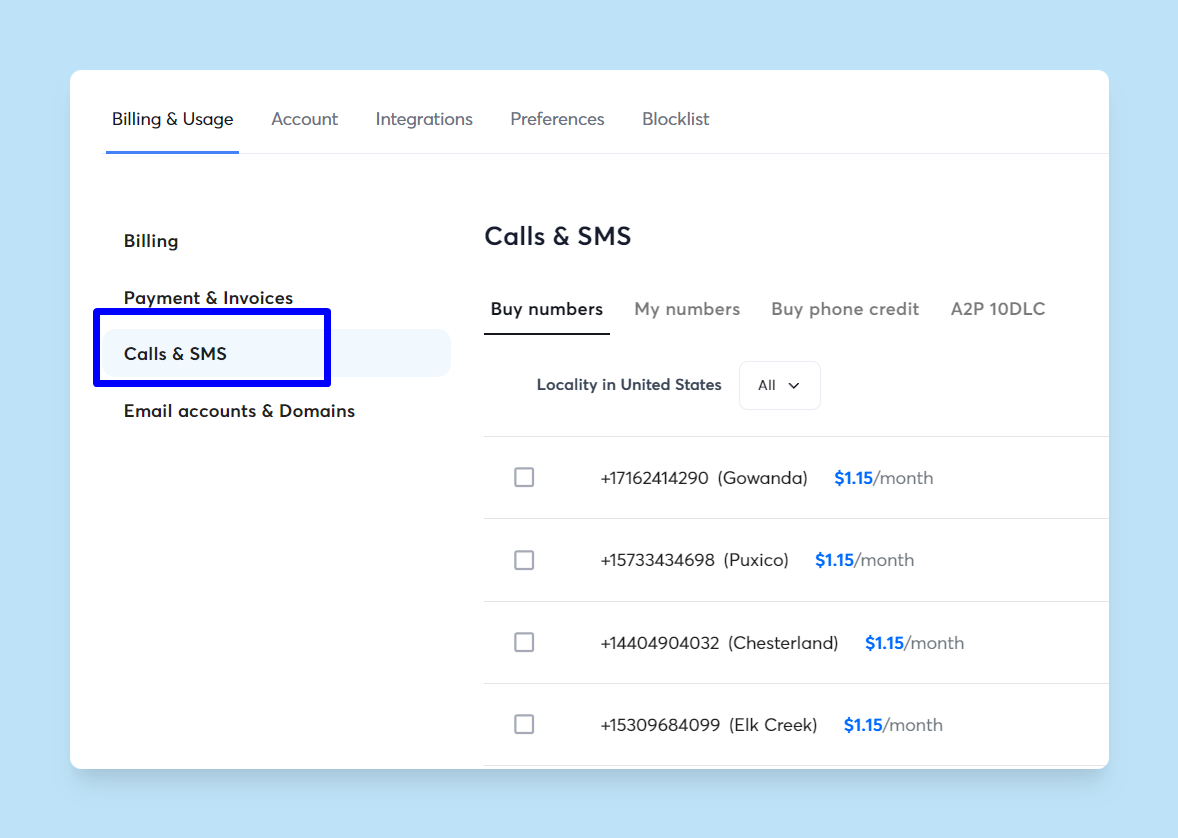
Look for platforms that support opt-out automation, message history, and two-way conversations. Instantly's Hyper CRM plan includes Calling & SMS, which lets you purchase phone numbers, send texts, and log all SMS activity directly within the platform.
Step 2: Link SMS to your CRM for unified communication
For Instantly users on the Hyper CRM plan, SMS logs automatically sync to the CRM. For external SMS tools, build a Zapier or Make.com workflow that creates a CRM activity on "New SMS received."
Unified communication means your reps see a complete interaction history on the same contact timeline.
Step 3: Establish clear texting guidelines and compliance
Text messaging laws are strict. In the United States, the Telephone Consumer Protection Act (TCPA) requires prior express written consent before sending marketing texts. In Canada, the Anti-Spam Legislation (CASL) has similar rules.
Keep texts short (under 160 characters), personalize with the contact's name, and send during business hours only. Multi-channel sequences that combine email and SMS typically see 15% to 25% higher reply rates than email-only campaigns.
Optimizing your integrated workflows for maximum efficiency
Automating follow-ups and reply handling
Instantly's multi-step sequences automate follow-ups based on prospect behavior. If a recipient doesn't reply after 3 days, the sequence sends a second email.
Instantly's AI Reply Agent drafts replies to common questions, objections, or scheduling requests. It works in Human-in-the-Loop mode (review before sending) or Autopilot mode (fully automated), saving hours of inbox triage each week.
Centralized reporting and analytics
Every email send, reply, and lead status change flows into your CRM, where you can build custom dashboards for pipeline attribution, rep productivity, and campaign performance. Multi-client sales analytics are critical for agencies managing multiple brands.
Instantly's built-in analytics show open rates, reply rates, bounce rates, and unsubscribe rates at the campaign and account level.
Maintaining data hygiene and deliverability
Data quality decays over time. Schedule quarterly reviews to:
- Deduplicate records
- Re-verify email addresses with Instantly's verification tool
- Update global blocklists
This prevents bounces and protects sender reputation. Keep warmup running indefinitely, even on established inboxes. Monitor sender reputation with tools like Google Postmaster and Microsoft SNDS.
Watch how Instantly gets you qualified and verified leads so you protect your deliverability.
"I really enjoy using Instantly for a variety of reasons. Its simplicity in managing inboxes and campaigns stood out immediately, making it a clear choice over other tools I had used before." - Nathan D. on G2
Common challenges and how to address them
Data silos appear when systems fail to sync bidirectionally. Use OutboundSync for Salesforce and HubSpot to ensure bidirectional sync. Build Zapier workflows with error-handling steps for other CRMs.
Deliverability problems often stem from poor list hygiene or inadequate warmup. Run inbox placement tests weekly. Slow ramp warmup is non-negotiable: 5 to 10 emails per day in week one, 15 to 20 in week two, and 30 by week four.
Instantly's flat-fee pricing eliminates per-seat scaling issues. The Growth plan starts at $37 per month with unlimited accounts. Your cost stays predictable as you scale sends, not headcount.
"I've tried a lot of tools, but Instantly.ai truly stands out. The automated warm-up, unlimited email sending, and smart campaign management saved me hours every week." - User on Trustpilot
Ready to streamline your outreach with composable integration?
Stop paying per-seat penalties for clunky suites. Instantly's flat-fee pricing gives you unlimited accounts, robust deliverability tools, and deep CRM integration.
Connect email and text messaging to your CRM, launch your first campaign, and book more meetings without burning domains or budget. Start your 14-day free trial to warm inboxes, verify leads, and prove value before you commit.
FAQs
What is composable sales outreach?
Composable sales outreach means building your sales stack from best-in-breed tools that integrate via API, webhooks, or native connectors. This approach offers flexibility, predictable costs, and deeper feature sets than monolithic platforms.
How does Instantly support email and text integration?
Instantly integrates with CRMs like Salesforce and HubSpot via OutboundSync, offers API v2 and webhooks for custom workflows, and includes Calling & SMS on the Hyper CRM plan.
What are the benefits of integrating email and text messaging?
Integration centralizes activity logs, eliminates manual data entry, and ensures accurate reporting. Multi-channel sequences with email and SMS typically achieve higher reply rates than email-only campaigns.
How can I ensure deliverability with integrated tools?
Run automated warmup for 2 to 4 weeks, verify email addresses during imports, and monitor inbox placement tests weekly. Keep bounce rates below 2%.
Key terms glossary
Composable sales stack:
A sales technology architecture built from specialized, best-in-breed tools that integrate via APIs, webhooks, or native connectors. This approach prioritizes flexibility and avoids vendor lock-in.
Deliverability network:
A pool of real email accounts used to warm up new sending inboxes through automated engagement. Instantly's network includes 4.2M+ accounts.
Primary inbox:
The main email folder where messages appear by default, as opposed to spam, promotions, or social tabs. High primary inbox placement (80%+) is critical for cold outreach success.
SISR (Server & IP Sharding & Rotation):
A deliverability feature on Instantly's Light Speed plan that provides dedicated IP pools and server rotation for complete reputation isolation.


