.svg)
%20(1).svg)


Updated December 17, 2025
TL;DR: Send 30 personalized emails per warmed inbox daily using verified prospect data, spin syntax for variations, and automated follow-up sequences to achieve 10-25% reply rates. Cap each inbox at 30 sends, use firmographic and behavioral data for deep personalization, and track reply rate as your primary success metric.
Send 30 personalized emails per warmed inbox daily using verified prospect data, spin syntax for variations, and automated follow-up sequences to achieve 10-25% reply rates. Generic cold emails generate 1-5% reply rates while personalized emails that reference specific company context, role-based pain points, and behavioral triggers achieve 10-25% or higher reply rates according to agency performance data.
This guide shows you how to move beyond basic merge tags to craft messages that feel truly tailored, ensuring your cold outreach stands out and converts without burning client domains. The best cold email outreach systems treat personalization as a deliverability strategy, not just a conversion tactic, relevant emails generate replies, replies build sender reputation, and reputation determines whether future campaigns reach the primary inbox.
Why Personalized Cold Emails Generate 10-25% Reply Rates vs 1-5% for Generic Emails
Generic mass emails fail because recipients spot a blast from a mile away, and mailbox providers filter low-engagement content into spam.
How personalization boosts engagement and reply rates
When you personalize your emails, you'll see measurable improvements across every metric:
| Metric | Generic Emails | Personalized Emails | Improvement |
|---|---|---|---|
| Open Rate | 16-20% | 35-40% | +100% |
| Reply Rate | 1-5% | 10-25% | +300-400% |
Research confirms this pattern. Studies show that personalization can increase open rates by 26-50% and response rates by 32.7%, demonstrating the dramatic impact of moving beyond generic blast campaigns to truly tailored outreach. Instantly solves the personalization-at-scale problem with unlimited email accounts, SuperSearch's 450M+ verified leads, AI Reply Agent for automated response handling, and built-in warmup, all at flat-fee pricing that scales with your agency.
Building trust and standing out
You signal respect when you personalize. When you reference a prospect's recent LinkedIn post, company news, or specific pain point, you demonstrate that you've invested time to understand their world. You build foundational trust before the first reply.
For agencies managing multiple client campaigns, this trust translates directly into sender reputation. When recipients engage with your personalized emails by opening, clicking, and replying, you send positive signals to mailbox providers, improving your inbox placement over time.
For the complete infrastructure checklist on authentication, warmup ramp schedules, and inbox placement monitoring that protects sender reputation as you scale personalized volume, see this email deliverability guide.
Deep Personalization vs Surface-Level Merge Tags in Cold Email
True personalization means you go far beyond inserting a first name. You craft messages that resonate with the recipient's specific context, challenges, and goals.
Deep vs. surface-level personalization
Surface-level personalization uses basic merge tags like {{first_name}} or {{company_name}}. Recipients understand how easy it is to automate these fields, and research shows simple name insertion delivers minimal impact compared to contextual personalization.
Deep personalization means you:
- Reference context-specific insights like recent product launches, funding rounds, or industry challenges
- Address role-based pain points unique to their job title and seniority
- Respond to behavioral triggers such as LinkedIn activity, content engagement, or hiring signals
Watch how Instantly enables you to personalize your emails at scale and that ultimately boosts your reply rates:
Types of data points for effective personalization
You'll use four types of data for deep personalization:
- Firmographic data includes company size, industry, location, and revenue. This helps you tailor value propositions to the company stage and market.
- Technographic data reveals the tools and technology stack a prospect uses. When they're using basic email tools, you can position Instantly's unified platform with unlimited accounts as an upgrade that consolidates their stack.
- Behavioral data tracks recent activities like website visits, LinkedIn posts, or job changes. This gives you timely hooks for outreach.
- Psychographic data uncovers pain points, goals, and priorities. When you understand that a Head of Sales is focused on scaling SDR teams efficiently, you can address that specific challenge rather than generic sales growth.
For a complete framework on tracking these metrics at the step level, reply rate trends, open rate attribution, and conversion across your personalized sequences, see this email metrics tracking guide
How to Research and Gather Prospect Data for Personalized Email Campaigns at Scale
You need quality data as the foundation for personalization at scale. Manual research doesn't scale when you're managing campaigns for 5-10 clients.
Using lead databases and AI for research
SuperSearch delivers 450M+ B2B leads with waterfall enrichment across 5+ providers. You get verified contact data, job titles, company details, and technographic insights in seconds.
The platform's LLM-assisted enrichment analyzes prospect data to suggest personalization angles and generate tailored icebreakers, cutting research time from 20 minutes to under 2 minutes per prospect.
Filter leads in SuperSearch by:
- Industry and company size matching your client's ICP
- Job title and seniority focusing on decision-makers
- Technology signals identifying prospects using complementary or competing tools
- Recent activity prioritizing companies with hiring, funding, or product launch signals
Instantly's Copilot acts as your in-app AI assistant. Ask it to "find 50 SaaS founders in Series A with recent LinkedIn activity" or "draft three subject line variants for HR tech buyers struggling with retention."
"The AI is capable of entering campaign configurations and applying fixes, which is a huge time saver!" - G2 Review
For data-backed formats and structural patterns behind subject lines that get replies across different industries and ICP types, see the full cold email subject line research guide.
Ensuring data hygiene for deliverability
Bad data kills deliverability. When your bounces climb above 1%, you're signaling poor list hygiene and harming sender reputation fast.
Our built-in verification checks email validity before sending. Combined with real-time bounce detection and automatic list cleaning, this keeps your client campaigns healthy.
Watch how Instantly's AI systems can help you personalize every stage of your outreach in this tutorial:
How to Write Personalized Cold Email Copy That Converts Prospects Into Meetings
You use data to enable personalization, but your copy converts prospects into meetings.
The personalized subject line
Test these four proven patterns:
- Name + company: "{{first_name}}, quick question about {{company_name}}'s outreach"
- News hook: "Congrats on {{company_name}}'s Series B, {{first_name}}!"
- Pain point: "Struggling with {{specific_pain_point}} at {{company_name}}?"
- Mutual connection: "{{mutual_connection}} suggested I reach out, {{first_name}}"
Our subject line testing guide recommends A/B/Z testing multiple variants simultaneously.
Opening lines that show your homework
Use one of these three strong opening patterns:
- Recent activity: "I saw your LinkedIn post about scaling SDR teams and your point on balancing quality vs. quantity resonated."
- Company milestone: "Just read about {{company_name}}'s expansion into the European market, congratulations!"
- Shared challenge: "Many {{job_title}}s at companies like {{company_name}} tell me that {{pain_point}} is their biggest bottleneck right now."
Tailoring your value proposition
Connect your solution to their specific challenge. Example for SaaS founders:
"Given {{company_name}}'s focus on scaling to 100 customers this quarter, I imagine generating consistent pipeline without hiring 5 more SDRs is a priority. Our platform automates personalized outreach across unlimited email accounts, so your existing team can 3x their meeting volume while protecting domain health."
Using Spin Syntax for variations at scale
Spin Syntax creates multiple variations of the same email, so no two prospects receive identical copy:
Hi {{first_name}},

{I noticed|I saw|I came across} {{company_name}}'s recent {growth|expansion|momentum}.

{Many|Several|A number of} {companies like yours|businesses at your stage} {struggle with|face challenges around} {scaling outreach|generating consistent pipeline}.
How to Send 300+ Personalized Emails Daily Without Hurting Deliverability
You should send no more than 30 emails per day from each account to maintain healthy sender reputation. When you're managing multiple clients, you need unlimited email accounts to scale volume without risking any single domain.
Unlimited accounts and warmup
New email accounts can't immediately send cold outreach. You need a 30-day warmup period where you gradually increase sending volume.
Our built-in warmup automates this process:
- Starts with 5 sends per day in week one
- Ramps to 15 per day in week two
- Reaches 30 per day by week four
- Maintains continuous warmup activity
"What stands out most is the deliverability and domain health performance — it's noticeably better than other tools we tested." - Luisa R., G2 Review
Inbox placement and send timing
Inbox Placement tests show exactly where your emails land across major providers. Run these tests weekly to catch deliverability issues early.
Send emails when prospects are most likely to engage:
- 8:30-10:30 a.m. local time: Prospects check email after arriving at work
- 2:00-3:30 p.m. local time: Post-lunch check-ins before afternoon meetings
When you need to send 300 emails per day for a client, use 10 warmed accounts rotating through the campaign.
How to Automate Personalized Follow-Up Sequences While Maintaining Human Touch
Your first email rarely gets a response. You need 3-5 touchpoints, each adding value and maintaining personalization.
Automated follow-up sequences
Structure your sequences like this:
- Day 1: Personalized introduction with specific insight
- Day 4: Value-add follow-up sharing a relevant resource or case study
- Day 7: Question-based follow-up addressing a likely objection
- Day 11: Breakup email with a final CTA
Our follow-up guide details the 60/40 content balance rule for maximizing reply rates across each touchpoint.
Using AI to handle replies
Instantly's AI Reply Agent automates reply handling by:
- Classifying replies: Positive, question, objection, or out-of-office
- Drafting responses: Personalized replies matching your brand voice
- Learning from feedback: Improves accuracy based on your edits
The AI Reply Agent processes responses in under 5 minutes, ensuring no lead goes cold. It costs 5 Instantly credits per AI reply.
You can configure it for autopilot mode (sends replies automatically) or human-in-the-loop (drafts replies for your review via Slack before sending).
Watch Instantly's tutorial on AI reply Agents below:
How to Track Reply Rates and ROI for Personalized Cold Email Campaigns
Track three north-star metrics:
- Reply rate: Your north star. Aim for 5%+ as a baseline. Personalized campaigns typically achieve 10-25%+ by combining deep research with targeted messaging.
- Open rate: Indicates subject line effectiveness. Target 35%+ for personalized subject lines.
- Booked meetings per 100 sends: Strong campaigns convert 1-3% of sends into booked meetings.
A/B testing personalization strategies
Test one variable at a time:
- Subject line personalization (generic vs. name vs. company name vs. news hook)
- Opening line depth (basic greeting vs. LinkedIn insight vs. company news)
- CTA style (question-based vs. calendar link vs. value offer)
Run tests for 5-7 days or until you reach statistical significance (typically 100+ sends per variant). See how A/Z testing works in practice with Instantly below:
Calculating ROI
For agencies, ROI calculation is straightforward:
ROI = (Client Retention Revenue + Upsell Revenue - Tool Costs - Labor Costs) / Total Investment
When personalized outreach helps you book 15 demos for a client in 10 days, and those demos convert at 20%, you've delivered 3 new customers. Show this math to clients to justify your fees.
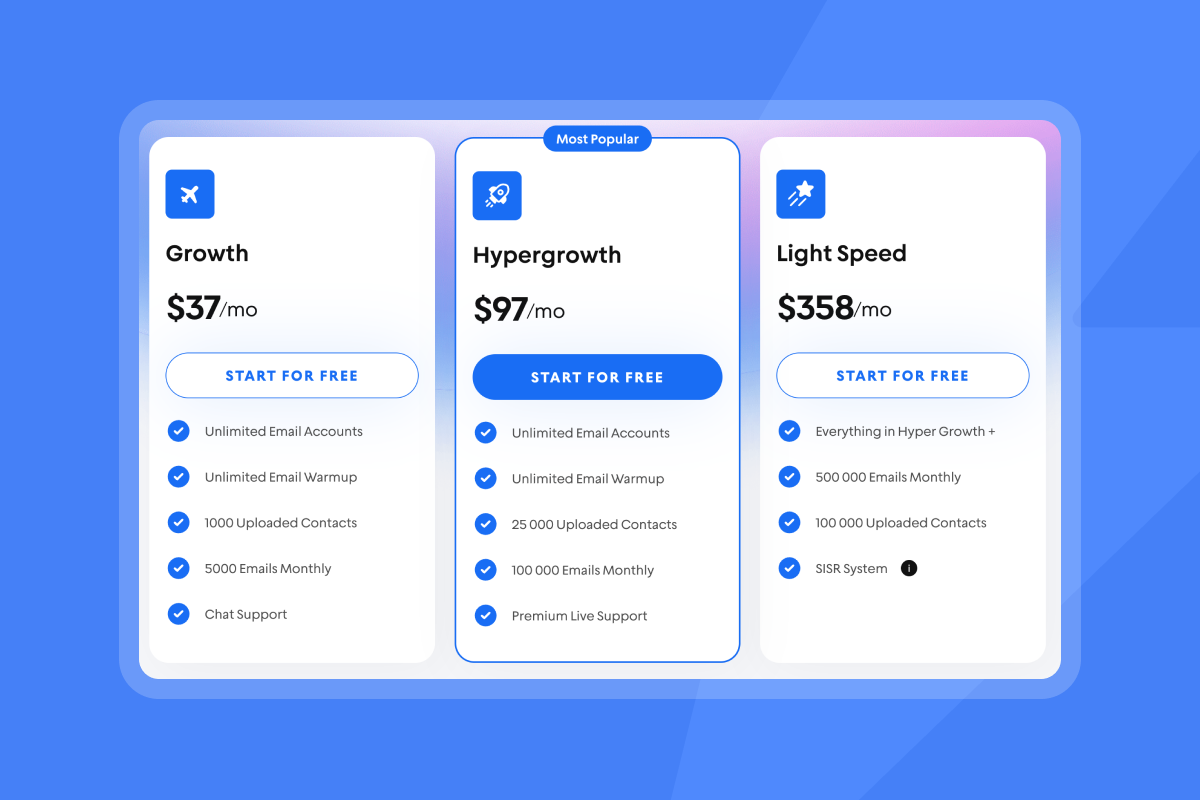
Our flat-fee pricing makes ROI calculations cleaner. With unlimited accounts starting at $37/month for outreach, plus SuperSearch at $47/month, your tool stack costs $84/month base.
Personalize to scale your cold outreach
You need personalization to succeed at cold email. The challenge for agencies is executing personalization at scale without burning client domains or budgets.
Our platform solves this with unlimited email accounts, SuperSearch's 450M+ verified leads, AI Reply Agent for automated response handling, and built-in warmup. All at flat-fee pricing that scales with your agency, not against it.
Ready to apply this playbook? Start your free 14-day trial, use the ramp template inside the app to start sending personalized emails at scale.
Frequently asked questions about sending personalized emails at scale
How do I personalize cold emails at scale without manual research?
Use SuperSearch's 450M+ verified B2B leads with waterfall enrichment to gather firmographic, technographic, and behavioral data in under 2 minutes per prospect. Combine this with Copilot's AI assistance to generate personalization angles and icebreakers automatically. Spin syntax creates natural variations so no two emails are identical.
What's the maximum number of personalized emails I can send per day per inbox?
Cap each sending account at 30 emails per day to protect deliverability and sender reputation. Scale volume by adding more warmed accounts. Ten warmed accounts safely send 300 personalized emails daily without hurting inbox placement.
How do I automate email personalization without losing the human touch?
Use spin syntax to create natural variations and let AI Reply Agent handle follow-ups in your brand voice. Vary sentence structure and vocabulary so emails feel human-written. Configure AI Reply Agent in human-in-the-loop mode to review drafts via Slack before sending if you want approval control.
What reply rate should I expect from personalized cold emails at scale?
Aim for 10-25% reply rates with deep personalization that combines firmographic data, behavioral triggers, and role-specific pain points. This compares to 1-5% for generic emails. Strong campaigns also convert 1-3% of sends into booked meetings. Track reply rate as your primary success metric.
Key terms glossary
Personalization: The practice of tailoring email content to individual recipients using specific data points about their company, role, behavior, and needs.
Spin Syntax: A formatting technique that creates multiple variations of the same email by defining alternative words in brackets, ensuring no two recipients receive identical copy.
SuperSearch: Instantly's integrated lead database containing 450M+ verified B2B contacts with waterfall enrichment across 5+ providers. Streamlines prospect research and data gathering for personalized campaigns.
AI Reply Agent: Instantly's automated reply handling tool that classifies incoming responses and drafts personalized replies in under 5 minutes. Operates in autopilot or human-in-the-loop mode using 5 credits per reply.
Sender Reputation: A score assigned by mailbox providers based on sending history, engagement rates, bounce rates, spam complaints, and authentication set up. Higher reputation improves inbox placement while poor reputation leads to spam filtering or domain blocks.



