


Updated December 17, 2025
TL;DR: Reps go rogue because legacy CRMs demand too much manual work, not because they are lazy. You fix compliance by removing friction through centralized communication, automated data entry, and clear deal stages. The four steps: centralize replies in a unified inbox, automate status updates, define clear deal stages, and audit with transparent analytics. Instantly delivers this through flat-fee unlimited seats, a Unibox that aggregates all rep inboxes, and automated reply classification. The result is clean data without manual logging and full visibility without micromanagement.
How should a CRM help B2B sales?
A Customer Relationship Management (CRM) system's sole purpose is to act as a centralized platform to store customer data, track interactions, and identify sales opportunities. It turns static contact records into dynamic action. Think of it as the difference between a filing cabinet and a command center. A spreadsheet holds names and numbers. A CRM captures every email, call, and meeting, then gives you workflows to move deals forward.
B2B sales CRM: Built for complex cycles
A B2B sales CRM is designed specifically for the complexities of business-to-business sales. These systems handle longer sales cycles, larger deal sizes, and relationships with multiple stakeholders within a single client organization.
The average B2B sales cycle ranges from weeks to several months, and in enterprise deals, it can stretch beyond a year. This is fundamentally different from B2C transactions, which are typically quick and transactional.
| Feature | B2B Sales CRM | B2C or General CRM |
|---|---|---|
| Sales cycle | Weeks to months, multiple touchpoints | Hours to days, transactional |
| Focus | Account-based tracking with multiple stakeholders | Individual consumer profiles |
| Key features | Pipeline management, deal stages, forecasting | Marketing automation, loyalty programs |
| Typical user | Sales teams of 3-15+ reps at 20-200 employee companies | High-volume consumer service teams |
If you manage a sales team at a B2B company, your CRM must handle deal progression through defined stages, track communication with multiple decision-makers per account, and provide visibility into rep activity without requiring constant check-ins.
The problem is that many CRMs built for enterprise complexity actually create more friction than they solve. This friction is what sends reps rogue.
Why reps go rogue (and why it kills revenue)
Your reps aren't lazy. They're just avoiding friction (I'd do the same if I didnt have the right system in place). When a CRM requires 15 clicks to log a single email and demands manual data entry after every call, reps build workarounds. They keep prospect lists in spreadsheets, skip logging follow-ups, and use personal email accounts to avoid the system. This is not a personnel problem. It is a systems problem.
The three friction points that create rogue behavior
1. Complex interfaces with clunky UIs
Legacy enterprise CRMs were built for IT administrators, not daily users. When your reps spend more time figuring out field mappings than actually selling, they will find shortcuts. Platforms that are intuitive and allow teams to get running quickly remove this barrier.
2. Per-seat pricing that limits access
When each additional CRM seat costs $50-150 per month, managers make tough choices. Junior SDRs get locked out. Contractors cannot access the system. Critical data lives in someone's inbox instead of the shared pipeline. This creates a two-tier system where only senior reps have visibility.
3. Manual data entry that never gets done
After a rep sends 30 emails, takes 8 calls, and books 2 meetings in a single day, the last thing they want to do is spend 45 minutes logging everything into a CRM. According to research showing that B2B buyers spend only 17% of their time with suppliers, your reps need to use that limited time to sell, not to fill out forms.
What this costs you
When reps go rogue, you lose pipeline visibility, coaching opportunities, and revenue. You cannot forecast accurately when half your deals live in undocumented spreadsheets. You cannot fix messaging problems you cannot see. Prospects fall through cracks because follow-ups never happen.
Watch how Instantly works end to end to make your action and outreach system tracking as low friction as possible with AI:
"I've been using instantly.ai for my cold email outreach, and it has completely changed the way I run campaigns. The platform is super intuitive, and I was able to get up and running in minutes." - Verified user review of Instantly

Step 1: Centralize communication with a unified inbox
The first step to standardizing your CRM is to stop reps from hiding conversations.
A unified inbox (also called a Unibox) aggregates replies from all team email accounts into one shared view. This means you see every prospect response across all your reps without logging in and out of individual inboxes.
How Instantly Unibox solves the visibility problem
Instantly's Unibox centralizes all incoming replies, classifies them automatically, and routes them to the right rep or manager. You get complete transparency without micromanagement. Instead of asking "Did you follow up with that lead?" you can open the Unibox and see the entire conversation thread, the last touchpoint, and whether a reply is pending.
"Instantly has assisted us in creating outbound email systems that reach your ideal buyer's inbox and foster meaningful connections. Also, their customer support is next level, 10/10." - Verified user review of Instantly
Why centralization beats fragmentation
When each rep manages their own inbox in isolation, three problems emerge:
- Hidden objections: A rep receives a pricing objection but never shares it with the team. You miss the pattern.
- Dropped leads: A rep goes on vacation and urgent replies sit unread for a week.
- No coaching data: You cannot improve messaging when you cannot see what prospects actually say.
Centralization fixes all three. One shared inbox means one source of truth.
Action step: Audit your current setup. How many email accounts do your reps use? Can you see all replies in one place? If the answer is no, you need a unified inbox.
For a visual walkthrough of setting up centralized reply management, watch this tutorial on Instantly's CRM features.
Step 2: Automate the grunt work (data entry)
Manual data entry is where deals go to die. If compliance requires 30 minutes of admin work per day, compliance will not happen. The solution is to automate status updates, reply classification, and activity logging so the CRM updates itself.
How automated reply classification works
Modern CRM systems use AI to read incoming emails and automatically categorize them as interested (prospect asks for a demo), objection (not right now), out of office, or unsubscribe. Instantly's automated reply classification handles this categorization and can draft responses automatically. This means your CRM stays accurate without reps lifting a finger.
"The platform is super intuitive, easy to set up, and makes it simple to manage multiple domains and inboxes at scale. Deliverability is great and the analytics give us exactly what we need to optimize campaigns quickly." - Verified user review of Instantly
What to automate vs. what to keep manual
Automate these tasks:
- Email opens and clicks
- Reply categorization (interested, objection, out-of-office)
- Status changes (Contacted → Replied → Meeting Booked)
- Bounce detection and list hygiene
Keep these manual (for now):
- Discovery call notes
- Custom objection handling
- Final pricing negotiations
- Contract redlines
The rule is simple: if it is repetitive and data-driven, automate it. If it requires judgment and context, let humans handle it.
Action step: List every manual data entry task your reps do daily. Identify which tasks a system could auto-log based on email activity. Implement automation for those first.
Watch how our AI Reply agent handles replies for you to emulate your behaviour:
Step 3: Standardize the deal flow
Reps go rogue when "qualified" means something different to each person on the team. Standardizing deal stages fixes this. Every deal stage needs an objective exit criterion. Not "we had a good call," but "prospect confirmed budget and timeline."
Here is a basic B2B pipeline structure:
- Cold: Lead added to sequence. Exit: first email sent.
- Contacted: Outreach in progress. Exit: prospect replies.
- Interested: Prospect shows intent. Exit: meeting booked or demo requested.
- Meeting Held: Discovery or demo completed. Exit: next steps agreed.
- Proposal Sent: Formal quote delivered. Exit: prospect reviews proposal.
- Negotiation: Pricing or terms discussion. Exit: verbal agreement.
- Closed Won: Contract signed.
- Closed Lost: Deal dead with documented reason.
How Instantly CRM makes standardization easy
Instantly's CRM features include a Kanban-style deal board where you drag opportunities through stages. Each stage has clear labels and your team sees the same view. The benefit is uniformity. When everyone defines "Qualified" the same way, your forecast becomes accurate.

Action step: Document your current sales stages. Write one-sentence exit criteria for each. Share this with your team and enforce it for two weeks. Track which stages cause confusion and refine.
Step 4: Audit performance with transparent analytics
You cannot manage what you cannot measure. The final step is to implement a dashboard that shows real activity, not vanity metrics.
The metrics that matter for inside sales
Stop tracking "emails sent." Start tracking these:
- Reply rate: Percentage of emails that get a response (target: 5% or higher)
- Positive reply rate: Percentage of replies that show interest (target: 1-2%)
- Meetings booked: Actual calendar invites accepted (target: 20-40 per month per rep)
- SQL conversion: Meetings that turn into sales-qualified leads
- Bounce rate: Invalid emails (target: under 1%)
- Spam rate: Emails flagged as spam (target: under 0.5%)
These metrics give you actionable insight into what is working and where reps need support.
Weekly performance reviews using CRM data
Schedule a 30-minute team meeting every Monday. Pull last week's numbers directly from your CRM dashboard:
- Rep-level performance: Who is hitting reply targets? Who needs coaching?
- Campaign performance: Which subject lines and messaging variants drive replies?
- Pipeline health: Are deals moving or stalling at a specific stage?
- Deliverability status: Any accounts showing spam signals or bounce spikes?
Instantly's analytics dashboard provides these metrics in one view, with filtering by rep, campaign, and time period. You can drill into individual campaigns to see what works and what does not.
"Instantly is honestly one of the best outreach tools I've used. Setup is quick, the interface is super clean, and it just works. Emails send smoothly, deliverability stays high, and the analytics make it easy to tweak campaigns." - Verified user review of Instantly
Action step: Set up a recurring weekly meeting focused solely on CRM data. Ban anecdotes and gut feelings. Only discuss what the numbers show. Adjust one variable per week and measure the impact.
For a deep dive into tracking the right KPIs, read this guide on essential lead generation metrics.
Top CRM platforms for B2B sales and marketing
When evaluating CRM options for inside sales, focus on three factors: ease of use, pricing model, and outreach capabilities.
Here is how the leading platforms compare:
| Platform | Pricing Model | Cold Email Capabilities | Best For |
|---|---|---|---|
| Instantly | Flat-fee, unlimited seats | Native outreach with warmup, Unibox, AI reply handling | Agencies and sales teams scaling outbound without per-seat costs |
| HubSpot | Freemium, then per-seat ($45-75+ per user)* | Basic sequences, requires add-ons for advanced features | Marketing-heavy teams with inbound focus |
| Salesforce | Per-seat ($25-300+ per user) | Limited native email, requires third-party integrations | Large enterprises with complex customization needs |
| Pipedrive | Per-seat ($14-99 per user) | Basic email tracking, limited automation | Small teams prioritizing deal pipeline over outreach |
*Professional tier upwards
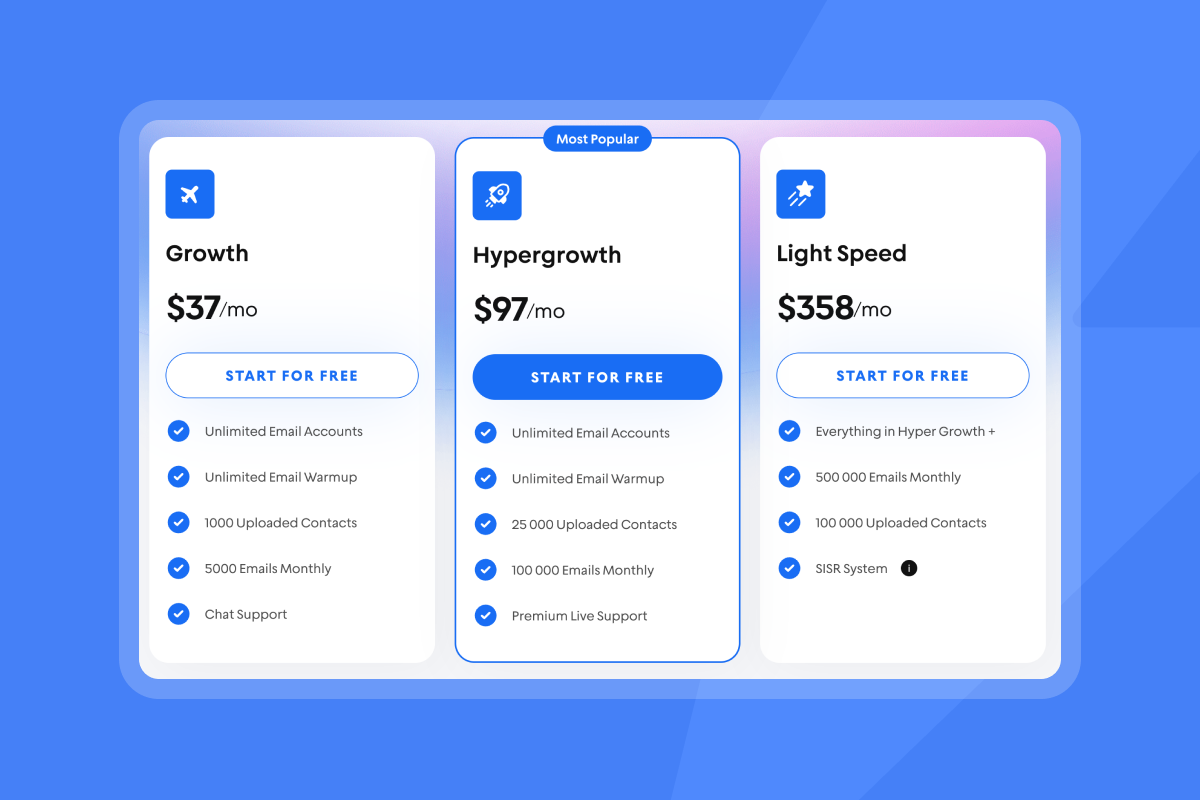
Instantly stands out with flat-fee pricing and native cold email tools like warmup and Unibox, while competitors charge per seat and lack built-in outreach infrastructure. Salesforce and HubSpot require costly add-ons for cold email capabilities, and Pipedrive offers only basic email tracking without serious automation.
Why Instantly is built for inside sales teams
Instantly's flat-fee pricing removes the per-seat penalty. You pay a flat fee and add unlimited email accounts. This means every rep gets full access to the CRM, Unibox, and campaign analytics without increasing your software bill.
For a sales leader managing 10 reps, this is the difference between paying $500 per month (flat-fee) versus $1,500+ per month (per-seat model at $150 per user). The platform's built-in email warmup automatically warms new domains and monitors sender reputation, while the lead finder provides verified B2B contacts so you do not need a separate data provider.
"I've been using Instantly for my outreach and I'm genuinely impressed. The platform is fast, intuitive, and delivers exactly what it promises. Setting up campaigns and managing deliverability became so much easier compared to other tools I used before." - Verified user review of Instantly
For a detailed pricing comparison between Instantly and other platforms, read this guide on sales engagement platform pricing.
For a visual comparison of how different CRM systems handle outreach workflows, watch this tutorial on Instantly's full platform.
Stop the chaos and standardize your inside sales CRM today
The four-step system is straightforward: centralize communication in a unified inbox, automate data entry with AI-powered reply classification, standardize deal stages with clear exit criteria, and audit performance with transparent analytics.
Instantly delivers all four steps on a flat-fee pricing model with unlimited email accounts, a centralized Unibox, and integrated AI automation. You get the visibility and control of an enterprise CRM without the per-seat tax or complex implementation.
For sales leaders managing 3-15 reps at B2B companies, this is the difference between a chaotic spreadsheet operation and a scalable, auditable sales process.
Ready to apply this system? Try Instantly free and see your entire team's pipeline in one dashboard. Set up takes less than 30 minutes, and you can run a 30-day pilot to measure reply rates, meetings booked, and data accuracy before committing.
For a complete walkthrough of setting up your first campaign in Instantly, watch this beginner's guide.
FAQs
What is the difference between a CRM and a sales engagement platform?
A CRM stores contact records and deal stages. A sales engagement platform (like Instantly) combines CRM functionality with active outreach tools, email automation, and reply management in one system.
How many sales reps do I need before a CRM is worth it?
At 3+ reps, manual coordination fails and you need centralized visibility. At 5+ reps, lack of a unified system costs you 10-15 hours per week in status meetings and lost leads.
What is a unified inbox and why does it matter?
A unified inbox (Unibox) aggregates all team email replies into one shared view, preventing leads from falling through cracks when reps are out or deals are reassigned.
How do I calculate the ROI of inside sales CRM software?
Track cost per meeting booked (total CRM cost divided by meetings set) and compare it to your average deal value. If your CRM costs $500/month and generates 30 meetings worth $3,000 each, your ROI is clear.
Can I use Instantly as my primary CRM or do I need Salesforce too?
Instantly functions as a full CRM for outbound-focused teams with deal management, activity tracking, and analytics. Many teams use Instantly as their primary system and export closed deals to Salesforce for long-term account management.
Key terms glossary
CRM: A system to track interactions and deal stages with prospects, combining contact storage with workflow automation and analytics.
B2B CRM: Customer Relationship Management software designed for long business-to-business sales cycles with multiple stakeholders per account.
Inside sales: Sales handled remotely via email, phone, and video rather than in-person field visits.
Unified inbox (Unibox): A centralized view that aggregates replies from all team email accounts into one shared interface.
Pipeline management: The process of tracking and guiding potential buyers through defined sales stages from first contact to close.
Lead nurturing: Consistent communication to keep prospects engaged through a long sales cycle until they are ready to buy.
Automation: Using software to handle repetitive tasks like data entry, status updates, or follow-up emails without manual intervention.
Reply rate: Percentage of sent emails that receive a response from the recipient, typically targeting 5% or higher for effective cold outreach.
Sender reputation: A score ISPs assign to your domain based on engagement, bounce rates, and spam complaints that determines inbox placement.
Deliverability: The ability of an email to land in the primary inbox rather than the spam or promotions folder.
Flat-fee pricing: A subscription model where you pay a fixed monthly cost regardless of the number of users or email accounts, unlike per-seat pricing.
Cost-per-meeting: Total campaign cost divided by the number of booked meetings, a key metric for measuring outreach efficiency and ROI.


