.svg)
%20(1).svg)


Updated September 23, 2025
TL;DR: If you need predictable scale without per-seat penalties, Instantly’s flat-fee pricing with unlimited email accounts, built-in warmup, a large lead database, and AI agents delivers strong ROI for startups and agencies. Use the calculator below to model meetings, pipeline, and cost per meeting, then compare Instantly with Smartlead, Skylead, and Reply.io to pick the best fit for your team.
Introduction: navigating the cold email landscape
Your outreach platform should protect inbox placement, scale across many inboxes, and show a clear cost per meeting. Instantly combines deliverability, data, and AI with flat-fee pricing so your costs map to outcomes, not seats.
According to a Gartner report on the B2B buying journey, B2B buyers spend only about 17 percent of their total buying time with suppliers. The same firm also notes that 80% of B2B sales interactions are now digital, which makes reliable inbox placement and clean reporting critical to your pipeline math.
This guide gives you transparent pricing, a practical ROI calculator, and an objective comparison of Instantly vs Smartlead, Skylead, and Reply.io. It is written for sales leaders, agency operators, growth marketers, and founders at B2B companies.
Head-to-head comparison: Instantly, Smartlead, Skylead, and Reply.io
Instantly is best for flat-fee scale across unlimited inboxes with integrated data and deliverability. Smartlead is a strong cold email alternative but lacks any lead data support. Skylead supports LinkedIn steps for multichannel plays. Reply.io is a broader sales engagement suite with per-seat pricing.
Key notes before the table
- Pricing snapshots come from third-party listings and first-party product pages where available.
- Validate must-have features and limits in a short pilot.
| Tool | Starting price | Key strengths | Best for |
|---|---|---|---|
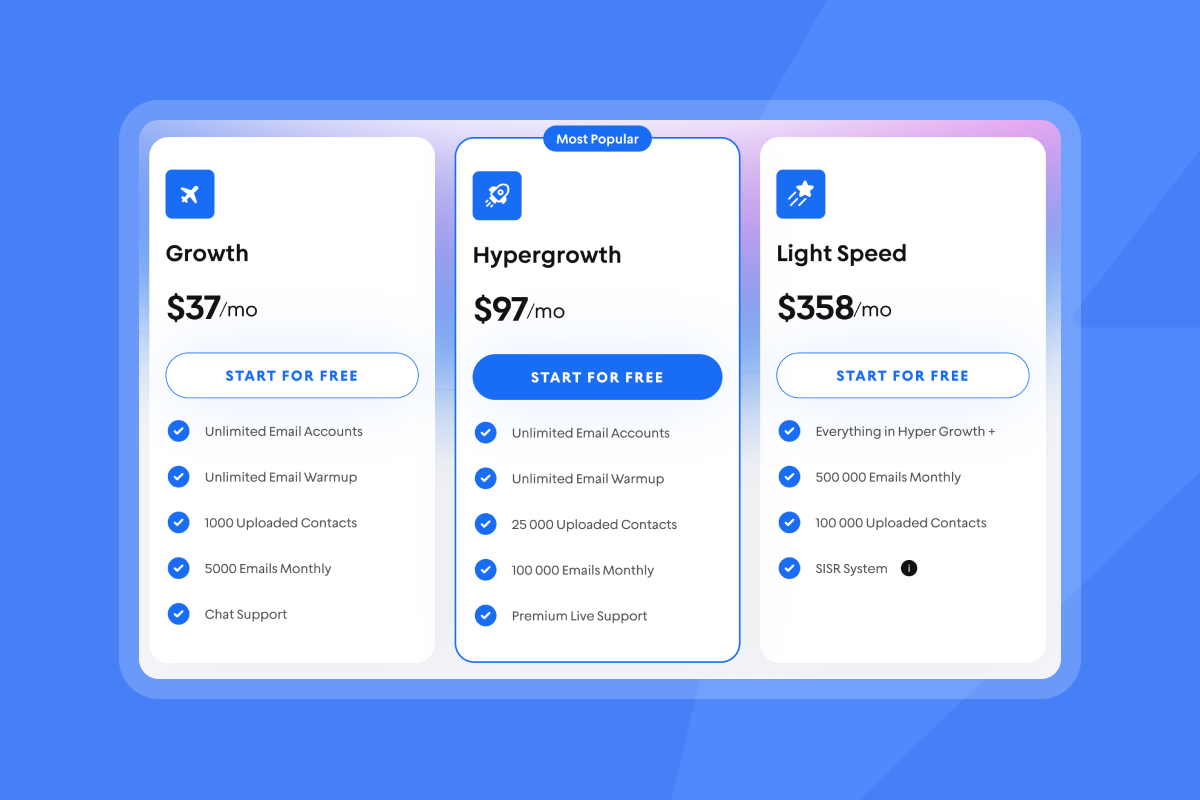
| Instantly | $37/mo | Flat-fee with unlimited email accounts and warmup. 450M+ lead database and advanced deliverability tools (4.2M account network, SISR). | Startups, agencies, and lean teams that want predictable costs, scale and an all in 1 tool. |
| Smartlead | From $39/mo | Unlimited mailboxes on core plans. Inbox rotation. No leads data. | Agencies focused on high-volume cold email with minimal lead data needs. |
| Skylead | ~$100/account/mo | Multichannel with LinkedIn plus email steps. | Teams that prioritize LinkedIn plus email in one flow. |
| Reply.io | From ~$49/user/mo | Complete sales engagement with multichannel, dialer, and AI SDR options. | Sales orgs that want a full SEP and accept per-seat pricing. |
Instantly: the all-in-one growth engine
Instantly is built to land in the primary inbox at scale and convert replies into meetings, without per-seat penalties.
Key features and benefits
- Deliverability as a system. Unlimited inboxes and warmup are included on every outreach plan on the pricing page. Automated Inbox Placement tests and reputation protections help you spot issues early.
- Integrated data. SuperSearch provides a B2B database of 450M+ contacts with waterfall enrichment so you can cut list waste and improve reply rate.
- AI agents that reduce manual work. Copilot helps you find leads, generate campaigns, and summarize analytics. The AI Reply Agent classifies and drafts replies in under 5 minutes, with human-in-the-loop or autopilot modes. Use the AI Email Writer to move faster.
- Flat-fee economics. Scale inbox count without compounding per-seat fees. You can add credits only when you need more data or AI actions.
- All-in-one workflow. Outreach, Unibox reply management, opportunities, and reporting live in the CRM plans listed on the pricing page.
For an end-to-end walkthrough, watch the Instantly Tutorial 2025 and the product demo explainer.
"The platform is super intuitive, easy to set up, and makes it simple to manage multiple domains and inboxes at scale. Deliverability is great and the analytics give us exactly what we need to optimize campaigns quickly." - Shaiel P. on G2
"The platform is super intuitive, and I was able to get up and running in minutes. Deliverability has been excellent..." - James M. on G2
"Instantly has a really good academy to get you started. I was able to get everything set up in a few hours." - Richard on Trustpilot
You can also review best practices in Inbox Placement and compare plan modules on the pricing page, then explore AI setup options in Copilot.
Pros
- Instantly’s pricing page lists a flat price with unlimited email accounts and built-in warmup.
- The SuperSearch update shows an integrated contact database that reduces tool sprawl.
- Inbox Placement and reputation protections reduce risk as you scale.
- Copilot and the AI Reply Agent reduce manual hours and response lag.
Cons
- Instantly is an email first platform but can easily be integrated to support multi-channel campaigns.
Ideal users
- Agencies running many client inboxes who want fixed software cost.
- Sales leaders who value deliverability, analytics, and team governance can explore Inbox Placement.
- Founders who want meetings without adding headcount first can start with Copilot.
Smartlead: scalable cold email with agency traction
Smartlead is a popular cold email alternative with unlimited mailboxes on core tiers and inbox rotation.
Key features and benefits
- Key plans offer unlimited mailboxes with rotation features.
- Campaign automation and analytics fit high-throughput sending.
- It is often considered by agencies evaluating options.
Pros
- Known for mailbox scale and rotation at accessible entry pricing.
- Clear value for high-volume sending patterns noted on G2 pricing.
- An active community and peer playbooks are easy to find.
Cons
- B2B contact data and AI reply handling may require extra tools, which will increase costs.
- Reporting depth and integrations vary by stack.
- Additional leads data tools, integrations and spend required.
Ideal users and alternatives
- Ideal for agencies that want an unlimited-mailbox model.
- Consider Instantly if you want integrated data, placement testing, and AI agents with flat-fee economics.

Skylead: multichannel outreach with LinkedIn automation
Skylead blends LinkedIn and email steps. It is best for teams where LinkedIn is a core step and email volumes are moderate.
Key features and benefits
- You can run LinkedIn plus email sequences from one tool.
- Smart scheduling and step logic work across channels.
- This is useful when your ICP lives on LinkedIn and you need profile-level engagement.
Pros
- Multichannel flows with LinkedIn steps.
- Good for hands-on, personalized outreach motions.
- Simple planning for social plus email sequences.
Cons
- Per-seat pricing can scale cost with headcount.
- Browser and LinkedIn automation carries compliance risk (account bans).
- Email deliverability and data often rely on add-ons.
Ideal users and alternatives
- Ideal for teams prioritizing LinkedIn engagement.
- Consider Instantly if most of your meetings come from email and you want flat-fee scale across many inboxes.
Reply.io: the comprehensive sales engagement platform
Reply.io is a full sales engagement suite with per-seat pricing. It adds dialer, tasks, and AI SDR capabilities beyond cold email.
Key features and benefits
- Multichannel outreach, dialer, and task orchestration live in one suite.
- CRM integrations fit sales team workflows.
Pros
- A broad feature footprint supports sales teams running multichannel.
- Strong workflow orchestration than specialized email tools.
Cons
- Per-user pricing ties spend to headcount, not outcomes.
- Email deliverability and lead data often require extra tools or credits listed.
- Implementation and admin complexity can be higher than focused email tools.
Ideal users
- Sales orgs that want a fuller SEP and accept per-seat pricing models.
Addressing the nuances: what reviews get right and wrong
The right pick depends on your channel mix and cost model. If you need to scale many inboxes safely, flat-fee plus deliverability tooling is usually the better economics. If you need LinkedIn tasks or a full SEP, per-seat suites can fit, with higher TCO at lower volumes.
What to watch
- Deliverability is a system. Outcomes depend on DNS, warmup, list hygiene, copy, complaint rate, and send windows. Gmail’s bulk sender guidelines and Yahoo’s sender requirements emphasize SPF, DKIM, DMARC, one-click unsubscribe, and low complaint rates. Ongoing Inbox Placement tests help you catch issues early.
- Unlimited is not infinite. Mailbox providers watch behavior. Keep bounces low and ramp thoughtfully.
- Analytics and CRM truth. Reconcile replies, meetings, and pipeline with your CRM. If you need automated reply handling, Instantly’s AI Reply Agent can triage and draft responses quickly to preserve speed-to-lead.
For a practical walkthrough, you can see the Ultimate Guide to Cold Email Deliverability.
Calculate your cold outreach ROI
Use the calculator inputs below to estimate meetings, pipeline, and ROI. Then adjust the sensitivity slider to see break-even volume for your model.
ROI calculator
Inputs (with defaults)
- Monthly emails sent: 5,000
- Delivery rate: 97%
- Reply rate: 1.5% of delivered
- Positive reply share: 40% of replies
- Meeting rate from positive replies: 40%
- Close rate from meetings: 15%
- Average deal size: $2,500
- Gross margin: 70%
- Monthly software cost: $131
- Monthly data/credits cost: included above
- Labor hours saved per month with AI: 16
- Fully loaded hourly cost: $40
Note on $131 default: Instantly Outreach Growth at $37, SuperSearch Growth at $47, and Growth CRM at $47 are listed on the pricing page. Adjust any line item to match your stack. Instantly does also have a $9/mo Nano plan for SuperSearch.
Formula and assumptions
- Delivered = Emails × Delivery rate
- Replies = Delivered × Reply rate
- Positive replies = Replies × Positive share
- Meetings = Positive replies × Meeting rate
- New customers = Meetings × Close rate
- Revenue = New customers × Average deal size
- Gross profit = Revenue × Gross margin
- Time savings value = Hours saved × Hourly cost
- ROI = (Gross profit + Time savings value - Software cost) ÷ Software cost
- Cost per meeting = Software cost ÷ Meetings
Sensitivity analysis by campaign size
Defaults above, varying monthly emails only.
| Monthly emails | Meetings | New customers | Gross profit | Est. ROI |
|---|---|---|---|---|
| 1,000 | ~2.3 | ~0.35 | ~$611 | ~855% |
| 5,000 | ~11.6 | ~1.75 | ~$3,056 | ~2,720% |
| 10,000 | ~23.3 | ~3.49 | ~$6,111 | ~5,050% |
| 20,000 | ~46.6 | ~6.98 | ~$12,222 | ~9,720% |
How to interpret this
- Break-even volume. Solve for the emails needed so gross profit equals software cost. With these defaults it is roughly 215 emails per month. If your reply or win rates are lower, your break-even rises.
- Compare stacks. Swap the software cost to reflect per-seat tools or add-ons. If your stack is $600 or more per month, cost per meeting rises quickly at lower volumes.
- Validate assumptions. Use your real average deal size, close rate, and reply rate. If you sell lower ACV, model higher volume or more inboxes to keep ROI positive.
Why Instantly often improves ROI
- Fewer tools. Data, warmup, and AI in one place reduce spend and integration time.
- Deliverability controls. Automated Inbox Placement tests and a private warmup network help protect reply rate at scale.
- Flat-fee economics. Unlimited accounts avoid compounding costs as you add inboxes or clients.
For related resources, browse selected Trustpilot reviews like this one from Richard about onboarding and support, and check a detailed G2 perspective in Shaiel P.’s review.
Choosing your ideal platform: a persona-centric checklist
Pick the plan that fits your channel mix, governance needs, and budget model.
Use this checklist to decide
- Deliverability and scale
- Do you need unlimited inboxes with built-in warmup on the pricing page and placement tests?
- Can you monitor bounces, complaints, and ramp rules per team or client?
- Data and list hygiene
- Do you need an integrated lead database with credits and verification in SuperSearch?
- Can you A/B test variants and enforce list hygiene policies?
- AI and ops
- Will AI setup, enrichment, and reply handling save you real hours each week with Copilot and the AI Reply Agent?
- Do you require audit trails, roles, and workspace governance?
- Cost model and ROI
- Do you prefer flat-fee over per-seat pricing as your team or client base grows on the pricing page?
- What is your modeled cost per meeting at 1k, 5k, and 10k emails per month?
Make your budget work harder
If cost per meeting and safe scale are your top priorities, a flat-fee, deliverability-first platform with integrated data and AI often wins. Run the calculator with your numbers, then pilot for 10 to 14 days with a tight ramp plan.
Calculate your ROI, then start your Instantly free trial, connect two warmed inboxes, import verified contacts from SuperSearch, and track cost per meeting in week one.
Related content
- For more context from practitioners, watch the Cold Email Masterclass with Instantly’s founder and Patrick Walsh’s Instantly AI Beginners Guide.
- You can watch an independent walkthrough in LeadSwift’s Instantly Tutorial & Review.
Frequently asked questions
Q: Is Instantly cheaper than Smartlead?
A: It depends on your plan and add-ons. Instantly Outreach starts at $37 per month with unlimited email accounts and warmup on the pricing page. Smartlead listings on G2 show a Basic plan at $39 per month with unlimited email accounts and warmup.
Q: How many inboxes do I need to start?
A: Two to four warmed inboxes is a common start for a new domain. You can run placement tests before scaling volume.
Q: What reply rate should I model in the calculator?
A: Conservative teams model 1 to 2 percent replies on delivered emails for cold campaigns. Monitor opens, replies, positive rate, and booked meetings weekly.
Q: Does Instantly include a lead database?
A: Yes. SuperSearch offers a large B2B contact database with credit-based enrichment to improve list quality and reduce bounces.
Q: How fast can AI handle replies?
A: The AI Reply Agent can draft and send replies in under 5 minutes, and costs 5 Instantly credits per AI reply. You can keep a human-in-the-loop or use autopilot.
Key terms glossary
- Deliverability: Your likelihood to land in the primary inbox.
- Warmup: Low-volume sending to build sender reputation before scaling.
- Sender reputation: Trust signals mailbox providers assign to your domain and IP.
- List hygiene: Ongoing removal of risky or unverified emails.
- Verified contacts: Emails confirmed deliverable by a verifier.
- Send windows: Time ranges when campaigns send.
- Spin syntax: Copy variations that reduce repeats.
- Unified inbox: One place to manage all replies.
- AI personalization: AI-assisted research and copy for each contact.
- Lead Builder: Tools to find and enrich contacts.
- Waterfall enrichment: Using multiple data sources to improve match rates.
- A/B testing: Testing variants to improve performance.
- Ramp plan: Gradual increase in sending volume to protect reputation.
- Flat-fee pricing: One price regardless of seats.
- Per-seat pricing: Pricing that increases with user count.



