


Updated September 17, 2025
TL;DR: Better outreach starts with better data. B2B lead enrichment adds firmographics, technographics, headcount, and funding context so you can segment precisely, write emails that get replies, and protect deliverability. Instantly.ai’s SuperSearch pairs 450M+ contacts with multi‑provider verification and AI enrichment, and Inbox Placement testing with flat‑fee sending across unlimited inboxes. That mix improves list quality, reply rate, and pipeline reliability. See SuperSearch in the product docs and review Inbox Placement details on the feature page.
What is B2B lead enrichment and why is it essential?
Enrichment augments each record with headcount, industry, tech stack, and funding so you can target with precision and write relevant emails that convert.
The shift from basic contacts to deep insights
Contact data decays quickly. Email lists shrink about 22 to 25 percent per year as people change jobs or addresses. That decay raises bounces and hurts sender reputation if you keep mailing stale records. A HubSpot analysis cites an average 22.5 percent annual decline. See HubSpot’s overview of database decay.
At the same time, buying is digital. Gartner reports roughly 80 percent of B2B sales interactions occur in digital channels by 2025. Your message competes in crowded inboxes, so current, rich data becomes a must. Read Gartner’s press release.
Benefits for sales and marketing teams
- Better targeting and segmentation with firmographics and technographics.
- Higher relevance in copy. Personalization leaders drive about 40 percent more revenue from those efforts than peers. See the McKinsey analysis on personalization impact.
- Productivity gains and faster cycles when reps focus on high‑fit accounts. Research on automated enrichment shows about 20 percent higher sales productivity and up to 15 percent shorter sales cycles. Review the MarketsandMarkets summary on enrichment ROI.
Essential features of a top B2B lead enrichment platform
Prioritize verified data, deep company context, AI helpers, reliable integrations, and deliverability protections. Add pricing transparency and team controls.
Data quality and verification
- Multi‑source or waterfall verification to reduce hard bounces.
- Active refresh cadence to prevent stale records.
- Flags for catch‑all and role accounts.
- Built‑in list hygiene and verification to protect sender reputation.
Comprehensive company and contact data
- Firmographics: industry, headcount, revenue band, location.
- Technographics: key tools in your category.
- Funding and growth signals, hiring velocity, and company description.
- Work emails and phones where lawful.
- In SuperSearch, you can filter by headcount, tech stack, and funding across 450M+ contacts.
AI‑powered enrichment and automation
- AI research assistants to define ICPs, surface targets, and draft campaigns. Instantly Copilot supports lead finding, sequence creation, and recurring tasks. Read the Copilot guide.
- AI reply handling to triage and respond within minutes, with human‑in‑the‑loop or autopilot modes. The AI Reply Agent targets replies in under 5 minutes and can book calls and update CRM status. See the AI Reply Agent help article and the feature changelog.
For a quick look at these workflows, watch the Instantly AI full tutorial on YouTube. You can also see sequence drafting in action in write email sequences in seconds and SuperSearch in we just killed traditional lead gen.
CRM integration and workflow automation
- Native and partner connectors, plus Zapier and webhooks for custom flows.
- Field mapping and dedupe rules to keep one source of truth.
- For HubSpot and Salesforce, teams commonly use the OutboundSync partner to log sends, replies, and statuses for attribution. Review the OutboundSync integration pattern.
Deliverability tools and reputation management
- Warmup across unlimited accounts to build reputation.
- Automated Inbox Placement tests and alerts by provider to catch issues early. See the Inbox Placement page and the automated tests article.
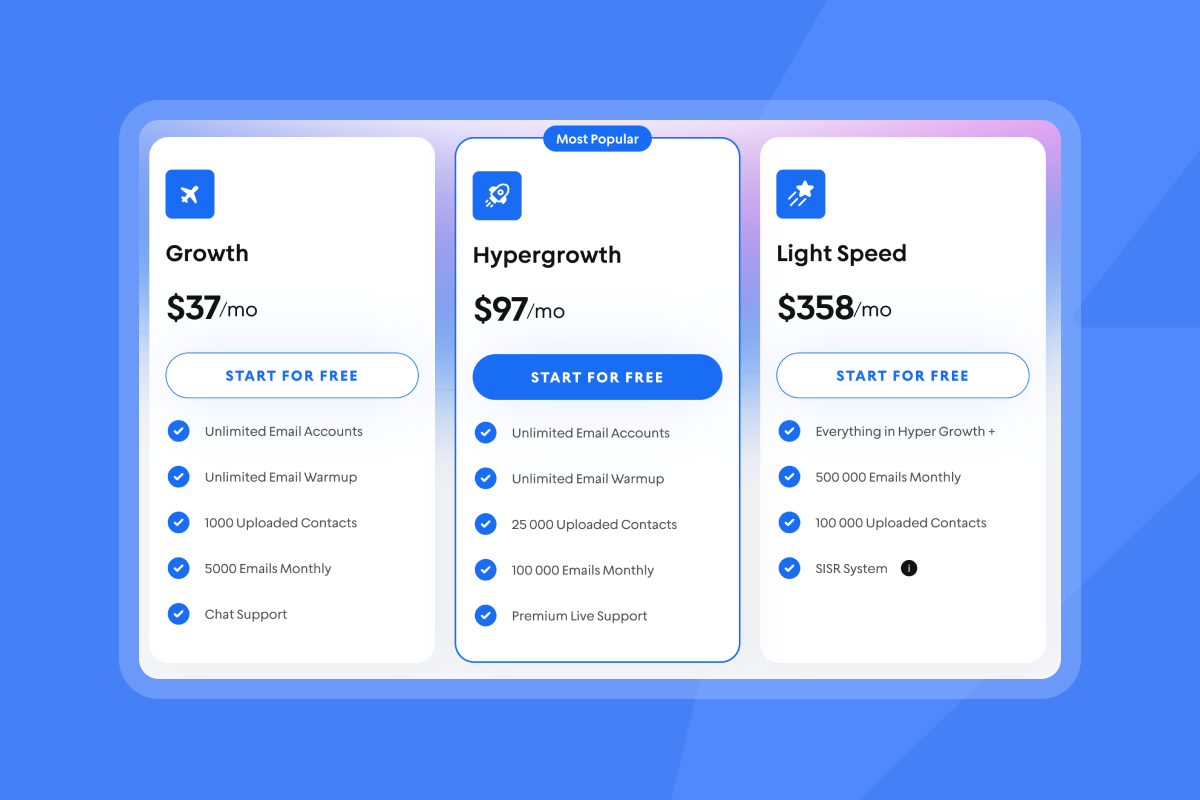
- On Light Speed tiers, SISR isolates sending across servers and IPs for safer scale. Review Light Speed tiers on the pricing page.
Feature checklist
- Data quality: multi‑provider verification, refresh cadence, catch‑all detection.
- Depth: firmographics, technographics, funding, hiring, description.
- AI: research, drafting, enrichment, reply management.
- Integrations: HubSpot, Salesforce, API v2, webhooks, Zapier. See the Inbox Placement Test endpoint in API v2.
- Deliverability: warmup, placement tests, SISR, global block list. Read about Inbox Placement.
- Controls: team workspaces, templates, approval flows, audit logs.
- Pricing: clear credits for data and AI, flat‑fee sending without per‑seat caps. Check the plans overview.
Top B2B lead enrichment providers: a detailed comparison
Methodology: We reviewed public docs, help centers, G2 pages, and press as of August 2025, focusing on data scope, verification, AI, deliverability, integrations, and pricing model transparency.
| Provider | Database size | Deliverability tools | CRM and integrations |
|---|---|---|---|
| Instantly.ai | 450M+ verified contacts | Warmup network of 4.2M, automated inbox tests | HubSpot, Salesforce, Pipedrive |
| ZoomInfo | 300M+ contact profiles | Owns NeverBounce | Major CRM and SEP ecosystems |
| Apollo | 224M+ contacts | 7-step email verification | Popular CRM and engagement tools |
| Cognism | 200M+ European contacts | Phone-verified mobiles, 87% accuracy | CRM and sales engagement tools |
| Reply | 60M+ accounts | Built-in email validation | CRM, email, calling integrations |
| Kaspr | ~160M contacts | Real-time verification from 150+ sources, enrichment | CRM and LinkedIn tools |
Instantly: integrated outreach, data, and AI
- Data depth: SuperSearch includes company description, headcount, technographics, and funding filters across 450M+ leads. Waterfall enrichment with 5+ providers and AI fills gaps. Learn more in the SuperSearch docs.
- Deliverability system: Unlimited accounts and warmup, automated placement tests, and SISR help protect primary inbox placement. See Inbox Placement and the automated tests article.
- AI and automation: Copilot for research and campaign creation, plus AI Reply Agent to triage and respond in under 5 minutes. Read about Copilot and the AI Reply Agent.
- Economics: Flat‑fee sending without per‑seat penalties. Credits for SuperSearch data and AI replies are published with clear ranges. Review the plans overview.
- Integration: API v2 and webhooks, with Salesforce and HubSpot sync patterns via OutboundSync for audit‑friendly attribution, or natively via the UI. See the Inbox Placement Test endpoint and the OutboundSync article.
See it in action
- Watch the Instantly AI SuperSearch Review on YouTube.
- See how to write email sequences in seconds with the new AI feature.
Other leading solutions: strengths and use cases
- ZoomInfo: deep company intelligence and compliance programs. Press reported 321M contacts in 2023, which suits enterprise data standardization.
- Apollo: integrated data and multichannel outreach for growth teams evaluating an all‑in‑one stack.
- Cognism: EU‑centric data and GDPR posture for compliance‑sensitive teams.
- Reply and Kaspr: multichannel sequencing and EU data capture for focused use cases.
Trade‑offs to weigh
- Per‑seat vs flat‑fee economics.
- Regional coverage and technographics depth.
- Deliverability tooling included vs add‑ons.
- Integration depth with your CRM and reporting stack.
How to choose the best B2B lead enrichment solution for your business
Validate data quality, list your must‑have features, do TCO math, confirm integration depth, then check support and compliance.
Evaluate data quality and freshness
- Ask for verification workflow and refresh cadence.
- Pilot with 500 to 1,000 verified contacts. Target hard bounces at or below 1 percent.
- Spot‑check priority filters like your ICP’s tech stack and funding.
Assess feature set vs your needs
- Heavy personalization needs firmographics and technographics.
- If deliverability hurt you, require warmup and automated placement testing. Review Inbox Placement.
- If scale across many inboxes matters, look for unlimited accounts and send isolation. See Light Speed tiers on the pricing page.
Understand pricing models and TCO
- Per‑seat examples can exceed four figures monthly at team scale after add‑ons.
- Flat‑fee example with Instantly: Hypergrowth Outreach at 97 plus Hyper Credits at 197 totals about 294 per month for unlimited senders, with optional CRM at 47. Use credits for data and AI as needed. See the plans overview and check pricing details.
- Include verification, export caps, and support SLAs in your math.
Prioritize integrations and workflow compatibility
- Confirm bidirectional behavior or partner solutions for Salesforce and HubSpot.
- Map fields, dedupe rules, and attribution before rollout.
- Require the endpoints you need. Instantly publishes an Inbox Placement Test API in API v2.
B2B lead enrichment for your role:
Different roles prioritize different risks. Match the platform to the job.
For sales leaders: driving pipeline and standardization
- Standardize targeting: lock ICP filters in SuperSearch and enforce A/Z testing so reps do not go rogue. Read the A/Z testing guide.
- Treat deliverability as a system: warmup, DNS alignment, send windows, placement tests, and bounce thresholds with pause rules. Review Inbox Placement.
- Audit‑friendly reporting: sync replies and statuses to CRM for attribution and forecasting. OutboundSync patterns are common for HubSpot and Salesforce.
- Team operations: unlimited inboxes per brand, shared templates, and global block lists protect domain reputation. Check Light Speed tiers on the pricing page.
What good looks like
- Bounces at or below 1 percent.
- Reply rate at or above 5 percent in week two.
- Meetings at or above 1 percent of sends.
If health dips, pause, re‑verify, and resume at a lower cap.
For growth marketers: optimizing campaigns and attribution
- List hygiene: use waterfall verification and suppress risky types to prevent bounce‑driven spam placement. Learn about catch‑all handling.
- Testing: run subject and body variants with a single changing variable and clear winners. Use the A/Z testing feature.
- Attribution: ensure UTM fields and campaign IDs map into your CRM, then tie replies and meetings back to list segments and variants.
- Personalization at scale: insert tech stack and funding facts into copy. Personalization leaders drive about 40 percent more revenue. See the McKinsey report.
For agency operators: scaling clients and protecting reputation
- Economics: flat‑fee sending and unlimited accounts keep costs predictable as you add client mailboxes. Credits for SuperSearch scale up or down. Review the plans overview.
- Deliverability isolation: use SISR for higher volumes per client. Warm each domain and run placement tests before scaling. Check pricing and SISR on the Light Speed page.
- Operational scale: manage many inboxes and sequences, route replies to a Unibox, and use AI Reply Agent to triage and book calls in minutes. Read the AI Reply Agent guide.
- Compliance posture: document data sources and opt‑out handling. Share DPA and sub‑processor lists with client reviewers. See the DPA and sub‑processors.
For startup founders: efficient lead discovery and ROI
- Time to first meetings: define a 14‑day sprint with two warmed inboxes, 400 enriched leads, two variants, and follow‑ups on day 3 and day 7. Scorecard above applies.
- Simple stack: start with Outreach Growth plus SuperSearch Growth for about 84 per month, then add CRM when reply volume requires it. Use the plans overview to confirm.
- Focus on fit: use headcount, industry, and tech filters to find 100 to 300 high‑fit accounts instead of blasting thousands. See SuperSearch filters.
- Automate busywork: use Copilot to draft sequences and AI Reply Agent for triage, with human review for key threads. Read about Copilot.
How to build a targeted list with SuperSearch in 10 minutes
- Define ICP filters: industry, headcount, geo, and two or three tech stack markers. Use the SuperSearch guide.
- Add event signals: funding in the last 12 months or active hiring.
- Exclude risky types: role accounts and known catch‑all domains. See catch‑all verification.
- Export 300 to 1,000 verified contacts. Aim for bounces at or below 1 percent.
- Launch two variants with one clear CTA. Follow up on day 3 and day 7. Use A/Z testing.
- Monitor health. If placement dips, pause, re‑verify, and resume at a lower cap. See automated placement tests.
Done when reply rate reaches or exceeds 5 percent in week two and meetings reach at least 1 percent of sends.
For a step‑by‑step video, see the Full Instantly tutorial 2025 and How to easily find 1000s of leads using this lead finder.
Fuel your outreach with deeper insights
Enrichment turns a static list into a targeting engine. When you pair fit signals like headcount, tech stack, and funding with deliverability controls and clear pricing, your team sends fewer emails and books more meetings. Instantly.ai combines SuperSearch, deliverability, and AI so you can build precise lists and run safe, scalable campaigns without per‑seat penalties. Learn about SuperSearch and review Inbox Placement.
Try Instantly’s SuperSearch free to build your first targeted prospect list on.
Further reading to explore next
- See SuperSearch plans on the Instantly pricing page.
- Learn how to check inbox placement with automated tests.
- Draft your next campaign with Copilot.
- Automate reply handling with the AI Reply Agent.
- Read the platform overview in Instantly features.
Frequently asked questions (FAQ)
- What is B2B lead enrichment?
Lead enrichment adds company context like headcount, industry, tech stack, and funding to basic contact data so you can segment and personalize. - Which data fields matter most for enrichment?
Industry, company size, technographics, recent funding, location, seniority, and a verified work email. - How many contacts are in Instantly SuperSearch?
450M+ B2B contacts with company description, headcount, tech, and funding filters. See the SuperSearch docs. - What bounce rate should I target?
Keep hard bounces at or below 1 percent. Use verification and list hygiene to protect sender reputation. Learn about catch‑all verification. - How is Instantly priced for sending and data?
Flat‑fee sending with unlimited accounts. SuperSearch uses a credits model. Example: Hypergrowth Outreach 97 and Hyper Credits 197 per month. Review the plans overview. - Does Instantly integrate with Salesforce and HubSpot?
Yes. Teams often use the OutboundSync partner to sync Instantly events and statuses to CRM. See the OutboundSync article. - What about compliance and data privacy?
Instantly publishes a DPA and a sub‑processor list under Foo Monk LLC. See the DPA and sub‑processors.
Key terminology: understanding B2B lead enrichment
- B2B contact database: Business contacts and company profiles for prospecting.
- Lead enrichment: Adding company and context fields to basic contacts.
- Firmographics: Company traits like size, industry, and revenue band.
- Technographics: Technologies a company uses.
- Deliverability: Likelihood messages reach the primary inbox.
- Warmup: Low‑volume sending to build sender reputation.
- List hygiene: Ongoing removal of risky or stale contacts.
- Verified contacts: Emails confirmed deliverable by a verifier.
- Send windows: Time ranges when emails can send.
- Spin syntax: Small copy variations to avoid repeats.
- Throughput: Total sends across connected inboxes.
- SISR: Server and IP sharding and rotation for isolation.


