


Updated February 24, 2026
TL;DR: Poor meeting scheduling emails create a hidden "reputation tax" that inflates your cost per meeting. Low reply rates (1-2%) waste lead data, burn domains, and drain agency margins. The fix is measurable: optimize for a 5%+ reply rate using cold email timeline-based hooks, rigorous warmup, and automated follow-ups. The result is a drop in cost per meeting from $222 to $44.40 while keeping all other costs flat. Instantly's unlimited sending accounts and built-in warmup give agencies the infrastructure to scale deliverability without per-seat penalties, lowering your true cost per booked call.
A 1% reply rate does not just mean fewer meetings. It means you are paying 5x more for every booked call than agencies running optimized campaigns. Poor meeting scheduling emails waste expensive lead data, burn client domains, and force your team to grind harder for the same pipeline output. The right automated cold email software eliminates these compounding costs by handling warmup, deliverability, and follow-up sequencing without per-seat penalties.
Most agencies focus on volume to solve pipeline problems. I argue that volume without optimization is a tax. If you don't already have the fundamentals locked in, start with the cold email playbook before calculating ROI. Deliverability and targeting gaps will skew any cost-per-meeting number you produce. This guide treats the meeting scheduling email as a financial asset and shows exactly how much money you lose when reply rates stagnate at 1%.
The real cost of low reply rates on your pipeline
Low reply rates are not neutral. Every ignored email has a cost. When your outreach falls flat, you burn three resources at once: the lead data you paid for, the domain reputation that took weeks to build, and the SDR time spent managing campaigns that do not convert.
But the real damage happens at the domain level. Gmail assigns reputation scores ranging from Bad (mail almost always rejected) to High (strong delivery). Once your score drops to Low or Bad, even the most compelling meeting requests vanish into spam folders.
The reputation tax: Why bad emails cost more than just a lead
When your emails consistently land in spam or generate low engagement, mailbox providers downgrade your sender reputation. This is the reputation tax in action.
Domain burnout forces you to buy and warm up new domains, multiplying your infrastructure costs. The typical warmup process for new domains takes 3-4 weeks of careful ramping, during which sending capacity is severely limited. Agencies running high-volume campaigns without proper deliverability controls end up in a constant cycle of domain replacement, which directly increases the effective cost per meeting during recovery periods.
The average B2B appointment costs range from $350 to $700, according to research. However, this figure assumes reasonable reply rates and qualification standards. When your meeting scheduling emails fail to achieve solid reply rates, your true cost per meeting can easily exceed $1,000.
How to calculate your cost per meeting scheduled
To measure the financial impact of your meeting scheduling emails, you need a clear formula: Total Cost (Tools + Data + Labor + Overhead) ÷ Total Qualified Meetings.
This formula forces you to track every dollar spent generating pipeline. A small agency email volumes faces realistic monthly costs of $14,000-$35,000 when you account for SDR salaries ($10,000-$26,000), tools ($2,000-$5,000), and operational overhead ($2,000-$4,000).
The total cost formula: Tools, time, and talent
Start with your tool stack. CRM costs per user run $12-$300 monthly, marketing automation platforms run $800-$3,000+ monthly, and lead intelligence tool costs range from $3,000-$12,000 annually. Add your cold email platform, dialing software ($50-$150 per SDR monthly), and data verification services. To factor your CRM costs into the full picture, use a B2B CRM ROI calculator to understand the true cost of your tech stack before dividing by meetings booked.
Calculate labor costs. One SDR in the US has SDR base salary costs of $5,867-$7,533 per month. When you factor in benefits, training, onboarding, and management overhead, the fully loaded cost rises to $9,800-$14,200 per month per rep.
Once you have your total monthly cost, divide by the number of qualified meetings booked. If you are spending $20,000 per month and booking 100 qualified meetings, your cost per meeting is $200. If you are only booking 40 meetings with the same spend, your cost per meeting jumps to $500.
Benchmark data: Email vs. cold calling vs. LinkedIn
Channel selection dramatically impacts your cost per meeting. Cold email cost advantages include 18x lower cost per meeting ($152.73 vs $2,777.78) compared to cold calling, according to Instantly's analysis of agency performance data. The ROI difference is even more stark: cold email returns $36-$42 per $1 spent while cold calling returns only $1-$3.50.
Cost & Response Comparison
Channel | Cost per Meeting | Response Rate | ROI per $1 Spent |
|---|---|---|---|
Cold Email | $152-$200 | 1-5% (up to 15%+ optimized) | $36-$42 |
Cold Calling | $2,778 | 0.3-4.8% | $1-$3.50 |
LinkedIn InMail | $300-$400 | 10.3% | $8-$15 |
Paid Ads | $300-$500 | Varies | $2-$8 |
Scalability Comparison
Channel | Monthly Reach | Scalability | Key Constraint |
|---|---|---|---|
Cold Email | 10,000+ prospects | High | Deliverability |
Cold Calling | 1,600 dials max | Low | SDR capacity |
LinkedIn InMail | 500-1,000 prospects | Medium | Platform limits |
Paid Ads | Unlimited | High | Budget |
Reaching 10,000 prospects monthly costs approximately $489 via cold email, including platform fees, domains, mailboxes, lead sourcing, and email verification. The same reach via cold calling requires multiple full-time SDRs at a cost exceeding $20,000 per month. If you're evaluating platforms before committing to infrastructure costs, compare your numbers using the smartlead roi calculator to see how tool choice affects your cost per meeting directly.
ROI Calculator: The impact of improving reply rates from 1% to 5%
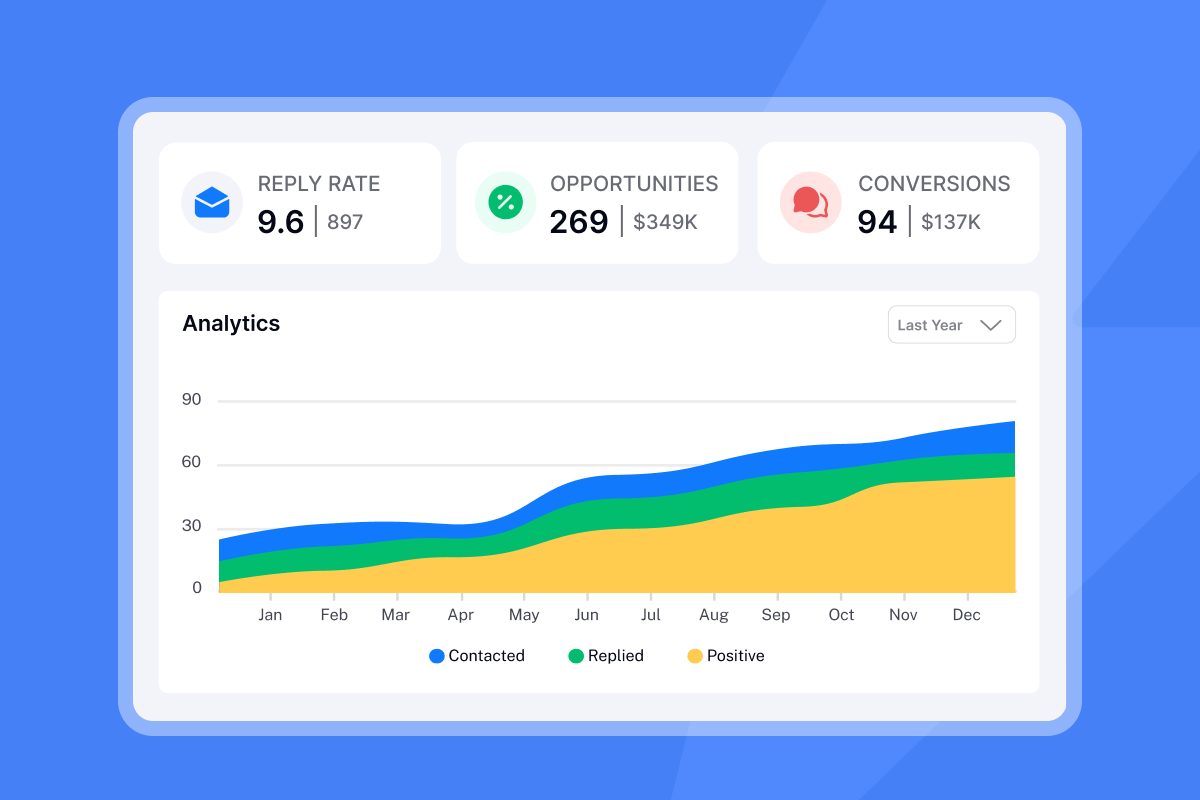
Watch what happens when you improve reply rates from 1% to 5% while keeping all other costs constant. Your cost per meeting drops by 5x. Here is the calculation using real agency numbers.
Scenario A: The high-volume, low-conversion trap
An agency sends 10,000 emails per month with a 1% reply rate and converts 50% of replies into qualified meetings.
Inputs:
- Emails sent: 10,000
- Reply rate: 1%
- Total replies: 100
- Meeting book rate: 50%
- Total meetings: 50
Costs:
- Lead data: 10 lists × $100 per 1,000 contacts = $1,000
- Cold email platform: $100
- SDR labor (1 rep): $10,000
- Total monthly cost: $11,100
Cost per meeting: $11,100 ÷ 50 = $222
At this rate, the agency is paying more than $200 per meeting before factoring in sales team time, CRM costs, or overhead. If the average deal size is $5,000 and the close rate is 20%, this agency needs to spend $1,110 in outreach costs alone to close one deal worth $5,000. That is a 22% customer acquisition cost before adding sales salaries, tools, or any other expenses.
Worse, this agency is burning through lead data at an unsustainable rate. To maintain 50 meetings per month, they need to continuously source 10,000 new leads, which means their list quality degrades over time as they scrape the bottom of their TAM.
Scenario B: The optimized agency approach
The same agency sends 10,000 emails per month with a 5% reply rate and converts 50% of replies into qualified meetings. All costs remain identical.
Inputs:
- Emails sent: 10,000
- Reply rate: 5%
- Total replies: 500
- Meeting book rate: 50%
- Total meetings: 250
Costs:
- Lead data: 10 lists × $100 per 1,000 contacts = $1,000
- Cold email platform: $100
- SDR labor (1 rep): $10,000
- Total monthly cost: $11,100
Cost per meeting: $11,100 ÷ 250 = $44.40
The optimized agency books 5x more meetings with the exact same spend. Their cost per meeting drops from $222 to $44.40, a $177.60 savings per meeting. Across 250 meetings, that is $44,400 in saved costs per month, or $532,800 annually.
The difference between Scenario A and Scenario B is not luck. It is process. I will walk you through the five steps that separate high-performing agencies from those trapped in the high-volume, low-conversion cycle.
5 steps to lower your cost per meeting
These five steps represent the core systems that separate high-performing agencies from those stuck in the high-volume, low-conversion trap. Each step has measurable impact on reply rates and cost per meeting.
1. Warm up every inbox to protect sender reputation
You must warm up every email account. It is the foundation of deliverability, not an optional add-on. Instantly's unlimited warmup feature is included on all plans, removing one tool from your stack and helping new inboxes earn trust faster. The warmup process gradually increases your sending volume while generating positive engagement signals to mailbox providers.
Without warmup, new domains start with zero reputation. Mailbox providers treat them as suspicious until they establish a sending history. The typical warmup process timeline is 3-4 weeks of careful ramping, during which you increase daily sends from 5 to 15 to 30 per inbox while keeping bounce rates at or below 1%. Before scaling volume, run through this scheduling deliverability checklist to confirm authentication, warmup, and inbox placement are all configured correctly across your client domains
"I love the automation features of Instantly, especially the automatic email scheduling. It saves me time by sending emails at optimal times, reducing the chances of them being marked as spam. The setup was very easy and straightforward." - Arshad M. on G2
This detailed warmup walkthrough covers the deliverability framework, including how to configure warmup filters for Google and Microsoft, set proper send windows, and monitor inbox health scores. Instantly's massive deliverability network underpins the warmup process, generating real engagement signals that mailbox providers recognize.
2. Use timeline-based hooks instead of generic requests
The hook you choose directly impacts reply rates and meeting quality. Timeline hooks drive higher reply and meeting rates compared to problem-based hooks. Timeline hooks achieved 10.01% reply rates while problem hooks lagged at 4.39%.
Timeline hooks reference a specific event, milestone, or change at the prospect's company (recent funding, new hire, product launch, expansion). They prove you did research and create a natural reason to reach out now. Problem hooks make assumptions about the prospect's challenges and often feel generic.
Example timeline hook: "Saw you just hired a VP of Sales. Planning how to ramp new SDRs in Q1?" This achieves higher engagement than a problem hook like "Struggling to scale your sales team?"
Instantly's AI Sequence Writer helps you generate timeline-based hooks at scale by analyzing prospect data and suggesting relevant recent events. For a complete framework, review Instantly's cold email copywriting guide, which breaks down the exact structure used to generate 400+ replies monthly.
3. Use AI to personalize at scale
Manual personalization does not scale. When you are managing 10-50 client campaigns, each sending to hundreds or thousands of prospects monthly, writing custom first lines becomes impossible. This AI workflow shows how automating lead research and personalization delivers significantly higher reply rates.
Instantly's AI features reduce labor costs while maintaining personalization quality. The platform offers AI personalized email lines, AI-generated sequence variants, and smart variable substitution. Starting at $47/month for unlimited email accounts, agencies get transparent costs and predictable scaling.
"I use Instantly for cold emailing, and it helps me in getting clients. I like the AI features, which are useful for diagnosis." - Mark G. on G2
For advanced personalization workflows, watch this deep-dive on AI-powered email systems showing how to personalize 1,000+ emails using free templates and automation. The video includes Clay integrations, data enrichment strategies, and Instantly campaign setup.
"Instantly effectively addresses our outreach and pipeline issues, directly contributing to our topline growth. By sending an impressive volume of 1 million emails monthly, Instantly facilitates efficient lead generation which we then convert through sales calls managed using Instantly's Unibox feature." - Daksh K. on G2
4. Optimize send windows for decision-maker attention
Timing matters. Best times to send are between 8:00 to 11:00 AM in the recipient's time zone. Decision-makers check email early before meetings consume their calendar. The best days are Tuesday and Thursday, closely followed by Wednesday.
Set your send window to match these patterns. In Instantly, you can configure send windows at the campaign level using campaign send window options. Spread your sends across the optimal hours rather than blasting all emails at once. This improves deliverability by mimicking natural human sending behavior.
"Instantly is the best cold email sequencer. It has many features that have helped in improving the deliverability of my email accounts." - Ronika Kashyap on Trustpilot
This follow-up strategy breakdown covers optimal send windows, follow-up intervals, and how to structure sequences that respect decision-maker schedules. Avoid sending outside business hours or on weekends. It signals automated behavior and triggers spam filters.
Ready to apply this playbook and lower your cost per meeting? Start with Instantly's Growth plan at $47/month for unlimited sending accounts and built-in warmup, or watch this speedrun to first booked call showing the exact setup process.I love how Instantly has significantly eased the process of outreach and service delivery for the past two years.
The UI is particularly impressive, providing a user-friendly and aesthetically pleasing interface that made setting things up incredibly easy. Apart from the natural learning curve associated with cold emails, the setup was smooth. Instantly effectively addresses our outreach and pipeline issues, directly contributing to our topline growth.
5. Automate follow-ups to catch the 60% who miss the first email
Most replies come from follow-up emails, not the initial send. Research found that emails sent as part of a 4-6 touch sequence had 3x the response rate of single emails.
The ideal first follow-up window is 2-3 business days after your initial email, with at least 2 days between each subsequent touch. Aim for a total duration of 10-25 days for most campaigns, with 4-9 points of contact per sequence spaced apart by 2-5 days.
Instantly automates follow-up sequences so you never miss a touch point. Configure your sequence structure with email 1, wait 3 days, email 2, wait 4 days, email 3, and so on. The platform handles the timing automatically and pauses the sequence if the prospect replies at any point.
This campaign creation walkthrough shows exactly how to set up your cold email system in 10 minutes, including follow-up intervals, variable insertion, and reply handling. For agencies managing multiple clients, Instantly's Unibox feature consolidates all replies from 1,000+ inboxes into one interface, making follow-up management simple at scale. Try it for yourself by starting a free trial of Instantly.
Frequently asked questions about meeting scheduling costs
What is a good reply rate for cold meeting scheduling emails?
For cold outreach, 5-8% is solid, 10%+ is exceptional. Timeline-based hooks consistently achieve 10%+ reply rates when paired with proper deliverability and list quality.
How much should I budget per booked meeting?
Budget $150-$300 per meeting for optimized cold email campaigns. If your cost per meeting exceeds $400, audit your reply rate, list quality, and deliverability first.
How long does it take to warm up a new sending domain?
Plan for 3-4 weeks of warmup before running full campaigns. Ramp daily sends from 5 to 15 to 30 per inbox while monitoring bounce rates.
What percentage of qualified leads should convert to meetings?
Top performers convert 60-88% of qualified leads to booked meetings. If your rate is below 40%, tighten qualification criteria or improve your scheduling process.
How many follow-ups should a meeting scheduling sequence include?
Use 4-7 follow-ups spaced 2-5 days apart. Sequences with multiple touches achieve significantly higher reply rates than single emails.
Can I scale cold email without burning domains?
Yes. Use unlimited sending accounts to spread volume, warm every inbox for 30 days, and never exceed 30 sends per day per inbox. Keep bounce rates below 1% and monitor domain health weekly.
Key terms glossary
Sender reputation: A score assigned by mailbox providers (Gmail, Outlook) based on your email engagement history, bounce rates, and spam complaints. Low reputation causes emails to land in spam regardless of content quality.
Warmup: The process of gradually increasing sending volume from a new email account over 3-4 weeks to build positive reputation signals. Proper warmup prevents new domains from being flagged as spam.
Cost per meeting: Total outreach expenses (tools, data, labor, overhead) divided by the number of qualified meetings booked. The key metric for measuring cold email ROI.
Reply rate: Percentage of sent emails that receive any response from the recipient. Benchmark is 5-8% for solid cold email campaigns, 10%+ for exceptional.
Timeline hook: An email opening line that references a specific recent event at the prospect's company (funding, hire, product launch). Drives 2.3x higher reply rates than generic problem statements.
Qualified meeting: A booked call with a prospect who has budget, authority, need, and timeline to buy. Differs from total meetings by excluding tire-kickers and unqualified leads.


