.svg)
%20(1).svg)


Updated December 12, 2025
TL;DR: Outbound lead generation centers on multi-step, personalized follow-up sequences where 94% of replies happen. Instantly gives you unlimited sending accounts on flat-fee pricing, a deliverability network of 4.2M+ accounts, and AI Reply Agent for automated reply handling. This guide shows you how to build these sequences to convert leads into booked meetings without burning domains.
Outbound lead generation remains the fastest path from cold contact to booked meeting. While inbound strategies build awareness over time, personalized outbound sequences put your offer directly in front of your ideal customer profile within hours.
Effective cold email outreach is built on systematic follow-up, the first email opens the door, but the sequence structure, timing, and value-add at each step determine whether a cold contact becomes a booked meeting. The difference between campaigns that book 15 demos in 10 days and those that collect dust comes down to how you structure, personalize, and automate your follow-ups.
Understanding Inbound Lead Generation
With inbound lead generation, you attract prospects who already have some awareness of their problem or your solution through content, search, and social presence before they initiate contact. The approach trades immediate volume for higher intent and typically warmer conversations. Instantly combines sending, deliverability, data, and AI automation in one system, unlimited email accounts on flat-fee pricing let agencies grow without compounding costs as they add client domains.
Core principles of inbound
Inbound operates on a pull model. You create valuable content addressing prospect pain points, optimize it for discovery through search engines and social channels, and capture interest when prospects actively seek solutions.
Three pillars support effective inbound strategies:
- Content marketing builds authority and organic traffic through educational assets like blog posts, case studies, and video tutorials
- SEO and technical optimization ensure your content appears when prospects search for solutions in your category
- Conversion paths guide visitors from awareness to action through clear CTAs, landing pages, and lead magnets
For the complete infrastructure checklist on authentication, warmup ramp schedules, and inbox placement monitoring that keeps your sequences in the primary inbox across all client domains, see this email deliverability guide.
Key inbound strategies and tactics
- Content marketing includes educational assets that answer specific questions your ICP asks during their buying journey. Creating lead prospecting guides attracts founders researching how to build their outreach engine.
- SEO focuses on ranking for terms your prospects actually use, combining technical optimization for fast load times with on-page targeting of keywords in titles and body copy.
- Lead magnets convert visitors into contacts by offering high-value resources like templates or calculators in exchange for email addresses.
Examples of Inbound Lead Generation in Action
Real-world inbound examples show how companies attract and convert prospects through various channels.
Content marketing examples
A full tutorial on cold email software demonstrates product value while capturing search traffic. Agencies publish playbooks like the 7-step personalized cold email checklist that attract prospects actively researching solutions.
For a dedicated framework on building follow-up sequences that convert positive replies into booked calls with minimal friction, see the full guide covering cadence, CTA formats, and AI-assisted booking workflows.
SEO and organic search
Ranking for high-intent keywords like "cold email deliverability" captures prospects in active buying mode. Detailed guides on optimizing underperforming campaigns answer specific questions and establish topical authority.
Social media and community building
When operators share screenshots of deliverability dashboards and reply rates in private communities, it generates organic interest. YouTube channels offering brutally honest cold email advice build trust and drive trial signups.
Mastering Cold Outbound with Strategic Follow-Up Sequences
Outbound lead generation actively reaches prospects before they know your brand exists. You identify ideal customers, craft personalized messages addressing their specific challenges, and initiate conversations through direct channels like email and calls.
Core principles of outbound
Outbound operates on a push model. Define your ICP using firmographic filters like industry, company size above $5M, and target revenue ranges, then craft value propositions addressing their specific pain points. Success depends on three factors: targeting precision, message relevance, and systematic follow-up.
Unlike inbounds' passive approach, outbound gives you control over pipeline velocity. You decide how many prospects to contact daily, which industries to target, and when to launch campaigns. The challenge is maintaining sender reputation and inbox placement while scaling volume.
6 Best Practices for Personalized Outbound Follow-Up Sequences
Follow these six practices to scale outbound safely:
- Start with clean, verified data. High bounce rates above 1% damage sender reputation permanently. Use tools like Instantly's SuperSearch with 450M+ B2B leads and built-in verification to ensure email accuracy before sending.
- Warm up new email accounts for 30 days before campaign launches. Instantly's automated warmup builds positive sending history by gradually increasing volume within a private deliverability network.
- Personalize beyond name tokens. Reference specific company achievements, recent news, or pain points relevant to their role. Clean data and personalization work together. One agency operator confirmed:
- Keep initial emails short. Aim for 50-100 words with a single clear CTA. Longer messages reduce reply rates. State why you're reaching out, offer specific value, and ask one easy question.
- Test systematically. Run A/B tests on subject lines, opening lines, and CTAs. Instantly's A/Z testing automatically optimizes winning variants across your campaigns.
- Cap daily volume at 30 emails per inbox to protect deliverability and maintain sender reputation over time.
"generating good quality leads through advanced personalization features" Aryan - G2 review
For a complete framework on the KPIs that reveal which test variables are actually moving reply rates and conversions across your sequences, see this email metrics tracking guide.
Why Personalized Follow-Up Sequences Generate 94% of Email Replies
First emails rarely convert. Analysis of millions of cold emails shows that 94% of replies come within the first three follow-up steps. Most deals happen in follow-ups two through four, not in your initial outreach.
Personalized sequences work because they:
- Build familiarity through repeated, relevant touchpoints
- Add new context or value in each message rather than repeating the same ask
- Respect the prospect's time while demonstrating genuine interest in solving their problems
The key is balancing persistence with respect. Send 3-4 follow-ups spaced 3-5 days apart. Use the 60/40 content balance rule: 60% informative value like case studies or insights, 40% persuasive CTAs pushing toward meetings. Break-up emails often generate the highest response rates by acknowledging you'll stop reaching out unless they indicate interest.
How to Build Personalized Follow-Up Sequences That Convert Cold Leads
Instantly provides the complete infrastructure to build, test, and scale personalized follow-up sequences without burning domains or hiring additional headcount. The platform combines sending, deliverability, data, and AI automation in one system.
7-Step Process for Creating Multi-Touch Follow-Up Sequences
Follow these steps to build your first sequence:
- Create a new campaign in the Campaigns section and name it descriptively.
- Add leads through CSV upload, SuperSearch, manual entry, or CRM integrations. Verify emails before importing to keep bounce rates below 1%.
- Navigate to the Sequence tab within your campaign and build your follow-up flow step by step. Instantly supports unlimited follow-up steps, though 3-4 steps are recommended for optimal engagement.
- Craft your subject line and body copy for each step. Insert personalization variables like
{{firstName}},{{companyName}}, and custom fields using the Variables button. The platform's simplicity supports this process. One user shared: - Set delays between steps using the "Send next message in X days" feature. Common timing includes first follow-up within 24 hours, then 3-4 day intervals. Instantly calculates these using calendar days and automatically adjusts for your sending schedule.
- Configure sending settings in the Schedule tab. Define specific days and hours when emails send. Set daily sending limits to stay at or below 30 cold emails per inbox per day.
- Preview your sequence for multiple leads to verify personalization tokens populate correctly. Send test emails to check formatting and links. Once satisfied, click Start Campaign to launch.
"simple and well-designed UX... AI capable of entering campaign configurations and applying fixes" guillaume n.- G2 review
Watch the full visual walkthrough showing the sequence builder, personalization setup, and campaign launch process for step-by-step guidance.
How AI for Automation Scales Personalized Follow-Up Response Handling
Manual reply sorting burns hours daily for agencies managing multiple client campaigns. Instantly's AI Reply Agent automates classification, response drafting, and meeting booking, responding in under 5 minutes.
The AI categorizes incoming replies into predefined buckets: interested, not interested, out of office, wrong person, or custom statuses you define. It can operate in autopilot mode, automatically sending responses, or human-in-the-loop mode where you approve before sending.
Set up the AI Reply Agent by navigating to your campaign settings and enabling the feature. Configure your desired automation level, classification rules, and response templates. The system learns from your corrections over time, improving accuracy.
For complex replies requiring human judgment, the AI routes them to your Unified Inbox with context and suggested responses. Integration with Slack allows team review and approval without switching tools.
The consolidation saves significant tool costs. One agency operator noted:
"replaced about 5 or 6 other technologies... powerhouse for lead scrubbing, lead mining, research, outreach, launch strategy, and automation" Heather O. - G2 review
The AI Reply Agent costs 5 credits per automated reply. Budget accordingly when planning campaigns. The time savings and faster response rates typically justify the credit cost through increased meeting bookings.
Maintaining Email Deliverability Across Multi-Step Follow-Up Sequences
Deliverability determines whether your perfectly crafted sequences reach the primary inbox or get buried in spam. Instantly's private deliverability network of 4.2M+ accounts provides the foundation for consistent inbox placement.
Start with technical setup. Verify that MX, SPF, DKIM, and DMARC records are correctly configured for your sending domains. Instantly's domain testing feature confirms proper authentication before you send your first email.
Use automated warmup for at least 30 days before launching campaigns. The warmup gradually increases sending volume while simulating engagement within Instantly's network. This builds positive sending history with inbox providers.
Run Inbox Placement tests before launching campaigns. These tests show whether your emails land in primary inbox, promotions, or spam across major providers like Gmail and Outlook. Tests provide seed list results so you can fix issues before they impact real prospects.
Monitor key metrics continuously. Keep bounce rates at or below 1%, open rates around 40-60%, and reply rates above 5% for healthy campaigns. If metrics dip, pause sends, review list quality, and adjust content.
Instantly's AI Spam Words Checker identifies risky phrases before sending. Avoid common triggers like "free," "guaranteed," and excessive punctuation. Plain text emails often deliver better than HTML with images.
Scale gradually. When adding new domains or increasing volume, ramp up slowly over 2-3 weeks. Sudden volume spikes trigger spam filters. When deliverability issues arise, fast support matters. One user appreciated:
"exceptional customer support... around the clock, seven days a week"
Andrew W. - G2 review
Use custom tracking domains to isolate your reputation. This prevents others' poor sending practices from affecting your deliverability when using shared infrastructure.
Managing Prospect Replies Across Multiple Follow-Up Sequences
Instantly's Unified Inbox centralizes replies from all campaigns and email accounts in one view. This consolidation prevents missed opportunities when managing dozens of sending addresses across multiple clients.
The inbox categorizes conversations by status: new replies, interested, meeting booked, not interested, and custom statuses. Filter by campaign, date range, or lead attributes to prioritize high-value conversations.
Use quick reply templates for common responses. Save templates for scheduling meetings, sharing case studies, or following up after no response. Templates maintain consistency while saving time.
The CRM integration automatically logs all interactions and updates lead statuses. When a prospect replies interested, the system can trigger subsequences based on keywords or statuses, sending targeted follow-ups without manual intervention.
The streamlined workflow supports diverse use cases. One user highlighted:
"extremely easy to use... creating email campaigns from our physician lists... excellent response rates" Theo S. - G2 review
Outbound Lead Generation Services Explained
Some companies lack internal resources or expertise to manage outbound campaigns. Outbound lead generation services handle prospecting, sequencing, and initial qualification on your behalf.
Types of outbound services
Done-for-you services manage your entire outbound engine, handling list building, email copy, sequence setup, and initial reply handling. Instantly offers VIP setup and management services where their team configures your domain infrastructure, sets up campaigns, and provides hands-on support during launch.
Consultation and training services teach your team outbound best practices without ongoing management. Hybrid models combine initial setup with ongoing support, configuring your infrastructure and first campaigns before transitioning management to your team.
When to consider an outbound service
Consider services when launching outbound for the first time and lacking internal expertise, or when scaling rapidly and needing to add 50+ sending accounts quickly. Done-for-you email setup handles bulk infrastructure deployment.
Avoid services if you have working internal processes and just need better tooling. Platforms like Instantly provide the infrastructure to scale yourself without ongoing service fees. One operator found:
"all the tools needed for cold outbound in one place. Previously, I was running 3 different systems to get a fraction of the results." James L. - G2 review
Inbound vs. Outbound: A Strategic Comparison
Most effective go-to-market strategies combine inbound and outbound rather than choosing one exclusively. Each approach has distinct advantages and ideal use cases.
Factor | Inbound | Outbound |
|---|---|---|
Timeline to results | 3-12 months | Days to weeks |
Lead quality | Higher intent, warmer | Requires nurturing, colder |
Control over volume | Limited by organic reach | Direct control over daily outreach |
Cost structure | Content creation, SEO investment | Platform fees, list costs, accounts |
Inbound builds long-term brand equity and attracts prospects actively seeking solutions. Content compounds over time, generating leads for years. However, results lag initial investment by months.
Outbound delivers immediate pipeline control. Launch a campaign Monday and book meetings by Friday. You decide which companies to target and when to reach out. Combine both for optimal results. Use inbound content to nurture outbound leads who aren't ready to buy immediately. This integrated approach converts more leads than either tactic alone.
Persona-Specific Insights: Tailoring Your Approach
Different roles approach lead generation with distinct priorities and constraints. Tailor your strategy to match your specific needs.
For the Agency Operator
You need flat-fee economics that don't penalize growth. Instantly's unlimited email accounts on all plans mean you can scale from 10 to 100+ client domains without per-seat taxes eating margins. The platform's simplicity supports this scaling approach. One operator shared:
"love Instantly... started using it just for my own outreach and ended up using it for my client's outreach too... extremely easy to understand" - Berel Media -Trustpilot review
Focus on deliverability infrastructure that protects client domains. Use dedicated IP pools with SISR on the Light Speed plan to isolate each client's reputation. Build repeatable playbooks junior staff can execute using Instantly's AI Sequence Generator to produce effective copy without senior oversight. Track cost per meeting across all clients by connecting campaigns to CRM opportunities and revenue.
For the Sales Leader
You need predictable pipeline to hit quarterly targets. Outbound gives you control over lead flow when inbound slows. Implement the 3-step AI Reply Agent system to automate qualification and booking without hiring more SDRs.
Monitor team performance through detailed analytics tracking open rates, reply rates, and meeting show rates by rep. Integrate outbound with your existing CRM by connecting Instantly with Salesforce and HubSpot to automatically log activities and update lead statuses.
For the Growth Marketer
You balance lead volume, cost per acquisition, and lead quality. Outbound complements paid channels by targeting specific accounts your ads can't reach efficiently.
Use SuperSearch's 450M+ B2B leads with LLM-assisted enrichment to build highly targeted lists. Run continuous A/B tests on messaging, targeting, and timing. Instantly's analytics track which variants drive the best cost per meeting. Connect outbound to retargeting campaigns by uploading engaged prospects to advertising audiences.
For the Startup Founder
You need meetings without hiring a full sales team. Outbound lets you test positioning and messaging directly with ICP prospects before scaling paid acquisition.
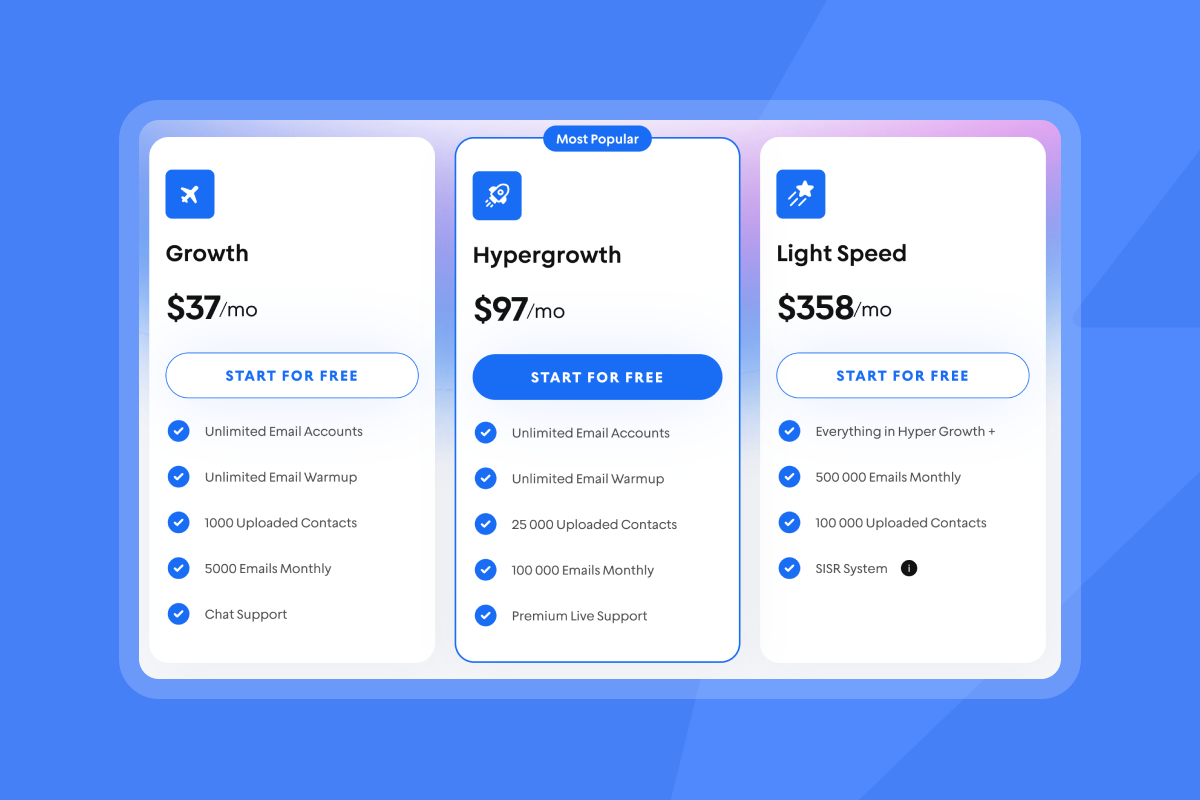
Start with Instantly's Growth plan at $37/month when billed annually plus lead credits. Use outbound to validate product-market fit by launching sequences testing different value propositions. Automate everything possible using AI Reply Agent to handle initial qualification and Copilot to draft sequences.
The ROI can be significant when you implement systematic follow-ups. One founder reported:
"converted several leads into deals using Instantly... paid for itself 5x" - Philip Hendrich -Trustpilot review
Converting More Leads with Personalized Follow-Up Sequences
Personalized follow-up sequences are the engine that converts cold contacts into qualified meetings. The difference between campaigns that book consistent demos and those that fail comes down to systematic execution: clean data, personalized messaging, strategic timing, and automated reply handling.
Instantly provides the complete infrastructure to build and scale these sequences safely. Unlimited email accounts on flat-fee pricing let agencies grow without compounding costs. The deliverability network of 4.2M+ accounts protects sender reputation while scaling volume. AI Reply Agent automates qualification and booking, converting replies into meetings faster than manual processes.
The operators booking 15 demos in 10 days follow proven frameworks. They warm accounts for 30 days, keep bounce rates below 1%, craft messages under 100 words with single CTAs, test variants systematically, and monitor deliverability continuously. These practices compound into consistent pipeline.
Ready to build your first high-converting follow-up sequence? Try Instantly free and access the sequence builder, AI tools, and deliverability features that help agencies and founders scale outbound without burning domains or hiring SDRs.
Frequently Asked Questions
How many follow-up emails should I send in an Instantly sequence?
Send 3-4 follow-up emails spaced 3-5 days apart, with 94% of replies typically coming within these first three follow-ups.
What reply rate should I expect from personalized outbound sequences?
Target 5%+ reply rates for well-executed cold outreach with clean data, proper warmup, and personalized messaging.
How long should I warm up email accounts before sending campaigns?
Warm up new accounts for at least 30 days using Instantly's automated warmup to build positive sending history.
Can I use Instantly to manage outbound for multiple clients?
Yes, Instantly's unlimited email accounts and workspace features make it ideal for agencies managing multiple client campaigns on flat-fee pricing.
What's the maximum daily sending limit per email account?
Send no more than 30 cold emails per individual inbox per day to maintain deliverability and protect sender reputation.
How does Instantly's AI Reply Agent improve conversion rates?
The AI classifies and responds to replies in under 5 minutes, qualifying leads and booking meetings automatically without manual review.
Does Instantly help maintain CAN-SPAM compliance?
Yes, Instantly includes automatic unsubscribe link insertion and honors opt-outs across all campaigns to maintain compliance.
Key Terminology
Sender reputation: A score inbox providers assign to your domain and IP address based on engagement rates, bounce rates, and spam complaints that determines inbox placement.
Inbox placement: The percentage of sent emails that land in the primary inbox versus promotions or spam folders.
Email warmup: The process of gradually increasing sending volume over 30+ days to build positive sending history with inbox providers.
Personalization tokens: Dynamic variables like {{firstName}} or {{companyName}} that insert prospect-specific data into email templates.
Bounce rate: The percentage of emails that fail to deliver, with rates above 1% damaging sender reputation permanently.
Reply rate: The percentage of prospects who respond to at least one email in your sequence, with 5%+ considered healthy for cold outreach.
Subsequences: Automated follow-up paths triggered by specific lead actions like clicking links or replying with certain keywords.
Unified Inbox: A centralized view consolidating replies from all email accounts and campaigns into one management interface.



