


Updated October 19, 2025
TL;DR: Personalization at scale is repeatable system to create targeted outreach. Define five actionable CRM fields, connect your CRM to Instantly.ai, use those fields inside modular templates, and run a short multi‑touch cadence. Expect cleaner data, higher reply rates, and faster time‑to‑first‑meeting without per‑seat taxes.
Most founders think they must choose between blasting generic mail merges or hand‑crafting a few emails each day - you do not. See how our email outreach automation can help you scale personalized outreach. The path to booked meetings is a repeatable system that turns CRM data into relevant one‑to‑one messages at scale.
- Why this matters now: Only about 8.5 percent of cold outreach emails get any response. Relevance lifts replies and protects deliverability by earning engagement. See the email outreach study on Backlinko for the baseline and why better targeting wins.
- What you will build: A lean, CRM‑triggered workflow that feeds Instantly campaigns with verified contacts and inserts specific context into each send. Start with five custom fields, then automate the flow from data to sequence.
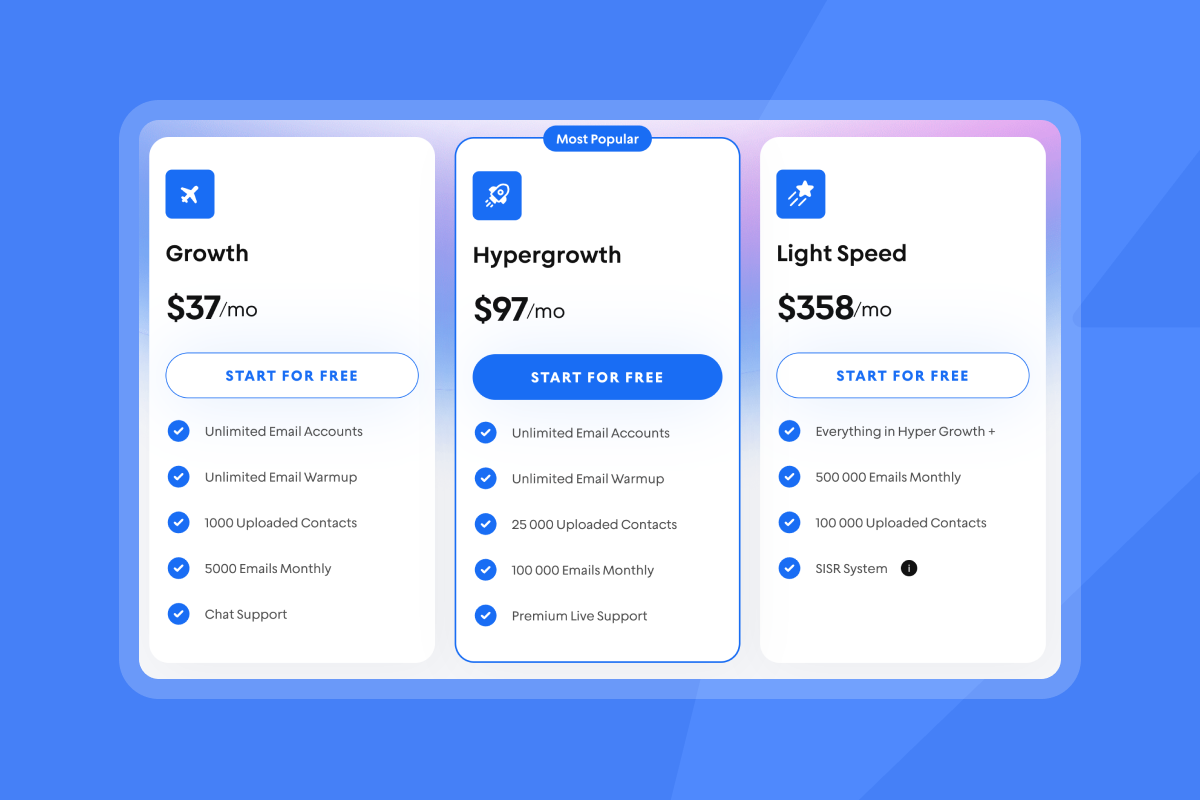
- What it costs: Instantly’s flat‑fee plans include unlimited email accounts and warmup starting at $37/mo.
What personalization at scale really means for a startup
Personalization at scale is making many emails read like one‑to‑one. You do it with structured data, not long prose. Previously it took large teams of SDRs to manually personalize emails - but with today's tools that's no longer necessary.
- Relevance beats name‑only merges: Move beyond '{{FirstName}}' to reference a lead’s tech stack, a public trigger event, or a role‑specific pain.
- One‑to‑many that feels one‑to‑one: Modular templates let you vary the open and first two lines with meaningful fields, then keep the rest short and useful. That balance reads human and scales.
- It is a system: Collect actionable data, keep it fresh, map it to variables, and test two short variants per step. Treat this as an operational loop, not a one‑off task. Contact data decays by about two point one percent each month, so schedule regular hygiene.
The foundation: Structuring your CRM for scalable personalization
Your CRM is the personalization database. Add five custom fields and only store data you will actually reference in copy. We cover this in detail in our meeting scheduling email deliverability guide.
Table: The five essential CRM fields for personalization. Our using merge tags effectively guide walks through this step by step.
| Field name | Data type | Example value | Purpose |
|---|---|---|---|
| Trigger_Event | Text | Hired new VP Sales | Time your outreach around real changes |
| Tech_Stack_1 | Text | HubSpot | Anchor the subject and first line |
| Persona_Pain_Point | Text | Low SDR productivity | Connect to a job‑specific struggle |
| Competitor_Mentioned | Text | Salesloft | Frame your wedge without naming names |
| Company_Goal | Text | International expansion | Tie the offer to a stated objective |
How to source the data
- Top tier accounts: Research manually for your highest‑value targets.
- Everyone else: Use enrichment and verification so the data is fresh and deliverable. Instantly’s SuperSearch uses waterfall enrichment from multiple providers with LLM‑assisted fills to populate core fields, then verifies emails before export.
- Keep it clean: B2B contact data decays fast each quarter. Build a short, recurring hygiene task: re‑verify emails, refresh titles and companies, and purge risky addresses.
- Note: the real values ideally contain as much information as your system can gather to provide as much context as possible to the AI agent.
Implementation tip
If you are on HubSpot, creating custom properties takes minutes. See the HubSpot properties guide for a clear walkthrough. The same pattern applies in Salesforce and other CRMs.
Want specifics on connecting CRMs to Instantly? See the integrator overview in Instantly’s integrations hub.
Build your CRM‑integrated SDR workflow
You will connect your CRM, define a trigger, write modular copy, and run a short cadence.
Connect your tools
- What to do: Link your CRM to Instantly using the native connector or an automation tool like Zapier or Make. Map the five fields above to Instantly variables.
- Done when: A test contact moves from CRM to an Instantly list with all five custom fields visible on the contact in Instantly.
- Resources: See Instantly’s integrations collection and the Zapier integration help guide. If you prefer Make, see the Make example that posts interested leads back to HubSpot.
Create dynamic triggers
- What to do: In your CRM, define a smart list or workflow. Example: when Lifecycle Stage becomes Marketing Qualified and Trigger_Event is not empty, push to “New‑Hire Trigger” in Instantly.
- Done when: Updating Trigger_Event on a CRM record auto‑adds that lead to the correct Instantly campaign within five minutes.
Write modular templates
What to do: Keep the open and first lines variable. Use one ask. Short beats long.
Or get our AI Copilot to do it for you:
Example template
- Subject: Quick one on {{Tech_Stack_1}}
- Body: Hi {{FirstName}}, noticed {{Trigger_Event}} at {{Company}}. Teams on {{Tech_Stack_1}} often flag {{Persona_Pain_Point}} during ramp. If a three‑step fix we use is helpful, I can outline it in five minutes this week. Worth it?
- Done when: Variables render correctly in a preview and in two test sends to internal inboxes. Both land in the primary inbox per your placement test. See Instantly’s Inbox Placement tests to verify before launch.
Design a short multi‑touch cadence
- What to do: Plan three to five touches across ten to fourteen days. Keep follow‑ups brief and reference the same personalization point.
- Why: Analyses show the first follow‑up often drives the biggest lift, then returns taper. You want timely nudges, not long threads that add risk.
- Done when: Two variants per step are live, send windows align with the prospect’s local time, and a one‑click unsubscribe is present.
Define send windows
Set your send window to business hours in the prospect’s local time, then cap per inbox based on domain health and placement results.
Choose the right tools: A founder’s comparison
You do not need five tools and per‑seat surprises to get to meetings. Instantly’s flat‑fee model with unlimited email accounts and warmup is built for lean teams. See the pricing details for plan tiers and the inclusion of unlimited accounts.
All‑in‑one advantages
- Less tool sprawl: SuperSearch for leads, Outreach for sequences, and CRM reply management in Unibox live in one place.
- Reply handling: Instantly’s AI Reply Agent can draft or handle replies in under five minutes, with human‑in‑the‑loop or autopilot. You choose where to keep control. See the AI Reply Agent guide for credit costs and Slack review options.
What small teams say
“It is like having a team of SDRs working round the clock while I focus on other work.” Read the August 13, 2025 G2 review from Shivank K.
Common pitfalls and how to avoid them
Data quality
- Symptom: High bounces, wrong references, low replies.
- Why it happens: Stale data and unverified emails.
- Fix: Re‑verify lists before sends, purge risky contacts, and refresh fields quarterly. See how to verify email addresses with Instantly.
Over‑automation and robotic copy
- Symptom: Low opens and quick deletes.
- Why it happens: Long AI text, repeated phrases, and weak first lines.
- Fix: Keep intros short, add spin syntax for variety, and review outputs. Short, specific beats long and vague.
Deliverability and ramp
- Symptom: Spam placement or mailbox flags.
- Why it happens: Aggressive ramp or missing alignment.
- Fix: Warm new domains, keep bounces at or below one percent, throttle daily caps, and run placement tests before scaling. See Instantly’s Inbox Placement and deliverability toolkit on the product site.
Pre‑launch sanity check
- Verified contacts and low predicted bounce rate.
- Warmup complete and placement at or above target on seeds.
- SPF, DKIM, DMARC pass. One‑click unsubscribe present.
- Test sends read like a human, not a bot.
Your first personalized campaign in seven days
- Day 1-2: Add five fields to your CRM. Connect to Instantly. Import a test list of verified contacts.
- Day 3: Write two short variants for step one. Run placement tests. Fix anything that fails.
- Day 4-5: Launch to a small batch inside safe send windows. Monitor bounces and replies in Unibox.
- Day 6-7: Add follow‑ups and scale volume if health holds.
You have the blueprint. Start your free trial today and launch your first CRM‑triggered personalized campaign today.
FAQ
What is the fastest way to do personalization at scale?
Connect your CRM to Instantly, store five actionable fields, and insert them into modular templates. Automate entry when a trigger event or lifecycle change hits, then run a three to five touch cadence. For an example flow, see the integrations collection on Instantly.
Do I need a separate CRM to use Instantly.ai?
No. Instantly integrates with HubSpot and Salesforce and also includes a built‑in CRM for unified replies and simple pipelines in Unibox. You can start without a third‑party CRM and add one later.
How much does a full cold email stack cost for a startup?
For practical examples, check out effective cold email outreach. A typical starter stack on Instantly that includes outreach, lead database credits, and CRM is about 131 dollars per month or even cheaper if you choose the $9/mo Nano plan for leads. See our best time for meeting emails guide for a full breakdown.
How many emails should I send per inbox?
Start small on new inboxes. After warmup and clean list checks, many teams cap early production at a few dozen per day and scale based on placement tests and complaint rates. Keep bounces at or below one percent and complaints at or below zero point three percent.


