


Updated October 23, 2025
TL;DR: LinkedIn Sales Navigator offers three pricing tiers (Core at $79.99-$99.99/month, Advanced at $108.33-$149.99/month, and Advanced Plus starting around $1,600/year). A Forrester study commissioned by LinkedIn found users achieved a 312% ROI over three years with a payback period under six months. However, true ROI depends on how you use the tool. Integrating Sales Navigator with Instantly's flat-fee unlimited accounts and automated warmup addresses the data export gap, manages deliverability, and converts LinkedIn leads into booked meetings without per-seat costs impacting your margins. This guide breaks down each tier, shows you how to calculate your real return, and provides a step-by-step framework for getting the most from your investment through strategic integration.
Your sales team uses LinkedIn Sales Navigator, but are you truly getting your money's worth? Many sales leaders struggle to connect subscription costs directly to pipeline growth. The quarter is tight, every dollar counts. You need a clear path from prospecting spend to meetings set.
This guide unpacks Sales Navigator's pricing tiers and shows you how to calculate your true return on investment. You will learn practical strategies to get the most from your investment, especially when integrating with Instantly for cost-effective cold outreach campaigns that deliver consistent meetings and pipeline health.
Understanding LinkedIn Sales Navigator's pricing tiers
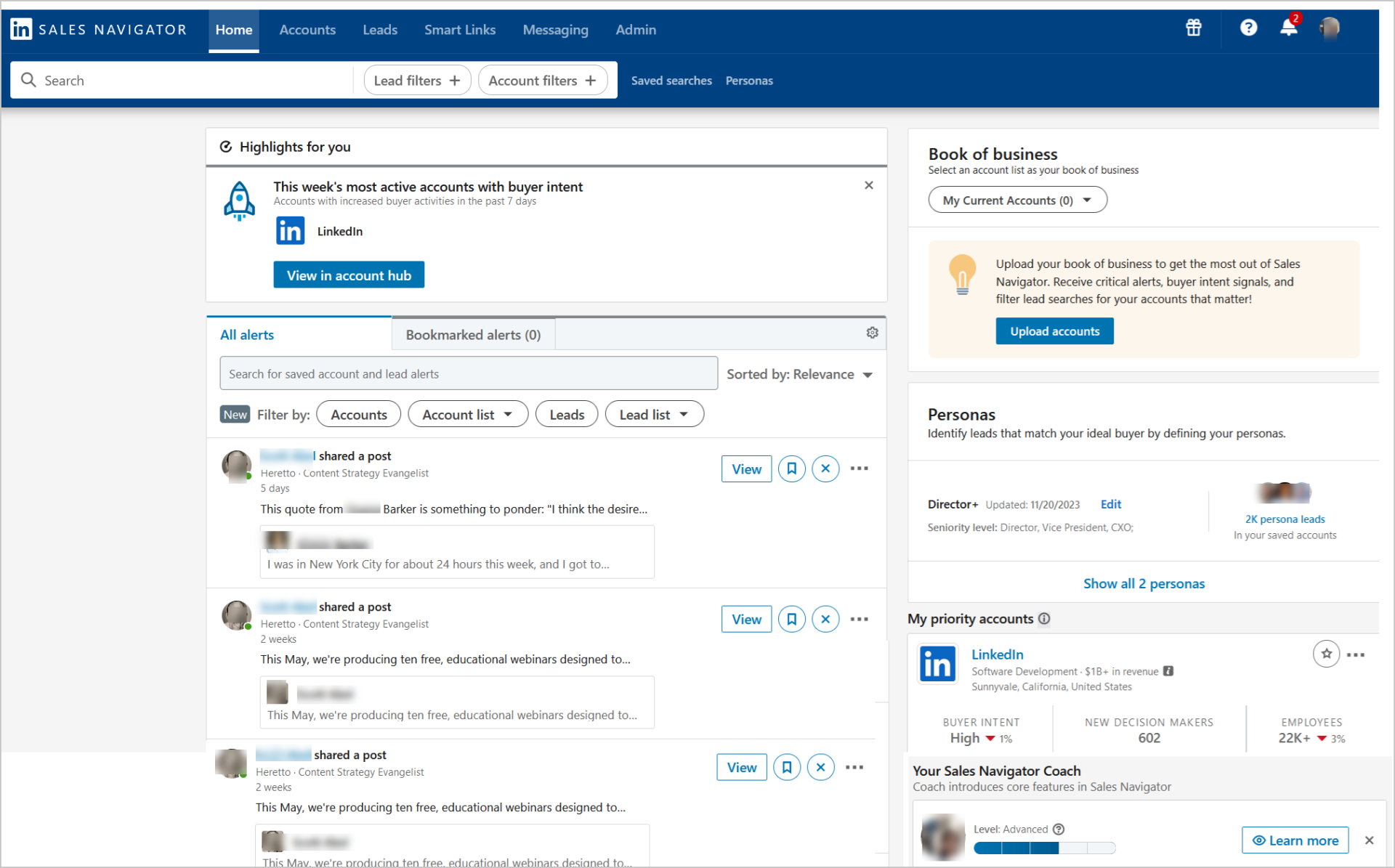
LinkedIn Sales Navigator structures pricing around three main tiers, each designed for different team sizes and prospecting needs. Annual billing typically saves 17-25% compared to monthly subscriptions.
Sales Navigator Core: Professional prospecting
Core targets individual sales professionals, freelancers, and small business owners who focus on solo prospecting. According to SalesTechScout, monthly billing runs $99.99, while annual billing drops to approximately $79.99 per month.
Key features include:
- Advanced lead and account search with over 50 filters
- 50 InMail messages per month and save up to 10,000 leads
- Lead recommendations powered by LinkedIn's algorithm
- Real-time alerts on job changes and company news.
- You also get 365 days of "Who's Viewed Your Profile" data and unlimited profile browsing.
- Most plans include a 30-day free trial.
Core works when you need LinkedIn-specific prospecting but run a small operation. The 50 InMail cap becomes a constraint if direct outreach is your primary motion.
Sales Navigator Advanced: Team collaboration and insights
Advanced serves small to medium sales teams that need collaboration tools and advanced analytics. Monthly billing runs approximately $149.99, while teams that commit annually see pricing drop to the $108.33 to $149.99 per user range.
Advanced includes all Core features plus TeamLink (which shows connection paths through your team's collective network), Smart Links for tracking content engagement, buyer intent signals, AI-generated account and lead summaries (Account IQ and Lead IQ), basic CRM integration, usage reporting, and enterprise license management with SSO and SCIM support.
TeamLink is the standout feature. Research shows that buyers are 4x more likely to engage when outreach acknowledges a mutual connection. If your team has a broad network, this feature can justify the upgrade.
Sales Navigator Advanced Plus: Enterprise solutions
Advanced Plus targets large enterprises that have complex sales operations and significant CRM requirements. According to PhantomBuster, pricing starts around $1,600 per seat annually and requires direct consultation with LinkedIn Sales Solutions.
Advanced Plus includes all Advanced features plus unmatched CRM integration with real-time, bidirectional sync to Salesforce and Microsoft Dynamics 365. You get TeamLink Extend (incorporating your entire organization's network), advanced admin capabilities (enterprise-grade security, SSO, cross-identity management), a dedicated LinkedIn account team, enhanced onboarding and training, and ROI reporting tools.
The full CRM sync is the critical differentiator. Lower tiers require manual data entry or third-party tools. Advanced Plus handles automatic syncing of lead lists, saved contacts, and employee data integration. This can save users up to 65 hours per year by eliminating tool-switching.
"The platform is super intuitive, easy to set up, and makes it simple to manage multiple domains and inboxes at scale. Deliverability is great and the analytics give us exactly what we need to optimize campaigns quickly." - Shaiel P., G2 review
Key pricing factors and considerations
| Plan | Monthly Cost (Annual Billing) | Monthly Cost (Monthly Billing) | Key Features | InMail Credits |
|---|---|---|---|---|
| Core | $79.99-$99.99 | ~$99.99 | 50+ search filters, 10k saved leads, real-time alerts | 50/month |
| Advanced | $108.33-$149.99 | ~$149.99 | TeamLink, Smart Links, buyer intent, basic CRM integration | 50/month |
| Advanced Plus | Custom (~$1,600/year) | Custom | Full CRM sync, TeamLink Extend, dedicated support, ROI reporting | Custom allocations |
Core and Advanced plans cap InMail at 50 messages per month. Advanced Plus typically offers higher limits or custom allocations. Credits roll over if unused but are lost upon cancellation. Search results cap at 2,500 leads per query (100 pages of 25 results).
Sales Navigator does not natively export CSV files. This means you will need third-party tools to extract lead data at scale. Or if you're looking for a native lead database that doesn't rely on scraping, you can use Instantly's SuperSearch which has 450M+ leads.
Sales Navigator Core's pricing is competitive for LinkedIn-specific prospecting. Other sales intelligence platforms often cost significantly more for similar features. Sales Navigator excels at LinkedIn-specific prospecting and relationship intelligence, though it is weaker on direct contact information and bulk export.
For a detailed walkthrough of Sales Navigator features, watch this LinkedIn Sales Navigator lead generation tutorial from Sell Better.
How to calculate your true Sales Navigator ROI
Subscription cost is just the starting line. True ROI includes lead quality, time savings, conversion rates, and the efficiency of your entire outreach stack.
Beyond subscription costs: The full ROI equation
Start with this formula:
ROI = ((Revenue Generated from Sales Navigator - Total Cost) / Total Cost) × 100%
- Total cost includes the Sales Navigator subscription, third-party data export tools, email verification services, time spent on training and manual workflows, and any CRM integration tools if you are not on Advanced Plus. Many sales leaders underestimate these hidden costs.
- Sales Navigator users achieved win rates 17% stronger on average, with complete users seeing a 6% win rate increase and 38% pipeline growth. The Forrester study reported a 312% ROI over three years, with a payback period of less than six months. Sales professionals saved 15% of research time each week, valued at over $2.6 million over three years.
- These numbers assume strategic, consistent use. Buying Sales Navigator and letting it sit idle delivers zero return.
Step-by-step ROI calculation for sales leaders
Here is a practical framework for an SMB sales leader managing a team of 5 SDRs:
Define your inputs:
- Annual Sales Navigator cost: 5 seats × $99.99/month × 12 months = $5,999.40
- Third-party export tool (Evaboot): $300/year
- Total annual cost: $6,299.40
Track lead generation metrics:
- Qualified leads identified per rep per month: 40
- Total leads per year: 40 × 5 reps × 12 months = 2,400 leads
Measure conversion rates:
- Lead-to-opportunity conversion rate: 10% (industry average for targeted outreach)
- Opportunities created: 2,400 × 10% = 240
- Opportunity-to-customer conversion rate: 20%
- New customers: 240 × 20% = 48
Calculate revenue impact:
- Average deal size: $8,000
- Revenue generated: 48 customers × $8,000 = $384,000
Calculate ROI:
- ROI = (($384,000 - $6,299.40) / $6,299.40) × 100%
- ROI = 6,000%
This example shows how even modest conversion rates deliver strong returns. The key is maintaining clean data, consistent outreach cadence, and tight integration with your CRM and outreach tools. Instantly's unlimited email accounts and automated warmup ensure that qualified leads extracted from Sales Navigator reach the primary inbox.
For a deep dive into cold email ROI calculations, read our TCO & ROI guide for cold email and sales engagement.
Real-world ROI examples for SMBs
The Forrester study found that Sales Navigator enabled users to identify and engage with high-quality leads, resulting in improved response rates and more closed-won opportunities valued at over $1.3 million over three years.
Customers reported an average 8% year-on-year revenue increase after adopting Sales Navigator (5% in year one, 8% in year two, 10% in year three). Some organizations attribute 40-60% of their revenue to Sales Navigator activities. Infosys reportedly generated a $370 million pipeline and a 1000x ROI with Sales Navigator.
These outcomes require disciplined execution. Sales Navigator identifies the right people. Your outreach engine (email, InMail, phone) converts them into meetings. A weak outreach engine bottlenecks the entire funnel.
"I like that instantly can handle large scale email campaigns without worrying about deliverability. The automation for inbox rotation, warm up and sending limits makes outreach very smooth and saves a lot of manual work. The most helpful part is the detailed reporting and analytics, which helps us refine our approach and improve conversion rates over time." - Anjali T., G2 review
Getting the most from Sales Navigator with smart strategies
Sales Navigator is effective, but only if you move beyond basic searches and implement strategic, repeatable processes.
Optimizing lead generation and filtering
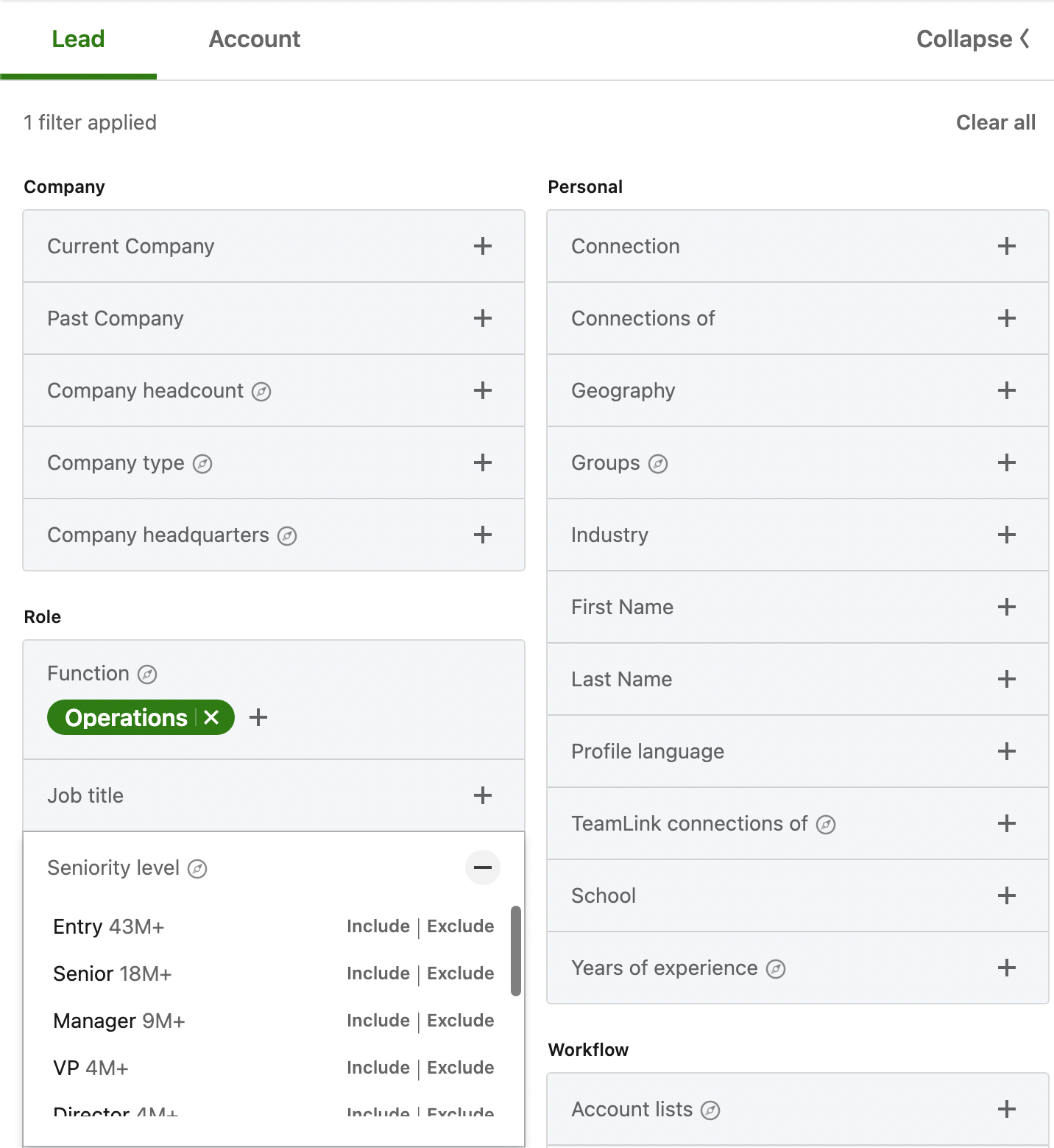
Master the 50+ search filters. Combine filters like industry, company size, seniority level, job function, and "changed jobs in the last 90 days" to create precise Ideal Customer Profiles (ICPs). Use Boolean operators (AND, OR, NOT) to refine searches. For example, "CEO NOT Interim OR Acting" narrows your target list.
Save your refined search criteria. Sales Navigator provides weekly updates with new leads matching your filters, creating a consistent flow of fresh prospects. Set up real-time alerts for key activities on saved leads and accounts (job changes, company news, content engagement). These alerts provide perfect icebreakers for outreach. Prospects are 65% more likely to accept an InMail if they switched jobs within the past 90 days.
Effective InMail and connection request practices
- Use your 50 InMail credits strategically. Target decision-makers not in your network, prospects who viewed your profile but haven't connected, or past customers who moved to new companies.
- Craft concise, personalized InMail messages that reference specific details from the prospect's profile, recent activity, or shared connections. Personalized InMails have significantly higher response rates than generic emails. LinkedIn users are 181% more likely to accept an InMail if they follow your company. Always include a clear, specific call to action.
- InMail credits are "refunded" if a recipient responds within 90 days, but the 50-message monthly cap still constrains high-volume outreach. That is where email becomes your primary channel, and InMail becomes a strategic supplement.
For ideas on crafting effective cold outreach, watch 10 Years of Cold Email Advice In 41 Minutes from Instantly.
Using buyer intent and account insights
- Sales Navigator's buyer intent feature identifies companies actively researching solutions like yours based on LinkedIn activity, website visits (if an Insight Tag is installed), and engagement with company content. Prioritize outreach to prospects showing intent signals. This shortens sales cycles and increases conversion rates.
- Understand what specific products or categories a potential buyer is interested in (Product Category Intent) to tailor your outreach message with extreme relevance. If your Advanced or Advanced Plus plan includes TeamLink, use it to see connection paths through your team's collective network. Buyers engage more often if outreach acknowledges a mutual connection.
- Collaborate on lead and account lists using shared lists and Smart Links to track engagement with shared content across your team. Monitor team activity and performance with usage reporting to identify best practices and optimize your collective sales strategy. Watch how you can use these signals to personalize outreach at scale with Instantly:
Integrating Sales Navigator with Instantly for effective outreach
Sales Navigator identifies the right people. Instantly turns those leads into booked meetings through scalable, deliverable cold email sequences.
Streamlining lead export from Sales Navigator to Instantly
Sales Navigator does not natively export lead lists in bulk. Use third-party LinkedIn scraping tools or browser extensions to extract lead data, including verified email addresses and contact details, from Sales Navigator search results.
Sales Navigator and Instantly can be indirectly connected in a few ways:
- Export leads from Sales Navigator using third-party tools and then import them into Instantly where you can add them to a cold email sequence
- Use a LinkedIn connection step as part of your outbound strategy via Instantly's CRM
- Integrate Sales Navigator with Instantly via Zapier or Make.com.
Here's one example of how user's are leveraging these no code integrations to customize their outreach workflows:
Use Instantly's AI Sequence Writer to craft personalized email sequences using enriched data as merge tags or custom variables. Reference specific details about the prospect or their company to make your outreach feel less "cold."
For step-by-step integration instructions, watch this Automated Email & LinkedIn Outreach tutorial covering HeyReach and Instantly integrations.
Instantly's unlimited accounts and warmup for scalable outreach
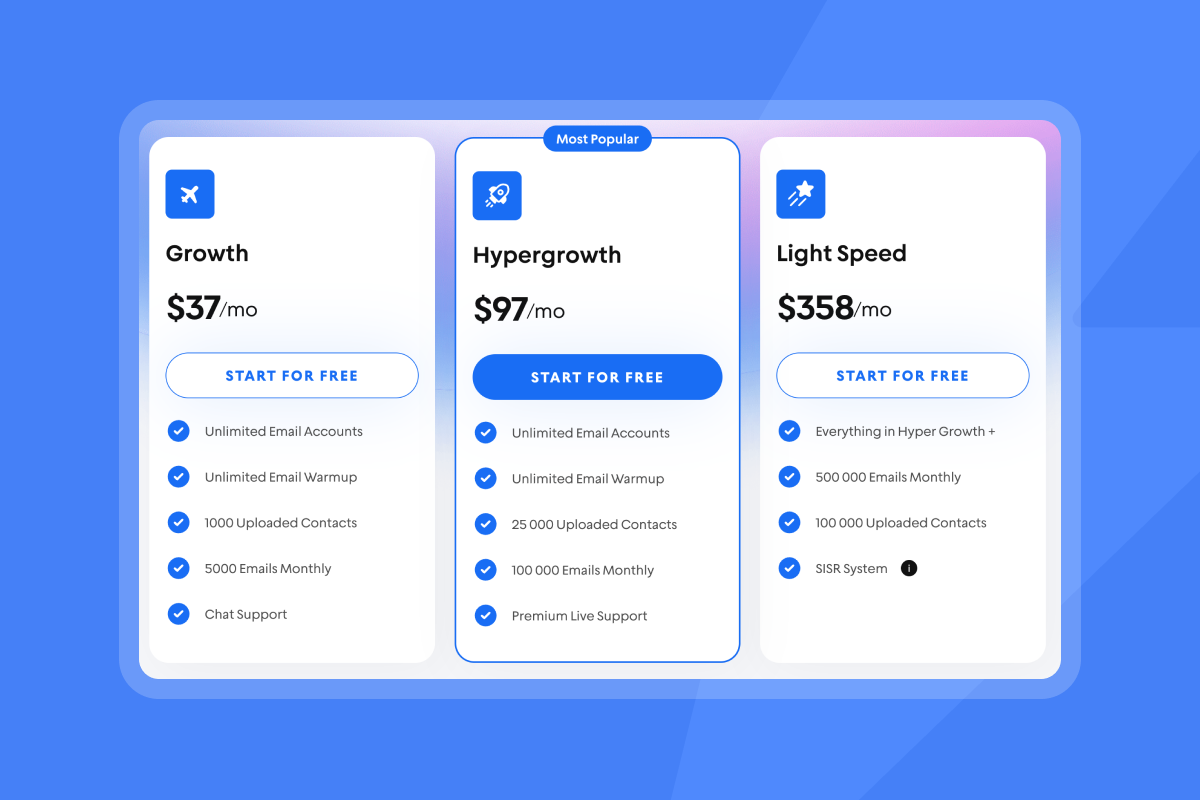
- Instantly offers unlimited email accounts and warmup on all Outreach plans, starting at $37/month (or $30/month annually) for the Growth plan. This flat-fee model removes per-seat penalties that impact margins as you scale.
- Instantly automates email warmup for new sending accounts through its private deliverability network of 4.2M+ accounts. Warm for 30 days. Ramp daily sends to a max of 30 emails per day per inbox. Keep bounces at or below 1 percent. If health dips, pause and run the hygiene checklist.
- Use Instantly's Inbox Placement tests to measure where your emails land (primary inbox, promotions, spam) before launching full campaigns. Automated alerts notify you of deliverability issues, allowing you to adjust pacing, domain settings, or copy before sender reputation takes a hit.
- Compare this to per-seat platforms. If you add 5 SDRs at $100/seat/month, that is $500/month just for sending capacity. Instantly's Hypergrowth plan at $97/month (or $77.60/month annually) includes unlimited accounts and 100k emails per month. The math favors flat-fee pricing as you scale.
"Instantly has been a game changer for my vertical in merchant service where email marketing is key. I've converted several leads into deals using Instantly and it's paid for itself 5x. On top of that, their customer service is quick and punctual when something comes up." - Philip Hendrich, Trustpilot review
Automating cold email sequences and follow-ups with Instantly
- Set the send window to 8:30 to 10:30 a.m. local time. Cap at 30 per day in week two. Use two to three copy variants per step. Instantly's A/B testing features identify the best-performing email variations. Optimize campaigns based on open rates, response rates, and conversion rates.
- Use insights gathered from Sales Navigator (recent job changes, company posts, shared connections) to create highly personalized email subject lines and body copy within Instantly. This shows prospects you have done your homework and makes your outreach feel warm, not cold.
For a complete cold email tutorial, watch The ONLY Cold Email Marketing Video You Will Ever Need from Instantly.
Unified inbox and AI reply handling for efficient conversions
Instantly's Unibox centralizes all replies in one place, eliminating the need to check multiple inboxes. The AI Reply Agent auto-handles lead replies in under 5 minutes, with configurable Human-in-the-Loop or Autopilot modes. AI replies cost 5 credits each.
This automation reduces manual reply handling time, speeds up response rates, and ensures no lead falls through the cracks. Integrate with Slack for review and approval workflows.
"Simple and well-designed UX, effective support from both humans and AI for small questions. Additionally, the AI is capable of entering campaign configurations and applying fixes, which is a huge time saver!" - Guillaume N., G2 review
Cost-effectiveness: Instantly's flat-fee model vs. per-seat pricing
Let's compare total monthly cost for a 5-rep SDR team:
Sales Navigator + Instantly:
- Sales Navigator Core: 5 seats × $99.99 = $499.95
- Evaboot (export tool): ~$25/month (annual)
- Instantly Hypergrowth: $97/month
- Instantly SuperSearch Growth: $47/month
- Instantly Growth CRM: $47/month
- Total: $715.95/month
(you could even replace Evaboot with Instantly's SuperSearch, saving money)
Sales Navigator + per-seat email platform:
- Sales Navigator Core: 5 seats × $99.99 = $499.95
- Per-seat email tool: 5 seats × $100 = $500
- Export tool: $25/month
- Total: $1,024.95/month
The Instantly stack saves $309/month or $3,708/year. That difference grows as you add reps. With per-seat pricing, each new SDR costs an additional $100/month. With Instantly's flat fee, the incremental cost is zero.
For agencies managing multiple clients, Instantly's unlimited accounts model keeps base costs predictable. Scale clients without increasing software costs.
"I've been using instantly.ai for my cold email outreach, and it has completely changed the way I run campaigns. The platform is super intuitive, and I was able to get up and running in minutes. Deliverability has been excellent, and the automation features save me hours every week." - James M., G2 review
Common questions about Sales Navigator pricing and ROI
- Can I integrate Sales Navigator with my CRM without Advanced Plus?
Yes, but expect limitations. Core and Advanced plans offer basic CRM integration, which often requires manual data entry or third-party tools like OutboundSync. Advanced Plus provides full, bidirectional sync with Salesforce and Microsoft Dynamics 365. - How do I avoid unexpected charges when my trial ends?
LinkedIn Sales Navigator subscriptions auto-renew, so cancel before your next billing date to avoid charges. Refunds are only granted if requested within seven days of being charged and if no premium features were used. - What hidden costs should I budget for beyond the subscription?
Third-party export tools cost $200-$400 annually, email verification services add another $20-$50/month, and integration tools or iPaaS subscriptions (Zapier, Make) can add $50-$200/month depending on usage. - Is Sales Navigator worth it for solo founders?
If LinkedIn is your primary prospecting channel and your ICP is active on LinkedIn, yes. Core at $79.99/month annually is manageable. However, you still need an outreach engine to convert leads into meetings. Pair it with a tool like Instantly to automate follow-ups and maintain deliverability. - How does Sales Navigator compare to other sales intelligence tools for SMBs?
Sales Navigator excels at LinkedIn-specific prospecting and relationship intelligence at a competitive price point. Other sales intelligence tools can cost significantly more for similar features, though they may offer broader multichannel data. Choose Sales Navigator if LinkedIn is your primary channel, or consider other tools if you need extensive off-LinkedIn contact databases.
"It has all the tools needed for cold outbound in one place. Previously, I was running 3 different systems to get a fraction of the results." - James L., G2 review
Drive predictable pipeline growth with optimized Sales Navigator and Instantly
LinkedIn Sales Navigator delivers value when you pair precision targeting with a scalable, deliverable outreach engine. The platform identifies decision-makers, tracks intent signals, and surfaces warm connection paths. But ROI lives in what happens next: clean data export, personalized sequences, primary-inbox placement, and fast reply handling.
Instantly addresses these gaps. Unlimited email accounts on a flat fee remove per-seat penalties. Automated warmup and Inbox Placement tests protect sender reputation. AI agents draft replies and build sequences. The Unibox centralizes conversations. SuperSearch adds 450M+ verified contacts when LinkedIn's 50 InMail credits run dry.
The quarter is tight. Stop guessing your Sales Navigator ROI. Apply the calculation framework, audit your hidden costs, and integrate a proven outreach stack. Book meetings, not just lists.
Ready to see your Sales Navigator investment pay off?
Start your free trial with Instantly and connect your Sales Navigator leads to automated, deliverable cold email sequences. Use our flat-fee unlimited accounts and built-in warmup to scale outreach without per-seat penalties. See primary-inbox placement, track replies in the Unibox, and let AI handle follow-ups while you focus on closing deals.
FAQs
What is the average ROI for LinkedIn Sales Navigator according to independent studies?
A Forrester Consulting study commissioned by LinkedIn found a 312% ROI over three years, with a payback period of less than six months. Customers reported an average 8% year-on-year revenue increase, with some organizations attributing 40-60% of revenue to Sales Navigator activities.
Does Instantly offer CSV export for Sales Navigator leads without third-party tools?
Instantly imports leads via CSV files extracted from third-party tools like Evaboot, Wiza, or Kaspr. Sales Navigator does not natively export CSVs. Once imported, Instantly handles enrichment, email verification, sequence automation, and deliverability monitoring.
How many email accounts can I connect to Instantly's Growth plan?
Unlimited. All Instantly Outreach plans (Growth at $37/month, Hypergrowth at $97/month, Light Speed at $358/month) include unlimited email accounts and automated warmup. This flat-fee model scales without per-seat penalties.
Can I track which Sales Navigator leads convert to meetings in Instantly?
Yes. Instantly's analytics show reply rates, positive replies, and meeting bookings per campaign. Integrate with your CRM via HubSpot, Salesforce (via OutboundSync), or Zapier to track full-funnel attribution from Sales Navigator lead to closed deal.
What is the total monthly cost for a 5-rep team using Sales Navigator and Instantly?
Sales Navigator Core (5 seats × $99.99) + Evaboot (~$25/month) + Instantly Hypergrowth ($97) + SuperSearch Growth ($47) + Growth CRM ($47) = approximately $715.95/month. This includes unlimited email accounts, warmup, lead data, and CRM functionality.
Key Terminology
Sales Navigator Core: LinkedIn's entry-level paid prospecting plan at $79.99-$99.99/month, offering 50+ search filters, 50 InMail credits, and 10,000 saved leads.
InMail: Direct messages sent to LinkedIn users outside your network, limited to 50 per month on Core and Advanced Sales Navigator plans. Credits are refunded if the recipient responds within 90 days.
TeamLink: A feature in Advanced and Advanced Plus plans that shows connection paths through your team's collective network, enabling warm introductions.
Buyer Intent: Signals that indicate when companies actively research solutions based on LinkedIn activity, website visits, and content engagement.
Warmup: An automated process of gradually increasing email sending volume to build sender reputation and improve deliverability, included in all Instantly Outreach plans.
Primary Inbox: The main inbox folder in Gmail or Outlook where important emails land, as opposed to Promotions, Spam, or Junk folders.
Unibox: Instantly's centralized reply management system that consolidates responses from multiple email accounts into one interface.
Deliverability Network: Instantly's private network of 4.2M+ accounts used for warmup and engagement to improve sender reputation and inbox placement.
SISR (Server & IP Sharding & Rotation): An advanced deliverability feature on Instantly's Light Speed plan that uses dedicated/private IP pools to improve inbox placement at scale.
ROI (Return on Investment): A financial metric calculated as ((Revenue Generated - Total Cost) / Total Cost) × 100%, measuring the profitability of an investment.


