


Secondary domains are essential to cold email marketing campaigns because they protect your primary domain and let you scale sending volume. But you must complete technical setups before launching campaigns using these alternate domains.
Instantly’s DFY service simplifies secondary domain setup by handling everything from buying to email account creation. You can also get pre-warmed email accounts from high-quality U.S. IP Google accounts with Instantly if you want to launch campaigns fast.
However, it's important not to treat secondary domain setup as part of a checklist. Below, we’ll explain why secondary domains are non-negotiable for scaling outreach campaigns.
Why Do You Need Secondary Domains?
Emailing random people using a Gmail account will likely result in your messages being ignored, bouncing, or landing in spam folders, no matter how good the copy. These issues create a compounding adverse effect on your account and domain.
Poor engagement, high bounce rates, or spam complaints signal to providers that your domain isn’t trustworthy. These issues increase the potential risk of blacklisting, which could create problems for normal business operations like sending updates to existing clients/customers.
Email warmups, finding the right leads, segmenting lists, and personalization all help reduce the chances of these issues happening. But if you only use your primary domain for cold emails, the next problem is volume.
Before, you could safely send 50 emails to prospects. Marketers from Reddit are already complaining that you can get accounts burned after sending 10.
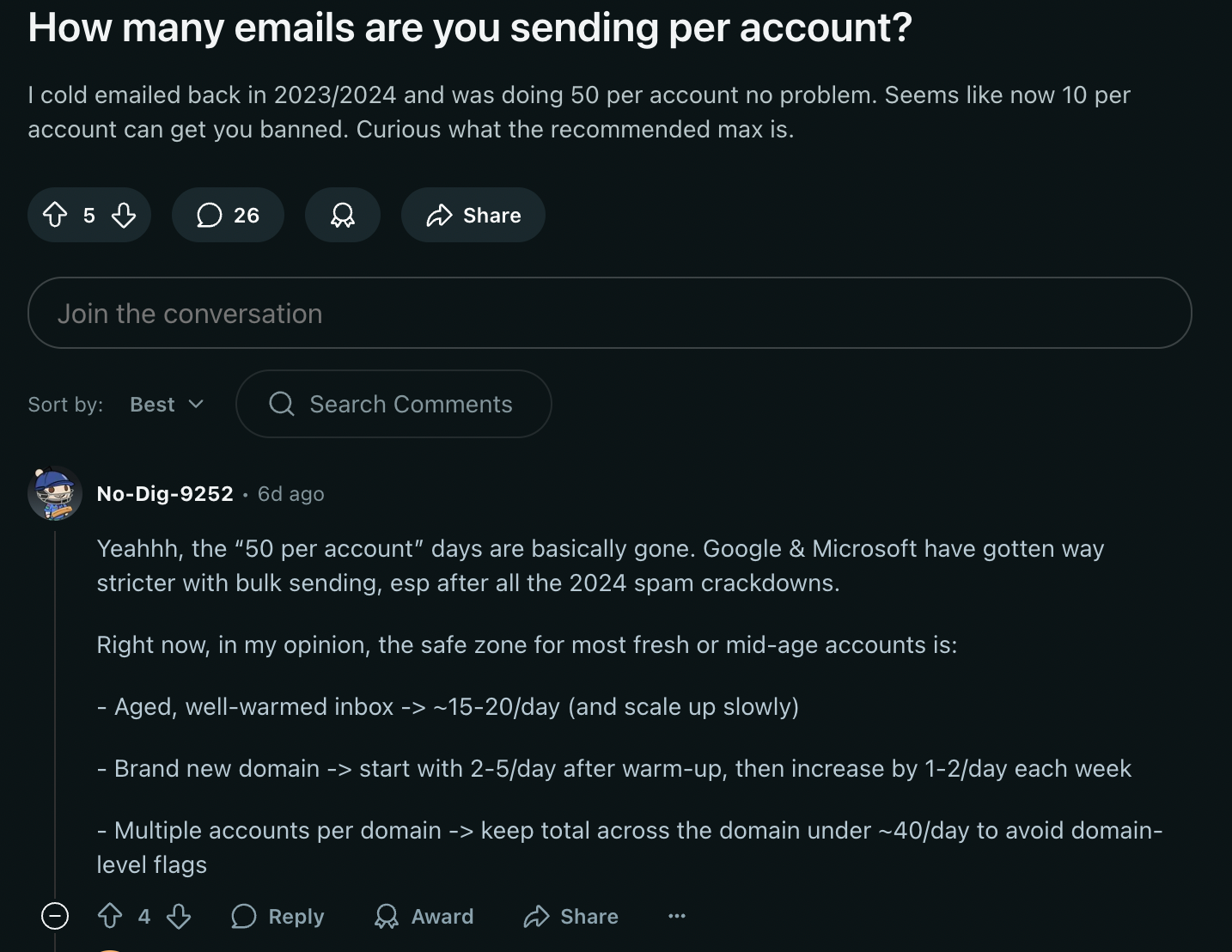
That means it's more important than ever to set up secondary domains for cold email campaigns. The question now is, how many alternate domains do you need?
How Many Secondary Domains Do You Need for Cold Email?
The number of alternate domains you need depends on how many cold emails you plan to send monthly. If you want to scale, creating three sending accounts per domain is best practice. Let’s say you want to send 10,000 cold emails monthly.
If you keep sending volume to 40 emails/day per sending account, you’ll need nine secondary domains (with three email accounts each) to send around 10,000 emails safely. You can do a 70%-30% split of warmups and cold emails for newer accounts.
According to statistics, getting a 1%-5% conversion rate for cold email is a good benchmark. So, if you have nine secondary domains, you can expect between 100 and 500 new leads from your campaigns. Of course, mileage varies depending on your industry and cold email strategy.
Best Platforms For Buying Secondary Domains
Most teams use Google Workspace or Microsoft 365 for cold outreach deliverability. These services already have a reputable sender infrastructure and make it easy to set up DKIM, SPF, and DMARC.
That said, they’re not your only option. Here are other platforms you can try:
Important note: GoDaddy has very affordable domains for the first year. Once renewal kicks in, people buying from GoDaddy often complain about higher renewal prices.
You must also consider that you’ll have to do technical setups if you purchase from these platforms. If you want transparent pricing and go hands-off with technical setups, Instantly offers premium-quality Google Workspace accounts for around $15/year per domain.
Do Alternate Domains Forward Emails to Your Primary Domain?
Secondary domains don’t automatically forward emails to your primary domain. Remember, each domain is independent. If you set up maria@tryxyzcompany.com, emails sent to that inbox will stay there unless you configure forwarding.
You can set up forwarding if you need it, but for a cold email campaign, it’s better to keep those inboxes separate and manage replies in their mailboxes or through your outreach platform. But keeping track of every inbox as you scale campaigns can be challenging to manage.
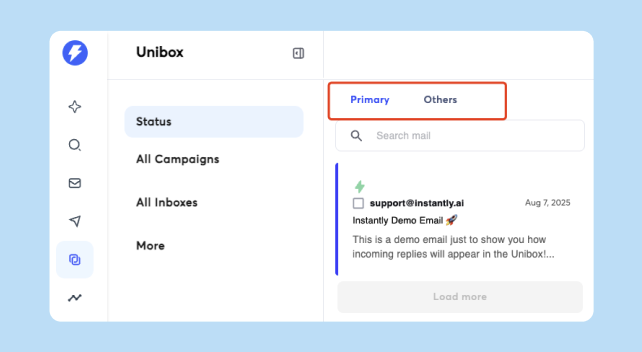
Instantly centralizes replies from all your secondary-domain inboxes with Unibox v2, so you don’t need to forward anything to your primary domain. Here’s a look at what it can do:
- Capture off-thread replies: Turn on “Save non-Instantly emails in Unibox” to catch forwards or replies from a different address in the Others tab, then move them to Primary and Attach Lead so sequences stop for the right contact.
- Triage faster: Use AI sentiment and interest statuses to sort positive, neutral, and negative replies. You can then add quick notes so handoffs to SDRs are clear.
- Work in batches: Bulk select to mark read, change interest, blocklist, or delete emails across email campaigns.
How to Name Your Secondary Domains and Email Accounts
When buying alternate domains, get domains similar to your primary one. That means if your primary domain is “XYZCompany.com,” your secondary domain could be:
- TryXYZCompany.com
- GetXYZCompany.com
- UseXYZCompany.com
The next thing you should consider is the sending accounts tied to the domains, since this is what your prospects will see when they open their inbox. The sending accounts you use can even affect email open rates. Here’s what you need to know:
- Use names instead of roles (john@tryXYZ.com, not sales@tryXYZ.com)
- Keep things professional
- Don’t use numbers or special characters (it can signal spam triggers)
- Be consistent with formatting email account names
Key Takeaways
Secondary domains are essential for cold email. They protect your primary domain, keep deliverability high, and let you scale volume safely. To recap, here’s what you need to know about secondary or alternate domains:
- Spread volume across multiple branded domains with 2–3 inboxes per domain.
- Don’t forget to include warmups and replies in your daily sending volume allocation.
- Use names instead of roles when creating email accounts.
- Set up SPF, DKIM, DMARC, custom tracking, and warm each inbox gradually.
If you want domains, inboxes, technical setup, and warmup handled in one place, Instantly covers the entire process. Need more domains without the hassle? Start your free Instantly trial.


