


TL;DR: Turn your sales playbook into scheduled work. Instantly’s AI Copilot runs explicit recurring tasks like weekly follow-up audits, daily lead sourcing, analytics summaries, and sequence refreshes. That means consistent outreach, safer scale, and audit-friendly results for every rep. This runbook shows how to set it up, protect deliverability, and roll out team‑wide without per‑seat costs. You can get started with ths runbook today for free with Instantly.
Updated October 09, 2025
Understanding copilot memory and recurring tasks: a primer
Two ideas often get conflated. They are different in practice. See how our cold email solution can help clarify the approach.
- Copilot memory: AI recall of user preferences, styles, or recurring topics.
- Recurring tasks: AI executes scheduled actions that produce work outputs.
Why this matters: Memory helps with personalization. Recurring tasks standardize execution. You need both, but only scheduled tasks give you predictable follow‑ups and auditable outcomes across a team.
Microsoft 365 Copilot: memory for preferences, styles, and recurring topics
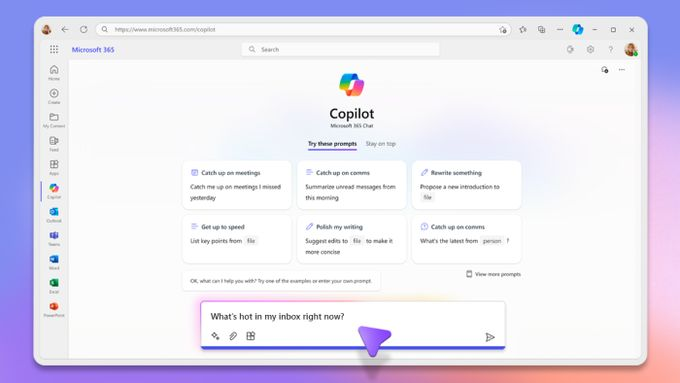
Microsoft’s Copilot Memory announcement says Memory is on by default, with user and tenant controls to view, edit, delete, or turn it off. Items are discoverable in Microsoft Purview eDiscovery, and Copilot stores items only when there is a clear intent to remember.
- Examples
- Remembers “keep my emails concise” or a preferred tone.
- Tracks recurring topics like a quarterly plan across apps.
- Pros
- Saves time in personal workflows.
- Deep Microsoft Graph integration and enterprise controls, including Purview.
- Cons
- Memory helps recall context. It does not run scheduled outbound steps or govern a sales team’s playbook.
Why this matters to sales leaders: Helpful for personal drafting inside M365. See our proven email campaign ideas guide for a full breakdown. You still need a system that executes explicit, recurring sales tasks with guardrails, deliverability checks, and team reporting.
Instantly’s Copilot: AI for automated recurring sales tasks and workflows
Instantly is built for outbound. Instantly Copilot converts your playbook into explicit tasks that run on a schedule and tie into your outreach, data, deliverability, and team governance. Our prospecting email templates guide walks through this step by step.
What Copilot can run on a schedule
- Daily: Find and stage verified leads that match your ICP.
- Weekly: Summarize campaign analytics and recommend two tests to run.
- Weekly: Audit follow‑up compliance and notify owners in Slack.
- Monthly: Refresh subject lines and propose updated CTAs.
For a guided walkthrough of setup and recurring tasks, watch this deep dive session I hosted:
What customers say:
"Getting set up is very easy, especially with the AI copilot that helps you every step of the way." - Antoine M. on G2
"It is the Inbox placement feature which i like the most as it help us to get to know the spam score and the mails that are placed in the inbox so by this we can manage the mail ids accordingly." - Verified User in IT on G2
"Simple and well-designed UX, effective support from both humans and AI for small questions. Additionally, the AI is capable of entering campaign configurations and applying fixes, which is a huge time saver!" - guillaume n. on G2
"In just the past 180 days, I've been able to book over 100 meetings, close deals worth more than €15,000, and even walk away from my regular 9 to 5 job, all with the help of Instantly." - Dustin Geissinger Gromicho on Trustpilot
How it works for sales teams
- Load Memory and ICPs. Add your website or PDFs so the AI understands your offers. Define one to three ICPs with firmographics and roles. The Copilot help article covers Memory, Guidance, and credits.
- Set Guidance. Codify tone, structure, and prohibited phrases so drafts match your brand.
- Create Copilot tasks. Set daily, weekly, or monthly recurring tasks to create campaigns, source leads, summarize analytics, and send Slack notifications.
- Deliverability first. Run automated Inbox Placement tests, blacklist checks, and content risk analysis. Set triggers to pause sending or enable slow ramp if placement dips.
- Handle replies with AI. The AI Reply Agent drafts and sends responses in under 5 minutes, with human‑in‑the‑loop or autopilot modes.
- Integrate with your stack. Use native integrations, webhooks, and partners like OutboundSync to sync sends, replies, and dispositions to HubSpot or Salesforce.
- Pricing and scale. Flat‑fee plans include unlimited email accounts and warmup so you grow throughput without per‑seat penalties. See pricing.
Copilot credits at a glance
- Generate a sequence: 0.1 credits.
- Find ideal prospects: 0.1 credits.
- Create a campaign: 0.5 credits.
- Workspace audit: 1 credit.
Credits vary by task complexity and do not include separate enrichment costs.
Here's a practical visual walkthrough of Instantly's AI Copilot:
Deliverability note: Warm up new domains, keep warmup enabled, and ramp carefully. Learn more in our cold email campaign guide guide. Instantly documents a conservative sending pattern and emphasizes 30 cold emails per account per day early on to protect sender reputation. See the cold email strategy.
Runbook: standardize recurring sales activities in 4 weeks
Week 1. Foundations and guardrails
- Connect two warmed inboxes and run Inbox Placement tests. Done when tests complete and you review provider‑level placement and blacklist status.
- Load Memory and define 1–3 ICPs. Done when Copilot can restate your offer and audience in a short paragraph.
- Write Guidance rules. Done when two regenerated drafts match tone and structure.
Week 2. Sequences and data
- Import a verified cohort from SuperSearch or your CRM lists. Done when required merge fields like first name and company are present.
- Build two sequence variants per ICP. Add two subject lines and one CTA variant each.Cap send volume for safety.
- Keep daily sends per inbox low during ramp and keep warmup on.
Week 3. Copilot tasks and replies
- Create three tasks:
- Daily “Add 50 verified leads to review” per ICP.
- Weekly “Analytics summary with two test recommendations.”
- Weekly “Follow‑up audit and Slack DM to owners.”
- Turn on AI Reply Agent in human‑in‑the‑loop mode. Approve in Slack for one week.
Week 4. Scale and governance
- Add two to four inboxes and maintain conservative per‑inbox caps as you ramp.
- Lock approved templates and restrict edits to admins.
- Connect CRM sync and validate fields, dedupe logic, and reporting. Use webhooks or OutboundSync for HubSpot and Salesforce.
Scoreboard to watch
- Placement and blacklist status from automated tests.
- Lead quality and off‑target rate for new adds.
- Reply handling speed and handoff to meetings.
- Task completion rates and follow‑up coverage.
Head‑to‑head: M365 Copilot memory vs. Instantly’s recurring tasks
| Category | M365 Copilot Memory | Instantly Copilot Recurring Tasks |
|---|---|---|
| Core function | Remembers preferences and recurring topics for drafting | Executes scheduled sales actions that produce lists, sequences, audits, and summaries |
| Controls | Memory on by default. Users and admins can manage or disable. Discoverable in Purview | Admin guardrails, task ownership, DPA, and audit logs |
| Deliverability | Not applicable | Warmup, placement tests, blacklist checks, and safe ramp |
| Scale economics | Seat-based Microsoft licensing | Flat-fee pricing with unlimited inboxes and warmup |
Choosing your copilot: a feature checklist for sales leaders
Use this to evaluate any “copilot” for standardizing outreach.
- Governance
- Role‑based admin controls for templates and tasks
- Audit logs for sends and approvals
- Public DPA and sub‑processor roster
- Deliverability
- Automated warmup and inbox placement tests
- Blacklist monitoring and content risk analysis
- Send windows and pacing caps
- Recurring tasks
- Daily, weekly, and monthly schedules
- Follow‑up audits and analytics summaries
- Subject and CTA refresh prompts
- Data and CRM
- Verified contacts and list hygiene
- Native integrations or webhook partners to HubSpot and Salesforce
- Reply classification and human‑in‑the‑loop modes
- Scale and cost
- Unlimited inboxes
- Flat‑fee pricing
- Transparent credits model for AI actions
Watch how Instantly's CRM and SuperSearch tools bring your sales system to the next level:
How‑to: set up Instantly Copilot recurring tasks
- Load Memory and ICPs
- In Copilot, add your website or one‑pagers.
- Create at least one ICP with industry, size, geography, and roles.
- Acceptance: Copilot returns a short company summary and a clear ICP.
- Write Guidance
- Define tone, structure, vocabulary, and forbidden claims.
- Acceptance: Two regenerated emails follow your rules.
- Add three tasks
- Daily lead add, weekly analytics, weekly follow‑up audit with Slack alerts.
- Acceptance: Tasks run on schedule and Slack messages arrive.
- Turn on deliverability checks
- Enable automated Inbox Placement tests and triggers for pauses.
- Acceptance: You review placement and blacklist reports weekly.
- Enable AI reply handling in HITL mode
- Route replies for approval, then graduate to autopilot if quality holds.
- Acceptance: Replies go out within minutes and meeting handoffs are clean.
Time Standardize and level up with AI
Ready to move from ad‑hoc follow‑ups to a consistent, auditable, AI powered system? Try Instantly for free. Standardize your team’s recurring outreach with Instantly’s Copilot and get predictable execution at scale.
More resources:
- For a step‑by‑step video, watch the Instantly AI full tutorial on YouTube.
- Setup email warmup with Instantly in just a few clicks.
FAQ:
- How is Instantly’s Copilot different from “AI memory” elsewhere?
Memory recalls preferences. Instantly’s Copilot executes scheduled sales tasks like daily lead adds and weekly follow‑up audits, then reports on outcomes. - What send caps protect domain health during ramp?
A conservative pattern is about 30 cold emails per account per day early on, with warmup enabled and placement checked before increases. - Can I scale without adding seats?
Yes. Flat‑fee plans include unlimited email accounts and warmup so throughput grows without per‑seat costs. - Does Copilot support CRM handoffs?
Yes. Use native integrations, Slack or webhooks, and OutboundSync to log sends, replies, and statuses to HubSpot or Salesforce. - What about privacy and discovery?
For M365 Memory, data is discoverable via Microsoft Purview eDiscovery. For Instantly, a DPA and sub‑processors list are available for procurement review.
Key terms glossary
- Primary inbox: The folder recipients check first.
- Sender reputation: How mailbox providers trust your domain and IP.
- Warmup: Controlled sends that build trust before scale.
- List hygiene: Ongoing removal of risky or stale contacts.
- Verified contacts: Emails confirmed deliverable.
- Send windows: Time ranges when campaigns send.
- Throughput: Total sends across all connected inboxes.


