


Updated October 31, 2025
TL;DR: Instantly.ai prices SuperSearch and Website Visitors on a clear credit model. Expect 1 to 2+ credits to find a verified work email in SuperSearch, 0.25 credits to verify an email you already have, and 0.5 credits for each optional enrichment. Website Visitors charges 1 credit for each resolved visitor profile with a business email or LinkedIn. AI Reply Agent replies cost 5 credits each. Plans start at $9 for SuperSearch credits and $97 for Website Visitors. Use the ROI calculator below to convert credits and plan fees into a predictable cost per lead.
If you can map credits and plan fees to meetings, you can forecast pipeline. Instantly keeps outreach flat fee and meters data and AI with credits. This guide gives you the exact prices, how credits are used in SuperSearch and Website Visitors, and simple math to model cost per lead for agencies, founders, sales leaders, and growth marketers.
SuperSearch lists 450M+ B2B contacts and Outreach tiers include unlimited email accounts with warmup. Light Speed adds SISR for dedicated or private pools when you need extra isolation, adhering to IETF specifications such as SPF RFC 7208 and DMARC RFC 7489.
Use the ROI calculator below to calculate your true cost per lead and pick the smallest plan that fits your volume. You can also compare plans on the Instantly pricing page, explore the SuperSearch guide, and review Website Visitors to see how credits map to outcomes.
Instantly pricing plans: a detailed breakdown
All prices are USD as shown on the Instantly pricing page. Annual equivalents are listed where published.
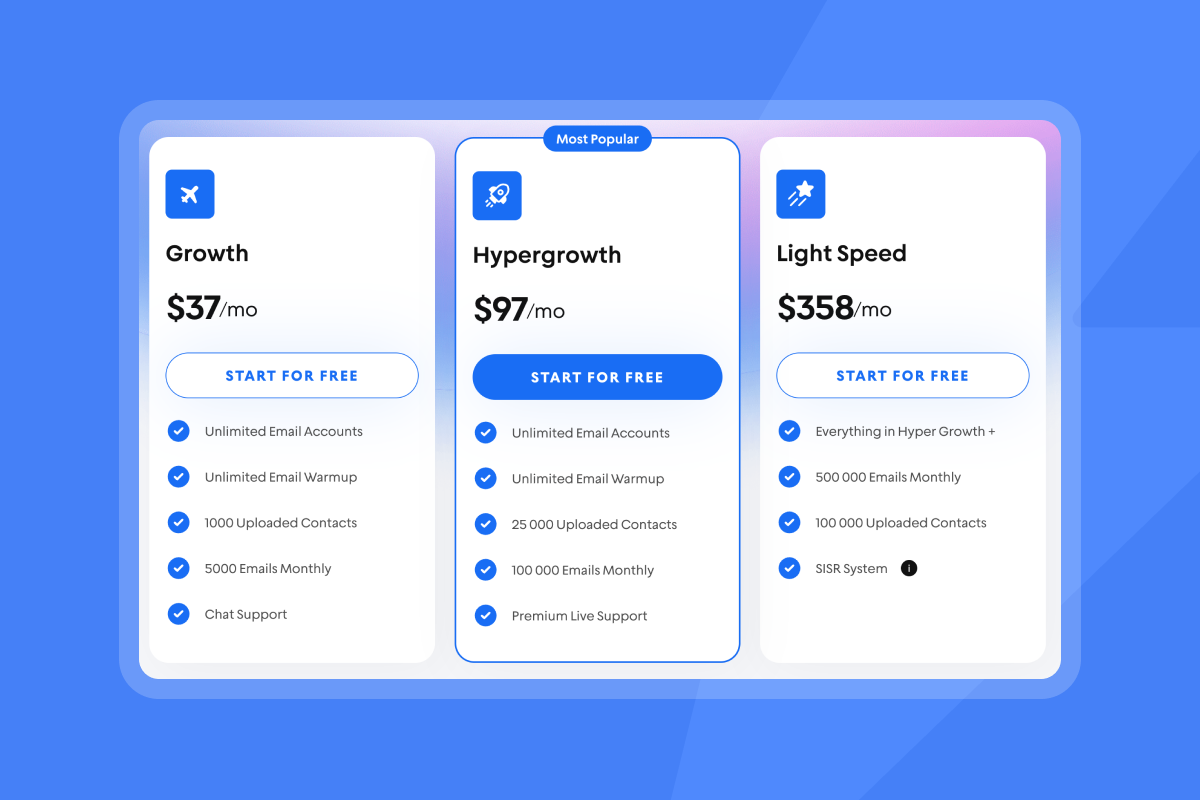
| Module | Plan | Price (monthly) | Key inclusions |
|---|---|---|---|
| Outreach | Growth | $37 | Unlimited email accounts and warmup |
| Outreach | Hypergrowth | $97 | 25,000 uploaded contacts, 100,000 emails monthly, premium support |
| Outreach | Light Speed | $358 | SISR with dedicated or private IP pools |
| SuperSearch credits | Nano | $9 | 150 credits for contact finding and enrichment |
| SuperSearch credits | Growth | $47 | 1,500 to 2,000 credits on annual |
| SuperSearch credits | Supersonic | $97 | 5,000 to 7,500 credits on annual |
| SuperSearch credits | Hyper Credits | $197 | 10,000 to 200,000 credits; enterprise available |
| CRM | Growth CRM | $47 | Unlimited seats, Unibox, opportunities, reporting |
| CRM | Hyper CRM | $97 | Calling and SMS, salesflows, visitors inside CRM, team reporting |
| Website Visitors | Basic | $97 | Pixel and US visitor identification credits |
| Website Visitors | LightSpeed | $397 | Higher monthly resolution volume and features |
Typical stacks to sanity check total cost of ownership
- A starter stack combines Outreach Growth ($37), SuperSearch Growth ($47), and Growth CRM ($47) as listed on the pricing page. Total about $131 per month.
- A power-sender stack combines Outreach Light Speed ($358) and Hyper Credits ($197) on the pricing page. Total about $555 per month.
- An agency bundle often includes Outreach Hypergrowth ($97), Hyper Credits ($197), Hyper CRM ($97), and Website Visitors LightSpeed ($397) on the pricing page. Total about $888 per month.
Understanding Instantly’s credit system for SuperSearch and Website Visitors
Here is how credits are used and how to plan your budget.
SuperSearch contact finding
1 credit for a verified email found directly by Instantly. 2 or more credits if a partner provider is used through waterfall enrichment. Many teams use 1.5 credits as a working average for modeling.
If you want to see lead finding in action, the SuperSearch demo in this lead finder video on YouTube shows how to pull and verify contacts fast or watch how to generate enriched and verified leads on demand with Instantly's SuperSearch:
Verification and hygiene
0.25 credits to verify an email you already have before sending. Use this on any third party list to keep hard bounces low and protect domain health, per the catch-all verification guide.
Enrichment
0.5 credits for each optional enrichment such as fully enriched profile, company technologies, job listings, recent news, or funding type.
AI in the database and inbox
0.5 credits for AI web research and 1 credit for custom AI prompts on a row in SuperSearch. AI Reply Agent costs 5 credits per reply when handling an inbound response, described in the AI Reply Agent help article.
Website Visitors pixel
1 credit equals one resolved visitor profile where Instantly finds a business email and or a LinkedIn profile. Credits are not taken for company‑only sightings on paid plans. Visitor tracking focuses on US traffic, per the plans overview.
Watch how to track website visitors in just a couple of clicks with Instantly:
Short example
- Goal: 3,000 verified contacts from SuperSearch, with 40 percent enriched for tech and funding.
- Credits: 3,000 × 1.5 = 4,500 to find. Plus 3,000 × 0.25 = 750 to verify. Plus 1,200 × 1.0 = 1,200 to enrich. Total about 6,450 credits. The Supersonic plan at $97 covers 5,000 to 7,500 credits on annual.
For a quick walkthrough of setup and features, watch the Full Instantly overview on YouTube.
Instantly pricing for agency operators: scaling clients profitably
Flat-fee Outreach and metered credits make client scale predictable. You do not pay per seat. You can connect unlimited email accounts across client workspaces on every Outreach tier, then meter data and AI with credits.
Checklist to protect margin
- Flat-fee plan math: Start most clients on Outreach Hypergrowth at $97 and a shared Hyper Credits pool at $197. This gives room to allocate 10k+ credits across campaigns without per-seat penalties.
- Client billing: Pass through SuperSearch and Website Visitors credits at a visible cost per verified lead or per resolved visitor. Keep Outreach flat fee in a retainer, or itemize when you increase uploaded contacts with add‑ons listed in add-on pricing.
- Ramp plans: Cap each inbox at 30 daily sends in week two. Grow only when placement looks healthy. Pause when Microsoft or Gmail placement dips and re‑verify the list. Use Inbox Placement automated tests on a schedule.
- Deliverability dashboard: Run Inbox Placement, watch blacklist checks, and use bounce detection before scaling. On Light Speed, SISR isolates reputation with dedicated or private pools.
- Sequence governance: Standardize templates, spin syntax, send windows, and A/Z tests. Require verified contacts. This protects sender reputation across all clients.
Agencies that meter enrichment only on segments where personalization moves reply rate cut SuperSearch spend by 25 to 35 percent without losing meetings.
Watch this deep dive on how to get the most from Instantly's inbox placement features:
Instantly pricing for startup founders: maximizing ROI on a lean budget
Measure pipeline per dollar. Keep the stack small and predictable until you prove reply rate and meetings.
A lean plan that works
- Outreach Growth at $37 for unlimited inboxes and warmup.
- SuperSearch Growth at $47 for 1,500 credits. Target 750 to 1,000 verified contacts per month at about 1.5 credits each.
- Add Growth CRM at $47 when reply volume justifies Unibox and deal tracking.
- Add Website Visitors Basic at $97 after you see steady traffic.
How to track ROI per dollar
- CPL formula: total campaign cost divided by number of qualified leads. Include plan fees and credits. Use the calculator below to model cost per lead and cost per meeting.
- Example: spend $131 on Outreach Growth, SuperSearch Growth, and Growth CRM. Generate 150 qualified leads. CPL is about $0.87. If you add $40 of credits and book 15 meetings at a 10 percent lead‑to‑meeting rate, cost per meeting is about $11.40 before labor.
Founder rules of thumb
- Only enrich what you use. Keep enrichments off until messaging needs them.
- Verify third party emails. Spend 0.25 credits rather than pay in bounces and domain damage.
- Avoid seat creep. Flat Outreach fees and unlimited accounts keep headcount from inflating software cost.
Instantly pricing for growth marketers: optimizing campaigns and A/B tests
Experiments consume credits when you pull data or use AI. Sending variants does not.
Checklist for predictable credit burn
- Plan test cohorts: Scope two or three subject lines and one body variant per step. Cap lists so you enrich only what you will send in the test window.
- Stagger enrichments: Run a baseline with verified emails only. Add tech stack or funding on the finalist variant. Each enrichment is 0.5 credits.
- Use AI where it pays: AI Reply Agent costs 5 credits per reply. Pilot on late‑stage threads where meetings are likely.
- Audit credit logs weekly: Compare credits per meeting across variants. Kill high‑cost variants that do not convert.
Expert POV from a Growth Marketer: Treat credits like ad spend. Attribute credits per meeting by cohort so you can stop the losers early and fund the winners.
Instantly pricing for sales leaders: justifying team investment and pipeline health
You need predictable spend and inbox placement that holds under scale. Flat‑fee Outreach with unlimited email accounts reduces seat math.
Key points for your budget memo
- Predictable economics: Outreach starts at $37 per month with unlimited email accounts and warmup. Website Visitors and SuperSearch credits are metered and visible on the pricing page.
- Deliverability as a system: Use Inbox Placement tests and domain health checks before scaling. Light Speed adds SISR for dedicated or private pools when you need extra isolation, adhering to IETF specifications such as SPF RFC 7208 and DMARC RFC 7489. Your setup should also align with Gmail bulk sender requirements.
- CRM integrity: Push verified contacts and replies into HubSpot or Salesforce so your revenue dashboards match. See the integrations library and OutboundSync options for deeper CRM logging.
ROI calculator: find your true cost per lead
Use this quick model to estimate cost per lead and cost per meeting. Adjust inputs until the plan fits your goals.
Default inputs for a starting point
- Verified emails needed: 1,500 per month
- Average credits per verified email: 1.5
- Email verification rate: 100 percent at 0.25 credits each
- Enrichment percent: 40 percent at 1.0 credits per enriched lead
- AI Reply Agent replies: 60 per month at 5 credits each
- Plans: Outreach Growth $37, SuperSearch Supersonic $97, CRM Growth $47, Website Visitors Basic $97
- Conversion: 6 percent reply, 20 percent meeting from replies
Outputs
- Total credits used: about 1,500 × 1.5 + 1,500 × 0.25 + 600 × 1.0 + 60 × 5 = 3,375 credits
- Total software: $278 per month on the plan mix above
- Cost per verified lead: $278 divided by 1,500, approximately $0.19
- Cost per meeting: if replies are 90 and meetings are 18, plan cost is approximately $15.45 per meeting before labor
Adjust the variables to match your list hygiene, enrichment strategy, and reply handling.
How to optimize credit usage
Run this checklist monthly to keep CPL low and protect domain health.
- Define ICP filters: Tight SuperSearch filters cut wasted enrichments. Start with industry, title, company size, geography, and one or two tech firmographics.
- Find then verify: Use the 0.25 credit verifier on any non‑Instantly emails before launch. Maintain a bounce rate at or below 1 percent with the catch-all verifier.
- Enrich selectively: Toggle tech or funding only when the messaging needs it.
- Skip no‑email profiles: Keep the option on to enrich only leads with an email to avoid charges on non‑actionable rows.
- Prioritize warm intent: Use Website Visitors leads first. These show on‑site interest and often convert at higher rates, as covered in the import visitors into a campaign guide.
- Throttle AI replies: Use AI Reply Agent on high‑intent threads where a meeting is likely. Each reply is 5 credits.
- Audit weekly: Compare credits per meeting by segment and variant. Stop high‑cost patterns early.
What customers say about value and pricing clarity
"With Instantly, I can manage individual campaigns in one place, including getting feedback from customers and having conversations with them."
- Verified User in Information Technology and Services on G2
"The platform is super intuitive, easy to set up, and makes it simple to manage multiple domains and inboxes at scale. Deliverability is great and the analytics give us exactly what we need to optimize campaigns quickly."
- Shaiel P. on G2
"One aspect I particularly appreciate about Instantly is their comprehensive facilitation of every aspect of the system. If there's an issue, their system provides clear explanations, whether it's related to DMARC, SPF, or other factors."
- Alice f. on G2
Prefer to see it live. Watch the Full Instantly tutorial on YouTube, and get a CRM walkthrough in this video on YouTube.
Make credits a budget lever
Map your monthly goals to credits and pick the smallest plan that fits. Keep enrichments targeted, verify everything, and allocate AI replies to late‑stage threads. With flat‑fee Outreach and clear credits for SuperSearch and Website Visitors, your cost per lead becomes a number you control, not a surprise.
Start a 14 day free trial and take control of your B2B lead generation budget. Use the ROI calculator above to see how Instantly’s SuperSearch and Website Visitors can deliver predictable results.
FAQs
What is the average credit cost per verified email in SuperSearch?
Plan for 1.5 credits on average. Direct finds are 1 credit. Partner‑sourced emails are 2 or more credits, as detailed in the SuperSearch guide mentioned earlier in this article.
How many credits does email verification consume?
0.25 credits per email to validate an address you already have.
How many credits does AI Reply Agent use?
5 Instantly credits per AI‑generated reply in your inbox.
How are Website Visitors credits counted?
1 credit per resolved visitor profile with a business email and or LinkedIn. Company‑only sightings on paid plans do not consume credits.
What annual discounts are available?
Outreach Growth shows $30 on annual versus $37 monthly. SuperSearch credits list a 10 percent annual discount with credits upfront.
How big is the SuperSearch database?
The Instantly pricing page lists 450M+ B2B contacts.
How do I connect data to my CRM?
Use the integrations library for HubSpot and Salesforce, or use OutboundSync for deeper event logging and attribution.
Is unlimited email accounts really unlimited and is it per user?
Yes. Outreach tiers include unlimited accounts and warmup without per-seat pricing.


