


Updated December 5, 2025
TL;DR: For agencies managing multiple client accounts, centralized email signature management prevents brand inconsistencies and compliance risks that can kill client trust. Manual signature updates waste IT hours and create legal exposure. Scalable solutions automate deployment, enforce templates, and maintain professional standards across unlimited inboxes. Instantly's flat-fee model for unlimited email accounts removes the per-seat penalties that make signature management expensive at scale, giving you the foundation to run consistent, compliant client campaigns without operational chaos.
Managing email signatures manually across 50 client domains is like asking each SDR to memorize brand guidelines and legal disclaimers. It doesn't work. One wrong logo, one missing compliance clause, and you've handed a client a reason to question your professionalism.
For agencies running cold outreach at scale, every email is a brand touchpoint. Your signature is the digital handshake that either reinforces trust or signals disorganization. When you're juggling multiple client workspaces, the stakes multiply. Centralized email signature management becomes essential infrastructure, not a nice-to-have.
This guide walks you through why centralized signature management matters for agency operators, what features solve real problems, and how to implement a system that scales without burning IT hours or client budgets.
Why agencies need centralized email signature management
The cost of inconsistent branding and missed opportunities
When employees create their own email signatures, you get a fragmented scenario. Different fonts, outdated logos, incorrect contact details, and missing CTAs proliferate across your team. This fragmentation damages your professional image and makes your agency appear disorganized to prospects and clients.
The business cost is real. Email signatures represent millions of impressions annually. A 50-person agency sending 200 emails per day generates 3.65 million signature impressions per year. If those signatures are inconsistent, you're wasting a marketing channel that costs nothing to activate.
Brand consistency directly impacts revenue, simple. Studies show consistent branding can increase revenue by up to 23%. When your agency's signatures vary wildly across campaigns, clients notice. One prospect sees a polished signature with social proof. Another gets plain text with a broken image attachment. That inconsistency seeds doubt about your ability to execute.
Meeting compliance and legal requirements across clients
Regulatory compliance is not optional. GDPR mandates specific disclosures in business communications. Many jurisdictions require company registration numbers, VAT IDs, or legal disclaimers on external emails. Financial services, healthcare, and legal verticals face even stricter rules.
Manual signature management creates compliance gaps. A single employee who forgets to include a required disclaimer exposes your client to regulatory risk. Centralized systems prevent these gaps by automatically inserting legally mandated text based on sender location, recipient type, or department rules.
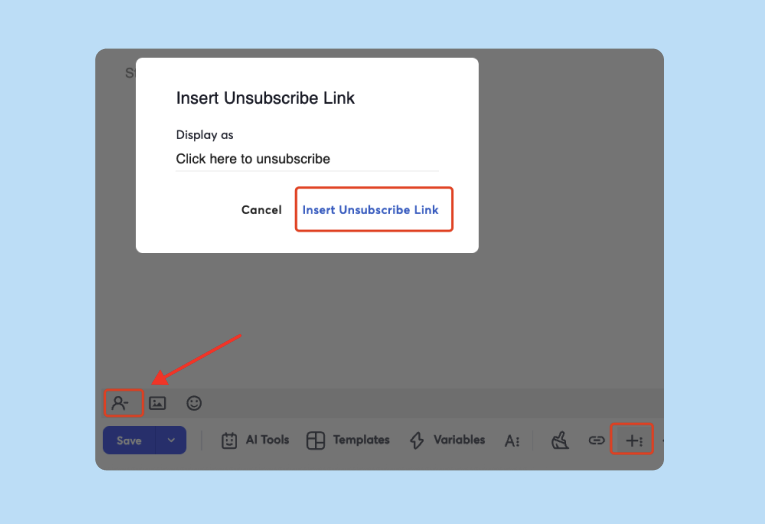
For agencies, compliance risk compounds. You're not just managing your own liability. You're managing it for every client account. A centralized system with audit trails and tamper-proof application protects both parties. For example Instantly allows you to easily insert unsubcribe links in just a single click.
The burden of manual updates and deployment for growing teams
IT time is expensive. When your team manually updates signatures, they're not fixing deliverability issues or optimizing send windows. IT departments spend hundreds of hours annually on signature-related support tickets, troubleshooting formatting issues, and chasing employees who ignore update requests.
The pain scales with growth. At 10 employees, manual updates are annoying. At 50 across multiple client workspaces, they're unmanageable. Every new hire, every rebrand, every campaign refresh requires individual intervention. Mistakes multiply. Support tickets spike.
Instantly supports this reality through unlimited email accounts on a flat fee. You can spin up new sending domains for client campaigns without worrying about per-seat costs compounding signature management complexity. The foundation for scalable operations is flat-fee infrastructure that doesn't penalize growth.
"The platform is super intuitive, easy to set up, and makes it simple to manage multiple domains and inboxes at scale." - Shaiel P. on G2
Key features to look for in an email signature management solution
Centralized control and effortless deployment
The core value proposition is simple. One admin interface controls all signatures across all users, devices, and email clients. Updates deploy in seconds, not days.
Centralized platforms pull employee data automatically from Microsoft Entra ID (formerly Active Directory) or Google Directory. Name, title, phone, department, all populate dynamically. When someone changes roles, their signature updates automatically. No manual intervention required.
For agencies running multiple client workspaces, this automation prevents the chaos of manual updates across 50+ sending accounts. You define the template once. The system applies it everywhere.
Strong template creation and customization options
Templates must balance consistency with flexibility. Your core brand elements, logo, colors, fonts, legal disclaimers, should be locked. But you need dynamic fields for employee details and campaign-specific CTAs.
Modern signature solutions offer drag-and-drop designers, pre-built templates, and HTML editing for advanced users. You can embed social media icons, promotional banners, booking links, or survey CTAs. Dynamic content rules allow sales teams to show different CTAs than support teams, all within brand guidelines.
One critical feature is mobile optimization. Signatures must render correctly on iPhone Mail, Gmail app, Outlook mobile, and desktop clients. Global brands report that inconsistent mobile signatures undermine professional communications.
Going beyond signatures watch our 1M email study where we detail what works and what doesn't:
User and team segmentation for custom signatures
Agencies serve multiple clients. You need signatures that reflect client branding, not just your own. Rule-based targeting solves this.
Modern platforms let you apply different signature templates based on department, user group, sender domain, or even recipient location. Your fintech client's team gets compliance-heavy signatures with required disclosures. Your SaaS client's SDRs get clean, CTA-focused signatures with booking links.
This segmentation integrates well with Instantly's workspace model, where each client gets isolated campaigns, sending accounts, and reporting. Your signature management system should mirror that structure.
Analytics and reporting for oversight and compliance
Visibility matters. IT administrators and compliance officers need audit trails showing which signature was applied to which email, when it was last updated, and who approved changes.
Signature management platforms provide dashboards showing deployment status, click-through rates on signature CTAs, and compliance coverage. If a legal team asks "Did we apply the updated disclaimer to all outbound emails after March 1?" you can answer with data, not guesswork.
Analytics also reveal marketing opportunities. Track clicks on promotional banners in signatures. Test different CTAs across teams. Measure which signature variants drive more meeting bookings. This turns signatures from static compliance artifacts into active marketing channels.

Easy integration with existing email and CRM tools
Your signature solution must integrate with your email platform. For Microsoft 365, look for native Exchange or Entra ID integration. For Google Workspace, ensure smooth Directory sync.
Many solutions also connect to CRMs like HubSpot or Salesforce, pulling contact data or pushing signature analytics. Instantly offers integrations that support similar automation, allowing data flows between your outreach platform, CRM, and signature management system.
Integration quality varies. Some platforms handle bidirectional sync and field mapping elegantly. Others require middleware like Zapier or Make. Validate integration depth during pilots, especially field mapping, dedupe logic, and error handling.
See Instantly's CRM in action below and how get it helps you get more leads:
How to implement centralized email signature management effectively
Step 1: Define your brand guidelines and compliance needs
- Start with the requirements. Document your brand standards: logo usage, colors, fonts, approved taglines. Gather legal disclaimers required by your industry or jurisdiction. Identify dynamic elements like employee photos, social icons, or campaign banners.
- For agencies, repeat this for each major client. Build a matrix showing which elements are mandatory, which are optional, and which vary by user role or campaign type.
- Implementation success requires stakeholder alignment. Get buy-in from marketing, legal, and IT before you design templates. Avoid the trap of IT-driven rollouts that ignore brand or compliance teams, which often leads to rework.
Step 2: Choose the right solution for your agency's scale and budget
- Evaluate solutions against your growth trajectory. If you manage 10 accounts today but plan to scale to 100, choose a platform that handles that growth without compounding costs.
- Pricing models vary. Some charge per user per month (e.g., $2 to $5 per user). Others offer flat tiers. For a 50-person agency, per-user pricing means $100 to $250 monthly. As you add client accounts and sending domains, costs can climb.
- Instantly removes per-seat penalties through unlimited email accounts on a flat fee. You're not paying extra as you scale sending infrastructure. Pair that with a signature solution that also avoids aggressive per-user pricing, and your total cost of ownership stays predictable.
- Key comparison points include template flexibility, mobile rendering, compliance features, analytics depth, and integration quality. Run pilots with real client domains and diverse email clients (Outlook desktop, Gmail web, iPhone Mail) to validate rendering and deployment reliability.
Step 3: Design and deploy signature templates with dynamic fields
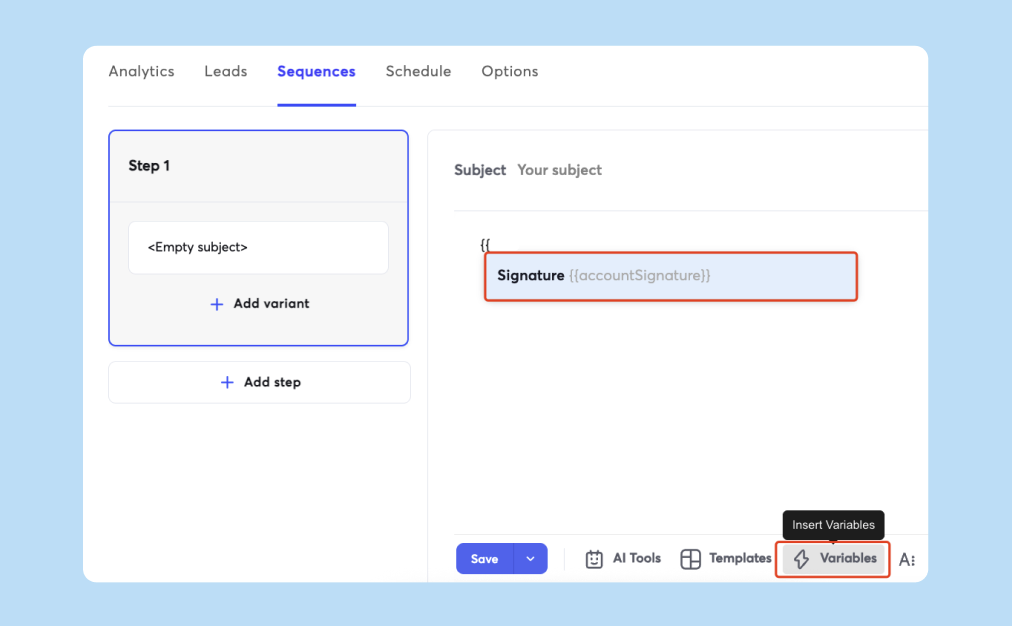
- Use your documented brand guidelines to build templates. Lock core elements like logos and legal disclaimers. Use dynamic fields for names, titles, phone numbers, and department-specific CTAs.
- Test across email clients before full deployment. Signatures that look perfect in Gmail web can break in Outlook 2016. Images may render as attachments in some clients. Test thoroughly.
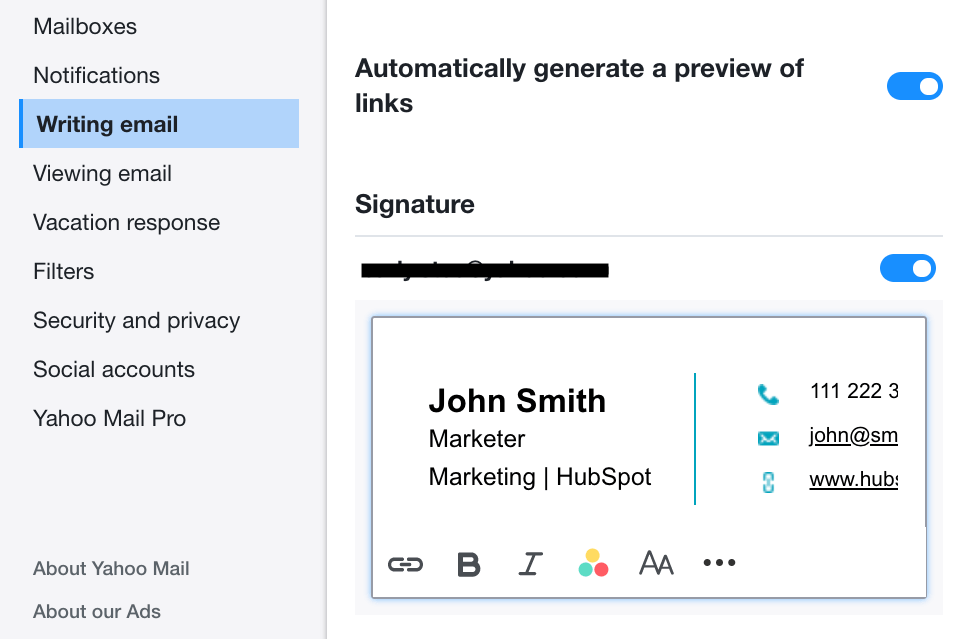
- For agencies, create a library of client-specific templates. Use naming conventions that make it easy to identify which template applies to which client workspace. If you're running Instantly campaigns for five clients, you'll have five signature sets mapped to five sending domain groups.
- Deploy in phases. Start with a pilot team or single client account. Monitor for rendering issues, user feedback, and compliance coverage. Iterate before rolling out company-wide.
Step 4: Train your teams and clients on new processes
- Most centralized systems are transparent to end users. Signatures apply automatically with no action required. But users should understand what changed and why they can't edit certain fields.
- Brief your teams on the benefits: consistent branding, automatic updates, compliance protection. Address common questions like "Can I add a personal tagline?" or "What if I need a special signature for a specific campaign?"
- For agencies managing client sending infrastructure, explain how centralized signatures protect their brand and meet compliance requirements. Position it as a value-add, not a constraint.
Step 5: Monitor, maintain, and iterate for continuous improvement
- Centralized management reduces ongoing work, but it's not set-and-forget. Monitor analytics dashboards for deployment coverage. Track signature CTA click-through rates. Review compliance audit logs quarterly.
- When clients rebrand, update templates immediately and deploy across all their accounts in minutes. Test new campaign CTAs in signatures. Use A/B testing if your platform supports it.
- Quarterly reviews of templates, compliance rules, and analytics help maintain quality. Check for formatting issues introduced by email client updates (especially Outlook, which changes HTML rendering rules periodically).
- When you refresh sending domains or ramp new inboxes, ensure signatures deploy correctly to maintain consistent branding throughout warmup and campaign launch.
Comparing centralized email signature management solutions for agencies
Instantly's approach: Supporting scalable email operations
Unlimited email accounts on a flat fee means you can create sending domains for each client without per-seat cost penalties along with unlimited signatures. When signature management solutions charge per user, your total cost compounds as you add accounts. Instantly's pricing structure removes that friction.
The platform's unified inbox and workspace model give you centralized control over client campaigns, sending accounts, and reply management. This pairs naturally with centralized signature management. You control the entire email operation, deliverability, outreach, replies, and branding from one lean stack.
Instantly's emphasis on deliverability and sender reputation also matters. Professional, compliant signatures contribute to inbox placement. Inconsistent signatures or missing legal disclaimers can trigger spam filters or legal scrutiny. By managing signatures centrally alongside warmup, send windows, and list hygiene, agencies build a holistic approach to email trust.
"Instantly has been a game changer for my vertical in merchant service where email marketing is key. I've converted several leads into deals using Instantly and it's paid for itself 5x." - Philip Hendrich on Trustpilot
Dedicated signature tools: What to consider beyond features
Dedicated signature management platforms like Exclaimer, CodeTwo, or Crossware offer comprehensive features: drag-and-drop designers, rule-based targeting, compliance automation, and analytics.
Key features and considerations
| Feature | Manual Management | Template-Based | Dedicated Software |
|---|---|---|---|
| Brand Consistency | Low (high variation) | Medium (user errors) | High (enforced templates) |
| Scalability | Poor (unmanageable at 50+ users) | Limited (semi-manual updates) | Excellent (automated at any scale) |
| Compliance Automation | None (manual disclaimers) | Basic (static text) | Advanced (rule-based, audit trails) |
| Cost Structure | High hidden costs (IT hours) | Low upfront, time cost for updates | Subscription ($2–$8/user/month) |
When evaluating these tools, look beyond feature checklists. Consider:
- Rendering quality: Does the signature display correctly in Outlook desktop, Gmail web, iPhone Mail, and Thunderbird? HTML email signature rendering is notoriously inconsistent across clients.
- Deployment speed: How quickly can you push an updated template to 100 users across 10 client domains?
- Integration depth: Does it sync well with Microsoft 365 or Google Workspace? Can it pull data from your CRM?
- Support quality: Agencies running client campaigns can't afford slow support. Check Trustpilot and G2 reviews for support responsiveness.
- Compliance coverage: Can it apply jurisdiction-specific disclaimers based on sender or recipient location?
Pricing typically ranges from $2 to $8 per user per month. For a 50-person agency, that's $100 to $400 monthly. Enterprise tiers with advanced analytics or white-label options cost more and often require custom quotes.
The hidden costs of per-user pricing models
Per-user pricing creates a tax on growth. When you're managing 10 accounts, $5 per user is manageable. At 100 accounts across multiple clients, you're paying $500 monthly just for signature management.
Agencies often underestimate total cost of ownership because they focus on per-user rates, not aggregate spend as they scale. This compounding effect becomes significant as teams grow.
This mirrors the pain Instantly solves for sending infrastructure. Traditional email tools charge per seat or per mailbox. Instantly's flat-fee unlimited accounts remove that penalty. Apply the same logic to signature management. Prioritize solutions with flat tiers or volume discounts that don't punish you for adding client accounts.
Streamline your agency's brand and compliance with smart signature management
Centralized email signature management is not a luxury for agencies running multi-client outreach. It's essential infrastructure that prevents brand inconsistencies, compliance gaps, and wasted IT hours.
Manual updates don't scale. Template-based approaches reduce chaos but still require significant intervention. Dedicated software automates deployment, enforces templates, and provides audit trails. The investment yields returns in saved time, reduced risk, and professional client communications.
For agencies using Instantly, the platform's unlimited accounts and flat-fee pricing provide the foundation for scalable signature management. You control sending infrastructure, deliverability, and reply handling without per-seat penalties. Pair that with a centralized signature solution that matches your growth trajectory, and you build a lean, reliable email operation that clients trust.
Watch this full Instantly.ai tutorial to see how the platform manages multi-client campaigns at scale, or explore the best cold email strategy for 2025 to understand how signature management fits into a complete outreach system.
Ready to unify your email operations? Try Instantly for free and build a consistent, compliant outreach engine that scales with your agency.
FAQs
What are the essential elements of a professional business email signature?
A professional signature includes your full name, job title, company name, phone number, email address, and company website. Many add a company logo, social media icons, and a brief legal disclaimer. Best practices recommend keeping signatures concise (4 to 6 lines of text), using web-safe fonts, and ensuring mobile-friendly formatting.
For agencies, client branding requirements may add campaign-specific CTAs, event banners, or booking links. Always test rendering across email clients.
How does centralized management ensure compliance with regulations like GDPR?
Centralized systems automatically insert legally required disclaimers based on predefined rules. For example, emails sent to EU recipients can include data processing notices that comply with GDPR requirements mandating transparency about data usage.
Administrators control which disclaimers apply to which users or recipient types. Updates deploy instantly across all accounts, ensuring compliance after regulatory changes. Audit trails provide proof of compliance during audits or legal disputes.
Can I integrate email signature management with my existing outreach platform?
Yes, most modern signature solutions integrate with platforms like Microsoft 365, Google Workspace, and major CRMs. Some offer API access for custom integrations. Instantly supports similar automation through integrations, allowing data to flow between your outreach campaigns and signature management system.
Validate integration quality during pilots. Test field mapping, automated data sync, and error handling to ensure smooth operation.
What are the typical costs associated with centralized email signature solutions?
Pricing varies by provider and scale. Entry-level plans start around $2 to $5 per user per month. Mid-tier plans with advanced analytics and compliance features run $5 to $8 per user monthly. Enterprise tiers with white-label options or dedicated support typically cost more and often require custom quotes.
For a 50-person agency, expect $100 to $400 monthly for dedicated software. Compare this against the hidden costs of manual management: IT hours, support tickets, and compliance risk.


