


Updated December 09, 2025
TL;DR: Email clients block embedded video players and reject large attachments over 20-25MB, which damages your sender reputation. The professional method is a clickable thumbnail (static image or GIF) linked to your YouTube URL. This approach keeps emails lightweight, preserves deliverability, and when executed through Instantly, tracks exactly who clicks your video and triggers automated follow-up sequences for engaged leads. Set up takes under 10 minutes and gives you full visibility into video engagement without risking your domain health.
Video gets results in cold outreach. Studies show that using a video thumbnail in emails increases click-through rates by an average of 21.52%, with some campaigns seeing substantial engagement lifts compared to static images.
The challenge is execution. Most sales leaders try to attach video files directly or embed players, which either bounces the email or lands it in spam. This guide shows you the system that preserves inbox placement while delivering trackable video engagement.
Why you shouldn't attach video files
Email providers impose hard limits on attachment size. Gmail caps attachments at 25MB, while most Outlook accounts restrict files to 20-25MB. A one-minute video at 1080p typically runs 50-150MB, putting it far outside acceptable ranges.
The hidden cost is deliverability damage. Large attachments signal to spam filters that you're sending bulk, low-value content. Your email might technically send, but inbox providers will downgrade your sender reputation with each heavy message.
Over time, this means more emails land in spam, even when they don't contain attachments. Embedded video players using iframe code or HTML5 video tags face similar problems. Most major email clients including Gmail, Outlook, and Yahoo Mail do not support embedded video playback for security reasons. Spam filters also flag emails with complex scripts or rich media embeds as potentially malicious.
3 methods for sending video (and which one wins)
You have three practical options for sharing video content in cold email.
| Method | Pros | Cons | Best For |
|---|---|---|---|
| Cloud Storage Link (WeTransfer, Dropbox) | Handles large files | Adds friction, no tracking | One-off file transfers |
| Video Compression | Fits attachment limits | Destroys quality, triggers spam filters | Internal sharing only |
| Thumbnail + YouTube Link | Lightweight, trackable, high CTR, preserves deliverability | Requires YouTube hosting | Cold outreach, demo sharing |
We recommend the thumbnail method for sales outreach because it combines engagement with deliverability protection. Including the word "video" in your subject line increases open rates by 19%, and emails with video thumbnails see a 34% higher click-through rate than those without.
Cloud storage services like WeTransfer are built for file transfer, not engagement. They require the recipient to navigate to a separate platform, download a file, and open it locally. That's too much friction for a cold prospect.
Video compression tools can shrink files to fit attachment limits, but the quality loss is visible. Attachments at volume, even at smaller sizes, can still harm sender reputation. The thumbnail method keeps your email lightweight, visually engaging, and fully trackable.
The 5-step system to send YouTube videos via Instantly
Step 1: Upload your video to YouTube and choose visibility settings
Navigate to YouTube Studio and upload your video. Unlisted videos don't appear in search results but anyone with the link can watch them, ideal for personalized demos. Public videos are fully searchable and appear on your channel, better for thought leadership content.
After uploading, click the "Share" button below the video player and copy the shortened URL. If you want the video to start at a specific timestamp, check the "Start at" box and enter the time before copying.
Step 2: Create a compelling thumbnail with a play button overlay
Your thumbnail is the primary driver of clicks. Thumbnails with high-contrast colors and expressive human faces generate more engagement than generic graphics. Download your video's official thumbnail from YouTube Studio, or take a high-quality screenshot. The recommended size is 1280x720 pixels.
Use a simple image editor (Canva offers free YouTube thumbnail templates) to overlay a "play" button icon (▶) in the center. This visual cue signals that the image is a video, which increases clicks. Keep text to 3-5 bold words maximum with fonts large enough to read on mobile screens.
Step 3: Insert your thumbnail image into your Instantly campaign
Log into Instantly and navigate to our campaign editor. Our video walkthrough guide shows the full flow.
- In your email sequence step, create a new column in your file and name it "video".
- Upload the thumbnail you created in Step 2. Set the image width to 600 pixels or less to ensure proper mobile display.
- Or for some providers copy and paste the embed code.
- Add descriptive alt text (example: "Product demo video showing dashboard setup") for accessibility.
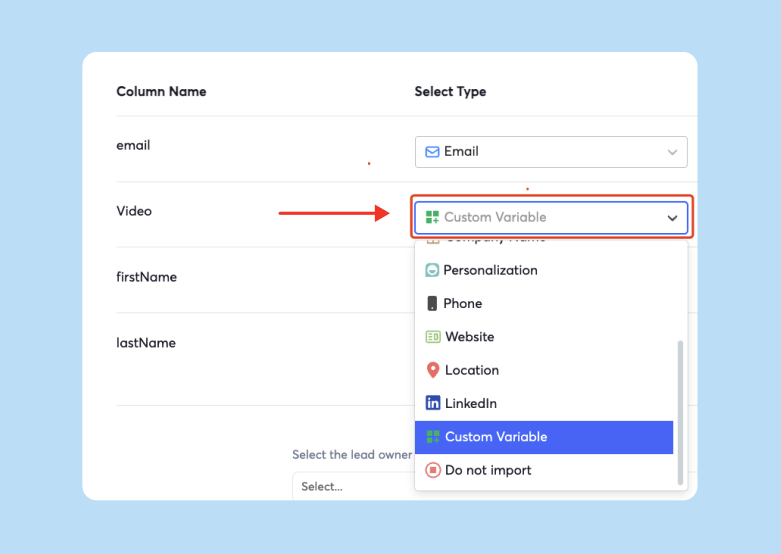

Step 4: Hyperlink the thumbnail to your YouTube URL
Select the thumbnail image. Click the "Insert Link" icon in the toolbar (chain link symbol, or Ctrl+K/Cmd+K). Paste your full YouTube URL into the link field. Use the complete URL, not a shortened link. Generic URL shorteners like bit.ly are frequently flagged by spam filters because they obscure the destination.
Test the link by clicking the thumbnail in preview mode. It should open the YouTube video in a new tab.
Step 5: Activate link tracking in Instantly settings
Navigate to your campaign settings and ensure "Track Links" is enabled. When you activate link tracking, we monitor every click on your video thumbnail.
Our analytics dashboard shows you exactly who clicked, when they clicked, and how many times they viewed the link. This data appears in your unified inbox alongside reply tracking and other engagement metrics. Click tracking also enables conditional follow-up sequences.
See the how the entire Instantly stack makes your campaigns safe, personalized and scalable below:
"Everything about instantly makes it better than competitors, the UI, the analytics, the data, deliver-ability, warm up pool." - G2 review
How to automate follow-ups based on video clicks
A prospect who clicks your video link has shown intent. They invested time to watch your content. The follow-up should reflect that engagement level.
We allow you to create sub-sequences triggered by specific actions. In your campaign builder, set up a conditional branch that activates when a prospect clicks your video link. Your video-click follow-up should acknowledge their engagement: "I saw you watched the demo. The dashboard setup usually raises questions about [specific feature]. Happy to walk through your specific use case."
To set this up, navigate to your campaign's "Automation" section in our platform. Create a new rule: "If link click contains [your YouTube URL], add to sub-sequence [name]." Define the sub-sequence with 2-3 targeted follow-ups spaced 3-4 days apart. Our AI Reply Agent can also monitor these interactions and flag high-intent prospects for immediate human review.
Key considerations for sales leaders
Managing video email campaigns at scale requires attention to several operational factors that protect your team's sender reputation and ensure consistent results across reps.
Sender reputation protection: Properly configured SPF, DKIM, and DMARC records are essential before you launch any link-heavy campaign. Our email warmup feature builds positive sending history before you launch campaigns.
"The warmup feature is really awesome that I loved the most as it helps my emails to land directly into the inbox." - Trustpilot review
List hygiene: Keep bounce rates at or below 1%. Verify email addresses before adding them to campaigns. High bounce rates will damage your sender reputation faster than any other single factor.
Send volume pacing: Cap daily sends at 30 emails per inbox per day during the first month. Gradually increase to 40-50 as your reputation stabilizes. Our unlimited email accounts model lets you scale volume by adding inboxes rather than pushing one domain too hard.
Mobile optimization: 85% of mobile videos are watched with sound off. If your video requires audio to make sense, add captions. Keep video length under 90 seconds.
CRM integration: Connect Instantly to your CRM using our native integrations or Zapier. We push video click data into your CRM contact records alongside other engagement metrics, giving your AEs full context when they pick up warm leads.
A/B testing: Run tests on thumbnail design, subject lines that mention video, and the timing of video placement in your sequence.
"I love Instantly's deliverability tools, which are the best I've encountered. Having used Salesloft, Apollo, and other tools, Instantly gives me the highest reply rate by far." - G2 review
The thumbnail system works because it aligns technical requirements with user experience. Your emails stay lightweight and deliverable. Your prospects see engaging visual content. You get analytics that show exactly who's interested.
Ready to implement this system with full click tracking and automated follow-ups? Start with our free trial and use our campaign builder to set up your first video sequence. We maintain a deliverability network of 4.2 million accounts to ensure your emails land in the primary inbox, and our unified analytics dashboard gives you complete visibility into video engagement.
Frequently Asked Questions
Should I use an animated GIF instead of a static thumbnail?
Animated GIFs can increase click-through rates but add to email file size. Keep GIFs under 1MB. Test both in your campaigns and measure performance.
How do I track which specific prospects clicked my video?
Our analytics dashboard shows click activity by contact. Filter your campaign view by "Link Clicks" to see a list of prospects who engaged with your video.
Will linking to YouTube hurt my deliverability?
No. Using full URLs to reputable platforms like YouTube does not trigger spam filters. Generic URL shorteners are the problem, not the destination domain.
Can I track YouTube video views from my email campaign?
YouTube Analytics shows traffic sources under "External" in the traffic report. A spike in external traffic after your email send indicates campaign impact. For more granular tracking, add UTM parameters to your YouTube URL before linking it in your campaign.
Key Terms Glossary
Email attachment size limit: The maximum file size an email provider accepts in a single message, typically 20-25MB. Exceeding this limit causes the email to bounce or fail to send.
Sender reputation: A score assigned by inbox providers based on your sending behavior, authentication, and engagement rates. Low sender reputation results in spam folder placement.
Deliverability: The ability of an email to reach the recipient's primary inbox rather than being filtered to spam or rejected entirely.
SPF (Sender Policy Framework): An email authentication protocol that specifies which mail servers are authorized to send from your domain.
DKIM (DomainKeys Identified Mail): A digital signature added to emails that allows receiving servers to verify the message hasn't been altered in transit.
DMARC (Domain-based Message Authentication): A policy framework that works with SPF and DKIM to instruct receiving servers how to handle emails that fail authentication checks.
Inbox placement: The specific folder (Primary, Promotions, Spam) where an email lands. Primary inbox placement is the goal for sales outreach.
Click-through rate (CTR): The percentage of email recipients who click a link in your message. Video thumbnails can increase CTR by 21-96% compared to text-only emails.
Video compression: The process of reducing file size by removing data, which decreases quality. Not recommended for sales outreach due to quality loss and continued spam filter risks.


