.svg)
%20(1).svg)


Updated September 19, 2025
TL;DR: Reply rate is the clearest sign your cold email created a conversation. Define how you count it, keep deliverability healthy, run controlled tests, and automate follow ups. Instantly brings this into one motion with unlimited inboxes and warmup, inbox placement tests, A/Z testing, SuperSearch lead data, a unified inbox, and AI agents for reply handling. Try Instantly free and let automation handle follow ups while you focus on live conversations.
For sales leaders, reply rate means meetings, pipeline, and plan. For more detail, see cold email ramp plan for meetings. This guide gives you the exact systems to define, track, analyze, and improve reply rates across a team or client portfolio.
What is email reply rate and why it matters
Email reply rate is the percentage of delivered emails that get a response. It shows two things at once. You landed in the primary inbox. Your message sparked enough interest to start a conversation.
- Definition: Reply rate = replies divided by delivered emails. Many teams also track positive reply rate, which excludes out of office, wrong contact, unsubscribe, and spam complaints.
- Why it matters: Buyers have limited supplier time. B2B buyers spend only about 17 percent of their buying time with all suppliers combined, according to Gartner. Your message must arrive cleanly and prompt a simple next step, or you miss that narrow window.
Deliverability, list quality, timing, and message quality all roll up into reply rate. If any layer breaks, replies fall.
How to calculate your email reply rate
Use delivered as the denominator.
- Formula: Reply rate = replies ÷ delivered × 100.
- Positive reply rate: Positive replies ÷ delivered × 100.
- Team view: Sum replies and delivered across all inboxes and sequences in the same period. Segment by campaign, persona, offer, and rep.
Tip: Count unique lead replies, not thread replies. Track meetings per delivered as a separate conversion.
What is a good email reply rate? Benchmarks and reality
Benchmarks vary because sources mix cold and warm emails, industries, and counting methods. See our cold email outreach guide for a full breakdown. Use ranges, then set internal targets by segment and intent.
- Average cold outreach: A Backlinko study of 12 million outreach emails found an average response rate of 8.5 percent.
- Impact of follow ups: The same study also found that adding at least one follow up increased replies by about 65.8 percent versus a single email.
- Subject line personalization: Campaign Monitor reports that personalized subject lines are about 26 percent more likely to be opened, which raises the ceiling for replies.
Practical target ranges:
- Average cold email reply rate: 5 to 12 percent
- Strong performance. 10 to 20 percent
- Top performers on tight ICPs: 20 to 35 percent with clear proof and clean placement
- Meetings from sends: 0.5 to 2 percent depending on offer and intent
Explain gaps clearly:
- Opens are noisy: Litmus’ analysis of Apple Mail Privacy Protection shows it inflates opens, so rely more on inbox placement and replies.
- Placement rules everything: If you land in spam or promotions, reply rate drops even with great copy.
The foundation: deliverability and sender reputation
Deliverability decides whether anyone can reply. Protect it like a shared quota.
Non-negotiables: Keep hard bounces at or below 1 percent. Keep spam complaints at or below 0.3 percent. Confirm SPF, DKIM, DMARC, and MX.
Key terms.
- Primary inbox: The folder your contacts actually read.
- Sender reputation: Trust signals on your domain and IP based on behavior.
- Warmup: Controlled sending to build reputation before production sends.
- List hygiene: Ongoing verification and removal of risky contacts.
- Inbox placement test: Seed test showing where email lands across providers.
How Instantly supports deliverability:
- Unlimited inboxes and warmup: Scale throughput by adding inboxes instead of spiking volume on one sender.
- Inbox placement tests: Run automated inbox placement tests and get alerts to catch spam placement early.
- Advanced scale: The Light Speed plan uses SISR to spread sending across dedicated infrastructure for safer scale, as detailed on the pricing page.
For a practical setup of authentication, throttling, and testing, watch Instantly’s The Ultimate Guide to Cold Email Deliverability in 2025. See how our cold email tool can help you manage campaigns effectively.
Tracking and analyzing your email reply rate
Start simple. Then standardize across the team.
Setting up your tracking system
- Write definitions: Team rules for reply, positive reply, meeting, and disqualified.
- Segment reporting: Break out by campaign, persona, industry, offer, and rep.
- Use delivered as denominator: Do not inflate rates with sends that include bounces.
- Stop on reply: Prevent over-sending after a response to protect brand and metrics.
- Centralize replies: Use a unified inbox to triage, tag, and route next actions.
Inside Instantly:
- Connect warmed inboxes and enable stop-on-reply. Manage all replies in a unified inbox with Unibox. You can see triage and reply workflows in this short YouTube walkthrough of Instantly’s CRM and reply management.
- Automate triage with AI. Use AI Reply Agent for interest, not a fit, and OOO handling, while routing meetings to humans.
Identifying trends and performance gaps
- By segment: Compare reply rates across industries and titles each week.
- By step: Track which sequence step earns the reply to refine follow ups and CTAs.
- By sender: Outliers can signal reputation issues or copy wins.
- By placement: Correlate placement dips with reply declines. Fix before scaling.
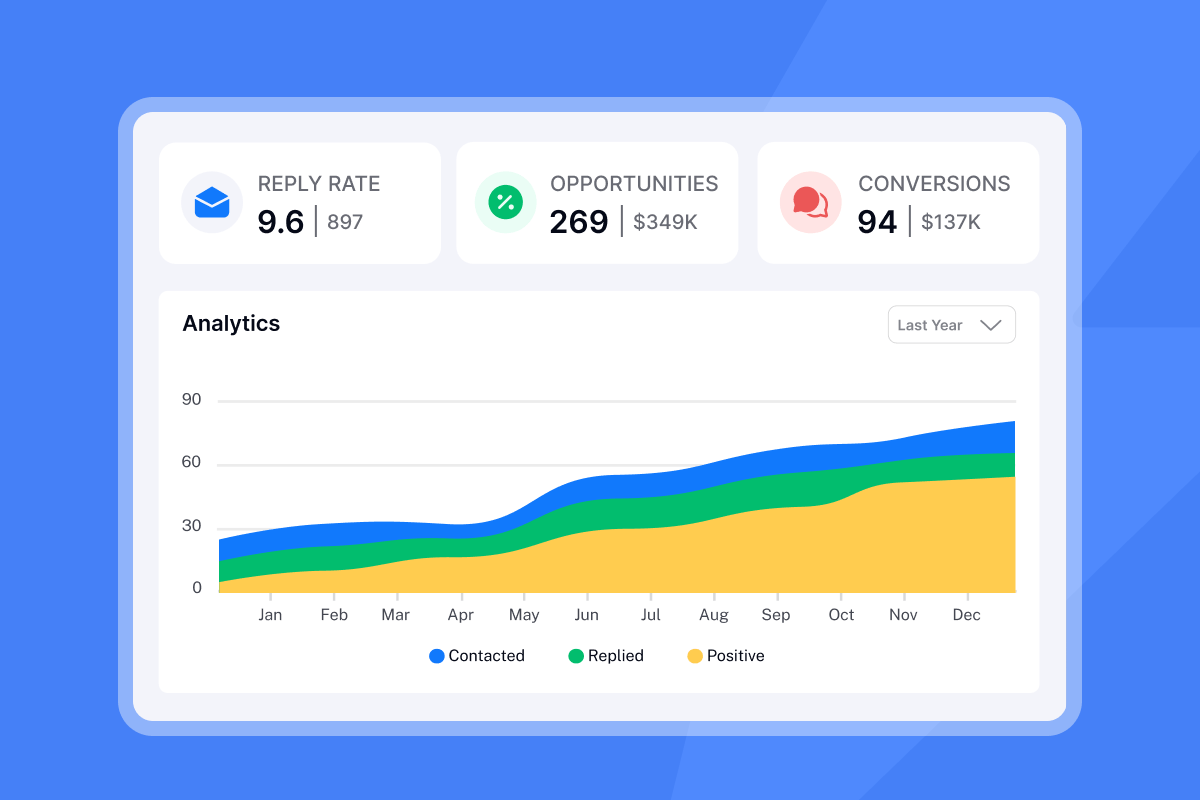
Using analytics for insights
- Subject lines: Pair reply data with open trends to separate placement from message fit.
- Positive reply ratio: If replies rise but positives do not, adjust targeting and promise.
- Time-to-first-reply: Use medians by segment to tighten follow up timing.
- Meetings per 1000 sends: Tie reply rate to capacity planning and revenue targets.

Core strategies to optimize your email reply rate
Hyper-personalization beyond first names
- Use firmographics and triggers: Industry, tech stack, hiring, funding, or news.
- Anchor to a real problem: Tie your line to their role and outcome they track.
- Keep it short: Six to eight sentences hold attention in cold outreach.
Crafting compelling calls to action
- One ask per email: Reduce friction and make the next step obvious.
- Start soft: Example: "Worth a quick outline of the ramp we use?"
- Offer value: Short audit, a playbook, or a number they care about.
The power of timely follow ups
- Plan 2 to 4 follow ups: Expect the first follow up to produce the largest lift.
- Change the angle: New proof point, shorter ask, or a one-liner bump.
- Automate safely: Stop on reply and exclude same-company contacts after a response.
Evidence: One follow up can increase total replies by about 65.8 percent, according to the Backlinko study cited above.
Subject line optimization and A/Z testing
- Personalize where true: Company name or role-specific hook.
- Stay under 50 characters: Avoid spammy words and emojis.
- Test meaningfully: Use A/Z testing to compare several variants until a winner is clear. For a step-by-step demo of A/Z testing and copy iteration, see the Instantly AI full tutorial.
Optimizing send windows and frequency
- Local mornings: 8:30 to 10:30 a.m. local, weekdays, work best for most segments.
- Human pacing: Add gaps between sends and avoid sudden spikes.
- Cap during ramp: Example: 30 per inbox in week one, then 50, then 100 if placement stays at or above 80 percent.
Optimization playbooks for your role
For growth marketers: Data-driven experimentation
- Define the experiment: Hypothesis, variants, and a winning metric of positive reply rate.
- Use A/Z tests: Test subject, opener, CTA, and proof lines once volume supports it.
- Guardrails: Pause any variant with bounces above 1 percent or placement under 70 percent.
- Reconcile weekly: Match Instantly analytics to CRM meetings and pipeline.
- Tools to use: A/Z testing and analytics in Instantly plus Copilot for brief generation.
For agency operators: Scaling client success
- Separate workspaces: Keep domain health plans isolated per client.
- Deliverability routine: Warmup on, alignment checks, blacklist monitoring, and weekly inbox placement tests.
- Throughput planning: Add inboxes instead of spiking volume per inbox.
- Client reporting: Weekly reply rate, positive replies, meetings, and cost per meeting.
- Data supply: Use Instantly SuperSearch with waterfall enrichment for verified contacts.
For sales leaders: Standardizing team performance
Scorecard:
- Reply rate target at or above 10 percent
- Positive reply rate at or above 3 percent
- Meetings at or above 1 percent of sends
- Bounces at or below 1 percent
- Complaints at or below 0.3 percent
Sequence governance: Approved templates, send windows, and stop-on-reply required.
Unified triage: Route all replies into Unibox. Tag intent and track SLAs.
CRM integration: Sync replies and meetings to HubSpot or Salesforce fields for attribution via Salesforce and HubSpot integration via OutboundSync. Read our full guide on email marketing campaign strategies.
Admin controls: Centralize domain health, auto-pauses on risk, and access roles.
For startup founders: Lean and effective outreach
- Two-domain ramp: Spin two sending domains and four inboxes. Warm 30 days.
- Clean data first: Verified contacts only. Start with 400 to 800 ICP leads.
- AI assist: Use Copilot for research and drafts. AI Reply Agent can classify and handle simple replies in under five minutes.
- Measure ROI: Time-to-first-meeting under 14 days. Track meetings per dollar.
- Cost control: Flat-fee unlimited inboxes reduces per-seat penalties as you add testers.
Tools and technologies for reply rate optimization
Key features to look for:
Unlimited inboxes with warmup: Scale safely without per-seat costs.
Inbox placement testing: Catch and fix spam placement early.
A/Z testing: Faster learning with valid comparisons across many variants.
Unified inbox: Centralized reply management and SLA control.
Lead data and verification: Verified contacts, low bounces, and enrichment.
AI agents: Research help, campaign setup, and reply handling.
Transparent analytics: Delivered-based reply math and exports.
How Instantly supports reply rate optimization
- Deliverability: Unlimited accounts and warmup, a private deliverability network, SISR on Light Speed, and automated inbox placement tests.
- Data: SuperSearch with 450M+ B2B leads and waterfall enrichment.
- Testing: A/Z testing, spin syntax, send windows, and reply-rate winners.
- Operations: Unibox centralizes replies for faster triage and routing.
- AI: Copilot for research and setup. AI Reply Agent to triage and respond in minutes.
For an end-to-end deliverability and setup walkthrough, watch The Ultimate Guide to Cold Email Deliverability in 2025.
What customers are saying:
"The platform is super intuitive, easy to set up, and makes it simple to manage multiple domains and inboxes at scale. Deliverability is great and the analytics give us exactly what we need to optimize campaigns quickly." - G2 review by Shaiel P.
"The platform is super intuitive, and I was able to get up and running in minutes." - G2 review by James M.
"Very easy now to just send emails with great deliverability. Easy to set up." - Trustpilot review by Umer Tariq
How-to: set up reply rate tracking the right way
- Warm inboxes for 30 days: Keep warmup on. Increase daily sends only if placement at or above 80 percent.
- Authenticate domains: SPF, DKIM, DMARC, and MX aligned. Verify before sending.
- Connect inboxes: Add at least four inboxes per domain to spread throughput.
- Import verified contacts: Aim for hard bounces at or below 1 percent on the first 500 sends.
- Build two sequences: One control and one variant with a single CTA each.
- Set send windows: 8:30 to 10:30 a.m. local, Monday to Thursday to start.
- Enable stop on reply: Prevent over-sending after a response.
- Turn on A/Z testing: Test four to six subject lines and two openers.
- Add two to four follow ups: Change angle and ask each time.
- Set up Unibox and tags: Route, tag intent, and assign SLAs.
- Run inbox placement tests weekly: Pause and fix any red flags before scaling.
- Review analytics weekly: Reply rate, positive replies, meetings, bounces, complaints.
- Push outcomes to CRM: Sync replies and meetings to opportunities and activities.
- Scale by adding inboxes: Increase senders instead of spiking volume on one.
Done when:
- Reply rate at or above 10 percent by week two on at least one segment
- Bounces at or below 1 percent
- Meetings at or above 1 percent of sends
Optimization strategies vs expected impact
| Strategy | What changes | Expected impact on replies | Notes |
|---|---|---|---|
| Personalized subject lines | Role or company in subject | +10 to 25 percent opens, raises reply ceiling | Campaign Monitor analysis |
| Add one follow up | Day 3 bump | +40 to 65 percent total replies | Backlinko study |
| Narrow ICP segment | Tighter list filters | +3 to 8 points in reply rate | Requires verified contacts |
| Proof point swap | Case study with numbers | +1 to 3 points in positive replies | Keep copy short |
| Send window tune | Mornings local time | +0.5 to 2 points | Segment dependent |
Tools and features comparison for reply rate optimization
| Capability | Why it matters | Instantly example | Outcome to expect |
|---|---|---|---|
| Unlimited inboxes + warmup | Safer scale and healthier reputation | Unlimited accounts and warmup | More throughput without spam flags |
| Inbox placement tests | Detect spam placement early | Automated tests and alerts | Fix delivery before replies collapse |
| A/Z testing | Valid multi-variant learning | A/Z with reply-rate winners | Better winners faster |
| Unified inbox | Faster triage and SLAs | Unibox for all replies | More meetings from same replies |
| AI reply handling | Reduce manual backlog | AI Reply Agent | Faster speed to meeting |
| Lead data + verification | Lower bounces | SuperSearch with enrichment | Trustworthy analytics and placement |
Email Outreach Optimization Checklist
Use this before every scale-up.
Deliverability
- DNS alignment verified for SPF, DKIM, DMARC, MX
- Warmup on for all inboxes
- Inbox placement test at or above 80 percent primary inbox
- Bounces under 1 percent on last 500 sends
- Complaint rate under 0.3 percent
Data hygiene
- All contacts verified within 30 days
- Remove role accounts and risky domains
- Segment by industry, size, and tech fit
Sequence build
- Two sequences live: one control, one variant
- One CTA per email with clear, low friction ask
- Two to four follow ups with new angles
- Spin syntax used to reduce repeats
Scheduling
- Send windows set per time zone
- Daily caps set per inbox with human gaps
- Stop on reply enabled
Ops and analytics
- Unibox tags for intent and SLA
- Weekly analytics review scheduled
- CRM sync and field mapping validated
- A/Z test plan documented
Scale rules
- Add inboxes, not spikes
- Auto-pause triggers defined for placement dips
- Playbook link pinned in your workspace
Combine the above with our best email outreach strategy for 2025:
Drive more conversations, consistently
Reply rate shows whether your message reached real people and sparked action. Protect deliverability, standardize tracking, and run disciplined tests. Then scale by adding inboxes, not risk. Instantly combines deliverability, data, automation, and AI so you can turn replies into meetings at a predictable cost.
Try Instantly free and let automation handle follow ups while you focus on live conversations.
FAQ: your reply rate questions answered
What is a good cold email reply rate in B2B?
5 to 12 percent is average. We break this down further in proven email campaign ideas. 10 to 20 percent is strong. Top campaigns hit 20 to 35 percent on tight ICPs. These ranges align with the Backlinko study cited above.
How many follow ups should I send?
Plan two to four. The first follow up often produces the biggest lift. One follow up increased total replies by roughly 65.8 percent in the Backlinko study.
Do opens still matter with Apple MPP?
Use opens directionally. Combine inbox placement tests with reply rates to decide next steps, given how Apple Mail Privacy Protection inflates opens as noted above.
What daily send cap should I use per inbox?
Week one 30, week two 50, week three 100 if placement stays at or above 80 percent and bounces at or below 1 percent.
How do I manage replies across 20+ inboxes?
Centralize in a unified inbox with tags and SLAs. Use AI Reply Agent for triage.
Key terms glossary
- Reply rate: Replies divided by delivered emails.
- Positive reply rate: Interested replies divided by delivered emails.
- Cold email: Unsolicited outreach to new contacts.
- KPI: A metric tied to outcomes.
- Personalization: Message adapted to a person or company.
- CTA: The clear next action you ask for.
- Follow ups: Later messages in the same sequence.
- Subject lines: The email title recipients see first.
- A/B testing: Compare two variants to find a winner.
- A/Z testing: Test many variants at once.
- Deliverability: Likelihood an email reaches the primary inbox.
- Sender reputation: Domain and IP trust signals.
- Unified inbox: One place to manage all replies.
- AI Reply Agent: Instantly AI that handles replies.
- Pipeline: Qualified open opportunities and value.
- Cost per meeting: Spend divided by meetings booked.
- Time-to-first-meeting: Days from first send to first booked call.
- Spin syntax: Automated copy variations to reduce repeats.
- Send windows: Scheduled times when emails send.
- Waterfall enrichment: Layered data providers for better coverage.
- Domain health: Overall reputation and alignment of a domain.
- Blacklist monitoring: Checks for flagged domains or IPs.



