


TL;DR: Lookalike companies are businesses that mirror your best customers. AI compares firmographics, technographics, intent, and behavior to find net‑new accounts that match your Ideal Customer Profile. Use a company discovery tool to expand your ICP, create high‑potential lead lists, and scale outreach while protecting sender reputation and budget.
Updated October 10, 2025
If you need a steadier flow of qualified meetings, lookalike company search gives you more accounts that fit what already works. AI models read your ICP and your best wins, then surface similar companies by size, stack, and buying signals. Your team spends more time on good‑fit prospects and less on guesswork. That lift in fit improves reply rate and reduces bounce risk, which protects your primary inbox placement.
How to find lookalike companies for B2B growth
Upload a clean seed list of your best customers to a company discovery tool with AI‑driven search. Define your ICP inputs like industry, employee range, revenue, tech stack, and locations. The tool scores and ranks similar companies from its database. Export the lookalike accounts, enrich verified contacts, sync to your CRM, and run paced email sequences after warmup and list hygiene. Track reply rate, meetings, pipeline per dollar, and bounces. According to Gmail bulk sender guidelines, keep spam complaint rates under 0.3 percent, target bounces at or below 1 percent, and meetings at or above 1 percent of sends.
Tip: Favor tools that combine company discovery, enrichment, and outreach. When data and activation live in one place, time to first meeting drops.
What are lookalike companies and why are they essential for B2B?
Lookalike companies share key traits with your highest value customers. Instead of generic industry lists, AI finds businesses that match on deeper context like tech stack, growth signals, and topics they care about. You expand reach without losing fit.
The power of lookalike companies for B2B growth
- Bigger qualified pool. You can go from hundreds to thousands of similar accounts in minutes.
- Higher fit. Models consider stack, hiring, and intent, not just industry codes.
- Faster activation. Integrated tools export verified contacts directly into outreach.
- Deliverability lift. Cleaner lists reduce bounces and improve reply rates.
Trade‑offs to watch:
- Seed bias. Mixed or low‑fit seed lists produce noisy lookalikes.
- Back‑looking patterns. Pure similarity can miss emerging segments.
- Opaque models. If a tool cannot explain scoring, you lose control. Favor vendors that show logic and let you adjust weights.
The AI engine: How machine learning powers lookalike discovery
Strong lookalike search blends machine learning and natural language processing.
- Clustering. The model groups your best customers into similarity clusters. Net‑new companies near those clusters become candidates.
- Similarity scoring. Features like industry, revenue bands, employee count, tech stack, hiring velocity, location, and content topics are weighted into a score.
- NLP on text. The system reads websites, job posts, and news to label companies with topics, products, and market language. That catches nuance that static SIC codes miss.
- Waterfall enrichment. Multiple providers fill missing fields to improve match accuracy and reduce bounces.
- Identity resolution. Company dedupe prevents variants of the same business from polluting results.
You get a ranked list that reflects how target companies operate, not just what they call themselves.
Getting started: Input requirements for lookalike tools
Bring three inputs to get quality results:
- Your ICP. Industry, employee range, revenue bands, geos, ACV fit, technographics, and disqualifiers.
- A clean seed list. 50 to 500 top customers or won deals with complete fields. Remove churned or low‑fit outliers.
- Example URLs. 5 to 20 customer domains help NLP seed the model.
Checklist
- ICP basics: industry, size, revenue, location.
- Signals: stack, hiring, funding stage, partner ecosystem.
- Outcome fields: LTV, ramp time, retention, average deal size.
- Exclusions: competitors, agencies, student domains, no‑go geos.
Key criteria: What defines a lookalike company?
Most models consider:
- Firmographics. Company attributes like industry, employee count, revenue, location, ownership.
- Technographics. The software and infrastructure a company uses.
- Behavioral signals. Website visits, content downloads, event attendance, job postings.
- Intent. Topic research surges and keyword clusters tied to your category.
- Growth indicators. Hiring velocity, funding events, product launches.
- Org shape. Team size by function and seniority signals in target departments.
Useful tools let you weigh criteria so sales leaders can align lists with quota reality.
Step‑by‑step guide: Performing your first lookalike company search
- Define a tight ICP. Write non‑negotiables and nice‑to‑haves. Include disqualifiers. Done when you have a one‑page ICP with ranges for size, revenue, ACV fit, and stack compatibility.
- Assemble a seed list. Export 50 to 500 of your best customers or recent wins. Include industry, size, revenue, domain, tech, and owner. Remove churned or discount‑heavy outliers. Done when at least 90 percent of records have complete fields.
- Clean and enrich. Run waterfall enrichment to fill missing firmographics and technographics. Verify domains. Done when enrichment coverage is at or above 85 percent and duplicates are removed.
- Load into a lookalike tool. Upload your seed list or point the tool to your CRM segment. Set strict filters first. Done when the preview shows at least 500 net‑new companies inside your size and geo bands.
- Review similarity scores. Sort by match score. Manually spot check 20 records against your ICP. Remove false positives. Done when 80 percent of the top 100 look like a clear fit.
- Export and verify contacts. Pull two to five ICP personas per company. Run email verification. Done when expected hard bounces are at or below 1 percent.
- Launch a warm, paced sequence. Use warmed domains, safe send windows, and copy variants. Start at low throughput, then ramp. For a quick ramp example, watch how to start sending 1000 emails a day in literally the next 5 mins. Done when reply rate is at or above 5 percent and placement checks show healthy inboxing.
- Measure and refine. Track opens, replies, meetings, SQLs, pipeline per dollar, and bounce rate. Tighten filters or update seeds based on outcomes. Repeat monthly.
For a visual walkthrough on how to do this with Instantly watch this video:
Essential features of top lookalike company discovery tools
Data quality and hygiene
- Waterfall enrichment. Multiple data sources reduce gaps and stale fields.
- Verification and dedupe. Email verification, domain checks, and company identity resolution protect deliverability.
- Field coverage reporting. Show completeness per field and per list before export.
- List hygiene automations. Auto‑pause risky sends, remove hard bounces, and suppress role emails.
Instantly’s lead database lists 450M+ B2B contacts and is available inside the product’s lead module so you can search and enrich without leaving your outreach stack.
Seamless integration and team collaboration
- CRM sync. Map fields to HubSpot or Salesforce. Respect owner rules. Prevent duplicates.
- Team workspaces. Govern templates, rules, and suppression lists across reps.
- Unified inbox. Centralize replies for triage and coaching.
For setup details, see Instantly’s integration guides for HubSpot, Salesforce via partner sync, Slack, Zapier, and Make.
AI capabilities and ethical use
- Explainable scoring. Know which attributes drove the match.
- AI copilots. Suggest segments, write first drafts, summarize replies, and flag risk.
- Human‑in‑the‑loop. Keep a review step for reply classification and high‑stakes emails.
- Guardrails. Respect unsubscribes and regional privacy rules. Do not upload restricted data.
Instantly Copilot helps with research and targeting, and the AI Reply Agent can handle replies in under 5 minutes in review or autopilot modes at 5 credits per AI reply.
Ensuring deliverability and protecting sender reputation
- Warmup and health checks. Warm new domains and inboxes. Throttle sends. Monitor spam signals.
- Inbox placement testing. Run automated tests and pause if placement drops.
- Reputation protections. Bounce detection, block lists, custom tracking, and safe send windows.
Instantly has a private deliverability network of 4.2M+ accounts for warmup and engagement signals. We dive deeper into warmup in our article on how to achieve 90%+ cold email deliverability in 2025, and it includes automated Inbox Placement tests to monitor deliverability.
According to Yahoo sender requirements, you should authenticate SPF, DKIM, and DMARC and offer one‑click unsubscribe. For a deeper walkthrough, watch The Ultimate Guide to Cold Email Deliverability in 2025.
Scaling capabilities for agencies
- Unlimited sending accounts. Add inboxes without per‑seat penalties.
- Client workspaces. Isolate data and rules per client.
- Predictable cost. Flat‑fee packaging that scales with throughput.
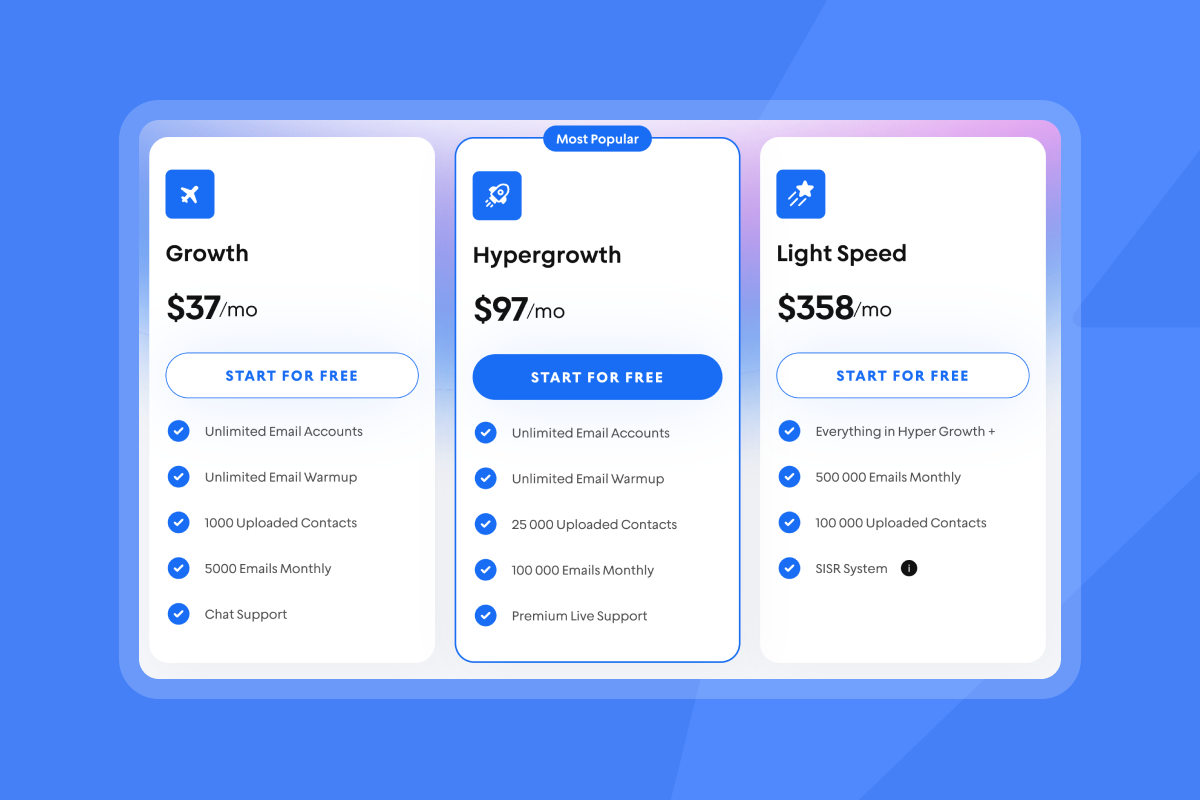
Instantly supports unlimited email accounts with flat‑fee packaging and adds SISR, which is server and IP sharding and rotation on Light Speed, for advanced scale.
Evaluating lookalike tools: Critical considerations for your business
Start with four checks: fit, budget, constraints, and ops.
- Fit. Can the tool reflect your ICP and find the personas you sell to.
- Budget. Model total cost, including credits, add‑ons, and seats.
- Constraints. Security, privacy, and regional rules.
- Ops. Integration depth, admin controls, and rollout time.
Pricing and ROI
Common models include per seat, per contact, or credits. Do the math in pipeline per dollar.
- Illustrative stack. An outreach plan at 37, a lead plan at 47, and a CRM plan at 47 sum to about 131 per month on Instantly’s current tiers. One meeting that closes even a modest deal often covers several months of spend.
- Credit math. If AI reply handling costs 5 credits per automated response, add that to your cost‑per‑meeting model using the AI Reply Agent documentation.
Set a 30‑day pilot with a clear success bar: time to first meeting, cost per meeting, reply rate, and bounce rate.
Measuring success: Reporting and analytics
Track these weekly:
- Placement and bounces. Hold hard bounces at or below 1 percent.
- Opens and replies. Aim for replies at or above 5 percent with verified contacts.
- Meetings and SQLs. Shoot for meetings at or above 1 percent of sends in early weeks.
- Pipeline per dollar. SQL value created divided by total monthly cost.
- Reconciliation. Make platform metrics match CRM truth for auditability.
Dashboards should show list‑level hygiene, send pacing, and outcomes by segment. This is how you protect domain health and defend spend to your CFO.
Comparison table: Lookalike tool evaluation
| Criteria | Instantly approach | Typical market approach |
|---|---|---|
| Pricing | Flat fee. Unlimited email accounts. Credits for data and AI | Per seat. Add‑on modules raise TCO |
| Data & discovery | 450M+ leads in‑product with AI enrichment | Separate data tool and SEP |
| Deliverability | Warmup, Inbox Placement tests, reputation protections | Warmup optional or third party |
| Team scale | Client workspaces, unlimited senders | Seat‑based. Cost grows with headcount |
How Instantly fits
If you want an integrated path from discovery to booked meetings, Instantly combines:
- Data: a 450M+ B2B lead database with AI and waterfall enrichment, documented on the site.
- Deliverability: built‑in warmup, a private deliverability network noted at 4.2M+ accounts on its blog, and automated placement tests via Inbox Placement.
- Outreach: unlimited email accounts on a flat fee with pacing and analytics that map to CRM.
- AI: Copilot for research and targeting, plus the AI Reply Agent to triage replies in under 5 minutes at 5 credits per AI reply.
Real‑world impact: Outcomes and proof points
"The platform is super intuitive, easy to set up, and makes it simple to manage multiple domains and inboxes at scale. Deliverability is great and the analytics give us exactly what we need to optimize campaigns quickly." - Shaiel P. on G2
"It has all the tools needed for cold outbound in one place. Previously, I was running 3 different systems to get a fraction of the results." - James L. on G2
"It’s simple to use, packed with all the features I actually need, and it just works." - Alexander Johansen on Trustpilot
"We increased our revenue by six figures within 4 months of starting with instantly." - Alexander on Trustpilot
Watch: 3‑minute lookalike and outreach walkthrough
Build your repeatable targeting system
Lookalike company search turns your best customers into a repeatable targeting system. Feed the model with a clean seed list, verify contacts, run placement tests, and pace sends. The outcome is a steady flow of high‑potential accounts, stronger meetings, and fewer surprises in your pipeline.
Discover your next high‑potential leads. Try Instantly free and generate your first lookalike company list using the in‑product 450M+ lead database, automated warmup, and inbox placement checks.
FAQ:
- What is a lookalike company in B2B?
A company that shares key traits with your best customers. AI models match on industry, size, revenue, tech stack, intent, and behavior to find similar accounts. - How many lookalikes can I expect from a 100‑account seed?
Often thousands of companies match strict filters when the database is large. Start narrow, then widen as you validate fit. - What inputs do I need to start?
A one‑page ICP, a clean seed list of 50 to 500 customers, and 5 to 20 example URLs. Enrich and verify before modeling. - How do I measure success?
Track hard bounces at or below 1 percent, replies at or above 5 percent, meetings at or above 1 percent of sends, and pipeline per dollar. - How do I protect inbox placement while scaling?
Warm new domains, throttle sends, verify contacts, vary copy, and run periodic inbox placement tests. Pause if placement dips. - Is this GDPR compliant?
Confirm your vendor’s DPA, data sources, and sub‑processors. Respect opt‑outs and avoid restricted data categories.
Terminology box
- ICP. Ideal Customer Profile. The traits of your best accounts.
- Firmographics. Company attributes like industry, employee count, and revenue.
- Technographics. The software and infrastructure a company uses.
- Intent data. Signals that a company is researching your category.
- Waterfall enrichment. Multiple providers fill missing fields for accuracy.
- Warmup. Controlled sending that builds sender reputation.
- Inbox placement. Whether emails land in the primary inbox, not spam.
- Credits. Units used to consume lead data or AI features in a platform.


