


Updated December 08, 2025
TL;DR: Attaching video files to cold outreach emails destroys deliverability. Gmail caps attachments at 25MB, and Outlook's free tier limits files to 20MB, while most major providers enforce similar restrictions. MIME encoding inflates file sizes by 33-40%, and spam filters flag large attachments long before you hit technical ceilings. The safe system: host your video externally (Google Drive, Loom, Vidyard) and send a lightweight email with a clickable link or GIF thumbnail. This protects sender reputation, enables engagement tracking, and ensures primary inbox placement.
Attaching a demo video to your cold email is one of the fastest ways to destroy your deliverability. Your email bounces, your domain reputation tanks, and your outreach never reaches the inbox.
Every cold email outreach system that incorporates video needs to understand that attachment size limits are a deliverability problem, not just a technical inconvenience, bounced video emails train spam filters to treat your entire domain as a risk. The problem is not just that providers enforce limits. Those limits interact with encoding overhead, spam filters, and recipient server configurations in ways that make direct video attachments a losing strategy for sales teams. Here's the technical reality behind the 25MB wall and the proven alternatives that protect your pipeline.
Understanding email attachment limits
Engineers built email for text messages in the 1980s, not 4K product demos. The infrastructure still reflects that origin, and every provider enforces size caps to keep servers stable. Instantly integrates with this workflow as the delivery engine, send your linked thumbnail through unlimited warmed accounts, track every click, and trigger automated follow-up sequences for prospects who engage with your video.
Gmail caps attachments at 25MB. When you exceed this limit, Gmail automatically uploads files to Google Drive and inserts a link instead. Outlook free accounts limit attachments to 20MB, while Microsoft 365 subscribers can reach 150MB with proper configuration. Yahoo Mail enforces a 25MB ceiling regardless of account type.
These are stated maximums. Run the math and you'll see the problem.
- When you attach a video, your email client uses Base64 MIME encoding to convert the binary file into text that SMTP can transmit. This encoding inflates file size by 33-40%, which means your 20MB video becomes 26-28MB once encoded. A file that looks safe suddenly exceeds the limit and bounces.
- If Gmail's stated limit is 25MB, your actual attachment budget after encoding is closer to 18-20MB raw file size according to Email Sorters analysis. Some rough maths: a one-minute video at 1080p resolution runs around 124MB, and even a 720p video hits about 88.3MB per minute. You can't fit typical sales videos into this window.
- Even if you compress a video under the technical limit, spam filters flag large attachments in cold outreach according to IAS email guidelines. Receiving servers may reject emails with large attachments outright, especially from new or unknown senders. Your email lands in spam or bounces to protect server resources.
We learned the technical limit never matches the deliverability limit. Repeatedly sending emails that bounce can harm your sender reputation. ISPs and email providers track bounce rates and spam signals. High bounce rates from oversized attachments train filters to treat your domain as a spammer, which means even your text-only follow-ups start landing in junk folders.
For cold email, the safe attachment size is effectively zero. Watch our full tutorial on cold email deliverability to understand the complete system.
"I love Instantly's deliverability tools, which are the best I've encountered. Having used Salesloft, Apollo, and other tools, Instantly gives me the highest reply rate by far." - Josh G.'s review on G2
Large attachments also consume significant bandwidth and processing power on both your sending server and the recipient's mail server. When you scale this across a team of SDRs sending hundreds of emails per day, the infrastructure strain multiplies. Email providers impose limits to prevent network congestion and ensure timely delivery for all users.
Methods for sending large videos
The solution is not to fight the size limits. The solution is to bypass them entirely by hosting your video content elsewhere and sending a link.
Method 1: Cloud storage links (the manual way)
Cloud storage platforms let you upload large files and generate shareable links that you embed in your email. The email itself remains lightweight (a few kilobytes), while recipients click through to watch the full video.
Step-by-step process:
- Upload your video: Use Google Drive, Dropbox, or WeTransfer.
- Set permissions: Choose "Anyone with the link can view" (no login required).
- Copy the shareable link: Paste it into your email as a clickable hyperlink.
- Create a thumbnail (optional): Hyperlink a still frame so the email looks visual.
iCloud users can leverage Mail Drop's 5GB file transfer, though that link expires after 30 days.
Pros:
- Free or very low cost: No monthly subscription required.
- Works with any email client: No platform lock-in.
- No vendor dependency: You control the storage.
Cons:
- Manual workflow: Each video requires individual upload and link generation.
- No engagement tracking: You cannot see if the recipient watched.
- Link trust issues: Corporate firewalls may block cloud storage domains.
This method works for one-off sends to warm contacts who trust your domain. It does not scale for cold outreach because you lose visibility into engagement and the manual steps slow down your reps.
Method 2: Video platforms (the sales way)
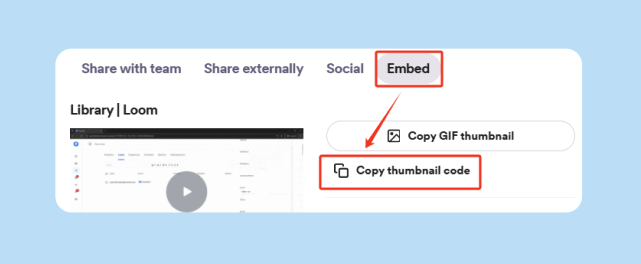
Dedicated video platforms like Loom, Vidyard, and Sendspark are purpose-built for sales outreach. You record or upload your video, the platform generates a landing page with the embedded video, and you get an animated GIF thumbnail to insert into your email. The email file size stays tiny while looking visually engaging.
When recipients click the thumbnail, they land on the video hosting page. The platform tracks opens, plays, and watch duration, giving you data on which prospects actually engage. Some platforms offer features like custom CTAs on video pages and CRM integrations to push engagement data directly into your deal records.
Step-by-step process:
- Record or upload: Use Loom, Vidyard, or Sendspark.
- Copy the GIF thumbnail: The platform generates this automatically.
- Insert the thumbnail: Place it in your email and hyperlink to the video landing page.
- Send and monitor: Use Instantly to send, then check engagement in the video platform dashboard.
Our guide on bulk uploading Loom videos to Instantly walks through the automation process for teams managing dozens of personalized videos per campaign.
Pros:
- Full engagement analytics: Play rate, watch time, and viewer drop-off data.
- GIF thumbnails: Animated previews increase click-through rates.
- Sales-optimized: Purpose-built workflows for outreach.
- No recipient friction: No downloads or permission gates.
Cons:
- Monthly subscription: Typically $15-50 per user per month.
- Third-party landing page: Not a native email experience.
- Free tier branding: Some platforms add watermarks on free plans.
This is the preferred method for sales teams running video outreach at scale. The tracking alone justifies the cost because you can prioritize follow-ups based on who actually watched your demo. Learn more in our article on optimizing email signatures for conversions.
Method 3: Compression (the last resort)
Video compression reduces file size by lowering resolution, frame rate, or applying aggressive encoding. Tools like Handbrake can shrink a video by 50-70%, but you sacrifice visual quality and spam filters still flag large attachments in cold outreach.
We only recommend compression for internal team updates, never for client-facing outreach. If your product requires high-fidelity visuals (software UI, design work, product details), compression destroys the value.
Comparison: Which method fits your team?
| Method | Pros | Cons | Best For |
|---|---|---|---|
| Cloud Storage Links | Free, works everywhere, simple | Manual process, no tracking, link trust issues | One-off sends to warm contacts who trust your domain |
| Video Platforms | Full analytics, GIF thumbnails, sales-optimized | Monthly cost, third-party page | Sales teams running 100+ personalized video campaigns per month |
| Compression | Keeps file "attached," no platform needed | Quality loss, still risks spam, no tracking | Internal team updates only (not for prospects) |
For sales leaders managing outreach at scale, video platforms are the clear winner. The engagement data and thumbnail click-through rates far outweigh the subscription cost, and you eliminate the deliverability risk that comes with attachments.
Our cold email deliverability guide explains why inbox placement depends on keeping emails lightweight and text-based.

The sales leader's protocol for video outreach
Sending video links instead of attachments is not just a technical workaround. It is a deliverability system that protects your domain reputation and gives you data to optimize your sequences.
The "host and link" checklist
Run this checklist before your reps send any video outreach email. It ensures consistency across your team and catches common mistakes that burn domains.
Pre-flight checklist:
- Video uploaded: To approved platform (Loom, Vidyard, or Google Drive).
- Link permissions set: "Anyone with the link" (no login wall).
- Thumbnail created: GIF or static image under 100KB.
- Email copy tested: Text-only version renders correctly, link is clickable.
- Link tracked: UTM parameters or platform analytics enabled.
- Domain health verified: Instantly inbox placement test shows 90%+ primary inbox, not spam.
This checklist takes 90 seconds per campaign setup and prevents the most common errors. Reps forget to set permissions, thumbnails exceed size limits, or they paste raw URLs instead of hyperlinking descriptive anchor text. Standardizing the process removes these variables.
"I have been using it instantly for the past 6 months now. I have explored the warm-up feature first, and started email campaigns, created the sequence, and I felt that instantly tool is easy to navigate and understandable." - Anjali Parmar's review on Trustpilot
For the complete infrastructure checklist on authentication, warmup ramp schedules, and inbox placement monitoring that ensures your video emails reach the primary inbox, see this email deliverability guide.
Tracking engagement without attachments
One of the biggest advantages of the "host and link" method is visibility. When you attach a video, you have zero data. When you host externally and link, you get actionable metrics.
Metrics to track:
- Link click rate: Percentage of email recipients who clicked the video link.
- Play rate: Percentage of link clickers who started the video.
- Watch time: Average percentage watched (high drop-off after 10 seconds signals a targeting problem).
- Rewatch rate: Prospects who watch twice are often sharing internally or seriously evaluating.
Instantly tracks link clicks at the campaign level through our analytics dashboard, and video platforms like Vidyard push engagement data into your CRM via API. You can build sequences that automatically follow up differently based on whether the prospect watched the video or ignored it. Our article on automating email reply classification using AI explains how to layer engagement signals into your triage workflow.
For a complete framework on tracking these metrics at the campaign level, click rate trends, reply rate attribution, and step-level conversion,see this email metrics tracking guide.
Video email platforms: enhancing engagement
The GIF thumbnail trick makes video links feel native in email. A static hyperlink ("Click here to watch my demo") has low click-through rates. An animated GIF that shows the first few seconds of the video creates curiosity and feels interactive even though it is just a linked image.
Vidyard and Sendspark auto-generate GIF thumbnails when you upload. Loom provides static thumbnails and shareable links. You insert the GIF as an image, then hyperlink the image to the video landing page URL. To recipients, it looks like an embedded video player, but the actual email file size remains under 100KB. The GIF file itself is typically 2-5MB and is hosted on the video platform's CDN. Your email only contains a reference to it, not the file itself.
For data-backed formats and structural patterns behind subject lines that get replies in cold outreach, including video-specific variants that boost open rates, see the full cold email subject line research guide.
How to embed video thumbnails in Instantly
Instantly's campaign editor supports image insertion with custom hyperlinks:
- Upload your video: Copy the landing page URL from Loom or Vidyard.
- Download the GIF thumbnail: Use the "Copy GIF" button on the video page.
- Insert in Instantly: Add the GIF as an image in the campaign editor.
- Hyperlink the image: Link it to the video landing page URL.
- Test send: Confirm the thumbnail is clickable and the link works.
For teams managing multiple video sequences, you can templatize this workflow in Instantly using our spin syntax and custom field features. Create a video library in your Loom or Vidyard account, tag each video with a use case (demo, case study, feature deep-dive), and reference them by custom field in your Instantly sequences. Check out our full Instantly tutorial for a walkthrough of the campaign editor.
The 25MB limit is a feature, not a bug
The 25MB limit is not just a technical inconvenience. It is a forcing function that separates teams with defensible deliverability systems from teams that burn domains and wonder why their reply rates tank.
Hosting video externally and sending lightweight, text-based emails with clickable links or GIF thumbnails keeps your sender reputation clean, gives you engagement data to optimize sequences, and ensures your outreach lands in the inbox. We built a system that is not complicated, but you must enforce it across your team. No more "just this once" attachments that compromise your domain health.
Ready to scale video outreach without the deliverability risk? Start your free trial with Instantly and use our inbox placement testing to confirm your emails land in the primary inbox before you launch your next campaign.
FAQs
Can I send a YouTube link in a cold email?
Yes, but YouTube links can hurt deliverability because spam filters flag external video domains. Hosting on a dedicated sales platform or Google Drive provides better inbox placement and tracking.
What happens if my video file is 30MB?
The email will bounce before it reaches the recipient. Gmail and Outlook reject files over their limits, and MIME encoding inflates the size by 33%, so a 30MB video becomes 40MB encoded.
Does iCloud Mail Drop work for cold email?
Mail Drop allows files up to 5GB, but links expire after 30 days and you get no engagement tracking. It is designed for personal file sharing, not sales outreach.
How do I know if my video link landed in spam?
Use Instantly's inbox placement test feature to check where your emails land before launching a campaign. Test with seed addresses across Gmail, Outlook, and Yahoo.
Should I ZIP my video to reduce size?
No. ZIP files are flagged as high-risk attachments by spam filters, and recipients must download and extract them. This adds friction and security concerns that kill conversion.
What's the deliverability impact of one bad video attachment campaign?
A single high-bounce campaign can drop your sender score and land future emails in spam. Run the pre-flight checklist before every send.
Can I track video engagement inside my CRM?
Yes. Vidyard and Sendspark push play data to Salesforce and HubSpot via native integrations. Instantly tracks link clicks at the campaign level.
Key Terms Glossary
MIME encoding: The process that converts binary files (like videos) into text format for email transmission, increasing file size by 33-40%.
Sender reputation: A score assigned to your email domain and IP address by ISPs, which determines whether your emails land in the primary inbox or spam.
Inbox placement: The percentage of your emails that reach the primary inbox versus spam, promotions, or bounce.
Bounce rate: The percentage of sent emails that are rejected by the recipient's server, often due to invalid addresses or oversized attachments.
Mail Drop: Apple's iCloud feature that allows sending files up to 5GB via temporary download links that expire after 30 days.
Base64: The encoding scheme used to convert binary data into ASCII text for SMTP transmission, causing a 33% file size increase.
GIF thumbnail: An animated preview image (2-5MB) that mimics an embedded video player in email but links to an external hosting page, keeping the email file lightweight.


