


Updated December 10, 2025
TL;DR: Founders need meetings fast, but rushing cold email kills deliverability and wastes time. This 14-day ramp plan protects your sender reputation while generating your first booked demos. Warm up accounts for 72 hours, find verified leads with SuperSearch, craft personalized sequences with a single clear CTA, and monitor inbox placement daily. Instantly provides unlimited email accounts with built-in warmup, a 450M+ lead database, and AI reply handling on a flat fee, so you can scale outreach without per-seat penalties or tool sprawl. Follow this system and you'll see 40-60% open rates and 5-10%+ reply rates, but remember that deliverability depends on list quality and warmup discipline.
Need meetings but don't have time to hire or train an SDR team? You execute cold email correctly or you burn domains trying.
Cold email is one of the most cost-efficient ways to book meetings when you execute it correctly. Most outbound campaigns fail because founders skip warmup, blast generic messages, or quit after one attempt.
This 14-day ramp plan gives you a systematic approach to launch campaigns safely, optimize for high reply rates, and convert interest into booked demos. Our platform for founders streamlines this process with built-in warmup, lead generation, and AI-powered reply handling so you can focus on closing deals instead of managing scattered tools.
Watch this 3-minute overview of the complete platform on the Instantly YouTube channel.
Your 14-Day Cold Email Ramp Checklist
| Days | Focus | Key Actions | Instantly Feature | Success Metric |
|---|---|---|---|---|
| 1-3 | Foundation | Set up 2-3 domains, configure DNS, start warmup | Email warmup network | 5-10 sends/day |
| 4-7 | Leads | Define ICP, find 100-200 verified contacts | SuperSearch lead database | <1% bounce rate |
| 8-10 | Messaging | Write sequences, test subject lines, build follow-ups | Campaign builder | 40-60% open rate |
| 11-14 | Launch | Send, monitor metrics, handle replies, book meetings | Unibox with AI Agent | 5-10% reply rate |

Why a 14-Day Cold Email Ramp is Essential for Founders
Founders need results fast, but you can't afford to burn domains or waste weeks on trial and error. A structured 14-day approach balances speed with sender reputation protection.
Protecting your sender reputation from day one
Your domain's sender reputation determines whether emails land in the primary inbox or spam. ISPs like Gmail and Outlook track three key signals:
- Sending patterns: Sudden volume spikes trigger spam filters
- Bounce rates: High bounces signal bad data
- Recipient engagement: Opens, replies, and deletions inform your reputation score
New or cold email accounts that suddenly send 100+ emails per day trigger spam filters immediately. Cold domains need gradual warmup to build trust with ISPs.
Instantly's email warmup sits on a deliverability network of 4.2M+ accounts, automatically exchanging emails to build trust with ISPs before you launch real campaigns. Theo S. on G2:
"Instantly is extremely user-friendly. We use it regularly to contact physicians about our opportunities, and it simplifies the process of creating email campaigns from our physician lists. Additionally, we have been seeing excellent response rates. I highly recommend it." Theo S. on G2
The ramp plan allocates Days 1-3 specifically for infrastructure setup and warmup, protecting your long-term deliverability.
Accelerating time-to-first-meeting with a structured approach
Well-targeted cold email campaigns can achieve 40-60% open rates, significantly higher than the ~40% average for general marketing emails in recent benchmark reports. The key is executing each phase correctly rather than skipping ahead.
By Day 7, your accounts are warmed and your lead lists are segmented. By Day 10, your sequences are live. By Day 14, you're analyzing replies and booking meetings.
Building a cash-efficient pipeline without hiring
Our research shows that hiring a full-time SDR costs $88,600+ annually when you factor in salary, benefits, training, and tools. Most early-stage founders can't justify that expense before proving product-market fit.
With platforms like Instantly, founders pay a flat monthly fee for unlimited email accounts rather than per-seat charges that scale with headcount. One reviewer on TrustPilot captured this advantage:
"Deliverability, automation, and analytics are all top-notch. The UI is clean and intuitive, and the support team is quick and genuinely helpful whenever we hit a snag." Abdulrahman Nashaat Abdulrahma on Trustpilot
Day 1-3: Setting Up Your Cold Email Foundation
The first three days focus on technical infrastructure and strategic planning. Rush this phase and you'll spend weeks recovering from deliverability problems.
Choosing and warming up your email accounts
Start with at least two dedicated email accounts for cold outreach. Never use your primary founder email for bulk sending, as reputation damage can affect all company communications.
Purchase new domains similar to your primary domain. Set up professional email accounts on these domains using Google Workspace or Microsoft 365.
Instantly's built-in warmup automatically begins sending and receiving emails across its network the moment you connect accounts. For a detailed walkthrough of account setup, refer to the full tutorial on our YouTube channel mentioned earlier.
Begin with conservative daily limits: 5-10 emails per account on Day 1, increasing by 5-10 daily until you reach 30 per account by week two. Never exceed 30 emails per day from a single inbox.
Verifying your domain and DNS records
Configure SPF, DKIM, and DMARC records for each sending domain to prove to ISPs that you're authorized to send email from these addresses.
Your DNS changes typically take 24-48 hours to propagate fully across the internet. Instantly's help documentation walks you through domain verification for all major providers.
Use inbox placement testing to check if your emails land in primary, promotions, or spam folders across major providers before launching campaigns.
Crafting your Ideal Customer Profile (ICP)
Your ICP defines who you're targeting and shapes every subsequent decision about messaging.
Start with firmographic criteria: industry, company size, geography, and growth stage. Then add role-specific details: job titles, departments, and typical pain points.
Rather than reaching "all marketing directors," focus on "marketing directors at Series A SaaS companies with 20-100 employees who recently raised funding." Narrow targeting improves personalization quality and reply rates.
Day 4-7: Finding and Segmenting Your First Leads
With your infrastructure ready, Days 4-7 focus on building targeted lead lists. Quality data is the foundation of high reply rates.
Using SuperSearch to find verified contacts
SuperSearch provides access to 450M+ B2B leads with waterfall enrichment across 5+ data providers, dramatically reducing time spent hunting for contact information.
Filter by your ICP criteria: job title, company size, industry, location, and technology stack. SuperSearch uses AI-assisted enrichment to verify email deliverability before you export lists.
The platform operates on a credit system, so you only pay for successfully enriched leads. Verifying emails before adding them to campaigns protects sender reputation, as invalid addresses directly harm deliverability.
Export lists of 100-200 contacts per segment for your initial campaigns. Smaller, tightly targeted lists consistently outperform large, loosely defined ones.
Building targeted lead lists for personalization
Create 3-5 distinct segments based on specific characteristics or pain points.
Example segments for a SaaS founder:
- Series A funded companies: Recently raised capital (pain point: scaling quickly with limited resources)
- Bootstrapped with steady revenue: Self-funded growth (pain point: doing more with less, efficiency focus)
- Post-acquisition integration: Recently merged or acquired (pain point: consolidating tools and teams)
Each segment receives messaging tailored to their context.
Ensuring list hygiene for optimal deliverability
Bounce rates above 5% signal spam-like behavior to ISPs and damage sender reputation permanently.
Verify every email address before adding it to your campaign. SuperSearch includes built-in verification, but if you're importing lists from other sources, run them through an email verification tool first.
Maintain bounce rates below 1% for optimal deliverability. Monitor this metric daily during your first two weeks.
Day 8-10: Crafting High-Converting Cold Email Sequences
With warmed accounts and verified leads, Days 8-10 focus on message creation.
Subject lines that demand attention
Personalized subject lines drive significantly higher open rates, making this your highest-leverage element.
Five proven subject line strategies:
- Personalization: "[First Name], your insights on [Topic] caught my attention"
- Curiosity: "Quick question about [Pain Point]"
- Value-first: "Idea for [Company Name] regarding [Specific Challenge]"
- Question-based: "Have you considered [Approach] for [Goal]?"
- Social proof: "[Mutual Connection] recommended we connect"
Keep subject lines under 50 characters (6-10 words) to prevent truncation on mobile devices. Question-based formats tend to perform well in B2B contexts.
Personalization at scale: Beyond {{first_name}}
Generic "Hi {{first_name}}" emails get deleted. Deep personalization based on research creates genuine connection and drives replies.
Three levels of personalization:
- Basic: First name, company name, industry
- Contextual: Recent company news, funding announcements, job changes, content they published
- Insight-based: Specific pain points tied to their role, competitive intelligence, relevant trends in their market
Reference specific details in your opening line: "Hi [Name], I noticed [Company] just expanded into [New Market]. That growth usually creates [Specific Challenge]."
Multi-point personalization significantly outperforms generic templates when executed correctly.
The single, clear Call to Action (CTA)
Multiple CTAs create decision paralysis. One clear, low-commitment ask dramatically increases response rates.
Strong CTA examples:
- "Worth a 15-minute call Thursday at 2pm?"
- "Should I send over the case study?"
- "Are you open to seeing how [Similar Company] solved this?"
Make the next step effortless. Don't ask prospects to "check your calendar and find a time." Instead, suggest two specific time slots.
Structuring your follow-up sequence
Single-email campaigns fail. Most sales require multiple touchpoints, yet most people quit after one attempt.
Structure a 4-touch sequence over 14 days:
- Email 1 (Day 1): Value-focused opener with personalization
- Email 2 (Day 3-4): Gentle reminder with new value (case study, data point)
- Email 3 (Day 7-8): Different angle addressing alternate pain point
- Email 4 (Day 12-14): Break-up email signaling end of outreach
Each follow-up provides new information rather than repeating "just checking in." Space touches 2-3 days apart initially, then extend to 5-7 days for later messages.
Sample break-up email: "Hi [Name], I've sent a few notes about [Solution] and haven't heard back. I understand priorities shift. If [Pain Point] becomes urgent, you know where to find me."
A/B testing for continuous improvement
Test one variable at a time: subject lines, opening lines, or CTAs. Send each variant to at least 100-200 recipients before declaring a winner.
Our guide on A/B testing cold emails shows how to test systematically to identify winning combinations faster.
Day 11-14: Launching, Monitoring, and Optimizing Your Campaigns
The final four days focus on execution and data-driven refinement.
Setting send windows and daily limits
Optimal send times vary by audience, but general best practices suggest Tuesday-Thursday mornings (8:30-11:00 AM recipient local time) perform best for B2B outreach.
Configure send windows to distribute emails gradually throughout optimal hours rather than sending all at once. Start with conservative daily limits: 20-30 emails per account in week two.
For precise control over send windows, daily caps, and pacing intervals, watch this beginner's guide demonstrating campaign configuration.
Monitoring deliverability and key metrics
Track five critical metrics daily:
- Open Rate: Target 40-60% for cold campaigns. Below 30% suggests subject line or deliverability problems.
- Reply Rate: Aim for 5-10%. Below 2% indicates messaging or targeting issues.
- Bounce Rate: Keep under 1%. Above 2% requires immediate list cleaning.
- Spam Complaints: Zero tolerance. One complaint per 1,000 emails warrants investigation.
- Inbox Placement: Monitor where emails land (primary, promotions, spam).
Well-executed cold email achieves 40-60% open rates and 5%+ reply rates consistently when targeting is tight and messaging resonates.
Instantly's inbox placement testing automatically checks deliverability across Gmail, Outlook, and other major providers, alerting you immediately if placement degrades. One user noted in their G2 review:
"Deliverability is great and the analytics give us exactly what we need to optimize campaigns quickly." Shaiel P on G2 review
Handling replies efficiently with AI
The AI Reply Agent automatically handles lead responses in under 5 minutes, categorizing replies, drafting responses, and routing opportunities appropriately.
You can run the AI Reply Agent in two modes:
- Human-in-the-Loop: AI drafts responses and sends them to Slack for approval before sending, giving you control while saving time.
- Autopilot: AI handles routine responses automatically, only escalating complex conversations.
Unibox centralizes all replies from multiple accounts in one interface, preventing missed opportunities.
For a detailed look at AI reply handling, watch this automation demo showing integration with workflow platforms.
Converting replies into booked meetings
When prospects respond positively, send a brief value reinforcement with a direct calendar link:
"Great, [Name]. Most [Similar Companies] see [Specific Outcome] within [Timeframe]. Here's my calendar: [link]. Grab 15 minutes that works for you."
For neutral replies, acknowledge timing and offer value without pressure: "Understood, [Name]. Here's a quick [Resource/Case Study] showing how [Similar Company] tackled [Pain Point]. If things change in Q1, ping me anytime."
Expect roughly one in every 10-12 positive replies to book a call when you remove friction from the scheduling process.
Instantly's Role in Your 14-Day Ramp Plan
The 14-day ramp plan works with any cold email approach, but integrated platforms dramatically reduce complexity and protect deliverability.
All-in-one platform for founders
We consolidate the entire stack:
- Warmup: Built-in across 4.2M+ account network
- Lead generation: 450M+ verified contacts via SuperSearch
- Sending: Unlimited email accounts with campaign automation
- Reply handling: AI Reply Agent plus unified inbox
- Analytics: Real-time deliverability monitoring and inbox placement testing
This integration eliminates data sync issues and ensures consistent deliverability practices. As one user noted on G2:
"It has all the tools needed for cold outbound in one place. Previously, I was running 3 different systems to get a fraction of the results."
Unlimited accounts, flat-fee pricing, and scalability
Per-seat pricing models punish scale. Every additional account or user increases monthly costs.
Instantly's pricing offers unlimited email accounts at flat monthly rates:
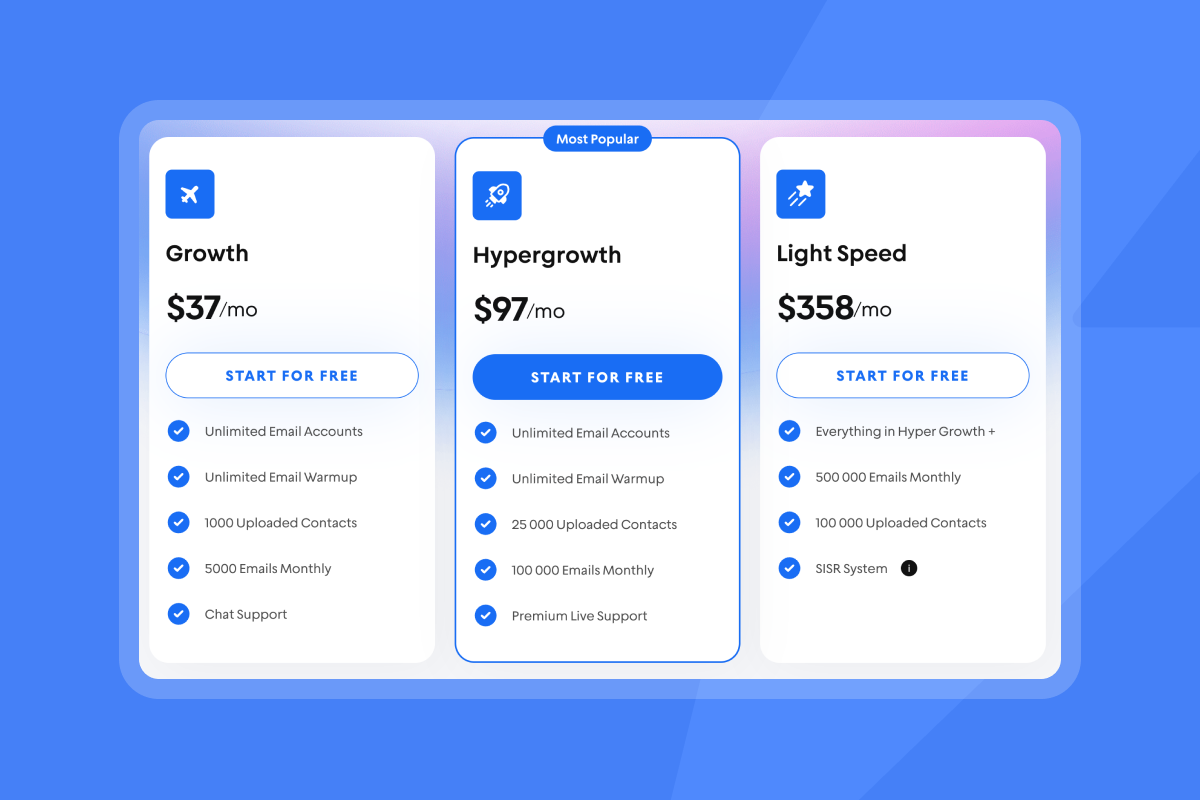
This pricing model means you can distribute volume across multiple warmed accounts the way deliverability experts recommend. Traditional sales engagement platforms charge $100-$200 per seat per month, making them prohibitively expensive for early-stage teams.
For agency founders managing client outreach, white-label features allow you to run campaigns under client branding without paying per client workspace.
AI-powered efficiency for time-strapped founders
Copilot acts as an in-app assistant for campaign creation, lead research, and analytics summaries. Ask Copilot to "find 100 marketing directors at Series A SaaS companies in NYC" and get instant answers.
The AI Reply Agent handles routine responses automatically, pricing at 5 credits per AI-generated reply. This transparent credit model prevents surprise costs while saving hours weekly.
One founder captured this efficiency in their TrustPilot review:
"I had Sumesh as my agent, and he took the time to thoroughly explain how spam words could impact my deliverability. As Head of Influencer Marketing at BeStratMedia, having a responsive, patient, and attentive support team is a must to run outreach campaigns smoothly." Ahmed Belmamoun on Trustpilot
Your Path to Consistent Meetings Starts Now
The 14-day cold email ramp plan removes guesswork from founder-led outreach. Protect sender reputation during Days 1-3 with proper warmup and DNS configuration. Build targeted, verified lead lists on Days 4-7. Craft personalized sequences with clear CTAs during Days 8-10. Launch, monitor, and optimize on Days 11-14.
This system works because it balances speed with sustainable deliverability practices. When you warm accounts properly, target the right people, personalize at scale, and follow up persistently, reply rates climb from 0.5-2% (typical untrained attempts) to 5-10%+ (best-in-class campaigns).
Ready to apply this 14-day plan? Start with Instantly and get your first meetings booked while we handle warmup, lead finding, and reply management.
Frequently Asked Questions
How many emails should I send per day during the 14-day ramp?
Start at 5-10 per account on Days 1-3, increase to 15-20 by Days 4-7, and reach 25-30 maximum by Days 11-14. Never exceed 30 emails per inbox per day.
What reply rate should I expect in my first 14 days?
Target 5-10% reply rates for well-targeted campaigns with strong personalization. Below 2% indicates messaging or targeting problems requiring immediate adjustment.
How many domains do I need for a 14-day cold email ramp?
Start with 2-3 dedicated domains separate from your primary company domain. This provides redundancy and protects your main domain if deliverability issues arise.
Can I skip the warmup phase to launch faster?
No. Cold domains that suddenly send high volumes damage sender reputation immediately and often permanently, landing your emails in spam folders.
How do I know if my emails are landing in spam?
Use inbox placement testing to check where your emails land across Gmail, Outlook, and other providers. Test weekly during your first month.
What's a realistic meeting conversion rate from cold email?
Expect roughly 8-10% of positive replies to convert to booked meetings. If you get 10 replies from 200 emails (5% reply rate), 1-2 should become calendar events.
Key Terms for Cold Email Success
Sender Reputation: A score ISPs assign to your email-sending domain based on engagement, bounce rates, and spam complaints that determines inbox placement.
Email Warmup: The gradual process of building sender reputation by slowly increasing send volume while maintaining positive engagement signals with recipient mail servers.
Bounce Rate: The percentage of emails that fail to deliver, measured as total bounces divided by total sends. Keep below 1% for sustainable deliverability.
Reply Rate: The percentage of recipients who respond to your email, calculated as replies divided by delivered emails. Industry benchmark is 5-10% for well-targeted cold campaigns.
Inbox Placement: Where your email lands in the recipient's inbox (primary tab, promotions tab, or spam folder). Aim for 80%+ primary inbox placement.
List Hygiene: The practice of verifying email addresses, removing invalid contacts, and maintaining clean prospect lists to protect sender reputation and deliverability.
Send Window: The specific timeframe during which your emails are sent, optimized for when recipients are most likely to engage (typically weekday mornings 8:30-11:00 AM local time).
ICP (Ideal Customer Profile): A detailed description of the companies and roles that receive the most value from your solution, used to focus targeting and personalization efforts.


