


Updated January 19, 2026
TL;DR: Agencies using personalized cold email follow a 7-step system: define ICP with firmographic filters, craft 50-125 word hyper-personalized emails, warm accounts 2-3 weeks, build 3-5 email sequences, monitor performance, automate replies, and scale safely. Send maximum 30 cold emails per inbox daily. Instantly provides 450M+ verified leads through SuperSearch, AI Copilot for personalization at scale, automated warmup, Inbox Placement testing, and AI Reply Agent handling responses in under 5 minutes. According to our email benchmark report, 58% of replies come from the first email while the remaining 42% come from follow-ups, and top performers exceed 10% reply rates using micro-segmentation and emails under 80 words.
When you run an agency and rely on cold email for growth, you need a repeatable system that drives results without killing sender reputation. For practical examples, check out learn cold email outreach. Generic spray-and-pray campaigns land in spam. Truly personalized and relevant outreach lands meetings.
The gap between 1% and 5% reply rates isn't luck. See how our sales email outreach software can help improve your results. It's process. This guide walks you through the exact 7-step checklist agencies use to book more demos by optimizing every stage of personalized email outreach.
Your 7-step checklist at a glance
| Step | Action | Key Instantly Feature |
|---|---|---|
| 1. Define ICP | Filter by industry, role, company size, and pain points | SuperSearch with 450M+ leads |
| 2. Craft copy | Write 50-125 word emails with personalized opening lines | AI Copilot for variables |
| 3. Set up deliverability | Warm 2-3 weeks, verify leads, test inbox placement | Built-in warmup + Inbox Placement tests |
| 4. Build sequence | Create 3-5 email sequence, A/B test, set send windows | Campaign builder + Step Analytics |
| 5. Monitor performance | Track 40-60% open rate, 5-8% reply rate, <1% bounces | Analytics dashboard |
| 6. Handle replies | Centralize responses, automate with AI | Unibox + AI Reply Agent |
| 7. Scale safely | Add unlimited accounts, stay under 30 emails/day per inbox | Flat-fee unlimited accounts |
Why personalized email is your agency's growth engine
We've found cold email to be one of the most cost-effective lead generation channels for agencies. When you execute it correctly, personalized outreach drives higher engagement, protects sender reputation, and converts replies into booked meetings at scale.
Why relevance beats volume in cold outreach
Your prospects receive dozens of cold emails daily. Most get deleted within seconds. When you personalize your subject lines and opening lines with specific references to the prospect's company, recent achievements, or industry challenges, you immediately stand out from generic blasts. See our personalize cold emails step by step guide guide for a full breakdown.
You'll book more meetings with relevant messages to 100 prospects than generic blasts to 1,000. Tailored CTAs that reference specific prospect pain points consistently perform better than generic calendar links.
"Easy to use, intuitive, minimal clicks/steps to get stuff done, and things just work." - G2 Review
Agencies on Instantly hit 50%+ open rates and 5% reply rates with 15% positive replies. These numbers translate directly into booked meetings and revenue.
Watch how Instantly enables personalization at scale to boost your reply rates:
Avoiding common pitfalls of generic outreach
When you send generic outreach, you burn domains and waste time. We cover this in detail in our send large video files in email tutorial guide. The biggest mistakes include skipping email warmup, using unverified lead lists, and sending from primary business domains. These practices trigger spam filters and damage sender reputation permanently.
Our cold email strategy guide emphasizes that protecting client domains requires alternate domains, proper DNS authentication, and gradual ramp-up.
"What stands out most is the deliverability and domain health performance — it's noticeably better than other tools we tested." - G2 Review
Step 1: Define your ideal client profile and persona
Before launching campaigns, you need crystal-clear target criteria. Vague targeting leads to low reply rates and wasted credits.
Build your ICP with firmographic filters
Analyze your best existing clients. Pull data on industries, company sizes, and job titles that convert fastest. Build your Ideal Customer Profile (ICP) from this data, including firmographic filters such as industry, employee range, geography, and revenue.
Instantly's AI Copilot can suggest these filters and generate targeted lead lists automatically.
Create buyer personas that map to pain points
Go deeper than job titles. Map out the day-to-day challenges, goals, and pain points your prospects face. Create 2-3 buyer personas per ICP. For example, if you target SaaS founders, distinguish between bootstrapped founders focused on cost per acquisition and venture-backed founders optimizing for speed to market.
Use SuperSearch for precise lead identification
Instantly's SuperSearch provides access to 450M+ verified B2B contacts with advanced filtering. You can target by industry, location, company size, job title, technologies used, funding stage, and hiring signals.
Key SuperSearch features:
- Firmographic filters: Industry, employee range, revenue, location
- Technographic data: Filter by specific tools prospects use
- Lookalike domains: Find companies similar to your best clients
- Built-in verification: Every email is automatically verified to reduce bounces
"I use it for client outreach, AI automation services, and even chatbot sales, and it helped me land multiple leads consistently." - TrustPilot Review
Watch how SuperSearch works in practice to get you verified leads data to fuel your personalization systems downstream:
Step 2: Craft hyper-personalized copy and offers
True personalization goes beyond inserting {{first_name}}. You need to reference specific, relevant details that prove you researched the prospect.
Structure your cold email for impact
Keep emails short (50-125 words). Concise messages with clear value propositions consistently get higher reply rates. Follow this structure:
- Personalized opening line: Reference a specific achievement, recent post, or company news
- Value statement: Explain the benefit in one sentence
- Social proof: Brief mention of similar client results
- Single CTA: One clear, easy action to take
Don't pitch in the first email. Lead with value and curiosity. Your goal is to start a conversation, not close a deal.
Scale personalization with AI
You can't manually personalize for hundreds of prospects. Instantly's AI Copilot solves this by generating custom variables and personalized first lines at scale. The AI analyzes prospect data and creates contextual opening lines like:
"Hi {{first_name}}, saw your recent post on LinkedIn about scaling your sales team. Many of our clients in similar situations struggle with reply rates..."
Using variables and spin syntax:
- Predefined variables:
{{first_name}},{{company_name}},{{job_title}} - Custom variables: Upload a CSV with a "Personalization" column for unique details
- Spin syntax: Create variations in intros to avoid duplicate content
Watch this AI Copilot demo to see how agencies generate hundreds of personalized lines in minutes.
Write compelling subject lines and CTAs
Your subject line determines if prospects open your email. Our subject line testing data shows that personalized, curiosity-driven lines outperform generic ones by 40%+.
Subject line styles that work:
- Direct benefit: "Quick tip to improve {{company_name}}'s lead gen"
- Curiosity: "Quick question, {{first_name}}?"
- Ultra-personalized: "Loved your work on {{project_name}}"
For CTAs, make them specific and low-friction: "Are you free for a quick 15-minute chat next week?" or "Just reply 'yes' if you'd like details."
Step 3: Set up your deliverability foundations
Personalization is worthless if your emails land in spam. Deliverability is the foundation of successful cold email campaigns.
Warm up new inboxes for optimal sender reputation
Don't send cold emails from new accounts without warmup. Email warmup builds sender reputation by gradually increasing sending volume over 2-3 weeks.
Instantly's built-in warmup feature is free and automated. Simply enable the flame icon for each email account. The platform sends simulated emails within Instantly's 4.2M+ deliverability network to build trust with email providers.
Warmup checklist:
- Enable warmup in Email Accounts dashboard
- Wait 2-3 weeks before cold sending
- Start with 5-10 cold emails per day per account in week one
- Ramp gradually to 15, then 20, then 30 emails per day maximum
- Monitor health scores daily
Watch our 2025 deliverability deep dive to see how Instantly ensures you have top tier deliverability:
Ensure primary inbox placement with automated tests
After warmup, monitor where your emails land. Instantly's Inbox Placement feature automatically tests deliverability across Gmail, Outlook, and other providers.
The tool sends test emails to seed accounts and reports whether messages land in primary inbox, promotions, or spam.
Target metrics:
- Primary inbox rate: 80%+ for optimal results
- Spam placement: If above 10%, pause and troubleshoot
- Provider-specific issues: Microsoft and Gmail have different rules
For agencies on the Light Speed plan, Instantly offers SISR (Server & IP Sharding & Rotation) with dedicated private IP pools for enhanced deliverability at scale.
Maintain list hygiene and avoid bounces
High bounce rates will kill your sender reputation fast. Keep bounces at or below 1%. Lead verification is essential before uploading any list.
When uploading leads to Instantly, check the "Verify leads" option. The platform validates email addresses, removing invalid contacts before you send.
"They specialize in getting emails delivered at a much higher rate than our previous email provider." - G2 Review
Step 4: Build your outreach sequence and A/B test
A single email rarely converts. Multi-step sequences with strategic follow-ups drive results.
Design multi-step follow-up sequences
Plan a 3-5 email sequence with 3-5 days between steps. Each email should offer new value or a different angle.
Sample sequence:
- Email 1: Personalized intro + value statement + soft CTA
- Email 2 (3 days later): Share specific result or case study
- Email 3 (3 days later): Address common objection or offer resource
- Email 4 (5 days later): Final check-in with time-bound offer
Enable "stop sending emails on reply" in Instantly's campaign settings to avoid over-messaging prospects who respond.
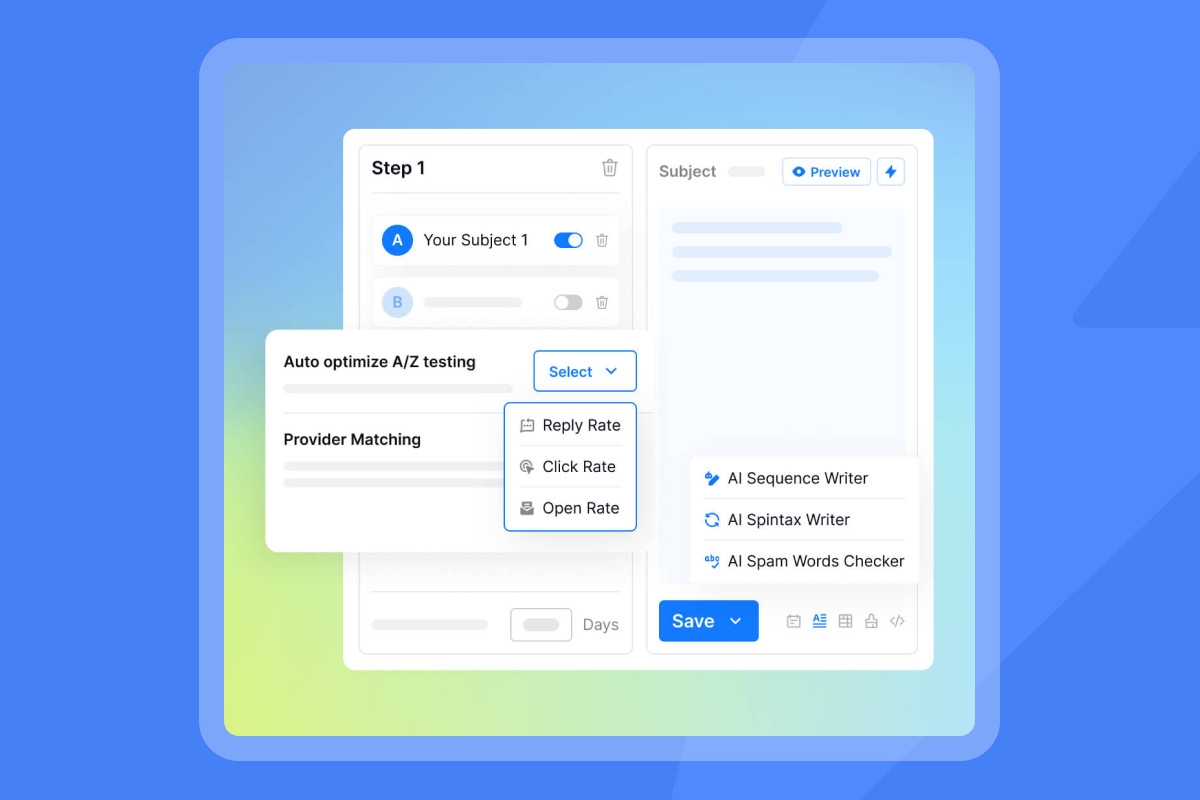
A/B test subject lines, body copy, and send windows
Test one variable at a time to isolate what works. A/B testing in cold email helps you identify what resonates with your audience.
Elements to test:
- Subject lines: Direct benefit vs. curiosity vs. personalized reference
- Opening lines: Problem-based vs. compliment-based
- Value propositions: Feature-focused vs. outcome-focused
- CTAs: Calendar link vs. simple reply vs. question
Instantly's Step Analytics feature tracks performance for each email variation. The platform also offers "Auto Optimize" which automatically switches off underperforming variants. Watch how A/Z testing works in Instantly at scale with AI below:
Set optimal send times and daily limits
Send during business hours in your prospect's time zone (8:30-10:30 a.m. or 1:30-3:30 p.m. local time). Research on optimal send windows found that timing affects open rates by 20%+.
Daily sending limits by account age:
| Account Age | Daily Cold Email Limit | Total Limit with Warmup |
|---|---|---|
| Weeks 1-2 | 5-10 emails | 20-30 total |
| Weeks 3-4 | 15-20 emails | 35-40 total |
| Month 2+ | 25-30 emails | 40 (30 cold emails max) total |
Don't exceed 30 cold emails per inbox per day, even with mature accounts. For higher volume, add more email accounts. Instantly's unlimited accounts model makes this cost-effective for agencies.

Step 5: Monitor campaign performance and optimize
After launch, monitor continuously. The agencies booking 5%+ reply rates optimize weekly.
Track metrics that drive revenue for your clients
Campaign analytics in Instantly track open rates, click-through rates, reply rates, and deliverability at both account and campaign levels.
Benchmark targets:
- Open rate: 40-60%
- Reply rate: 5-8% overall, 15%+ positive replies
- Bounce rate: Under 1%
- Meeting conversion: 10-15% of positive replies
If open rates are low, test new subject lines. If reply rates lag, improve personalization. Review cold email reply rate optimization strategies for detailed troubleshooting.
Use data to identify and fix underperforming campaigns
Instantly's dashboard shows performance by campaign, account, and individual sequence step. Use Advanced Lead Filters to segment prospects who opened, clicked, or replied.
Quick optimization checklist:
- Low opens? Test 3 new subject line variants
- Low replies? Add deeper personalization
- High bounces? Re-verify your lead list immediately
- Spam complaints? Review copy and reduce volume
"Deliverability is great and the analytics give us exactly what we need to optimize campaigns quickly." - G2 Review
Watch how Instantly users increase their reply rates up to 19% in some cases:
Step 6: Handle replies efficiently and convert leads
When you respond fast, you book more meetings. Slow responses lose deals.
Centralize all replies with a unified inbox
Without the right system, you'll face chaos managing replies across dozens of accounts. Instantly's Unibox consolidates all replies from connected accounts into a single unified inbox. Tag conversations, assign to team members, and track follow-ups without switching between Gmail tabs.
Automate reply handling with AI agents
Instantly's AI Reply Agent handles lead replies in under 5 minutes, 24/7. The AI classifies responses (interested, not interested, question, out-of-office) and responds accordingly based on rules you configure.
AI Reply Agent workflow:
- Prospect replies in Unibox
- AI classifies intent and urgency
- You choose Human-in-the-loop or Autopilot
- AI sends contextual reply or books meeting
- Team gets Slack notification for hot leads
The AI Reply Agent uses 5 credits per reply through Instantly's credit system. For agencies, this scales cost-effectively across multiple client campaigns without per-seat fees. Watch how the agent works end to end to match your tone of voice and business rules for you:
"I've converted several leads into deals using Instantly and it's paid for itself 5x." - TrustPilot Review
Move qualified leads into your sales pipeline
Use Instantly's integrated CRM to track lead stages: interested, demo booked, follow-up needed, not qualified. For advanced workflows, connect Instantly with your main CRM using Zapier or OutboundSync for Salesforce and HubSpot.
Step 7: Scale your outreach safely and cost-effectively
Once your system works, scale without breaking deliverability or budgets.
Add unlimited email accounts for agency growth
Most cold email platforms charge per seat or per inbox. This punishes agencies as they grow. Instantly's flat-fee pricing includes unlimited email accounts on all plans, starting at $37/month for the Growth plan.
Scaling approach:
- Month 1: Start with 3-5 email accounts per client campaign
- Month 2: Add 5-10 more warmed accounts for higher volume
- Month 3+: Distribute volume across 10-20 accounts per client
This keeps daily sending limits safe (under 30 per account) while scaling total throughput.
Understand Instantly's flat-fee pricing model
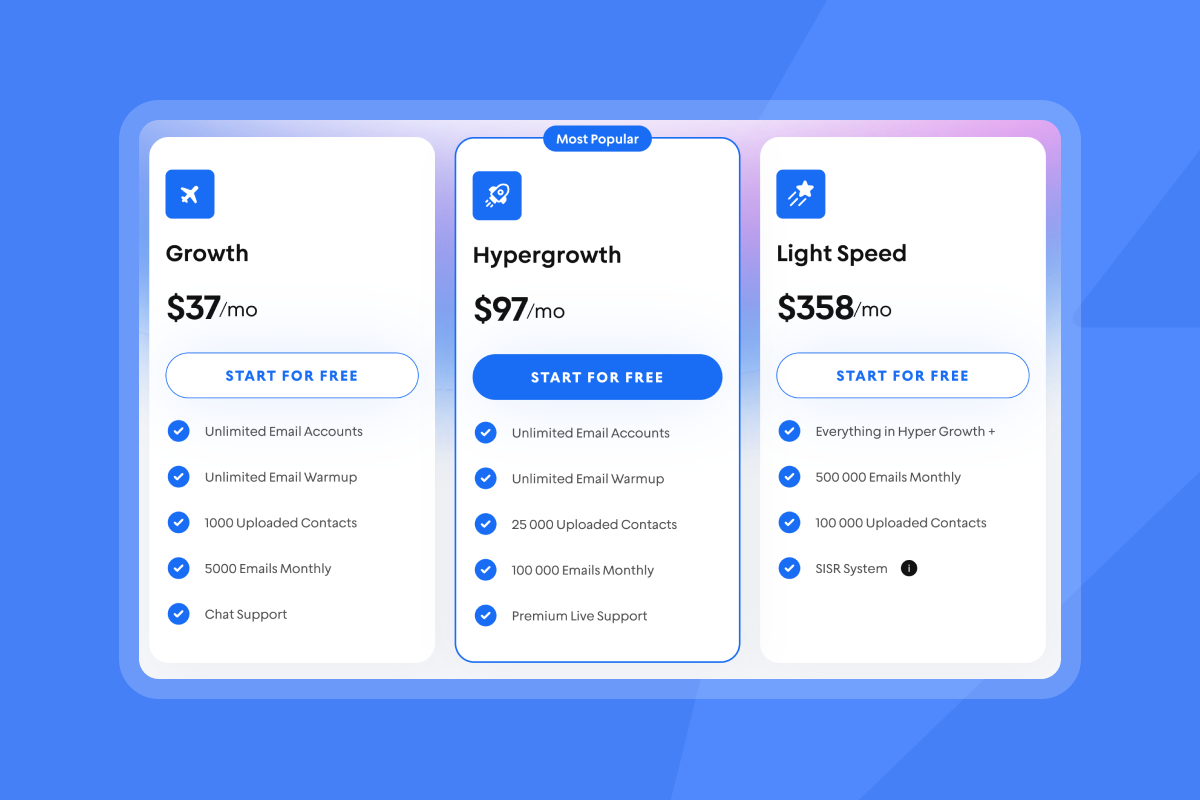
Instantly's pricing structure is designed for agencies managing multiple clients:
| Plan | Monthly Price | Key Features |
|---|---|---|
| Growth | $37 | Unlimited accounts, warmup, 100k emails/mo |
| Hypergrowth | $97 | Everything in Growth plus premium support |
| Light Speed | $358 | SISR dedicated IPs for enhanced deliverability |
Add SuperSearch starting at $47/month for 1,500-2,000 credits to access 450M+ verified leads. The AI Reply Agent uses credits from your SuperSearch plan (5 credits per reply). Review the full pricing comparison vs. Lemlist to see the agency advantage.
Build repeatable systems for your team
Document your entire process so junior team members can replicate results. Create templates, SOPs, and checklists for each step. Instantly's AI Copilot helps your team members generate personalized content, following proven patterns.
Your blueprint for high-converting personalized emails
You now have a repeatable system for booking demos with personalized cold email. When you define tight ICPs, craft relevant copy, protect deliverability, test strategically, monitor performance, automate replies, and scale safely, you'll hit 5%+ reply rates and book meetings consistently.
Campaigns that book 15 demos in 10 days follow a process, not luck. Use this checklist as your roadmap, adjust based on your data, and iterate weekly.
Ready to implement this playbook for your agency? Try Instantly free and access unlimited email accounts, built-in warmup, SuperSearch with 450M+ leads, and AI Reply Agent automation in one platform.
FAQs
How long should I warm up email accounts before sending cold emails?
Warm up for 2-3 weeks minimum, sending 5-10 emails per day initially and ramping to 30 gradually. Monitor health scores daily in Instantly's dashboard.
What bounce rate is acceptable for cold email campaigns?
Keep bounces at or below 1%. Higher rates damage sender reputation permanently. Always verify leads before sending.
How many cold emails can I send per inbox per day?
Don't exceed 30 cold emails per inbox per day, even with warmed accounts. Our free method to send personalized emails guide walks through this step by step. For higher volume, add more email accounts using Instantly's unlimited model.
How do I know if my emails are landing in spam?
Use Instantly's Inbox Placement tests to check primary inbox vs. spam placement across Gmail, Outlook, and other providers before launching campaigns.
What reply rate should I target for personalized cold emails?
Target 5-8% overall reply rate with 15%+ positive replies. If you're below 3%, improve personalization depth or adjust your ICP targeting.
Key personalized email terminology
Sender reputation: A score assigned by email providers based on bounce rates, spam complaints, and engagement, determining inbox placement.
Email warmup: The process of gradually increasing sending volume from new accounts over 2-3 weeks to build positive sender reputation.
List hygiene: Regular verification and cleaning of email lists to remove invalid, inactive, or unengaged contacts, protecting deliverability.
Spin syntax: A technique to create multiple text variations within one template, making each email unique while scaling personalization.
Primary inbox: The main inbox folder where important emails land, as opposed to promotions or spam folders.
Reply rate: The percentage of recipients who respond to an email, a core metric for campaign effectiveness and a leading indicator of meetings booked.


