


Modern B2B marketing templates are dynamic workflow systems, not static documents. To drive pipeline, these templates must be integrated, intelligent, and actionable.
Key frameworks include a strategic Campaign Blueprint, a multi-channel Outreach Sequence, and a live Performance Dashboard. Success hinges on deep personalization that moves beyond merge tags, AI-powered optimization based on campaign data, and seamless integration across your tech stack to eliminate manual data swaps and visibility gaps.
So you've gotten another marketing plan template from a credible platform. Filled in the brackets. Shared it with your team. Launched the campaign.
Several weeks later, nobody's looking at it. Your SDRs are winging their outreach. Your reporting is a mess of disconnected spreadsheets. The template didn't fail because it was bad, but because it was static.
Most B2B marketing templates out there are designed like forms to simply fill out. They don't track outcomes or adapt as campaigns evolve. Most importantly, they don't connect planning to execution to meaningful results.
In contrast, effective B2B marketing templates guide decisions, enforce best practices, adapt to performance, and keep marketing and sales moving in lockstep. When templates start acting like systems, campaigns become sharper, cycles get shorter, and pipelines grow healthier. That’s the difference we'll unpack below.
What Makes a B2B Marketing Template Actually Useful?
Most templates you'll find online are glorified checklists. They give you categories to fill in, but no framework for using that information to drive outcomes.
An effective B2B marketing template does three things at a minimum:
- It guides execution, not just planning: Every field should prompt a specific action. "Target audience" isn't useful unless it connects to where you find those people and what message resonates with them. Good templates force clarity on what happens next at every stage.
- It adapts as your campaign evolves: Static templates break the moment reality hits. A useful template captures feedback, surfaces what's working, and helps you iterate without starting from scratch. Your best templates should look different at the end of a campaign than they did at the beginning because they absorbed what you learned.
- It connects to your actual tools and workflow: A template that lives in a Google Doc separate from your CRM, email platform, and reporting dashboard is just documentation theater. The best templates integrate or at least sync with the systems your team actually uses daily.
If your current templates don't do these three things, you're most likely using forms that make you feel organized while your campaigns stay chaotic.
B2B Marketing Templates That Work (And How to Use Them)
Templates cut out repetitive planning, keep teams aligned, and give campaigns a repeatable edge. Below, you’ll find five field-tested examples—each with a quick explanation of what it’s for, when to use it, and how to fill it in for your next campaign.
B2B Marketing Plan Template
What it’s for: Guides your team through campaign setup—objectives, audiences, messages, and KPIs—so everyone shares the same game plan.
When to use: Before launching a new campaign or moving into a new market.
How to use: Customize for your offer, ICP, and goals. Revisit and update as your campaign progresses.
Template:
- Objective: {{campaign_goal}}
- Target Audience: {{industry}}, {{role}}, {{company_size}}
- Key Messages:
- {{message_one}}
- {{message_two}}
- Key Channels: {{channel_1}}, {{channel_2}}
- KPIs: {{kpi_1}}, {{kpi_2}}
- Owner: {{team_member}}
- Timeline: {{start_date}}–{{end_date}}
- Budget: {{budget}}
Content Calendar & Priority Matrix
What it’s for: Maps out your deliverables, sends, and due dates in one place for team-wide visibility.
When to use: At campaign kickoff or anytime your team juggles overlapping tasks.
How to use: Fill in each row with campaign details. Assign priority so work stays focused on results.
Content Production Tracker Template
| Date | Asset | Channel | Owner | Priority | Status |
|---|---|---|---|---|---|
| {{date}} | {{asset_type}} | {{channel}} | {{owner}} | {{high/med/low}} | {{draft/sent}} |
Cold Email Outreach Template
What it’s for: Shapes high-response emails that scale personalization—no more guesswork or batch-and-blast.
When to use: For every new cold outreach sequence or when testing messaging.
How to use: Replace the curly brackets with your campaign details. Adjust as you get data on what lands.
Subject: {{subject_line}}Hi {{first_name}},
{{personalized_opening}}
I noticed {{recent_activity}} at {{company}}. We’ve helped {{industry}} teams achieve {{measurable_result}} using {{product_or_service}}.
Are you open to a quick call about {{pain_point}}?Best,{{your_name}}, {{your_role}}
Follow-Up: Hi {{first_name}}, just checking in case my note above landed in spam. Interested in {{result_or_offer}}?Best, {{your_name}}
Sales Enablement Deck Outline
What it’s for: Delivers a consistent, data-backed sales presentation without building a new deck each time.
When to use: Every time you pitch your solution to a new account or segment.
How to use: Swap out the bracketed fields, update with the latest proof, and keep it short.
- Intro: {{client_logo}}, {{sales_rep_name}}
- Pain Points: {{challenge_one}}, {{challenge_two}}
- Solution: {{product_feature}}, {{unique_value}}
- Case Study: {{customer_name}} achieved {{metric}} with {{feature}}
- ROI Calculator: {{cost_savings}}, {{time_saved}}
- Next Step: {{call_to_action}}
Campaign Reporting Dashboard Starter
What it’s for: Tracks outcomes and next steps in one place—so you see performance, not just activity.
When to use: Throughout your campaign, especially for optimizing sequences and reporting up the chain.
How to use: Log progress after each campaign step. Use the “Next Action” column to keep momentum.
| Step Name | Sent | Replies | Meetings | Revenue | Next Action |
|---|---|---|---|---|---|
| {{step_name}} | {{sent}} | {{replies}} | {{meetings}} | {{revenue}} | {{next_action}} |
Use these templates as a foundation. Adapt the fields to your workflow, fill in the brackets, and keep improving them as you collect results.
Real-World Example: Using Advanced Templates for Outbound Success
You're launching a new outbound campaign targeting FinTech CTOs. Instead of cobbling together old slides and dusty email scripts, you start with the right templates at every step.
- Marketing Plan Template: You lay out your target vertical, goal (25 qualified demos in 30 days), and top channels. The template walks you through buyer personas, key messages, and success metrics. Everything you need lives in one document, ready for your team to reference.
- Content Calendar & Task Matrix: You drag your campaign emails and LinkedIn touches onto a visual calendar. Each action has a date and an owner. The priority matrix helps you single out the tasks that drive the pipeline, not just fill your to-do list.
- Cold Email Template: You build your sequence using a template with proven subject lines (“Question about your API workflow”), mandatory personalization fields (“{{first_name}}” and “{{company}}”), and a slot for a recent FinTech case study. You see reply rates climb because the template forces relevance.
- Sales Deck Template: For demos, you use a deck with drop-in sections: intro, pain points (with real FinTech stats), customer stories, and an ROI calculator. No starting from scratch.
- Reporting Dashboard: As replies land, your dashboard tracks every response, flags slow sequences, and points you toward the best next step. You watch your demos and conversions stack up. Measurable every step of the way.
With Instantly, you get templates that connect these dots. Lead Finder brings in the exact FinTech CTOs you need. Sequence Generator personalizes each touch. Your reporting dashboard turns results into action.
Templates here don’t slow you down. They’re your campaign engine, guiding you from first reach-out to booked meeting.
How the Best B2B Teams Are Using Templates
Static templates are out. Top B2B teams now build templates that grow with every campaign. You see real-time suggestions, auto-filled data fields, and templates that adjust to what’s working.
AI-powered frameworks are common. Templates offer content tweaks based on performance metrics, suggest split tests, and even highlight segments ripe for personalization. You’re not just saving time; you’re raising reply rates and pipeline velocity.
Personalization now means more than using “{{first_name}}.” Leading teams build templates that pull in behavioral data: recent activity, content consumed, and even buying signals. Campaigns feel direct and relevant every time.
Cross-channel coordination is rising. Instead of managing email, LinkedIn, and reporting templates separately, integrated templates now sync calendars, automate outreach, and update dashboards on the fly.
Visual storytelling matters more. Templates use graphics and charts to turn complex data into clear narratives. Decision-makers get context fast.
Best of all, every template collects outcome data. You see what’s working and what to change, without sifting through spreadsheets.
Common Gaps (and How to Fix Them)
Most teams use templates to save time, not to drive outcomes. That’s why the biggest gaps remain invisible until results stagnate.
| Gap | Typical Problem | How to Fix It |
|---|---|---|
| Lack of AI integration | Templates stay static, never learning from your results | Use tools that suggest tweaks as campaign data comes in |
| Shallow personalization | Only names change; the rest stays generic | Design templates to pull behavioral signals or recent activity |
| Weak multi-channel coordination | Email, LinkedIn, and reporting templates don’t sync | Use integrated templates that link all key channels and dashboards |
| Missing sustainability / ethics | No prompts for compliance, consent, or inclusive language | Add fields for ESG, regulation, and ethical best practices |
| Poor collaboration | Templates live in files, not team platforms | Switch to editable, versioned, team-access templates |
Spotting a gap early is the difference between wasted effort and compounding wins. Review your toolkit—then upgrade to templates that solve for your real bottlenecks.
Building (and Customizing) B2B Templates for Your Workflow
A template isn’t one-size-fits-all. Your industry, customer profile, and sales cycle shape what you need. Start by mapping your ideal process, then adapt each template for the specifics of your workflow.
- Tailor for your ICP: Add custom fields for pain points, industry terms, or decision makers relevant to your audience.
- Set team ownership: Assign sections and action items in your templates, so everyone knows their role.
- Keep templates actionable: Every section should prompt a specific action (send, follow-up, update), not just store information.
- Collect feedback: Ask your team what works and what’s missing. Update templates regularly based on real campaign results.
- Measure every step: Use templates that surface key metrics, so you can spot bottlenecks and iterate quickly.
Well-built templates grow with your business. They become a living guidebook that’s always optimized, never outdated.
How Instantly Powers the Next Generation of B2B Templates
Plug-and-play templates only get you so far. Instantly gives you a toolkit for building dynamic, results-driven workflows: templates that connect every stage from prospecting to reporting.
Instantly Supersearch
Manual prospecting wastes hours. With Instantly Supersearch, you get access to Instantly’s database of 450 million+ verified contacts, including filtering by industry, seniority, location, tech stack, and more. You filter for your ICP and add the results to your campaign list with a single click.
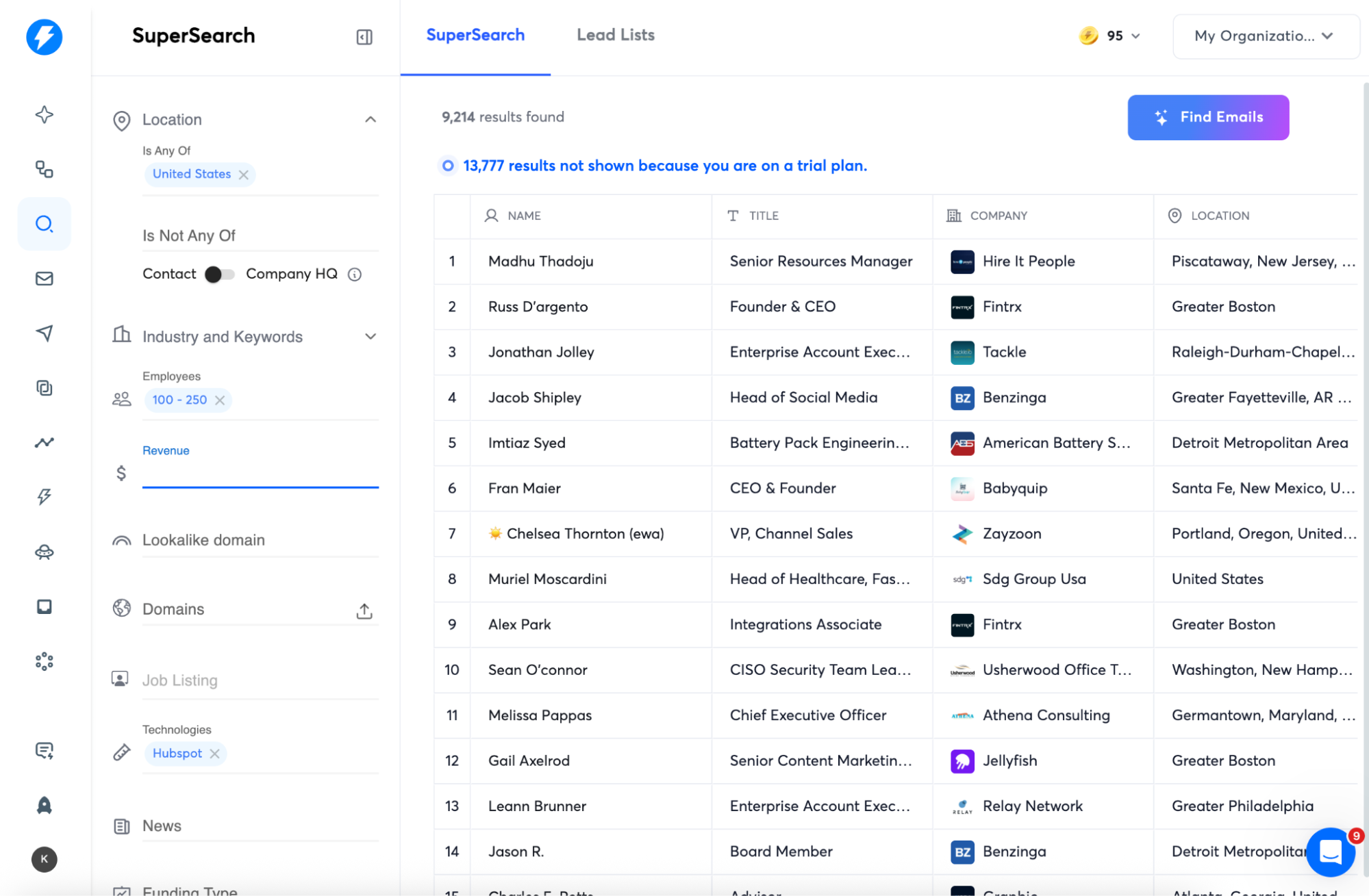
That means no more stale CSVs or mismatched leads. Every new campaign starts with up-to-the-minute, pre-qualified prospects, ready for outreach.
A cybersecurity campaign can, for instance, pull 1,000 IT decision-makers at US FinTech firms and drop them straight into your templates with no manual sorting.
AI Sequence Generator
Writing cold emails from scratch (or patching together old scripts) kills speed and consistency. Instantly’s AI Sequence Generator crafts full, multi-step campaigns tailored to your audience and offer.
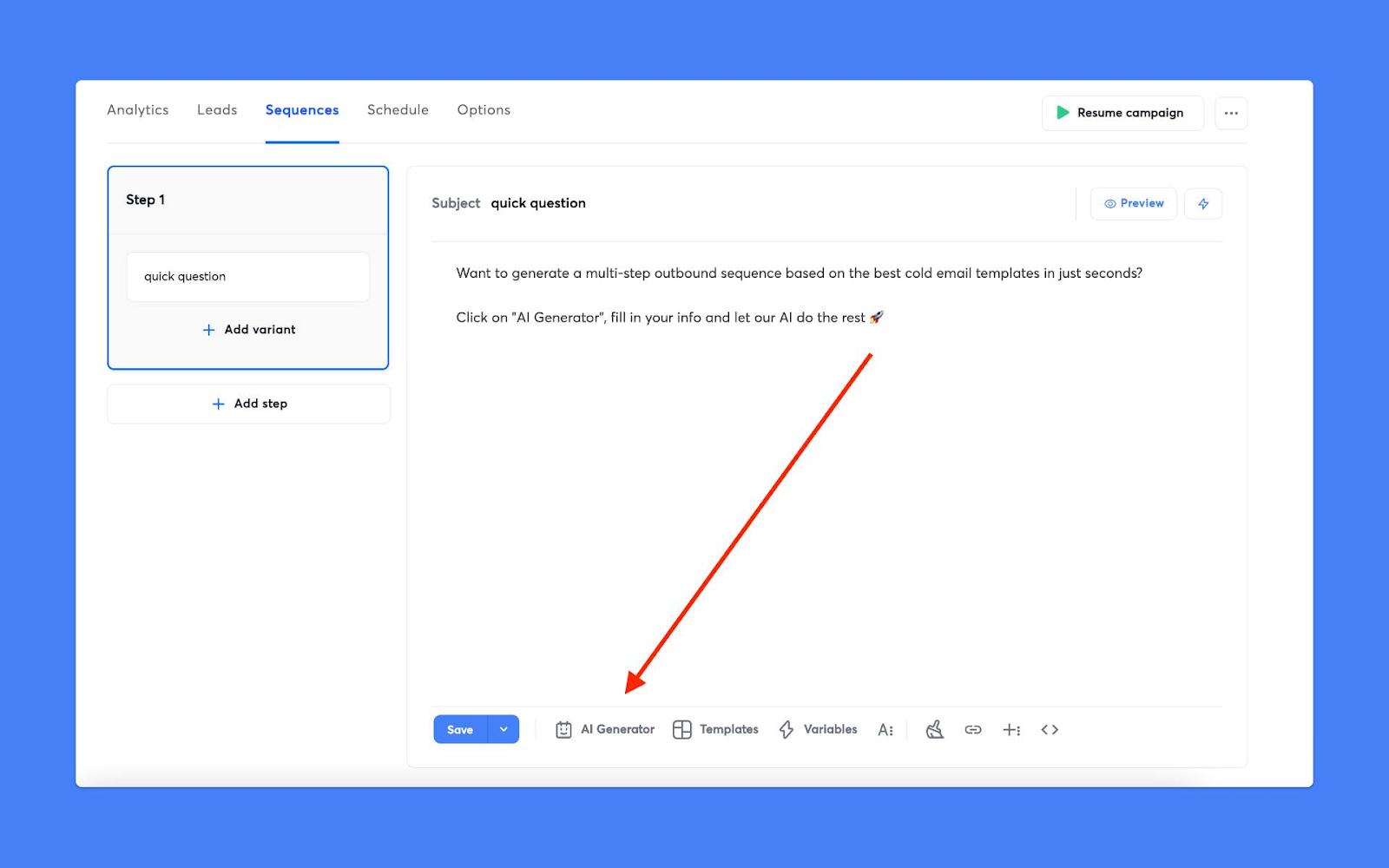
Just enter your value proposition and choose your segment; the AI builds subject lines, intro hooks, follow-ups, and smart CTAs.
Benefit: You launch faster, stay on message, and benefit from data-backed messaging frameworks. Each template adapts to your vertical and gets smarter as you refine campaigns.
Example: Enter your messaging for a SaaS onboarding offer. Instantly generates a three-email sequence with variable personalization tags (“{{first_name}},” “{{pain_point}}”), auto-suggested follow-ups, and a proven close.
Dynamic Personalization
Static templates break when your audience changes. Instantly’s workflows use variables beyond {{first_name}}: job title, recent activity, tech stack, or even trigger events (site visit, prior demo, or tech adoption). Fields update based on lead or segment, so every touch is fresh.
Benefit: You deliver relevant, contextual messages at scale. Templates never get outdated or off-target.
Example: For a renewal campaign, emails auto-fill with the recipient’s last product feature used and their renewal date.
Smart Reporting Dashboards
Swapping spreadsheets for dashboards means you see results in real time. Instantly tracks replies, demos booked, and pipeline value on live dashboards. Each template has outcome fields, so you see at a glance what’s working.
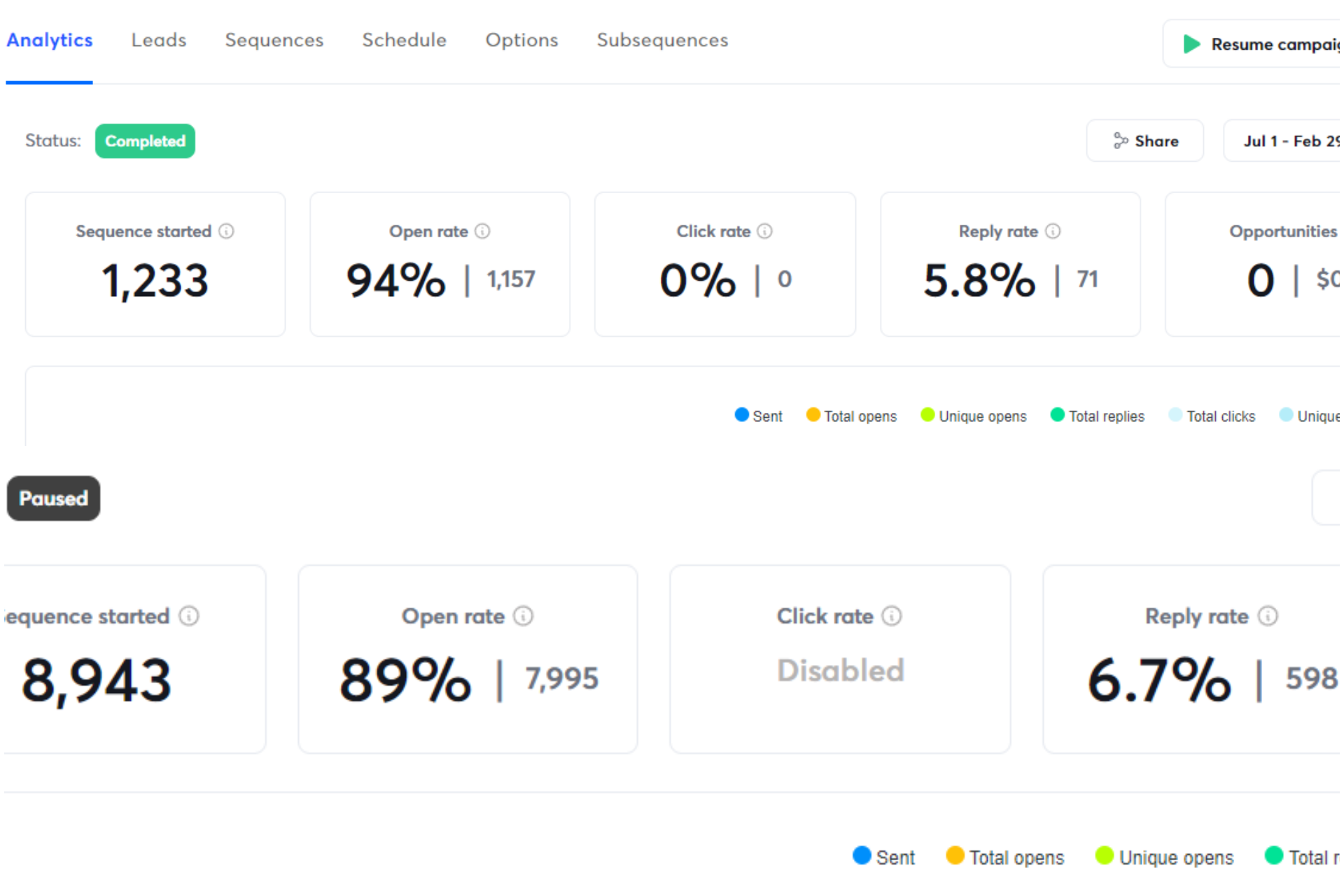
Benefit: You spot drop-off points, test new tactics, and measure pipeline health without manual tracking.
Example: Your dashboard flags when reply rates drop on touchpoint #2, so you A/B test a new CTA the same day.
Seamless Integration & Workflow Automation
Juggling files and tools slows you down. Instantly connects every stage: prospecting, outreach, follow-up, and reporting inside one platform. Campaign steps update automatically as leads move through your workflow.
Benefit: You save hours, prevent data loss, and keep every stakeholder in sync on campaign status.
Example: After a prospect replies, the template triggers a task for your sales rep to follow up, and logs the outcome for reporting. Rather than simply copying templates, you build complete, adaptive systems and campaigns that launch themselves, learn from outcomes, and scale as you grow.
Key Takeaways
Templates can make or break a campaign. The best teams go beyond templates and build workflows that adapt, integrate, and turn outreach into repeatable wins. As you scale, the difference between generic frameworks and living, data-driven templates shows up in your metrics and pipeline.
Upgrading your toolkit now means faster campaigns, better alignment across your team, and results that compound over time.
Here’s what separates high-performing teams from those stuck with static files:
- The right templates drive measurable results across your pipeline.
- Flexible templates adapt with every campaign, fitting your workflow and your ICP.
- Integrated systems save hours, surface data instantly, and keep your team on track.
- Personalization, automation, and live feedback outperform static files every time.
- Instantly’s toolkit connects prospecting, outreach, and reporting so each step builds momentum.
Don’t let static files hold you back. Start your free Instantly trial and see how dynamic templates and integrated workflows accelerate B2B growth.


