


Updated January 19, 2026
TL;DR: Protect campaigns from poor inbox placement by running automated Inbox Placement tests and setting rules to pause when placement drops below 80% or bounces rise. Keep spam complaints under 0.3%, authenticate with SPF/DKIM/DMARC, and cap sends at 30 emails per inbox daily. Instantly's AI Spam Checker flags risky content before sending, while the Deliverability Network warms accounts across a private network. Use SISR on Light Speed for dedicated IP pools. Adjust campaigns by cleaning lists, reducing volume, and spreading sends across warmed inboxes instead of hard pausing. According to our latest cold email benchmark report, maintain consistent sending patterns with gradual warmup starting at 5-10 emails daily to achieve elite performance metrics.
How to protect campaigns from poor inbox placement
Monitor inbox placement continuously and automate your response when risk rises. In Instantly, you schedule automated Inbox Placement tests and map alerts to rules that pause campaigns on poor placement. The Deliverability Network warms and rotates across many inboxes, while the AI Spam Checker flags risky content before you send. For setup and actions, use the Inbox Placement page and the automated tests guide.
"It is the Inbox placement feature which i like the most as it help us to get to know the spam score and the mails that are placed in the inbox so by this we can manage the mail ids accordingly." - Verified User in Information Technology on G2
Do three things:
- Test placement daily and set rules to pause campaigns if placement or bounce rate breaches your thresholds. You can auto-pause a mailbox and put it back into warmup when placement drops below a value you define, as described in the automated tests guide.
- Keep domain health high with a slow ramp warmup, SPF, DKIM, DMARC alignment, and safe per-inbox caps. Instantly pricing shows unlimited email accounts on outreach tiers so you spread volume safely.
- Fix issues before resuming. Clean recent uploads, shorten send windows, reduce per-inbox volume, and address content risks using the AI Spam Words Checker in the sequence editor.
Defining poor inbox placement
- Primary inbox vs spam. If you land in spam or promotions, opens and replies fall.
- Signals of poor placement. Open and reply drops, rising bounces or complaints, failing seed tests, blacklist hits.
- Why it matters. Global inbox placement averaged about 83.5 percent in 2024, so there is real room to lose or gain visibility based on health and content choices, according to Validity’s 2025 benchmark preview.
Deliverability is usually something agencies and sales teams forget about but it ends up impacting all their hard work. For a full deep dive on how to avoid that scenario watch our Youtube tutorial below:
The impact of pausing campaigns: what happens when you hit stop
Pausing buys time, but it also has side effects. Treat it as a safety catch, not your only tool.
Impact on email campaigns: sender reputation and re-warming
Reputation cools when mail stops. Sudden stops and starts can look unnatural. Plan a measured ramp when resuming and confirm placement with seed tests before scaling. Warmup guidance notes that dependable warmup takes weeks, not days, so set expectations accordingly, as explained in the Mailgun warmup guide.
Placement recovery. If you paused due to spam placement, do not resume at previous throughput. Use low per-inbox caps, confirm authentication is passing, and require passing placement tests before increasing volume.
Data flow. You halt engagement signals mailbox providers use to score you. Keep some controlled activity through warmup while you fix root causes.
Alternatives to outright pausing: smarter optimization strategies
You keep more momentum when you adjust inputs instead of hard stopping.
Email-specific adjustments: refining your outreach
- Clean the list. Re-verify and suppress risky segments.
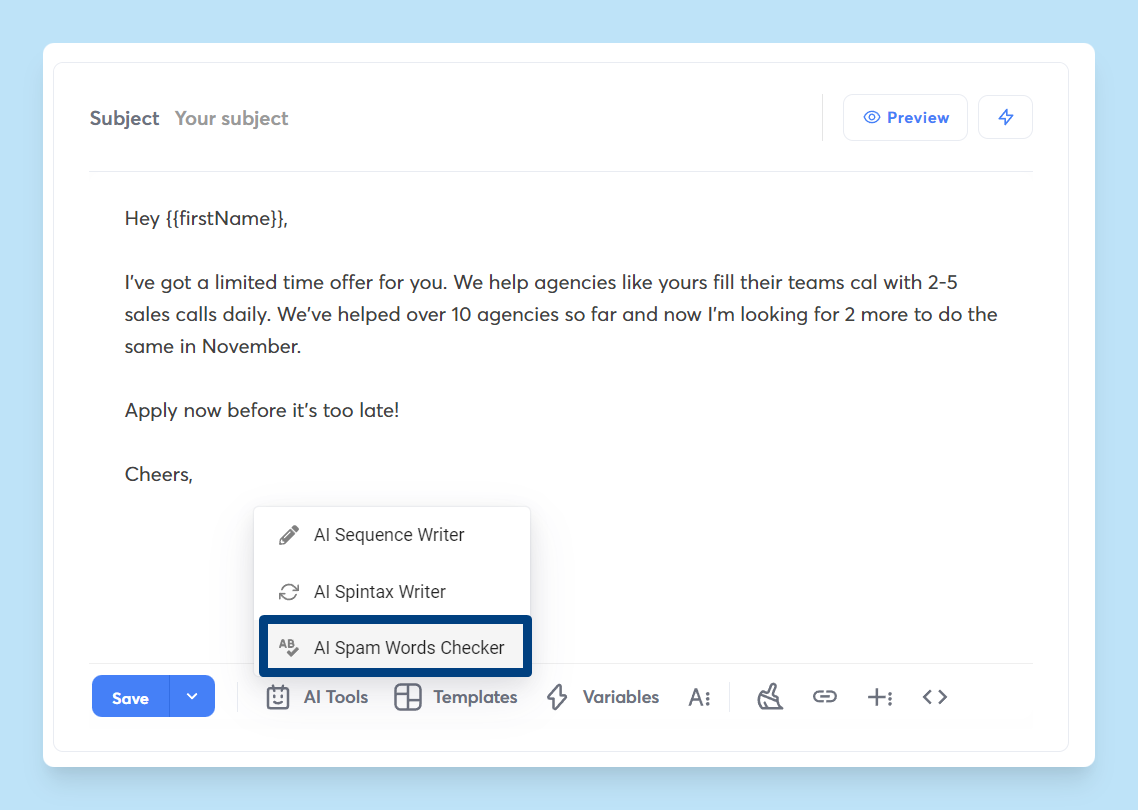
- Fix content. Run the AI Spam Words Checker to spot risky phrases and link patterns before sending, then test revised variants against seeds. For a hands-on walkthrough, watch the tutorial How to Avoid Cold Emails Going to Spam FAST.
- Throttle safely. Reduce per-inbox volume and spread sends across more warmed inboxes and domains. Instantly’s slow ramp guidance shows how to step up volume only after passing placement checks. What is slow ramp warmup.
- Tighten targeting. Improve ICP filters and use verified contacts.
- Adjust timing. Use business-hour send windows by time zone.
- Validate first. Run automated placement tests per variant in Inbox Placement, then ship only those that meet your threshold.
Use Instantly's automated rules and alerts for deliverability
Automate detection and response so issues do not snowball during a live month.
Instantly's Deliverability Network: the foundation of protection
Private network for warmup and testing. New and existing senders warm through a large private deliverability network that simulates positive engagement and supports seed testing, as shown on the Inbox Placement page and in our deliverability solutions overview.
Unlimited email accounts on outreach tiers. You spread volume across many inboxes and keep per-inbox caps low, which reduces risk during scale.
SISR on Light Speed. Server and IP sharding and rotation isolate risk across dedicated or private IP pools and swap flagged IPs, as detailed on the Light Speed plan and in the IP sharding guide.
Deliverability health view. Monitor placement by provider, bounces, spam complaints, replies, and an overall health view that guides actions, as described in the deliverability analytics blog.
"The platform is super intuitive, easy to set up, and makes it simple to manage multiple domains and inboxes at scale. Deliverability is great and the analytics give us exactly what we need to optimize campaigns quickly." — Shaiel P. on G2
AI Spam Checker: proactive threat detection
Context-aware checks. The AI Spam Words Checker scans language and structure, not just trigger words, and suggests safer alternatives directly in the sequence editor.
"Inbox Placement Features and AI Recognition i like the most" — Kiran K. on G2
Add copy and analysis support with Copilot. It drafts variants, suggests audiences, and summarizes analytics so you can edit once and test fast.
Setting up automated rules for email campaigns
Use rules to pause campaigns on poor placement before damage spreads.
- Enable automated Inbox Placement tests and choose the cadence.
- Define thresholds and alerts. For example, auto-pause a mailbox and enable warmup when placement falls below your chosen percentage or when a blacklist is detected. Route alerts to Slack or email.
- Protect domain health. Add rules to stop sending from a specific inbox or domain if provider-specific placement drops below your threshold, as shown in the Inbox Placement feature overview.
- Remediation play. When a pause triggers, run your checklist: verify authentication, re-verify the last batch, review content with the AI Spam Checker, and re-warm at lower throughput.
- Resume with proof. Require a passing placement test and stable bounce and complaint metrics before increasing volume.
Read more in our guide here or watch our setting up warmup tutorial below:
Best practices for maintaining campaign momentum and data integrity
- Gate scale with placement. Require inbox placement at or above 80 percent on seed tests before promoting a variant to production.
- Cap per inbox volume. Do not exceed 30 emails per inbox per day. Increase throughput by adding warmed inboxes instead of overdriving one.
- Authenticate and align. SPF, DKIM, DMARC must pass. Use a custom tracking domain in good standing.
- Keep complaints low. Google’s bulk sender rules require keeping user-reported spam below 0.3 percent in Postmaster Tools, with many experts targeting 0.1 percent, per the Google sender FAQ.
- Measure what pays. Focus on replies and meetings, keep it simple!
Comparison: pausing vs. alternatives across email
| Category | Pausing now | Adjusting inputs instead | When to use |
|---|---|---|---|
| Email deliverability | Stops damage but loses momentum. Resuming requires a measured ramp and passing placement tests. | Clean lists, revise content, lower per-inbox volume, rotate inboxes, and run placement tests. | Pause on severe bounces or complaints. Adjust for mild dips. |
| Email data quality | Halts signals providers use to score reputation. | Maintains data flow with safer sends and better targeting. | Prefer adjustment unless multiple health indicators are red. |
| Time to recover | Days to weeks depending on cause and volume. | Hours to days. | Choose the shortest safe path to stability. |
Decision checklist: pause, adjust, or automate
- Health check
- Inbox placement below 80 percent on seeds.
- Hard bounces rising.
- Spam complaints approaching 0.3 percent in Gmail Postmaster Tools.
- If any two are true, pause with remediation
- Run AI Spam Checker on the sequence.
- Re-verify the last upload.
- Validate SPF, DKIM, DMARC, tracking domain.
- Resume at low caps only after a passing placement test and stable metrics.
- If only one is true, adjust without pausing
- Reduce send windows and throughput.
- Improve data filters and copy.
- Add more warmed inboxes.
- Automate the safety net
- Use rules to pause campaigns on poor placement and on blacklist hits.
- Route alerts to Slack or email.
- Assign an owner to clear the checklist before resuming.
Shielding your outreach for consistent ROI
Poor inbox placement is the hidden tax on outbound. Instantly’s Deliverability Network, AI Spam Checker, SISR on Light Speed, and automated rules give you a system to detect risk early and pause campaigns on poor placement before it burns a quarter. With unlimited accounts and warmup, automated placement tests, and a deliverability health view, you keep sends in the primary inbox and meetings on the calendar. Email continues to deliver strong returns, often near 36 to 1, according to the Litmus ROI snapshot.
See how automated Inbox Placement tests, the AI Spam Checker, and rules reduce risk while you scale. Start a free Instantly trial to test these features out.
Further reading:
- Email strategy deep dive guide
- How to avoid spam guide on YouTube.
FAQ: your questions answered
- How does Instantly pause campaigns on poor placement?
Use automations tied to placement and blacklist triggers. When a threshold trips, Instantly can pause the affected mailbox, enable warmup, and alert your team. - What thresholds should I set for email?
Common starting points are placement at or above 80 percent on seeds, low hard bounces, and spam complaints below 0.3 percent to meet Gmail bulk sender requirements. - Do I need to re-warm after pausing email?
If you paused longer or after a placement crash, plan a measured ramp with seed tests before scaling. Warmup typically takes weeks, not days. - Can AI handle replies while I fix placement?
Yes. Instantly’s AI Reply Agent can triage and answer inbound messages in under five minutes with human-in-the-loop or Autopilot modes, so you do not lose deals while remediation runs. AI Reply Agent help.
Key terminology glossary
- Primary inbox. The folder recipients check first.
- Sender reputation. A trust score providers assign to your domain and IP based on behavior.
- Warmup. A controlled plan to build trust signals before scaling sends.
- List hygiene. Ongoing verification to remove invalid or risky emails.
- Send windows. Time ranges when campaigns send by time zone.
- Spin syntax. Safe variations that reduce repetitive content.
- Reply rate. Replies divided by delivered emails.
- Throughput. Total sends per day across connected inboxes.
- SISR. Server and IP sharding and rotation on the Light Speed plan to isolate risk.


