


An email marketing database drives results only when it’s accurate, enriched, and organized for action. High-performing databases focus on ICP fit, verified emails, usable context, and clear segmentation by intent, source, and funnel stage.
Regular cleanup protects deliverability, while AI simplifies enrichment and personalization at scale. Put simply, when you treat your database as a system, it becomes a predictable source of replies, meetings, and revenue.
An email marketing database is a curated system of contacts with names, companies, and context you can use for outreach. For B2B SaaS, agencies, and solopreneurs, using this database is what makes repeatable, scalable client acquisition possible.
If you don’t have an inbound lead generation campaign or have one but it's not yielding enough leads for your team to build a decent-sized database, you can use Instantly SuperSearch. It’s an email marketing database with over 450M+ verified B2B leads.
Whether you build your list from content, referrals, or lead finder tools, the real advantage isn’t having more contacts; it’s how you structure that data, segment it, and keep it clean. That begins with understanding what constitutes a high-quality email marketing database.
What Makes a Quality and Profitable Email Marketing Database
Not every email list is an asset. Some databases are just piles of unqualified, outdated contacts that burn your sender reputation and waste your team’s time.
A quality, profitable email marketing database is built around the right people, kept clean and accurate, enriched with proper context, and organized so you can quickly launch targeted campaigns. Here are the key ingredients you’ll need to make a quality and profitable database:
- It’s Filled With the Right People: A profitable email database starts with the right people, not just more people. Your contacts should align with your ideal customer profile, encompassing the right industries, company sizes, job titles, and regions.
- The Data Is Accurate and Deliverable: Quality data means verified emails and clean fields for key details such as first name, company, and job title. High bounce rates and messy data don’t just waste sends; they damage your sender reputation and make it harder for future campaigns to reach the inbox.
- You Have Context for Personalization: Beyond contact details, you want meaningful context (seniority, department, tech stack, funding, etc.). This is what lets you write relevant, well-researched emails.
- It’s Organized for Action: A good database is structured so you always know who to email next and with what angle. Segments by industry, persona, or funnel stage, plus tags for past campaigns and engagement, turn a static list into a predictable source of replies, meetings, and revenue.
How do You Build an Email Marketing Database
Once you know what a good database looks like, the next question is how to actually build one from where you are today. Maybe you’re starting from zero, or perhaps you’ve got a messy mix of CSVs, CRM records, and old campaign lists.
The goal isn’t to “collect as many contacts as possible,” but to establish a straightforward system that consistently adds the right people, maintains their data integrity, and provides your team with a reliable source of pipeline.
Start With a Clear Ideal Customer Profile (ICP) and Buyer Persona
Before adding contacts, define which ideal customer profile (ICP) belongs in your database, including their industry, company size, job titles, regions, tech stack, and buying triggers. Then layer in buyer personas so you’re clear on what these people care about and why they’d agree to a meeting.
Capture Leads From Inbound and Owned Channels
If you have inbound working, every demo request, contact form, webinar signup, and newsletter subscriber should flow into the same database or CRM. Standardize fields (name, company, role, email, source, stage), so your team isn’t working with fragmented or incomplete records.
Wherever possible, add an email verification step in your inbound flow so bad addresses, typos, and role accounts don’t get into your system in the first place. It’s still best practice to run verification regularly, even on “warm” inbound leads, to maintain clean data and deliverability.
If you don’t want to sit around waiting for inbound volume, use Instantly SuperSearch to proactively find contacts who match your ICP and buyer personas.
Each lead in SuperSearch is already pre-verified, so you can pull those contacts straight into your database, treat them like any other owned record, and start building a pipeline without wasting sends on risky emails.
Standardize Fields and Enrichment
One of the best lead generation tips we have comes from Lead Gen Jay: standardize and normalize your fields. Take company names, for example. You might have a lead listed as “ABC Company DevOps & Software Development.”
If you plug that straight into a {{company_name}} variable, your email ends up saying something like, “I’ve been following ABC Company DevOps & Software Development,” which doesn’t sound human and instantly feels automated.
With Instantly, you can clean and enrich your data in the same workflow. Utilize community-made prompt templates to standardize fields such as company, job title, and location, ensuring they flow naturally in your copy.
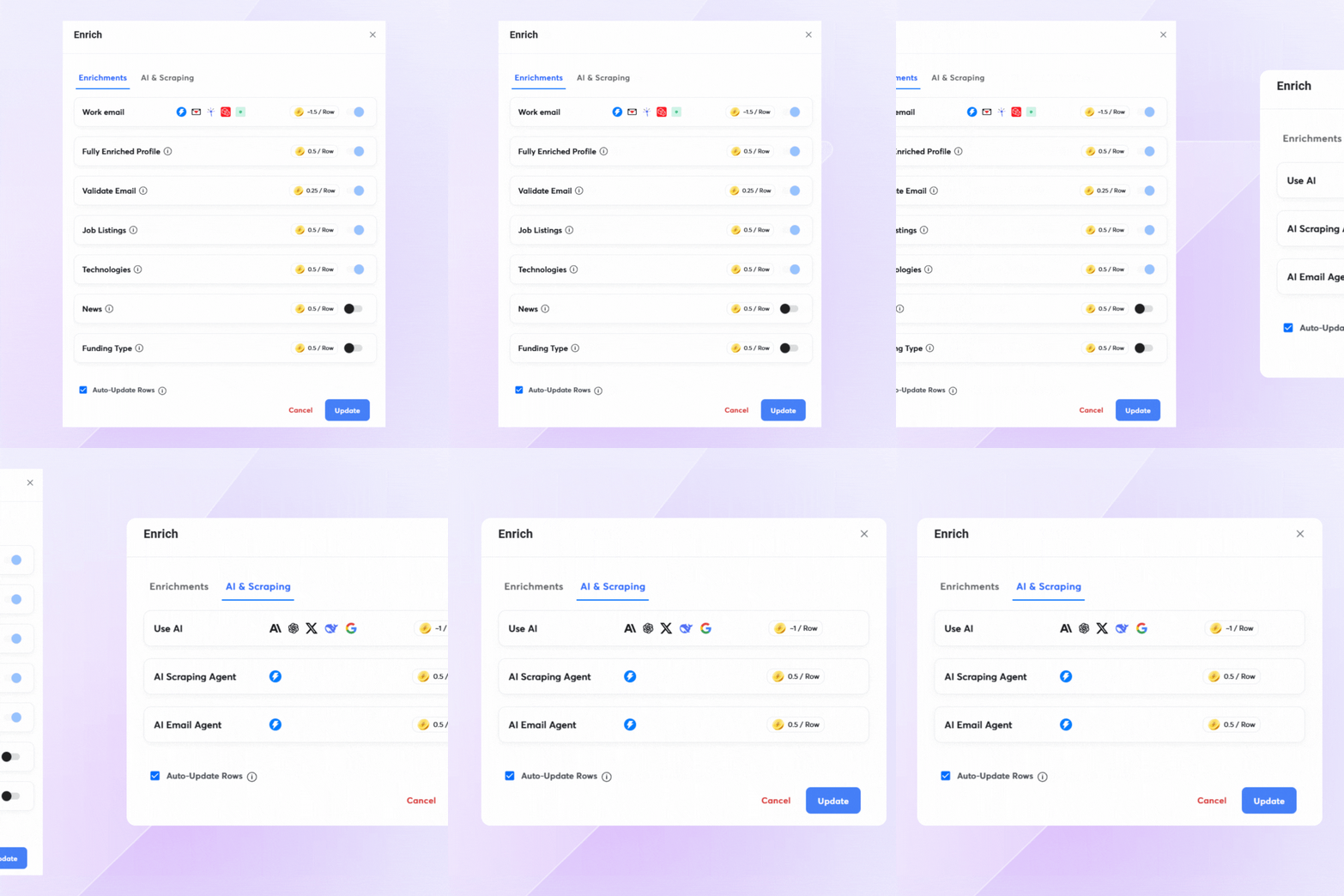
Then layer on enrichment with SuperSearch to pull in additional context, such as the company's activities, tools they use, or key details from their website. The result is a database where fields are both clean and rich enough to power personalization at scale.
Keep It Clean and Up to Date
Even the best email marketing databases decay. People change jobs, companies rebrand, and old addresses turn into hard bounces. If you’re not regularly cleaning and updating your data, you’ll destroy deliverability and waste sends on contacts who weren’t going to see your emails.
Instantly helps you turn list hygiene into a built-in habit, rather than a manual chore. You get:
- Email verification: Verify email addresses in campaigns or CRM lists using Instantly Credits (0.25 credits per lead) to reduce bounces and protect email deliverability.
- Duplicate detection: Instantly checks for duplicates during upload, both within the original file and (optionally) across your entire workspace.
- Lead data management and enrichment: You can manually update lead information in the Leads section or CRM panel, or use Enrich & AI in CRM Lists or Campaigns.
- Filtering and cleanup: Filter leads by verification status (Valid, Risky, Invalid) to quickly remove or suppress bad contacts.
- Global status synchronization: Lead statuses are automatically synced across all campaigns. Once a lead is contacted, replied to, bounced, or unsubscribed in one campaign, the status updates accordingly in all other campaigns.
The Importance of Segmenting Your Email Marketing Database
Once your database is clean and enriched, segmentation begins to yield results. Instead of one gigantic list, you slice it into smaller groups based on who they are, what they care about. Remember, different stakeholders have different metrics for success.
Let’s say you’re building a list of B2B SaaS CEOs. Some have just received funding, others are currently hiring for specific positions, and a handful may’ve recently been promoted. You can create different value propositions for each one to personalize outreach further. Here’s how you do just that:
Turn ICP and Buyer Personas Into Filters and Tags
Defining your ICP and buyer personas is step one. The real leverage comes when you can query them on demand. That means turning all those traits into actual fields, filters, and tags inside Instantly, so you can pull up the exact slice of your market you want to target.
On Instantly, you can do this directly inside the Campaign → Leads tab or CRM → All leads using layered filters:
- Variables/Data Fields: Filter by custom variables such as company, title, location, industry, company size, or persona.
- Status filters: Segment by engagement status, like replied, opened, clicked, unsubscribed, bounced, contacted, or not yet contacted.
- Custom conditions: Create behavior-based segments like “opened 3+ times in the last 7 days” or “clicked but never replied.”
- Lead owner: Filter by assigned owner to route segments to specific reps.
- Email provider: Filter by email provider (Google, Microsoft, Zoho, Yandex, etc.) when you want to compare performance or test deliverability.
Then you turn all of that into a living system with tags and labels:
- Custom lead labels: Use labels such as “Interested,” “Not a fit,” or “Follow up later” to reflect your sales process accurately.
- AI-powered tagging: Automatically tag replies as interested, not interested, or out-of-office using AI in your sales pipeline, so hot segments are always easy to find.
Segment by Funnel Stage and Intent
Cold leads need more context, problem framing, and social proof. High-intent inbound leads need more precise next steps and stronger, more direct CTAs.
Customers need expansion, upsell, or referral offers, not basic intros. Your database should clearly indicate who belongs to which group. So, your next job is to separate people by how “warm” they are:
- Cold outbound leads (e.g., added from Instantly SuperSearch)
- Engaged but not converted (opened, clicked, replied, but no meeting)
- High-intent inbound (demo requests, trials, pricing page visitors)
- Existing customers and past customers
Segment by Source and Channel
Segmenting by source or channel makes it easier to reference the proper context in your copy (“you joined our webinar on…”, “we met at…”, “you’re using {{tool}} already…”), and to track which channels are actually creating pipeline instead of just email addresses.
Where someone came from often hints at what matters to them. Break out segments by source:
- SuperSearch / outbound lead generation
- Content downloads and webinars
- Referrals and partner programs
- Events and conferences
How to Leverage AI When Building an Email Marketing Database
AI doesn’t replace the fundamentals of a good email marketing database. It only streamlines tedious parts like cleaning fields, enriching records, tagging leads, and creating personalization that you can actually use in campaigns.
Use AI to Automate Cleanup You’d Never Do Manually
You’ve already seen how important it is to standardize fields like company, title, and location. AI is what enables you to do that at scale without spending all day in spreadsheets. On Instantly, enrichment and AI turns those cleanup rules into a repeatable workflow:
- Normalize naming conventions: Turn variations like “Acme Inc.” / “Acme, Inc” / “Acme Software Solutions” into a single clean value you actually want to show in {{company}}.
- Simplify noisy job titles: Collapse “Head of Global Business Development, EMEA” into a usable role like “Head of Business Development” for segmentation and copy.
- Fill or fix missing fields: Use AI to infer missing industries, regions, or persona buckets based on job title and company info.
Enrich Leads With Context
A bare email address and name are rarely enough for effective outreach. Instantly SuperSearch can pull verified B2B leads with core fields (work email, job title, company, location, LinkedIn URL), then you can layer on more details:
- Turn on Fully Enriched Profile to get contact summaries, company descriptions, and other contextual data
- Use Instantly AI Web Researcher to grab key information from a company’s website (what they do, their product focus, who they serve)
Now your database isn’t just “John, VP Sales, Company X” – it includes the kind of context you can reference in your angles and icebreakers without manually Googling every lead.
Generate Personalization Variables and Drafts With AI
Once your data is cleaned and enriched, AI helps turn that context into high-value, unique selling points. On Instantly, you can do both: create personalization variables at scale and generate complete sequences with AI Copilot.
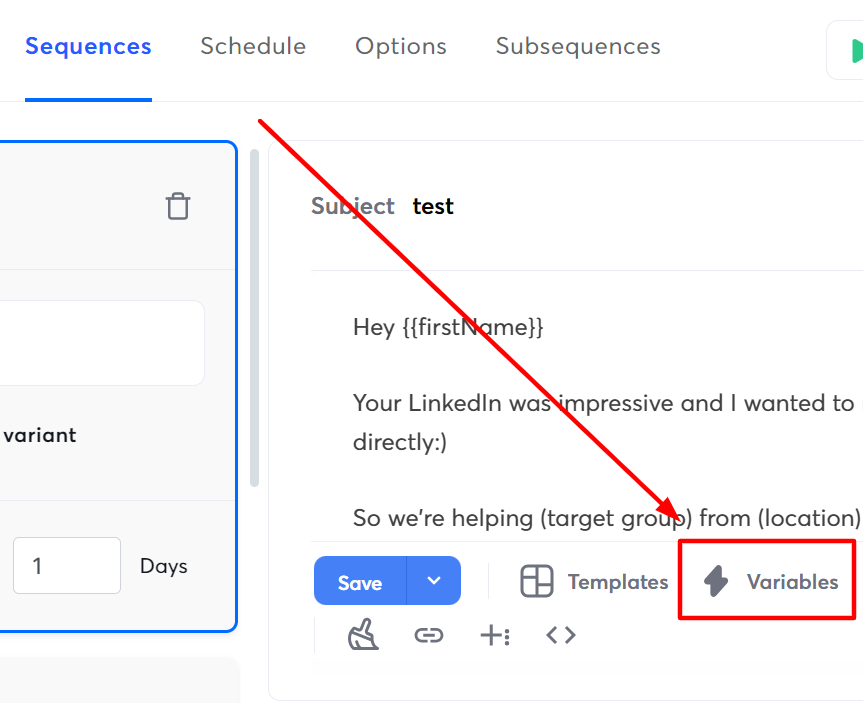
Use Enrich & AI to create reusable variables, such as {{personalization line}}, {{pain point}}, or {{reason for outreach}}, so every contact has a short, context-aware hook that you can plug into your campaigns.
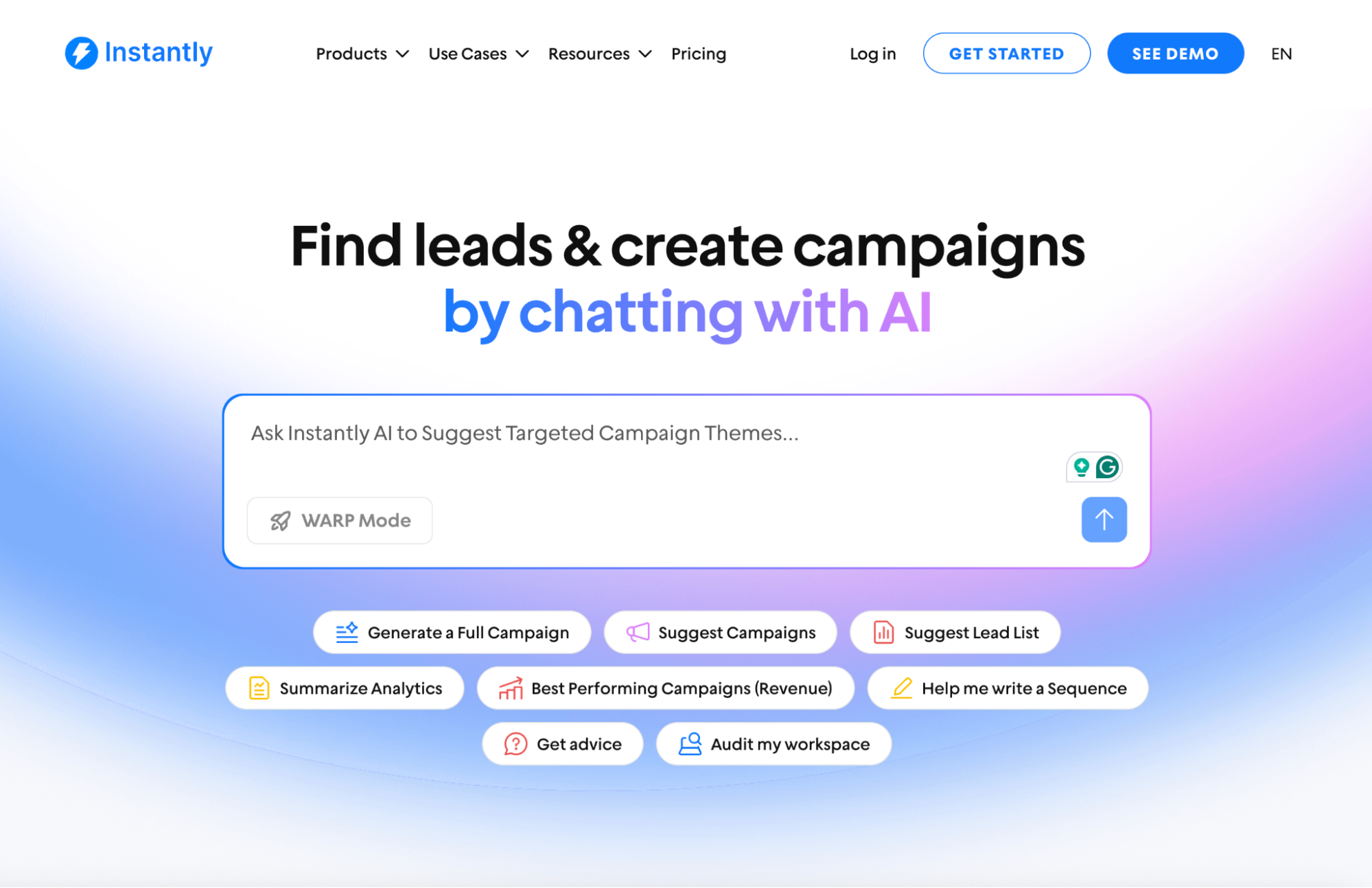
Then use Instantly Copilot when you want AI to do the heavy lifting on full emails:
- Write full sequences: Copilot can generate complete outreach flows (initial email + follow-ups) based on your business info, target audience, and messaging style.
- Flexible prompts: You can type a custom prompt or use prebuilt options, such as “Write a Sequence” or “Generate Campaign.”
- One-click campaign ready: Edit the drafts, then drop them straight into your campaign without leaving Instantly.
- Credit efficient: Generating sequences uses a small number of Instantly credits so that you can iterate on angles without a high cost.
Key Takeaways
An email marketing database isn’t meant to be a collection of names and contact information in a spreadsheet collecting dust. It’s an opportunity to provide value to your audience, and in return, gain more revenue and a more predictable sales pipeline.
If you want to build your own email marketing database but don’t know where to start, Instantly SuperSearch has all the tools you need to get up and running. Start your free Instantly trial.


