


Email providers like Google and Outlook treat every new domain as a potential threat. The email warmup process is your method for proving innocence.
It unfolds in four stages: building initial trust (~ days 1-7), scaling volume safely (~ days 8-21), reaching full sending capacity (~ days 22-30), and transitioning to ongoing maintenance.
Gradual volume increases, proper authentication, engagement tracking, and consistent sending signals all help prevent spam flags. Instantly helps simplify and automate this process for sustainable inbox placement.
Starting a new email domain isn’t as simple as sending your first campaign. Gmail, Outlook, and other email providers now treat every fresh domain like it's guilty until proven innocent.
This is a logical defense against spammers who increasingly buy domains, blast thousands of emails, get banned, then repeat the cycle with a new domain. Put differently, email providers follow a simple rule: new domain = probably spam.
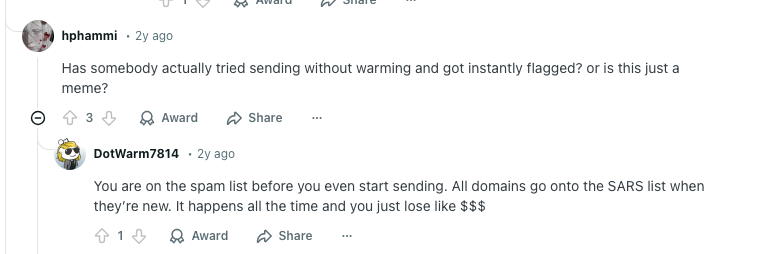
Email warmup gets around this by gradually building your sender reputation through engagement signals that prove you're legitimate. Think steady volume increases, consistent open rates, actual replies, and clean authentication.

The warmup process has four distinct stages, each with its own role in building reputation. If you skip a stage or rush through the timeline, the result will be the same: deliverability drops and your emails end up in spam.
Instantly automates this process across unlimited email accounts. But even with automation, understanding what's happening behind the scenes helps you avoid the mistakes that waste domains and ruin campaigns.
Stage 1: Building Initial Trust (Days 1-7)
The first week proves you're a real person, not a spam bot. Sending volume stays at 5-10 emails per day while Gmail and Outlook monitor your authentication, bounce rates, and engagement patterns.
Authentication setup happens first. SPF, DKIM, and DMARC records verify that you own the domain you're sending from, and email providers check these protocols on every email. Missing or broken authentication triggers immediate spam filtering, which means your warmup is building on a broken foundation.
Bounce rates get tracked closely during this stage. Hard bounces (emails to non-existent addresses) damage reputation fast. Even a 2%-3% bounce rate can land you in spam for weeks, so the target is staying under 1%.
Engagement quality matters most during week one. Five emails with 100% open rates and real replies build more trust than 50 emails that nobody opens. Email providers track these metrics in real time and adjust your reputation based on what they see.
The 5-10 email limit exists for a reason. Sending 100 emails on day one looks like spam bot behavior, while sending 5-10 looks like normal email usage for a new address. This is why the gradual approach works better than trying to scale fast.
Instantly automates this stage through a private network of 4.2 million email addresses.
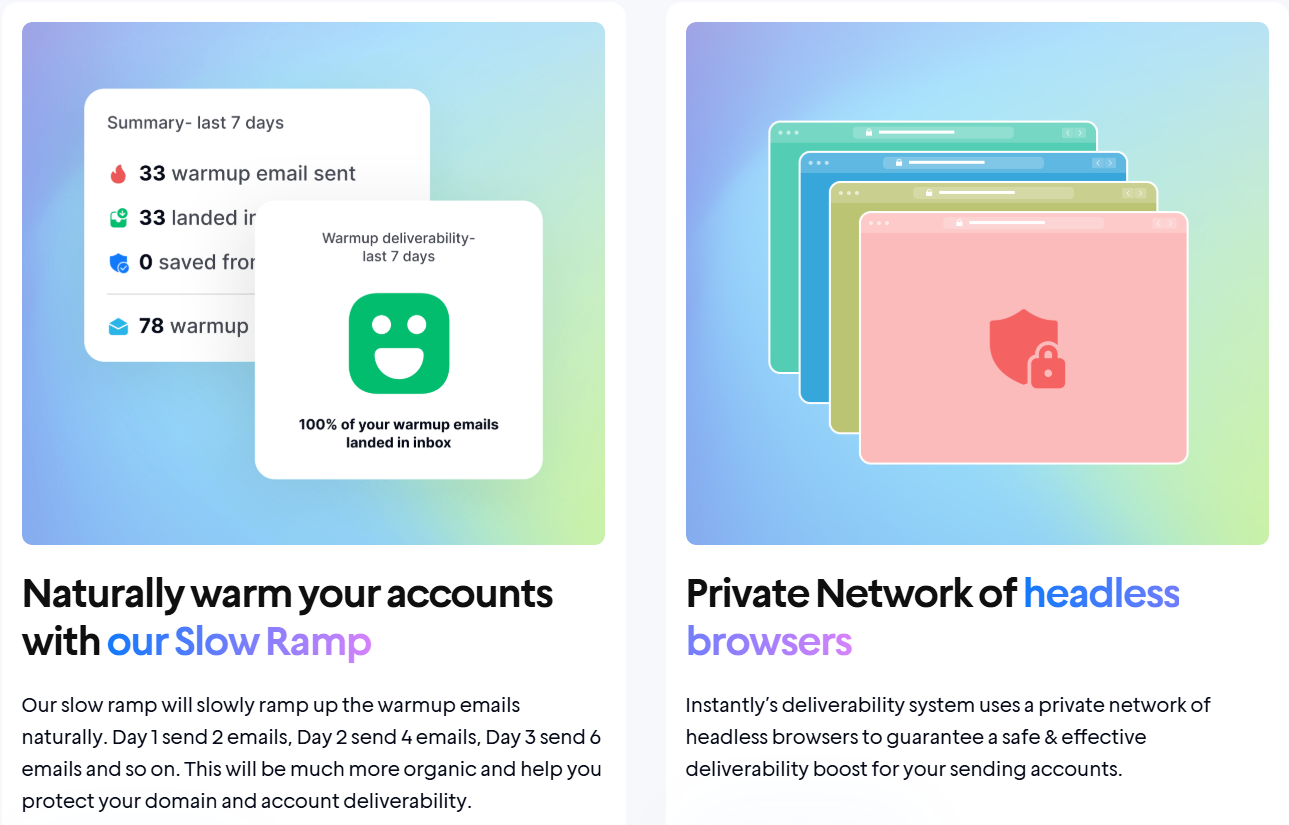
These accounts automatically open warmup emails, reply to them, and mark them as important, so there's no manual coordination needed.
Stage 2: Scaling Send Volume (Days 8-21)
Week two and three focus on building capacity. You've proven legitimacy during week one, and now it's time to increase volume without triggering spam filters.
The progression goes from 10-20 daily emails up to 40-60 by day 21, but the increase needs to happen gradually. Doubling volume overnight looks suspicious to email providers, while adding 5-10 emails every few days mimics natural growth patterns.
Send timing starts to matter during this stage. Sending all 40 emails at 9am sharp looks automated and raises red flags. That’s why you should spread your emails across business hours (typically 8am to 5pm in the recipient's timezone) to create realistic activity patterns.
Content variation helps avoid pattern detection. Using identical subject lines and email bodies for every warmup send creates a fingerprint that spam filters can spot easily. Good warmup systems rotate greetings, adjust punctuation, and vary phrasing so each email looks unique to filtering algorithms.
Engagement consistency matters even more now than it did in week one. If your open rates drop from 80% to 40% over a few days, email providers interpret this as declining quality and increase filtering accordingly. This is why monitoring metrics daily helps catch problems before they spiral.
Expect soft bounces to increase during volume expansion. These temporary delivery failures happen when recipients' inboxes are full, or their servers are temporarily down. Under 5% is normal, but anything above that signals list quality problems that need attention.
Instantly handles the scaling automatically based on your account age. Accounts under six months old ramp up by one email per day, while older accounts can handle increases of two per day.
The platform monitors inbox placement across Gmail, Outlook, Yahoo, and Apple Mail continuously, and it pauses if bounce rates spike or if emails start landing in spam.
Setup takes about 5 minutes, and you can customize daily volume, reply rates, and spam protection levels through the settings panel. The system adjusts automatically based on what's happening with your deliverability, so you don't need to manually track metrics and make changes.
Want to see how it works? This video covers the setup step by step:
Stage 3: Reaching full capacity (Days 22-30)
The final week brings you to 60-100 emails per day while keeping all the positive signals that convinced Gmail and Outlook you're legitimate.
Week three is about proving consistency. Gmail, Outlook, and other providers track 30-day rolling averages for engagement, bounces, and spam complaints. They want to see if you can maintain the quality from weeks one and two.
Your domain reputation becomes fully independent during this phase. Most email platforms use shared IPs, so you're sending from the same address as hundreds of other users. That IP carries everyone's collective reputation. Your domain reputation is different. It's entirely yours, and building it takes the full month.
Spam complaints matter more now than at any other stage. Keep them under 0.1% (one complaint per 1,000 emails) to maintain inbox placement. Cross 0.3% and aggressive filtering kicks in, potentially leading to blacklisting. This is where targeting quality becomes more important than hitting volume targets.
Expect 30%-40% open rates and 5%-10% reply rates for B2B cold outreach after proper warmup. These numbers vary based on industry and targeting accuracy, but they signal a healthy sender reputation to email providers. If you're seeing significantly lower numbers, it usually points to either targeting issues or deliverability problems that need fixing.
Authentication stays important throughout. Email providers check SPF, DKIM, and DMARC on every single send, not just during setup. A DNS change or expired DKIM key can destroy deliverability overnight, even after weeks of clean sending. Regular monitoring catches these problems before they impact campaigns.
So, how do you actually know where your emails are landing? Instantly runs inbox placement tests across Gmail, Outlook, Yahoo, and Apple Mail, then reports where your messages were delivered: primary inbox, promotions, spam, or blocked. Testing runs continuously, so any deliverability changes show up immediately.
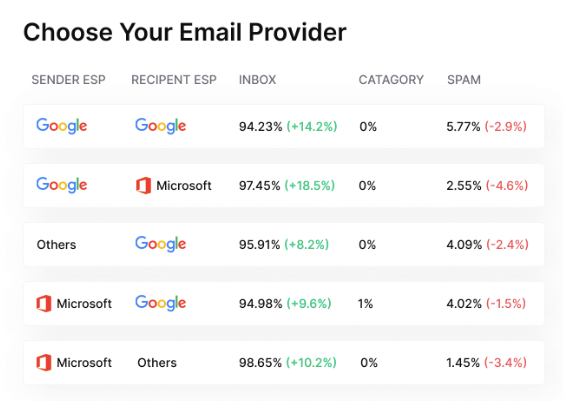
For users on Light Speed plans, the SISR infrastructure handles IP reputation automatically. The system rotates sending across dedicated IP pools, and when one IP gets flagged, it swaps to a clean one without manual intervention. This keeps deliverability steady even when individual IPs face temporary issues.
The results speak for themselves. As one Instantly user put it:

Stage 4: Ongoing Maintenance (Post-30 Days)
Warmup doesn't stop once you hit day 30. Your sender reputation needs consistent positive signals, or email providers start treating you like a stranger again.
The good news is that maintenance takes far less effort than the initial build. The hard work of proving legitimacy is behind you.
Keep warmup running alongside your actual campaigns. Most deliverability experts recommend maintaining at least 20-30 warmup emails per day, even when you're sending real outreach. This keeps engagement signals flowing during slower campaign periods and helps offset any negative interactions from cold prospects.
Watch your metrics weekly. Open rates dropping? Bounce rates creeping up? These are early warning signs that something's off, whether that's list quality, authentication, or content triggering spam filters.
Instantly's dashboard makes this easy. The warmup health score gives you a quick read on each account, so you can spot issues before they turn into deliverability problems.
Bonus tip: People assume an older domain automatically means better deliverability. It doesn't work that way. A six-month-old domain with inconsistent sending can perform worse than a two-month-old domain with steady engagement. Email providers care about recent behavior, not how long you've been around. Reputation is earned daily, not banked permanently.
Troubleshooting and Recovery
Signs your warmup isn't working
Sometimes warmup stalls without obvious errors. Your emails technically send, but something's off. Google Postmaster Tools can help here. If your domain reputation shows "Low" or "Bad" despite weeks of warmup, or if your spam rate is climbing above 0.1%, the process isn't doing its job.
Other red flags include a sudden drop in warmup email engagement or emails consistently landing in promotions instead of the primary inbox. When this happens, pause and diagnose before continuing.
How to recover a damaged domain
If your domain reputation is already in bad shape, whether from a failed warmup or inheriting a problematic domain, recovery is possible but slow. Start by stopping all outbound campaigns. Run warmup at low volumes (10-15 emails per day) for at least two weeks while monitoring Postmaster metrics. If spam rates stay high or reputation doesn't improve after 30 days, it may be faster to start fresh with a new domain than to rehabilitate the old one. Some domains just aren't worth saving.
Platform-specific considerations
Gmail, Outlook, and Yahoo don't all evaluate senders the same way. Gmail weighs engagement heavily and tracks your spam rate through Postmaster Tools. Outlook focuses more on complaint rates and has stricter filtering for new senders. Yahoo tends to be more forgiving early on, but can be aggressive with blocking once issues arise. If you're seeing deliverability problems with one provider but not others, tailor your approach accordingly rather than treating all inboxes the same.
Manual vs automated warmup
Manual warmup means sending emails yourself, tracking replies, and gradually increasing volume by hand. It works in theory, but it's tedious and hard to maintain consistently. Automated tools handle the entire process in the background, simulating real engagement at scale. For anyone warming up more than one or two accounts, automation is the only practical option. The time you save is worth far more than the cost of the tool.
Key Takeaways
Deliverability issues rarely come down to your subject lines or copy. They usually trace back to the weeks before your first campaign, when email providers were still deciding whether to trust you. Warmup is what earns that trust before you ever hit send.
The good news is that once you understand the process, it runs mostly on autopilot. The hard part is being patient enough to let it work. Here's what to remember:
- New domains start with zero trust. Gmail and Outlook assume you're spam until you prove otherwise through consistent engagement signals.
- The warmup process has four stages: building initial trust (days 1-7), scaling volume (days 8-21), reaching full capacity (days 22-30), and ongoing maintenance.
- Rushing the timeline backfires. Volume spikes, broken authentication, and high bounce rates can undo weeks of progress overnight.
- Warmup never actually ends. Keeping it running alongside your campaigns maintains the engagement signals that protect your sender reputation.
Instantly automates the entire process across unlimited email accounts, so you can focus on writing campaigns instead of babysitting deliverability. Start your free trial with Instantly and get your domains inbox-ready.


