.svg)
%20(1).svg)


Updated September 11, 2026
TL;DR: Your email bounce rate is the percentage of emails that never reach the inbox, calculated as bounces divided by emails sent, times 100. Keep it under 2% for cold email specifically, and under 5% generally, since anything higher damages your sender reputation. Bounces are either hard (a permanent failure, remove the address) or soft (a temporary issue, retry then suppress). The fastest way to lower it is to verify and clean your list before you send, authenticate your domain, and warm up new sending accounts.
What is an email bounce rate?
An email bounce rate is the percentage of emails that fail to reach the intended recipient’s inbox. It's a key performance indicator that divides the percentage of emails returned over the total number of emails sent.
With nowhere else to go, bounced emails return back to you. Marketers and entrepreneurs need to monitor email bounce rates to get a full picture of their campaign's performance.
Armed with this knowledge, teams can reevaluate email marketing efforts and adjust sending behavior to ensure that emails are seen and read by intended recipients.
Hard vs. soft bounce
When sending emails, you can encounter two types of email bounces: a hard bounce and a soft bounce. Here is how they differ and what to do about each:
| Bounce type | What it means | Common causes | What to do |
|---|---|---|---|
| Hard bounce | A permanent sending failure | Invalid or non-existent address, a blocked sender, or broken authentication | Remove the address immediately. It will not recover. |
| Soft bounce | A temporary, fixable delivery issue | A full inbox, a server outage, a message that is too large, or a spam filter | Retry later. If it keeps soft-bouncing, suppress it |
A hard bounce is permanent and the address should be removed on sight, while a soft bounce is temporary and worth one or two retries before you suppress it. If all your emails hard bounce, your authentication protocols are likely misconfigured or your sending reputation is damaged.
Encountering these email bounce-backs can indicate underlying email list quality issues. If left unchecked, this can obstruct your ongoing email marketing efforts.
Encountering these email bounce-backs can indicate underlying email list quality issues. If left unchecked, this can obstruct your ongoing email marketing efforts.
How do email bounce rates affect outreach?
To ensure business continuity, you must be proactive and keep your email bounce rate as low as possible. Neglecting this metric can lead to poor cold outreach outcomes, including the following:
- A lower sending reputation: A high bounce rate can reveal to email service providers that you’re sending emails en-masse in a spammy fashion. This can cause them to lower your email volume sending limits and potentially blacklist your IP.
- Lower customer engagement: As your email bounce rate increases, other KPIs like total click-through rates and open rates decrease. This can impede company-set milestones and slow your marketing efforts to a crawl.
- Inefficient resource allocation: Bounced emails often take up a chunk of your already-limited daily sending volume. This stretches your email cycle, increases unproductive hours, and entails a higher cost per customer.
- Reduced profitability: With poorer-quality leads in your email list, you’ll expend more resources to send these emails. This can lead to longer campaign cycles and increased marketing costs, lowering this marketing stream’s ROI.
If you’re suffering from these outreach problems, the best course of action is to halt the campaign for a few weeks.
During this time, diagnose the problem and consider warming up a new set of email domains to start with a clean slate. Cleaning your list can improve your email reputation in the long run.

How to calculate email bounce rate
Calculating email bounce rate is easy. The email bounce rate formula is bounced emails divided by total emails sent, times 100.
Here’s a visual and a step-by-step guide on how to do it:
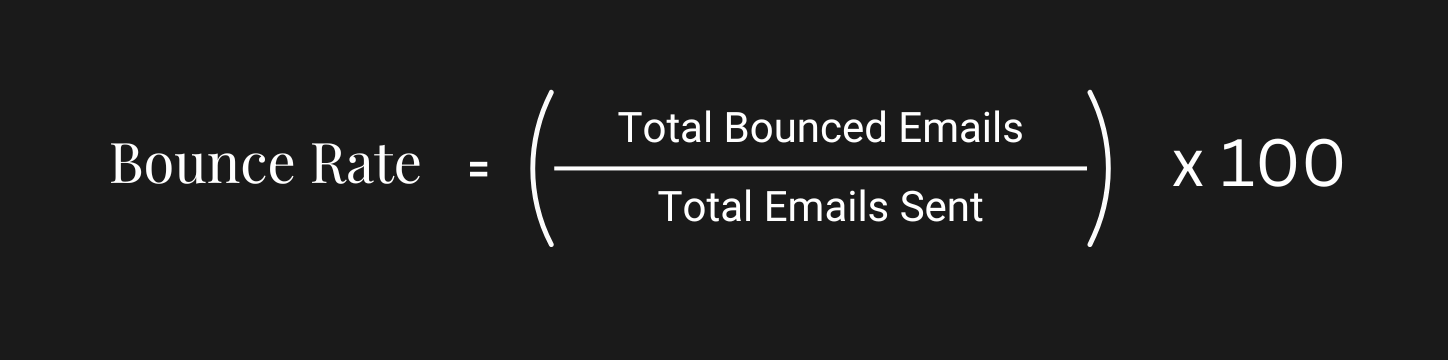
- First, sum your soft and hard bounces.
- Divide the bounced emails with your total emails sent during the period.
- Multiply the value by 100 to get the percentage.
Let’s imagine that you have sent 1,000 emails on a typical workday. Twenty of these emails have bounced back to your email address—with 15 of them being hard bounces and five of them being soft bounces.
Given this information, your email bounce rate would be twenty over one thousand leads—or 2%.
Fortunately, you don’t have to compute these figures in your head all the time. Cold email marketing tools like Instantly come equipped with a detailed Analytics dashboard that tracks the most popular email KPIs, such as open rates and reply rates. Instantly also has a filter option to track bounced emails and auto add them to your block list. This can help keep your domain’s reputation safe.
What is a good email bounce rate?
Regardless of your industry, you should seek to maintain an email bounce rate of 2% or less. An email bounce rate between 2% and 5% is still acceptable, but may suggest some email list hygiene issues.
Anything over 5% can be detrimental to your sending reputation in the long run. If your bounce rate exceeds that critical threshold, then email service providers may find your domain untrustworthy. This could ending up in spam folders or not getting sent at all.
For cold email specifically, aim even lower, under 2%. Cold outreach sends to unengaged, unverified addresses, so mailbox providers watch bounce rates closely, and a spike above that can throttle a new domain fast.
What causes a bad bounce rate?
- Purchasing email lists: If you have bought your emails from a list seller, then you’ll end up having to sort through a large number of invalid and dormant email addresses.
- Failing to clean your email list: Failure to validate your lead’s legitimacy can lead to a high bounce rate. Use third-party tools to remove invalid email addresses.
- Triggering spam words: You may have inadvertently incorporated spam words into your email content,, which resulted in the email being flagged.
- Sending too much in too little time: A high sending frequency to a large volume of emails can set warning alarms to ESPs, causing them to return your emails. Read this if you want to know how to boost sending limits.
- Repeatedly experiencing hard and soft bounces: Sending to dormant, blocked, and full inboxes regularly can tarnish your sending reputation and increase your bounce rate.
How to improve email bounce rates
You know what causes a bad bounce rate. Now fix it. Start with double opt-in, clean list hygiene, domain authentication, and a strong sending reputation.
Use double opt-in methods
Implement double opt-in methods on websites and social media pages to verify email addresses and confirm subscriber intent. This double confirmation ensures you won't have disengaged people on your list.
Verify and clean your list
Maintaining list health involves vetting your list and showing the door to uninterested and bad leads, like dormant and invalid accounts. Unless you’re only dealing with a few dozen email addresses, refrain from cleaning your list manually.
Instead, automate the list-cleaning process using email marketing software to remove email addresses that bounce, are invalid, or don’t respond to you. People move on from emails fast, so do this routinely—once a year is the minimum.
Authenticate your domains
Before sending in bulk, authenticate your email’s domain with SPF, DKIM, and DMARC records. It’s also recommended that you use a @domain.com email rather than a personal one, like @gmail.com.
An authenticated domain lowers your email’s chance of ending up in the spam folder. Plus, it’s essential for keeping a sound sending reputation even once you begin ramping up your sending volume.
With an authenticated domain, your email will look more legitimate in the eyes of ESPs, improving your chances to land on your recipient’s primary inbox.
Establish your sending reputation
Your sending reputation isn’t a number handed out to marketers by Google, but, it can increase and decrease. Most of maintaining a good reputation has to do with your content.
To improve your email content, try this:
- Create personalized emails
- Use compelling subject lines.
- Use a tone that’s a right fit for your brand.
- Warm up your domains.
- Make it easy for people to unsubscribe.
Avoid spam label
A single subscriber has a lot of influence on your email's deliverability. If your spam complaint rate rises above 0.1%, meaning more than one person in 1,000 marks your content as spam, inbox placement starts to degrade. Above 0.3%, providers begin rejecting your mail outright.
Frequently asked questions about email bounce rates
What is a good email bounce rate?
A good email bounce rate is 2% or less. Between 2% and 5% is acceptable but signals list-hygiene issues, and anything above 5% damages your sender reputation. For cold email, aim for under 2%.
What is the difference between a hard bounce and a soft bounce?
A hard bounce is a permanent failure, usually an invalid or non-existent address, and the address should be removed for good. A soft bounce is a temporary issue, like a full inbox or a server outage, and is worth a retry before you suppress it.
How do you calculate email bounce rate?
Divide the number of bounced emails by the total emails sent, then multiply by 100. For example, 20 bounces on 1,000 sent is a 2% bounce rate. Count both hard and soft bounces in the total.
What bounce rate is too high for cold email?
For cold email, a bounce rate above 2% is a warning sign. New domains are especially fragile, so verify your list before every send and pause a campaign if bounces spike.
Key takeaways
To ensure high email deliverability, it's crucial to minimize your email bounce rates. Allowing emails to land in spam is not an option. Here's how to manage it:
- Identify if your bounces are hard or soft, and address them accordingly.
- Aim to keep your email bounce rate under 2% for cold email, and under 5% overall. Utilize tools for monitoring and reducing it.
- Regularly cleanse your email list, confirm the validity of your subscribers, and steer clear of spam-triggering content to preserve a healthy email bounce rate.
- Use automation to create and send high-quality emails that reach the primary inboxes of your list.
- Warm up your domains with Instantly.



