


ESP (email service provider) matching gives cold emails a higher chance of landing in your prospects’ primary inboxes. It works by aligning your sending domain with the infrastructure your prospects’ email providers already trust.
That’s why Instantly built features and tools to ensure campaigns match your prospects' ESP. Our users get improved inbox placement because Gmail accounts send Gmail leads, Outlook accounts send to Outlook leads, and so on (more on this later).
But there’s more to ESP matching than connecting domains. This short guide explores the difference between ESP and simple domain matching. We’ll also walk through enabling ESP matching at the campaign and workspace level and pro tips from our cold email community.
What is Email Service Provider (ESP) Matching?
ESP matching is an email deliverability strategy that pairs your sending account with your prospect's email provider.
Instead of routing every message through a single ESP, the system ensures Gmail-to-Gmail or Outlook-to-Outlook connections happen whenever possible.
To simplify ESP matching, Instantly offers a built-in option you can toggle on at either the campaign or workspace level. At the campaign level, you can adjust settings under Advanced Options > Provider Matching.
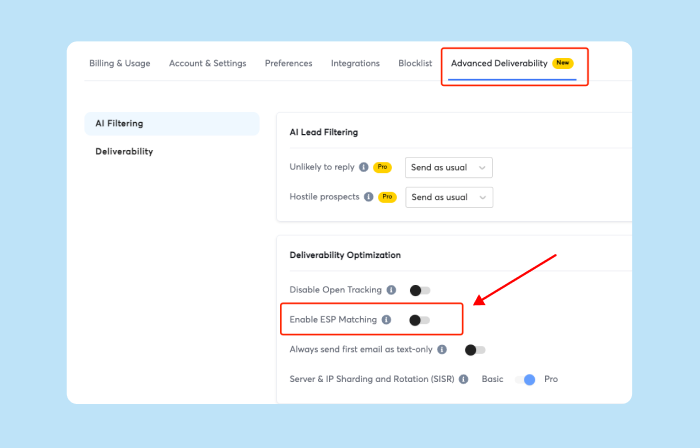
Meanwhile, workspace-level controls let you apply ESP matching across every campaign simultaneously. You can customize routing rules, so different sending accounts handle specific providers based on your sending strategy.
What’s the Best Sending Strategy for ESP Matching
ESP matching can impact the sending volume of your cold email outreach campaigns. To compensate for the reduced volume, take the following steps:
Add More Sending Accounts Across Different ESPs
Adding alternate domains is key to building a solid cold email infrastructure. If you want a broader ESP coverage, this should become a priority. However, if your data shows that most prospects use a specific ESP, you can focus on that instead.
Use Custom ESP Routing Rules to Stay Flexible
At Instantly, we know that not every campaign should follow the same sending logic. Our Custom ESP Routing gives you complete control over how emails move between ESPs.
Instead of relying only on default Gmail-to-Gmail or Outlook-to-Outlook matches, you can decide which sending accounts reach which recipient ESPs and block the ones that don’t make sense for your strategy. Here’s how ESP routing works with Instantly:
- Select which ESP sends emails to which recipient ESPs.
- Block specific routes you don’t want (for example, preventing “Other ESPs” from sending to Microsoft inboxes).
- Combine multiple rules to build exact routing strategies for different audiences and providers.
Setting Up Custom ESP Routing
- Open your target campaign.
- Go to the Campaign Options tab.
- Select Advanced Options > Provider Matching > ESP Routing.
- Create your rules:
- Pick a sender ESP (e.g., Google) and assign it to a recipient ESP (e.g., Others).
- Remove “All” from the dropdown to target specific routes only.
- Add as many rules as you need to refine delivery paths.
If you create a “Do Not Send” rule, always pair it with at least one “Send” rule to keep your campaign active. This ensures emails flow where you want them, blocking only the chosen routes.
What to do Before ESP Matching To Ensure High Deliverability
You can’t rely on ESP matching alone for deliverability. It’s an essential layer, but it works best alongside strong cold email marketing fundamentals. Before turning it on, make sure you also have the following in place:
Authentication and Email Infrastructure
Set up DMARC, DKIM, and SPF for all alternate domains, regardless of their ESP. You also need the correct DNS/PTR, TLS, and a clean sending IP address.
If you want to be hands-off with technicals, Instantly offers a Done-For-You (DFY) email setup service that handles everything, including warmups.
Domain and Inbox Warmup
After authenticating, warm up domains and inboxes for at least two weeks before a campaign. Ramp up sending volume and set realistic daily send times and limits for each inbox. With Instantly, you can warm up unlimited accounts and automate the process with a click.
Strategic List Building
If your email automation tool doesn’t support ESP matching, you can still proactively filter lead lists before launching campaigns.
Grouping contacts by their provider, like separating Gmail, Outlook, Yahoo, and custom domains, lets you decide which sending accounts should handle each segment.
Sender Reputation Monitoring
ESP matching works best when sending accounts have strong sender reputations. Monitor your accounts and have alternatives in place if one ESP starts flagging emails or if inbox placement drops.
When this happens, it’s better to focus on ESPs where accounts still perform well. With Instantly, you don’t have to guess. We provide multiple tools to help you stay ahead of reputation issues:
- Inbox Placement Feature: Check email blacklists, test inbox placement, and get detailed deliverability insights directly in your dashboard.
- Warmup Health Score: Every sending account has a health score. Scores above 90 signal a strong reputation, while scores below 85 mean it’s time to pause campaigns.
- IP Reputation Management: Our system automatically monitors IP performance, rotates high-reputation IPs, and instantly removes flagged ones.
- Domain Setup Testing: Run automated checks for SPF, DKIM, and DMARC to ensure your domain is correctly configured and protected.
Key Takeaways
With how strict ESPs have become, matching your sending accounts to your prospects’ provider is essential. As a quick recap, here are the steps you can take to ensure every campaign has ESP matching implemented:
- Use Custom ESP Routing Rules: Decide which ESPs should send to which recipients, block risky routes, and create precise strategies tailored to your list.
- Strengthen fundamentals first: Authenticate domains (SPF, DKIM, DMARC), warm up inboxes, and maintain solid list hygiene before relying on ESP matching.
- Monitor sender reputation continuously: Use Instantly’s inbox placement tests, warmup health scores, IP reputation management, and domain setup testing to spot and fix issues early.
- Scale smart: Add more sending accounts across different ESPs so campaigns don’t stall due to reduced volume from matching rules.
If you want ESP matching simplified, Instantly has all the tools to ensure you’re sending from the right domains and targeting the right providers. Start your free Instantly trial.


