


Updated December 09, 2025
TL;DR: You cannot attach large video files to cold emails without destroying deliverability. Email providers cap attachments at 20-25MB, and large files trigger spam filters. The solution is to host your video externally and use a clickable thumbnail link in your email. To measure if video outperforms text, run controlled A/B tests with split-variant campaigns. Test one variable at a time with at least 250-300 contacts per variant. Track reply rate and booked meetings, not just clicks. Video is a variable to test, not a silver bullet.
Everyone claims video increases reply rates. But does it work for your prospects? The only way to know is to test it properly.
The challenge is technical and strategic. Most email clients reject large video files outright. Gmail caps attachments at 25MB, and Outlook stops at 20MB. If you attach a 50MB video, your email bounces. Even smaller files can land in spam because attachments add weight and trigger filters.
This guide walks you through the technical workaround, the testing framework, and how to measure whether video improves your cold outreach.
Why you cannot attach large video files to cold emails
Email providers did not build email systems to handle video files.
Attachment size limits block large files
A 60-second video at 1080p can easily exceed 100MB. When you try to send it, the message fails or the video gets stripped out. Some platforms like Apple Mail offer Mail Drop for files up to 5GB or services like WeTransfer for large transfers, but both add friction by requiring third-party clicks and do not provide email-native analytics.
Large attachments trigger spam filters
Even if your video file is under the limit, it still adds risk. Spam filters scan attachments for malware and phishing. A large file slows delivery and raises suspicion. Cold email deliverability best practices recommend keeping emails as lightweight as possible to maintain sender reputation.
"I love Instantly's deliverability tools, which are the best I've encountered. Having used Salesloft, Apollo, and other tools, Instantly gives me the highest reply rate by far. The ability to send emails as text only, without HTML, significantly boosts deliverability." - Josh G. on G2
Attachments increase the chance your email gets flagged as spam. Mailbox providers prefer lean messages. If you want to land in the primary inbox, you need a different approach.
Embedded video does not work in most email clients
Most email clients, including Gmail and Outlook, do not support embedded video playback. Recipients see a broken video player or a static fallback image. This inconsistent experience makes embedding unreliable for cold outreach.
The workaround: Host videos and use thumbnail links
The universally accepted solution is to host your video externally and link to it with a clickable thumbnail image.
Upload your video to a hosting platform
Instead of attaching the video file, upload it to a cloud platform built for video sharing. Your options:
- Loom: Fast, simple screen recordings with built-in personalization, ideal for quick, authentic video messages.
- Wistia: Marketing-focused platform with detailed analytics on viewer engagement.
- Vimeo: High-quality video playback with no ads, known for professional-grade hosting.
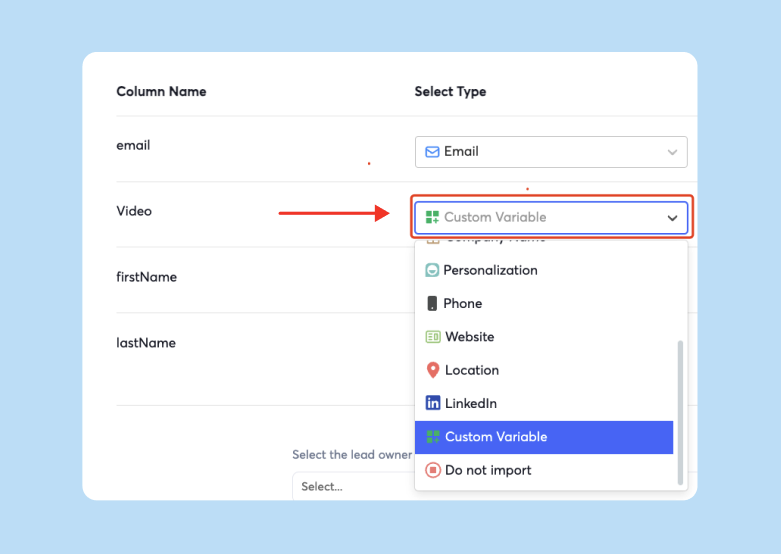
Each platform gives you a shareable link and analytics to track who watches your video and for how long. This data is critical for measuring engagement beyond the email itself. Instantly enables you to dynamically insert personalized video urls into your campaigns in just a click.

Create a compelling thumbnail image
Your thumbnail is the first visual impression of your video. It determines whether the recipient clicks. A well-designed thumbnail can significantly increase click-through rates.
Best practices for thumbnails:
- Use high-quality images: A screenshot of an engaging moment from your video works well.
- Add a play button overlay: Adding a play button icon creates the illusion of an embedded video and signals clickable content.
- Consider an animated GIF: A short, animated GIF can be more dynamic than a static image, potentially leading to higher click-through rates. Keep the file size under 1MB to avoid slow loading times.
Link the thumbnail to your hosted video
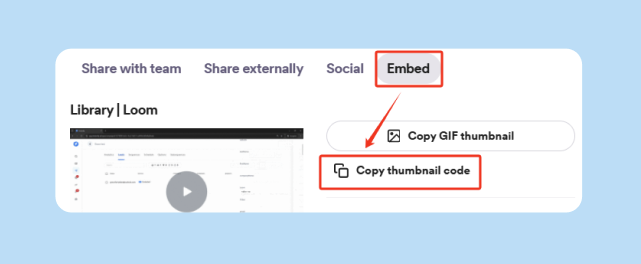
Embed the thumbnail image in your email body and link it to the video URL. When a recipient clicks the image, they are directed to the hosting platform to watch the video. This approach works across all email clients and gives you full control over the viewing experience.
Here is a comparison of your options:
| Method | Pros | Cons | When to Use |
|---|---|---|---|
| Cloud Storage (Google Drive, Dropbox) | Easy to upload, free tiers available | No analytics, generic viewing experience | Quick internal tests or backup hosting |
| Video Platforms (Loom, Wistia, Vimeo) | Built-in analytics, professional playback, engagement tracking | Paid plans for advanced features | Cold outreach campaigns where you need engagement data |
| Compression Tools (Handbrake, Compresto) | Reduces file size for faster loading | Extra step, potential quality loss | When video host limits are restrictive |
Framework: How to A/B test video vs. text
A/B testing is how you prove whether video improves results. The process requires discipline. Test one variable at a time, use a large enough sample, and track the right metrics.
Step 1: Isolate the variable
Your test should change only one element between the two versions. If you test a video thumbnail in Variant A and also change the subject line, you will not know which change drove the difference in performance. To get clear results, your A and B versions should be identical except for the one element you are testing.
Step 2: Create Variant A (the control)
Variant A is your baseline. Write a short, value-driven email with no video. Keep the message under 100 words. State your value proposition clearly and include a single call-to-action, such as "Are you open to a 15-minute call?"
Step 3: Create Variant B (the video link)
Variant B is identical to Variant A except it includes your video thumbnail and link. Place the thumbnail early in the email, ideally after one or two lines of text. Keep the surrounding copy the same.
Example structure for Variant B:
Hi [First Name],
I noticed [specific observation about their company]. I recorded a quick 45-second video showing how we helped [similar company] solve [specific problem].
[Video Thumbnail Link]
Would you be open to a short call next week?
Step 4: Determine your sample size
Aim for at least 250-300 contacts per variant. Smaller samples can produce misleading results. Larger samples give you confidence that the difference in performance is real, not random chance. After your test runs, use an A/B testing calculator to confirm the difference is statistically significant at 95% confidence before declaring a winner.
Step 5: Run the test for at least 5-7 days
Give your test time to collect data. Send the variants over several days to account for different time zones and email checking habits. If you send everything on a Monday morning, you miss recipients who only check email later in the week.
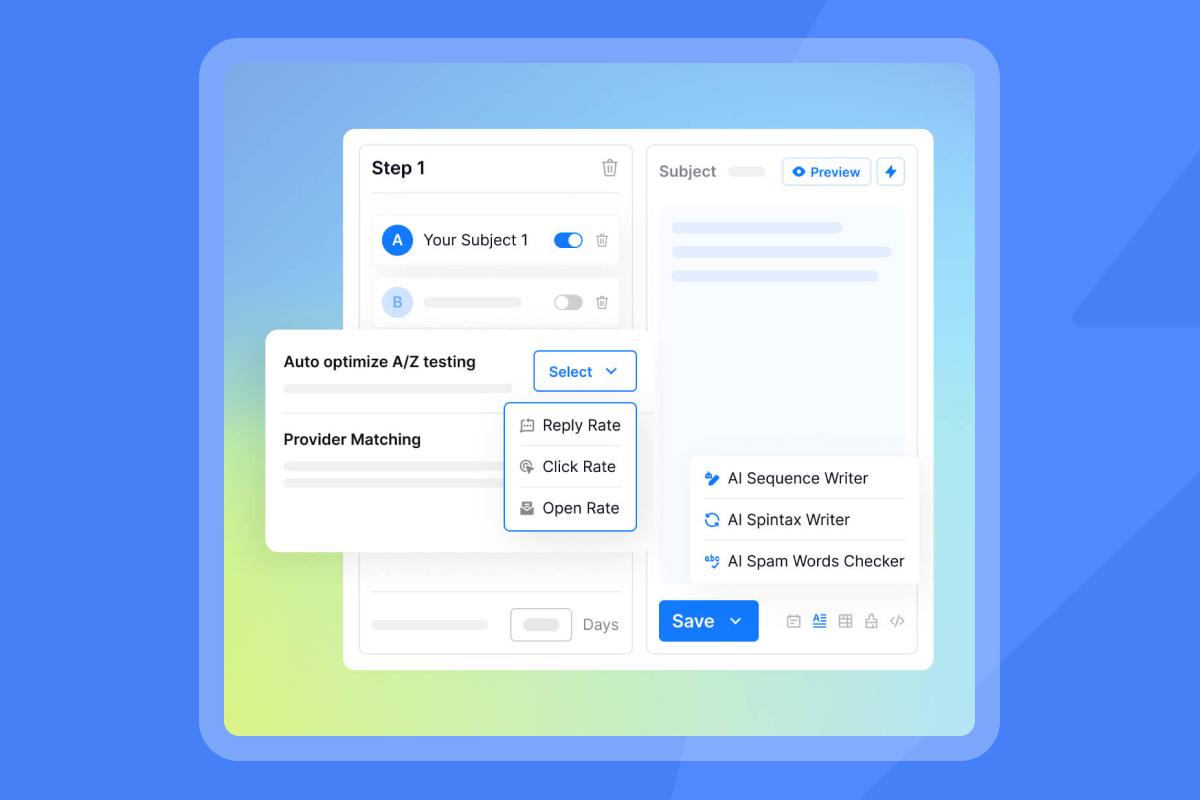
Watch how Instantly enables you to A/Z test at scale, coupled with AI to give you significant testing scale in a data driven manner.
Quick video content checklist
Your test results depend on video quality. Keep these practices in mind:
- Keep it short: 30-60 seconds maximum. State your value proposition in the first 10 seconds.
- Personalize the opening: Address the prospect by name or show their company website in the first frame.
- Clear call-to-action: End with a specific next step like "Reply to book a 15-minute call."
- Authentic over polished: Good lighting and clear audio matter more than studio production. Smile and be yourself.
- Lead with value: Share a quick analysis, useful tip, or insight before pitching.
Watch Alex Hormozi's brutally honest cold email advice for more on leading with value.
Setting up video A/B tests in Instantly
We built A/Z testing to make it easy to test video against text in a single campaign. The platform automatically splits your audience and tracks performance for each variant.
Step-by-step setup:
- Create your campaign: In Instantly, navigate to Campaigns and create a new campaign. Name it something descriptive like "Video Test - [Month]."
- Enable A/Z testing: In the campaign editor, click on the A/Z Testing tab. This allows you to add multiple variants to a single email step.
- Write Variant A (text only): In the first variant, write your control email with no video. Keep it short and focused. Include your call-to-action.
- Write Variant B (video link): In the second variant, copy your text from Variant A and insert your video thumbnail image. Link the image to your hosted video URL.
- Set your sample size: Upload your contact list. Instantly will automatically split the list evenly between the two variants. For a valid test, aim for at least 500 total contacts (250 per variant).
- Monitor inbox placement: Before launching, check your inbox placement metrics to confirm emails land in the primary inbox. Poor deliverability will skew your results.
- Launch the campaign: Send the emails. Instantly will distribute the variants randomly to maintain test integrity.
For a full walkthrough of our features, watch this complete tutorial on Instantly AI.
Key metrics to track and interpret
Track the right metrics to separate signal from noise. Do not stop at open rates. Measure engagement and business outcomes.
Click-through rate (CTR)
CTR measures the percentage of recipients who clicked the video link. This is your primary metric for evaluating the thumbnail's effectiveness. CTR directly measures how compelling your video thumbnail and call-to-action are.
If Variant B (video) has a significantly higher CTR than Variant A (text), the video thumbnail is capturing attention. But clicks alone do not guarantee meetings.
Reply rate
Reply rate is often the ultimate goal for cold outreach. It tells you whether the message was persuasive enough to elicit a response. Track the ratio of positive replies to total emails sent.
If Variant B has a higher CTR but a lower reply rate than Variant A, the video is attracting clicks without driving conversions. In that case, fix the video content or tighten the surrounding copy.
Video engagement metrics
Most hosting platforms provide analytics on how your audience interacts with the video. Key metrics include:
- Play rate: The percentage of people who landed on the video page and clicked play.
- Watch time: How long, on average, viewers watched your video. A high drop-off rate in the first few seconds may indicate that your intro is not engaging enough.
Booked meetings rate
For many cold email campaigns, the primary objective is to book a sales meeting. Track the percentage of emails sent that result in a booked meeting. This metric connects your email and video performance directly to business outcomes.
Interpreting your results
Once your test has run for at least 5-7 days and collected data from 250+ contacts per variant, analyze the results.
- Check statistical significance: Use an A/B testing calculator to confirm that the difference in performance is not due to random chance. A 95% confidence level is standard.
- Compare primary and secondary metrics: If Variant B has a higher CTR but Variant A has a higher reply rate, the video may be attracting the wrong audience. Optimize the video content or the targeting.
- Document your findings: Keep a record of every test. Note your hypothesis, the variants, the results, and your conclusions. This documentation becomes a valuable resource for future campaigns.
For more on tracking and improving reply rates, read how to calculate cold email reply rates.
Technical quick reference: File sizes and fallbacks
Optimize your files for fast loading and plan for edge cases.
Recommended file sizes
| File Type | Maximum Size | Notes |
|---|---|---|
| Thumbnail images (JPG, PNG) | Under 100KB | Ensures fast loading on all connections |
| Animated GIFs | Under 1MB | Keeps email load times fast across devices |
| Linked video clips | Under 10MB | 720p or 480p resolution keeps files small |
Outlook GIF fallback
Some Outlook versions only display the first frame of a GIF. Ensure your first frame is a compelling static image with a clear play button and call-to-action.
For more on deliverability and safe scaling, watch our guide on how to avoid your emails going to spam in 2025.
How Instantly helps you test video safely at scale
Video adds deliverability risk. Links and images in your emails can hurt sender reputation if you do not warm up properly or if your emails land in spam. We protect you with built-in safeguards:
- Automated warmup: We warm up your inboxes automatically using our deliverability network of 4.2M+ accounts. This builds sender reputation before you start sending production emails.
- Inbox placement testing: Run automated tests to see where your emails land across Gmail, Outlook, and other providers. If your video emails start going to spam, you know immediately.
- Unlimited email accounts: We allow unlimited sending accounts on a flat fee, so you can scale your video tests across multiple inboxes without per-seat penalties.
- A/Z testing: Run clean, controlled tests of video vs. text in a single campaign. We automatically split your audience and track performance.
"Instantly has completely transformed our email outreach. The platform is super intuitive, easy to set up, and makes it simple to manage multiple domains and inboxes at scale. Deliverability is great and the analytics give us exactly what we need to optimize campaigns quickly." - Shaiel P. on G2
Ready to test video in your cold outreach? Start a free trial with Instantly and use the A/Z testing feature to find your winner this week.
FAQs
Can I use YouTube links in cold emails?
Yes. YouTube links work, but YouTube pages include suggested videos and ads that distract recipients. For professional outreach, use a dedicated platform like Loom or Wistia for cleaner viewing and better analytics.
What is the minimum sample size for a valid A/B test?
Aim for at least 250-300 recipients per variant. Smaller samples can produce misleading results. Use an A/B testing calculator after your test runs to confirm the difference is statistically significant at 95% confidence before declaring a winner.
How do I know if my video is hurting deliverability?
Monitor your inbox placement tests and bounce rates. If you see a sudden increase in spam folder placement or bounces after adding video, pause the campaign. Check that your thumbnail image is under 100KB and that you are not using too many links. Run a placement test with and without the video to isolate the issue.
Should I include video in the subject line?
Test it. Some sales teams report higher open rates when they include "video" in the subject line. Run an A/B test with "I recorded a quick video for you" vs. a generic subject line to measure the impact on opens and replies for your audience.
What is the ideal video length for cold email?
30-60 seconds. Longer videos have higher drop-off rates. State your value proposition in the first 10 seconds to capture attention immediately.
Key terms glossary
A/Z Testing: Our feature that lets you test multiple email body or subject variants simultaneously within a single campaign. We automatically split your audience and track performance for each variant.
Mail Drop: Apple's feature for sending large files up to 5GB via iCloud links. Recipients can download files from any browser on any device, not just Apple Mail.
WeTransfer: A cloud-based file transfer service for sending large files. Useful for one-off file sharing but adds friction in cold outreach.
Thumbnail Link: A static image or animated GIF with a play button overlay that hyperlinks to a hosted video. This is the standard method for including video in cold emails.
Click-Through Rate (CTR): The percentage of email recipients who clicked a link within your email. For video emails, CTR measures how compelling your thumbnail is.
Reply Rate: The percentage of email recipients who replied to your email. This is often the most important metric for cold outreach, as it indicates genuine engagement.
Inbox Placement: The percentage of your emails that land in the primary inbox versus the spam or promotions folder. High inbox placement is critical for cold email success.
Statistical Significance: A measure of confidence that the results of your A/B test are not due to random chance. A 95% confidence level is standard.


