.svg)
%20(1).svg)


Updated January 19, 2026
TL;DR: Send cold emails successfully by starting with alternate domains, SPF/DKIM/DMARC authentication, and 2-4 weeks of account warmup. Find qualified leads through inbound generation, verified databases like Instantly's 450M+ B2B contacts, or manual prospecting. Write short, personalized messages focused on prospect needs with one clear call-to-action. Build simple sequences with 2-3 follow-ups, track reply rates, and remove non-responsive contacts. Instantly automates warmup, sequencing, and tracking while spintax variations protect deliverability at scale. According to our cold email benchmark report, keep bounce rates below 2%, maintain consistent sending patterns with gradual volume increases starting at 5-10 emails daily, and launch new sequences on Monday while pushing follow-ups on Wednesday for peak engagement.
Learning how to send cold emails is one of those skills that looks harder than it really is. You don’t need fancy systems or a decade of sales experience. You just need a clean setup, the right habits, and messages that sound like a human talking to another human.
When you understand the fundamentals of cold email outreach, infrastructure, targeting, copy, and sequencing, the system becomes predictable and scalable rather than a guessing game. Done properly (with alternate domains, authentication, warmup, targeted leads, personalized copy), cold email is one of the fastest, most measurable ways to fill your sales funnel consistently.
This guide walks you through everything you need to send cold emails with confidence. You’ll see how to set things up properly, how to find the right audience for your offers, and how to keep your deliverability safe while you scale, as well as a few proven cold email templates to customize for your campaigns. Instantly automates the entire process, you connect your inboxes, turn it on, and the platform builds a healthy sending reputation in the background while your outreach scales.
What is a Cold Email?
A cold email is a simple introduction. You’re reaching out to someone who doesn’t know you yet, but who has a legitimate reason to hear from you. Maybe they’ve shown buying signals on your website. Or maybe they run the kind of business you help every day.
Either way, the goal is the same: start a conversation that might lead to something useful for both sides. Everything else you’ve heard about cold email (personalization, list quality, deliverability, timing) comes from trying to make that first contact feel less like a stranger knocking and more like someone worth hearing out.
Because the person doesn’t know you, inboxes can be a tough place. A lot of cold emails get filtered out. Not because cold email is “dead,” but because most messages are impersonal or sent from poorly configured domains.
With the right setup and a little care, cold email scales cleanly. You set up your sending infrastructure, define your audience, build a simple process, and the whole system starts working in the background while you refine the messaging.
Before you get to that point, though, let’s make sure you know what sending your first cold email looks like.
Sending Your First Cold Email
If you’re sending your very first cold email, you really only need three things:
- A properly warmed sending account
- A list of people who actually need what you offer
- A message that feels like it was written for one person
Say you help local cafes with their Instagram. You find the owner of "The Corner Cup." You look at their profile. It hasn't been updated in months. Here’s what matters in that first message:
- A subject line that sounds natural and specific
- A simple, professional intro
- One or two personal details that show you did your homework
- A short explanation of why you’re reaching out
- A benefit they can picture
- A small, low-pressure next step
Rather than: "Hi, I'm a social media expert, let's hop on a call.", your email should sound something like this:
"Hi {{Owner's Name}}, I was looking at The Corner Cup's Instagram and really loved the photo of the new maple latte. It's a shame more people aren't seeing it. I put together two quick ideas for a post that could get local foodies in the door. No strings attached, just thought it might help. You can see them here: {{link}}."
See the difference? It's specific. It's about them. It offers a tiny piece of value upfront with zero commitment.
At Instantly, for instance, we take things up a notch with a spintax (Spin Syntax) feature embedded into messaging. This means you can send slightly different variations of the same email to your audience for added deliverability protection.
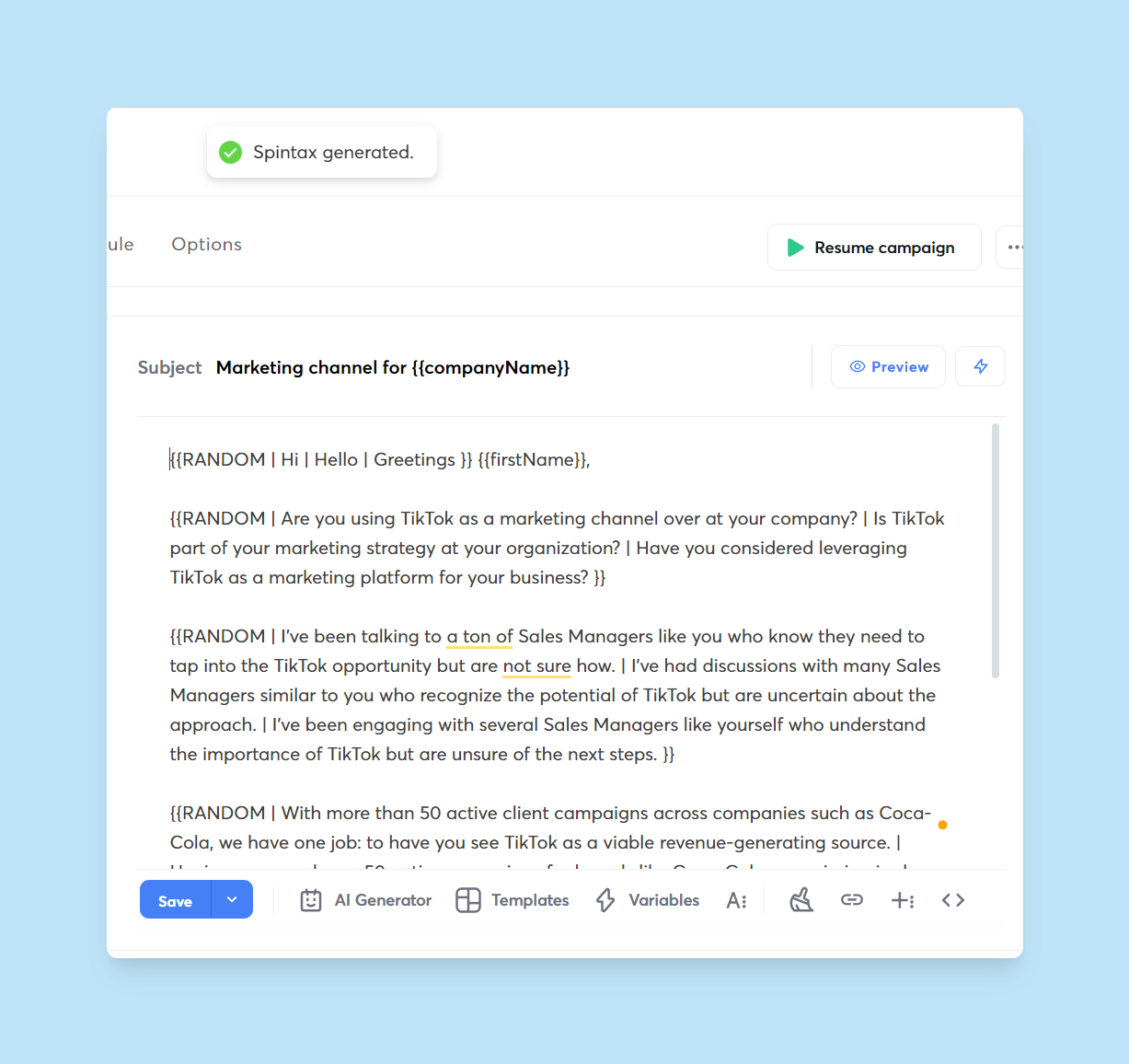
Anyone can write a message like this. Doing it for ten or twenty leads a day is manageable. But once you want steady results (real consistency, real pipeline), you’ll outgrow manual sending pretty quickly.
That’s the point when you start automating your outreach and letting software handle the repetition while you focus on improving the message and the targeting.
Prerequisites For Automating Your Cold Email Campaigns
Before you automate anything, you need a setup that email providers trust. Think of this as the “foundation phase.” If the foundation is shaky, nothing else works. If you get it right, though, you can scale safely without worrying about your domain getting flagged or your sender reputation falling off a cliff.
Below is the full setup we recommend if you want to run automated campaigns with Instantly. It looks like a lot at first, but once you’ve done it once, it’s very straightforward.
Step 1: Buy a Couple of Alternate Domains
Cold email has one golden rule: protect your main domain. Not because cold email is shady. It’s because volume, replies, bounces, and user behavior all affect reputation. You don’t want that tied directly to your primary brand domain.
So you buy two or three secondary domains. They should look clean and close enough to your brand that they don’t feel random. For example, if you run HealthyMealsDaily.com, you might grab something like TryHealthyMeals.com. These alternate domains will host your sending accounts while your main domain stays untouched.
Step 2: Create Professional Email Accounts
Once you’ve got the domains, set up a few professional email addresses on each one. Two or three per domain is standard because it lets you spread out your sending volume without stressing any single account.
Google Workspace is the easiest and most deliverability-friendly option for cold email. The setup is simple. You follow Google’s steps, verify your domain, and your inboxes are live in a few minutes. After that, you’re ready for authentication.
Step 3: Authenticate Your Domains (Non-Negotiable)
Right now, your new domains are “neutral.” They aren’t trusted yet. To fix that, you authenticate them with three key records that email providers rely on:
- Sender Policy Framework (SPF): tells providers which mail servers are authorized to send email for your domain.
- DomainKeys Identified Mail (DKIM): adds a digital signature to emails to verify their integrity during transit.
- Domain-based Message Authentication, Reporting, and Conformance (DMARC): tells receiving servers how to handle emails that fail SPF or DKIM checks and provides reporting on the results.
Every major ESP (for example, Google) has simple guides you can follow to enable all three. It’s mostly copy-and-paste work inside your DNS settings.
Once you’ve added the records, check your setup with a domain authentication checker. You’ll see whether everything is passing and whether anything still needs fixing.
One last thing: forward your alternate domains to your main website. It’s a trust signal and helps prospects confirm you’re real when they look you up. For the complete infrastructure checklist covering SPF, DKIM, DMARC setup, warmup ramp schedules, and inbox placement monitoring, see this email deliverability guide before launching your first campaign.
Step 4: Warm Up Your Sending Accounts With Instantly
Now the inboxes exist, and the domains are authenticated. But you still can’t start blasting cold emails. New inboxes look suspicious if they suddenly start sending at volume. That’s why warmup is essential.
With Instantly, the warmup process is fully automated. You connect your inboxes, turn on warmup, and Instantly starts exchanging real, positive-signal emails behind the scenes. Replies, opens, and sends build a healthy sending reputation over time.
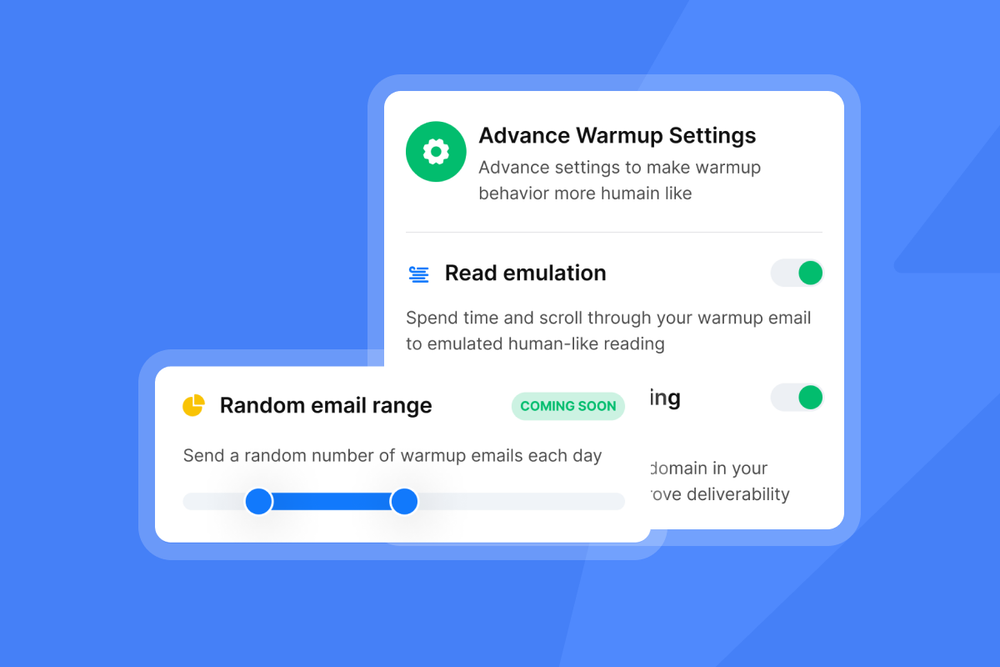
A good rule of thumb:
Warm up for at least two to four weeks before sending cold outreach. Longer is even better. And keep warmup running forever. It stabilizes your deliverability in the background while your actual outreach scales.
Once all accounts are warmed and stable, you’re ready to build your cold email sequences. But before you write a single line of copy, you need qualified leads worth talking to. That’s where we’re headed next.

How to Find Qualified Leads for Your Cold Email Campaigns
If you want your cold emails to land well, you need people who might actually care about what you’re offering. That’s where lead generation comes in. There are a few reliable ways to find the right people. For a benchmarked comparison of how the major email verification tools perform on accuracy and catch-all detection in real-world conditions, see the 2026 accuracy score breakdown before choosing a verifier.
Inbound Lead Generation
Inbound leads are the ones who already have a foot in the door. They found you through a blog post, a guide, a webinar, or something else you published because it genuinely helped them.
If you’ve ever downloaded a resource and handed over your email in return, you’ve seen this play out. Gated content works well for this. It gives people something useful and gives you permission to keep the conversation going.
Buying Leads
Then there’s the faster, more intentional route. You can buy access to verified lists through Instantly B2B Lead Database or alternative tools like Apollo and Hunter. These tools pull publicly available business data together so you don’t have to hunt for it yourself.
They’re great when you want reach, consistency, and a predictable workflow. And if they don’t match what you need, there are plenty of alternatives that focus on different niches or data sources.
Finding Leads Manually
Sometimes the most effective move is the scrappiest one. Manually finding a prospect’s email address forces you to slow down and learn about their business. You start noticing how they talk about themselves. You pick up on what they might be struggling with. That context becomes fuel for genuinely relevant outreach.
Whichever way you build your list, always verify the email addresses. A clean list protects your deliverability and saves your sending accounts from unnecessary damage. Once your list looks good, upload it as a CSV into Instantly, and you’re ready to build your sequences.
Setting Up Your Cold Email Sequences
Cold email works best when it feels like a natural conversation rather than a blast of sales messages. Instantly helps you do that by letting you set up simple sequences that move on their own based on how people respond.
Most teams stick to a short run: an initial email, a friendly reminder, and then a short “last call” message if nothing happens.
If someone still doesn’t reply after a few touches, that’s okay. Take them off the active list. Leave them with value, something small but helpful. People remember that, and some will come back months later.
Inside Instantly, the sequence builder is straightforward. Go to “My Campaigns,” open the “Sequences” tab, and start adding your steps.
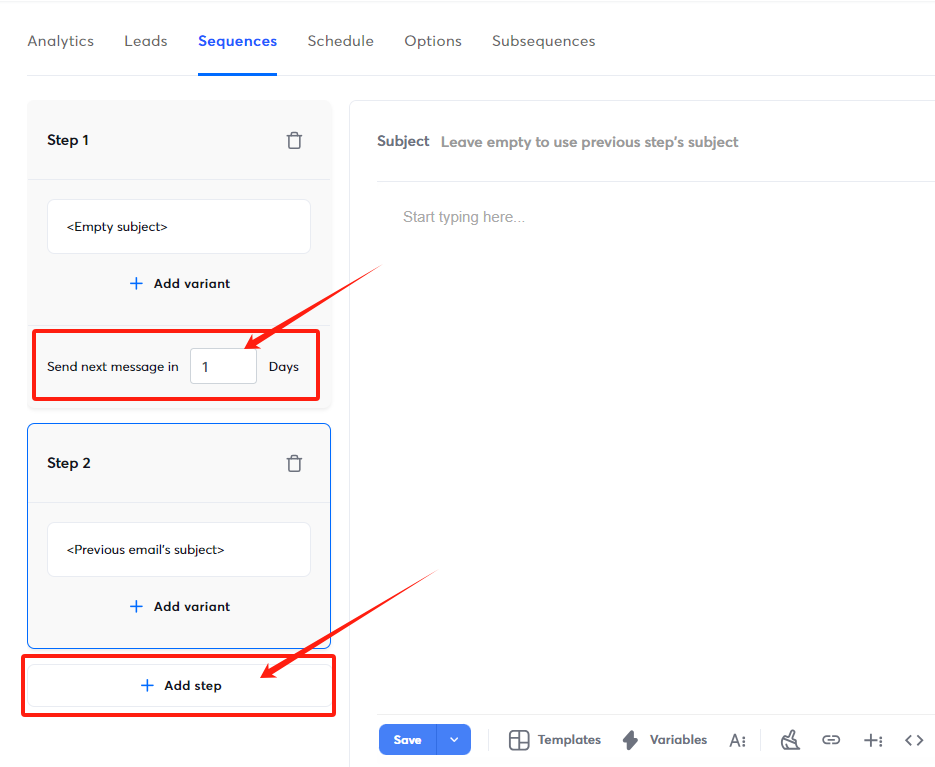
You choose the timing; Instantly handles the rest. When your structure is set, all that’s left is the fun part: writing messages people actually want to open.
Proven Cold Email Templates To Adapt
If there’s one part of your campaign that can make or break everything, it’s the copy. You don’t need poetry. You just need clarity and a message that feels like it was written by an actual person who understands the problem the reader wakes up with.
A few simple rules always help:
- Keep your copy concise and straightforward
- Personalize more than you think you need to
- Use a professional email sign-off
- Share something useful instead of listing features
- Automate the tedious bits when possible
Below are templates you can borrow, twist, or break apart. They’re inspired by emails that have actually worked in the wild. And if you want more, you’ll find a full library of ready-to-use templates on our blog.
Hyper Personalized Cold Email Template
This style only works if you slow down and look at the person you’re reaching out to. Their website. Their LinkedIn. A recent announcement. Anything that shows you didn’t just scrape their email and blast a sequence at them.
Here’s a version you can adapt:
Hey {{Name}},
Saw that you {{recently achieved goals}}. That’s a big lift. Anyone who’s done it knows how messy {{unique painpoint}} can get along the way. We’ve wrestled with that ourselves, so I get it.
That’s basically why we built a system to make that whole part easier. The workflow is simple:
{{step 1}}
{{step 2}}
{{step 3}}
It’s the same setup we used when we helped {{Company Name}} and a few others in a similar spot. If you want the full story, here’s a quick {{case study}} on {{Company A}}.
But I’m more curious about how you’re handling {{unique pain point}} right now. What’s your current process?
Best,
{{Your Name}}
“We See Something Big Here” Template
This one works because you’re speaking to possibility. People like knowing someone else can see a clear path forward for their business, especially if it’s a path they didn’t quite have words for yet.
Hey, {{Name}},
Have you ever considered {{opportunity}} for {{Prospect’s business}}? You’re closer to it than you think. I’ve helped teams in the same spot reach that goal, and here’s what moved the needle for them:
{{strategy 1}}
{{strategy 2}}
{{strategy 3}}
If you want, I can put together a quick audit showing exactly where {{opportunity}} fits into your current setup. No pressure either way. Just let me know.
Best,
{{Your Name}}
FOMO + Scarcity Template
FOMO and Scarcity play into the reality that markets shift fast. When something changes, nobody wants to be the last to react. You’re not fearmongering; you’re just naming what’s already happening.
Hey, {{First Name}},
{{Industry}} is moving fast right now with {{event}}. A lot of teams are scrambling because it’s pushing a huge shakeup across {{industry}}.
Here’s what we’re doing at {{Company Name}} to stay ahead:
{{strategy 1}}
{{strategy 2}}
{{strategy 3}}
We’ve also built a system for handling the messiest parts of {{event}}, and early results have been strong. {{Client 1}} is already seeing improvements {{link to case study}}. If you want a quick audit to see how this applies to your setup, I’m happy to share it.
Best,
{{Your Name}}
The “We Should Be Working Together” Template
Sometimes you see a business and immediately know you can help. This template is for those moments when the fit feels obvious, and you want a clean, friendly way to say it.
Hey {{First Name}},
I’m {{Your Name}}. I’ve been following your posts on {{topic}}, and they’ve been genuinely helpful. Thought I’d return the favor.
Here’s a case study we published on {{topic}}. It breaks down the exact process we used to solve {{common pain point}} for teams in {{industry}}.
With your experience and what we’ve built, there’s a real overlap between {{Your company}} and {{Prospect’s company}}.
Curious what you think of the fit.
All the best,
{{Your Name}}
Social Proof Template
When you want to build trust quickly, few things work better than showing prospects how you solved the same problem for someone just like them.
Good day, {{First Name}},
{{common pain point}} can slow a team down fast. {{Your client’s company}} dealt with the same issue for months.
Here’s what ended up fixing it:
{{Solution 1}}
{{Solution 2}}
{{Solution 3}}
Since your setup looks similar, we thought the case study we did for {{Your client’s company}} (plus three others) might help. If you’d like a clear breakdown of how this translates to {{Prospect’s company}}, I’m happy to walk you through it.
Does that sound useful?
All the best,
{{Your Name}}
Once you start sending these, keep an eye on Instantly’s analytics dashboard. Look at reply rates. Look at what surprises you. Small tweaks usually outperform big overhauls, so iterate on what’s already working instead of rewriting your whole strategy every week.
Key Takeaways
Cold email can move the needle fast when you treat it like a real system instead of a guessing game. The steps aren’t complicated, but each one matters.
Start by protecting the domain your business relies on. Pick up a couple of alternates and use those for outbound. Once they’re set up, warm the new accounts so email providers trust you. Keep email warmup running indefinitely to maintain a healthy deliverability over time.
When you’re ready to send, keep your volume reasonable. Around fifty emails a day per account is a safe ceiling, especially if you’re just getting started. Personalization should be baked into every message. Templates with {{merge tags}} help you scale this without losing the human touch.
And finally, automate what slows you down. Scheduling, tracking, warmup, sequencing, sending, follow-ups—this is the operational layer that frees you to focus on better messaging and better targeting. For a complete framework on the KPIs that reveal what's working across your sequences, reply rate, bounce rate, and step-level attribution, see this email metrics tracking guide.
If you want one place that handles all of this without friction, Instantly does the job well. Sign up for a free trial today and see how it fits into your workflow.



