


Updated October 13, 2025
TL;DR: Done-For-You (DFY) email accounts are production-ready inboxes and secondary domains that a provider sets up, authenticates, warms, and monitors for cold outreach. Good DFY services handle domain purchase, SPF, DKIM, DMARC, mailbox creation, placement testing, and ongoing health checks so your messages land in the primary inbox. The payoff is speed, safer scale, and lower risk to your main domain. Instantly adds flat-fee unlimited accounts and warmup on every outreach plan, automated Inbox Placement tests, a private deliverability network with 4.2M+ accounts, and AI tools to convert replies into meetings. Start free.
Struggling to scale cold email without getting flagged or burning domains? DFY email accounts remove the heavy technical setup so you can launch safely and keep placements steady.
This guide explains what DFY is, how setup works, who benefits most, and how top providers compare. It also shows where Instantly fits if you want predictable throughput, strong deliverability controls, and clean handoffs to your CRM.
Understanding Done-For-You (DFY)
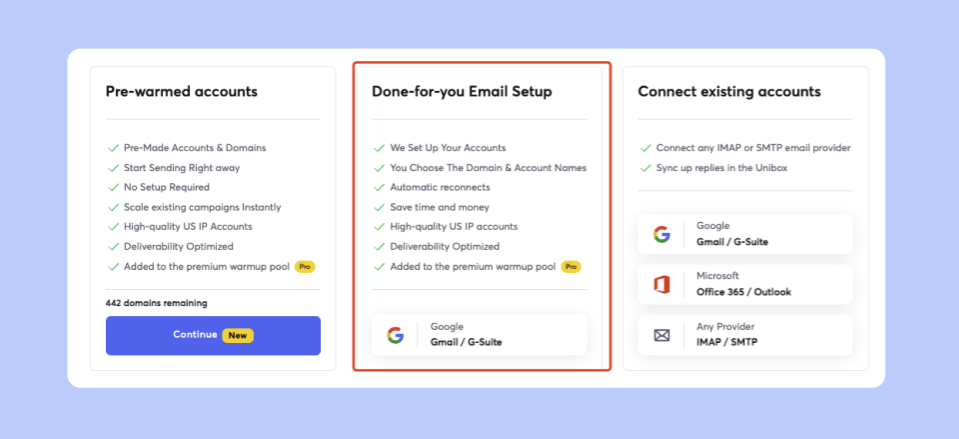
DFY email accounts are pre-configured inboxes on secondary domains that a provider prepares for cold outreach. You skip domain registrars, DNS tweaks, and manual warmup. You get inboxes that are ready to ramp.
Why this matters:
- Time savings: DFY compresses what used to take weeks into days. Typical DFY provisioning completes in 24 to 72 hours once DNS propagates and mailbox checks pass, then you warm before production sends, as outlined in the DFY setup guide.
- Deliverability: Correct SPF, DKIM, and DMARC plus systematic warmup build sender reputation. This is the difference between primary inbox and spam, as reinforced by Inbox Placement tests.
- Scalability: Adding mailboxes and domains becomes a few clicks rather than a brittle project. Instantly’s outreach plans include unlimited email accounts and unlimited warmup on a flat fee, which supports safe throughput growth.
Why manual setup often fails:
- DNS drift:A single misconfigured SPF or missing DKIM record tanks placement. Automated checks and alerts catch this early with Inbox Placement testing.
- No warmup: New domains start with no reputation. Spiking volume too soon triggers filters and blocks. See the warmup approach in scaling email warm-up.
- Risky sending patterns and data: Poor list hygiene and erratic ramps drive bounces and complaints. Aim for hard bounces at or below 1 percent and keep spam complaints far below 0.3 percent, based on ZeroBounce benchmarks.
- Brand risk: Sending cold from your main domain risks long-term reputation damage. DFY isolates risk to secondary domains, as covered on email accounts.
How DFY email account setup works: from domain to deliverability
A good DFY flow turns a blank slate into warmed inboxes you can safely ramp.
- Domain strategy and acquisition
Providers register on-brand secondary domains. These isolate cold outreach from your main domain and often forward to your primary site for consistency. Instantly can procure and connect domains as part of DFY, as explained in Done-For-You email accounts. - DNS authentication
SPF, DKIM, and DMARC are configured with alignment so receiving servers trust your mail. DFY also includes a domain setup check so errors do not slip into production. Review domain safety practices in how to use secondary domains. - Mailbox creation
Google or Microsoft inboxes are provisioned on the new domains. Providers cap mailboxes per domain to respect provider limits and distribute volume. Instantly supports connecting unlimited accounts once you are on an outreach plan, as shown in getting started with email accounts. - Automated warmup
New inboxes send and receive gradually inside a controlled pool. Messages are opened, replied to, and rescued from spam to simulate healthy engagement. Instantly’s deliverability content details this process in scaling email warm-up. - Health monitoring
Daily checks catch DNS drift, bounce spikes, blacklist hits, and placement drops. You pause, fix, and resume before damage spreads. Instantly adds automated Inbox Placement tests and alerts so you can verify inboxing before each ramp. - Integration and governance
DFY inboxes connect to your outreach platform, unified inbox, and CRM. Role-based controls, global block lists, and send windows reduce rep-level mistakes. Instantly connects to HubSpot and Salesforce natively for imports and supports activity sync through partners like OutboundSync. See connecting HubSpot and Salesforce and HubSpot sync via OutboundSync.
For a short walkthrough of the process, watch New Feature: Done-For-You Email Set Up on YouTube.
Instantly’s DFY setup targets speed with guardrails. Setup and DNS propagation take 24 to 72 hours. Responsible teams still run a warmup period of at least 2 weeks before full production sends, unless using pre-warmed accounts that are ready to launch on day one.
"Getting set up is very easy, especially with the AI copilot that helps you every step of the way" - G2 review by Antoine M.
"The platform is super intuitive, easy to set up, and makes it simple to manage multiple domains and inboxes at scale. Deliverability is great and the analytics give us exactly what we need to optimize campaigns quickly." - G2 review by Shaiel P.
Checklist: DFY setup steps
- Secondary domains: Add clean, on-brand domains for outreach.
- DNS done right: Apply SPF, DKIM, and DMARC with alignment and verify with Inbox Placement.
- Provision inboxes: Create Google or Microsoft accounts against those domains, following the DFY setup guide.
- Automated warmup: Enable continuous warmup from day one and ramp gradually, per scaling email warm-up.
- Placement testing: Run Inbox Placement checks before scaling sends and watch alerts.
- Send windows: Set narrow, local-time windows to avoid spikes.
- Ramp limits: Cap at 30 cold emails per inbox per day in production. Increase throughput by adding inboxes, not volume per inbox, as covered in unlimited email sending platforms.
- Data hygiene: Use verified contacts and keep hard bounces at or below 1 percent, guided by ZeroBounce benchmarks.
- Governance: Enforce block lists, sequence rules, and reply handling.
- CRM sync: Map replies, meetings, and lead outcomes to your CRM with OutboundSync integration.
For further details read our help docs breakdown for our DFY email option.
Choosing the right DFY email service: persona-specific needs
Different roles value different controls. Use these checklists to match features to goals.
For growth marketers: scalable testing and actionable analytics
- What you need
- A/B testing and spin syntax. Fast subject and copy tests with small variations that avoid patterns.
- Attribution that reconciles. Opens and replies are not enough. You need meetings and pipeline that map to CRM reality.
- Data quality metrics. Verified contacts, catch-all handling, and bounce prediction.
- Transparent credits. Understand how data and AI use credits.
- How Instantly maps
- A/Z testing and analytics inside outreach campaigns with send windows and throttling. Compare options in the email outreach plans guide.
- SuperSearch taps 450M+ contacts with waterfall enrichment to lower bounces and raise match rates.
- Inbox health checks with Inbox Placement to see inbox, promotions, or spam across major providers.
- Copilot and the AI Reply Agent help draft, summarize, and respond so you spend more time on high-signal prospects.
For agency operators: unlimited scale and client management
- What you need
- Flat-fee economics. Avoid per-seat or per-mailbox penalties as you add clients.
- Unlimited inboxes with warmup that scales across accounts.
- Deliverability dashboards. Domain health, placement, bounces, and pause rules in one view.
- Clear cancellation terms. No renewal games.
- Ramp plans per client with mailbox caps per domain.
- How Instantly maps
- Flat-fee unlimited email accounts and warmup across outreach plans. See the agency page for how teams scale clients.
- Private deliverability network and SISR on Light Speed to shard and rotate servers and IPs as volume rises.
- Unibox centralizes replies. Team workspaces and shared assets standardize execution across clients.
"Instantly is for me the Apple of Cold Outreach tools. Easy to use, intuitive, minimal clicks/steps to get stuff done, and things just work." - G2 review by Thomas D.
For sales leaders: team governance and CRM integration
- What you need
- Sequence governance. Guardrails on caps, send times, and approved templates.
- Audit-friendly reporting. Meetings and SQLs that reconcile with CRM.
- Admin controls. Roles, block lists, and workspace policies.
- Security posture. Clear DPA and sub-processor list.
- How Instantly maps
- Team-level standardization with global settings and analytics that stand up to a CFO review, detailed in the email outreach plans guide.
- CRM connections for HubSpot and Salesforce, plus event-level sync via partners like OutboundSync. See the HubSpot integration.
- Privacy and compliance are documented in the DPA.
- The AI Reply Agent triages and replies in under 5 minutes, with human-in-the-loop or autopilot modes.
For startup founders: cost-efficiency and quick pipeline
- What you need
- Fast time to first meeting. Production-ready inboxes and verified data cut ramp time.
- Simple pricing. Clarity on credits and no per-seat surprises.
- ROI proof. Reply and meeting benchmarks to guide investments.
- Ethical prospecting. Verified contacts and clean consent posture.
- How Instantly maps
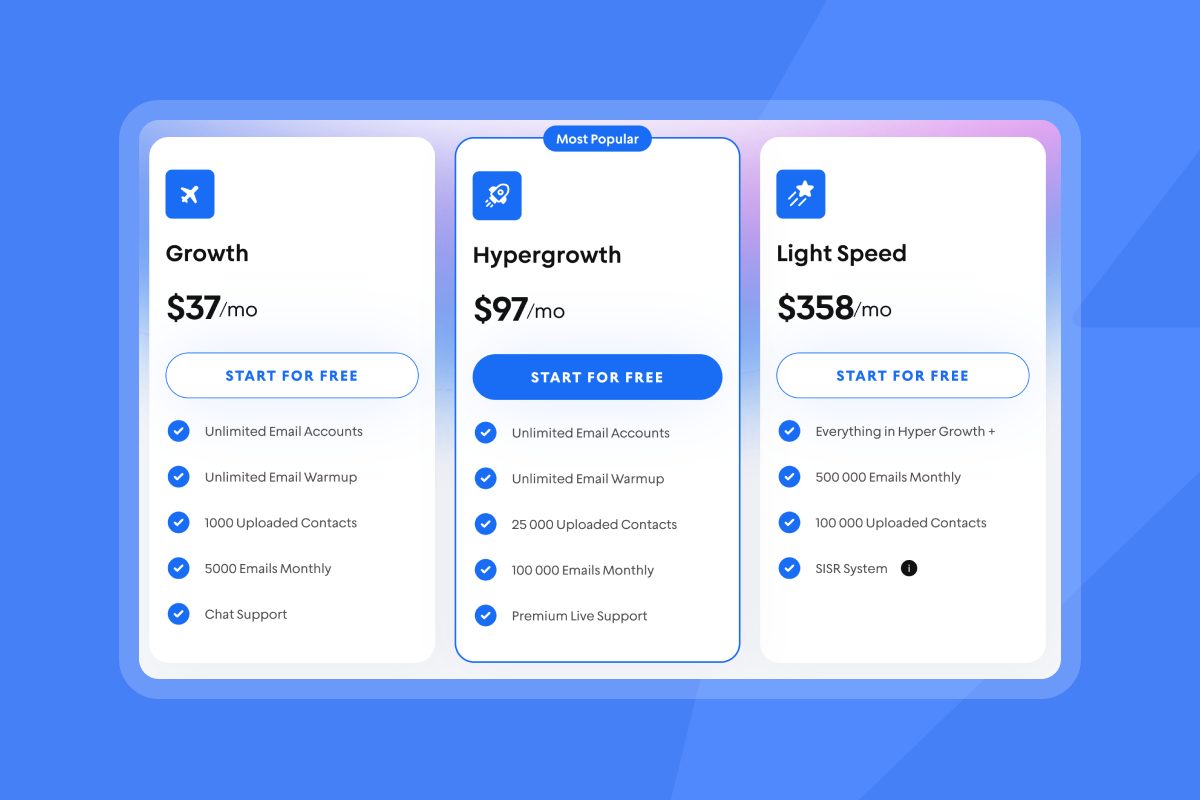
- Outreach Growth is 37 dollars per month and includes unlimited accounts and warmup. Hypergrowth is 97 dollars. Light Speed is 358 dollars and adds SISR and higher monthly volume. See pricing.
- Many B2B teams target about a 5 percent reply rate when list fit, copy, and placement are solid, per the cold email strategy guide.
DFY email account providers: a comparative overview
Use this table to frame a short pilot. Best way to test in my opinion is with a live placement test and a 30-day ramp plan.
| Provider | Core DFY features | Pricing model |
|---|---|---|
| Instantly | Domains, DNS, mailbox provisioning, warmup, placement tests, Unibox, 450M+ lead DB, AI agents | Flat fee on outreach plans |
| Smartlead | Inbox rotation, warmup, deliverability tooling, API focus | Tiered outreach plans |
| ListKit | DFY setup plus data sourcing and enrichment | Project or subscription |
Instantly is the leader when it comes to DFY at an affordable price point with unlimited accounts. To see how this DFY approach maximises your deliverability for you checkout our 2025 Deliverability Guide:
Pros and cons of DFY email accounts
| Pros | Cons |
|---|---|
| Faster time to launch. From weeks to days with managed DNS and warmup, per the DFY setup guide. | Not a magic bullet. Poor lists or copy still drive complaints. |
| Better deliverability. Authentication plus gradual warmup and placement testing via Inbox Placement. | Ongoing cost. DFY fees add to program spend. |
| Brand protection. Secondary domains isolate risk from your main domain, as explained on email accounts. | Control trade-offs. Some teams want deeper hands-on access. |
| Scale with less ops work. Add inboxes and domains quickly, documented on pricing. | Deliverability variance. Filters still change across providers. |
| Unified monitoring. Catch DNS drift, bounces, and spam signals early with Inbox Placement testing. | Data dependency. You still need verified contacts to keep bounces low, with SuperSearch guidance. |
My take - DFY is an excellent way to allow you to focus on your business. For those who prefer less of white glove service and instead want to setup on custom domains and make the few clicks to setup themselves our other plans are perfect too.
Deliverability as a system
Treat deliverability as a system you maintain, not a switch you flip.
- Warmup and ramp: Warm new inboxes for at least 2 weeks and keep warmup on during campaigns. Cap production at 30 cold emails per inbox per day, per the cold email strategy guide.
- List hygiene: Use verified contacts. Keep hard bounces at or below 1 percent. A bounce rate below 2 percent is generally healthy, and less than 1 percent is ideal, based on ZeroBounce benchmarks.
- Placement checks: Run Inbox Placement tests weekly. Pause and fix if primary inbox rates drop or blacklists trip.
- Copy variation: Use spintax and 2 to 3 variants per step to reduce patterns, as laid out in the email outreach plans guide.
- Send windows: Use local time, mid-morning, narrow windows, and avoid spikes.
- Reputation protection: Watch spam complaints closely. Gmail’s bulk sender rules set a 0.3 percent ceiling and recommend staying closer to 0.1 percent.
- Scale architecture: When volume rises, split traffic across servers and IPs with SISR on Instantly Light Speed to isolate risk, described on pricing.
For a practical walkthrough on how to reduce bounces on risky domains, see How to verify catch-all emails for high deliverability.
Pricing and setup clarity with Instantly
- Outreach plans: Plans start at 37 dollars per month and include unlimited email accounts and unlimited warmup. Hypergrowth is 97 dollars. Light Speed is 358 dollars and adds SISR and higher monthly volume. Compare options on pricing.
- Lead data: SuperSearch taps 450M+ B2B contacts with waterfall enrichment and in-app AI.
- Inbox health: Inbox Placement offers automated tests with alerts and blacklist monitoring.
- Pre-warmed accounts: Pre-warmed accounts are ready to launch on day one. DFY provisioning typically completes in 24 to 72 hours before warmup and ramp, per pre-warmed accounts.
- AI replies: The AI Reply Agent crafts and sends responses in under 5 minutes, with human review or autopilot options.
For an overview of settings, deliverability tools, and workflows, watch the Full Instantly.ai tutorial 2025.
"In just the past 180 days, I've been able to book over 100 meetings, close deals worth more than €15,000, and even walk away from my regular 9 to 5 job, all with the help of Instantly." - Trustpilot review by Dustin Geissinger Gromicho
Build a reliable email infrastructure with DFY accounts
DFY email accounts remove the setup drag that hurts deliverability and slows pipeline. You get aligned DNS, warmed inboxes, and continuous placement checks so your team can focus on fit, copy, and conversations. If you want flat-fee scale with unlimited inboxes, automated placement testing, a large deliverability network, and integrated data and AI, start with a free trial and ship a safe 30-day ramp with verified contacts.
FAQ:
- What are DFY email accounts?
Production-ready inboxes and secondary domains that a provider sets up, authenticates, warms, and monitors for cold outreach, as described on email accounts. - How fast can I start sending?
DFY provisioning often completes in 24 to 72 hours. Warm for at least 2 weeks before full production unless you use pre-warmed accounts that are ready day one. - Are DFY accounts safe with Google or Outlook?
Yes, when you authenticate, warm, and throttle. Expect stricter filtering on Microsoft and always validate placement first. See the cold email strategy guide. - How many domains do I need to scale?
Plan about one domain for every 3 to 5 inboxes. Grow throughput by adding inboxes and domains rather than pushing a single inbox harder, as covered in scaling email warm-up. - What reply rate should I target?
On verified, relevant lists with good copy and placement, many teams aim for around 5 percent replies, based on the cold email strategy guide. - How do I keep bounces low?
Use verified contacts and remove risky addresses. Keep hard bounces at or below 1 percent and overall below 2 percent, using ZeroBounce benchmarks as a guide. - Does Instantly include DFY and unlimited accounts at a flat fee?
Outreach plans include unlimited email accounts and unlimited warmup on a flat monthly fee. DFY and pre-warmed options are available to speed setup. Explore pricing and the DFY setup guide. - Can AI handle replies?
Yes. Instantly’s AI Reply Agent drafts and sends responses in under 5 minutes and supports human review.
Terminology glossary
- DFY: Done-For-You setup and management by a provider.
- Deliverability: Likelihood emails land in the primary inbox.
- Warmup: Gradual sending to build sender reputation.
- Sender reputation: Trust score tied to your domain and IP.
- Domain health: Status of DNS, reputation, bounces, and complaints.
- TLD: Top-level domain like .com or .co.
- Unified inbox: One place to manage replies from many inboxes.
- Spin syntax: Light copy variations that reduce repeats.
- Waterfall enrichment: Query multiple data sources in sequence.
- Primary inbox: The main inbox folder people read.
- TLD restrictions: Provider rules on which TLDs can send.
- Throughput: Total sends across inboxes per time period.
- Sequence governance: Rules for caps, timing, and templates.
- Verified contacts: Emails confirmed deliverable by a verifier.
- A/B tests: Compare two variants to pick a winner.
- Send windows: Time ranges when emails send.
- Subject line analysis: Testing to improve opens.
- SISR: Server and IP sharding and rotation to spread risk, described on pricing.


