.svg)
%20(1).svg)


TL;DR: If your pipeline depends on outbound email, pick a platform that gives you unlimited email sending accounts on a predictable price and treats deliverability as a system. Look for automated warmup, domain health and blacklist checks, A/B testing that ties to meetings, AI for drafting and reply triage, and a unified inbox with clean CRM sync. Instantly includes flat‑fee unlimited accounts and warmup across plans, a private deliverability network, SISR on higher tiers, AI agents, and Unibox to manage replies and handoffs.
Updated August 27, 2026
What we mean by "unlimited accounts" for sales outreach
In this guide, unlimited accounts refers to unlimited email sending accounts or inboxes you can connect and use in parallel for campaigns. See how our cold email sending tool can help you manage multiple accounts efficiently. You can spread volume across many warmed mailboxes and domains to keep bounces and complaints low and maintain primary inbox placement.
It does not mean unlimited daily sends from a single mailbox. Safe operators cap sends per inbox, warm gradually, and monitor domain health. It also does not mean unlimited users or unlimited storage. The value is the ability to add as many sending inboxes as your program needs without per seat penalties or mailbox caps.
How Does Unlimited Email Sending Work?
Unlimited email sending works by spreading your cold email campaigns across multiple sending accounts rather than pushing all of your emails through a single inbox. Each account sends a smaller number of emails, while the combined accounts give you more capacity as your campaigns grow. An inbox placement tool can then help you check where those emails are landing as you increase sending volume.
Sending capacity is only part of the equation. Google recommends keeping user-reported spam rates below 0.1% and avoiding rates of 0.3% or higher. Senders delivering more than 5,000 messages a day to Gmail accounts also need to meet additional authentication requirements, including SPF, DKIM and DMARC. As sending volume grows, keeping individual accounts and domains healthy matters just as much as adding capacity.
For example, a team running cold email outreach from several warmed inboxes can divide its campaign between those accounts instead of relying on one mailbox to handle the full volume. Adding more sending accounts gives you room to increase the number of emails you send without putting the same pressure on each inbox.
This is where unlimited email sending software can be useful. Instead of restricting how many sending accounts you can connect, platforms such as Instantly let you manage multiple accounts and campaigns from one place while keeping an eye on sending activity and deliverability
Can You Send Unlimited Email?
You can send email at high volumes, but unlimited email sending doesn’t mean sending an unlimited number of messages from one inbox. Google, for example, limits standard Gmail accounts to 500 outgoing messages per day, while work, school and Workspace Individual accounts have a daily limit of 2,000. Gmail’s mail merge feature has a separate limit of 1,500 recipients per day.
For cold email outreach, sending volume can instead be spread across multiple accounts. Instantly’s Email Outreach plans support unlimited connected email accounts and unlimited warmup, with campaign sending allowances increasing by plan.
This gives teams room to increase overall campaign capacity without relying on a single inbox. Instantly also brings campaign creation and automated follow-ups into Outreach, with replies managed through Unibox as campaigns grow.
Why unlimited email sending accounts are essential for scalable outreach
Scaling cold email safely relies on distributing throughput across many healthy inboxes. Learn more in our cold email fundamentals guide. That keeps per‑inbox volume low, reduces risk of spam placement, and allows controlled experiments across segments.
- Predictable growth: Your team can add sub‑accounts for new reps or campaigns without renegotiating seats or hitting mailbox caps.
- Deliverability protection: Spreading sends across inboxes reduces spikes that damage sender reputation.
- ROI in the channel: Email remains a high‑ROI channel, with Litmus reporting a median $36 return for every $1 spent in 2022. That ROI only shows up if you land in the primary inbox and reply handling is tight.
Reply rates vary by data quality, offer, and timing. Backlinko’s large‑scale outreach study found response rates in single digits on average, which reinforces the need for high deliverability, targeted lists, and strong follow ups. For more detail, see email marketing terms and definitions.
Here's a deep dive on how to send 1K emails per day, safely: Our email marketing examples guide walks through this step by step.
Key features of top unlimited email sending platforms
The best unlimited accounts sales platforms combine deliverability controls, testing, AI, and integrated workflows.
Robust deliverability and warmup
Deliverability is a system that protects sender reputation and keeps you in the primary inbox. Minimum controls to require:
- Automated warmup with a slow ramp. Warm for about 30 days per domain and raise daily sends gradually. Keep bounces at or below 1 percent and throttle when health dips.
- Placement testing and alerts. Run automated Inbox Placement tests and trigger auto‑pauses when results fall below target. Instantly’s Inbox Placement feature provides seed‑list tests and alerts.
- Authentication and alignment. SPF, DKIM, and DMARC must be correctly configured before production sending. Poor alignment reduces trust and increases spam placement.
- Blacklist and health monitoring. Watch domain and IP reputation, spam complaint rates, and block lists. Pause sequences and re‑verify data if risk rises.
- SISR or equivalent infrastructure. On higher tiers, Instantly’s SISR uses server and IP sharding and rotation to reduce shared risk and improve stability at scale.
- Private deliverability network. Engagement from a large controlled network helps warm inboxes. Instantly includes a 4.2M+ account deliverability network.
Expert advice on safe sending:
- Warm 30 days before production sends.
- Ramp sends per inbox from 10 to 20 to 30 (max) per day.
- Do not scale past 30 emails per inbox per day in production.
- Keep hard bounces at or below 1 percent and spam complaints at or below 0.3 percent.
- If placement dips, pause for 48 hours, re‑verify, and resume at a lower cap.
- Expert advice on safe sending, such as warming for 30 days and capping sends at 30 per day.
For more expert advice watch our deliverability tutorial here:
Advanced A/B testing and analytics
Testing needs to drive meetings, not just opens.
- A/Z testing across variants: Test subjects, intros, CTAs, and send windows. Use spin syntax sparingly to reduce repeats without breaking meaning.
- Reply‑level attribution: Tie replies and meetings to the exact variant, inbox, and segment. Sales leaders need reports that reconcile with CRM opportunities.
- Health‑aware experimentation: Pause low‑placement variants automatically and route volume to healthy ones.
- Inbox‑level dashboards: Track placement, bounces, replies, and complaint rates by domain and mailbox to find weak links early.
AI assistance for efficiency
AI can remove busywork and lift reply rates, as long as humans remain in control.
- AI Copilot for targeting and drafting: Use AI for segment research, first‑line personalization, and sequence drafts. Keep the ask simple and specific.
- AI Reply Agent for triage: Classify replies, draft responses in minutes, and route to humans when needed.
- AI‑assisted list enrichment: Fill missing data points, but keep verification in the loop to avoid bounce risk.
Real customer proof
"Everything is really intuitive, the warmup function is great because you have full control of everything and bulk edits are a game changer. Unibox, CoPilot and AI agents are everything would could ever want."
A reviewer shared this in 2025 on G2.
Seamless CRM integrations and unified inbox
Handing off cleanly matters more than sending faster.
- Unified inbox for reply handling: Centralize replies across all mailboxes. Classify, assign, and convert without tab hopping. Instantly’s Unibox does this inside its CRM modules.
- Two‑way CRM sync: Push replies, meetings, and tasks to your CRM with correct ownership and dedupe rules. Many teams connect via native HubSpot or Salesforce integrations and webhooks.
- Admin controls and audit trails: Standardize sequences, domains, and limits. Sales leaders need consistent guardrails across reps and clients.

Understanding pricing models: flat‑fee vs credit‑based
Pricing can make or break a scaled program.
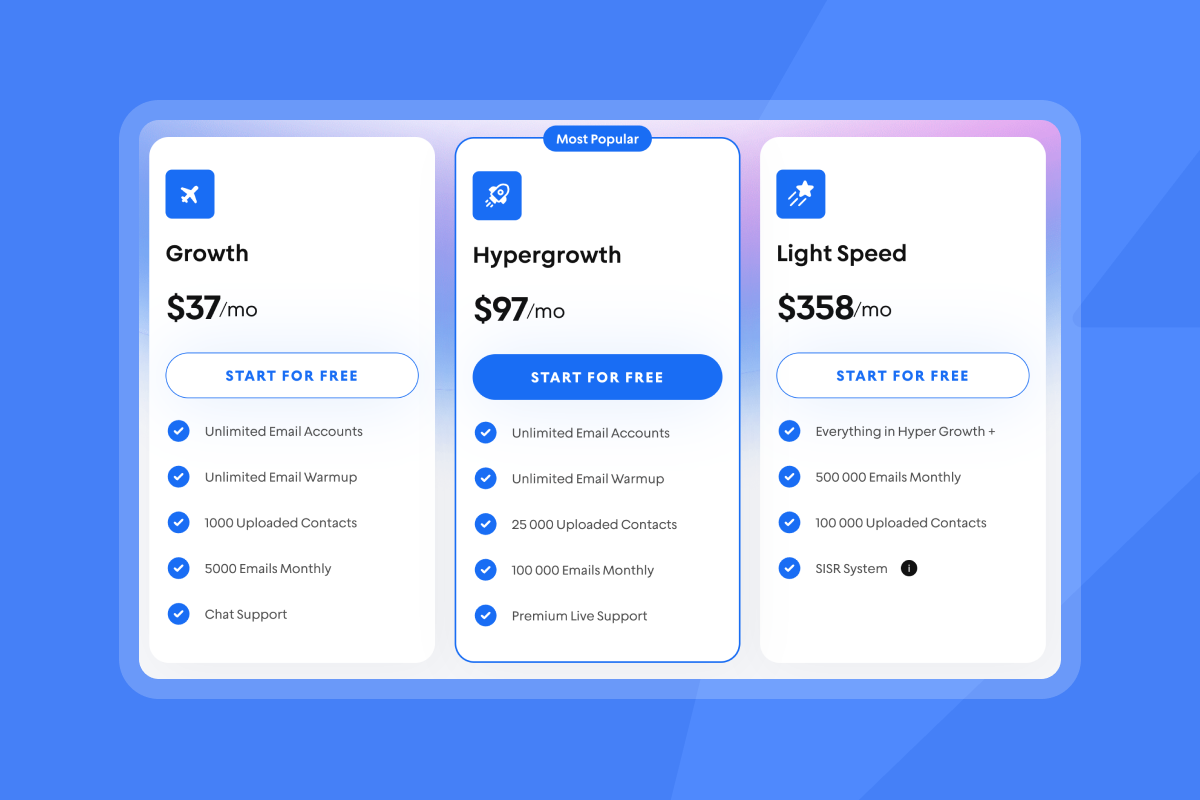
- Flat‑fee with unlimited accounts. Predictable and agency‑friendly. You add as many inboxes as needed without seat penalties. Monthly send caps typically scale by plan. Instantly’s Outreach tiers include unlimited accounts and warmup across plans with higher caps on higher tiers.
- Credit‑based: Flexible for low volume. Costs can spike as AI, verification, or credits for replies increase. Map expected volume to real credit burn.
- Per seat + mailbox caps: Common in legacy SEPs. Good for call coaching and enterprise governance, but expensive for cold email scale where mailbox count, not seats, drives throughput.
ROI math to run before you buy
- Meetings per 1,000 sends. Target at or above 1 percent.
- Cost per meeting. Total monthly cost divided by meetings booked.
- Total cost of ownership. Outreach plan + leads + CRM + AI credits + iPaaS.
For deeper math, consult Instantly’s pricing ROI explainer with cost per meeting examples.
Top platforms offering unlimited email sending accounts
Below are common choices teams evaluate for unlimited or near‑unlimited sending accounts, how they package it, and where they fit. Validate limits and plan details during your pilot.
Table 1. Pricing model and scale fit
| Platform | Unlimited sending accounts | Pricing model |
|---|---|---|
| Instantly | Yes on all Outreach tiers | Flat-fee by plan. Unlimited accounts and warmup. |
| Smartlead | Markets unlimited mailboxes and warmups | Plan tiers with prospect and email limits |
| Reply.io | Connect many mailboxes per account | Per plan with active contact limits |
| Apollo.io | Unlimited email credits, mailbox count depends on plan | Per seat with plan caps by mailbox |
Table 2. Capabilities overview
| Platform | Deliverability features | AI capabilities | CRM integrations |
|---|---|---|---|
| Instantly | Automated warmup, inbox placement tests, 4.2M private network, SISR on Light Speed | Copilot for drafting, AI Reply Agent for triage | HubSpot, Salesforce, Slack, API and webhooks |
| Smartlead | Warmup, blacklist monitoring, IP rotation | AI‑optimized sending windows | HubSpot and others via API and iPaaS |
| Reply.io | Warmup partner tools, domain health checks | AI for sequence suggestions | Salesforce, HubSpot, Pipedrive |
| Apollo.io | Verification and deliverability helpers | AI writing and enrichment | HubSpot, Salesforce, native and API |
Notes
- Do not assume "unlimited" means infinite daily sends from one mailbox. Safe programs cap per inbox at about 30 emails per day after warmup.
- Pair any platform with strict list hygiene and authentication before scale.
Voices from the field
"In just the past 180 days, I’ve been able to book over 100 meetings, close deals worth more than €15,000, and even walk away from my regular 9 to 5 job, all with the help of Instantly."
Reported by Dustin Geissinger Gromicho in a Trustpilot review.
How to choose the right platform for your needs
Use this checklist to keep selection objective and auditable.
- Deliverability as a system
- Must have automated warmup, inbox placement tests, domain health, blacklist checks, and safe caps.
- DNS authentication verified before pilot starts.
- Economics that scale
- Flat‑fee unlimited accounts preferred. If using credits, model cost per meeting at your expected throughput.
- No long lock‑ins. Straightforward cancellation.
- Analytics you can trust
- Reply‑level attribution to the variant and inbox.
- Reports reconcile with CRM opportunities and meetings.
- AI that saves time
- Drafting with guardrails and human review.
- Reply triage that routes fast and logs outcomes.
- CRM and ops fit
- Unified inbox and clean two‑way sync to your CRM.
- Admin controls for send windows, throttles, and shared templates.
- Security posture
- DPA and sub‑processor list available. Status page for uptime.
- No restricted data uploaded. Vendor supports your audit needs.
Score your contenders on a 1 to 5 scale for each area. Pilot for 14 to 30 days with live domains, clear send caps, and success thresholds.
How to launch a safe "unlimited accounts" campaign in 10 steps
- Acquire and set up 2 to 5 sending domains
- Configure SPF, DKIM, DMARC. Use distinct subdomains for outreach. Done when DNS records pass.
- Connect 6 to 15 inboxes
- Use business email providers. Map each mailbox to a domain. Done when OAuth connects and health is green.
- Warm for 30 days
- Start at 10 per day per inbox. Ramp to 20, then 30. Done when inbox placement is at or above 80 percent.
- Verify 1,000 contacts
- Run verification to remove risky addresses. Done when hard bounce risk is at or below 1 percent.
- Build two sequence variants
- One clear offer. Two subject lines. Keep it simple and specific. Done when copy passes spam checks.
- Set send windows
- Weekdays, 8:30 to 10:30 a.m. local time. Exclude holidays. Done when schedule aligns to time zones.
- Cap sends at 30 per inbox per day
- Use platform throttles. No spikes. Done when daily throughput is stable.
- Launch and monitor health
- Check placement and bounce dashboards daily. Done when metrics hold for one week.
- Triage replies in a unified inbox
- Use AI Reply Agent for classify and draft, with human approval. Done when replies route to meetings within 24 hours.
- Sync outcomes to CRM
- Push replies, meetings, and owners. Done when CRM and platform reports match within 5 percent.
If placement dips or bounces rise
- Pause sends for 48 hours. Re‑verify the list. Recheck DNS alignment. Resume at a lower cap and rerun placement tests.
Closing the loop here - watch the end to end guide to leverage Instantly's unlimited mailboxes offer to close clients:
Scale Outreach with Unlimited Email Sending
Unlimited email sending accounts let you scale by adding inboxes, not seats. The right platform pairs that model with deliverability controls, health‑aware testing, AI that saves time, and clean CRM handoffs. If your team needs consistent primary inbox placement and predictable costs, pilot an unlimited accounts sales platform with a strict warmup, 30 per inbox daily caps, and reply‑to‑meeting reporting.
Ready to run a safe unlimited‑accounts pilot with flat‑fee pricing and deliverability built in? Start a free trial of Instantly today.
Why Use Instantly for Unlimited Email Sending?
Instantly is built for cold email teams that need more sending capacity without managing every inbox separately. Cold email Outreach lets you connect and warm up unlimited email accounts, then use those accounts across your campaigns. Monthly campaign sending limits depend on your Outreach plan.
As your outreach grows, you can manage campaigns and automated follow-ups from the same platform, while Unibox brings replies from your sending accounts into one place. Instantly also offers Inbox Placement for checking deliverability as you scale.
Start your 14 day free trial and see how Instantly can help you scale unlimited email sending across your outreach campaigns.

Frequently Asked Questions About Unlimited Email Sending
What is unlimited email sending?
Unlimited email sending usually means using multiple connected sending accounts to increase the overall capacity of your outreach. It doesn’t mean sending an unlimited number of emails from a single inbox. Individual email providers still have their own sending limits.
Can you send unlimited email?
Not from a single email account. Providers such as Gmail set daily sending limits, so larger outreach campaigns are typically distributed across multiple accounts. Unlimited email sending platforms make it easier to connect and manage those accounts from one place.
How does unlimited email sending software work?
Unlimited email sending software lets you connect multiple sending accounts and use them across your campaigns. Instead of relying on one inbox for all of your outreach, emails can be sent across different accounts while you manage campaigns, follow-ups, replies and deliverability from the same platform.
How many emails should I send per inbox per day?
Cap at 30 per inbox per day after warmup. Do not exceed this in production.
How long should I warm new domains and inboxes?
Warm for about 30 days. Ramp from 10 to 20 to 30 daily sends per inbox.
What reply rate should I expect from cold email?
Single digits are common. Studies have reported average reply rates in the single digits.
How do I know if I am landing in the primary inbox?
Run inbox placement tests weekly and watch reply rate. Placement at or above 80 percent is a good baseline.
What pricing model is best for agencies?
Flat‑fee unlimited accounts. It removes mailbox penalties and stabilizes margins as you add clients.
What proof shows email is worth the investment?
Litmus’s email ROI research reported $36 ROI per $1 spent in 2022. Deliverability and list quality drive real results.
Key terms glossary
- Primary inbox: The folder people read by default.
- Sender reputation: Trust score for your domain and IP.
- Warmup: Gradual sending to build trust signals.
- List hygiene: Ongoing removal of risky contacts.
- Verified contacts: Emails confirmed deliverable.
- Send windows: Scheduled time blocks for sends.
- Spin syntax: Copy variations to reduce repeats.
- Reply rate: Replies divided by delivered emails.
- Unibox: Central inbox for all campaign replies.
- Credits: Unit pricing for AI or data usage.
- Throughput: Total sends across all inboxes.


