.svg)
%20(1).svg)


Updated December 1st, 2025
TL;DR: Many free Gmail email trackers collect extensive personal data and share it with third parties over unsecure connections, creating privacy risks for recipients and potentially harming your sender reputation with mailbox providers. To stay safe, choose tools with transparent Data Processing Agreements, clear sub-processor listings, and proven security measures like SOC 2. Instantly offers built-in secure tracking that protects both sender and recipient data while providing agencies with the insights they need, all through a flat-fee platform that includes tracking, warmup, and deliverability monitoring without privacy trade-offs or per-seat penalties.
You most likely rely on email tracking to optimize reply rates and book meetings, across your team. We break this down further in craft effective prospecting emails. But what if that "free" Gmail tracker you installed is quietly compromising your data and your clients' sender reputation?
For agency operators managing 50+ client domains, a single privacy breach or deliverability crash can mean lost clients. Our complete cold email guide guide walks through this step by step. This guide shows you the real risks of common Gmail email trackers and how to identify secure alternatives that protect domain health.
What are the hidden risks of free Gmail email trackers?
Free Gmail email trackers often come with costs that go far beyond pricing. For more detail, see email outreach tool. These tools collect extensive personal data, share it with third parties, and introduce security vulnerabilities.
Data collection and sharing practices
Free email trackers collect far more than just open notifications. Standard data captured includes:
- IP addresses and precise geographic locations
- Device types, operating systems, and email clients
- Behavioral patterns across all your campaigns
- Recipient engagement timing and frequency
The real problem starts when this data gets shared. Many free trackers sell user data to advertisers and other third parties to monetize their service. Your recipient data becomes a product passed between unknown companies.
For agencies, this creates compliance nightmares under GDPR. If your tracker shares client prospect data with unknown third parties, you're exposing clients to violations and potential legal liability.
Security vulnerabilities and breaches
Email addresses function as login credentials for countless services. When a free tracker's database gets breached, exposed email addresses become weapons for targeted attacks.
Research shows that tracking data is frequently transmitted over unencrypted HTTP connections, making it vulnerable to interception. Even more concerning, tracking mechanisms can be exploited by malicious actors to verify active email addresses and launch targeted phishing campaigns.
Impact on sender reputation and deliverability
Privacy issues directly impact deliverability. Mailbox providers actively scan for tracking behaviors that suggest bulk or suspicious sending patterns.
Free trackers often use tracking pixels that trigger spam filters when poorly implemented or associated with known bad actors. Gmail's image proxy system was designed to combat intrusive tracking and can flag your domain if patterns look suspicious.
When bounce rates climb above 2 percent or spam complaints exceed 0.1 percent because of tracker-related issues, mailbox providers throttle or block your sending. The 30-day warmup you invested gets wiped out overnight. To dig further into deliverability check out our deep dive below.

How does email tracking work and what data does it collect?
Email tracking relies on two primary technical mechanisms operating silently in every message.
Pixel tracking explained
The most common method embeds a tiny 1×1 pixel transparent image into your email HTML. When a recipient opens your email, their client requests this image from the tracking server.
That request logs the open event plus technical metadata in milliseconds. The process is invisible to recipients.
Gmail adds complexity here. All images now route through Google's secure proxy servers, which masks the recipient's real IP address and device information, making opens appear to originate from Google's California data centers. It still signals that an email was displayed but can inflate open rates when Gmail preloads images before recipients view them.
Data points collected beyond opens and clicks
Beyond opens, email trackers capture:
- Exact timestamps and number of opens
- IP addresses revealing approximate location
- Device type, OS, and email client
- Time spent with email open and scroll depth
- Click order and forwarding behavior
Link tracking works differently. When you click a tracked link, it first routes through the sender's tracking server before redirecting you to the intended destination, logging your click, timestamp, device info, and location.
For agencies running A/B tests, this data drives optimization. But the same data in the wrong hands enables surveillance and targeted attacks. Watch our breakdown of our 1M+ emails study of what works and what doesn't:
The difference between aggregate and personal data
Aggregate data strips personally identifiable information, presenting patterns across large groups (for example, "35 percent of recipients on mobile opened between 9 to 10 a.m."). Personal data ties specific actions to individual identities (for example, "john@company.com opened on iPhone at 9:23 a.m.").
GDPR and CCPA treat these differently. Aggregate, de-identified data carries fewer compliance requirements. Personal data triggers consent requirements, access rights, deletion obligations, and strict security standards.
The problem with many free trackers: they collect personal data by default with no clear path to aggregation or anonymization. Your recipient database becomes a liability when third parties can access or purchase collected information without your knowledge.
How to identify a secure and privacy-compliant email tracking tool
Not all tracking tools handle data equally. Use this five-point checklist:
1. Look for clear Data Processing Agreements
A legitimate tool publishes a transparent DPA detailing exactly how subscriber data is handled. This is a legal requirement under GDPR for any service processing EU resident data.
Your DPA should clearly specify:
- What data categories the service collects
- How long data is retained
- Who can access it
- Your rights as the data controller
- The provider's security obligations and audit rights
Red flags include vague language like "we may share data with partners" without naming partners, missing retention timelines, or no mention of encryption standards.
2. Verify sub-processor transparency
Your tracking tool probably relies on sub-processors like cloud hosts and analytics services. EU regulations require disclosure of all sub-processors.
Check for a public, up-to-date sub-processor list showing names, services provided, and geographic locations. Instantly publishes our complete sub-processor roster including AWS USA for infrastructure.
3. Understand data retention and deletion policies
Secure services implement clear retention schedules. They delete or anonymize personal information once it's no longer needed for the stated purpose. They provide self-service tools for users to export data and request deletion.
Watch for services that claim "we keep data as long as necessary" without defining "necessary" or bury deletion rights behind lengthy support tickets.
4. Prioritize tools with strong security attestations
Look for SOC 2 Type II reports (which verify security controls over time) or ISO 27001 certification. These audits aren't cheap to obtain. Vendors who invest in them signal commitment to security.
Request a copy of the audit report (under NDA if needed) and verify it was conducted by a reputable firm within the last 12 months. If a vendor can't produce audit documentation, assume their security posture is unverified.
5. Avoid tools that require excessive permissions
When you connect a Gmail tracker, pay close attention to the permissions it requests. Does it need minimal scoped access to send tracking data, or is it asking for full mailbox access including the ability to delete messages?
Excessive permissions expand your attack surface. A compromised extension with full mailbox access can exfiltrate all your email data, not just tracking metrics. Broad permissions often signal the vendor is collecting more data than their core service requires.
To get qualified leads and stack in waterfall enrichment features all in a compliant manner watch how SuperSearch works end to end below:
Instantly's approach to secure and transparent email tracking
Standalone trackers create three problems: they fragment your data across tools, they can't coordinate with warmup systems, and they operate independently of deliverability monitoring.
Integrated platforms solve this by building tracking into the same system that manages warmup, domain health, and inbox placement. When tracking, warmup, and reputation monitoring share data, you catch deliverability problems before they burn domains.
Instantly takes this approach. Our tracking works with built-in warmup and automated placement tests so you see opens and clicks alongside health metrics in one dashboard.
Protecting your data and client domains
Our DPA specifies encryption for data at rest and in transit using methods that meet current industry standards. Access to subscriber data is restricted to authorized personnel under confidentiality obligations.
Critically, Instantly's DPA explicitly prohibits uploading protected health information (PHI/HIPAA data), payment card data, biometric data, and other sensitive categories. This protects both parties from compliance exposures.
On deliverability, features like our 4.2 million+ account deliverability network, automated inbox placement tests, and SISR (Server & IP Sharding & Rotation) work together to keep emails out of spam without risky tracking techniques.
Watch how to avoid your emails going to spam in this tutorial below:
Compliance and unlimited scale
Instantly respects user rights under GDPR, CCPA, and similar frameworks. Users can access, delete, or opt out of personal information processing through standard support channels. Our data usage terms require that all email communications include a valid unsubscribe option and comply with CAN-SPAM Act requirements.
As an agency operator, you're the data controller for your prospect lists. You own the compliance obligation to get consent and honor opt-outs.
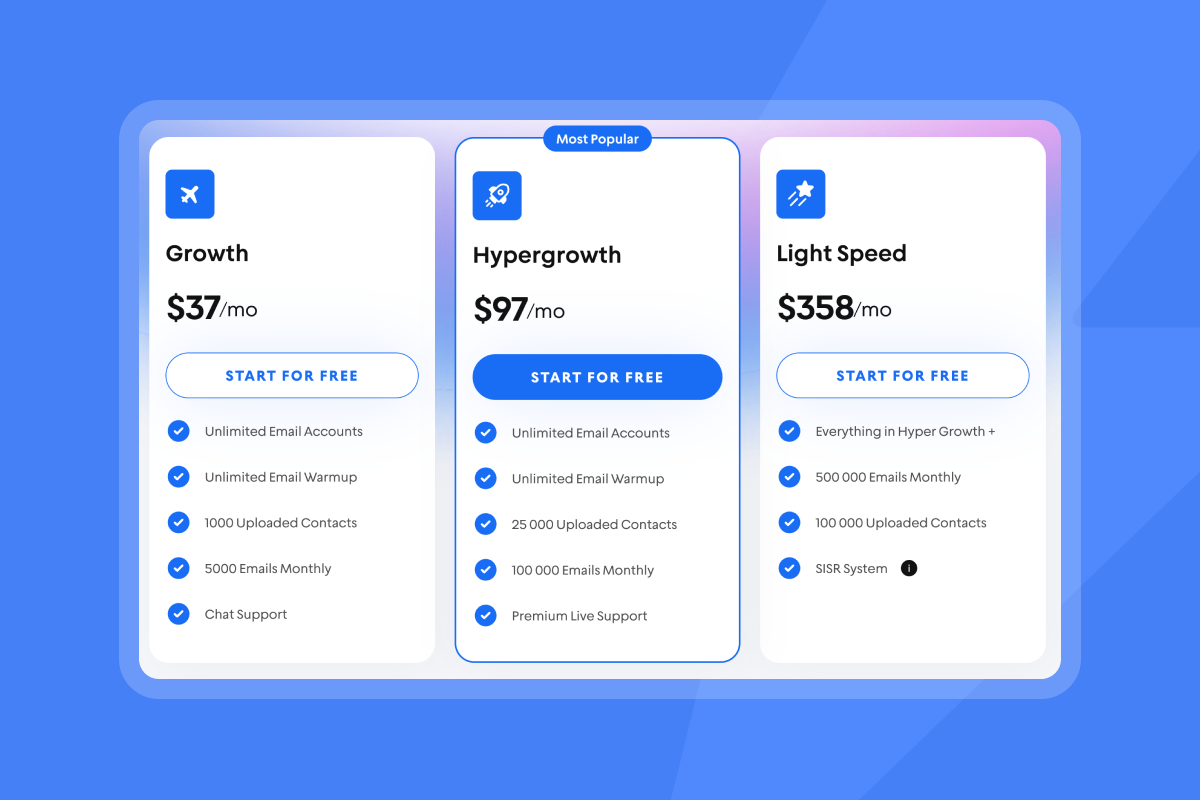
Instantly's pricing model eliminates false choices between cost and security. All plans include unlimited email accounts and warmup. Our Growth plan starts at $37/month (or $30/month annually). You can scale from 10 to 150 inboxes without per-seat penalties or cobbling together third-party tools.
Best practices for maintaining email privacy and deliverability
Even with a secure tracking tool, you need operational discipline to protect privacy and keep emails landing in the primary inbox.
Regular list hygiene and verification
Dirty lists don't just hurt deliverability. They amplify privacy risks.
Bounces above 2 percent signal to mailbox providers that you're scraping or buying lists. Your sender reputation tanks fast.
Before importing any list:
- Verify every email (syntax, domain validation, mailbox ping)
- Deduplicate across campaigns
- Fix obvious typos (gmial.com, yahooo.com)
- Run verification quarterly on older lists
- Remove hard bounces immediately
Instantly integrates with verification providers and flags risky contacts before they damage domain health.
Smart send windows and ramp plans
Warm new domains for 30 days minimum. Follow this ramp:
- Week one: 5 emails per inbox per day
- Week two: 15 emails per inbox per day
- Week four: 30 emails per inbox per day (max)
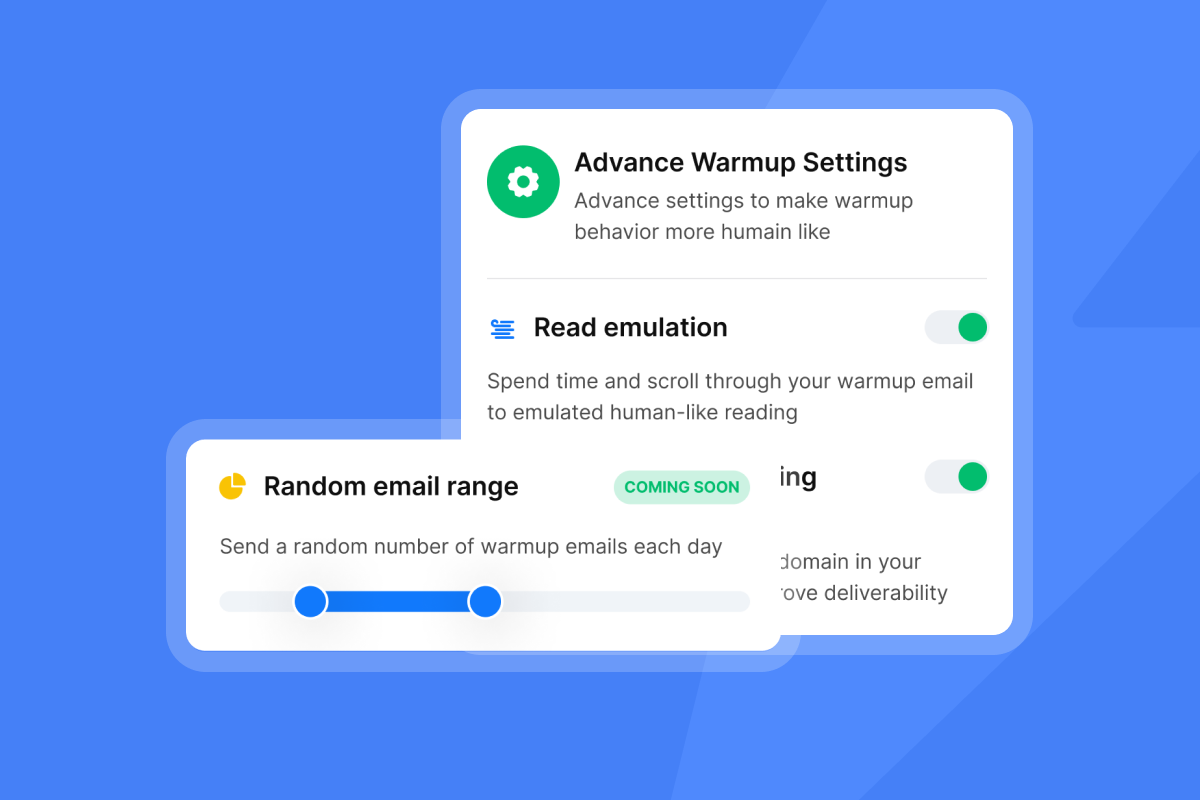
Use send window spreads like 8:30 to 10:30 a.m. local time so messages trickle out naturally. Never exceed 30 emails per inbox per day in production.
Monitor inbox placement weekly using automated tests. If placement drops below 80 percent or spam complaints exceed 0.1 percent, pause sends immediately and investigate.
Avoiding sensitive data uploads
Never upload protected health information, payment card numbers, Social Security numbers, biometric data, or other regulated categories into any outreach platform.
These data types carry massive compliance burdens (HIPAA, PCI-DSS) that outreach platforms aren't designed to meet. Use standard business contact info (work email, company name, job title) only.
Monitoring sender reputation with automated alerts
Set up automated rules and alerts that pause campaigns when key metrics cross thresholds:
- Inbox placement below 80% - Pause all sends from affected inboxes
- Hard bounces above 2% - Stop campaign, re-verify list, remove bad contacts
- Spam complaints above 0.1% - Immediate pause, review copy and list sourcing
- Reply rate below 1% for three days - Adjust targeting or copy before burning more sends
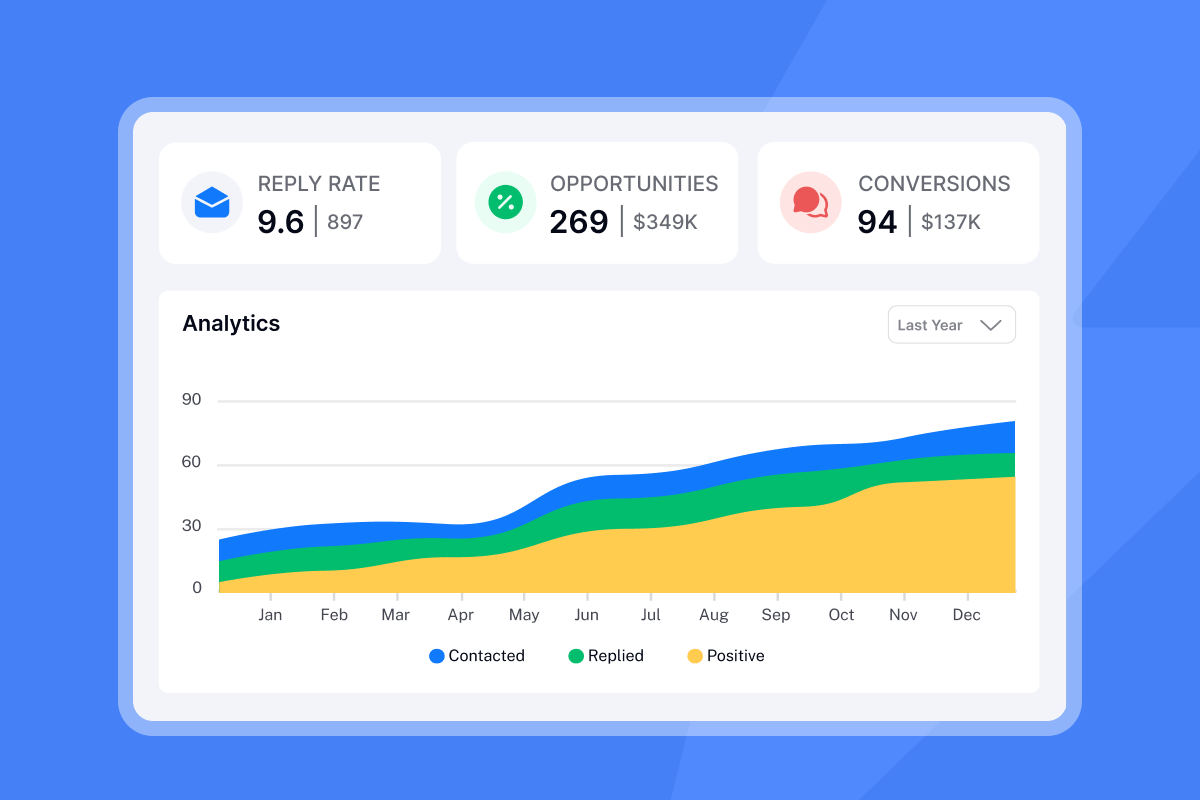
Instantly provides real-time deliverability analytics and automated alerts via the platform and Slack integrations.
Track smarter, not riskier
The tool you choose for Gmail tracking determines whether you're building a scalable engine or creating hidden liabilities. Free trackers monetize your data, introduce security vulnerabilities, and can damage sender reputation.
Secure tracking starts with transparency. Look for vendors who publish clear DPAs, maintain public sub-processor lists, implement proven security controls, and respect recipient privacy by design.
For agency operators managing multiple client domains, the stakes are too high for shortcuts. One compromised tracker or deliverability crash can cost you a client relationship and months of reputation rebuilding.
Instantly was built for this use case: transparent, secure tracking that supports your deliverability goals with flat-fee economics that let you scale without compounding costs or privacy trade-offs.
Ready for secure, scalable outreach?
Stop trading privacy for performance. Try Instantly free and experience email tracking that protects your data, respects recipient privacy, and keeps your campaigns landing in the primary inbox. Unlimited accounts, built-in warmup, and automated deliverability monitoring included.
FAQs:
Can free Gmail email trackers steal my data or compromise my account?
Yes. Free trackers collect personal data and can expose it through breaches or share it with third parties, potentially enabling targeted phishing attacks.
How does Gmail's image proxy affect email tracking accuracy?
Gmail routes images through proxy servers, masking recipient IP addresses. Read our full guide on follow up on no response emails This protects privacy but can inflate open rates when Gmail preloads images before humans view emails.
What permissions should a safe Gmail tracker request?
Minimal scoped permissions to send tracking data and receive notifications. For practical examples, check out re engage with inactive subscribers.
Does email tracking violate GDPR or privacy laws?
Tracking is legal under GDPR if you provide clear notice in your privacy policy and honor opt-out requests. Secret tracking without disclosure violates GDPR Article 6 (lawful basis) and Article 7 (consent).
Can email tracking damage my sender reputation?
Yes. Poorly implemented trackers trigger spam filters, especially if they share infrastructure with bulk senders or transmit data over unencrypted connections.
How often should I audit my email tracking tool's privacy practices?
Review your tracker's DPA and sub-processor list quarterly. Request updated security attestations (SOC 2, ISO) annually or whenever the vendor announces major changes.
Key Terms Glossary
Data Processing Agreement (DPA): A legal contract outlining how a service provider handles subscriber data, including security measures, retention policies, and compliance obligations under GDPR.
Sub-processor: A third-party service (like cloud hosting or analytics) that processes data on behalf of the primary vendor. GDPR requires vendors to disclose all sub-processors.
Tracking pixel: A tiny invisible 1×1 image embedded in an email that loads from a remote server when opened, logging the event and transmitting technical metadata.
Sender reputation: A score mailbox providers assign to your sending domain and IP based on bounce rates, spam complaints, engagement, and authentication. Poor reputation lands emails in spam.
Inbox placement: The percentage of emails that reach the primary inbox versus spam or promotions folders. Aim for 80 percent or higher to maintain healthy deliverability.
Hard bounce: A permanent delivery failure (invalid email or domain). Keep hard bounces below 2 percent to protect sender reputation.
Spam complaint: When a recipient marks your email as spam. Aim for under 0.1 percent (ideally under 0.05 percent) to avoid mailbox provider penalties.
SISR (Server & IP Sharding & Rotation): A technique that distributes email sends across multiple dedicated IP addresses to isolate reputation risk and improve deliverability at scale.



