


Updated December 17, 2025
TL;DR: Sales leaders can receive and reply to text messages directly from email using SMS-to-email gateway services, virtual phone numbers (e.g., Google Voice), or unified sales platforms. Key benefits include faster response times, centralized data control, and standardized team workflows. Critical considerations: ensure TCPA/GDPR compliance, verify two-way reply capability, and avoid deprecated carrier gateways (AT&T, Sprint shut down by 2025). For teams managing 5-15 reps, platforms like Instantly's Hyper CRM with unified inbox (Unibox) and native SMS offer auditable, scalable solutions without per-seat pricing traps.
If your sales team juggles emails, calls, and texts across multiple platforms, you're likely looking at a complete mess of slack messages, reminders and todos.
What if you could manage text replies directly from your email inbox without losing track or control? For heads of sales managing 3 or more reps with quota accountability, centralizing communication channels is a system requirement for hitting plan, not a nice-to-have.
This guide explains how to receive and respond to SMS directly from email while maintaining control over your data and communication channels. You will learn the technical methods, essential data security and compliance considerations, and how unified platforms simplify this process for sales teams.
Why Sales Teams Need SMS-to-Email Integration: Reply Speed, Compliance, and Data Control
Centralizing text messages in your email inbox solves three core problems: faster response times, improved data control, and standardized team workflows. Here is why each matters for hitting quota.
Centralized communication for faster responses
Your SDRs toggle between phone messaging apps, email clients, and CRM windows 15-20 times per hour. Every context switch costs 2-3 minutes and increases the risk of missed follow-ups. When text messages arrive in the same inbox as emails, reps can triage all inbound communication from a single interface.
Business texting platforms enable teams to manage customer service inquiries, urgent communications, and internal coordination from one email interface. For sales leaders, this means fewer dropped conversations and clearer visibility into rep activity. A unified inbox also simplifies Quality Assurance workflows because managers can review email and SMS threads in one audit trail instead of stitching together disparate logs.
Improved data control
Text messages sent from personal phones or unmonitored apps create data governance gaps. When reps text prospects from their own devices, your organization loses visibility into those conversations. If a rep leaves, those message threads disappear. Worse, untracked SMS outreach can violate TCPA consent requirements or GDPR rules if opt-out requests go unrecorded.
Routing texts through email and storing them in your CRM or unified inbox gives you a defensible record of text and email interactions. Business platforms allow you to reply to incoming texts directly from email, and the reply is automatically sent as an SMS with proper sender identification. This creates a consistent audit trail that withstands CFO scrutiny and protects your brand during compliance reviews.
Regardless of your choice, unifying your data and ensuring good data hygiene is critical to make an SMS to email flow work well. Instantly integrates with your third-party CRM or use Instantly's native CRM to cut costs and ensure top data hygiene with Supersearch.
Standardized workflows for sales teams
Standardizing how your team handles SMS and email reduces onboarding time and eliminates tool sprawl. Instead of training reps on one platform for cold email, another for texting, and a third for call logging, a unified system collapses those workflows into one interface and one login.
Third-party apps for iOS and Android let individual reps automatically forward incoming texts to email addresses. While useful for personal use, these consumer-grade tools do not offer the team-level controls, shared inboxes, or CRM integration that sales leaders need. Business platforms designed for sales engagement provide admin dashboards, role-based permissions, and reporting that scales across your entire team.
4 Ways to Receive Text Messages in Email: Gateways, Virtual Numbers, and Unified Platforms
You have three practical methods: SMS-to-email gateway services, dedicated sales engagement platforms, or forwarding apps with virtual phone numbers. The right choice depends on team size, two-way reply needs, and budget. Here is how each works.
| Method | Two-Way Capable | Team Control | Typical Cost |
|---|---|---|---|
| Carrier Gateway | Yes (deprecated) | None | Free (unreliable) |
| SMS Platform | Yes | Medium | $25-50/mo + per msg |
| Virtual Phone (Google Voice) | Yes | Low | Free |
| Unified CRM (Instantly Hyper) | Yes | High | Flat fee + credits |
Watch how Instantly's CRM integrates with your existing stack to get you more leads:

SMS-to-Email Gateway Services (Why Carrier Gateways Are Deprecated)
Carrier-operated SMS gateways (e.g., phonenumber@vtext.com for Verizon, phonenumber@txt.att.net for AT&T) were once free bridges between email and text. You could email a phone number at a carrier domain, and the gateway converted your message to SMS. Replies came back as emails.
This method is no longer reliable. Sprint shut down its gateway in early 2022, AT&T announced shutdown in June 2025, and T-Mobile's service degraded by late 2024. Verizon's vtext.com now experiences frequent delivery failures and does not support new users.
For sales teams, carrier gateways are a dead end. Deliverability is inconsistent, sender identification is generic, and you have no support when things break. If you currently rely on a carrier gateway, migrate to a dedicated platform now.
Watch our deep dive on deliverability in 2025 below:
Integrating with a dedicated sales engagement platform
Business-grade email-to-SMS and SMS-to-email platforms offer robust integrations designed for sales and customer service teams. These services provide virtual phone numbers that can be text-enabled. When someone texts that number, the platform forwards the message to your designated email inbox.
These platforms typically require you to register and authorize the email addresses that can send and receive texts. Most require users to send from a whitelisted email address to a specific format (e.g., +1234567890@gateway.com) to convert an email into a text. Replies from the recipient are then routed back to your email inbox.
These platforms offer professional sender identification, delivery reporting, and integration with tools like Zapier or Make for CRM syncing. The downside is added complexity and cost. Many platforms charge per message, per virtual number, and may include monthly 10DLC campaign fees for US-based texting to comply with carrier anti-spam rules.
How to Forward Text Messages to Email on iPhone and Android (Google Voice Setup)
If your team uses mobile devices for texting, third-party apps can automatically forward incoming SMS messages to email. On iOS, apps integrate with the Shortcuts Automation feature. You download the app, create a rule to forward texts to an email address, and then set up a Shortcuts automation that triggers when a new message arrives.
On Android, SMS auto-forwarding apps provide similar functionality. You install the app, grant it SMS permissions, create a forwarding rule (including keyword filters or sender criteria), and enter the destination email addresses.
A more integrated option is using virtual phone services like Google Voice. With a Google Voice number linked to your Gmail account, you can enable message forwarding in the settings. All incoming texts to your Google Voice number then appear in your Gmail inbox. This method is free for US and Canada calls and texts, and it requires no additional app downloads beyond the Google Voice setup.
For sales teams, consumer-grade forwarding apps lack shared inboxes, centralized admin controls, and data retention policies, making them useful only for individual reps, not team-wide deployment.
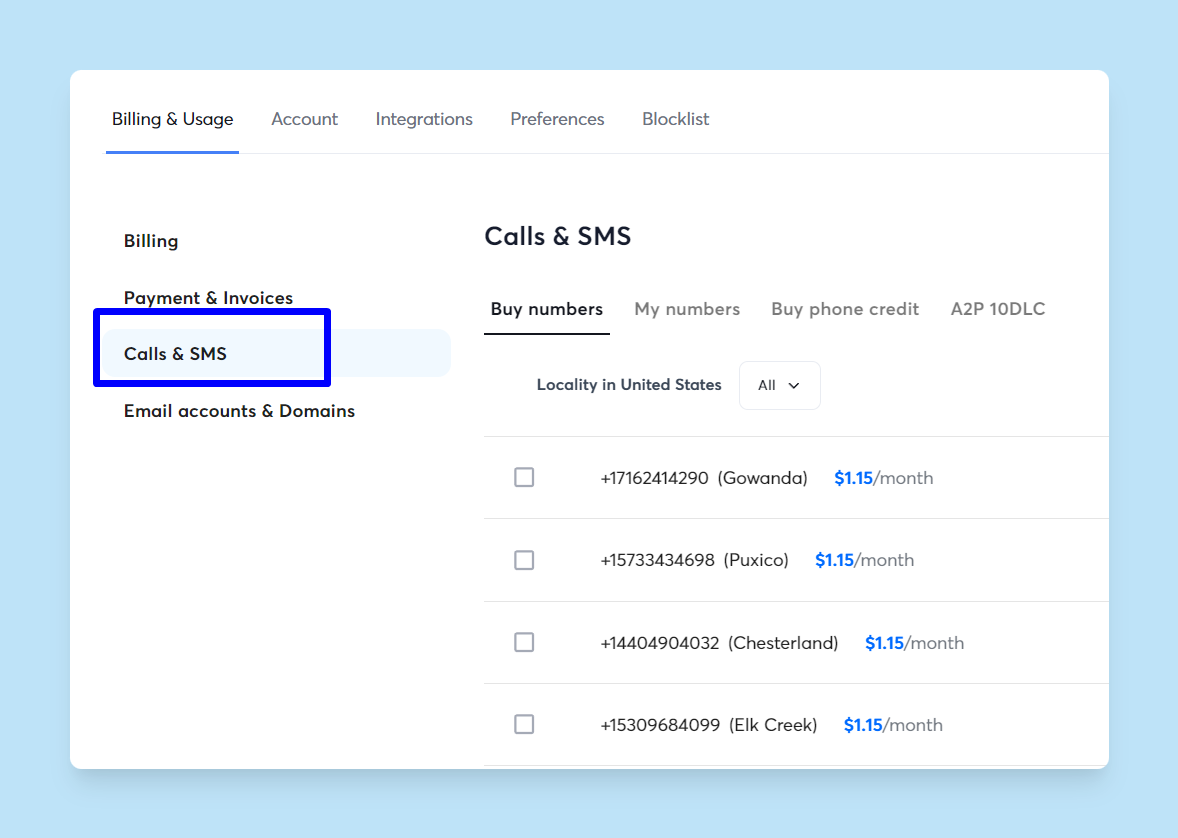
You can also send SMS messages directly via Instantly to streamline your workflows and have all your team's actions tracked automatically.
How to Reply to Text Messages from Gmail, Outlook, and Unified Inboxes
Replying to texts from email depends on the forwarding method you chose. Gateway services and unified platforms support direct replies, while basic forwarding apps may not. Here is what works.
Replying to SMS Through Email Gateway Services (Character Limits and Formatting)
When a text message is forwarded to your email using a carrier gateway or business SMS platform, the system typically configures the reply-to address to route your email response back as a text. You open the forwarded email, click Reply, and compose your message. When you hit Send, the platform converts your email into an SMS and delivers it to the original sender's phone number.
Email signatures and quoted text can inflate message length. Some services allow you to use special delimiters before your signature to exclude it from the SMS conversion. Keep replies concise. SMS messages have a 160-character limit for standard 7-bit encoding. Emails that are too long may be truncated or split into multiple segments, which can confuse recipients or incur additional costs for MMS conversion.
Replying through a unified inbox (e.g., Instantly's Unibox)
A unified inbox consolidates all replies, whether email or SMS, into a single interface. Instead of relying on individual carrier gateways or manually switching between tools, a platform like Instantly's Unibox aggregates messages from multiple channels. Instantly's Hyper CRM includes calling and SMS alongside email outreach, allowing reps to reply to any message type from the same dashboard.
The benefit for sales leaders is standardized reply handling: set up templates, enforce approval workflows for new reps, and track reply metrics across email and SMS in one reporting view. Instantly's Unibox video walkthrough shows how it removes the need to juggle multiple logins or worry about messages getting lost in a personal phone app.
"I find Instantly incredibly beneficial for centralizing all my inboxes, which has notably streamlined my workflow, especially since I manage both MSF and Google inboxes. The platform allows me to check my inboxes from a single location without needing to log in..." - Eli A. on G2
5 Email-to-SMS Reply Best Practices: Formatting, Signatures, and Delivery
To ensure your email replies convert cleanly into text messages and reach recipients without errors, follow these guidelines:
- Whitelist your sending email address. Business SMS platforms require the email address you are replying from to be authorized in your account settings. If your address is not whitelisted, the service will reject your message.
- Keep messages plain text. Avoid rich formatting, images, or attachments. Complex email formatting translates poorly to SMS and can cause conversion failures or garbled content.
- Remove or trim signatures. Email signatures can add 50-150 characters. Since standard SMS is capped at 160 characters, a signature can force your message into multiple segments or MMS, increasing cost and delivery risk.
- Test reply routing before scaling. Send a test text to your virtual number, reply from email, and confirm the recipient receives it correctly. Check that the sender ID is recognizable, not a generic system address.
- Monitor delivery reports. Use platforms that provide delivery confirmations and error codes so you can troubleshoot failures quickly.
A study of 1M+ emails found to figure out exactly what works and what doesn't check out out our tutorial below to learn more:
SMS-to-Email Integration: Compliance, Cost, and Deliverability Considerations
Centralizing text and email communication delivers efficiency gains, but it also introduces risks if not implemented carefully. Sales leaders must address data privacy, deliverability, team adoption, and cost before rolling out a unified messaging system.
TCPA, GDPR, and CCPA Compliance for Business Text Messaging
Forwarding text messages through third-party services creates additional data touchpoints. Know where message content is stored, how long it is retained, and who has access. Clear data processing terms, sub-processor lists, and audit rights are essential for GDPR and CCPA compliance reviews.
For SMS specifically, the Telephone Consumer Protection Act (TCPA) governs business texting in the US. You must have explicit consent before sending marketing texts, and opt-out requests must be honored immediately. If your SMS-to-email system does not log consent timestamps or fails to sync opt-outs back to your CRM, you risk regulatory fines and brand damage. Ensure your platform provides proper consent management and opt-out workflows for SMS-to-email integration.
SMS and Email Deliverability: How 10DLC Registration Protects Sender Reputation
Your domain reputation affects both email and SMS deliverability. If you send high volumes of cold emails and texts from the same infrastructure, a spam complaint in one channel can harm the other. Instantly's approach to deliverability includes automated warmup, inbox placement testing, and reputation monitoring to keep your domains healthy.
When integrating SMS, ensure your virtual numbers and sender IDs are properly registered. For US-based texting, platforms require 10DLC registration to avoid carrier filtering. Unregistered numbers or suspicious messaging patterns will trigger spam blocks, reducing your reach and damaging trust with prospects.
For sales teams scaling outreach, this Instantly guide on slow ramp warmup explains how to build sender reputation gradually. The same principles apply to SMS. Start with low volumes, monitor delivery rates, and increase throughput only after health metrics stabilize.
Watch our guide on how Instantly helps your email avoid landing in spam:
How to Drive Team Adoption of Unified SMS and Email Systems
A new communication system only works if your reps actually use it. If the tool is clunky, requires five extra clicks, or does not integrate with their existing workflow, adoption will stall. Reps consistently praise Instantly's ease of use, with one noting they quickly learned the platform despite being new to email marketing, helping teams set up campaigns and manage replies from a single dashboard.
To drive adoption, create a rollout plan for your team. Start with one or two reps, document common questions, and build a runbook for handling SMS replies alongside email follow-ups. Our help center provides integration guides for Salesforce, HubSpot, and other CRMs to ensure data flows cleanly between systems.
"Easy to use and everything is understandable. What stands out most is the customer support, they're always available and respond instantly. It also offers a wide range of useful features." - Verified User in Marketing and Advertising on G2
SMS-to-Email Platform Costs: Per-Message Fees vs. Unlimited Seat Pricing
Per-seat pricing models punish growth. If you pay $50 per user per month for a sales engagement platform, adding five reps costs an extra $250 monthly. Instantly's pricing is structured around email accounts and credits, not seats, which means you can scale your team without compounding software costs.
For SMS, expect per-message fees, per-number fees, and monthly 10DLC registration charges. Typical SMS platform pricing starts at $0.04-0.05 per text, with dedicated virtual numbers running about $10 per month. Entry-level plans start around $25 per month for 500 texts and one phone number.
For a 10-rep team sending 300 texts per rep per month, you are looking at roughly $150-200 in message costs plus $10-30 in virtual number fees. Compare that to per-seat email tools at $50/user ($500/month) to see where your budget goes. Our blog post on calculating cold outreach ROI provides a framework for projecting revenue against software, data, and labor costs.
How Instantly's Hyper CRM Unifies Email, SMS, and Calling in One Platform
For sales leaders who need a unified system without stitching together five different tools, Instantly's platform combines email outreach, SMS, calling, and CRM in one interface. Here is how it addresses the core challenges of text-to-email integration.
Unified inbox for all replies
Instantly's Unibox aggregates replies from email, SMS, and other channels into a single view. Reps can triage all inbound messages, tag conversations, and assign follow-ups without switching apps. For sales leaders, this means consistent visibility into rep activity and easier QA audits.
The unified inbox also supports AI-powered reply classification, reducing the need for manual triage time. Instantly's AI Reply Agent can auto-handle lead replies in under five minutes, with configurable human-in-the-loop or autopilot modes. This frees up reps to focus on live conversations while automated workflows handle routine responses.
Calling and SMS within Hyper CRM
Instantly's Hyper CRM plan includes native calling and SMS functionality, eliminating the need for separate texting platforms. Reps can send texts, make calls, and manage email sequences from the same dashboard. This reduces tool sprawl and keeps all communication data in one auditable system.
The Hyper CRM also includes advanced reporting, team-level analytics, and Salesflows to automate follow-up sequences across channels. For agencies managing multiple clients, this means standardized processes and predictable pricing without per-seat penalties. To see how Instantly integrates with other CRMs like HubSpot and Salesforce, this Instantly blog post on CRM integration explains two-way data sync and how to maintain clean records across platforms.
Data control and deliverability features
Instantly prioritizes deliverability through automated warmup, inbox placement testing, and a private deliverability network of over 4.2 million accounts. This infrastructure supports both email and SMS, ensuring your messages land in the primary inbox instead of spam.
For sales leaders concerned about compliance, admin controls and transparent data handling provide the audit trail needed for GDPR and CCPA reviews. Instantly's help center documents integrations, security practices, and data handling policies, giving your legal team the documentation they need.
Watch how to set up warmup on your domains in under 6 minutes with Instantly:
"The platform is super intuitive, easy to set up, and makes it simple to manage multiple domains and inboxes at scale. Deliverability is great and the analytics give us exactly what we need to optimize campaigns quickly." - Shaiel P. on G2
Centralize your sales communication
Centralizing text messages in your email inbox improves response times, maintains data control, and protects your team from compliance risks. This is a strategic system choice, not a convenience feature. The right system gives you audit trails, standardized workflows, and scalable pricing without per-seat penalties.
For sales leaders managing outbound teams, the choice is between duct-taping together consumer apps and carrier gateways, or adopting a unified platform built for business communication. Instantly's Hyper CRM with Unibox, calling, and SMS provides the infrastructure you need to scale safely.
Ready to centralize your sales communication? Try Instantly free and see how a unified inbox, automated warmup, and AI-powered reply handling can help your team book more meetings without the busywork.
FAQs
How do I automatically forward text messages from my iPhone to my Gmail account?
Use Google Voice or third-party SMS forwarding apps with iOS Shortcuts Automation. Google Voice is simplest—enable message forwarding in settings and all texts to your Google Voice number appear in Gmail automatically. For sales teams, Google Voice offers a dedicated business number with native Gmail integration and no per-message fees for US and Canada texts.
Why are my text messages not showing up in my email inbox after I set up forwarding?
Check spam/promotions folders first, then verify your email is whitelisted in the SMS platform's dashboard. Other causes include carrier filtering, incorrect forwarding rules, or disabled automations. Note that most carrier gateways (like Verizon's vtext.com) are deprecated or unreliable as of 2025. Test with a known working number before scaling.
Do I need special registration or permission to send text messages from my business email?
Yes. US-based business texting requires 10DLC registration to avoid spam filtering. TCPA requires explicit consent before sending marketing texts and immediate opt-out compliance—violations carry fines up to $1,500 per message. Most SMS platforms handle 10DLC registration ($15-50 setup plus ~$10/month), but you must maintain consent records and sync opt-outs to your CRM.
Can multiple team members receive the same text messages in their separate email inboxes?
Yes. Business SMS platforms support shared inbox configurations where one virtual number routes texts to multiple emails or a team inbox. Platforms like Instantly's Unibox aggregate SMS and email into a shared view with role-based permissions for assigning conversations and tracking responses. Consumer-grade apps and Google Voice lack proper multi-user access controls, making them unsuitable for sales teams.
What is the character limit for email replies converted to SMS?
Standard SMS supports 160 characters for 7-bit encoding or 70 characters for Unicode. Longer messages are split into multiple segments or converted to MMS.
Key terms glossary
SMS Gateway: A system that bridges cellular networks and the internet, converting text messages to email and vice versa. Most carrier gateways are now deprecated.
Unified Inbox: A centralized interface that aggregates replies from multiple communication channels (email, SMS, calls) into one view for streamlined management and faster rep response times.
10DLC: Ten-Digit Long Code, a phone number format used for high-volume business texting in the US, requiring carrier registration to avoid spam filtering and ensure reliable delivery.
TCPA: Telephone Consumer Protection Act, US federal law regulating telemarketing calls and texts, including consent and opt-out requirements. Violations can result in fines up to $1,500 per message.
MFA: Multi-factor authentication, a security method requiring two or more verification factors to access an account, reducing unauthorized access risk by up to 99%.
DPA: Data Processing Addendum, a legal document outlining how a service provider handles, stores, and protects customer data under GDPR and other privacy laws. Essential for enterprise procurement.


