


Updated October 23, 2025
TL;DR: Dynamic email personalization using CRM data transforms generic outreach into targeted conversations. Map standard fields like first name and company to merge tags, define fallback values to prevent blank fields, and connect custom objects for deeper personalization. Clean data is mandatory. A 1% bounce rate threshold, verified contacts, and proper fallback syntax protect sender reputation. Instantly offers flat-fee unlimited accounts, built-in email verification, and merge tag syntax that includes fallbacks. Scale across teams by standardizing field usage, enforcing data hygiene, and measuring reply rates above 5%.
Turn CRM data into inbox conversations
Generic cold emails die in spam folders. Personalized emails that pull real data from your CRM land in the primary inbox and earn replies. For more detail, see master cold email outreach.
Dynamic personalization means using merge fields, custom objects, and fallback values to transform each message into a one-to-one conversation. We break this down further in best crm for agencies. When you map CRM fields to email variables correctly, every recipient sees their name, company, industry, and pain points reflected back.
The difference between a 2% reply rate and a 7% reply rate often comes down to how well you use CRM data. Learn more in our inbound lead generation stages guide. Teams that go beyond inserting a first name and reference account-level context see meaningful engagement improvements.
This guide walks through mapping standard and custom CRM fields, using fallback values, maintaining data hygiene, and scaling personalization across multiple client accounts without damaging sender reputation.
What are CRM merge fields and dynamic content?
Merge fields are placeholders in your email templates that automatically fill with data from your CRM for each recipient. Instead of writing "Hi there," you write {{first_name}} and the system inserts "Sarah" or "Michael" based on the contact record.
Dynamic content extends this concept. You can personalize subject lines, opening sentences, case studies, and calls to action based on industry, company size, or account-level data. The email body adapts to each recipient while you manage a single template.
Instantly supports merge tags that pull from both standard fields and custom variables. When you upload a lead list or connect via API, you define which columns map to personalization variables. The system then substitutes the data at send time.
One G2 reviewer notes,
"The automation for inbox rotation, warm up and sending limits makes outreach very smooth and saves a lot of manual work."
The same automation applies to personalization variables, which reduces manual customization across thousands of emails.
Step-by-step: Using dynamic merge fields in your emails
Start with standard fields that exist in nearly every CRM: first name, last name, company name, job title, and industry. These fields give you the foundation for basic personalization.
Connect your CRM or upload verified contacts
Instantly integrates with CRMs through its API V2, direct connectors, or iPaaS platforms like Zapier and Make.com. For quick tests, upload a CSV with columns for email, first name, company, and any custom fields you want to use.
When uploading, map each column to a variable name. Standard fields like "First Name" map automatically. Custom fields require you to define a variable name like {{industry_vertical}} or {{recent_funding_round}}.
Verify your list before sending. Email verification at the point of entry prevents invalid addresses from entering your workflow, and research shows that this practice transforms organizational performance. Instantly offers built-in verification and enrichment through SuperSearch, which covers 450M+ B2B leads.
Insert merge tags in your email template
In the email composer, place merge tags where you want personalized data to appear. Use syntax like {{first_name}} in the greeting, {{company_name}} in the body, and {{job_title}} in the context.
Example template:
Subject: Quick question for {{company_name}}
Body: Hi {{first_name}},
Noticed {{company_name}} recently expanded into {{industry_vertical}}. Teams in your space often struggle with inbox placement when scaling outreach.
Worth a 10-minute call to walk through the three-step ramp we use for {{job_title}}s at similar companies?
This approach keeps the template reusable while tailoring each message to the recipient.
Preview and test before launching
Instantly provides a preview function that shows how the email renders for different leads. Select a lead, review the populated fields, and send a test email to your own inbox.
Check for blank fields, formatting issues, and awkward phrasing. If {{first_name}} is missing for a contact, the email will display as "Hi ," which damages credibility and signals a mass send to spam filters.
One Trustpilot review highlights,
"I've converted several leads into deals using Instantly and it's paid for itself 5x." That ROI depends on clean data and proper merge tag setup.
For a visual walkthrough see our end to end walkthrough on how Instantly's CRM helps you get more leads:
The safety net: Using fallback values for missing data
Fallback values are default text that appears when a CRM field is empty. Instead of "Hi ," the email displays "Hi there" or "Hi team."
Fallback values protect sender reputation. Emails with blank fields or broken merge tags look like spam. Generic messages lacking genuine relevance trigger spam filters and studies on deliverability confirm this pattern.
Why fallbacks are non-negotiable for deliverability
Incomplete CRM data is common. Contacts may lack a first name, job title, or company size field. Sending emails with visible placeholders like {{first_name}} or awkward gaps signals poor list hygiene.
Companies lose significant revenue due to bad data, and research on CRM costs quantifies the surprisingly high impact. High bounce rates and low engagement from incomplete records damage your sender reputation, causing future emails to land in spam.
Fallbacks prevent this. They ensure every email reads professionally even when data is missing.
How to configure fallback values in your sequences
Instantly supports fallback syntax directly in merge tags. Use the pipe | separator to define a fallback. For example, {{first_name|there}} will display "there" if the first name field is empty.
Our tutorial on personalization features demonstrates this syntax and shows how to personalize 1,000 cold emails with AI in seconds. See how our best cold email tool can help you scale personalization. The fallback ensures emails remain readable without manual intervention.
Apply fallbacks to every merge tag where data might be missing:
{{first_name|there}}for greetings{{company_name|your company}}for body references{{job_title|your role}}for context
Test fallbacks by previewing emails for contacts with incomplete data. Send test emails to verify the fallback text appears correctly.
Best practices for fallback strategy
Keep fallback text natural and conversational. "Hi there" feels more human than "Hi [First Name]." Avoid corporate jargon in fallbacks.
Audit your CRM regularly to reduce reliance on fallbacks. If 30% of contacts lack a first name, prioritize data enrichment before launching campaigns. Instantly's lead enrichment through SuperSearch can fill gaps in firmographic and contact data.
Set internal rules: pause campaigns if bounce rates exceed 1%, if reply rates drop below 3%, or if more than 10% of merge tags trigger fallbacks. These thresholds signal data quality issues that need fixing before scaling.
Beyond the basics: Connecting custom objects to email variables
Custom objects store data specific to your business model. A SaaS company might track product tier, renewal date, and feature usage. An agency might track client vertical, campaign budget, and past engagement.
Custom objects let you personalize beyond standard contact fields. You can reference a prospect's current tech stack, recent funding round, or expansion plans if that data exists in your CRM.
What are custom objects and why use them?
Custom objects extend your CRM schema. Standard objects include contacts, accounts, and deals. Custom objects capture unique relationships and attributes.
For example, a "Partners" custom object might include fields like partnership tier, contract end date, and co-marketing budget. Referencing these fields in outreach shows you understand the recipient's context.
Using industry, company size, and growth stage to tailor messaging moves personalization from surface-level to strategic. Custom objects make this possible at scale.
Advanced data mapping for hyper-personalization
- Integrating custom objects requires API access or an iPaaS connector. Instantly's API V2 and webhooks offer programmatic control over leads, campaigns, and data mapping.
- For Zapier integration, map custom fields when adding leads to Instantly campaigns. Define a "Custom Variables" field in the Zap and populate it with data from your CRM's custom object.
- For Make.com, use Instantly's "Add a Lead" module and map custom object fields to Instantly variables. Set up webhooks to trigger updates when custom object data changes in your CRM.
Example workflow:
- Prospect visits your pricing page (tracked in CRM).
- Webhook fires to Make.com or Zapier.
- Automation pulls prospect data and custom object fields (product interest, page views).
- Lead added to Instantly campaign with custom variables.
- Email references specific product interest: "Noticed you checked out our enterprise tier."
One G2 review emphasizes,
"The AI-driven campaign setup and lead reply suggestions provide actionable insights."
Combining AI with custom object data creates contextual outreach that feels personal. For practical examples, check out ai powered sales outreach personalization. To take personalization even further watch How to connect your Highlevel CRM in just a few clicks to Instantly.
Or if you use another CRM checkout our integrations guide where we walk through Hubspot, Salesforce and more CRM integrations.
Examples of custom object personalization in action
Scenario 1: SaaS targeting by tech stack
Custom object: Technologies (field: CRM platform)
Email: "Hi {{first_name}}, saw {{company_name}} uses {{crm_platform}}. Teams on that stack often struggle with inbox placement when they scale past 10k sends per month. Worth a quick call?"
Scenario 2: Agency outreach by industry
Custom object: Account details (field: industry vertical)
Email: "Hi {{first_name}}, {{industry_vertical}} companies we work with see reply rates jump from 3% to 7% after using waterfall enrichment. Can I share the three-step process?"
Scenario 3: Funding-based targeting
Custom object: Funding (field: recent round)
Email: "Congrats on the {{funding_round}} round, {{first_name}}. Growing teams often hit deliverability issues around month three of scaling outreach. Let's talk about how to avoid that."
These examples show how custom objects move personalization from surface-level name-dropping to genuine relevance.

The ROI of personalization: Why it matters for cold email
Personalization drives engagement, which protects sender reputation and increases meetings booked. The ROI shows up in open rates, reply rates, and cost per meeting.
Increased open and reply rates
When recipients see their name, company, and context reflected in the subject line and opening sentence, they open the email. Campaigns using dynamic content and account-level data consistently outperform generic templates.
Watch our deep-personalization system video to see how teams personalize 1,000+ cold emails using AI and achieve higher reply rates.
Target reply rates for well-personalized campaigns should reach 5% or higher. If you send 1,000 emails per week and achieve a 5% reply rate, that yields 50 conversations. At a 10% meeting conversion rate, you book five meetings per week. If your average deal size is 10,000 and your close rate is 2010,000 and your close rate is 2010,000 in new pipeline.
Improved deliverability and sender reputation
- Generic messages trigger spam filters. Personalized emails with genuine relevance signal to mailbox providers that recipients value your content.
- High engagement (opens, clicks, replies) improves sender reputation. Low engagement (ignores, deletes, spam complaints) damages it. Low engagement from dirty data negatively affects placement, and inbox placement studies document common triggers to avoid.
- Instantly offers automated Inbox Placement tests and a deliverability network of 4.2M+ accounts to maintain sender reputation. Personalization complements these technical measures by ensuring recipients engage with your emails.
One G2 user writes
"Deliverability tools that actually move the needle: warmup, inbox rotation, and smart sending windows help us land in Primary instead of Promotions/Spam." Personalization amplifies these efforts.
Enhanced customer experience and trust
Personalization shows you did your homework. Referencing a prospect's industry challenges, recent company news, or tech stack builds credibility.
Contrast this with emails that open with "Hi [First Name]" or reference the wrong company. These mistakes destroy trust and mark you as a spammer.
Poor personalization damages brand perception, and research on data quality confirms that your CRM might not be broken, but your data quality determines results. Accurate, thoughtful personalization positions you as a partner who understands the prospect's world.
Best practices for data hygiene and quality
Dynamic personalization only works if your CRM data is accurate. Dirty data produces broken merge tags, high bounce rates, and damaged sender reputation.
Regular data audits and cleaning
- Schedule monthly audits of your CRM. Check for missing fields, outdated job titles, duplicate records, and invalid email formats.
- Companies using real-time verification at data entry prevent most issues, and studies on CRM data quality show measurable performance improvements. Instantly integrates verification tools that flag invalid addresses before they enter campaigns.
- Remove contacts who have not engaged in 3 to 6 months. Deliverability best practices recommend purging unresponsive addresses to maintain strong engagement metrics, and email deliverability pitfalls are well-documented.
- Address duplicates immediately. Multiple entries for the same contact lead to overlapping outreach, wasted resources, and frustrated prospects, and analysis of messy CRM costs reveals the financial impact.
Verifying email addresses and contact information
- Use email verification tools before launching campaigns. Instantly's verification service checks deliverability, flags spam traps, and removes disposable addresses.
- Target a bounce rate at or below 1%. Bounces above 2% signal data quality problems that will hurt sender reputation. High bounce rates are a strong indicator of poor sender practices, and deliverability research confirms this threshold.
- Validate not just email format but also domain health. Emails to abandoned domains or typo domains damage your reputation even if they do not hard bounce.
Limit daily sends per inbox
To protect sender reputation and avoid being flagged by mailbox providers, do not scale past 30 emails per a single inbox per day. Gradually increase sending volume over time.
This threshold maintains healthy engagement rates and prevents sudden spikes that trigger spam filters. Consistent, controlled sending patterns improve inbox placement, and our guide on mastering email send windows confirms this approach.
Strategies for enriching incomplete data
- If 20% of your contacts lack a first name or job title, use enrichment services before sending. Instantly's SuperSearch provides firmographic, technographic, and contact data for 450M+ leads, filling gaps through waterfall enrichment.
- Automate enrichment in your workflow. When a lead enters your CRM, trigger an enrichment API call through Zapier or Make.com. This keeps data fresh without manual lookups.
- Set minimum data thresholds. Require at least email, first name, and company name before a contact enters an active campaign. Contacts missing these fields go into an enrichment queue.
Scaling personalization: Strategies for teams and agencies
Agencies managing multiple client accounts need standardized processes for dynamic personalization. Ad hoc approaches break down when you scale past five clients or 50 inboxes.
Standardizing dynamic field usage across your team
- Define a universal field naming convention. Decide whether you use
{{first_name}},{{firstName}}, or{{First Name}}and enforce it across all campaigns. - Document which fields are mandatory for each campaign type. A cold outreach campaign might require first name, company name, and industry. A re-engagement campaign might need last interaction date and previous product interest.
- Create template libraries with pre-built merge tags and fallback values. Junior team members can launch campaigns faster when they start from tested templates rather than building from scratch.
One G2 review notes,
"There's some highly complex features both already present and being constantly released. However it still feels very use-able with the excellent customer service bots and agents combined with the built in AI."
This balance of power and usability matters when scaling across teams.
Admin controls for fallback enforcement
- Instantly allows unlimited email accounts on all plans, which helps agencies scale. Flat-fee pricing removes the per-seat penalty that other platforms impose.
- As an admin, enforce fallback usage by including it in your campaign launch checklist. No campaign goes live without documented fallbacks for every merge tag.
- Use Instantly's preview function to spot-check campaigns before launch. Select contacts with incomplete data and verify fallbacks render correctly.
- Assign a data quality owner for each client account. This person audits CRM data monthly, tracks bounce rates, and escalates when data quality drops below thresholds.
Managing personalization for multiple client accounts
- Segment client data by workspace or campaign. Never mix client lists or reuse personalization fields across unrelated industries.
- For clients in similar industries, build industry-specific template libraries. A fintech template might reference compliance challenges. A healthcare template might reference HIPAA or patient acquisition.
- Use Instantly's API to automate campaign setup for new clients. When a client signs, trigger a workflow that creates their workspace, imports verified contacts, maps custom fields, and launches a starter campaign.
Our full platform tutorial walks through multi-account management and automation, which reduces onboarding time for new clients.
Measuring success: Analytics and reporting on personalization results
You cannot improve what you do not measure. Track metrics that tie personalization directly to pipeline and revenue.
Key metrics to track for personalized campaigns
- Reply rate: Measure replies per emails sent. Target 5% or higher for cold outreach. Rates below 3% signal poor targeting, weak messaging, or data quality issues.
- Meeting booking rate: Track meetings booked as a percentage of replies. A 10% to 20% conversion rate is typical. If reply rates are high but meeting rates are low, your qualification process or call to action needs work.
- Bounce rate: Keep hard bounces at or below 1%. Instantly's deliverability monitoring alerts you when bounce rates spike, allowing you to pause and fix data issues.
- Inbox placement rate: Use Instantly's Inbox Placement tests to measure where your emails land (primary, promotions, spam). Target 80% or higher primary inbox placement.
- Cost per meeting: Divide total campaign cost (tools, data, time) by meetings booked. If you spend 500 per month on Instantly and book 20 meetings, your cost per meeting is 500 per month on Instantly and book 20 meetings, your cost per meeting is 25. Compare this to other channels to prove ROI.
Attributing personalization to pipeline growth
- Tag campaigns by personalization level. Run a control group with basic first name personalization and a test group with account-level data and custom objects. Compare reply rates and meeting booking rates.
- Sophisticated personalization that references industry context, company size, and growth stage typically doubles reply rates compared to generic templates. Teams that test systematically find which variables drive the highest engagement.
- Track which custom fields drive the highest engagement. If emails referencing
{{recent_funding_round}}get 8% reply rates while emails without it get 4%, prioritize funding data enrichment. - Use CRM attribution to connect Instantly campaigns to closed deals. Tag opportunities with the originating campaign so you can measure pipeline generated and revenue closed.
A/B testing dynamic content and fallbacks
Instantly supports A/Z testing with unlimited variations. Test subject lines, opening sentences, and personalization depth.
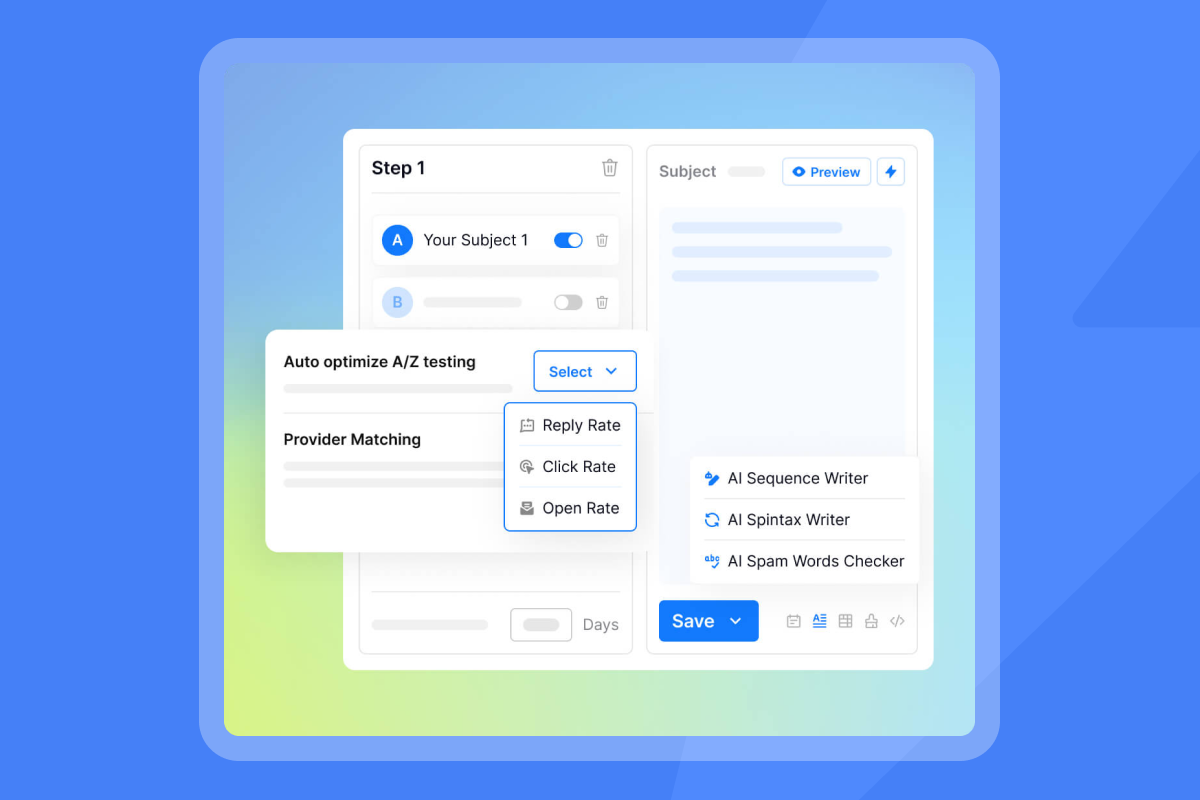
Example test:
- Variant A:
{{first_name}}, generic value proposition - Variant B:
{{first_name}},{{company_name}}, industry-specific pain point - Variant C:
{{first_name}},{{company_name}},{{recent_funding_round}}, tailored case study
Run tests for at least 200 sends per variant to reach statistical significance. Track reply rate as the primary metric.
Test fallback text as well. Does "Hi there" outperform "Hi team" when first name is missing? Small changes can shift reply rates by 1 to 2 percentage points.
Platform spotlight: Instantly and other CRM/outreach tools
Several platforms offer dynamic personalization, but setup, fallback support, and integration depth vary.
Instantly's approach to dynamic personalization
- Instantly combines unlimited email accounts, built-in warmup, lead enrichment through SuperSearch, and AI agents (Copilot and AI Reply Agent) into a single platform.
- Merge tags use simple syntax like
{{first_name}}with fallback support via the pipe separator:{{first_name|there}}. Custom fields from CSV uploads or API integrations map directly to variables. - API and webhook access enables custom object integration for advanced use cases. Instantly integrates with HubSpot, Salesforce, and other CRMs through direct connectors or iPaaS platforms like Zapier and Make.com.
- Reviews highlight ease of use: "The platform is super intuitive, easy to set up, and makes it simple to manage multiple domains and inboxes at scale. Deliverability is great and the analytics give us exactly what we need to optimize campaigns quickly."
- Pricing starts at $37 per month for the Growth plan, which includes unlimited accounts and warmup. Agency operators benefit from flat-fee economics that scale without per-seat penalties.
Comparison with other leading platforms
| Platform | Merge field syntax | Fallback support | Custom object integration | Unlimited accounts | Starting price |
|---|---|---|---|---|---|
| Instantly | {{field|fallback}} |
Yes, native | API V2, webhooks, iPaaS | Yes, all plans | $37/mo |
| Apollo | {{field}} |
Limited | Native CRM sync | No, per-seat | $49/user/mo |
| Lemlist | {{field}} |
Yes, conditional | API, iPaaS | No, per-seat | $59/user/mo |
| Smartlead | {{field}} |
Yes, conditional | API, limited | Yes, tiered | $39/mo |
Instantly's native fallback syntax simplifies setup compared to platforms requiring conditional logic. Unlimited accounts on flat pricing make Instantly attractive for agencies managing 10+ client inboxes.
Apollo offers good native CRM integration but charges per seat, which increases costs as teams grow. Lemlist provides multichannel features (LinkedIn, video) but lacks Instantly's deliverability network and inbox rotation.
Your path to hyper-personalized outreach
- Dynamic email personalization transforms cold outreach from generic blasts into targeted conversations. Map standard CRM fields to merge tags, use fallback values to prevent blank fields, and integrate custom objects for account-level relevance.
- Data quality determines success. Verify contacts before sending, maintain bounce rates below 1%, and enrich incomplete records through tools like Instantly's SuperSearch. Scale personalization across teams by standardizing field usage, enforcing fallback rules, and measuring reply rates and cost per meeting.
- Instantly provides the infrastructure for safe, scalable personalization: unlimited accounts, built-in warmup, verification, API access, and flat-fee pricing that removes per-seat penalties.
Ready to scale your personalized outreach?
Try Instantly's platform to set up dynamic email personalization with CRM fields, fallback values, and custom object mapping. Start with a free trial and launch your first hyper-personalized campaign in under 30 minutes.
FAQs
What happens if a merge tag references a field that does not exist in my CRM?
The merge tag will display as raw code (e.g., {{field_name}}) or leave a blank space, depending on platform behavior. This damages sender reputation. Use fallback syntax like {{field_name|default_text}} to prevent this. Always preview emails with contacts that have incomplete data to catch missing fields before sending.
How many custom fields can I add to an Instantly campaign?
Instantly supports unlimited custom fields when uploading via CSV or integrating through the API. Each field maps to a variable you define. Practical limits depend on email readability. Using 5 to 8 personalized elements per email is typical. More than that risks overwhelming the recipient or appearing overly scripted.
Should I personalize the subject line or just the email body?
Personalize both. Subject lines with the recipient's first name or company name can improve open rates by making the email feel relevant. Test variations: Quick question for {{company_name}} versus {{first_name}}, saw your post on deliverability. Measure open rates to find what resonates with your audience.
Can I use conditional logic to show different content based on CRM data?
Instantly supports conditional logic for advanced personalization. For example, show one paragraph if a contact is in healthcare and a different paragraph if they are in fintech. This requires setting up variants or using the API to build conditional rules. For most use cases, segmenting campaigns by industry and using tailored templates is simpler and equally effective.
How do I prevent my emails from looking too automated?
Use natural fallback text, vary sentence structure, and limit the number of merge tags. Avoid listing multiple personalized facts in a row (e.g., "Hi {{first_name}}, I saw {{company_name}} in {{industry}} raised {{funding_round}}"). Instead, weave one or two personalized elements into a conversational opening. Our video guide on personalization shows examples of natural-sounding dynamic content.
Key terminology glossary
Merge fields: Placeholders in email templates that automatically fill with data from your CRM for each recipient (e.g., {{first_name}}).
Dynamic content: Email content that adapts based on recipient data, such as industry-specific case studies or account-level pain points.
Fallback values: Default text that appears when a CRM field is empty, preventing blank spaces or broken merge tags (e.g., {{first_name|there}}).
Custom objects: CRM data structures that store information beyond standard contact fields, such as product tiers, funding rounds, or partnership details.
Sender reputation: A trust score assigned by mailbox providers based on your sending behavior, engagement rates, and bounce rates.
List hygiene: The process of removing invalid, inactive, or duplicate contacts to maintain data quality and deliverability.
Bounce rate: The percentage of emails that fail to deliver. Hard bounces (invalid addresses) should stay at or below 1%.
Primary inbox: The main folder where recipients see important emails. Personalized, relevant messages land in the primary inbox instead of promotions or spam.
Waterfall enrichment: A process that queries multiple data sources to find verified contact information when a CRM field is missing.
Throughput: Total emails sent across all connected inboxes within a specific time period, managed to protect sender reputation and inbox placement.



