


Inbox placement testing shows where emails truly land, which helps close the gap between delivery metrics and real visibility. While your ESP might report a 99% delivery rate, it doesn't tell you if your email landed in the primary inbox or the spam folder.
By testing your placement against a seed list of accounts (Gmail, Outlook, etc.) before you launch, you can identify authentication errors and content triggers that are silently killing your revenue.
Instantly automates testing across providers with unlimited tests, authentication monitoring, and alerts when placement drops.
Inbox placement testing shows where your emails actually land across different email providers: in the primary inbox, spam folder, promotions tab, or if they fail to deliver entirely.
For cold email senders, B2B sales teams, and email marketers, it reveals the gap between emails that are technically "delivered" and emails that recipients can actually see.
According to Mailgun's State of Email Deliverability 2025 report, only 13% of senders use inbox placement testing to measure deliverability. That means 87% of email senders are operating blind.
This guide explains how inbox placement testing works, why it matters for cold email campaigns, and how to run tests using tools like Instantly to protect your sender reputation and maximize campaign ROI.
What's the Difference between Inbox Placement and Email Deliverability?
Email deliverability tells you whether your email reached the recipient's mail server. Inbox placement tells you where it landed after arrival.
Think of it like this: deliverability confirms your package was delivered to someone's building. Inbox placement reveals whether it made it to their apartment or ended up in the trash chute.
Your email service provider (ESP) reports a 98% delivery rate. Great news, right? Not necessarily. That 98% only means your emails weren't bounced back. It doesn't tell you:
- How many landed in the primary inbox
- How many got filtered to spam
- How many went to the promotions tab
- How many disappeared without a trace
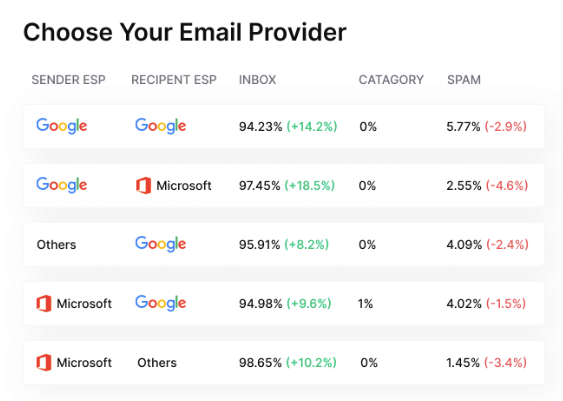
An inbox placement test reveals these critical details by sending your email to a seed list (a collection of test email addresses across major providers like Gmail, Outlook, Yahoo, and Apple Mail), then tracking where each message lands.
Why Does Inbox Placement Matter for Cold Email Campaigns?
Cold emails face stricter scrutiny than regular marketing emails because recipients haven't opted in to receive them. Email providers like Gmail and Outlook use engagement signals to decide where your emails belong.
Low engagement from previous campaigns can trigger spam filtering for future sends. This creates a negative feedback loop: your emails go to spam, recipients can't engage, your sender reputation drops, and then even more emails go to spam.
For teams sending cold outreach at scale, poor inbox placement means:
- Wasted sending capacity across multiple email accounts
- Damaged domain reputation that takes weeks to repair
- Lost revenue from prospects who never see your outreach
- Time spent crafting personalization that nobody reads
Inbox placement testing breaks this cycle by showing exactly where your emails land before you commit to a full send. And with even a 20% spam rate cutting campaign ROI in half, testing gives you the visibility to fix problems before they cost you deals.
What Causes Emails to Land in Spam Instead of the Inbox?
Authentication issues top the list. SPF, DKIM, and DMARC records tell email providers your emails are legitimate, and missing or misconfigured authentication practically guarantees spam placement.
Content triggers include:
- Excessive links or suspicious URLs
- Spammy phrases like "limited time offer," "act now," or "no obligation"
- All caps text or excessive punctuation
- Large images or HTML-heavy layouts
- Misleading subject lines
Sender reputation factors matter most for cold email. Email providers track:
- Bounce rates (keep below 2%-3%)
- Spam complaint rates (aim for under 0.1%)
- Engagement rates through opens, clicks, and replies
- Sending volume patterns where sudden spikes trigger filters
- Domain age and history
List quality has a bigger impact on placement than most senders realize. Invalid addresses, spam traps, and unengaged contacts damage your reputation faster than any content issue, and once your domain lands on a blacklist, the problem multiplies.
How to Test Inbox Placement in Instantly
Instantly includes built-in inbox placement testing with unlimited automated tests in all Outreach plans, starting at $37/month. The feature integrates directly with your email accounts and warmup settings.
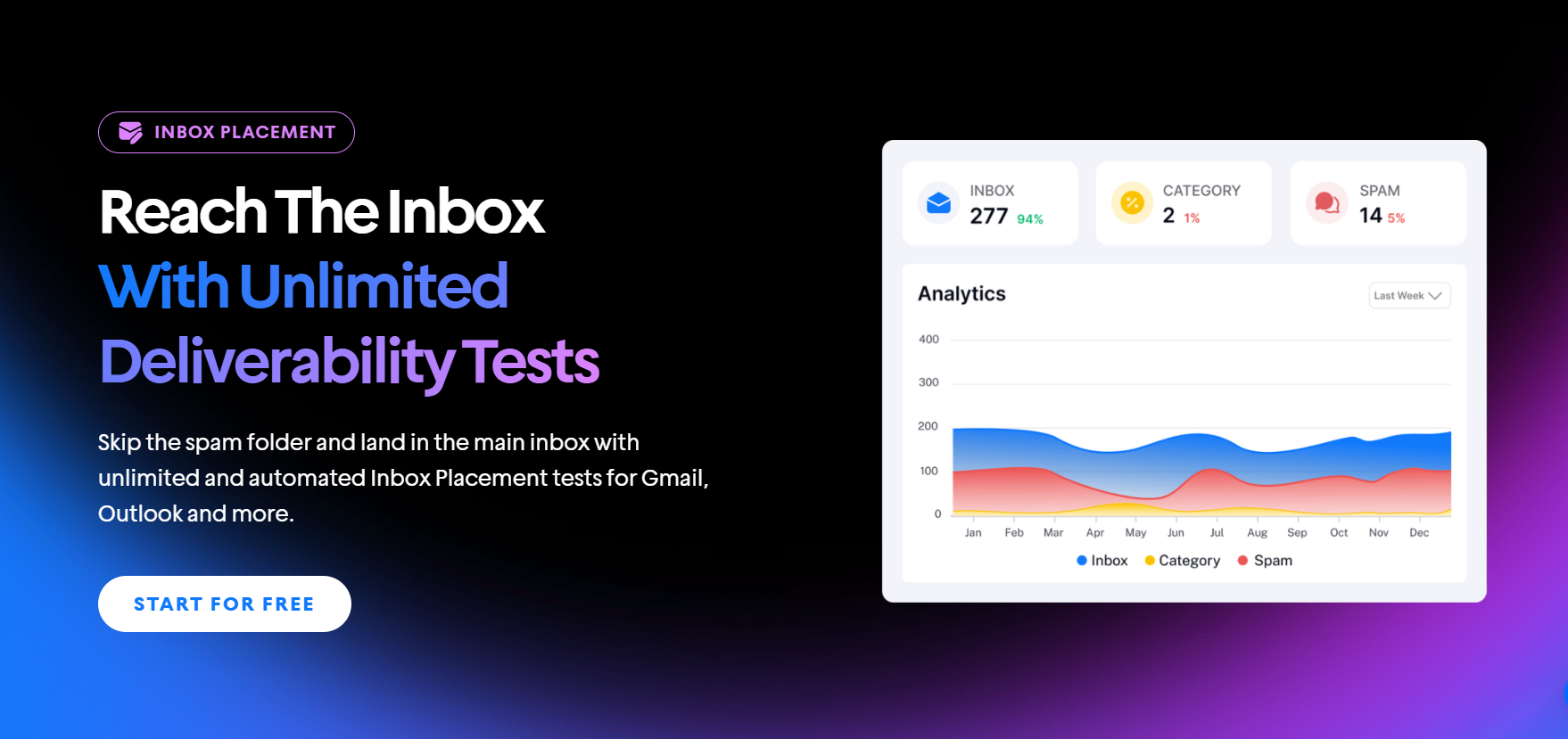
Access the inbox placement feature: Navigate to your Instantly dashboard and locate the Inbox Placement section. Select the email account you want to test, or create a new test for multiple accounts.
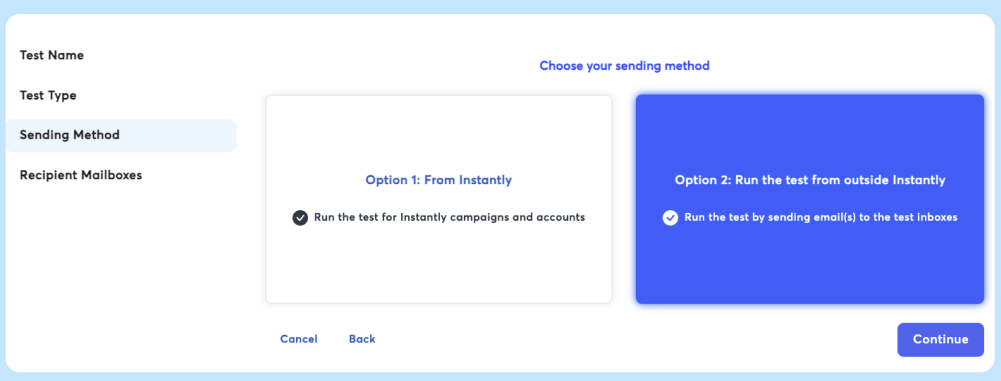
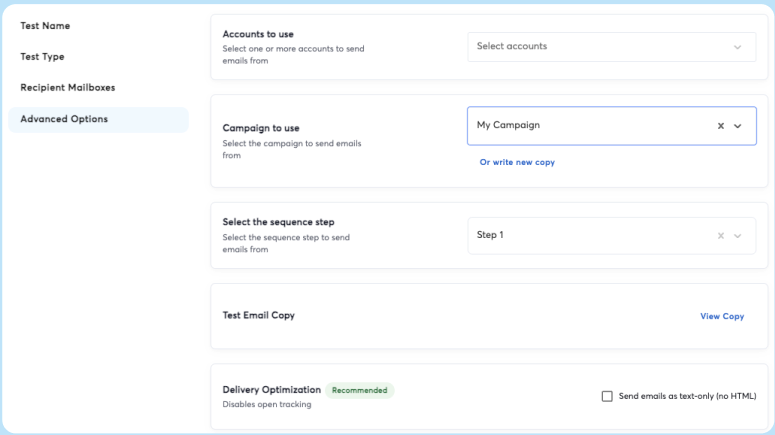
Configure your test: Choose whether to send from Instantly directly or test emails sent from outside the platform. Set up your test email with the subject line and body content you plan to use in your actual campaign.
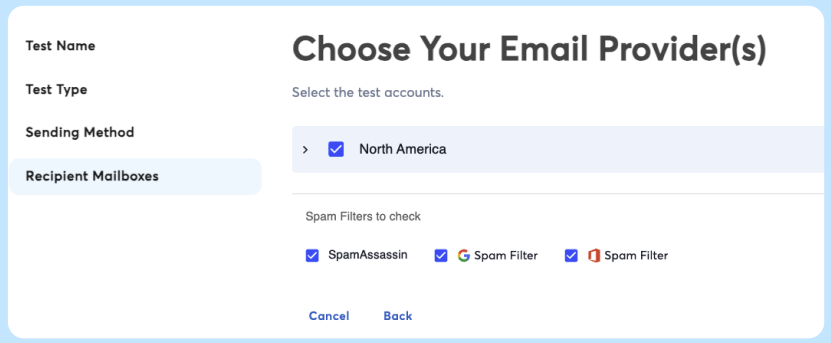
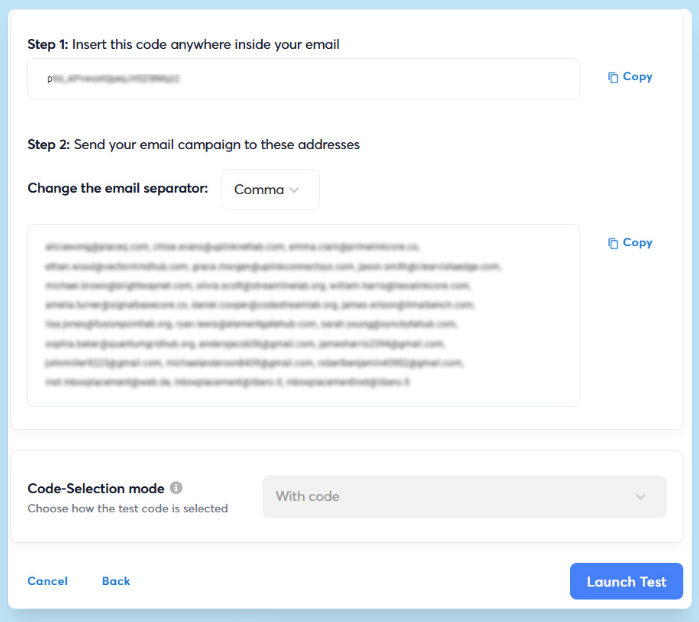
Generate your seed list: Instantly automatically provides seed email addresses across Gmail, Outlook, Yahoo, and other major providers. You can customize which providers to test based on your target audience.
Send your test: Send your campaign email to the generated seed list. Instantly tracks each message and checks where it lands within 5-10 minutes.
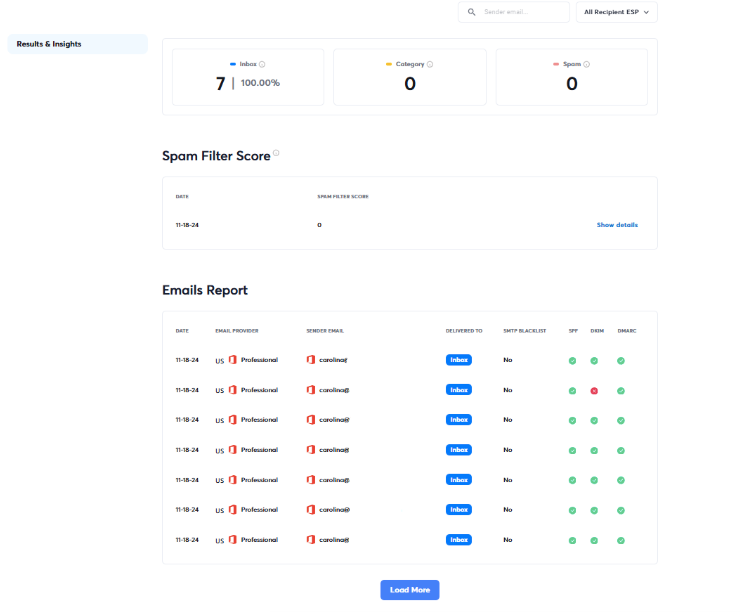
Review your placement report: Your dashboard displays:
- Overall inbox placement percentage
- Provider-specific breakdown (Gmail vs Outlook vs Yahoo)
- Spam folder percentage
- Missing emails that failed to deliver
- Authentication status (SPF, DKIM, DMARC)
- SpamAssassin score showing content spam triggers
- Blacklist monitoring across 400+ databases
Set up automated testing: You can also schedule recurring tests that run automatically on specific days and times. Configure automated rules to pause campaigns if inbox placement drops below your specified threshold, protecting your sender reputation before damage occurs.
Instantly provides AI-powered suggestions to fix deliverability issues based on your test results. During your warmup phase, Instantly monitors placement continuously and adjusts your sending patterns to maintain high inbox rates.
Want to see the complete testing process in action? This tutorial walks you through every step of running inbox placement tests in Instantly:
What Inbox Placement Rate Should You Aim for?
A healthy inbox placement rate is 90% or higher for cold email campaigns, and anything below 85% needs immediate attention. According to Warmforge's data, the average inbox placement rate across senders is 77%, but top performers consistently exceed 90%.
Different placement rates tell different stories about your campaigns:
- 95-100%: Excellent sender reputation, properly warmed domains, high-quality content
- 85-94%: Good performance with room for improvement
- 70-84%: Significant deliverability issues requiring fixes
- Below 70%: Critical problems that will kill campaign ROI
Cold emailers running placement tests daily often frame these benchmarks in terms of spam rates, which is the inverse of inbox placement.

These benchmarks apply to cold outreach specifically. Newsletter campaigns or transactional emails might see different thresholds depending on engagement history with recipients.
Which Email Providers Should You Test?
Your inbox placement test should cover the providers your prospects actually use. For B2B cold email, prioritize these four:
- Apple Mail (dominant globally with over 50% market share)
- Gmail/Google Workspace (used by 90% of US startups and dominant in business)
- Microsoft 365/Outlook (common in enterprise environments)
- Yahoo Mail (smaller but still present in some audiences)
Provider-specific placement is important because Gmail might deliver your email to the primary inbox while Outlook filters it to spam. These providers use different algorithms and spam filters, and a blanket 90% placement rate across all providers doesn't tell the full story about where your emails actually land.
How Often Should You Test Inbox Placement?
Run a placement test before launching any new campaign. This catches deliverability issues before you start sending to real prospects and wasting daily send limits on emails that land in spam.
Test weekly once your campaign is active. Placement rates shift based on recipient engagement, provider algorithm changes, and your sending patterns. Weekly testing helps you spot drops early, before they turn into serious reputation damage.
You should also run a test after making changes to:
- Subject lines or email templates
- Daily sending volume
- Domain or DNS settings
- Email service provider
What performed well last week can trigger filters this week, especially after template changes or volume increases.
Can You Fix Poor Inbox Placement?
Poor inbox placement is recoverable, but it requires addressing the root causes rather than just treating symptoms. Start with authentication, move to list quality, then tackle content and volume.
Verify your authentication setup
Authentication failures tank inbox placement faster than almost any other issue. Use MXToolbox or MailGenius to check that your SPF, DKIM, and DMARC records are configured correctly and passing validation. If any of these fail, emails get flagged as potentially spoofed or malicious before the content even gets reviewed.
Clean your email list
List quality drives placement more than content. Remove contacts that damage your sender reputation:
- Hard bounces: Delete immediately after hard bounces occur
- Soft bounces: Remove after 3-5 failed delivery attempts
- Unengaged contacts: Drop recipients who haven't opened or clicked in over 60 days
- Role-based addresses: Remove info@, sales@, support@ addresses that rarely engage
- Spam traps: Use verification tools to identify and remove these before sending (Instantly includes built-in email verification to catch spam traps, invalid addresses, and risky contacts before you send)
Keep your bounce rate under 2%-3% and spam complaints below 0.1% to maintain good standing with mailbox providers.
Reduce your volume temporarily
If placement drops suddenly, pause or significantly reduce your daily send volume. Continuing to send at high volume while placement is poor makes the reputation damage worse. Scale back up gradually once placement recovers, increasing volume by 20%-30% weekly rather than jumping back to full capacity.
Improve your email content
Content triggers matter less than authentication and list quality, but they still affect placement:
- Remove spma triggers: Avoid spam trigger phrases like "free," "limited time," "act now," and excessive caps
- Simplify HTML structure: HTML structures like heavy code, broken layouts, and high image-to-text ratios trigger spam filters
- Test before sending: Run emails through spam checkers to catch issues
- Check SpamAssassin scores: Scores above 5.0 indicate high spam risk
Instantly offers features that help prevent placement drops before they happen. Smart Sending Limits adjust volume based on engagement patterns, and AI-powered recommendations flag authentication issues, content problems, and risky sending behaviors before they damage your reputation.
Key Takeaways
Most email platforms tell you delivery rates hit 98%, but that number hides the reality of where your emails actually land. Inbox placement testing shows you what delivery metrics can't: whether prospects are seeing your messages or if they're sitting in spam folders you'll never know about.
Here's what matters most for cold email inbox placement:
- Test before launches and weekly during active campaigns
- Target 90% or higher placement for cold outreach
- Configure SPF, DKIM, and DMARC authentication correctly
- List quality matters more than content optimization
- Placement varies by provider—Gmail and Outlook filter differently
- Automate testing and set up alerts for placement drops
Instantly automates inbox placement testing across all major providers, monitors authentication status, and pauses campaigns automatically when placement drops below your threshold. All Outreach plans include unlimited testing with no per-test fees. Start your free trial today.


